




已更新 2026年4月23日
在 .NET 中用 Microsoft.Extensions.AI 簡化 LLM 整合
AI 正在改變軟體開發,但將大型語言模型 (LLM) 整合到 .NET 中一直很複雜。利用 IronPdf.AI 將 AI 整合推向更遠,為 .NET 應用程式帶來由 OpenAI 驅動的 PDF 解析、資料擷取和內容總結。
閱讀更多

AES (高級加密標準) 是最常用的對稱加密演算法之一。 它使用相同的金鑰來加密和解密資料,使得AES加密在許多應用中對保護敏感資料既高效又快速。
本教程將著重於C#中的AES加密,使用AES類來加密和解密資料以及IronPDF程式庫。 我們將涵蓋實用範例,演練加密過程,並了解如何使用密碼分組鏈(CBC)模式來提高安全性。 我們還將討論加密金鑰管理和初始化向量(IV)的作用。
高級加密標準(AES)是由美國國家標準技術研究院(NIST)標準化的一種對稱加密演算法。 該演算法可以具有128、192或256位的金鑰大小,對於加密機密資料極為安全。 它使用相同的加密金鑰來加密和解密資料。
AES通過將原始資料分成塊並對這些塊應用轉換來工作。 它在不同的加密模式下操作,如CBC(密碼分組鏈)和電子密碼本(ECB),每個都提供不同的安全功能。
C#中的AES加密演算法是System.Security.Cryptography命名空間的一部分。 此命名空間包括AES類,允許我們建立AES實例,指定金鑰大小、密碼模式和填充模式,然後使用秘密金鑰加密和解密資料。
欲在C#中使用AES,請依照這些基本步驟:
Aes.Create()建立AES類的實例。讓我們在C#中建立一個基本的加密流程和解密程式。
using System;
using System.IO;
using System.Security.Cryptography;
using System.Text;

class Program
{
    // Declare a static byte array for encrypted data
    public static byte[] encryptedData;

    // Main method to demonstrate encryption and decryption
    public static void Main(string[] args)
    {
        // String plaintext to be encrypted
        string plaintext = "This is some sensitive data!";
        string key = "abcdefghijklmnop"; // 128-bit key (16 characters)

        // Encrypt the plaintext
        string ciphertext = Encrypt(plaintext, key);
        Console.WriteLine("Encrypted Data: " + ciphertext);

        // Decrypt the ciphertext
        string decryptedData = Decrypt(ciphertext, key);
        Console.WriteLine("Decrypted Data: " + decryptedData);
    }

    // Method to encrypt data
    public static string Encrypt(string plaintext, string key)
    {
        // Create a new instance of the AES encryption algorithm
        using (Aes aes = Aes.Create())
        {
            aes.Key = Encoding.UTF8.GetBytes(key);
            aes.IV = new byte[16]; // Initialization vector (IV)

            // Create an encryptor to perform the stream transform
            ICryptoTransform encryptor = aes.CreateEncryptor(aes.Key, aes.IV);

            // Create the streams used for encryption
            using (MemoryStream ms = new MemoryStream())
            {
                // Create a CryptoStream using the encryptor
                using (CryptoStream cs = new CryptoStream(ms, encryptor, CryptoStreamMode.Write))
                {
                    using (StreamWriter sw = new StreamWriter(cs))
                    {
                        sw.Write(plaintext);
                    }
                }
                // Store the encrypted data in the public static byte array
                encryptedData = ms.ToArray();
                return Convert.ToBase64String(encryptedData);
            }
        }
    }

    // Method to decrypt data
    public static string Decrypt(string ciphertext, string key)
    {
        using (Aes aes = Aes.Create())
        {
            aes.Key = Encoding.UTF8.GetBytes(key);
            aes.IV = new byte[16]; // Initialization vector (IV)

            // Create a decryptor to perform the stream transform
            ICryptoTransform decryptor = aes.CreateDecryptor(aes.Key, aes.IV);

            // Create the streams used for decryption
            using (MemoryStream ms = new MemoryStream(Convert.FromBase64String(ciphertext)))
            {
                using (CryptoStream cs = new CryptoStream(ms, decryptor, CryptoStreamMode.Read))
                {
                    using (StreamReader sr = new StreamReader(cs))
                    {
                        return sr.ReadToEnd();
                    }
                }
            }
        }
    }
}Imports System
Imports System.IO
Imports System.Security.Cryptography
Imports System.Text
Friend Class Program
' Declare a static byte array for encrypted data
Public Shared encryptedData() As Byte
' Main method to demonstrate encryption and decryption
Public Shared Sub Main(ByVal args() As String)
' String plaintext to be encrypted
Dim plaintext As String = "This is some sensitive data!"
Dim key As String = "abcdefghijklmnop" ' 128-bit key (16 characters)
' Encrypt the plaintext
Dim ciphertext As String = Encrypt(plaintext, key)
Console.WriteLine("Encrypted Data: " & ciphertext)
' Decrypt the ciphertext
Dim decryptedData As String = Decrypt(ciphertext, key)
Console.WriteLine("Decrypted Data: " & decryptedData)
End Sub
' Method to encrypt data
Public Shared Function Encrypt(ByVal plaintext As String, ByVal key As String) As String
' Create a new instance of the AES encryption algorithm
Using aes As Aes = System.Security.Cryptography.Aes.Create()
aes.Key = Encoding.UTF8.GetBytes(key)
aes.IV = New Byte(15){} ' Initialization vector (IV)
' Create an encryptor to perform the stream transform
Dim encryptor As ICryptoTransform = aes.CreateEncryptor(aes.Key, aes.IV)
' Create the streams used for encryption
Using ms As New MemoryStream()
' Create a CryptoStream using the encryptor
Using cs As New CryptoStream(ms, encryptor, CryptoStreamMode.Write)
Using sw As New StreamWriter(cs)
sw.Write(plaintext)
End Using
End Using
' Store the encrypted data in the public static byte array
encryptedData = ms.ToArray()
Return Convert.ToBase64String(encryptedData)
End Using
End Using
End Function
' Method to decrypt data
Public Shared Function Decrypt(ByVal ciphertext As String, ByVal key As String) As String
Using aes As Aes = System.Security.Cryptography.Aes.Create()
aes.Key = Encoding.UTF8.GetBytes(key)
aes.IV = New Byte(15){} ' Initialization vector (IV)
' Create a decryptor to perform the stream transform
Dim decryptor As ICryptoTransform = aes.CreateDecryptor(aes.Key, aes.IV)
' Create the streams used for decryption
Using ms As New MemoryStream(Convert.FromBase64String(ciphertext))
Using cs As New CryptoStream(ms, decryptor, CryptoStreamMode.Read)
Using sr As New StreamReader(cs)
Return sr.ReadToEnd()
End Using
End Using
End Using
End Using
End Function
End Class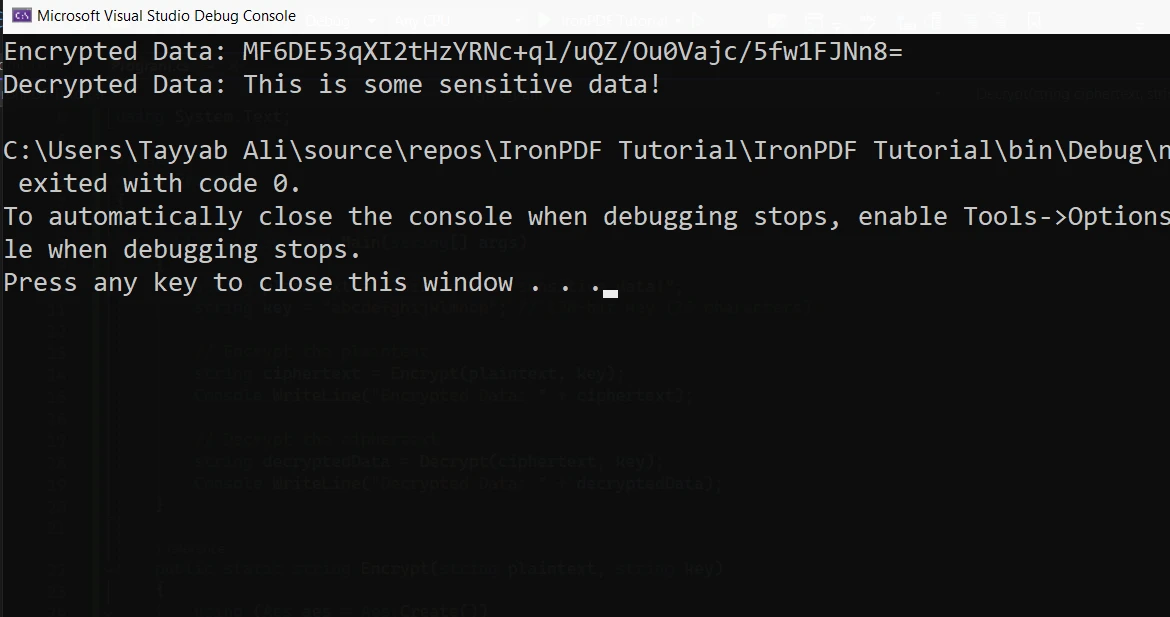
Aes.Create():這會建立AES加密演算法的新實例。aes.Key:用於加密和解密的金鑰。 其必須是有效大小,如128位元(16字節)、192位元或256位元。aes.IV:初始化向量(IV),用於隨機化加密過程。 在此範例中,我們使用零IV以簡化。讓我們在前面的範例基礎上生成一個隨機金鑰和IV,確保加密更為安全。
public static string EncryptData(string plaintext)
{
    using (Aes aes = Aes.Create())
    {
        aes.Key = new byte[32]; // AES-256 requires a 256-bit key (32 bytes)
        aes.IV = new byte[16];  // 128-bit block size

        // Randomly generate key and IV
        using (RandomNumberGenerator rng = RandomNumberGenerator.Create())
        {
            rng.GetBytes(aes.Key); // Generate a random key
            rng.GetBytes(aes.IV);  // Generate a random IV
        }

        // Create an encryptor to perform the stream transform
        ICryptoTransform encryptor = aes.CreateEncryptor(aes.Key, aes.IV);

        // Create the streams used for encryption
        using (MemoryStream ms = new MemoryStream())
        {
            using (CryptoStream cs = new CryptoStream(ms, encryptor, CryptoStreamMode.Write))
            {
                using (StreamWriter sw = new StreamWriter(cs))
                {
                    sw.Write(plaintext);
                }
            }
            return Convert.ToBase64String(ms.ToArray());
        }
    }
}Public Shared Function EncryptData(ByVal plaintext As String) As String
Using aes As Aes = Aes.Create()
aes.Key = New Byte(31){} ' AES-256 requires a 256-bit key (32 bytes)
aes.IV = New Byte(15){} ' 128-bit block size
' Randomly generate key and IV
Using rng As RandomNumberGenerator = RandomNumberGenerator.Create()
rng.GetBytes(aes.Key) ' Generate a random key
rng.GetBytes(aes.IV) ' Generate a random IV
End Using
' Create an encryptor to perform the stream transform
Dim encryptor As ICryptoTransform = aes.CreateEncryptor(aes.Key, aes.IV)
' Create the streams used for encryption
Using ms As New MemoryStream()
Using cs As New CryptoStream(ms, encryptor, CryptoStreamMode.Write)
Using sw As New StreamWriter(cs)
sw.Write(plaintext)
End Using
End Using
Return Convert.ToBase64String(ms.ToArray())
End Using
End Using
End Function在這種情況下,每次調用該函式時,我們都會生成一個新金鑰和IV。 這提供了更強的加密,因為相同的金鑰不會用於每次操作。 AES支持金鑰大小如128、192和256位元。
解密是加密資料的反向過程。 在我們的範例中,必須提供用於加密的相同金鑰和IV以解密資料。 解密過程包括將加密資料轉換回其原始形式。
這是使用先前加密資料的範例:
public static string DecryptData(string ciphertext, byte[] key, byte[] iv)
{
    using (Aes aes = Aes.Create())
    {
        aes.Key = key;
        aes.IV = iv;

        // Create a decryptor to perform the stream transform
        ICryptoTransform decryptor = aes.CreateDecryptor(aes.Key, aes.IV);

        // Create the streams used for decryption
        using (MemoryStream ms = new MemoryStream(Convert.FromBase64String(ciphertext)))
        {
            using (CryptoStream cs = new CryptoStream(ms, decryptor, CryptoStreamMode.Read))
            {
                using (StreamReader sr = new StreamReader(cs))
                {
                    return sr.ReadToEnd();
                }
            }
        }
    }
}Public Shared Function DecryptData(ByVal ciphertext As String, ByVal key() As Byte, ByVal iv() As Byte) As String
Using aes As Aes = Aes.Create()
aes.Key = key
aes.IV = iv
' Create a decryptor to perform the stream transform
Dim decryptor As ICryptoTransform = aes.CreateDecryptor(aes.Key, aes.IV)
' Create the streams used for decryption
Using ms As New MemoryStream(Convert.FromBase64String(ciphertext))
Using cs As New CryptoStream(ms, decryptor, CryptoStreamMode.Read)
Using sr As New StreamReader(cs)
Return sr.ReadToEnd()
End Using
End Using
End Using
End Using
End Function此程式碼將加密資料解密回原始資料。
IronPDF是一個簡單且對開發人員友好的.NET程式庫,旨在使用簡單的C#程式碼生成、編輯和操作PDF。 它允許開發人員直接從HTML、CSS和JavaScript建立PDF文件,這對於動態生成報告、發票或其他文件非常有用。 支持合併、分割,甚至新增密碼或數位簽章等安全功能,IronPDF是一個全面的.NET應用中的PDF生成解決方案。
當您生成敏感報告或文件時,可能需要確保這些PDF中的資料在共享之前被加密。 AES(高級加密標準)加密是安全加密PDF文件內容的理想解決方案。 通過結合IronPDF和AES加密,您可以在保護PDF中的資料的同時,保持對文件本身的操作能力。
使用ChromePdfRenderer類從HTML內容生成PDF並將其保存到文件中:
var htmlContent = "<h1>Confidential</h1><p>This is sensitive data.</p>";
var renderer = new ChromePdfRenderer();
var pdf = renderer.RenderHtmlAsPdf(htmlContent);
pdf.SaveAs(@"C:\Reports\ConfidentialReport.pdf");Dim htmlContent = "<h1>Confidential</h1><p>This is sensitive data.</p>"
Dim renderer = New ChromePdfRenderer()
Dim pdf = renderer.RenderHtmlAsPdf(htmlContent)
pdf.SaveAs("C:\Reports\ConfidentialReport.pdf")一旦建立了PDF,就用AES加密它:
byte[] pdfBytes = File.ReadAllBytes(@"C:\Reports\ConfidentialReport.pdf");
using (Aes aes = Aes.Create())
{
    aes.Key = Encoding.UTF8.GetBytes("abcdefghijklmnop");
    aes.IV = new byte[16];
    using (var encryptor = aes.CreateEncryptor(aes.Key, aes.IV))
    using (var ms = new MemoryStream())
    {
        using (var cs = new CryptoStream(ms, encryptor, CryptoStreamMode.Write))
        {
            cs.Write(pdfBytes, 0, pdfBytes.Length);
        }
        File.WriteAllBytes(@"C:\Reports\ConfidentialReport.encrypted", ms.ToArray());
    }
}Dim pdfBytes() As Byte = File.ReadAllBytes("C:\Reports\ConfidentialReport.pdf")
Using aes As Aes = Aes.Create()
aes.Key = Encoding.UTF8.GetBytes("abcdefghijklmnop")
aes.IV = New Byte(15){}
Using encryptor = aes.CreateEncryptor(aes.Key, aes.IV)
Using ms = New MemoryStream()
Using cs = New CryptoStream(ms, encryptor, CryptoStreamMode.Write)
cs.Write(pdfBytes, 0, pdfBytes.Length)
End Using
File.WriteAllBytes("C:\Reports\ConfidentialReport.encrypted", ms.ToArray())
End Using
End Using
End Using將IronPDF與AES加密整合允許您生成既可存取又加密的動態安全文件。 無論是開發需要安全文件生成的應用,還是管理敏感報告,結合IronPDF和強大加密保護您的資料。 IronPDF簡化了PDF的處理,而AES保證內容保持安全。
IronPDF提供免費試用,讓開發人員在投入之前輕鬆探索其功能。 如果您準備在您的專案中實施IronPDF,授權從$999起,一次性購買。

Jacob Mellor是Iron Software的首席技術官,一位在C# PDF技術上開創先河的遠見工程師。作為Iron Software核心程式碼庫的原開發者,他從創立以來就一直在塑造公司的產品架構,與首席執行官Cameron Rimington一起將公司轉變為服務於NASA、特斯拉和全球政府公司的50多名人員的公司。



IronPDF 是 IRONSUITE 的一部分
10 款適用於辦公室文件的 .NET API 產品

當您需要您的PDF看起來像HTML一樣快速。












