




已更新 2026年4月23日
在 .NET 中用 Microsoft.Extensions.AI 簡化 LLM 整合
AI 正在改變軟體開發,但將大型語言模型 (LLM) 整合到 .NET 中一直很複雜。利用 IronPdf.AI 將 AI 整合推向更遠,為 .NET 應用程式帶來由 OpenAI 驅動的 PDF 解析、資料擷取和內容總結。
閱讀更多

The HttpClient class, part of the .NET framework, provides methods to send HTTP requests and receive HTTP responses from a resource identified by a URI. 它簡化了HTTP請求的呼叫,無論您正在執行GET、POST、PUT還是DELETE請求。 這份指南將涵蓋在實際場景中使用HttpClient的基本方法,並介紹IronPDF程式庫。
HttpClient類用於發送HTTP請求。 您可以按以下方式建立其新實例:
using System;
using System.Net.Http;
using System.Threading.Tasks;

class Program
{
    static async Task Main(string[] args)
    {
        using var client = new HttpClient(); // Create a new instance of HttpClient

        // Send a GET request to the specified URI and store the HTTP response
        var response = await client.GetAsync("https://api.weatherapi.com/v1/current.json?key=YOUR_API_KEY&q=London");

        // Retrieve the response content as a string
        var responseBody = await response.Content.ReadAsStringAsync();

        // Print the response content to the console
        Console.WriteLine(responseBody);
    }
}Imports System
Imports System.Net.Http
Imports System.Threading.Tasks
Module Program
Async Function Main(args As String()) As Task
Using client As New HttpClient() ' Create a new instance of HttpClient
' Send a GET request to the specified URI and store the HTTP response
Dim response = Await client.GetAsync("https://api.weatherapi.com/v1/current.json?key=YOUR_API_KEY&q=London")
' Retrieve the response content as a string
Dim responseBody = Await response.Content.ReadAsStringAsync()
' Print the response content to the console
Console.WriteLine(responseBody)
End Using
End Function
End Module在此範例中:
var client = new HttpClient()建立新的HttpClient實例。GetAsync方法發送HTTP GET請求。var response中。response.Content.ReadAsStringAsync()檢索響應的內容。要進行HTTP GET請求並處理響應:
using System;
using System.Net.Http;
using System.Threading.Tasks;

class Example
{
    static async Task Main(string[] args)
    {
        var client = new HttpClient();
        var response = await client.GetAsync("https://api.weatherapi.com/v1/current.json?key=YOUR_API_KEY&q=Paris");

        // Check if the request was successful
        if (response.IsSuccessStatusCode)
        {
            var responseBody = await response.Content.ReadAsStringAsync();
            Console.WriteLine(responseBody);
        }
    }
}Imports System
Imports System.Net.Http
Imports System.Threading.Tasks
Friend Class Example
Shared Async Function Main(ByVal args() As String) As Task
Dim client = New HttpClient()
Dim response = Await client.GetAsync("https://api.weatherapi.com/v1/current.json?key=YOUR_API_KEY&q=Paris")
' Check if the request was successful
If response.IsSuccessStatusCode Then
Dim responseBody = Await response.Content.ReadAsStringAsync()
Console.WriteLine(responseBody)
End If
End Function
End ClassIsSuccessStatusCode屬性確保請求成功。ReadAsStringAsync()異步讀取響應體。發送POST請求涉及新增請求體:
using System;
using System.Net.Http;
using System.Text;
using System.Threading.Tasks;

class Example
{
    static async Task Main(string[] args)
    {
        var client = new HttpClient();
        var requestBody = new StringContent("{ \"location\": \"New York\" }", Encoding.UTF8, "application/json");

        // Send the POST request with the specified body
        var response = await client.PostAsync("https://api.weatherapi.com/v1/forecast.json?key=YOUR_API_KEY", requestBody);

        // Check if the request was successful
        if (response.IsSuccessStatusCode)
        {
            var responseBody = await response.Content.ReadAsStringAsync();
            Console.WriteLine(responseBody);
        }
    }
}Imports System
Imports System.Net.Http
Imports System.Text
Imports System.Threading.Tasks
Friend Class Example
Shared Async Function Main(ByVal args() As String) As Task
Dim client = New HttpClient()
Dim requestBody = New StringContent("{ ""location"": ""New York"" }", Encoding.UTF8, "application/json")
' Send the POST request with the specified body
Dim response = Await client.PostAsync("https://api.weatherapi.com/v1/forecast.json?key=YOUR_API_KEY", requestBody)
' Check if the request was successful
If response.IsSuccessStatusCode Then
Dim responseBody = Await response.Content.ReadAsStringAsync()
Console.WriteLine(responseBody)
End If
End Function
End ClassrequestBody)發送請求。HTTP PUT請求更新資源:
using System;
using System.Net.Http;
using System.Text;
using System.Threading.Tasks;

class Example
{
    static async Task Main(string[] args)
    {
        var client = new HttpClient();
        var requestBody = new StringContent("{ \"location\": \"Tokyo\", \"days\": 3 }", Encoding.UTF8, "application/json");

        // Send a PUT request to update the resource
        var response = await client.PutAsync("https://api.weatherapi.com/v1/forecast.json?key=YOUR_API_KEY", requestBody);

        // Check if the request was successful
        if (response.IsSuccessStatusCode)
        {
            var responseBody = await response.Content.ReadAsStringAsync();
            Console.WriteLine(responseBody);
        }
    }
}Imports System
Imports System.Net.Http
Imports System.Text
Imports System.Threading.Tasks
Friend Class Example
Shared Async Function Main(ByVal args() As String) As Task
Dim client = New HttpClient()
Dim requestBody = New StringContent("{ ""location"": ""Tokyo"", ""days"": 3 }", Encoding.UTF8, "application/json")
' Send a PUT request to update the resource
Dim response = Await client.PutAsync("https://api.weatherapi.com/v1/forecast.json?key=YOUR_API_KEY", requestBody)
' Check if the request was successful
If response.IsSuccessStatusCode Then
Dim responseBody = Await response.Content.ReadAsStringAsync()
Console.WriteLine(responseBody)
End If
End Function
End ClassPutAsync將PUT請求發送到指定的URI以更新資源。要發送HTTP DELETE請求:
using System;
using System.Net.Http;
using System.Threading.Tasks;

class Example
{
    static async Task Main(string[] args)
    {
        var client = new HttpClient();

        // Send a DELETE request to remove the resource
        var response = await client.DeleteAsync("https://api.weatherapi.com/v1/locations/1?key=YOUR_API_KEY");

        // Check if the request was successful
        if (response.IsSuccessStatusCode)
        {
            Console.WriteLine("Resource deleted successfully");
        }
    }
}Imports System
Imports System.Net.Http
Imports System.Threading.Tasks
Friend Class Example
Shared Async Function Main(ByVal args() As String) As Task
Dim client = New HttpClient()
' Send a DELETE request to remove the resource
Dim response = Await client.DeleteAsync("https://api.weatherapi.com/v1/locations/1?key=YOUR_API_KEY")
' Check if the request was successful
If response.IsSuccessStatusCode Then
Console.WriteLine("Resource deleted successfully")
End If
End Function
End ClassDeleteAsync發送DELETE請求以刪除資源。每個HTTP請求返回一個HttpResponseMessage物件,其中包含響應體、標頭和狀態程式碼。 例如:
using System;
using System.Net.Http;
using System.Threading.Tasks;

class Example
{
    static async Task Main(string[] args)
    {
        var client = new HttpClient();
        var response = await client.GetAsync("https://api.weatherapi.com/v1/current.json?key=YOUR_API_KEY&q=Sydney");

        // Check if the request was successful
        if (response.IsSuccessStatusCode)
        {
            var responseBody = await response.Content.ReadAsStringAsync();
            Console.WriteLine(responseBody);
        }
        else
        {
            Console.WriteLine($"Error: {response.StatusCode}");
        }
    }
}Imports System
Imports System.Net.Http
Imports System.Threading.Tasks
Friend Class Example
Shared Async Function Main(ByVal args() As String) As Task
Dim client = New HttpClient()
Dim response = Await client.GetAsync("https://api.weatherapi.com/v1/current.json?key=YOUR_API_KEY&q=Sydney")
' Check if the request was successful
If response.IsSuccessStatusCode Then
Dim responseBody = Await response.Content.ReadAsStringAsync()
Console.WriteLine(responseBody)
Else
Console.WriteLine($"Error: {response.StatusCode}")
End If
End Function
End ClassResponse.StatusCode提供狀態程式碼(例如,200,404)。ReadAsStringAsync()異步讀取。HttpClient實例應重用,以利用連接池功能並避免耗盡系統資源。 通常的模式是在應用程式或服務的整個生命週期中建立一個HttpClient實例。這可以使用靜態變數或依賴注入來為網頁應用程式完成。
public static class HttpClientProvider
{
    private static readonly HttpClient client = new HttpClient();
    public static HttpClient Client => client;
}Public Module HttpClientProvider
'INSTANT VB NOTE: The field client was renamed since Visual Basic does not allow fields to have the same name as other class members:
Private ReadOnly client_Conflict As New HttpClient()
Public ReadOnly Property Client() As HttpClient
Get
Return client_Conflict
End Get
End Property
End ModuleHttpClient實例在整個應用程式中重用,減少了建立新HTTP連接的開銷。
在網頁應用中,推薦的方法是將HttpClient註冊為單例服務:
public void ConfigureServices(IServiceCollection services)
{
    services.AddHttpClient();
}Public Sub ConfigureServices(ByVal services As IServiceCollection)
services.AddHttpClient()
End Sub您還可以建立命名客戶端和型別化客戶端進行更具體的配置。
通過重用HttpClient實例,您可以從連接池中受益,這提高了對同一伺服器的多個請求的性能。 您還可以使用HttpClientHandler類配置代理設置:
using System.Net;
using System.Net.Http;

var handler = new HttpClientHandler
{
    Proxy = new WebProxy("http://proxyserver:port"), // Set the proxy server
    UseProxy = true
};

var client = new HttpClient(handler);Imports System.Net
Imports System.Net.Http
Private handler = New HttpClientHandler With {
.Proxy = New WebProxy("http://proxyserver:port"),
.UseProxy = True
}
Private client = New HttpClient(handler)要處理不同的HTTP狀態程式碼,檢查HttpResponseMessage.StatusCode屬性:
using System;
using System.Net;
using System.Net.Http;
using System.Threading.Tasks;

async Task MakeRequestAsync()
{
    try
    {
        using var client = new HttpClient();
        var response = await client.GetAsync("https://api.weatherapi.com/v1/current.json?key=YOUR_API_KEY&q=Berlin");

        // Handle the response based on the status code
        switch (response.StatusCode)
        {
            case HttpStatusCode.OK:
                Console.WriteLine("Success");
                var content = await response.Content.ReadAsStringAsync();
                Console.WriteLine($"Response content: {content}");
                break;
            case HttpStatusCode.NotFound:
                Console.WriteLine("Resource not found");
                break;
            case HttpStatusCode.Unauthorized:
                Console.WriteLine("Unauthorized access");
                break;
            case HttpStatusCode.InternalServerError:
                Console.WriteLine("Server error occurred");
                break;
            default:
                Console.WriteLine($"Unexpected status code: {response.StatusCode}");
                break;
        }
    }
    catch (HttpRequestException e)
    {
        Console.WriteLine($"Request error: {e.Message}");
    }
    catch (Exception e)
    {
        Console.WriteLine($"An error occurred: {e.Message}");
    }
}Imports System
Imports System.Net
Imports System.Net.Http
Imports System.Threading.Tasks
Async Function MakeRequestAsync() As Task
Try
Dim client = New HttpClient()
Dim response = Await client.GetAsync("https://api.weatherapi.com/v1/current.json?key=YOUR_API_KEY&q=Berlin")
' Handle the response based on the status code
Select Case response.StatusCode
Case HttpStatusCode.OK
Console.WriteLine("Success")
Dim content = Await response.Content.ReadAsStringAsync()
Console.WriteLine($"Response content: {content}")
Case HttpStatusCode.NotFound
Console.WriteLine("Resource not found")
Case HttpStatusCode.Unauthorized
Console.WriteLine("Unauthorized access")
Case HttpStatusCode.InternalServerError
Console.WriteLine("Server error occurred")
Case Else
Console.WriteLine($"Unexpected status code: {response.StatusCode}")
End Select
Catch e As HttpRequestException
Console.WriteLine($"Request error: {e.Message}")
Catch e As Exception
Console.WriteLine($"An error occurred: {e.Message}")
End Try
End Function您經常需要處理JSON響應。 您可以將響應內容反序列化成為強型別的物件:
using System;
using System.Net.Http;
using System.Text.Json;
using System.Threading.Tasks;

class Example
{
    static async Task Main(string[] args)
    {
        var client = new HttpClient();
        var response = await client.GetAsync("https://api.weatherapi.com/v1/current.json?key=YOUR_API_KEY&q=London");
        var jsonString = await response.Content.ReadAsStringAsync();

        // Deserialize the JSON response into a WeatherResponse object
        var weatherResponse = JsonSerializer.Deserialize<WeatherResponse>(jsonString);

        Console.WriteLine($"Location: {weatherResponse.Location}, Temperature: {weatherResponse.Temperature}");
    }
}

public class WeatherResponse
{
    public string Location { get; set; }
    public double Temperature { get; set; }
}Imports System
Imports System.Net.Http
Imports System.Text.Json
Imports System.Threading.Tasks
Module Example
Async Function Main(ByVal args As String()) As Task
Dim client = New HttpClient()
Dim response = Await client.GetAsync("https://api.weatherapi.com/v1/current.json?key=YOUR_API_KEY&q=London")
Dim jsonString = Await response.Content.ReadAsStringAsync()
' Deserialize the JSON response into a WeatherResponse object
Dim weatherResponse = JsonSerializer.Deserialize(Of WeatherResponse)(jsonString)
Console.WriteLine($"Location: {weatherResponse.Location}, Temperature: {weatherResponse.Temperature}")
End Function
End Module
Public Class WeatherResponse
Public Property Location As String
Public Property Temperature As Double
End ClassReadAsStringAsync()方法簡化了直接將JSON內容讀取到C#物件中。
IronPDF是一個.NET的PDF程式庫,專為建立、操作和轉換C#中的PDF文件而設計。 它廣泛用於從HTML、CSS、JavaScript和其他格式生成高質量的PDF。 IronPDF提供了HTML到PDF轉換、PDF合併、水印,甚至高級操作如數位簽名和PDF加密等功能。 它相容各種平台,包括Windows、Linux和macOS,使其成為跨平台開發的多功能解決方案。
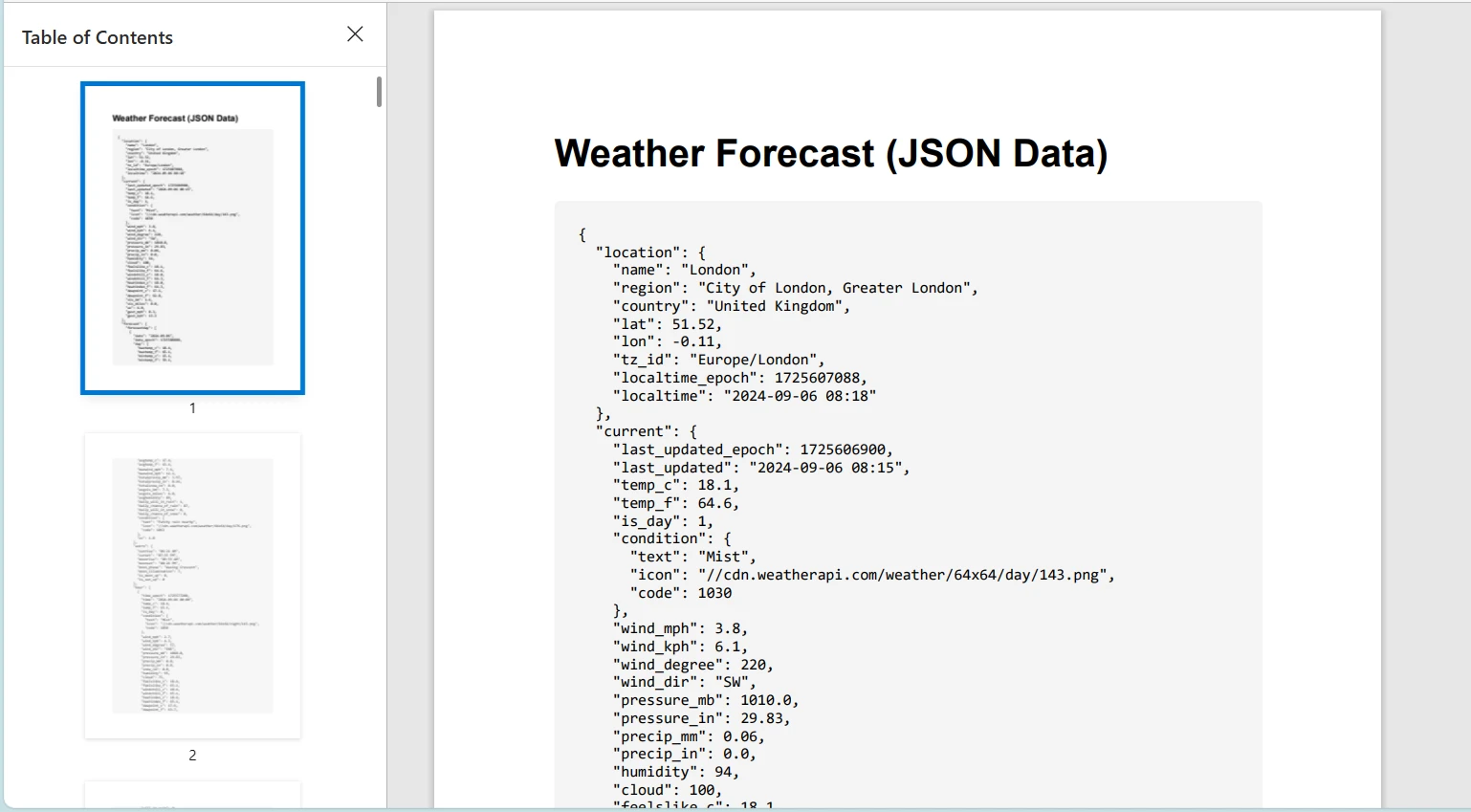
在C#中結合IronPDF和HttpClient類是從網路資源中動態生成和操作PDF文件的有效方法。 例如,您可以通過HttpClient從URL檢索HTML內容,然後使用IronPDF將此HTML轉換為PDF文件。 這在基於即時網路內容動態生成報告、發票或任何文件時非常有用。
using System;
using System.Net.Http;
using System.Text.Json;
using System.Threading.Tasks;
using IronPdf;

class Program
{
    static async Task Main(string[] args)
    {
        License.LicenseKey = "YOUR_LICENSE_KEY"; // Set your IronPDF license key
        using var client = new HttpClient();
        var response = await client.GetAsync("https://api.weatherapi.com/v1/forecast.json?key=YOUR_API_KEY&q=London&days=3");

        // Check if the request was successful
        if (response.IsSuccessStatusCode)
        {
            var jsonContent = await response.Content.ReadAsStringAsync();
            var jsonElement = JsonSerializer.Deserialize<JsonElement>(jsonContent);

            // Format the JSON content for pretty-printing
            var formattedJson = JsonSerializer.Serialize(jsonElement, new JsonSerializerOptions { WriteIndented = true });

            // Escape the JSON for HTML
            formattedJson = System.Web.HttpUtility.HtmlEncode(formattedJson);

            // Create an HTML string for PDF generation
            var htmlContent = $@"
            <html>
            <head>
                <style>
                    body {{font-family: Arial, sans-serif;}}
                    pre {{background-color: #f4f4f4; padding: 20px; border-radius: 5px; white-space: pre-wrap; word-wrap: break-word;}}
                </style>
            </head>
            <body>
                <h1>Weather Forecast (JSON Data)</h1>
                <pre>{formattedJson}</pre>
            </body>
            </html>";

            // Generate the PDF from the HTML content
            var renderer = new ChromePdfRenderer();
            var pdf = renderer.RenderHtmlAsPdf(htmlContent);

            // Save the PDF to a file
            pdf.SaveAs("F://weather_report.pdf");

            Console.WriteLine("PDF generated successfully!");
        }
        else
        {
            Console.WriteLine($"Failed to retrieve content. Status code: {response.StatusCode}");
        }
    }
}
請記得在使用真實的天氣API時將"YOUR_API_KEY"替換為API金鑰。
本教程探討了在C#中使用HttpClient類發送HTTP請求和處理響應。 我們還介紹了IronPDF,它是一個用於在.NET應用程式中生成PDF的強大程式庫。 我們演示瞭如何通過HttpClient從網路服務檢索HTML內容,並使用IronPDF將其轉化為PDF來結合這些技術。
IronPDF提供免費試用,其授權$999起售,使其成為尋求全面PDF生成功能的開發者的寶貴工具。

Jacob Mellor是Iron Software的首席技術官,一位在C# PDF技術上開創先河的遠見工程師。作為Iron Software核心程式碼庫的原開發者,他從創立以來就一直在塑造公司的產品架構,與首席執行官Cameron Rimington一起將公司轉變為服務於NASA、特斯拉和全球政府公司的50多名人員的公司。



IronPDF 是 IRONSUITE 的一部分
10 款適用於辦公室文件的 .NET API 產品

當您需要您的PDF看起來像HTML一樣快速。












