.NET çerçevesinin bir parçası olan HttpClient sınıfı, URI ile tanımlanan bir kaynak üzerinde HTTP istekleri gönderme ve HTTP yanıtlarını alma yöntemleri sağlar. Get, POST, PUT veya DELETE döngülerinden biri olsun, HTTP istek çağrılarını basitleştirir. Bu kılavuz, HttpClient'in pratik senaryolarda temel kullanımını kapsayacak ve IronPDF kütüphanesini tanıtacaktır.
Yeni Bir HttpClient Örneği Oluşturma
HttpClient sınıfı, HTTP istekleri göndermek için kullanılır. Yeni bir örneğini şu şekilde oluşturabilirsiniz:
using System;
using System.Net.Http;
using System.Threading.Tasks;

class Program
{
    static async Task Main(string[] args)
    {
        using var client = new HttpClient(); // Create a new instance of HttpClient

        // Send a GET request to the specified URI and store the HTTP response
        var response = await client.GetAsync("https://api.weatherapi.com/v1/current.json?key=YOUR_API_KEY&q=London");

        // Retrieve the response content as a string
        var responseBody = await response.Content.ReadAsStringAsync();

        // Print the response content to the console
        Console.WriteLine(responseBody);
    }
}
using System;
using System.Net.Http;
using System.Threading.Tasks;

class Program
{
    static async Task Main(string[] args)
    {
        using var client = new HttpClient(); // Create a new instance of HttpClient

        // Send a GET request to the specified URI and store the HTTP response
        var response = await client.GetAsync("https://api.weatherapi.com/v1/current.json?key=YOUR_API_KEY&q=London");

        // Retrieve the response content as a string
        var responseBody = await response.Content.ReadAsStringAsync();

        // Print the response content to the console
        Console.WriteLine(responseBody);
    }
}
Imports System
Imports System.Net.Http
Imports System.Threading.Tasks
Module Program
Async Function Main(args As String()) As Task
Using client As New HttpClient() ' Create a new instance of HttpClient
' Send a GET request to the specified URI and store the HTTP response
Dim response = Await client.GetAsync("https://api.weatherapi.com/v1/current.json?key=YOUR_API_KEY&q=London")
' Retrieve the response content as a string
Dim responseBody = Await response.Content.ReadAsStringAsync()
' Print the response content to the console
Console.WriteLine(responseBody)
End Using
End Function
End Module
Imports System
Imports System.Net.Http
Imports System.Threading.Tasks

Module Program
    Async Function Main(args As String()) As Task
        Using client As New HttpClient() ' Create a new instance of HttpClient

            ' Send a GET request to the specified URI and store the HTTP response
            Dim response = Await client.GetAsync("https://api.weatherapi.com/v1/current.json?key=YOUR_API_KEY&q=London")

            ' Retrieve the response content as a string
            Dim responseBody = Await response.Content.ReadAsStringAsync()

            ' Print the response content to the console
            Console.WriteLine(responseBody)
        End Using
    End Function
End Module
Bu örnekte:
- Yeni bir HttpClient örneği
var client = new HttpClient() kullanılarak oluşturulur.
- Bir HTTP GET isteği
GetAsync yöntemi kullanılarak gönderilir.
HttpResponseMessage, var response içinde saklanır.- Yanıt içeriği
response.Content.ReadAsStringAsync() kullanılarak alınır.
HTTP İstekleri Gönderme
HTTP GET İsteği
Bir HTTP GET isteği gerçekleştirmek ve yanıtı işlemek için:
using System;
using System.Net.Http;
using System.Threading.Tasks;

class Example
{
    static async Task Main(string[] args)
    {
        var client = new HttpClient();
        var response = await client.GetAsync("https://api.weatherapi.com/v1/current.json?key=YOUR_API_KEY&q=Paris");

        // Check if the request was successful
        if (response.IsSuccessStatusCode)
        {
            var responseBody = await response.Content.ReadAsStringAsync();
            Console.WriteLine(responseBody);
        }
    }
}
using System;
using System.Net.Http;
using System.Threading.Tasks;

class Example
{
    static async Task Main(string[] args)
    {
        var client = new HttpClient();
        var response = await client.GetAsync("https://api.weatherapi.com/v1/current.json?key=YOUR_API_KEY&q=Paris");

        // Check if the request was successful
        if (response.IsSuccessStatusCode)
        {
            var responseBody = await response.Content.ReadAsStringAsync();
            Console.WriteLine(responseBody);
        }
    }
}
Imports System
Imports System.Net.Http
Imports System.Threading.Tasks
Friend Class Example
Shared Async Function Main(ByVal args() As String) As Task
Dim client = New HttpClient()
Dim response = Await client.GetAsync("https://api.weatherapi.com/v1/current.json?key=YOUR_API_KEY&q=Paris")
' Check if the request was successful
If response.IsSuccessStatusCode Then
Dim responseBody = Await response.Content.ReadAsStringAsync()
Console.WriteLine(responseBody)
End If
End Function
End Class
Imports System
Imports System.Net.Http
Imports System.Threading.Tasks

Friend Class Example
	Shared Async Function Main(ByVal args() As String) As Task
		Dim client = New HttpClient()
		Dim response = Await client.GetAsync("https://api.weatherapi.com/v1/current.json?key=YOUR_API_KEY&q=Paris")

		' Check if the request was successful
		If response.IsSuccessStatusCode Then
			Dim responseBody = Await response.Content.ReadAsStringAsync()
			Console.WriteLine(responseBody)
		End If
	End Function
End Class
IsSuccessStatusCode özelliği, isteğin başarılı olduğunu garanti eder.- Yanıt gövdesi
ReadAsStringAsync() ile asenkron olarak okunur.
HTTP POST İsteği
Bir POST isteği gönderme, bir istek gövdesi eklemeyi içerir:
using System;
using System.Net.Http;
using System.Text;
using System.Threading.Tasks;

class Example
{
    static async Task Main(string[] args)
    {
        var client = new HttpClient();
        var requestBody = new StringContent("{ \"location\": \"New York\" }", Encoding.UTF8, "application/json");

        // Send the POST request with the specified body
        var response = await client.PostAsync("https://api.weatherapi.com/v1/forecast.json?key=YOUR_API_KEY", requestBody);

        // Check if the request was successful
        if (response.IsSuccessStatusCode)
        {
            var responseBody = await response.Content.ReadAsStringAsync();
            Console.WriteLine(responseBody);
        }
    }
}
using System;
using System.Net.Http;
using System.Text;
using System.Threading.Tasks;

class Example
{
    static async Task Main(string[] args)
    {
        var client = new HttpClient();
        var requestBody = new StringContent("{ \"location\": \"New York\" }", Encoding.UTF8, "application/json");

        // Send the POST request with the specified body
        var response = await client.PostAsync("https://api.weatherapi.com/v1/forecast.json?key=YOUR_API_KEY", requestBody);

        // Check if the request was successful
        if (response.IsSuccessStatusCode)
        {
            var responseBody = await response.Content.ReadAsStringAsync();
            Console.WriteLine(responseBody);
        }
    }
}
Imports System
Imports System.Net.Http
Imports System.Text
Imports System.Threading.Tasks
Friend Class Example
Shared Async Function Main(ByVal args() As String) As Task
Dim client = New HttpClient()
Dim requestBody = New StringContent("{ ""location"": ""New York"" }", Encoding.UTF8, "application/json")
' Send the POST request with the specified body
Dim response = Await client.PostAsync("https://api.weatherapi.com/v1/forecast.json?key=YOUR_API_KEY", requestBody)
' Check if the request was successful
If response.IsSuccessStatusCode Then
Dim responseBody = Await response.Content.ReadAsStringAsync()
Console.WriteLine(responseBody)
End If
End Function
End Class
Imports System
Imports System.Net.Http
Imports System.Text
Imports System.Threading.Tasks

Friend Class Example
	Shared Async Function Main(ByVal args() As String) As Task
		Dim client = New HttpClient()
		Dim requestBody = New StringContent("{ ""location"": ""New York"" }", Encoding.UTF8, "application/json")

		' Send the POST request with the specified body
		Dim response = Await client.PostAsync("https://api.weatherapi.com/v1/forecast.json?key=YOUR_API_KEY", requestBody)

		' Check if the request was successful
		If response.IsSuccessStatusCode Then
			Dim responseBody = Await response.Content.ReadAsStringAsync()
			Console.WriteLine(responseBody)
		End If
	End Function
End Class
PostAsync, belirtilen gövde (requestBody) ile isteği gönderir.- İçerik tipi belirtilmelidir (application/json).
HTTP PUT İsteği
Bir HTTP PUT isteği kaynakları günceller:
using System;
using System.Net.Http;
using System.Text;
using System.Threading.Tasks;

class Example
{
    static async Task Main(string[] args)
    {
        var client = new HttpClient();
        var requestBody = new StringContent("{ \"location\": \"Tokyo\", \"days\": 3 }", Encoding.UTF8, "application/json");

        // Send a PUT request to update the resource
        var response = await client.PutAsync("https://api.weatherapi.com/v1/forecast.json?key=YOUR_API_KEY", requestBody);

        // Check if the request was successful
        if (response.IsSuccessStatusCode)
        {
            var responseBody = await response.Content.ReadAsStringAsync();
            Console.WriteLine(responseBody);
        }
    }
}
using System;
using System.Net.Http;
using System.Text;
using System.Threading.Tasks;

class Example
{
    static async Task Main(string[] args)
    {
        var client = new HttpClient();
        var requestBody = new StringContent("{ \"location\": \"Tokyo\", \"days\": 3 }", Encoding.UTF8, "application/json");

        // Send a PUT request to update the resource
        var response = await client.PutAsync("https://api.weatherapi.com/v1/forecast.json?key=YOUR_API_KEY", requestBody);

        // Check if the request was successful
        if (response.IsSuccessStatusCode)
        {
            var responseBody = await response.Content.ReadAsStringAsync();
            Console.WriteLine(responseBody);
        }
    }
}
Imports System
Imports System.Net.Http
Imports System.Text
Imports System.Threading.Tasks
Friend Class Example
Shared Async Function Main(ByVal args() As String) As Task
Dim client = New HttpClient()
Dim requestBody = New StringContent("{ ""location"": ""Tokyo"", ""days"": 3 }", Encoding.UTF8, "application/json")
' Send a PUT request to update the resource
Dim response = Await client.PutAsync("https://api.weatherapi.com/v1/forecast.json?key=YOUR_API_KEY", requestBody)
' Check if the request was successful
If response.IsSuccessStatusCode Then
Dim responseBody = Await response.Content.ReadAsStringAsync()
Console.WriteLine(responseBody)
End If
End Function
End Class
Imports System
Imports System.Net.Http
Imports System.Text
Imports System.Threading.Tasks

Friend Class Example
	Shared Async Function Main(ByVal args() As String) As Task
		Dim client = New HttpClient()
		Dim requestBody = New StringContent("{ ""location"": ""Tokyo"", ""days"": 3 }", Encoding.UTF8, "application/json")

		' Send a PUT request to update the resource
		Dim response = Await client.PutAsync("https://api.weatherapi.com/v1/forecast.json?key=YOUR_API_KEY", requestBody)

		' Check if the request was successful
		If response.IsSuccessStatusCode Then
			Dim responseBody = Await response.Content.ReadAsStringAsync()
			Console.WriteLine(responseBody)
		End If
	End Function
End Class
PutAsync, belirli URI'deki kaynağı güncellemek için bir PUT isteği gönderir.- İstek gövdesi tipik olarak güncellenmesi gereken verileri içerir.
HTTP DELETE İsteği
Bir HTTP DELETE isteği göndermek için:
using System;
using System.Net.Http;
using System.Threading.Tasks;

class Example
{
    static async Task Main(string[] args)
    {
        var client = new HttpClient();

        // Send a DELETE request to remove the resource
        var response = await client.DeleteAsync("https://api.weatherapi.com/v1/locations/1?key=YOUR_API_KEY");

        // Check if the request was successful
        if (response.IsSuccessStatusCode)
        {
            Console.WriteLine("Resource deleted successfully");
        }
    }
}
using System;
using System.Net.Http;
using System.Threading.Tasks;

class Example
{
    static async Task Main(string[] args)
    {
        var client = new HttpClient();

        // Send a DELETE request to remove the resource
        var response = await client.DeleteAsync("https://api.weatherapi.com/v1/locations/1?key=YOUR_API_KEY");

        // Check if the request was successful
        if (response.IsSuccessStatusCode)
        {
            Console.WriteLine("Resource deleted successfully");
        }
    }
}
Imports System
Imports System.Net.Http
Imports System.Threading.Tasks
Friend Class Example
Shared Async Function Main(ByVal args() As String) As Task
Dim client = New HttpClient()
' Send a DELETE request to remove the resource
Dim response = Await client.DeleteAsync("https://api.weatherapi.com/v1/locations/1?key=YOUR_API_KEY")
' Check if the request was successful
If response.IsSuccessStatusCode Then
Console.WriteLine("Resource deleted successfully")
End If
End Function
End Class
Imports System
Imports System.Net.Http
Imports System.Threading.Tasks

Friend Class Example
	Shared Async Function Main(ByVal args() As String) As Task
		Dim client = New HttpClient()

		' Send a DELETE request to remove the resource
		Dim response = Await client.DeleteAsync("https://api.weatherapi.com/v1/locations/1?key=YOUR_API_KEY")

		' Check if the request was successful
		If response.IsSuccessStatusCode Then
			Console.WriteLine("Resource deleted successfully")
		End If
	End Function
End Class
DeleteAsync, kaynağı kaldırmak için bir DELETE isteği gönderir.
HTTP Yanıtlarını Yönetme
Her bir HTTP isteği, yanıt gövdesi, başlıklar ve durum kodunu içeren bir HttpResponseMessage nesnesi döndürür. Örneğin:
using System;
using System.Net.Http;
using System.Threading.Tasks;

class Example
{
    static async Task Main(string[] args)
    {
        var client = new HttpClient();
        var response = await client.GetAsync("https://api.weatherapi.com/v1/current.json?key=YOUR_API_KEY&q=Sydney");

        // Check if the request was successful
        if (response.IsSuccessStatusCode)
        {
            var responseBody = await response.Content.ReadAsStringAsync();
            Console.WriteLine(responseBody);
        }
        else
        {
            Console.WriteLine($"Error: {response.StatusCode}");
        }
    }
}
using System;
using System.Net.Http;
using System.Threading.Tasks;

class Example
{
    static async Task Main(string[] args)
    {
        var client = new HttpClient();
        var response = await client.GetAsync("https://api.weatherapi.com/v1/current.json?key=YOUR_API_KEY&q=Sydney");

        // Check if the request was successful
        if (response.IsSuccessStatusCode)
        {
            var responseBody = await response.Content.ReadAsStringAsync();
            Console.WriteLine(responseBody);
        }
        else
        {
            Console.WriteLine($"Error: {response.StatusCode}");
        }
    }
}
Imports System
Imports System.Net.Http
Imports System.Threading.Tasks
Friend Class Example
Shared Async Function Main(ByVal args() As String) As Task
Dim client = New HttpClient()
Dim response = Await client.GetAsync("https://api.weatherapi.com/v1/current.json?key=YOUR_API_KEY&q=Sydney")
' Check if the request was successful
If response.IsSuccessStatusCode Then
Dim responseBody = Await response.Content.ReadAsStringAsync()
Console.WriteLine(responseBody)
Else
Console.WriteLine($"Error: {response.StatusCode}")
End If
End Function
End Class
Imports System
Imports System.Net.Http
Imports System.Threading.Tasks

Friend Class Example
	Shared Async Function Main(ByVal args() As String) As Task
		Dim client = New HttpClient()
		Dim response = Await client.GetAsync("https://api.weatherapi.com/v1/current.json?key=YOUR_API_KEY&q=Sydney")

		' Check if the request was successful
		If response.IsSuccessStatusCode Then
			Dim responseBody = Await response.Content.ReadAsStringAsync()
			Console.WriteLine(responseBody)
		Else
			Console.WriteLine($"Error: {response.StatusCode}")
		End If
	End Function
End Class
Response.StatusCode, durum kodunu sağlar (örn. 200, 404).response.Content, yanıt gövdesini içerir ve bu, ReadAsStringAsync() kullanılarak asenkron olarak okunabilir.
HttpClient'i Etkili Kullanma
HttpClient örnekleri, bağlantı havuzlamasından yararlanmak ve sistem kaynaklarının tükenmesini önlemek için yeniden kullanılmalıdır. Tipik bir model, uygulamanızın veya servisin ömrü boyunca tek bir HttpClient örneği oluşturmaktır. Bu, web uygulamaları için statik bir değişken veya bağımlılık enjeksiyonu kullanılarak yapılabilir.
Statik HttpClient Örneği
public static class HttpClientProvider
{
    private static readonly HttpClient client = new HttpClient();
    public static HttpClient Client => client;
}
public static class HttpClientProvider
{
    private static readonly HttpClient client = new HttpClient();
    public static HttpClient Client => client;
}
Public Module HttpClientProvider
'INSTANT VB NOTE: The field client was renamed since Visual Basic does not allow fields to have the same name as other class members:
Private ReadOnly client_Conflict As New HttpClient()
Public ReadOnly Property Client() As HttpClient
Get
Return client_Conflict
End Get
End Property
End Module
Public Module HttpClientProvider
'INSTANT VB NOTE: The field client was renamed since Visual Basic does not allow fields to have the same name as other class members:
	Private ReadOnly client_Conflict As New HttpClient()
	Public ReadOnly Property Client() As HttpClient
		Get
			Return client_Conflict
		End Get
	End Property
End Module
HttpClient örneği, uygulama genelinde yeniden kullanılır, yeni HTTP bağlantıları oluşturmanın yükünü azaltır.
HttpClient'i Bağımlılık Enjeksiyonu ile Kullanma
Bir web uygulamasında, önerilen yaklaşım, HttpClient'i tekil bir hizmet olarak kaydetmektir:
public void ConfigureServices(IServiceCollection services)
{
    services.AddHttpClient();
}
public void ConfigureServices(IServiceCollection services)
{
    services.AddHttpClient();
}
Public Sub ConfigureServices(ByVal services As IServiceCollection)
services.AddHttpClient()
End Sub
Public Sub ConfigureServices(ByVal services As IServiceCollection)
	services.AddHttpClient()
End Sub
Daha özel konfigürasyonlar için adlandırılmış ve türlenmiş istemciler de oluşturabilirsiniz.
Bağlantı Havuzlaması ve Proxy Ayarları
HttpClient örneklerini yeniden kullanarak, aynı sunucuya yapılan çoklu isteklerin performansını artıran bağlantı havuzlamasından yararlanırsınız. HttpClientHandler sınıfını kullanarak proxy ayarlarını da yapılandırabilirsiniz:
using System.Net;
using System.Net.Http;

var handler = new HttpClientHandler
{
    Proxy = new WebProxy("http://proxyserver:port"), // Set the proxy server
    UseProxy = true
};

var client = new HttpClient(handler);
using System.Net;
using System.Net.Http;

var handler = new HttpClientHandler
{
    Proxy = new WebProxy("http://proxyserver:port"), // Set the proxy server
    UseProxy = true
};

var client = new HttpClient(handler);
Imports System.Net
Imports System.Net.Http
Private handler = New HttpClientHandler With {
.Proxy = New WebProxy("http://proxyserver:port"),
.UseProxy = True
}
Private client = New HttpClient(handler)
Imports System.Net
Imports System.Net.Http

Private handler = New HttpClientHandler With {
	.Proxy = New WebProxy("http://proxyserver:port"),
	.UseProxy = True
}

Private client = New HttpClient(handler)
Hata Yönetimi ve Durum Kodları
Farklı HTTP durum kodlarını yönetmek için, HttpResponseMessage.StatusCode özelliğini kontrol edin:
using System;
using System.Net;
using System.Net.Http;
using System.Threading.Tasks;

async Task MakeRequestAsync()
{
    try
    {
        using var client = new HttpClient();
        var response = await client.GetAsync("https://api.weatherapi.com/v1/current.json?key=YOUR_API_KEY&q=Berlin");

        // Handle the response based on the status code
        switch (response.StatusCode)
        {
            case HttpStatusCode.OK:
                Console.WriteLine("Success");
                var content = await response.Content.ReadAsStringAsync();
                Console.WriteLine($"Response content: {content}");
                break;
            case HttpStatusCode.NotFound:
                Console.WriteLine("Resource not found");
                break;
            case HttpStatusCode.Unauthorized:
                Console.WriteLine("Unauthorized access");
                break;
            case HttpStatusCode.InternalServerError:
                Console.WriteLine("Server error occurred");
                break;
            default:
                Console.WriteLine($"Unexpected status code: {response.StatusCode}");
                break;
        }
    }
    catch (HttpRequestException e)
    {
        Console.WriteLine($"Request error: {e.Message}");
    }
    catch (Exception e)
    {
        Console.WriteLine($"An error occurred: {e.Message}");
    }
}
using System;
using System.Net;
using System.Net.Http;
using System.Threading.Tasks;

async Task MakeRequestAsync()
{
    try
    {
        using var client = new HttpClient();
        var response = await client.GetAsync("https://api.weatherapi.com/v1/current.json?key=YOUR_API_KEY&q=Berlin");

        // Handle the response based on the status code
        switch (response.StatusCode)
        {
            case HttpStatusCode.OK:
                Console.WriteLine("Success");
                var content = await response.Content.ReadAsStringAsync();
                Console.WriteLine($"Response content: {content}");
                break;
            case HttpStatusCode.NotFound:
                Console.WriteLine("Resource not found");
                break;
            case HttpStatusCode.Unauthorized:
                Console.WriteLine("Unauthorized access");
                break;
            case HttpStatusCode.InternalServerError:
                Console.WriteLine("Server error occurred");
                break;
            default:
                Console.WriteLine($"Unexpected status code: {response.StatusCode}");
                break;
        }
    }
    catch (HttpRequestException e)
    {
        Console.WriteLine($"Request error: {e.Message}");
    }
    catch (Exception e)
    {
        Console.WriteLine($"An error occurred: {e.Message}");
    }
}
Imports System
Imports System.Net
Imports System.Net.Http
Imports System.Threading.Tasks
Async Function MakeRequestAsync() As Task
Try
Dim client = New HttpClient()
Dim response = Await client.GetAsync("https://api.weatherapi.com/v1/current.json?key=YOUR_API_KEY&q=Berlin")
' Handle the response based on the status code
Select Case response.StatusCode
Case HttpStatusCode.OK
Console.WriteLine("Success")
Dim content = Await response.Content.ReadAsStringAsync()
Console.WriteLine($"Response content: {content}")
Case HttpStatusCode.NotFound
Console.WriteLine("Resource not found")
Case HttpStatusCode.Unauthorized
Console.WriteLine("Unauthorized access")
Case HttpStatusCode.InternalServerError
Console.WriteLine("Server error occurred")
Case Else
Console.WriteLine($"Unexpected status code: {response.StatusCode}")
End Select
Catch e As HttpRequestException
Console.WriteLine($"Request error: {e.Message}")
Catch e As Exception
Console.WriteLine($"An error occurred: {e.Message}")
End Try
End Function
Imports System
Imports System.Net
Imports System.Net.Http
Imports System.Threading.Tasks

Async Function MakeRequestAsync() As Task
	Try
		Dim client = New HttpClient()
		Dim response = Await client.GetAsync("https://api.weatherapi.com/v1/current.json?key=YOUR_API_KEY&q=Berlin")

		' Handle the response based on the status code
		Select Case response.StatusCode
			Case HttpStatusCode.OK
				Console.WriteLine("Success")
				Dim content = Await response.Content.ReadAsStringAsync()
				Console.WriteLine($"Response content: {content}")
			Case HttpStatusCode.NotFound
				Console.WriteLine("Resource not found")
			Case HttpStatusCode.Unauthorized
				Console.WriteLine("Unauthorized access")
			Case HttpStatusCode.InternalServerError
				Console.WriteLine("Server error occurred")
			Case Else
				Console.WriteLine($"Unexpected status code: {response.StatusCode}")
		End Select
	Catch e As HttpRequestException
		Console.WriteLine($"Request error: {e.Message}")
	Catch e As Exception
		Console.WriteLine($"An error occurred: {e.Message}")
	End Try
End Function
JSON Yanıt Gövdesi Yönetimi
Çoğunlukla JSON yanıtlarıyla çalışırsınız. Yanıt içeriğini güçlü bir şekilde bağıntılı bir nesneye seri olmaktan çıkarabilirsiniz:
using System;
using System.Net.Http;
using System.Text.Json;
using System.Threading.Tasks;

class Example
{
    static async Task Main(string[] args)
    {
        var client = new HttpClient();
        var response = await client.GetAsync("https://api.weatherapi.com/v1/current.json?key=YOUR_API_KEY&q=London");
        var jsonString = await response.Content.ReadAsStringAsync();

        // Deserialize the JSON response into a WeatherResponse object
        var weatherResponse = JsonSerializer.Deserialize<WeatherResponse>(jsonString);

        Console.WriteLine($"Location: {weatherResponse.Location}, Temperature: {weatherResponse.Temperature}");
    }
}

public class WeatherResponse
{
    public string Location { get; set; }
    public double Temperature { get; set; }
}
using System;
using System.Net.Http;
using System.Text.Json;
using System.Threading.Tasks;

class Example
{
    static async Task Main(string[] args)
    {
        var client = new HttpClient();
        var response = await client.GetAsync("https://api.weatherapi.com/v1/current.json?key=YOUR_API_KEY&q=London");
        var jsonString = await response.Content.ReadAsStringAsync();

        // Deserialize the JSON response into a WeatherResponse object
        var weatherResponse = JsonSerializer.Deserialize<WeatherResponse>(jsonString);

        Console.WriteLine($"Location: {weatherResponse.Location}, Temperature: {weatherResponse.Temperature}");
    }
}

public class WeatherResponse
{
    public string Location { get; set; }
    public double Temperature { get; set; }
}
Imports System
Imports System.Net.Http
Imports System.Text.Json
Imports System.Threading.Tasks
Module Example
Async Function Main(ByVal args As String()) As Task
Dim client = New HttpClient()
Dim response = Await client.GetAsync("https://api.weatherapi.com/v1/current.json?key=YOUR_API_KEY&q=London")
Dim jsonString = Await response.Content.ReadAsStringAsync()
' Deserialize the JSON response into a WeatherResponse object
Dim weatherResponse = JsonSerializer.Deserialize(Of WeatherResponse)(jsonString)
Console.WriteLine($"Location: {weatherResponse.Location}, Temperature: {weatherResponse.Temperature}")
End Function
End Module
Public Class WeatherResponse
Public Property Location As String
Public Property Temperature As Double
End Class
Imports System
Imports System.Net.Http
Imports System.Text.Json
Imports System.Threading.Tasks

Module Example
    Async Function Main(ByVal args As String()) As Task
        Dim client = New HttpClient()
        Dim response = Await client.GetAsync("https://api.weatherapi.com/v1/current.json?key=YOUR_API_KEY&q=London")
        Dim jsonString = Await response.Content.ReadAsStringAsync()

        ' Deserialize the JSON response into a WeatherResponse object
        Dim weatherResponse = JsonSerializer.Deserialize(Of WeatherResponse)(jsonString)

        Console.WriteLine($"Location: {weatherResponse.Location}, Temperature: {weatherResponse.Temperature}")
    End Function
End Module

Public Class WeatherResponse
    Public Property Location As String
    Public Property Temperature As Double
End Class
ReadAsStringAsync() yöntemi, JSON içeriğini doğrudan C# nesnelerine okuma işlemini basitleştirir.
IronPDF Tanıtımı
IronPDF, C#'ta PDF dosyaları oluşturmak, manipüle etmek ve dönüştürmek için tasarlanmış bir .NET PDF kütüphanesidir. HTML, CSS, JavaScript ve diğer formatlardan yüksek kaliteli PDF'ler oluşturmak için yaygın olarak kullanılır. IronPDF, HTML to PDF dönüşümü, PDF'leri birleştirme, filigran ekleme ve hatta dijital imzalar ve PDF şifrelemesi gibi gelişmiş işlemler gibi özellikler sunar. Windows, Linux ve macOS dahil olmak üzere çeşitli platformlarla uyumludur ve çapraz platform geliştirmeye uygun çok yönlü bir çözüm sunar.
HttpClient ile IronPDF Kullanma
IronPDF'yi C#'ta HttpClient sınıfı ile birleştirmek, web kaynaklarından dinamik olarak PDF belgeleri oluşturma ve manipüle etme konusunda etkili bir yoldur. Örneğin, HttpClient aracılığıyla bir URL'den HTML içeriği alabilir ve ardından bu HTML'yi IronPDF kullanarak bir PDF belgesine dönüştürebilirsiniz. Bu, raporlar, faturalar veya canlı web içeriğine dayalı olarak dinamik olarak oluşturulmuş herhangi bir belge oluştururken kullanışlıdır.
using System;
using System.Net.Http;
using System.Text.Json;
using System.Threading.Tasks;
using IronPdf;

class Program
{
    static async Task Main(string[] args)
    {
        License.LicenseKey = "YOUR_LICENSE_KEY"; // Set your IronPDF license key
        using var client = new HttpClient();
        var response = await client.GetAsync("https://api.weatherapi.com/v1/forecast.json?key=YOUR_API_KEY&q=London&days=3");

        // Check if the request was successful
        if (response.IsSuccessStatusCode)
        {
            var jsonContent = await response.Content.ReadAsStringAsync();
            var jsonElement = JsonSerializer.Deserialize<JsonElement>(jsonContent);

            // Format the JSON content for pretty-printing
            var formattedJson = JsonSerializer.Serialize(jsonElement, new JsonSerializerOptions { WriteIndented = true });

            // Escape the JSON for HTML
            formattedJson = System.Web.HttpUtility.HtmlEncode(formattedJson);

            // Create an HTML string for PDF generation
            var htmlContent = $@"
            <html>
            <head>
                <style>
                    body {{font-family: Arial, sans-serif;}}
                    pre {{background-color: #f4f4f4; padding: 20px; border-radius: 5px; white-space: pre-wrap; word-wrap: break-word;}}
                </style>
            </head>
            <body>
                <h1>Weather Forecast (JSON Data)</h1>
                <pre>{formattedJson}</pre>
            </body>
            </html>";

            // Generate the PDF from the HTML content
            var renderer = new ChromePdfRenderer();
            var pdf = renderer.RenderHtmlAsPdf(htmlContent);

            // Save the PDF to a file
            pdf.SaveAs("F://weather_report.pdf");

            Console.WriteLine("PDF generated successfully!");
        }
        else
        {
            Console.WriteLine($"Failed to retrieve content. Status code: {response.StatusCode}");
        }
    }
}
using System;
using System.Net.Http;
using System.Text.Json;
using System.Threading.Tasks;
using IronPdf;

class Program
{
    static async Task Main(string[] args)
    {
        License.LicenseKey = "YOUR_LICENSE_KEY"; // Set your IronPDF license key
        using var client = new HttpClient();
        var response = await client.GetAsync("https://api.weatherapi.com/v1/forecast.json?key=YOUR_API_KEY&q=London&days=3");

        // Check if the request was successful
        if (response.IsSuccessStatusCode)
        {
            var jsonContent = await response.Content.ReadAsStringAsync();
            var jsonElement = JsonSerializer.Deserialize<JsonElement>(jsonContent);

            // Format the JSON content for pretty-printing
            var formattedJson = JsonSerializer.Serialize(jsonElement, new JsonSerializerOptions { WriteIndented = true });

            // Escape the JSON for HTML
            formattedJson = System.Web.HttpUtility.HtmlEncode(formattedJson);

            // Create an HTML string for PDF generation
            var htmlContent = $@"
            <html>
            <head>
                <style>
                    body {{font-family: Arial, sans-serif;}}
                    pre {{background-color: #f4f4f4; padding: 20px; border-radius: 5px; white-space: pre-wrap; word-wrap: break-word;}}
                </style>
            </head>
            <body>
                <h1>Weather Forecast (JSON Data)</h1>
                <pre>{formattedJson}</pre>
            </body>
            </html>";

            // Generate the PDF from the HTML content
            var renderer = new ChromePdfRenderer();
            var pdf = renderer.RenderHtmlAsPdf(htmlContent);

            // Save the PDF to a file
            pdf.SaveAs("F://weather_report.pdf");

            Console.WriteLine("PDF generated successfully!");
        }
        else
        {
            Console.WriteLine($"Failed to retrieve content. Status code: {response.StatusCode}");
        }
    }
}
Imports System
Imports System.Net.Http
Imports System.Text.Json
Imports System.Threading.Tasks
Imports IronPdf
Module Program
Async Function Main(args As String()) As Task
License.LicenseKey = "YOUR_LICENSE_KEY" ' Set your IronPDF license key
Using client As New HttpClient()
Dim response = Await client.GetAsync("https://api.weatherapi.com/v1/forecast.json?key=YOUR_API_KEY&q=London&days=3")
' Check if the request was successful
If response.IsSuccessStatusCode Then
Dim jsonContent = Await response.Content.ReadAsStringAsync()
Dim jsonElement = JsonSerializer.Deserialize(Of JsonElement)(jsonContent)
' Format the JSON content for pretty-printing
Dim formattedJson = JsonSerializer.Serialize(jsonElement, New JsonSerializerOptions With {.WriteIndented = True})
' Escape the JSON for HTML
formattedJson = System.Web.HttpUtility.HtmlEncode(formattedJson)
' Create an HTML string for PDF generation
Dim htmlContent = "
<html>
<head>
<style>
body {font-family: Arial, sans-serif;}
pre {background-color: #f4f4f4; padding: 20px; border-radius: 5px; white-space: pre-wrap; word-wrap: break-word;}
</style>
</head>
<body>
<h1>Weather Forecast (JSON Data)</h1>
<pre>" & formattedJson & "</pre>
</body>
</html>"
' Generate the PDF from the HTML content
Dim renderer = New ChromePdfRenderer()
Dim pdf = renderer.RenderHtmlAsPdf(htmlContent)
' Save the PDF to a file
pdf.SaveAs("F://weather_report.pdf")
Console.WriteLine("PDF generated successfully!")
Else
Console.WriteLine($"Failed to retrieve content. Status code: {response.StatusCode}")
End If
End Using
End Function
End Module
Imports System
Imports System.Net.Http
Imports System.Text.Json
Imports System.Threading.Tasks
Imports IronPdf

Module Program
    Async Function Main(args As String()) As Task
        License.LicenseKey = "YOUR_LICENSE_KEY" ' Set your IronPDF license key
        Using client As New HttpClient()
            Dim response = Await client.GetAsync("https://api.weatherapi.com/v1/forecast.json?key=YOUR_API_KEY&q=London&days=3")

            ' Check if the request was successful
            If response.IsSuccessStatusCode Then
                Dim jsonContent = Await response.Content.ReadAsStringAsync()
                Dim jsonElement = JsonSerializer.Deserialize(Of JsonElement)(jsonContent)

                ' Format the JSON content for pretty-printing
                Dim formattedJson = JsonSerializer.Serialize(jsonElement, New JsonSerializerOptions With {.WriteIndented = True})

                ' Escape the JSON for HTML
                formattedJson = System.Web.HttpUtility.HtmlEncode(formattedJson)

                ' Create an HTML string for PDF generation
                Dim htmlContent = "
                <html>
                <head>
                    <style>
                        body {font-family: Arial, sans-serif;}
                        pre {background-color: #f4f4f4; padding: 20px; border-radius: 5px; white-space: pre-wrap; word-wrap: break-word;}
                    </style>
                </head>
                <body>
                    <h1>Weather Forecast (JSON Data)</h1>
                    <pre>" & formattedJson & "</pre>
                </body>
                </html>"

                ' Generate the PDF from the HTML content
                Dim renderer = New ChromePdfRenderer()
                Dim pdf = renderer.RenderHtmlAsPdf(htmlContent)

                ' Save the PDF to a file
                pdf.SaveAs("F://weather_report.pdf")

                Console.WriteLine("PDF generated successfully!")
            Else
                Console.WriteLine($"Failed to retrieve content. Status code: {response.StatusCode}")
            End If
        End Using
    End Function
End Module
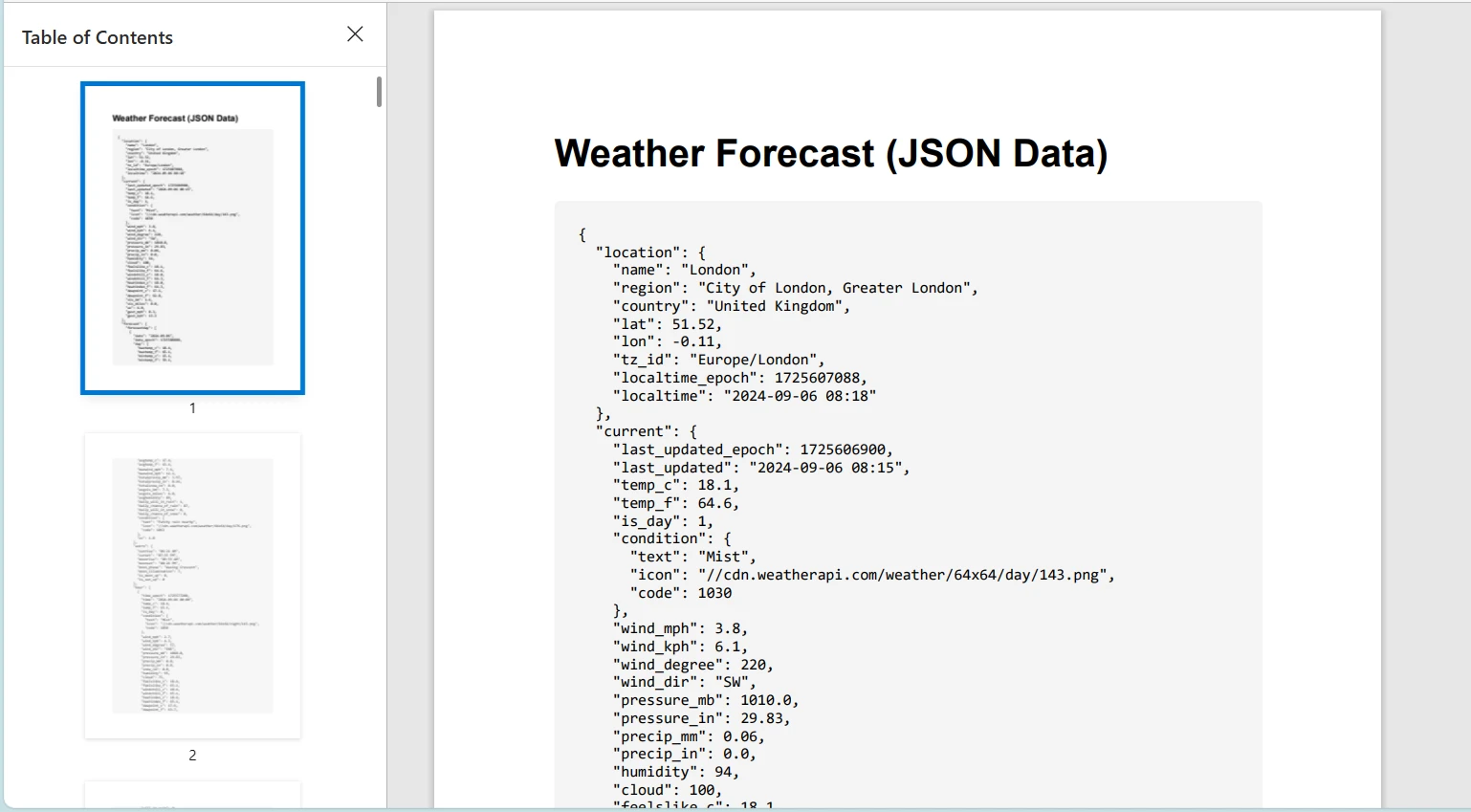
"YOUR_API_KEY"'yi gerçek bir hava durumu API'si kullanırken bir API anahtarı ile değiştirmeyi unutmayın.
Sonuç
Bu öğretici, C#'ta HttpClient sınıfını kullanarak HTTP istekleri göndermeyi ve yanıtları yönetmeyi ele aldı. Ayrıca, bir .NET uygulamaları için PDF'ler oluşturma konusunda güçlü bir kütüphane olan IronPDF'yi tanıttık. Bu teknolojileri birleştirmeyi, bir web hizmetinden HTML içeriği alarak HttpClient kullandık ve ardından IronPDF kullanarak PDF'ye dönüştürdük.
IronPDF, ücretsiz bir deneme sunar ve lisansları $999'dan başlar, bu da onu kapsamlı PDF oluşturma yetenekleri arayan geliştiriciler için değerli bir araç yapar.













