La clase HttpClient, parte del framework .NET, proporciona métodos para enviar solicitudes HTTP y recibir respuestas HTTP de un recurso identificado por un URI. Simplifica realizar llamadas de solicitud HTTP, ya sea que esté realizando solicitudes GET, POST, PUT o DELETE. Esta guía cubrirá el uso esencial de HttpClient en escenarios prácticos e introducirá la biblioteca IronPDF.
Creación de una nueva instancia de HttpClient
La clase HttpClient se utiliza para enviar solicitudes HTTP. Puede crear una nueva instancia de la siguiente manera:
using System;
using System.Net.Http;
using System.Threading.Tasks;

class Program
{
    static async Task Main(string[] args)
    {
        using var client = new HttpClient(); // Create a new instance of HttpClient

        // Send a GET request to the specified URI and store the HTTP response
        var response = await client.GetAsync("https://api.weatherapi.com/v1/current.json?key=YOUR_API_KEY&q=London");

        // Retrieve the response content as a string
        var responseBody = await response.Content.ReadAsStringAsync();

        // Print the response content to the console
        Console.WriteLine(responseBody);
    }
}
using System;
using System.Net.Http;
using System.Threading.Tasks;

class Program
{
    static async Task Main(string[] args)
    {
        using var client = new HttpClient(); // Create a new instance of HttpClient

        // Send a GET request to the specified URI and store the HTTP response
        var response = await client.GetAsync("https://api.weatherapi.com/v1/current.json?key=YOUR_API_KEY&q=London");

        // Retrieve the response content as a string
        var responseBody = await response.Content.ReadAsStringAsync();

        // Print the response content to the console
        Console.WriteLine(responseBody);
    }
}
Imports System
Imports System.Net.Http
Imports System.Threading.Tasks
Module Program
Async Function Main(args As String()) As Task
Using client As New HttpClient() ' Create a new instance of HttpClient
' Send a GET request to the specified URI and store the HTTP response
Dim response = Await client.GetAsync("https://api.weatherapi.com/v1/current.json?key=YOUR_API_KEY&q=London")
' Retrieve the response content as a string
Dim responseBody = Await response.Content.ReadAsStringAsync()
' Print the response content to the console
Console.WriteLine(responseBody)
End Using
End Function
End Module
Imports System
Imports System.Net.Http
Imports System.Threading.Tasks

Module Program
    Async Function Main(args As String()) As Task
        Using client As New HttpClient() ' Create a new instance of HttpClient

            ' Send a GET request to the specified URI and store the HTTP response
            Dim response = Await client.GetAsync("https://api.weatherapi.com/v1/current.json?key=YOUR_API_KEY&q=London")

            ' Retrieve the response content as a string
            Dim responseBody = Await response.Content.ReadAsStringAsync()

            ' Print the response content to the console
            Console.WriteLine(responseBody)
        End Using
    End Function
End Module
En este ejemplo:
- Se crea una nueva instancia de HttpClient utilizando
var client = new HttpClient().
- Se envía una solicitud HTTP GET usando el método
GetAsync.
- El
HttpResponseMessage se almacena en var response.
- El contenido de la respuesta se recupera usando
response.Content.ReadAsStringAsync().
Envío de solicitudes HTTP
Solicitud GETHTTP
Para hacer una solicitud HTTP GET y manejar la respuesta:
using System;
using System.Net.Http;
using System.Threading.Tasks;

class Example
{
    static async Task Main(string[] args)
    {
        var client = new HttpClient();
        var response = await client.GetAsync("https://api.weatherapi.com/v1/current.json?key=YOUR_API_KEY&q=Paris");

        // Check if the request was successful
        if (response.IsSuccessStatusCode)
        {
            var responseBody = await response.Content.ReadAsStringAsync();
            Console.WriteLine(responseBody);
        }
    }
}
using System;
using System.Net.Http;
using System.Threading.Tasks;

class Example
{
    static async Task Main(string[] args)
    {
        var client = new HttpClient();
        var response = await client.GetAsync("https://api.weatherapi.com/v1/current.json?key=YOUR_API_KEY&q=Paris");

        // Check if the request was successful
        if (response.IsSuccessStatusCode)
        {
            var responseBody = await response.Content.ReadAsStringAsync();
            Console.WriteLine(responseBody);
        }
    }
}
Imports System
Imports System.Net.Http
Imports System.Threading.Tasks
Friend Class Example
Shared Async Function Main(ByVal args() As String) As Task
Dim client = New HttpClient()
Dim response = Await client.GetAsync("https://api.weatherapi.com/v1/current.json?key=YOUR_API_KEY&q=Paris")
' Check if the request was successful
If response.IsSuccessStatusCode Then
Dim responseBody = Await response.Content.ReadAsStringAsync()
Console.WriteLine(responseBody)
End If
End Function
End Class
Imports System
Imports System.Net.Http
Imports System.Threading.Tasks

Friend Class Example
	Shared Async Function Main(ByVal args() As String) As Task
		Dim client = New HttpClient()
		Dim response = Await client.GetAsync("https://api.weatherapi.com/v1/current.json?key=YOUR_API_KEY&q=Paris")

		' Check if the request was successful
		If response.IsSuccessStatusCode Then
			Dim responseBody = Await response.Content.ReadAsStringAsync()
			Console.WriteLine(responseBody)
		End If
	End Function
End Class
- La propiedad
IsSuccessStatusCode asegura que la solicitud fue exitosa.
- El cuerpo de la respuesta se lee asincrónicamente con
ReadAsStringAsync().
Solicitud POSTHTTP
Enviar una solicitud POST implica agregar un cuerpo de solicitud:
using System;
using System.Net.Http;
using System.Text;
using System.Threading.Tasks;

class Example
{
    static async Task Main(string[] args)
    {
        var client = new HttpClient();
        var requestBody = new StringContent("{ \"location\": \"New York\" }", Encoding.UTF8, "application/json");

        // Send the POST request with the specified body
        var response = await client.PostAsync("https://api.weatherapi.com/v1/forecast.json?key=YOUR_API_KEY", requestBody);

        // Check if the request was successful
        if (response.IsSuccessStatusCode)
        {
            var responseBody = await response.Content.ReadAsStringAsync();
            Console.WriteLine(responseBody);
        }
    }
}
using System;
using System.Net.Http;
using System.Text;
using System.Threading.Tasks;

class Example
{
    static async Task Main(string[] args)
    {
        var client = new HttpClient();
        var requestBody = new StringContent("{ \"location\": \"New York\" }", Encoding.UTF8, "application/json");

        // Send the POST request with the specified body
        var response = await client.PostAsync("https://api.weatherapi.com/v1/forecast.json?key=YOUR_API_KEY", requestBody);

        // Check if the request was successful
        if (response.IsSuccessStatusCode)
        {
            var responseBody = await response.Content.ReadAsStringAsync();
            Console.WriteLine(responseBody);
        }
    }
}
Imports System
Imports System.Net.Http
Imports System.Text
Imports System.Threading.Tasks
Friend Class Example
Shared Async Function Main(ByVal args() As String) As Task
Dim client = New HttpClient()
Dim requestBody = New StringContent("{ ""location"": ""New York"" }", Encoding.UTF8, "application/json")
' Send the POST request with the specified body
Dim response = Await client.PostAsync("https://api.weatherapi.com/v1/forecast.json?key=YOUR_API_KEY", requestBody)
' Check if the request was successful
If response.IsSuccessStatusCode Then
Dim responseBody = Await response.Content.ReadAsStringAsync()
Console.WriteLine(responseBody)
End If
End Function
End Class
Imports System
Imports System.Net.Http
Imports System.Text
Imports System.Threading.Tasks

Friend Class Example
	Shared Async Function Main(ByVal args() As String) As Task
		Dim client = New HttpClient()
		Dim requestBody = New StringContent("{ ""location"": ""New York"" }", Encoding.UTF8, "application/json")

		' Send the POST request with the specified body
		Dim response = Await client.PostAsync("https://api.weatherapi.com/v1/forecast.json?key=YOUR_API_KEY", requestBody)

		' Check if the request was successful
		If response.IsSuccessStatusCode Then
			Dim responseBody = Await response.Content.ReadAsStringAsync()
			Console.WriteLine(responseBody)
		End If
	End Function
End Class
PostAsync envía la solicitud con el cuerpo especificado (requestBody).- Se debe especificar el tipo de contenido (application/json).
Solicitud HTTP PUT
Una solicitud HTTP PUT actualiza los recursos:
using System;
using System.Net.Http;
using System.Text;
using System.Threading.Tasks;

class Example
{
    static async Task Main(string[] args)
    {
        var client = new HttpClient();
        var requestBody = new StringContent("{ \"location\": \"Tokyo\", \"days\": 3 }", Encoding.UTF8, "application/json");

        // Send a PUT request to update the resource
        var response = await client.PutAsync("https://api.weatherapi.com/v1/forecast.json?key=YOUR_API_KEY", requestBody);

        // Check if the request was successful
        if (response.IsSuccessStatusCode)
        {
            var responseBody = await response.Content.ReadAsStringAsync();
            Console.WriteLine(responseBody);
        }
    }
}
using System;
using System.Net.Http;
using System.Text;
using System.Threading.Tasks;

class Example
{
    static async Task Main(string[] args)
    {
        var client = new HttpClient();
        var requestBody = new StringContent("{ \"location\": \"Tokyo\", \"days\": 3 }", Encoding.UTF8, "application/json");

        // Send a PUT request to update the resource
        var response = await client.PutAsync("https://api.weatherapi.com/v1/forecast.json?key=YOUR_API_KEY", requestBody);

        // Check if the request was successful
        if (response.IsSuccessStatusCode)
        {
            var responseBody = await response.Content.ReadAsStringAsync();
            Console.WriteLine(responseBody);
        }
    }
}
Imports System
Imports System.Net.Http
Imports System.Text
Imports System.Threading.Tasks
Friend Class Example
Shared Async Function Main(ByVal args() As String) As Task
Dim client = New HttpClient()
Dim requestBody = New StringContent("{ ""location"": ""Tokyo"", ""days"": 3 }", Encoding.UTF8, "application/json")
' Send a PUT request to update the resource
Dim response = Await client.PutAsync("https://api.weatherapi.com/v1/forecast.json?key=YOUR_API_KEY", requestBody)
' Check if the request was successful
If response.IsSuccessStatusCode Then
Dim responseBody = Await response.Content.ReadAsStringAsync()
Console.WriteLine(responseBody)
End If
End Function
End Class
Imports System
Imports System.Net.Http
Imports System.Text
Imports System.Threading.Tasks

Friend Class Example
	Shared Async Function Main(ByVal args() As String) As Task
		Dim client = New HttpClient()
		Dim requestBody = New StringContent("{ ""location"": ""Tokyo"", ""days"": 3 }", Encoding.UTF8, "application/json")

		' Send a PUT request to update the resource
		Dim response = Await client.PutAsync("https://api.weatherapi.com/v1/forecast.json?key=YOUR_API_KEY", requestBody)

		' Check if the request was successful
		If response.IsSuccessStatusCode Then
			Dim responseBody = Await response.Content.ReadAsStringAsync()
			Console.WriteLine(responseBody)
		End If
	End Function
End Class
PutAsync envía una solicitud PUT para actualizar el recurso en la URI especificada.- El cuerpo de la solicitud típicamente contiene los datos a actualizar.
Solicitud DELETEHTTP
Para enviar una solicitud HTTP DELETE:
using System;
using System.Net.Http;
using System.Threading.Tasks;

class Example
{
    static async Task Main(string[] args)
    {
        var client = new HttpClient();

        // Send a DELETE request to remove the resource
        var response = await client.DeleteAsync("https://api.weatherapi.com/v1/locations/1?key=YOUR_API_KEY");

        // Check if the request was successful
        if (response.IsSuccessStatusCode)
        {
            Console.WriteLine("Resource deleted successfully");
        }
    }
}
using System;
using System.Net.Http;
using System.Threading.Tasks;

class Example
{
    static async Task Main(string[] args)
    {
        var client = new HttpClient();

        // Send a DELETE request to remove the resource
        var response = await client.DeleteAsync("https://api.weatherapi.com/v1/locations/1?key=YOUR_API_KEY");

        // Check if the request was successful
        if (response.IsSuccessStatusCode)
        {
            Console.WriteLine("Resource deleted successfully");
        }
    }
}
Imports System
Imports System.Net.Http
Imports System.Threading.Tasks
Friend Class Example
Shared Async Function Main(ByVal args() As String) As Task
Dim client = New HttpClient()
' Send a DELETE request to remove the resource
Dim response = Await client.DeleteAsync("https://api.weatherapi.com/v1/locations/1?key=YOUR_API_KEY")
' Check if the request was successful
If response.IsSuccessStatusCode Then
Console.WriteLine("Resource deleted successfully")
End If
End Function
End Class
Imports System
Imports System.Net.Http
Imports System.Threading.Tasks

Friend Class Example
	Shared Async Function Main(ByVal args() As String) As Task
		Dim client = New HttpClient()

		' Send a DELETE request to remove the resource
		Dim response = Await client.DeleteAsync("https://api.weatherapi.com/v1/locations/1?key=YOUR_API_KEY")

		' Check if the request was successful
		If response.IsSuccessStatusCode Then
			Console.WriteLine("Resource deleted successfully")
		End If
	End Function
End Class
DeleteAsync envía una solicitud DELETE para eliminar el recurso.
Manejo de respuestas HTTP
Cada solicitud HTTP devuelve un objeto HttpResponseMessage, que incluye el cuerpo de la respuesta, encabezados y código de estado. Por ejemplo:
using System;
using System.Net.Http;
using System.Threading.Tasks;

class Example
{
    static async Task Main(string[] args)
    {
        var client = new HttpClient();
        var response = await client.GetAsync("https://api.weatherapi.com/v1/current.json?key=YOUR_API_KEY&q=Sydney");

        // Check if the request was successful
        if (response.IsSuccessStatusCode)
        {
            var responseBody = await response.Content.ReadAsStringAsync();
            Console.WriteLine(responseBody);
        }
        else
        {
            Console.WriteLine($"Error: {response.StatusCode}");
        }
    }
}
using System;
using System.Net.Http;
using System.Threading.Tasks;

class Example
{
    static async Task Main(string[] args)
    {
        var client = new HttpClient();
        var response = await client.GetAsync("https://api.weatherapi.com/v1/current.json?key=YOUR_API_KEY&q=Sydney");

        // Check if the request was successful
        if (response.IsSuccessStatusCode)
        {
            var responseBody = await response.Content.ReadAsStringAsync();
            Console.WriteLine(responseBody);
        }
        else
        {
            Console.WriteLine($"Error: {response.StatusCode}");
        }
    }
}
Imports System
Imports System.Net.Http
Imports System.Threading.Tasks
Friend Class Example
Shared Async Function Main(ByVal args() As String) As Task
Dim client = New HttpClient()
Dim response = Await client.GetAsync("https://api.weatherapi.com/v1/current.json?key=YOUR_API_KEY&q=Sydney")
' Check if the request was successful
If response.IsSuccessStatusCode Then
Dim responseBody = Await response.Content.ReadAsStringAsync()
Console.WriteLine(responseBody)
Else
Console.WriteLine($"Error: {response.StatusCode}")
End If
End Function
End Class
Imports System
Imports System.Net.Http
Imports System.Threading.Tasks

Friend Class Example
	Shared Async Function Main(ByVal args() As String) As Task
		Dim client = New HttpClient()
		Dim response = Await client.GetAsync("https://api.weatherapi.com/v1/current.json?key=YOUR_API_KEY&q=Sydney")

		' Check if the request was successful
		If response.IsSuccessStatusCode Then
			Dim responseBody = Await response.Content.ReadAsStringAsync()
			Console.WriteLine(responseBody)
		Else
			Console.WriteLine($"Error: {response.StatusCode}")
		End If
	End Function
End Class
Response.StatusCode proporciona el código de estado (por ejemplo, 200, 404).response.Content contiene el cuerpo de la respuesta, que puede ser leído asincrónicamente usando ReadAsStringAsync().
Uso eficiente de HttpClient
Las instancias de HttpClient deben reutilizarse para aprovechar el agrupamiento de conexiones y evitar agotar los recursos del sistema. Un patrón típico es crear una única instancia de HttpClient para el tiempo de vida de su aplicación o servicio. Esto se puede hacer utilizando una variable estática o inyección de dependencias para aplicaciones web.
Ejemplo de HttpClient estático
public static class HttpClientProvider
{
    private static readonly HttpClient client = new HttpClient();
    public static HttpClient Client => client;
}
public static class HttpClientProvider
{
    private static readonly HttpClient client = new HttpClient();
    public static HttpClient Client => client;
}
Public Module HttpClientProvider
'INSTANT VB NOTE: The field client was renamed since Visual Basic does not allow fields to have the same name as other class members:
Private ReadOnly client_Conflict As New HttpClient()
Public ReadOnly Property Client() As HttpClient
Get
Return client_Conflict
End Get
End Property
End Module
Public Module HttpClientProvider
'INSTANT VB NOTE: The field client was renamed since Visual Basic does not allow fields to have the same name as other class members:
	Private ReadOnly client_Conflict As New HttpClient()
	Public ReadOnly Property Client() As HttpClient
		Get
			Return client_Conflict
		End Get
	End Property
End Module
La instancia de HttpClient se reutiliza en la aplicación, reduciendo la sobrecarga de crear nuevas conexiones HTTP.
Uso de HttpClient con inyección de dependencias
En una aplicación web, el enfoque recomendado es registrar HttpClient como un servicio singleton:
public void ConfigureServices(IServiceCollection services)
{
    services.AddHttpClient();
}
public void ConfigureServices(IServiceCollection services)
{
    services.AddHttpClient();
}
Public Sub ConfigureServices(ByVal services As IServiceCollection)
services.AddHttpClient()
End Sub
Public Sub ConfigureServices(ByVal services As IServiceCollection)
	services.AddHttpClient()
End Sub
También puede crear clientes con nombre y clientes tipados para configuraciones más específicas.
Connection Pooling y configuración de proxy
Al reutilizar las instancias de HttpClient, se beneficia del agrupamiento de conexiones, que mejora el rendimiento de múltiples solicitudes al mismo servidor. También puede configurar los ajustes de proxy utilizando la clase HttpClientHandler:
using System.Net;
using System.Net.Http;

var handler = new HttpClientHandler
{
    Proxy = new WebProxy("http://proxyserver:port"), // Set the proxy server
    UseProxy = true
};

var client = new HttpClient(handler);
using System.Net;
using System.Net.Http;

var handler = new HttpClientHandler
{
    Proxy = new WebProxy("http://proxyserver:port"), // Set the proxy server
    UseProxy = true
};

var client = new HttpClient(handler);
Imports System.Net
Imports System.Net.Http
Private handler = New HttpClientHandler With {
.Proxy = New WebProxy("http://proxyserver:port"),
.UseProxy = True
}
Private client = New HttpClient(handler)
Imports System.Net
Imports System.Net.Http

Private handler = New HttpClientHandler With {
	.Proxy = New WebProxy("http://proxyserver:port"),
	.UseProxy = True
}

Private client = New HttpClient(handler)
Manejo de errores y códigos de estado
Para manejar diferentes códigos de estado HTTP, verifique la propiedad HttpResponseMessage.StatusCode:
using System;
using System.Net;
using System.Net.Http;
using System.Threading.Tasks;

async Task MakeRequestAsync()
{
    try
    {
        using var client = new HttpClient();
        var response = await client.GetAsync("https://api.weatherapi.com/v1/current.json?key=YOUR_API_KEY&q=Berlin");

        // Handle the response based on the status code
        switch (response.StatusCode)
        {
            case HttpStatusCode.OK:
                Console.WriteLine("Success");
                var content = await response.Content.ReadAsStringAsync();
                Console.WriteLine($"Response content: {content}");
                break;
            case HttpStatusCode.NotFound:
                Console.WriteLine("Resource not found");
                break;
            case HttpStatusCode.Unauthorized:
                Console.WriteLine("Unauthorized access");
                break;
            case HttpStatusCode.InternalServerError:
                Console.WriteLine("Server error occurred");
                break;
            default:
                Console.WriteLine($"Unexpected status code: {response.StatusCode}");
                break;
        }
    }
    catch (HttpRequestException e)
    {
        Console.WriteLine($"Request error: {e.Message}");
    }
    catch (Exception e)
    {
        Console.WriteLine($"An error occurred: {e.Message}");
    }
}
using System;
using System.Net;
using System.Net.Http;
using System.Threading.Tasks;

async Task MakeRequestAsync()
{
    try
    {
        using var client = new HttpClient();
        var response = await client.GetAsync("https://api.weatherapi.com/v1/current.json?key=YOUR_API_KEY&q=Berlin");

        // Handle the response based on the status code
        switch (response.StatusCode)
        {
            case HttpStatusCode.OK:
                Console.WriteLine("Success");
                var content = await response.Content.ReadAsStringAsync();
                Console.WriteLine($"Response content: {content}");
                break;
            case HttpStatusCode.NotFound:
                Console.WriteLine("Resource not found");
                break;
            case HttpStatusCode.Unauthorized:
                Console.WriteLine("Unauthorized access");
                break;
            case HttpStatusCode.InternalServerError:
                Console.WriteLine("Server error occurred");
                break;
            default:
                Console.WriteLine($"Unexpected status code: {response.StatusCode}");
                break;
        }
    }
    catch (HttpRequestException e)
    {
        Console.WriteLine($"Request error: {e.Message}");
    }
    catch (Exception e)
    {
        Console.WriteLine($"An error occurred: {e.Message}");
    }
}
Imports System
Imports System.Net
Imports System.Net.Http
Imports System.Threading.Tasks
Async Function MakeRequestAsync() As Task
Try
Dim client = New HttpClient()
Dim response = Await client.GetAsync("https://api.weatherapi.com/v1/current.json?key=YOUR_API_KEY&q=Berlin")
' Handle the response based on the status code
Select Case response.StatusCode
Case HttpStatusCode.OK
Console.WriteLine("Success")
Dim content = Await response.Content.ReadAsStringAsync()
Console.WriteLine($"Response content: {content}")
Case HttpStatusCode.NotFound
Console.WriteLine("Resource not found")
Case HttpStatusCode.Unauthorized
Console.WriteLine("Unauthorized access")
Case HttpStatusCode.InternalServerError
Console.WriteLine("Server error occurred")
Case Else
Console.WriteLine($"Unexpected status code: {response.StatusCode}")
End Select
Catch e As HttpRequestException
Console.WriteLine($"Request error: {e.Message}")
Catch e As Exception
Console.WriteLine($"An error occurred: {e.Message}")
End Try
End Function
Imports System
Imports System.Net
Imports System.Net.Http
Imports System.Threading.Tasks

Async Function MakeRequestAsync() As Task
	Try
		Dim client = New HttpClient()
		Dim response = Await client.GetAsync("https://api.weatherapi.com/v1/current.json?key=YOUR_API_KEY&q=Berlin")

		' Handle the response based on the status code
		Select Case response.StatusCode
			Case HttpStatusCode.OK
				Console.WriteLine("Success")
				Dim content = Await response.Content.ReadAsStringAsync()
				Console.WriteLine($"Response content: {content}")
			Case HttpStatusCode.NotFound
				Console.WriteLine("Resource not found")
			Case HttpStatusCode.Unauthorized
				Console.WriteLine("Unauthorized access")
			Case HttpStatusCode.InternalServerError
				Console.WriteLine("Server error occurred")
			Case Else
				Console.WriteLine($"Unexpected status code: {response.StatusCode}")
		End Select
	Catch e As HttpRequestException
		Console.WriteLine($"Request error: {e.Message}")
	Catch e As Exception
		Console.WriteLine($"An error occurred: {e.Message}")
	End Try
End Function
Manejo del cuerpo de respuesta JSON
A menudo trabaja con respuestas JSON. Puede deserializar el contenido de la respuesta en un objeto de tipo fuerte:
using System;
using System.Net.Http;
using System.Text.Json;
using System.Threading.Tasks;

class Example
{
    static async Task Main(string[] args)
    {
        var client = new HttpClient();
        var response = await client.GetAsync("https://api.weatherapi.com/v1/current.json?key=YOUR_API_KEY&q=London");
        var jsonString = await response.Content.ReadAsStringAsync();

        // Deserialize the JSON response into a WeatherResponse object
        var weatherResponse = JsonSerializer.Deserialize<WeatherResponse>(jsonString);

        Console.WriteLine($"Location: {weatherResponse.Location}, Temperature: {weatherResponse.Temperature}");
    }
}

public class WeatherResponse
{
    public string Location { get; set; }
    public double Temperature { get; set; }
}
using System;
using System.Net.Http;
using System.Text.Json;
using System.Threading.Tasks;

class Example
{
    static async Task Main(string[] args)
    {
        var client = new HttpClient();
        var response = await client.GetAsync("https://api.weatherapi.com/v1/current.json?key=YOUR_API_KEY&q=London");
        var jsonString = await response.Content.ReadAsStringAsync();

        // Deserialize the JSON response into a WeatherResponse object
        var weatherResponse = JsonSerializer.Deserialize<WeatherResponse>(jsonString);

        Console.WriteLine($"Location: {weatherResponse.Location}, Temperature: {weatherResponse.Temperature}");
    }
}

public class WeatherResponse
{
    public string Location { get; set; }
    public double Temperature { get; set; }
}
Imports System
Imports System.Net.Http
Imports System.Text.Json
Imports System.Threading.Tasks
Module Example
Async Function Main(ByVal args As String()) As Task
Dim client = New HttpClient()
Dim response = Await client.GetAsync("https://api.weatherapi.com/v1/current.json?key=YOUR_API_KEY&q=London")
Dim jsonString = Await response.Content.ReadAsStringAsync()
' Deserialize the JSON response into a WeatherResponse object
Dim weatherResponse = JsonSerializer.Deserialize(Of WeatherResponse)(jsonString)
Console.WriteLine($"Location: {weatherResponse.Location}, Temperature: {weatherResponse.Temperature}")
End Function
End Module
Public Class WeatherResponse
Public Property Location As String
Public Property Temperature As Double
End Class
Imports System
Imports System.Net.Http
Imports System.Text.Json
Imports System.Threading.Tasks

Module Example
    Async Function Main(ByVal args As String()) As Task
        Dim client = New HttpClient()
        Dim response = Await client.GetAsync("https://api.weatherapi.com/v1/current.json?key=YOUR_API_KEY&q=London")
        Dim jsonString = Await response.Content.ReadAsStringAsync()

        ' Deserialize the JSON response into a WeatherResponse object
        Dim weatherResponse = JsonSerializer.Deserialize(Of WeatherResponse)(jsonString)

        Console.WriteLine($"Location: {weatherResponse.Location}, Temperature: {weatherResponse.Temperature}")
    End Function
End Module

Public Class WeatherResponse
    Public Property Location As String
    Public Property Temperature As Double
End Class
El método ReadAsStringAsync() simplifica la lectura del contenido JSON directamente en objetos de C#.
Presentando IronPDF
IronPDF es una biblioteca .NET para PDF diseñada para crear, manipular y convertir archivos PDF en C#. Es ampliamente utilizada para generar PDFs de alta calidad a partir de HTML, CSS, JavaScript y otros formatos. IronPDF ofrece características como la conversión de HTML a PDF, la fusión de PDFs, marcas de agua e incluso operaciones avanzadas como firmas digitales y cifrado de PDFs. Es compatible con varias plataformas, incluidas Windows, Linux y macOS, lo que la convierte en una solución versátil para el desarrollo multiplataforma.
Uso de IronPDF con HttpClient
Combinar IronPDF con la clase HttpClient en C# es una forma efectiva de generar y manipular documentos PDF a partir de recursos web dinámicamente. Por ejemplo, puede recuperar contenido HTML desde una URL a través de HttpClient y luego convertir este HTML en un documento PDF utilizando IronPDF. Esto es útil al generar informes, facturas o cualquier documento dinámicamente basado en contenido web en vivo.
using System;
using System.Net.Http;
using System.Text.Json;
using System.Threading.Tasks;
using IronPdf;

class Program
{
    static async Task Main(string[] args)
    {
        License.LicenseKey = "YOUR_LICENSE_KEY"; // Set your IronPDF license key
        using var client = new HttpClient();
        var response = await client.GetAsync("https://api.weatherapi.com/v1/forecast.json?key=YOUR_API_KEY&q=London&days=3");

        // Check if the request was successful
        if (response.IsSuccessStatusCode)
        {
            var jsonContent = await response.Content.ReadAsStringAsync();
            var jsonElement = JsonSerializer.Deserialize<JsonElement>(jsonContent);

            // Format the JSON content for pretty-printing
            var formattedJson = JsonSerializer.Serialize(jsonElement, new JsonSerializerOptions { WriteIndented = true });

            // Escape the JSON for HTML
            formattedJson = System.Web.HttpUtility.HtmlEncode(formattedJson);

            // Create an HTML string for PDF generation
            var htmlContent = $@"
            <html>
            <head>
                <style>
                    body {{font-family: Arial, sans-serif;}}
                    pre {{background-color: #f4f4f4; padding: 20px; border-radius: 5px; white-space: pre-wrap; word-wrap: break-word;}}
                </style>
            </head>
            <body>
                <h1>Weather Forecast (JSON Data)</h1>
                <pre>{formattedJson}</pre>
            </body>
            </html>";

            // Generate the PDF from the HTML content
            var renderer = new ChromePdfRenderer();
            var pdf = renderer.RenderHtmlAsPdf(htmlContent);

            // Save the PDF to a file
            pdf.SaveAs("F://weather_report.pdf");

            Console.WriteLine("PDF generated successfully!");
        }
        else
        {
            Console.WriteLine($"Failed to retrieve content. Status code: {response.StatusCode}");
        }
    }
}
using System;
using System.Net.Http;
using System.Text.Json;
using System.Threading.Tasks;
using IronPdf;

class Program
{
    static async Task Main(string[] args)
    {
        License.LicenseKey = "YOUR_LICENSE_KEY"; // Set your IronPDF license key
        using var client = new HttpClient();
        var response = await client.GetAsync("https://api.weatherapi.com/v1/forecast.json?key=YOUR_API_KEY&q=London&days=3");

        // Check if the request was successful
        if (response.IsSuccessStatusCode)
        {
            var jsonContent = await response.Content.ReadAsStringAsync();
            var jsonElement = JsonSerializer.Deserialize<JsonElement>(jsonContent);

            // Format the JSON content for pretty-printing
            var formattedJson = JsonSerializer.Serialize(jsonElement, new JsonSerializerOptions { WriteIndented = true });

            // Escape the JSON for HTML
            formattedJson = System.Web.HttpUtility.HtmlEncode(formattedJson);

            // Create an HTML string for PDF generation
            var htmlContent = $@"
            <html>
            <head>
                <style>
                    body {{font-family: Arial, sans-serif;}}
                    pre {{background-color: #f4f4f4; padding: 20px; border-radius: 5px; white-space: pre-wrap; word-wrap: break-word;}}
                </style>
            </head>
            <body>
                <h1>Weather Forecast (JSON Data)</h1>
                <pre>{formattedJson}</pre>
            </body>
            </html>";

            // Generate the PDF from the HTML content
            var renderer = new ChromePdfRenderer();
            var pdf = renderer.RenderHtmlAsPdf(htmlContent);

            // Save the PDF to a file
            pdf.SaveAs("F://weather_report.pdf");

            Console.WriteLine("PDF generated successfully!");
        }
        else
        {
            Console.WriteLine($"Failed to retrieve content. Status code: {response.StatusCode}");
        }
    }
}
C#
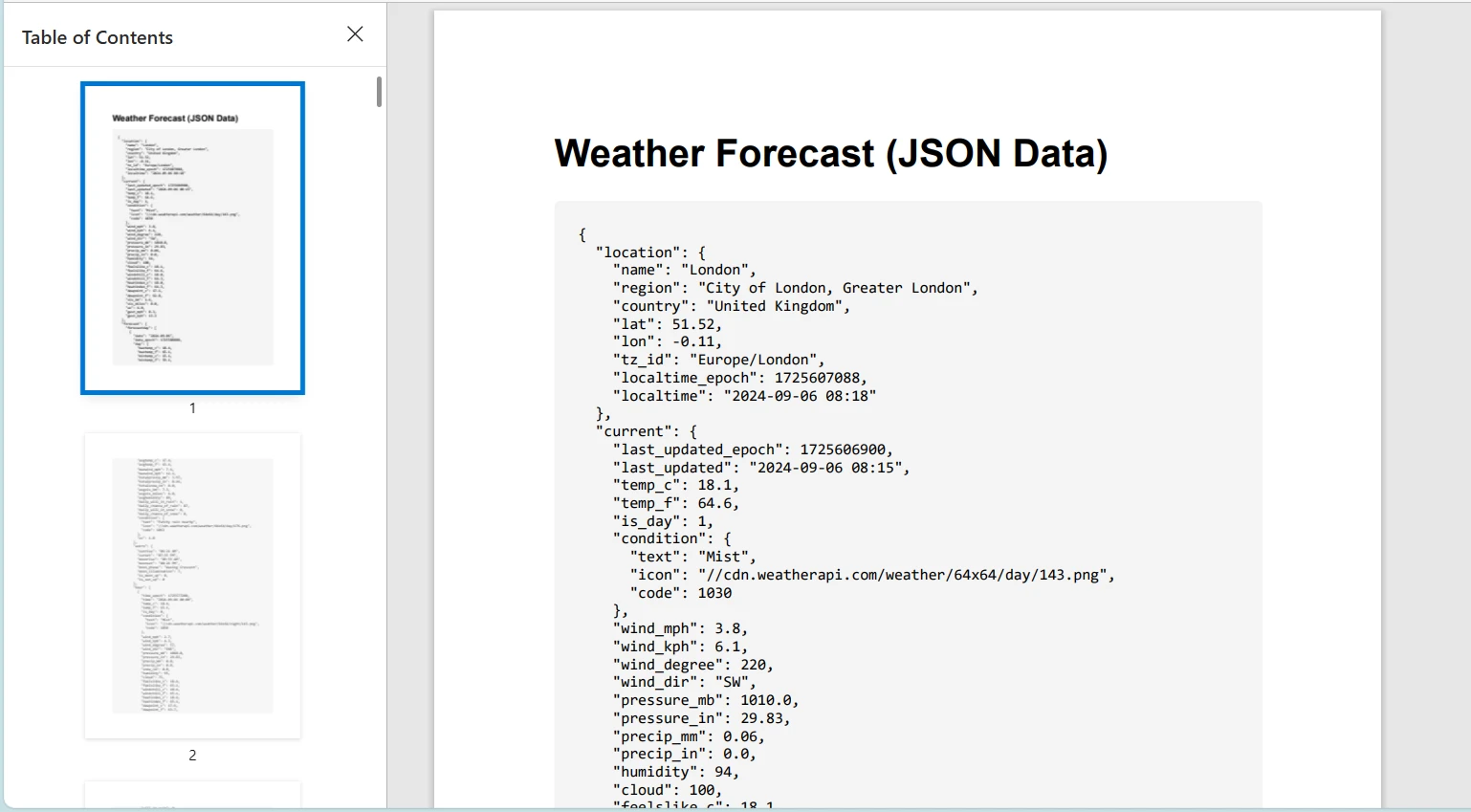
Recuerde reemplazar "YOUR_API_KEY" con una clave API al usar una API de clima real.
Conclusión
Este tutorial exploró el uso de la clase HttpClient en C# para enviar solicitudes HTTP y manejar respuestas. También presentamos IronPDF, una poderosa biblioteca para generar PDFs en aplicaciones .NET. Demostramos cómo combinar estas tecnologías mediante la recuperación de contenido HTML desde un servicio web utilizando HttpClient y convirtiéndolo en PDF usando IronPDF.
IronPDF ofrece una prueba gratuita, y sus licencias empiezan a partir de $999, lo que lo convierte en una herramienta valiosa para desarrolladores que buscan capacidades completas de generación PDF.























