




更新日 2026年4月23日
Microsoft.Extensions.AIを使用した .NET での LLM 統合の簡素化
AI はソフトウェア開発を変革していますが、.NET への大規模言語モデル (LLM) の統合はこれまで複雑でした。IronPdf.AI を使用して AI 統合をさらに進め、OpenAI を活用した PDF 解析、データ抽出、およびコンテンツの要約を .NET アプリケーションにもたらします。
詳しく読む

AES(高度暗号化標準)は、最も一般的に使用される対称暗号化アルゴリズムの1つです。 データを暗号化および復号化するために同じキーを使用するため、AES暗号化は多くのアプリケーションで機密データを保護するために効率的かつ高速です。
このチュートリアルでは、C#でのAES暗号化に焦点を当て、AESクラスを使用してデータを暗号化および復号化し、IronPDFライブラリを使用します。 実践的な例を取り上げ、暗号化プロセスを通じて解説し、セキュリティを向上させるためにブロック連鎖暗号モード (CBC) の使用方法を紹介します。 暗号化キーの管理と初期化ベクトル (IV) の役割についても議論します。
高度暗号化標準 (AES) は、国家標準技術研究所 (NIST) によって標準化された対称暗号化アルゴリズムです。 アルゴリズムは128ビット、192ビット、または256ビットのキーサイズを持ち、機密データの暗号化に非常に安全です。 データを暗号化および復号化するために同じ暗号化キーを使用します。
AESは元のデータをブロックに分割し、それらのブロックに対して変換を施すことで動作します。 CBC(暗号ブロック連鎖)やECB(電子コードブック)など、異なる暗号モードで動作し、それぞれ異なるセキュリティ機能を提供します。
C#のAES暗号化アルゴリズムはSystem.Security.Cryptography名前空間の一部です。 この名前空間にはAESクラスが含まれており、これを使用してAESのインスタンスを作成し、キーサイズ、暗号モード、パディングモードを指定し、秘密キーを使用してデータを暗号化および復号化できます。
C#でAESを使用するには、次の基本的な手順に従います。
Aes.Create()を使用してAESクラスのインスタンスを作成します。C#で基本的な暗号化プロセスと復号プログラムを作成しましょう。
using System;
using System.IO;
using System.Security.Cryptography;
using System.Text;

class Program
{
    // Declare a static byte array for encrypted data
    public static byte[] encryptedData;

    // Main method to demonstrate encryption and decryption
    public static void Main(string[] args)
    {
        // String plaintext to be encrypted
        string plaintext = "This is some sensitive data!";
        string key = "abcdefghijklmnop"; // 128-bit key (16 characters)

        // Encrypt the plaintext
        string ciphertext = Encrypt(plaintext, key);
        Console.WriteLine("Encrypted Data: " + ciphertext);

        // Decrypt the ciphertext
        string decryptedData = Decrypt(ciphertext, key);
        Console.WriteLine("Decrypted Data: " + decryptedData);
    }

    // Method to encrypt data
    public static string Encrypt(string plaintext, string key)
    {
        // Create a new instance of the AES encryption algorithm
        using (Aes aes = Aes.Create())
        {
            aes.Key = Encoding.UTF8.GetBytes(key);
            aes.IV = new byte[16]; // Initialization vector (IV)

            // Create an encryptor to perform the stream transform
            ICryptoTransform encryptor = aes.CreateEncryptor(aes.Key, aes.IV);

            // Create the streams used for encryption
            using (MemoryStream ms = new MemoryStream())
            {
                // Create a CryptoStream using the encryptor
                using (CryptoStream cs = new CryptoStream(ms, encryptor, CryptoStreamMode.Write))
                {
                    using (StreamWriter sw = new StreamWriter(cs))
                    {
                        sw.Write(plaintext);
                    }
                }
                // Store the encrypted data in the public static byte array
                encryptedData = ms.ToArray();
                return Convert.ToBase64String(encryptedData);
            }
        }
    }

    // Method to decrypt data
    public static string Decrypt(string ciphertext, string key)
    {
        using (Aes aes = Aes.Create())
        {
            aes.Key = Encoding.UTF8.GetBytes(key);
            aes.IV = new byte[16]; // Initialization vector (IV)

            // Create a decryptor to perform the stream transform
            ICryptoTransform decryptor = aes.CreateDecryptor(aes.Key, aes.IV);

            // Create the streams used for decryption
            using (MemoryStream ms = new MemoryStream(Convert.FromBase64String(ciphertext)))
            {
                using (CryptoStream cs = new CryptoStream(ms, decryptor, CryptoStreamMode.Read))
                {
                    using (StreamReader sr = new StreamReader(cs))
                    {
                        return sr.ReadToEnd();
                    }
                }
            }
        }
    }
}Imports System
Imports System.IO
Imports System.Security.Cryptography
Imports System.Text
Friend Class Program
' Declare a static byte array for encrypted data
Public Shared encryptedData() As Byte
' Main method to demonstrate encryption and decryption
Public Shared Sub Main(ByVal args() As String)
' String plaintext to be encrypted
Dim plaintext As String = "This is some sensitive data!"
Dim key As String = "abcdefghijklmnop" ' 128-bit key (16 characters)
' Encrypt the plaintext
Dim ciphertext As String = Encrypt(plaintext, key)
Console.WriteLine("Encrypted Data: " & ciphertext)
' Decrypt the ciphertext
Dim decryptedData As String = Decrypt(ciphertext, key)
Console.WriteLine("Decrypted Data: " & decryptedData)
End Sub
' Method to encrypt data
Public Shared Function Encrypt(ByVal plaintext As String, ByVal key As String) As String
' Create a new instance of the AES encryption algorithm
Using aes As Aes = System.Security.Cryptography.Aes.Create()
aes.Key = Encoding.UTF8.GetBytes(key)
aes.IV = New Byte(15){} ' Initialization vector (IV)
' Create an encryptor to perform the stream transform
Dim encryptor As ICryptoTransform = aes.CreateEncryptor(aes.Key, aes.IV)
' Create the streams used for encryption
Using ms As New MemoryStream()
' Create a CryptoStream using the encryptor
Using cs As New CryptoStream(ms, encryptor, CryptoStreamMode.Write)
Using sw As New StreamWriter(cs)
sw.Write(plaintext)
End Using
End Using
' Store the encrypted data in the public static byte array
encryptedData = ms.ToArray()
Return Convert.ToBase64String(encryptedData)
End Using
End Using
End Function
' Method to decrypt data
Public Shared Function Decrypt(ByVal ciphertext As String, ByVal key As String) As String
Using aes As Aes = System.Security.Cryptography.Aes.Create()
aes.Key = Encoding.UTF8.GetBytes(key)
aes.IV = New Byte(15){} ' Initialization vector (IV)
' Create a decryptor to perform the stream transform
Dim decryptor As ICryptoTransform = aes.CreateDecryptor(aes.Key, aes.IV)
' Create the streams used for decryption
Using ms As New MemoryStream(Convert.FromBase64String(ciphertext))
Using cs As New CryptoStream(ms, decryptor, CryptoStreamMode.Read)
Using sr As New StreamReader(cs)
Return sr.ReadToEnd()
End Using
End Using
End Using
End Using
End Function
End Class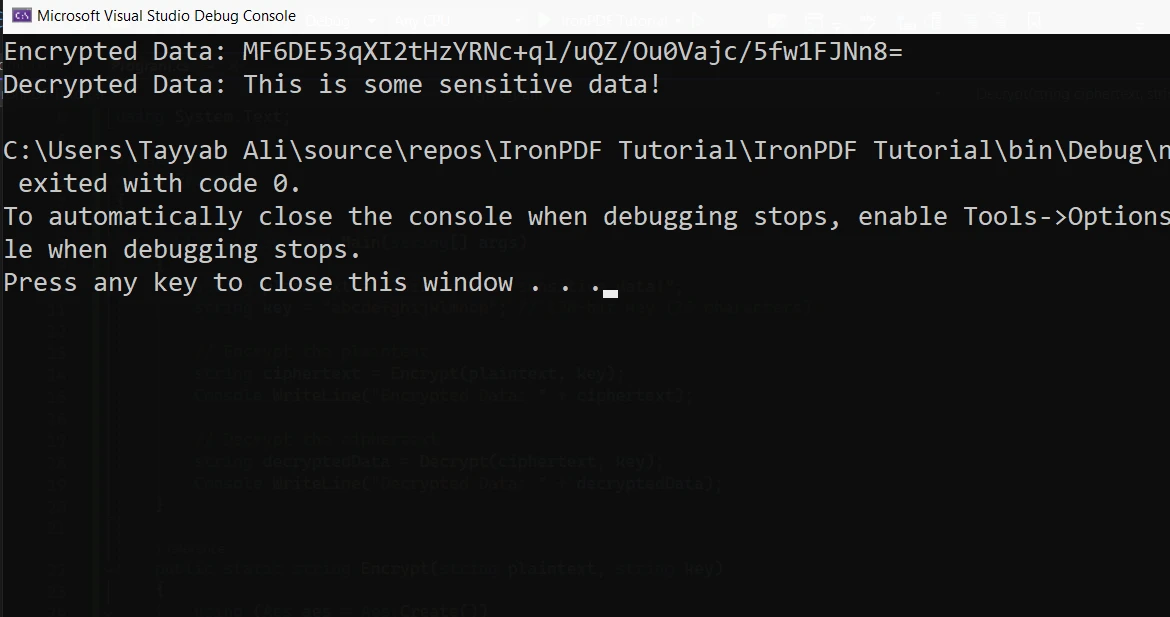
Aes.Create(): これはAES暗号化アルゴリズムの新しいインスタンスを作成します。aes.Key: 暗号化と復号化の両方に使用される鍵です。 サイズは128ビット(16バイト)、192ビット、または256ビットのように有効でなければなりません。aes.IV: 初期化ベクトル(IV)は、暗号化プロセスをランダム化するために使用されます。 この例では、シンプルさのためにゼロのIVを使用します。以前の例を基にして、ランダムキーとIVを生成し、暗号化をより安全にします。
public static string EncryptData(string plaintext)
{
    using (Aes aes = Aes.Create())
    {
        aes.Key = new byte[32]; // AES-256 requires a 256-bit key (32 bytes)
        aes.IV = new byte[16];  // 128-bit block size

        // Randomly generate key and IV
        using (RandomNumberGenerator rng = RandomNumberGenerator.Create())
        {
            rng.GetBytes(aes.Key); // Generate a random key
            rng.GetBytes(aes.IV);  // Generate a random IV
        }

        // Create an encryptor to perform the stream transform
        ICryptoTransform encryptor = aes.CreateEncryptor(aes.Key, aes.IV);

        // Create the streams used for encryption
        using (MemoryStream ms = new MemoryStream())
        {
            using (CryptoStream cs = new CryptoStream(ms, encryptor, CryptoStreamMode.Write))
            {
                using (StreamWriter sw = new StreamWriter(cs))
                {
                    sw.Write(plaintext);
                }
            }
            return Convert.ToBase64String(ms.ToArray());
        }
    }
}Public Shared Function EncryptData(ByVal plaintext As String) As String
Using aes As Aes = Aes.Create()
aes.Key = New Byte(31){} ' AES-256 requires a 256-bit key (32 bytes)
aes.IV = New Byte(15){} ' 128-bit block size
' Randomly generate key and IV
Using rng As RandomNumberGenerator = RandomNumberGenerator.Create()
rng.GetBytes(aes.Key) ' Generate a random key
rng.GetBytes(aes.IV) ' Generate a random IV
End Using
' Create an encryptor to perform the stream transform
Dim encryptor As ICryptoTransform = aes.CreateEncryptor(aes.Key, aes.IV)
' Create the streams used for encryption
Using ms As New MemoryStream()
Using cs As New CryptoStream(ms, encryptor, CryptoStreamMode.Write)
Using sw As New StreamWriter(cs)
sw.Write(plaintext)
End Using
End Using
Return Convert.ToBase64String(ms.ToArray())
End Using
End Using
End Functionこの場合、関数が呼び出されるたびに新しいキーとIVを生成します。 これにより、同じキーがすべての操作で使用されないため、より堅牢な暗号化が提供されます。 AESは128、192、256ビットのようなキーサイズをサポートしています。
復号化は、データを暗号化する逆プロセスです。 私たちの例では、暗号化に使用された同じキーとIVを提供してデータを復号化する必要があります。 復号化プロセスには、暗号化されたデータを元の形式に戻すことが含まれます。
ここでは、以前に暗号化されたデータを使用した例を紹介します。
public static string DecryptData(string ciphertext, byte[] key, byte[] iv)
{
    using (Aes aes = Aes.Create())
    {
        aes.Key = key;
        aes.IV = iv;

        // Create a decryptor to perform the stream transform
        ICryptoTransform decryptor = aes.CreateDecryptor(aes.Key, aes.IV);

        // Create the streams used for decryption
        using (MemoryStream ms = new MemoryStream(Convert.FromBase64String(ciphertext)))
        {
            using (CryptoStream cs = new CryptoStream(ms, decryptor, CryptoStreamMode.Read))
            {
                using (StreamReader sr = new StreamReader(cs))
                {
                    return sr.ReadToEnd();
                }
            }
        }
    }
}Public Shared Function DecryptData(ByVal ciphertext As String, ByVal key() As Byte, ByVal iv() As Byte) As String
Using aes As Aes = Aes.Create()
aes.Key = key
aes.IV = iv
' Create a decryptor to perform the stream transform
Dim decryptor As ICryptoTransform = aes.CreateDecryptor(aes.Key, aes.IV)
' Create the streams used for decryption
Using ms As New MemoryStream(Convert.FromBase64String(ciphertext))
Using cs As New CryptoStream(ms, decryptor, CryptoStreamMode.Read)
Using sr As New StreamReader(cs)
Return sr.ReadToEnd()
End Using
End Using
End Using
End Using
End Functionこのコードは暗号化されたデータを元のデータに戻します。
IronPDFは、シンプルで開発者フレンドリーな.NETライブラリで、簡単なC#コードを使用してPDFを生成、編集、および操作するために設計されています。 開発者がHTML、CSS、およびJavaScriptから直接PDFドキュメントを作成することを可能にし、動的なレポート、請求書、その他のドキュメントの生成に非常に便利です。 マージ、分割、さらにはパスワードやデジタル署名などのセキュリティ機能を追加するサポートを備えたIronPDFは、.NETアプリケーションでのPDF生成の包括的なソリューションです。
機密レポートやドキュメントを生成する際には、PDF内のデータが共有前に暗号化されていることを保証する必要があるかもしれません。 AES(高度暗号化標準)暗号化は、PDFファイルの内容を安全に暗号化するための完璧なソリューションです。 IronPDFとAES暗号化を組み合わせることで、PDF内のデータを保護しつつ、ドキュメント自体と連携できるようにします。
ChromePdfRendererクラスを使用してHTMLコンテンツからPDFを生成し、ファイルに保存します。
var htmlContent = "<h1>Confidential</h1><p>This is sensitive data.</p>";
var renderer = new ChromePdfRenderer();
var pdf = renderer.RenderHtmlAsPdf(htmlContent);
pdf.SaveAs(@"C:\Reports\ConfidentialReport.pdf");Dim htmlContent = "<h1>Confidential</h1><p>This is sensitive data.</p>"
Dim renderer = New ChromePdfRenderer()
Dim pdf = renderer.RenderHtmlAsPdf(htmlContent)
pdf.SaveAs("C:\Reports\ConfidentialReport.pdf")PDF が作成されたら、 AES で暗号化します。
byte[] pdfBytes = File.ReadAllBytes(@"C:\Reports\ConfidentialReport.pdf");
using (Aes aes = Aes.Create())
{
    aes.Key = Encoding.UTF8.GetBytes("abcdefghijklmnop");
    aes.IV = new byte[16];
    using (var encryptor = aes.CreateEncryptor(aes.Key, aes.IV))
    using (var ms = new MemoryStream())
    {
        using (var cs = new CryptoStream(ms, encryptor, CryptoStreamMode.Write))
        {
            cs.Write(pdfBytes, 0, pdfBytes.Length);
        }
        File.WriteAllBytes(@"C:\Reports\ConfidentialReport.encrypted", ms.ToArray());
    }
}Dim pdfBytes() As Byte = File.ReadAllBytes("C:\Reports\ConfidentialReport.pdf")
Using aes As Aes = Aes.Create()
aes.Key = Encoding.UTF8.GetBytes("abcdefghijklmnop")
aes.IV = New Byte(15){}
Using encryptor = aes.CreateEncryptor(aes.Key, aes.IV)
Using ms = New MemoryStream()
Using cs = New CryptoStream(ms, encryptor, CryptoStreamMode.Write)
cs.Write(pdfBytes, 0, pdfBytes.Length)
End Using
File.WriteAllBytes("C:\Reports\ConfidentialReport.encrypted", ms.ToArray())
End Using
End Using
End UsingIronPDFとAES暗号化を統合することで、アクセス可能でありながら暗号化された動的で安全なドキュメントを生成することができます。 安全なドキュメント生成を必要とするアプリケーションの開発や機密レポートの管理において、強固な暗号化との統合によってデータを保護します。 IronPDFはPDFの取り扱いを簡略化し、AESはコンテンツが安全であることを保証します。
IronPDFは無料トライアルを提供しており、開発者はその機能を検討する前に探索することが容易です。 IronPDF をプロジェクトに実装する準備ができたら、ライセンスは一度限りの購入で$999から始まります。

ジェイコブ・メラーはIron Softwareの最高技術責任者(CTO)であり、C# PDFテクノロジーを開拓する先見的なエンジニアです。Iron Softwareのコアコードベースを支えるオリジナル開発者として、彼は創業以来、会社の製品アーキテクチャを形成し、CEOのCameron Rimingtonとともに、会社をNASA、Tesla、および世界的な政府機関にサービスを提供する50人以上の会社に変えました。1999年にロンドンで最初のソフトウェアビジネスを開業し、2005年に最初 for .NETコンポーネントを作成した後、Microsoftのエコシステム全体で複雑な問題を解決することを専門としました。



IronPDF はIRONSUITEの一部です
オフィス文書向けの.NET API製品10個

PDFがHTMLのように見える必要があるとき、迅速に。












