Klasa ArrayList jest częścią przestrzeni nazw kolekcji .NET Framework i służy do przechowywania zbioru obiektów. Jest to kolekcja nieogólna, co oznacza, że może zawierać elementy dowolnego typu danych. Ta cecha sprawia, że jest ona bardzo elastyczna, ale mniej bezpieczna pod względem typów w porównaniu z kolekcjami generycznymi. ArrayList może zawierać zduplikowane elementy i umożliwia dynamiczne zmianę rozmiaru w miarę dodawania lub usuwania prawidłowych wartości. W tym artykułe omówimy podstawy ArrayList oraz funkcje biblioteki IronPDF.
Podstawy ArrayList
ArrayList jest zasadniczo niegeneryczną kolekcją zdolną do przechowywania dowolnej liczby elementów dowolnego typu danych, co czyni ją wszechstronnym wyborem dla różnych scenariuszy programistycznych. Jedną z kluczowych funkcji jest możliwość dowolnego dodawania lub usuwania elementów bez ograniczeń związanych z ustalonym rozmiarem. ArrayList automatycznie dostosowuje swój rozmiar, aby pomieścić nowe elementy, co jest możliwe dzięki implementacji interfejsu IList. Ta dynamiczna zmiana rozmiaru ma kluczowe znaczenie dla aplikacji, które wymagają kolekcji o zmiennej liczbie elementów w trakcie ich cyklu życia.
Tworząc instancję ArrayList, tworzysz kolekcję, która może przechowywać dowolne wartości obiektów, od liczb całkowitych i ciągów znaków po złożone obiekty niestandardowe. Dodawanie elementów do ArrayList jest proste dzięki metodom takim jak Add, która dołącza wartość obiektu na końcu kolekcji, oraz Insert, która umieszcza nowy element w określonym indeksie, przesuwając istniejące elementy w razie potrzeby, aby zrobić miejsce. Ta elastyczność pozwala programistom na bardziej efektywne zarządzanie kolekcjami, dostosowując się do potrzeb aplikacji w miarę jej rozwoju.
Praca z elementami
Dodawanie elementów do ArrayList jest proste i intuicyjne. Weźmy na przykład scenariusz, w którym tworzysz kolekcję różnych typów danych. Za pomocą metody Add można dołączyć do ArrayList dowolny obiekt, od ciągów znaków po liczby całkowite, a nawet inne kolekcje. Pojemność ArrayList jest automatycznie zwiększana w razie potrzeby, zapewniając zawsze miejsce dla nowych elementów obiektowych. Ta automatyczna zmiana rozmiaru stanowi znaczną przewagę nad tradycyjnymi tablicami, które wymagają ręcznej zmiany rozmiaru lub utworzenia nowej tablicy w celu pomieścić więcej elementów.
ArrayList udostępnia również metody do wstawiania i usuwania elementów w określonych pozycjach lub przy określonym indeksie. Metoda Insert pozwala na dodanie elementu w określonej pozycji, umożliwiając precyzyjne umieszczenie nowych elementów w kolekcji pod dowolnym indeksem. Podobnie metody Remove i RemoveAt ułatwiają usuwanie elementów poprzez określenie obiektu, który ma zostać usunięty, lub jego indeksu w kolekcji. Ta szczegółowa kontrola nad elementami w ArrayList sprawia, że jest to potężne narzędzie do zarządzania danymi dynamicznymi.
Tworzenie i dodawanie elementów
Aby rozpocząć korzystanie z ArrayList, należy najpierw utworzyć jej instancję. Następnie można dodawać elementy do ArrayList za pomocą metody Add, która wstawia obiekt na koniec ArrayList.
using System;
using System.Collections;

class Program
{
    // The main entry point of the program
    public static void Main()
    {
        // Create a new ArrayList
        ArrayList myArrayList = new ArrayList();

        // Add elements of different types
        myArrayList.Add("Hello");
        myArrayList.Add(100);

        var item = "World";
        myArrayList.Add(item);

        // Iterate through the ArrayList and print each element
        foreach (var obj in myArrayList)
        {
            Console.WriteLine(obj);
        }
    }
}
using System;
using System.Collections;

class Program
{
    // The main entry point of the program
    public static void Main()
    {
        // Create a new ArrayList
        ArrayList myArrayList = new ArrayList();

        // Add elements of different types
        myArrayList.Add("Hello");
        myArrayList.Add(100);

        var item = "World";
        myArrayList.Add(item);

        // Iterate through the ArrayList and print each element
        foreach (var obj in myArrayList)
        {
            Console.WriteLine(obj);
        }
    }
}
Imports System
Imports System.Collections
Module Program
' The main entry point of the program
Sub Main()
' Create a new ArrayList
Dim myArrayList As New ArrayList()
' Add elements of different types
myArrayList.Add("Hello")
myArrayList.Add(100)
Dim item = "World"
myArrayList.Add(item)
' Iterate through the ArrayList and print each element
For Each obj In myArrayList
Console.WriteLine(obj)
Next
End Sub
End Module
Imports System
Imports System.Collections

Module Program
    ' The main entry point of the program
    Sub Main()
        ' Create a new ArrayList
        Dim myArrayList As New ArrayList()

        ' Add elements of different types
        myArrayList.Add("Hello")
        myArrayList.Add(100)

        Dim item = "World"
        myArrayList.Add(item)

        ' Iterate through the ArrayList and print each element
        For Each obj In myArrayList
            Console.WriteLine(obj)
        Next
    End Sub
End Module
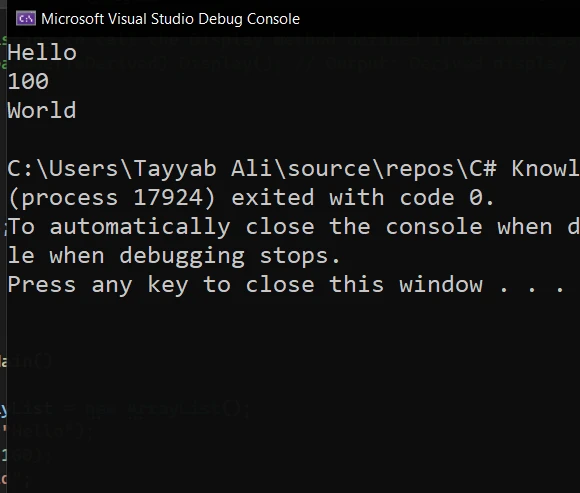
Ten przykład pokazuje, jak utworzyć nową listę ArrayList i dodać do niej różne typy elementów. Następnie pętla foreach iteruje przez ArrayList, wyświetlając każdy element i drukując go.
Wstawianie elementów
Aby wstawić element pod określonym indeksem, należy użyć metody Insert, pamiętając, że jest to system indeksowania oparty na zerze.
// Insert element at index 1
myArrayList.Insert(1, "Inserted Item");
// Insert element at index 1
myArrayList.Insert(1, "Inserted Item");
' Insert element at index 1
myArrayList.Insert(1, "Inserted Item")
' Insert element at index 1
myArrayList.Insert(1, "Inserted Item")
Usuwanie elementów
Aby usunąć elementy, przydatne są metody Remove i RemoveAt. Remove usuwa pierwsze wystąpienie określonego obiektu, natomiast RemoveAt usuwa element znajdujący się pod określonym indeksem całkowitoliczbowym.
myArrayList.Remove("Hello"); // Removes the first occurrence of "Hello"
myArrayList.RemoveAt(0);     // Removes the element at index 0
myArrayList.Remove("Hello"); // Removes the first occurrence of "Hello"
myArrayList.RemoveAt(0); // Removes the element at index 0myArrayList.Remove("Hello") ' Removes the first occurrence of "Hello"
myArrayList.RemoveAt(0) ' Removes the element at index 0
myArrayList.Remove("Hello") ' Removes the first occurrence of "Hello"
myArrayList.RemoveAt(0) ' Removes the element at index 0
Przykład: Zarządzanie listą ArrayList
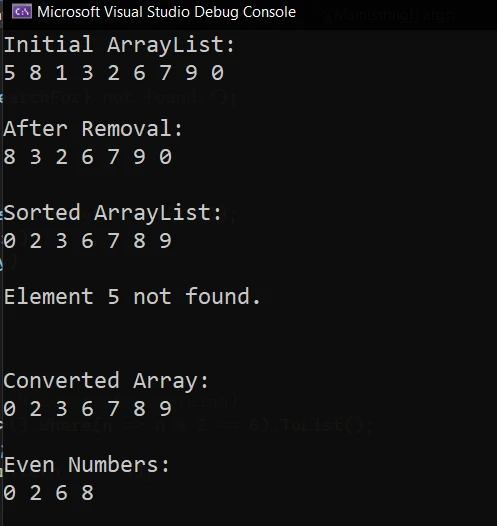
Stworzenie zaawansowanego przykładu wykorzystania ArrayList w języku C# wymaga zaprezentowania nie tylko podstawowych operacji, takich jak dodawanie lub usuwanie elementów, ale także bardziej złożonych manipulacji, takich jak sortowanie, wyszukiwanie i konwersja ArrayList do innych struktur danych. Umieść poniższy przykład w pliku Program.cs, aby go uruchomić:
using System;
using System.Collections;
using System.Linq;

class AdvancedArrayListExample
{
    static void Main(string[] args)
    {
        // Initialize an ArrayList with some elements
        ArrayList numbers = new ArrayList() { 5, 8, 1, 3, 2 };

        // Adding elements
        numbers.Add(6); // Add an element to the end
        numbers.AddRange(new int[] { 7, 9, 0 }); // Add multiple elements from a specified collection.

        Console.WriteLine("Initial ArrayList:");
        foreach (int number in numbers)
        {
            Console.Write(number + " ");
        }
        Console.WriteLine("\n");

        // Removing elements
        numbers.Remove(1); // Remove the element 1
        numbers.RemoveAt(0); // Remove the first element

        Console.WriteLine("After Removal:");
        foreach (int number in numbers)
        {
            Console.Write(number + " ");
        }
        Console.WriteLine("\n");

        // Sorting
        numbers.Sort(); // Sort the ArrayList
        Console.WriteLine("Sorted ArrayList:");
        foreach (int number in numbers)
        {
            Console.Write(number + " ");
        }
        Console.WriteLine("\n");

        // Searching
        int searchFor = 5;
        int index = numbers.IndexOf(searchFor); // Find the index of the element
        if (index != -1)
        {
            Console.WriteLine($"Element {searchFor} found at index {index}");
        }
        else
        {
            Console.WriteLine($"Element {searchFor} not found.");
        }
        Console.WriteLine("\n");

        // Converting ArrayList to Array
        int[] numbersArray = (int[])numbers.ToArray(typeof(int));
        Console.WriteLine("Converted Array:");
        foreach (int number in numbersArray)
        {
            Console.Write(number + " ");
        }
        Console.WriteLine("\n");

        // Demonstrate LINQ with ArrayList (Requires System.Linq)
        var evenNumbers = numbers.Cast<int>().Where(n => n % 2 == 0).ToList(); // Assign values to evenNumbers from the filtered results.
        Console.WriteLine("Even Numbers:");
        evenNumbers.ForEach(n => Console.Write(n + " "));
        Console.WriteLine();
    }
}
using System;
using System.Collections;
using System.Linq;

class AdvancedArrayListExample
{
    static void Main(string[] args)
    {
        // Initialize an ArrayList with some elements
        ArrayList numbers = new ArrayList() { 5, 8, 1, 3, 2 };

        // Adding elements
        numbers.Add(6); // Add an element to the end
        numbers.AddRange(new int[] { 7, 9, 0 }); // Add multiple elements from a specified collection.

        Console.WriteLine("Initial ArrayList:");
        foreach (int number in numbers)
        {
            Console.Write(number + " ");
        }
        Console.WriteLine("\n");

        // Removing elements
        numbers.Remove(1); // Remove the element 1
        numbers.RemoveAt(0); // Remove the first element

        Console.WriteLine("After Removal:");
        foreach (int number in numbers)
        {
            Console.Write(number + " ");
        }
        Console.WriteLine("\n");

        // Sorting
        numbers.Sort(); // Sort the ArrayList
        Console.WriteLine("Sorted ArrayList:");
        foreach (int number in numbers)
        {
            Console.Write(number + " ");
        }
        Console.WriteLine("\n");

        // Searching
        int searchFor = 5;
        int index = numbers.IndexOf(searchFor); // Find the index of the element
        if (index != -1)
        {
            Console.WriteLine($"Element {searchFor} found at index {index}");
        }
        else
        {
            Console.WriteLine($"Element {searchFor} not found.");
        }
        Console.WriteLine("\n");

        // Converting ArrayList to Array
        int[] numbersArray = (int[])numbers.ToArray(typeof(int));
        Console.WriteLine("Converted Array:");
        foreach (int number in numbersArray)
        {
            Console.Write(number + " ");
        }
        Console.WriteLine("\n");

        // Demonstrate LINQ with ArrayList (Requires System.Linq)
        var evenNumbers = numbers.Cast<int>().Where(n => n % 2 == 0).ToList(); // Assign values to evenNumbers from the filtered results.
        Console.WriteLine("Even Numbers:");
        evenNumbers.ForEach(n => Console.Write(n + " "));
        Console.WriteLine();
    }
}
Imports System
Imports System.Collections
Imports System.Linq
Class AdvancedArrayListExample
Shared Sub Main(ByVal args As String())
' Initialize an ArrayList with some elements
Dim numbers As New ArrayList() From {5, 8, 1, 3, 2}
' Adding elements
numbers.Add(6) ' Add an element to the end
numbers.AddRange(New Integer() {7, 9, 0}) ' Add multiple elements from a specified collection.
Console.WriteLine("Initial ArrayList:")
For Each number As Integer In numbers
Console.Write(number & " ")
Next
Console.WriteLine(vbCrLf)
' Removing elements
numbers.Remove(1) ' Remove the element 1
numbers.RemoveAt(0) ' Remove the first element
Console.WriteLine("After Removal:")
For Each number As Integer In numbers
Console.Write(number & " ")
Next
Console.WriteLine(vbCrLf)
' Sorting
numbers.Sort() ' Sort the ArrayList
Console.WriteLine("Sorted ArrayList:")
For Each number As Integer In numbers
Console.Write(number & " ")
Next
Console.WriteLine(vbCrLf)
' Searching
Dim searchFor As Integer = 5
Dim index As Integer = numbers.IndexOf(searchFor) ' Find the index of the element
If index <> -1 Then
Console.WriteLine($"Element {searchFor} found at index {index}")
Else
Console.WriteLine($"Element {searchFor} not found.")
End If
Console.WriteLine(vbCrLf)
' Converting ArrayList to Array
Dim numbersArray() As Integer = DirectCast(numbers.ToArray(GetType(Integer)), Integer())
Console.WriteLine("Converted Array:")
For Each number As Integer In numbersArray
Console.Write(number & " ")
Next
Console.WriteLine(vbCrLf)
' Demonstrate LINQ with ArrayList (Requires System.Linq)
Dim evenNumbers = numbers.Cast(Of Integer)().Where(Function(n) n Mod 2 = 0).ToList() ' Assign values to evenNumbers from the filtered results.
Console.WriteLine("Even Numbers:")
evenNumbers.ForEach(Sub(n) Console.Write(n & " "))
Console.WriteLine()
End Sub
End Class
Imports System
Imports System.Collections
Imports System.Linq

Class AdvancedArrayListExample
    Shared Sub Main(ByVal args As String())
        ' Initialize an ArrayList with some elements
        Dim numbers As New ArrayList() From {5, 8, 1, 3, 2}

        ' Adding elements
        numbers.Add(6) ' Add an element to the end
        numbers.AddRange(New Integer() {7, 9, 0}) ' Add multiple elements from a specified collection.

        Console.WriteLine("Initial ArrayList:")
        For Each number As Integer In numbers
            Console.Write(number & " ")
        Next
        Console.WriteLine(vbCrLf)

        ' Removing elements
        numbers.Remove(1) ' Remove the element 1
        numbers.RemoveAt(0) ' Remove the first element

        Console.WriteLine("After Removal:")
        For Each number As Integer In numbers
            Console.Write(number & " ")
        Next
        Console.WriteLine(vbCrLf)

        ' Sorting
        numbers.Sort() ' Sort the ArrayList
        Console.WriteLine("Sorted ArrayList:")
        For Each number As Integer In numbers
            Console.Write(number & " ")
        Next
        Console.WriteLine(vbCrLf)

        ' Searching
        Dim searchFor As Integer = 5
        Dim index As Integer = numbers.IndexOf(searchFor) ' Find the index of the element
        If index <> -1 Then
            Console.WriteLine($"Element {searchFor} found at index {index}")
        Else
            Console.WriteLine($"Element {searchFor} not found.")
        End If
        Console.WriteLine(vbCrLf)

        ' Converting ArrayList to Array
        Dim numbersArray() As Integer = DirectCast(numbers.ToArray(GetType(Integer)), Integer())
        Console.WriteLine("Converted Array:")
        For Each number As Integer In numbersArray
            Console.Write(number & " ")
        Next
        Console.WriteLine(vbCrLf)

        ' Demonstrate LINQ with ArrayList (Requires System.Linq)
        Dim evenNumbers = numbers.Cast(Of Integer)().Where(Function(n) n Mod 2 = 0).ToList() ' Assign values to evenNumbers from the filtered results.
        Console.WriteLine("Even Numbers:")
        evenNumbers.ForEach(Sub(n) Console.Write(n & " "))
        Console.WriteLine()
    End Sub
End Class
Ten fragment kodu pokazuje, jak:
- Zainicjuj ArrayList z zestawem elementów.
- Dodaj pojedyncze i wiele elementów do ArrayList.
- Usuń elementy według wartości i według indeksu.
- Posortuj ArrayList, aby uporządkować elementy.
- Wyszukaj element i znajdź jego indeks.
- Przekonwertuj ArrayList na standardową tablicę.
- Użyj LINQ z ArrayList, aby odfiltrować liczby parzyste, pokazując, jak połączyć kolekcje niegeneryczne z potężnymi możliwościami zapytań LINQ.
Wprowadzenie IronPDF: C# Biblioteka PDF
IronPDF to potężna biblioteka dla języka C#, która upraszcza złożony proces generowania plików PDF, oferując szeroki zakres funkcji do manipulacji plikami PDF, w tym możliwość generowania plików PDF z HTML, dodawania tekstu i obrazów, zabezpieczania dokumentów i wiele więcej.
Integracja IronPDF z ArrayList
Napiszmy prosty program w języku C#, który tworzy listę elementów typu ArrayList, a następnie wykorzystuje bibliotekę IronPDF do wygenerowania dokumentu PDF zawierającego listę tych elementów.
using IronPdf;
using System;
using System.Collections;

class PdfCode
{
    static void Main(string[] args)
    {
        // Set your IronPDF license key here
        IronPdf.License.LicenseKey = "Your_License_Key";

        // Create a new ArrayList and add some items
        ArrayList itemList = new ArrayList();
        itemList.Add("Apple");
        itemList.Add("Banana");
        itemList.Add("Cherry");
        itemList.Add("Date");

        // Initialize a new PDF document
        var Renderer = new ChromePdfRenderer();

        // Create an HTML string to hold our content
        string htmlContent = "<h1>Items List</h1><ul>";

        // Iterate over each item in the ArrayList and add it to the HTML string
        foreach (var item in itemList)
        {
            htmlContent += $"<li>{item}</li>";
        }
        htmlContent += "</ul>";

        // Convert the HTML string to a PDF document
        var PDF = Renderer.RenderHtmlAsPdf(htmlContent);

        // Save the PDF to a file
        PDF.SaveAs("ItemList.pdf");

        Console.WriteLine("PDF file 'ItemList.pdf' has been generated.");
    }
}
using IronPdf;
using System;
using System.Collections;

class PdfCode
{
    static void Main(string[] args)
    {
        // Set your IronPDF license key here
        IronPdf.License.LicenseKey = "Your_License_Key";

        // Create a new ArrayList and add some items
        ArrayList itemList = new ArrayList();
        itemList.Add("Apple");
        itemList.Add("Banana");
        itemList.Add("Cherry");
        itemList.Add("Date");

        // Initialize a new PDF document
        var Renderer = new ChromePdfRenderer();

        // Create an HTML string to hold our content
        string htmlContent = "<h1>Items List</h1><ul>";

        // Iterate over each item in the ArrayList and add it to the HTML string
        foreach (var item in itemList)
        {
            htmlContent += $"<li>{item}</li>";
        }
        htmlContent += "</ul>";

        // Convert the HTML string to a PDF document
        var PDF = Renderer.RenderHtmlAsPdf(htmlContent);

        // Save the PDF to a file
        PDF.SaveAs("ItemList.pdf");

        Console.WriteLine("PDF file 'ItemList.pdf' has been generated.");
    }
}
Imports IronPdf
Imports System
Imports System.Collections
Class PdfCode
Shared Sub Main(ByVal args() As String)
' Set your IronPDF license key here
IronPdf.License.LicenseKey = "Your_License_Key"
' Create a new ArrayList and add some items
Dim itemList As New ArrayList()
itemList.Add("Apple")
itemList.Add("Banana")
itemList.Add("Cherry")
itemList.Add("Date")
' Initialize a new PDF document
Dim Renderer = New ChromePdfRenderer()
' Create an HTML string to hold our content
Dim htmlContent As String = "<h1>Items List</h1><ul>"
' Iterate over each item in the ArrayList and add it to the HTML string
For Each item In itemList
htmlContent += $"<li>{item}</li>"
Next
htmlContent += "</ul>"
' Convert the HTML string to a PDF document
Dim PDF = Renderer.RenderHtmlAsPdf(htmlContent)
' Save the PDF to a file
PDF.SaveAs("ItemList.pdf")
Console.WriteLine("PDF file 'ItemList.pdf' has been generated.")
End Sub
End Class
Imports IronPdf
Imports System
Imports System.Collections

Class PdfCode
    Shared Sub Main(ByVal args() As String)
        ' Set your IronPDF license key here
        IronPdf.License.LicenseKey = "Your_License_Key"

        ' Create a new ArrayList and add some items
        Dim itemList As New ArrayList()
        itemList.Add("Apple")
        itemList.Add("Banana")
        itemList.Add("Cherry")
        itemList.Add("Date")

        ' Initialize a new PDF document
        Dim Renderer = New ChromePdfRenderer()

        ' Create an HTML string to hold our content
        Dim htmlContent As String = "<h1>Items List</h1><ul>"

        ' Iterate over each item in the ArrayList and add it to the HTML string
        For Each item In itemList
            htmlContent += $"<li>{item}</li>"
        Next
        htmlContent += "</ul>"

        ' Convert the HTML string to a PDF document
        Dim PDF = Renderer.RenderHtmlAsPdf(htmlContent)

        ' Save the PDF to a file
        PDF.SaveAs("ItemList.pdf")

        Console.WriteLine("PDF file 'ItemList.pdf' has been generated.")
    End Sub
End Class
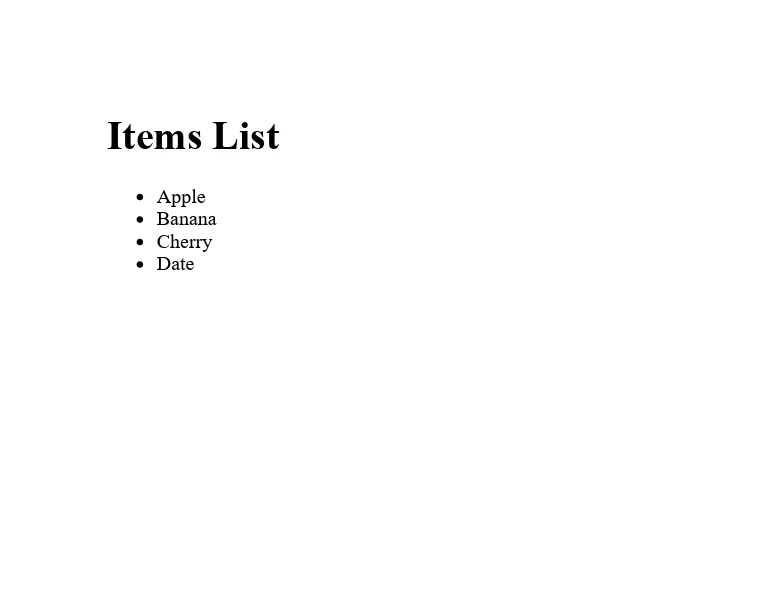
W tym przykładzie zaczynamy od utworzenia listy ArrayList o nazwie itemList i wypełnienia jej kilkoma elementami typu string. Następnie inicjujemy nową instancję klasy ChromePdfRenderer biblioteki IronPDF, której użyjemy do konwersji treści HTML na dokument PDF.
Wynik
Oto plik PDF wygenerowany przez IronPDF:
Wnioski
ArrayList to potężna kolekcja oferowana przez C# do przechowywania listy obiektów. Możliwość dynamicznego dostosowywania rozmiaru i przechowywania elementów dowolnego typu sprawia, że jest to rozwiązanie wszechstronne, nadające się do szerokiego zakresu zastosowań. Jednak ze względu na bezpieczeństwo typów i lepszą wydajność zaleca się stosowanie kolekcji generycznych. Eksperymentowanie z ArrayList i jej metodami pomoże Ci zrozumieć jej zastosowania i to, jak można ją wykorzystać w Twoich aplikacjach.
Ponadto dla osób zainteresowanych rozszerzeniem swoich możliwości w zakresie języka C# o obsługę plików PDF firma IronPDF oferuje bezpłatną wersję próbną funkcji PDF w środowisku .NET, umożliwiającą zapoznanie się z jej możliwościami. Licencje zaczynają się od $999, oferując kompleksowe rozwiązanie do integracji funkcjonalności PDF w aplikacjach .NET.













