




已更新 2026年4月23日
在 .NET 中用 Microsoft.Extensions.AI 簡化 LLM 整合
AI 正在改變軟體開發,但將大型語言模型 (LLM) 整合到 .NET 中一直很複雜。利用 IronPdf.AI 將 AI 整合推向更遠,為 .NET 應用程式帶來由 OpenAI 驅動的 PDF 解析、資料擷取和內容總結。
閱讀更多

在 .NET Framework 的集合命名空間中,ArrayList 類別設計用來儲存物件的集合。 它是一個非泛型集合,這意味著它可以容納任何資料型別的項目。 這個功能使其具有高度靈活性,但與泛型集合相比,在型別安全性方面較低。 該 ArrayList 可包含重複元素,並允許在加入或移除有效值時動態調整大小。 在本文中,我們將探討ArrayList的基礎知識及IronPDF 程式庫功能。
ArrayList 本質上是一個非泛型的集合,可以儲存任何資料型別的多個元素,使其成為多種程式設計場景中的多功能選擇。 能夠隨意新增或移除項目而不受固定大小的限制,是其主要特點之一。 ArrayList 自動調整其大小以容納新元素,這一功能是通過其實施 IList 接口實現的。 這種動態調整大小對於需要在其生命週期內包含可變數量元素的應用程式至關重要。
當您實例化一個 ArrayList 時,您是在建立一個可以容納任何物件值的集合,從整數和字串到複雜的自定義物件。 由於有如 Add 方法這類方法的存在,將元素新增到 ArrayList 非常簡單,它將物件值附加到集合的末尾;此外,Insert 方法則將新項目放置在指定索引處,必要時移動現有元素以騰出空間。 這種靈活性使開發人員能夠更有效地管理集合,根據應用程式的需求進行調整。
將元素加入 ArrayList 是簡單且直覺的。例如,考慮您正在建立一個包含各種資料型別的集合的情況。 透過 Add 方法,您可以將任何物件附加到 ArrayList,從字串到整數,甚至是其他集合。 ArrayList 的容量會根據需要自動增加,確保始終有空間容納新的物件元素。 這種自動調整大小的優勢明顯優於傳統的陣列,它們需要手動調整大小或建立新陣列以容納更多元素。
ArrayList 還提供了方法,用於在特定位置或索引處插入和移除元素。 Insert 方法允許您將元素新增到指定的位置,有效地使您可以精確地將新項目放置在集合中的任何指定索引處。 同樣地,Remove 和 RemoveAt 方法可以方便地刪除項目,無論是通過指定要移除的物件還是其在集合中的索引。 這種對 ArrayList 元素的細粒度控制,使其成為管理動態資料的強大工具。
要開始使用 ArrayList,您必須首先建立它的一個實例。 然後,您可以使用 Add 方法將元素新增到 ArrayList,該方法會將物件插入到 ArrayList 的末尾。
using System;
using System.Collections;

class Program
{
    // The main entry point of the program
    public static void Main()
    {
        // Create a new ArrayList
        ArrayList myArrayList = new ArrayList();

        // Add elements of different types
        myArrayList.Add("Hello");
        myArrayList.Add(100);

        var item = "World";
        myArrayList.Add(item);

        // Iterate through the ArrayList and print each element
        foreach (var obj in myArrayList)
        {
            Console.WriteLine(obj);
        }
    }
}Imports System
Imports System.Collections
Module Program
' The main entry point of the program
Sub Main()
' Create a new ArrayList
Dim myArrayList As New ArrayList()
' Add elements of different types
myArrayList.Add("Hello")
myArrayList.Add(100)
Dim item = "World"
myArrayList.Add(item)
' Iterate through the ArrayList and print each element
For Each obj In myArrayList
Console.WriteLine(obj)
Next
End Sub
End Module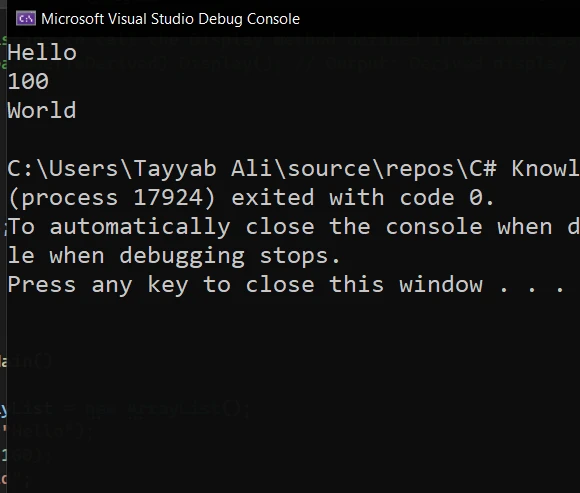
此範例演示如何建立新的 ArrayList 並向其中新增不同型別的元素。 foreach 迴圈接著遍歷 ArrayList,列印出每個元素。
要在指定的索引處插入元素,請使用 Insert 方法,請注意這是一個從零開始的索引系統。
// Insert element at index 1
myArrayList.Insert(1, "Inserted Item");' Insert element at index 1
myArrayList.Insert(1, "Inserted Item")要移除元素,可以使用 Remove 和 RemoveAt 方法。 Remove 刪除特定物件的第一次出現,而 RemoveAt 則移除位於指定整數索引上的元素。
myArrayList.Remove("Hello"); // Removes the first occurrence of "Hello"
myArrayList.RemoveAt(0); // Removes the element at index 0myArrayList.Remove("Hello") ' Removes the first occurrence of "Hello"
myArrayList.RemoveAt(0) ' Removes the element at index 0在 C# 中使用 ArrayList 的高級範例,涉及的不僅僅是像新增或移除元素這樣的基本操作,還包括更複雜的操作,例如排序、搜索和將 ArrayList 轉換為其他資料結構。 將以下範例放入 Program.cs 檔案中運行它:
using System;
using System.Collections;
using System.Linq;

class AdvancedArrayListExample
{
    static void Main(string[] args)
    {
        // Initialize an ArrayList with some elements
        ArrayList numbers = new ArrayList() { 5, 8, 1, 3, 2 };

        // Adding elements
        numbers.Add(6); // Add an element to the end
        numbers.AddRange(new int[] { 7, 9, 0 }); // Add multiple elements from a specified collection.

        Console.WriteLine("Initial ArrayList:");
        foreach (int number in numbers)
        {
            Console.Write(number + " ");
        }
        Console.WriteLine("\n");

        // Removing elements
        numbers.Remove(1); // Remove the element 1
        numbers.RemoveAt(0); // Remove the first element

        Console.WriteLine("After Removal:");
        foreach (int number in numbers)
        {
            Console.Write(number + " ");
        }
        Console.WriteLine("\n");

        // Sorting
        numbers.Sort(); // Sort the ArrayList
        Console.WriteLine("Sorted ArrayList:");
        foreach (int number in numbers)
        {
            Console.Write(number + " ");
        }
        Console.WriteLine("\n");

        // Searching
        int searchFor = 5;
        int index = numbers.IndexOf(searchFor); // Find the index of the element
        if (index != -1)
        {
            Console.WriteLine($"Element {searchFor} found at index {index}");
        }
        else
        {
            Console.WriteLine($"Element {searchFor} not found.");
        }
        Console.WriteLine("\n");

        // Converting ArrayList to Array
        int[] numbersArray = (int[])numbers.ToArray(typeof(int));
        Console.WriteLine("Converted Array:");
        foreach (int number in numbersArray)
        {
            Console.Write(number + " ");
        }
        Console.WriteLine("\n");

        // Demonstrate LINQ with ArrayList (Requires System.Linq)
        var evenNumbers = numbers.Cast<int>().Where(n => n % 2 == 0).ToList(); // Assign values to evenNumbers from the filtered results.
        Console.WriteLine("Even Numbers:");
        evenNumbers.ForEach(n => Console.Write(n + " "));
        Console.WriteLine();
    }
}Imports System
Imports System.Collections
Imports System.Linq
Class AdvancedArrayListExample
Shared Sub Main(ByVal args As String())
' Initialize an ArrayList with some elements
Dim numbers As New ArrayList() From {5, 8, 1, 3, 2}
' Adding elements
numbers.Add(6) ' Add an element to the end
numbers.AddRange(New Integer() {7, 9, 0}) ' Add multiple elements from a specified collection.
Console.WriteLine("Initial ArrayList:")
For Each number As Integer In numbers
Console.Write(number & " ")
Next
Console.WriteLine(vbCrLf)
' Removing elements
numbers.Remove(1) ' Remove the element 1
numbers.RemoveAt(0) ' Remove the first element
Console.WriteLine("After Removal:")
For Each number As Integer In numbers
Console.Write(number & " ")
Next
Console.WriteLine(vbCrLf)
' Sorting
numbers.Sort() ' Sort the ArrayList
Console.WriteLine("Sorted ArrayList:")
For Each number As Integer In numbers
Console.Write(number & " ")
Next
Console.WriteLine(vbCrLf)
' Searching
Dim searchFor As Integer = 5
Dim index As Integer = numbers.IndexOf(searchFor) ' Find the index of the element
If index <> -1 Then
Console.WriteLine($"Element {searchFor} found at index {index}")
Else
Console.WriteLine($"Element {searchFor} not found.")
End If
Console.WriteLine(vbCrLf)
' Converting ArrayList to Array
Dim numbersArray() As Integer = DirectCast(numbers.ToArray(GetType(Integer)), Integer())
Console.WriteLine("Converted Array:")
For Each number As Integer In numbersArray
Console.Write(number & " ")
Next
Console.WriteLine(vbCrLf)
' Demonstrate LINQ with ArrayList (Requires System.Linq)
Dim evenNumbers = numbers.Cast(Of Integer)().Where(Function(n) n Mod 2 = 0).ToList() ' Assign values to evenNumbers from the filtered results.
Console.WriteLine("Even Numbers:")
evenNumbers.ForEach(Sub(n) Console.Write(n & " "))
Console.WriteLine()
End Sub
End Class此程式碼片段演示如何進行以下操作:
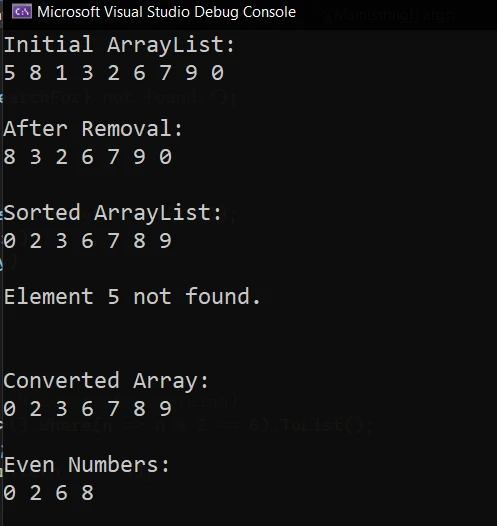
IronPDF 是一個強大的 C# 程式庫,可以簡化 PDF 生成的複雜過程,提供廣泛的 PDF 操作功能,包括從 HTML 生成 PDF、新增文字和圖像、保護文件等。
讓我們編寫一個簡單的 C# 程式,建立一個項目的 ArrayList,然後使用 IronPDF 生成列出這些項目的 PDF 文件。
using IronPdf;
using System;
using System.Collections;

class PdfCode
{
    static void Main(string[] args)
    {
        // Set your IronPDF license key here
        IronPdf.License.LicenseKey = "Your_License_Key";

        // Create a new ArrayList and add some items
        ArrayList itemList = new ArrayList();
        itemList.Add("Apple");
        itemList.Add("Banana");
        itemList.Add("Cherry");
        itemList.Add("Date");

        // Initialize a new PDF document
        var Renderer = new ChromePdfRenderer();

        // Create an HTML string to hold our content
        string htmlContent = "<h1>Items List</h1><ul>";

        // Iterate over each item in the ArrayList and add it to the HTML string
        foreach (var item in itemList)
        {
            htmlContent += $"<li>{item}</li>";
        }
        htmlContent += "</ul>";

        // Convert the HTML string to a PDF document
        var PDF = Renderer.RenderHtmlAsPdf(htmlContent);

        // Save the PDF to a file
        PDF.SaveAs("ItemList.pdf");

        Console.WriteLine("PDF file 'ItemList.pdf' has been generated.");
    }
}Imports IronPdf
Imports System
Imports System.Collections
Class PdfCode
Shared Sub Main(ByVal args() As String)
' Set your IronPDF license key here
IronPdf.License.LicenseKey = "Your_License_Key"
' Create a new ArrayList and add some items
Dim itemList As New ArrayList()
itemList.Add("Apple")
itemList.Add("Banana")
itemList.Add("Cherry")
itemList.Add("Date")
' Initialize a new PDF document
Dim Renderer = New ChromePdfRenderer()
' Create an HTML string to hold our content
Dim htmlContent As String = "<h1>Items List</h1><ul>"
' Iterate over each item in the ArrayList and add it to the HTML string
For Each item In itemList
htmlContent += $"<li>{item}</li>"
Next
htmlContent += "</ul>"
' Convert the HTML string to a PDF document
Dim PDF = Renderer.RenderHtmlAsPdf(htmlContent)
' Save the PDF to a file
PDF.SaveAs("ItemList.pdf")
Console.WriteLine("PDF file 'ItemList.pdf' has been generated.")
End Sub
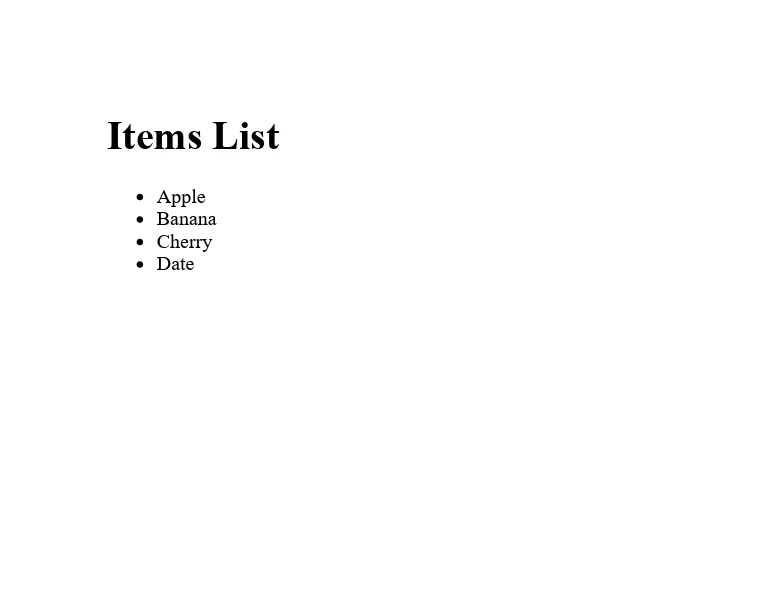
End Class在此範例中,我們從建立名為 itemList 的 ArrayList 並填充多個字串項目開始。 接下來,我們初始化 IronPDF 的 ChromePdfRenderer 類的一個新實例,將用它將 HTML 內容轉換為 PDF 文件。
這是 IronPDF 生成的輸出 PDF。
ArrayList 是 C# 提供的一個強大集合,用於儲存物件列表。 其動態調整大小的能力和儲存任何型別元素的能力使其在多種應用程式中變得多功能。 然而,為了型別安全性和更好的性能,建議使用泛型集合。 使用 ArrayList 和其方法進行實驗將幫助您理解其用途以及如何整合到應用程式中。
此外,對於有興趣擴展其 C# 功能到 PDF 操作的人,IronPDF 提供了免費試用 .NET PDF 功能來探索其特性。 授權價格從 $999 開始,提供將 PDF 功能整合到 .NET 應用程式中的綜合解決方案。

Jacob Mellor是Iron Software的首席技術官,一位在C# PDF技術上開創先河的遠見工程師。作為Iron Software核心程式碼庫的原開發者,他從創立以來就一直在塑造公司的產品架構,與首席執行官Cameron Rimington一起將公司轉變為服務於NASA、特斯拉和全球政府公司的50多名人員的公司。



IronPDF 是 IRONSUITE 的一部分
10 款適用於辦公室文件的 .NET API 產品

當您需要您的PDF看起來像HTML一樣快速。












