


Math.Round C#(對於開發者的運行原理)

在 C# 程式設計的領域中,Math.Round 值方法在數值的四捨五入中扮演了舉足輕重的角色,尤其是在處理雙值和小數值資料類型時。此方法允許開發人員將給定的數值四捨五入到最接近的整數值或指定的較少的小數位數,為數學運算提供了靈活性和精確度。 有多種四捨五入類型可供選擇,例如中點四捨五入。 在這篇文章中,我們將深入探討 C# 中 Math.Round 的複雜性,探索其各個面向和使用情境。 在本文的後續部分,我們將探討如何利用 Iron Software 所提供的 IronPDF 函式庫來處理 PDF。
Basics of Math.Round in C#
Math.Round 方法
C# 中的 Math.Round 方法是使用指定的四捨五入慣例對小數位進行四捨五入的強大工具。 它是 System 命名空間的一部分,並提供多種重載以適應不同的四捨五入操作。
// Methods overloaded by Math.Round
Math.Round(Double)
Math.Round(Double, Int32) // Int32 specifies number of fractional digits
Math.Round(Double, Int32, MidpointRounding)  // Int32 specifies number of fractional digits, MidpointRounding is the type of rounding method
Math.Round(Double, MidpointRounding)  // MidpointRounding is the type of rounding method
Math.Round(Decimal)
Math.Round(Decimal, Int32) // Int32 specifies number of fractional digits
Math.Round(Decimal, Int32, MidpointRounding)
Math.Round(Decimal, MidpointRounding)
// Methods overloaded by Math.Round
Math.Round(Double)
Math.Round(Double, Int32) // Int32 specifies number of fractional digits
Math.Round(Double, Int32, MidpointRounding) // Int32 specifies number of fractional digits, MidpointRounding is the type of rounding method
Math.Round(Double, MidpointRounding) // MidpointRounding is the type of rounding method
Math.Round(Decimal)
Math.Round(Decimal, Int32) // Int32 specifies number of fractional digits
Math.Round(Decimal, Int32, MidpointRounding)
Math.Round(Decimal, MidpointRounding)' Methods overloaded by Math.Round
'INSTANT VB TODO TASK: The following line uses invalid syntax:
'Math.Round(Double) Math.Round(Double, Int32) Math.Round(Double, Int32, MidpointRounding) Math.Round(Double, MidpointRounding) Math.Round(Decimal) Math.Round(Decimal, Int32) Math.Round(Decimal, Int32, MidpointRounding) Math.Round(Decimal, MidpointRounding)重整雙倍值
當處理 double 值時,Math.Round 通常用來將數值四捨五入為最接近的整數。 舉例來說
double originalValue = 3.75;
double roundedValue = Math.Round(originalValue);
// Output: 4
double originalValue = 3.75;
double roundedValue = Math.Round(originalValue);
// Output: 4Dim originalValue As Double = 3.75
Dim roundedValue As Double = Math.Round(originalValue)
' Output: 4在這個範例中,Math.Round 方法將原始的 double 值 3.75 四捨五入為最接近的整數值,也就是 4。
重整小數值
同樣地,Math.Round 方法也適用於十進位數值。 請考慮以下範例:
decimal originalValue = 8.625m;
decimal roundedValue = Math.Round(originalValue, 2);
// Output: 8.63
decimal originalValue = 8.625m;
decimal roundedValue = Math.Round(originalValue, 2);
// Output: 8.63Dim originalValue As Decimal = 8.625D
Dim roundedValue As Decimal = Math.Round(originalValue, 2)
' Output: 8.63這裡使用 Math.Round 方法將小數 8.625 四捨五入到小數點後兩位,得到四捨五入後的值 8.63。
最近整數值
Math.Round 的主要目的是將給定的數值四捨五入為最接近的整數。 當小數部分正好在兩個整數的中間時,該方法會遵循指定的四捨五入慣例。 MidpointRounding 枚舉可作為 Math.Round 方法的參數,並決定是否朝最接近的偶數捨入或遠離零。
指定的四捨五入慣例
讓我們來探討如何運用 MidpointRounding 模式:
double originalValue = 5.5;
double roundedValueEven = Math.Round(originalValue, MidpointRounding.ToEven);
double roundedValueOdd = Math.Round(originalValue, MidpointRounding.AwayFromZero);
// Output: roundedValueEven = 6, roundedValueOdd = 6
double originalValue = 5.5;
double roundedValueEven = Math.Round(originalValue, MidpointRounding.ToEven);
double roundedValueOdd = Math.Round(originalValue, MidpointRounding.AwayFromZero);
// Output: roundedValueEven = 6, roundedValueOdd = 6Dim originalValue As Double = 5.5
Dim roundedValueEven As Double = Math.Round(originalValue, MidpointRounding.ToEven)
Dim roundedValueOdd As Double = Math.Round(originalValue, MidpointRounding.AwayFromZero)
' Output: roundedValueEven = 6, roundedValueOdd = 6在這個範例中,當進位 5.5 這個值時,MidpointRounding.ToEven 會向最接近的偶數進位 (結果為 6),而 MidpointRounding.AwayFromZero 則會從零開始進位,結果為 6。
舍入到指定的小數位數
若要將一個數字四捨五入到指定的小數位數,Math.Round 方法允許加入代表小數位數的額外參數:
decimal originalValue = 9.123456m;
decimal roundedValue = Math.Round(originalValue, 3);
// Output: 9.123
decimal originalValue = 9.123456m;
decimal roundedValue = Math.Round(originalValue, 3);
// Output: 9.123Dim originalValue As Decimal = 9.123456D
Dim roundedValue As Decimal = Math.Round(originalValue, 3)
' Output: 9.123在此,小數位 9.123456 四捨五入到小數點後三位,得出捨入值 9.123。
Midpoint Values and Rounding Conventions in C#
當結果中最小有效位元後的值正好在兩個數字的中間時,就會產生中點值。 例如,2.56500 在四捨五入到小數點後兩位為 2.57 時是一個中點值,而 3.500 在四捨五入到整數 4 時是一個中點值。挑戰在於在沒有定義四捨五入慣例的情況下,如何在中點值的四捨五入策略中找出最接近的值。
C# 中的 Round 方法支援兩種處理中點值的四捨五入慣例:
-
從零開始的四捨五入:中點值會四捨五入到從零開始的後一位數。 此方法由 MidpointRounding.AwayFromZero 枚舉成員表示。
- 四捨五入至最接近的偶數(銀行家四捨五入):中點值四捨五入為最接近的偶數。 MidpointRounding.ToEven 枚舉成員表示這種四捨五入方法。
decimal[] decimalSampleValues = { 1.15m, 1.25m, 1.35m, 1.45m, 1.55m, 1.65m };
decimal sum = 0;

// Calculate true mean values.
foreach (var value in decimalSampleValues)
{
    sum += value;
}
Console.WriteLine("True mean values: {0:N2}", sum / decimalSampleValues.Length);

// Calculate mean values with rounding away from zero.
sum = 0;
foreach (var value in decimalSampleValues)
{
    sum += Math.Round(value, 1, MidpointRounding.AwayFromZero);
}
Console.WriteLine("AwayFromZero mean: {0:N2}", sum / decimalSampleValues.Length);

// Calculate mean values with rounding to the nearest even.
sum = 0;
foreach (var value in decimalSampleValues)
{
    sum += Math.Round(value, 1, MidpointRounding.ToEven);
}
Console.WriteLine("ToEven mean: {0:N2}", sum / decimalSampleValues.Length);
decimal[] decimalSampleValues = { 1.15m, 1.25m, 1.35m, 1.45m, 1.55m, 1.65m };
decimal sum = 0;
// Calculate true mean values.
foreach (var value in decimalSampleValues)
{
sum += value;
}
Console.WriteLine("True mean values: {0:N2}", sum / decimalSampleValues.Length);
// Calculate mean values with rounding away from zero.
sum = 0;
foreach (var value in decimalSampleValues)
{
sum += Math.Round(value, 1, MidpointRounding.AwayFromZero);
}
Console.WriteLine("AwayFromZero mean: {0:N2}", sum / decimalSampleValues.Length);
// Calculate mean values with rounding to the nearest even.
sum = 0;
foreach (var value in decimalSampleValues)
{
sum += Math.Round(value, 1, MidpointRounding.ToEven);
}
Console.WriteLine("ToEven mean: {0:N2}", sum / decimalSampleValues.Length);Dim decimalSampleValues() As Decimal = { 1.15D, 1.25D, 1.35D, 1.45D, 1.55D, 1.65D }
Dim sum As Decimal = 0
' Calculate true mean values.
For Each value In decimalSampleValues
sum += value
Next value
Console.WriteLine("True mean values: {0:N2}", sum / decimalSampleValues.Length)
' Calculate mean values with rounding away from zero.
sum = 0
For Each value In decimalSampleValues
sum += Math.Round(value, 1, MidpointRounding.AwayFromZero)
Next value
Console.WriteLine("AwayFromZero mean: {0:N2}", sum / decimalSampleValues.Length)
' Calculate mean values with rounding to the nearest even.
sum = 0
For Each value In decimalSampleValues
sum += Math.Round(value, 1, MidpointRounding.ToEven)
Next value
Console.WriteLine("ToEven mean: {0:N2}", sum / decimalSampleValues.Length)輸出
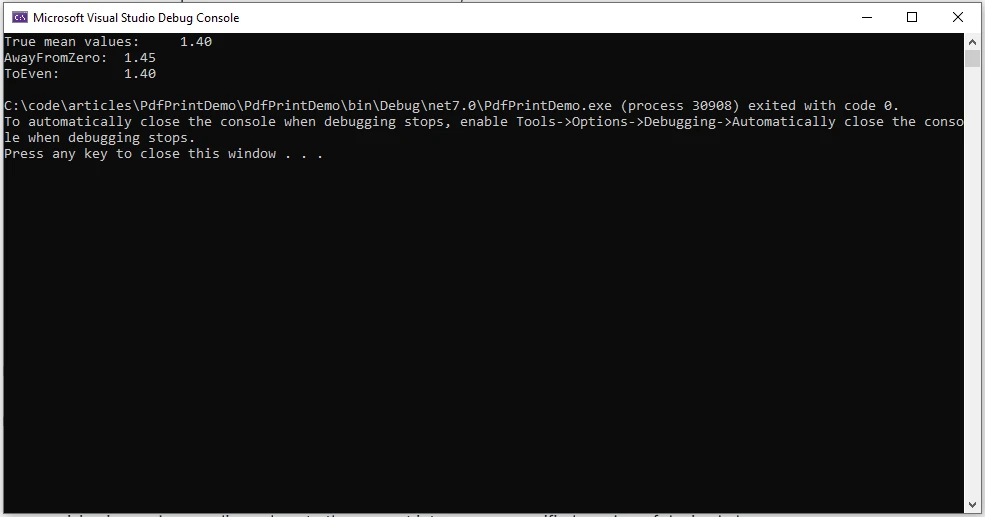
MidpointRounding 模式

AwayFromZero:1
AwayFromZero 四捨五入策略將數字捨入到最接近的數位,將一個數位捨入到兩個其他數位的中間,使其遠離零。
ToZero:2
此策略的特點是直接向零捨入。 結果是最接近且幅度不超過無限精確的結果。
偶數:0
此策略涉及到四捨五入,當一個數字在兩個其他數字的中間時,會向最接近的偶數捨入。
ToNegativeInfinity:3
此策略需要向下四捨五入,結果最接近但不會大於無限精確的結果。
ToPositiveInfinity:4
此策略涉及向上捨入,結果是最接近且不低於無限精確的結果。
精確和雙精確浮點運算
精確度和雙倍值
在使用雙精度浮點數時,必須瞭解由於浮點表示法的性質所導致的潛在不精確性。 Math.Round 方法可將數值四捨五入至最接近的整數或指定的小數位數,有助於減少精確度問題。
使用 Math.Round 指定精確度
開發人員可以利用 Math.Round 方法來達到所需的計算精確度:
double originalValue = 123.456789;
double result = Math.Round(originalValue, 4);
// Output: 123.4568, rounded value
double originalValue = 123.456789;
double result = Math.Round(originalValue, 4);
// Output: 123.4568, rounded valueDim originalValue As Double = 123.456789
Dim result As Double = Math.Round(originalValue, 4)
' Output: 123.4568, rounded value在本範例中,將雙倍數值 123.456789 四捨五入至小數點後四位,得到更精確的數值 123.4568。
中點捨入策略
處理中點值
當一個小數值正好在兩個整數的中間時,中點四捨五入策略就變得非常重要。 Math.Round 方法採用指定的 MidpointRounding 策略來解決這種情況。
中點捨入範例
考慮以下使用中點四捨五入的範例:
double originalValue = 7.5;
double roundedValue = Math.Round(originalValue, MidpointRounding.AwayFromZero);
// Output: 8
double originalValue = 7.5;
double roundedValue = Math.Round(originalValue, MidpointRounding.AwayFromZero);
// Output: 8Dim originalValue As Double = 7.5
Dim roundedValue As Double = Math.Round(originalValue, MidpointRounding.AwayFromZero)
' Output: 8在此,數值 7.5 從零開始四捨五入,得出四捨五入後的數值 8。
在現實世界場景中的應用
以下是其在各種情境中應用的一些範例:
財務計算
在金融應用程式中,精確的四捨五入至關重要。 例如,在計算利率、兌換貨幣或處理稅收計算時,可以使用 Math.Round 方法來確保結果四捨五入到適當的小數位數,並遵守財務標準。
double interestRate = 0.04567;
double roundedInterest = Math.Round(interestRate, 4); // Round to 4 decimal places
double interestRate = 0.04567;
double roundedInterest = Math.Round(interestRate, 4); // Round to 4 decimal placesDim interestRate As Double = 0.04567
Dim roundedInterest As Double = Math.Round(interestRate, 4) ' Round to 4 decimal places使用者介面顯示
在使用者介面中顯示數值時,通常會將數字四捨五入以提高可讀性。 使用 Math.Round 進行四捨五入可以提高呈現資訊的清晰度。
double temperature = 23.678;
double roundedTemperature = Math.Round(temperature, 1); // Round to 1 decimal place
double temperature = 23.678;
double roundedTemperature = Math.Round(temperature, 1); // Round to 1 decimal placeDim temperature As Double = 23.678
Dim roundedTemperature As Double = Math.Round(temperature, 1) ' Round to 1 decimal place統計分析
在統計分析中,精確的四捨五入是避免引入偏差或不準確的必要條件。 Math.Round 方法有助於以所需的精確度呈現結果。
double meanValue = CalculateMean(data);
double roundedMean = Math.Round(meanValue, 2); // Round mean value to 2 decimal places
double meanValue = CalculateMean(data);
double roundedMean = Math.Round(meanValue, 2); // Round mean value to 2 decimal placesDim meanValue As Double = CalculateMean(data)
Dim roundedMean As Double = Math.Round(meanValue, 2) ' Round mean value to 2 decimal places科學計算
在科學應用上,精確度是至關重要的。 在處理實驗資料或科學計算時,使用 Math.Round 進行四捨五入可確保結果以有意義且精確的方式呈現。
double experimentalResult = 9.87654321;
double roundedResult = Math.Round(experimentalResult, 5); // Round to 5 decimal places
double experimentalResult = 9.87654321;
double roundedResult = Math.Round(experimentalResult, 5); // Round to 5 decimal placesDim experimentalResult As Double = 9.87654321
Dim roundedResult As Double = Math.Round(experimentalResult, 5) ' Round to 5 decimal places數學建模
在執行數學模型或模擬時,四捨五入可以簡化複雜的計算。 在建模過程中,可運用 Math.Round 方法來控制中間結果的精確度。
double modelResult = SimulatePhysicalSystem(parameters);
double roundedModelResult = Math.Round(modelResult, 3); // Round to 3 decimal places
double modelResult = SimulatePhysicalSystem(parameters);
double roundedModelResult = Math.Round(modelResult, 3); // Round to 3 decimal placesDim modelResult As Double = SimulatePhysicalSystem(parameters)
Dim roundedModelResult As Double = Math.Round(modelResult, 3) ' Round to 3 decimal places遊戲開發
在遊戲開發中,數值精確度對於物理計算、定位和其他數學運算至關重要。 Math.Round 方法可確保遊戲相關的數值四捨五入到適當的精準度。
double playerPosition = CalculatePlayerPosition();
double roundedPosition = Math.Round(playerPosition, 2); // Round to 2 decimal places
double playerPosition = CalculatePlayerPosition();
double roundedPosition = Math.Round(playerPosition, 2); // Round to 2 decimal placesDim playerPosition As Double = CalculatePlayerPosition()
Dim roundedPosition As Double = Math.Round(playerPosition, 2) ' Round to 2 decimal places在上述每種情況下,Math.Round 方法都可讓開發人員控制數值的精確度,提升應用程式的精確度與可讀性。
介紹 IronPDF。
IronPDF 的核心功能是其HTML轉PDF功能,保持版面和樣式。 它可將網頁內容轉換成 PDF,非常適合報告、發票和文件。 您可以輕鬆地將 HTML 檔案、URL 和 HTML 字串轉換為 PDF。
using IronPdf;

class Program
{
    static void Main(string[] args)
    {
        var renderer = new ChromePdfRenderer();

        // Convert HTML String to PDF
        var htmlContent = "<h1>Hello, IronPDF!</h1><p>This is a PDF from an HTML string.</p>";
        var pdfFromHtmlString = renderer.RenderHtmlAsPdf(htmlContent);
        pdfFromHtmlString.SaveAs("HTMLStringToPDF.pdf");

        // Convert HTML File to PDF
        var htmlFilePath = "path_to_your_html_file.html"; // Specify the path to your HTML file
        var pdfFromHtmlFile = renderer.RenderHtmlFileAsPdf(htmlFilePath);
        pdfFromHtmlFile.SaveAs("HTMLFileToPDF.pdf");

        // Convert URL to PDF
        var url = "http://ironpdf.com"; // Specify the URL
        var pdfFromUrl = renderer.RenderUrlAsPdf(url);
        pdfFromUrl.SaveAs("URLToPDF.pdf");
    }
}
using IronPdf;
class Program
{
static void Main(string[] args)
{
var renderer = new ChromePdfRenderer();
// Convert HTML String to PDF
var htmlContent = "<h1>Hello, IronPDF!</h1><p>This is a PDF from an HTML string.</p>";
var pdfFromHtmlString = renderer.RenderHtmlAsPdf(htmlContent);
pdfFromHtmlString.SaveAs("HTMLStringToPDF.pdf");
// Convert HTML File to PDF
var htmlFilePath = "path_to_your_html_file.html"; // Specify the path to your HTML file
var pdfFromHtmlFile = renderer.RenderHtmlFileAsPdf(htmlFilePath);
pdfFromHtmlFile.SaveAs("HTMLFileToPDF.pdf");
// Convert URL to PDF
var url = "http://ironpdf.com"; // Specify the URL
var pdfFromUrl = renderer.RenderUrlAsPdf(url);
pdfFromUrl.SaveAs("URLToPDF.pdf");
}
}Imports IronPdf
Friend Class Program
Shared Sub Main(ByVal args() As String)
Dim renderer = New ChromePdfRenderer()
' Convert HTML String to PDF
Dim htmlContent = "<h1>Hello, IronPDF!</h1><p>This is a PDF from an HTML string.</p>"
Dim pdfFromHtmlString = renderer.RenderHtmlAsPdf(htmlContent)
pdfFromHtmlString.SaveAs("HTMLStringToPDF.pdf")
' Convert HTML File to PDF
Dim htmlFilePath = "path_to_your_html_file.html" ' Specify the path to your HTML file
Dim pdfFromHtmlFile = renderer.RenderHtmlFileAsPdf(htmlFilePath)
pdfFromHtmlFile.SaveAs("HTMLFileToPDF.pdf")
' Convert URL to PDF
Dim url = "http://ironpdf.com" ' Specify the URL
Dim pdfFromUrl = renderer.RenderUrlAsPdf(url)
pdfFromUrl.SaveAs("URLToPDF.pdf")
End Sub
End Class現在讓我們看看如何使用 IronPDF 的 Iron Software C# PDF 函式庫來產生 PDF 文件。
安裝
您可以選擇透過 NuGet 套件管理員主控台或 Visual Studio 套件管理員安裝 IronPDF。
Install-Package IronPdf
使用 NuGet Package Manager 安裝 IronPDF,方法是在搜尋列中搜尋"ironpdf"。
使用 IronPDF 生成 PDF.
using IronPdf;

List<string> cart = new List<string>();

void AddItems(params string[] items)
{
    for (int i = 0; i < items.Length; i++)
    {
        cart.Add(items[i]);
    }
}

Console.WriteLine("Enter the cart items as comma-separated values:");
var itemsString = Console.ReadLine();
if (itemsString != null)
{
    var items = itemsString.Split(",").ToArray();
    AddItems(items);
}

AddItems("Sample1", "Sample2");

Console.WriteLine("-------------------------------------------------------");
Console.WriteLine("Display Cart");

string name = "Sam";
var count = cart.Count;
string content = $@"
<!DOCTYPE html>
<html>
<body>
<h1>Hello, {name}!</h1>
<p>You have {count} items in the cart.</p>
" + string.Join("\n", cart.Select(x => $"<p>{x}</p>"))
+ @"
</body>
</html>";

var pdfRenderer = new ChromePdfRenderer();
pdfRenderer.RenderHtmlAsPdf(content).SaveAs("cart.pdf");
using IronPdf;
List<string> cart = new List<string>();
void AddItems(params string[] items)
{
for (int i = 0; i < items.Length; i++)
{
cart.Add(items[i]);
}
}
Console.WriteLine("Enter the cart items as comma-separated values:");
var itemsString = Console.ReadLine();
if (itemsString != null)
{
var items = itemsString.Split(",").ToArray();
AddItems(items);
}
AddItems("Sample1", "Sample2");
Console.WriteLine("-------------------------------------------------------");
Console.WriteLine("Display Cart");
string name = "Sam";
var count = cart.Count;
string content = $@"
<!DOCTYPE html>
<html>
<body>
<h1>Hello, {name}!</h1>
<p>You have {count} items in the cart.</p>
" + string.Join("\n", cart.Select(x => $"<p>{x}</p>"))
+ @"
</body>
</html>";
var pdfRenderer = new ChromePdfRenderer();
pdfRenderer.RenderHtmlAsPdf(content).SaveAs("cart.pdf");Imports Microsoft.VisualBasic
Imports IronPdf
Private cart As New List(Of String)()
Private Sub AddItems(ParamArray ByVal items() As String)
For i As Integer = 0 To items.Length - 1
cart.Add(items(i))
Next i
End Sub
Console.WriteLine("Enter the cart items as comma-separated values:")
Dim itemsString = Console.ReadLine()
If itemsString IsNot Nothing Then
Dim items = itemsString.Split(",").ToArray()
AddItems(items)
End If
AddItems("Sample1", "Sample2")
Console.WriteLine("-------------------------------------------------------")
Console.WriteLine("Display Cart")
Dim name As String = "Sam"
Dim count = cart.Count
Dim content As String = $"
<!DOCTYPE html>
<html>
<body>
<h1>Hello, {name}!</h1>
<p>You have {count} items in the cart.</p>
" & String.Join(vbLf, cart.Select(Function(x) $"<p>{x}</p>")) & "
</body>
</html>"
Dim pdfRenderer = New ChromePdfRenderer()
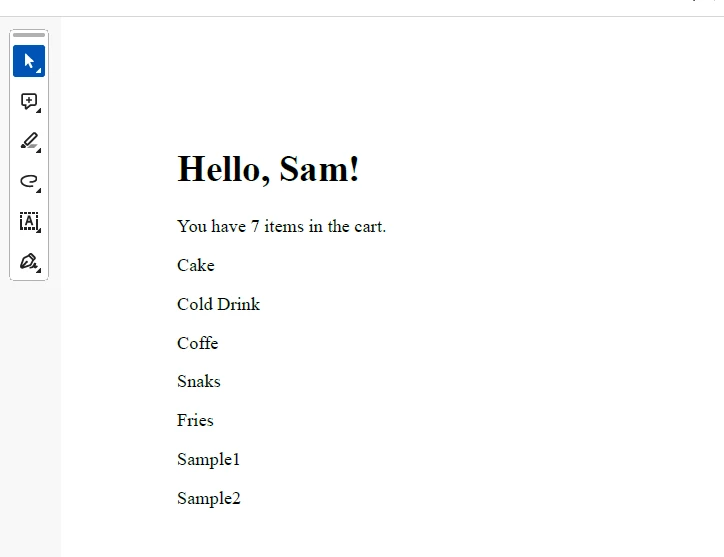
pdfRenderer.RenderHtmlAsPdf(content).SaveAs("cart.pdf")在上述程式碼中,我們為購物車項目生成 HTML 文件,然後再使用 IronPDF 將其儲存為 PDF 文件。
輸出
授權(可免費試用)
若要啟用所提供程式碼的功能,必須取得授權金鑰。 您可從此位置 here 取得試用金鑰,且必須將此金鑰插入 appsettings.json 檔案。
"IronPdf.LicenseKey": "your license key"提供您的電子郵件 ID 即可獲得試用授權。
結論
總而言之,C# 中的 Math.Round 方法是用來對雙數值和小數值進行四捨五入的多功能工具,可讓開發人員彈性地將數值四捨五入至最接近的整數或指定的小數位數。 了解 Math.Round 的複雜性,包括其對中點值的處理以及 MidpointRounding 策略的使用,對於在 C# 程式設計中進行準確可靠的數學運算至關重要。 無論是處理財務計算、使用者介面顯示或其他需要精確數值表示的情況,Math.Round 方法都是程式設計師工具包中不可或缺的資產。 此外,我們也看到 IronPDF 是如何產生 PDF 文件的多功能函式庫。
常見問題解答
Math.Round 如何用於 C# 中的財務計算?
Math.Round 常用於財務計算中以確保精確性,特別是對利率計算、貨幣轉換以及稅務計算等操作至關重要。透過四捨五入至指定的小數位數,它有助於維持數字的完整性。
什麼是 C# 中的 MidpointRounding,它如何影響四捨五入?
MidpointRounding 是 C# 中的一個枚舉,當數值正好位於兩個數字之間時,會影響四捨五入的方式。它提供了例如 MidpointRounding.AwayFromZero,將數值往零距外四捨五入,和 MidpointRounding.ToEven,將數值四捨五入至最接近的偶數,這用以最小化累積的四捨五入誤差。
如何在用戶界面設計中使用 Math.Round?
在用戶界面設計中,Math.Round 用於改善數字值的顯示,通過四捨五入至指定的小數位數,確保信息對最終用戶呈現得清楚且準確。
Math.Round 方法如何處理 C# 中的 double 和 decimal 資料類型?
Math.Round 方法可以通過四捨五入到最接近的整數值或指定的小數位數來處理 double 和 decimal 資料類型。這種靈活性對數學計算中的精確性至關重要。
Math.Round 可以應用於科學計算嗎?
是的,Math.Round 在科學計算中用於根據所需精度將數字結果四捨五入,確保大規模計算和資料分析的準確性。
在 C# 應用程式中使用 IronPDF 的好處是什麼?
IronPDF 是一個 C# 庫,允許開發人員將 HTML 內容轉換為 PDF。它對於生成報告、發票和文檔等操作而言十分有益,是處理 C# 應用程式中 PDF 操作的必備工具。
MidpointRounding.ToEven 在 C# 中是如何工作的?
MidpointRounding.ToEven,也稱為銀行家四捨五入,將中點值四捨五入到最接近的偶數。這種方法減少了累積的四捨五入誤差,特別是在重複計算中,在財務和統計應用中很有用。
Math.Round 適合用於 C# 的遊戲開發嗎?
是的,Math.Round 適合用於遊戲開發,因為它有助於物理計算、定位和其他關鍵數學操作的精確性,這對流暢的遊戲體驗至關重要。


















 免費開始使用
 免費開始使用
 預約免費現場演示





 無需信用卡或創建帳戶










