


Math.Round C#(開発者向けの動作方法)

C#プログラミングの世界では、Math.Roundの値メソッドは、特にdouble値とdecimal値のデータ型を扱う際に、数値を丸める際に重要な役割を担っています。このメソッドにより、開発者は指定された少数桁数に数値を丸めたり、整数値に丸めたりすることができ、数学的操作における柔軟性と精度を提供します。 Midpoint Roundingのような複数の丸めタイプが利用可能です。 この記事では、C#におけるMath.Roundの複雑さを探り、そのさまざまな側面と使用シナリオを考察します。 この記事の後半では、PDFを扱うためのIronPDFライブラリの利用について探ります。
C#におけるMath.Roundの基礎
Math.Roundメソッド
C#におけるMath.Roundメソッドは、指定された丸めの規則を使用して小数桁を丸める強力なツールです。 これはSystem名前空間の一部であり、異なる丸め操作に対応するためのいくつかのオーバーロードを提供します。
// Methods overloaded by Math.Round
Math.Round(Double)
Math.Round(Double, Int32) // Int32 specifies number of fractional digits
Math.Round(Double, Int32, MidpointRounding)  // Int32 specifies number of fractional digits, MidpointRounding is the type of rounding method
Math.Round(Double, MidpointRounding)  // MidpointRounding is the type of rounding method
Math.Round(Decimal)
Math.Round(Decimal, Int32) // Int32 specifies number of fractional digits
Math.Round(Decimal, Int32, MidpointRounding)
Math.Round(Decimal, MidpointRounding)
// Methods overloaded by Math.Round
Math.Round(Double)
Math.Round(Double, Int32) // Int32 specifies number of fractional digits
Math.Round(Double, Int32, MidpointRounding) // Int32 specifies number of fractional digits, MidpointRounding is the type of rounding method
Math.Round(Double, MidpointRounding) // MidpointRounding is the type of rounding method
Math.Round(Decimal)
Math.Round(Decimal, Int32) // Int32 specifies number of fractional digits
Math.Round(Decimal, Int32, MidpointRounding)
Math.Round(Decimal, MidpointRounding)' Methods overloaded by Math.Round
'INSTANT VB TODO TASK: The following line uses invalid syntax:
'Math.Round(Double) Math.Round(Double, Int32) Math.Round(Double, Int32, MidpointRounding) Math.Round(Double, MidpointRounding) Math.Round(Decimal) Math.Round(Decimal, Int32) Math.Round(Decimal, Int32, MidpointRounding) Math.Round(Decimal, MidpointRounding)Double値の丸め
double値を扱う際、Math.Roundは通常、数値を最も近い整数に丸めるために使用されます。 例えば:
double originalValue = 3.75;
double roundedValue = Math.Round(originalValue);
// Output: 4
double originalValue = 3.75;
double roundedValue = Math.Round(originalValue);
// Output: 4Dim originalValue As Double = 3.75
Dim roundedValue As Double = Math.Round(originalValue)
' Output: 4この例では、Math.Roundメソッドが元のdouble値3.75を最も近い整数値である4に丸めました。
Decimal値の丸め
同様に、Math.Roundメソッドはdecimal値にも適用されます。 次の例を考えてみましょう。
decimal originalValue = 8.625m;
decimal roundedValue = Math.Round(originalValue, 2);
// Output: 8.63
decimal originalValue = 8.625m;
decimal roundedValue = Math.Round(originalValue, 2);
// Output: 8.63Dim originalValue As Decimal = 8.625D
Dim roundedValue As Decimal = Math.Round(originalValue, 2)
' Output: 8.63ここでは、Math.Roundメソッドを使用して小数8.625を小数点以下2桁に丸めた結果、丸められた値8.63が得られました。
最も近い整数値
Math.Roundの主な目的は、与えられた数値を最も近い整数に丸めることです。 小数部分がちょうど2つの整数の中間の場合、メソッドは指定された丸めの規則に従います。 MidpointRounding列挙型はMath.Roundメソッド内で引数として使用でき、最も近い偶数またはゼロから遠い方向へ丸めるかを決定します。
指定された丸めの規則
MidpointRoundingモードがどのように使用されるか探ってみましょう:
double originalValue = 5.5;
double roundedValueEven = Math.Round(originalValue, MidpointRounding.ToEven);
double roundedValueOdd = Math.Round(originalValue, MidpointRounding.AwayFromZero);
// Output: roundedValueEven = 6, roundedValueOdd = 6
double originalValue = 5.5;
double roundedValueEven = Math.Round(originalValue, MidpointRounding.ToEven);
double roundedValueOdd = Math.Round(originalValue, MidpointRounding.AwayFromZero);
// Output: roundedValueEven = 6, roundedValueOdd = 6Dim originalValue As Double = 5.5
Dim roundedValueEven As Double = Math.Round(originalValue, MidpointRounding.ToEven)
Dim roundedValueOdd As Double = Math.Round(originalValue, MidpointRounding.AwayFromZero)
' Output: roundedValueEven = 6, roundedValueOdd = 6この例では、値5.5を丸める際に、MidpointRounding.ToEvenは最も近い偶数方向に丸め(結果は6)、MidpointRounding.AwayFromZeroはゼロから遠い方向に丸め、結果として6が得られます。
指定された小数点以下の桁数への丸め
指定された小数桁数に数値を丸めるために、Math.Roundメソッドは、余分なパラメーターとして少数桁数を取り込むことができます:
decimal originalValue = 9.123456m;
decimal roundedValue = Math.Round(originalValue, 3);
// Output: 9.123
decimal originalValue = 9.123456m;
decimal roundedValue = Math.Round(originalValue, 3);
// Output: 9.123Dim originalValue As Decimal = 9.123456D
Dim roundedValue As Decimal = Math.Round(originalValue, 3)
' Output: 9.123ここでは、小数点数9.123456が小数点以下3桁に丸められ、丸めた値は9.123になります。
C#における中間点の値と丸めの規則
中間点の値は、結果の最小有効桁の後の値がちょうど2つの数の中間にある場合に発生します。 例えば、小数点以下2桁に丸めた場合の2.56500は2.57であり、整数4に丸めたときの3.500は中間点の値です。課題は、定義された丸めの規則なしに中間点の値のための最も近い戦略を特定することにあります。
C#のRoundメソッドは、中間点の値を扱うための2つの丸めの規則をサポートしています:
-
ゼロから遠くへの丸め: 中間点の値は、ゼロから遠い次の数に丸められます。 このメソッドはMidpointRounding.AwayFromZero列挙メンバーによって表されます。
- 最も近い偶数への丸め(銀行家の丸め): 中間点の値は、最も近い偶数に丸められます。 この丸めのアプローチはMidpointRounding.ToEven列挙メンバーによって示されています。
decimal[] decimalSampleValues = { 1.15m, 1.25m, 1.35m, 1.45m, 1.55m, 1.65m };
decimal sum = 0;

// Calculate true mean values.
foreach (var value in decimalSampleValues)
{
    sum += value;
}
Console.WriteLine("True mean values: {0:N2}", sum / decimalSampleValues.Length);

// Calculate mean values with rounding away from zero.
sum = 0;
foreach (var value in decimalSampleValues)
{
    sum += Math.Round(value, 1, MidpointRounding.AwayFromZero);
}
Console.WriteLine("AwayFromZero mean: {0:N2}", sum / decimalSampleValues.Length);

// Calculate mean values with rounding to the nearest even.
sum = 0;
foreach (var value in decimalSampleValues)
{
    sum += Math.Round(value, 1, MidpointRounding.ToEven);
}
Console.WriteLine("ToEven mean: {0:N2}", sum / decimalSampleValues.Length);
decimal[] decimalSampleValues = { 1.15m, 1.25m, 1.35m, 1.45m, 1.55m, 1.65m };
decimal sum = 0;
// Calculate true mean values.
foreach (var value in decimalSampleValues)
{
sum += value;
}
Console.WriteLine("True mean values: {0:N2}", sum / decimalSampleValues.Length);
// Calculate mean values with rounding away from zero.
sum = 0;
foreach (var value in decimalSampleValues)
{
sum += Math.Round(value, 1, MidpointRounding.AwayFromZero);
}
Console.WriteLine("AwayFromZero mean: {0:N2}", sum / decimalSampleValues.Length);
// Calculate mean values with rounding to the nearest even.
sum = 0;
foreach (var value in decimalSampleValues)
{
sum += Math.Round(value, 1, MidpointRounding.ToEven);
}
Console.WriteLine("ToEven mean: {0:N2}", sum / decimalSampleValues.Length);Dim decimalSampleValues() As Decimal = { 1.15D, 1.25D, 1.35D, 1.45D, 1.55D, 1.65D }
Dim sum As Decimal = 0
' Calculate true mean values.
For Each value In decimalSampleValues
sum += value
Next value
Console.WriteLine("True mean values: {0:N2}", sum / decimalSampleValues.Length)
' Calculate mean values with rounding away from zero.
sum = 0
For Each value In decimalSampleValues
sum += Math.Round(value, 1, MidpointRounding.AwayFromZero)
Next value
Console.WriteLine("AwayFromZero mean: {0:N2}", sum / decimalSampleValues.Length)
' Calculate mean values with rounding to the nearest even.
sum = 0
For Each value In decimalSampleValues
sum += Math.Round(value, 1, MidpointRounding.ToEven)
Next value
Console.WriteLine("ToEven mean: {0:N2}", sum / decimalSampleValues.Length)出力
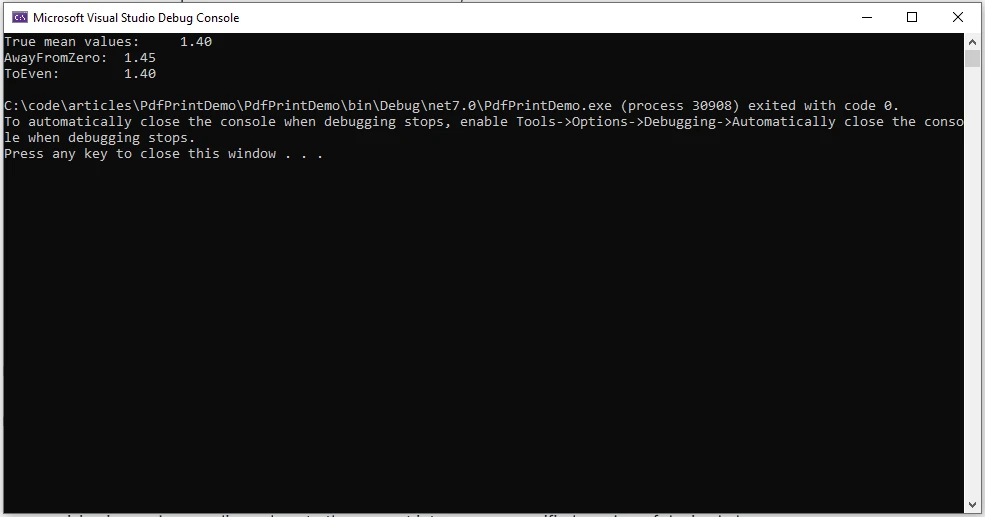
MidpointRoundingモード

AwayFromZero: 1
ゼロから遠い丸め戦略は、2つの他の数の中間にある数をゼロから遠くない最寄りの数に丸めます。
ゼロに向かう: 2
この戦略はゼロに向かって指向された丸めを特徴としています。 結果は、無限に正確な結果に最も近く、かつそれ以上の大きさではありません。
偶数に向かう: 0
この戦略は最も近い数に丸めることを含み、数が2つの他の数の中間の場合、最も近い偶数に向かって丸められます。
負の無限大に向かう: 3
この戦略は下方への丸めを伴い、結果は無限の精度の結果より大きくない最も近いものです。
正の無限大に向かう: 4
この戦略は上方向に丸めを伴い、結果は無限の精度の結果よりも小さくない最も近いものです。
精度とダブル精度浮動小数点
精度とダブル値
ダブル精度の浮動小数点数を使用する場合、浮動小数点の表現上の性質による潜在的な不正確さを理解することが重要です。 Math.Roundメソッドは、整数に最も近い値または指定された小数桁数の値に丸めることで精度の問題を軽減します。
Math.Roundを使用した指定された精度
開発者はMath.Roundメソッドを活用して計算で望む精度を達成することができます:
double originalValue = 123.456789;
double result = Math.Round(originalValue, 4);
// Output: 123.4568, rounded value
double originalValue = 123.456789;
double result = Math.Round(originalValue, 4);
// Output: 123.4568, rounded valueDim originalValue As Double = 123.456789
Dim result As Double = Math.Round(originalValue, 4)
' Output: 123.4568, rounded valueこの例では、double値123.456789が小数点以下4桁に丸められ、より正確な値123.4568が得られました。
中間点の丸め戦略
中間点の値の処理
中間点の丸め戦略は、小数値がちょうど2つの整数の中間にある場合に重要になります。 Math.Roundメソッドは、指定されたMidpointRounding戦略を使用してそのようなケースを解決します。
中間点の丸めの例
中間点の丸めが利用される次の例を考えてみてください:
double originalValue = 7.5;
double roundedValue = Math.Round(originalValue, MidpointRounding.AwayFromZero);
// Output: 8
double originalValue = 7.5;
double roundedValue = Math.Round(originalValue, MidpointRounding.AwayFromZero);
// Output: 8Dim originalValue As Double = 7.5
Dim roundedValue As Double = Math.Round(originalValue, MidpointRounding.AwayFromZero)
' Output: 8ここでは、値7.5がゼロから遠くに丸められ、丸められた値として8が得られます。
実際のシナリオにおける適用
さまざまなコンテキストでの適用例をいくつか紹介します:
財務計算
財務アプリケーションでは、正確な丸めが重要です。 例えば、金利の計算、通貨の変換、税金の計算において、Math.Roundメソッドを使用して、結果が適切な小数点以下の桁数に丸められ、財務上の規格に準じるようにすることができます。
double interestRate = 0.04567;
double roundedInterest = Math.Round(interestRate, 4); // Round to 4 decimal places
double interestRate = 0.04567;
double roundedInterest = Math.Round(interestRate, 4); // Round to 4 decimal placesDim interestRate As Double = 0.04567
Dim roundedInterest As Double = Math.Round(interestRate, 4) ' Round to 4 decimal placesユーザーインターフェースの表示
ユーザーインターフェースに数値を表示する際には、読みやすさを高めるために数値を丸めることが一般的です。 Math.Roundを使用した丸めにより、表示された情報の明瞭さが向上します。
double temperature = 23.678;
double roundedTemperature = Math.Round(temperature, 1); // Round to 1 decimal place
double temperature = 23.678;
double roundedTemperature = Math.Round(temperature, 1); // Round to 1 decimal placeDim temperature As Double = 23.678
Dim roundedTemperature As Double = Math.Round(temperature, 1) ' Round to 1 decimal place統計分析
統計分析では、バイアスや不正確さを回避するために正確な丸めが不可欠です。 Math.Roundメソッドは、望ましい精度のレベルで結果を提示するのに役立ちます。
double meanValue = CalculateMean(data);
double roundedMean = Math.Round(meanValue, 2); // Round mean value to 2 decimal places
double meanValue = CalculateMean(data);
double roundedMean = Math.Round(meanValue, 2); // Round mean value to 2 decimal placesDim meanValue As Double = CalculateMean(data)
Dim roundedMean As Double = Math.Round(meanValue, 2) ' Round mean value to 2 decimal places科学計算
科学的なアプリケーションにおいては、精度が重要です。 実験データや科学的な計算を扱う際には、Math.Roundを使用した丸めにより、意味のある正確な結果が得られます。
double experimentalResult = 9.87654321;
double roundedResult = Math.Round(experimentalResult, 5); // Round to 5 decimal places
double experimentalResult = 9.87654321;
double roundedResult = Math.Round(experimentalResult, 5); // Round to 5 decimal placesDim experimentalResult As Double = 9.87654321
Dim roundedResult As Double = Math.Round(experimentalResult, 5) ' Round to 5 decimal places数学的モデリング
数学モデルやシミュレーションを実装する際には、丸めが複雑な計算を簡略化することがあります。 Math.Roundメソッドは、モデリングプロセスにおける中間結果の精度を管理するために適用できます。
double modelResult = SimulatePhysicalSystem(parameters);
double roundedModelResult = Math.Round(modelResult, 3); // Round to 3 decimal places
double modelResult = SimulatePhysicalSystem(parameters);
double roundedModelResult = Math.Round(modelResult, 3); // Round to 3 decimal placesDim modelResult As Double = SimulatePhysicalSystem(parameters)
Dim roundedModelResult As Double = Math.Round(modelResult, 3) ' Round to 3 decimal placesゲーム開発
ゲーム開発においては、物理計算、位置決定、その他の数学的操作のための数値の精度が重要です。 Math.Roundメソッドは、ゲーム関連の値が適切な精度レベルに丸められることを保証します。
double playerPosition = CalculatePlayerPosition();
double roundedPosition = Math.Round(playerPosition, 2); // Round to 2 decimal places
double playerPosition = CalculatePlayerPosition();
double roundedPosition = Math.Round(playerPosition, 2); // Round to 2 decimal placesDim playerPosition As Double = CalculatePlayerPosition()
Dim roundedPosition As Double = Math.Round(playerPosition, 2) ' Round to 2 decimal placesこれらの各シナリオでは、Math.Roundメソッドにより、開発者は数値の精度を管理し、アプリケーションにおける精度と可読性を促進します。
IronPDFの紹介
IronPDFの主要な機能は、そのHTML to PDF機能で、レイアウトやスタイルを保持します。 ウェブコンテンツをPDFに変換することで、レポート、請求書、ドキュメントに最適です。 HTMLファイル、URLs、HTML文字列を簡単にPDFに変換できます。
using IronPdf;

class Program
{
    static void Main(string[] args)
    {
        var renderer = new ChromePdfRenderer();

        // Convert HTML String to PDF
        var htmlContent = "<h1>Hello, IronPDF!</h1><p>This is a PDF from an HTML string.</p>";
        var pdfFromHtmlString = renderer.RenderHtmlAsPdf(htmlContent);
        pdfFromHtmlString.SaveAs("HTMLStringToPDF.pdf");

        // Convert HTML File to PDF
        var htmlFilePath = "path_to_your_html_file.html"; // Specify the path to your HTML file
        var pdfFromHtmlFile = renderer.RenderHtmlFileAsPdf(htmlFilePath);
        pdfFromHtmlFile.SaveAs("HTMLFileToPDF.pdf");

        // Convert URL to PDF
        var url = "http://ironpdf.com"; // Specify the URL
        var pdfFromUrl = renderer.RenderUrlAsPdf(url);
        pdfFromUrl.SaveAs("URLToPDF.pdf");
    }
}
using IronPdf;
class Program
{
static void Main(string[] args)
{
var renderer = new ChromePdfRenderer();
// Convert HTML String to PDF
var htmlContent = "<h1>Hello, IronPDF!</h1><p>This is a PDF from an HTML string.</p>";
var pdfFromHtmlString = renderer.RenderHtmlAsPdf(htmlContent);
pdfFromHtmlString.SaveAs("HTMLStringToPDF.pdf");
// Convert HTML File to PDF
var htmlFilePath = "path_to_your_html_file.html"; // Specify the path to your HTML file
var pdfFromHtmlFile = renderer.RenderHtmlFileAsPdf(htmlFilePath);
pdfFromHtmlFile.SaveAs("HTMLFileToPDF.pdf");
// Convert URL to PDF
var url = "http://ironpdf.com"; // Specify the URL
var pdfFromUrl = renderer.RenderUrlAsPdf(url);
pdfFromUrl.SaveAs("URLToPDF.pdf");
}
}Imports IronPdf
Friend Class Program
Shared Sub Main(ByVal args() As String)
Dim renderer = New ChromePdfRenderer()
' Convert HTML String to PDF
Dim htmlContent = "<h1>Hello, IronPDF!</h1><p>This is a PDF from an HTML string.</p>"
Dim pdfFromHtmlString = renderer.RenderHtmlAsPdf(htmlContent)
pdfFromHtmlString.SaveAs("HTMLStringToPDF.pdf")
' Convert HTML File to PDF
Dim htmlFilePath = "path_to_your_html_file.html" ' Specify the path to your HTML file
Dim pdfFromHtmlFile = renderer.RenderHtmlFileAsPdf(htmlFilePath)
pdfFromHtmlFile.SaveAs("HTMLFileToPDF.pdf")
' Convert URL to PDF
Dim url = "http://ironpdf.com" ' Specify the URL
Dim pdfFromUrl = renderer.RenderUrlAsPdf(url)
pdfFromUrl.SaveAs("URLToPDF.pdf")
End Sub
End Classさて、IronPDF C# PDFライブラリを使用して、PDF文書をどのように生成できるか見てみましょう。
インストール
IronPDFは、NuGetパッケージマネージャーコンソールやVisual Studioパッケージマネージャーを通じてインストールするオプションがあります。
Install-Package IronPdf
NuGetパッケージマネージャを使用してIronPDFをインストールするには、検索バーに"ironpdf"と入力します。
IronPDFを使用したPDFの生成
using IronPdf;

List<string> cart = new List<string>();

void AddItems(params string[] items)
{
    for (int i = 0; i < items.Length; i++)
    {
        cart.Add(items[i]);
    }
}

Console.WriteLine("Enter the cart items as comma-separated values:");
var itemsString = Console.ReadLine();
if (itemsString != null)
{
    var items = itemsString.Split(",").ToArray();
    AddItems(items);
}

AddItems("Sample1", "Sample2");

Console.WriteLine("-------------------------------------------------------");
Console.WriteLine("Display Cart");

string name = "Sam";
var count = cart.Count;
string content = $@"
<!DOCTYPE html>
<html>
<body>
<h1>Hello, {name}!</h1>
<p>You have {count} items in the cart.</p>
" + string.Join("\n", cart.Select(x => $"<p>{x}</p>"))
+ @"
</body>
</html>";

var pdfRenderer = new ChromePdfRenderer();
pdfRenderer.RenderHtmlAsPdf(content).SaveAs("cart.pdf");
using IronPdf;
List<string> cart = new List<string>();
void AddItems(params string[] items)
{
for (int i = 0; i < items.Length; i++)
{
cart.Add(items[i]);
}
}
Console.WriteLine("Enter the cart items as comma-separated values:");
var itemsString = Console.ReadLine();
if (itemsString != null)
{
var items = itemsString.Split(",").ToArray();
AddItems(items);
}
AddItems("Sample1", "Sample2");
Console.WriteLine("-------------------------------------------------------");
Console.WriteLine("Display Cart");
string name = "Sam";
var count = cart.Count;
string content = $@"
<!DOCTYPE html>
<html>
<body>
<h1>Hello, {name}!</h1>
<p>You have {count} items in the cart.</p>
" + string.Join("\n", cart.Select(x => $"<p>{x}</p>"))
+ @"
</body>
</html>";
var pdfRenderer = new ChromePdfRenderer();
pdfRenderer.RenderHtmlAsPdf(content).SaveAs("cart.pdf");Imports Microsoft.VisualBasic
Imports IronPdf
Private cart As New List(Of String)()
Private Sub AddItems(ParamArray ByVal items() As String)
For i As Integer = 0 To items.Length - 1
cart.Add(items(i))
Next i
End Sub
Console.WriteLine("Enter the cart items as comma-separated values:")
Dim itemsString = Console.ReadLine()
If itemsString IsNot Nothing Then
Dim items = itemsString.Split(",").ToArray()
AddItems(items)
End If
AddItems("Sample1", "Sample2")
Console.WriteLine("-------------------------------------------------------")
Console.WriteLine("Display Cart")
Dim name As String = "Sam"
Dim count = cart.Count
Dim content As String = $"
<!DOCTYPE html>
<html>
<body>
<h1>Hello, {name}!</h1>
<p>You have {count} items in the cart.</p>
" & String.Join(vbLf, cart.Select(Function(x) $"<p>{x}</p>")) & "
</body>
</html>"
Dim pdfRenderer = New ChromePdfRenderer()
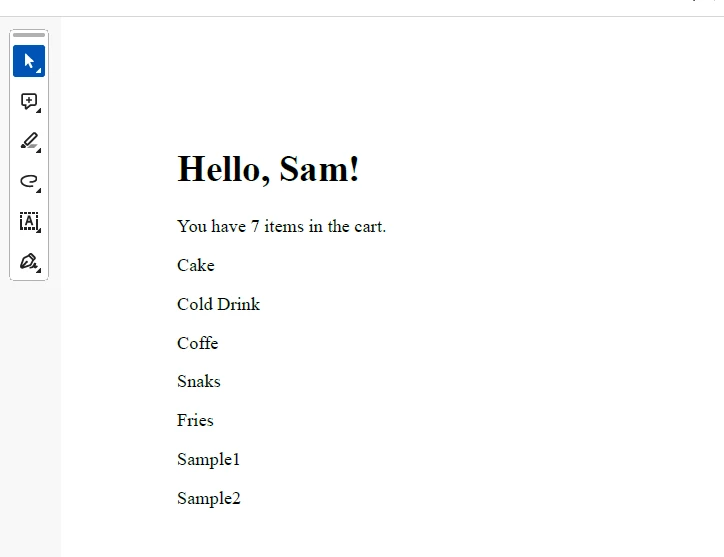
pdfRenderer.RenderHtmlAsPdf(content).SaveAs("cart.pdf")上記のコードでは、カートアイテムのHTMLドキュメントを生成し、IronPDFを使用してPDF文書として保存しています。
出力
ライセンス (無料トライアル利用可能)
提供されたコードの機能を有効にするには、ライセンスキーを取得する必要があります。 こちらからトライアルキーを取得し、それをappsettings.jsonファイルに挿入する必要があります。
"IronPdf.LicenseKey": "your license key"トライアルライセンスを受け取るためにメールIDを提供してください。
結論
結論として、C#のMath.Roundメソッドは、doubleおよびdecimal値を丸めるための多目的ツールであり、開発者が最も近い整数または指定された小数点以下の桁数に丸める柔軟性を提供します。 Math.Roundの複雑さ、特に中央点の値の扱いとMidpointRoundingの戦略の使用を理解することは、C#プログラミングにおける正確で信頼性のある数学的操作のために重要です。 財務計算、ユーザーインターフェースの表示、または正確な数値表現を必要とする他のシナリオに対処する際に、Math.Roundメソッドはプログラマーのツールキットにおいて欠かせない資産であることが証明されています。 さらに、IronPDFがPDF文書を生成するための汎用ライブラリであることを見ました。
よくある質問
Math.RoundはC#の金融計算にどのように使用できますか?
Math.Roundは金融計算で精度を確保するためによく使用されます。特に利率計算、通貨換算、税金計算などの操作で、指定された小数点以下の桁数に丸めることで数値の整合性を維持します。
C#のMidpointRoundingとは何であり、丸めにどのように影響しますか?
MidpointRoundingはC#の列挙型で、値がちょうど2つの数の中間にある場合に丸めがどのように行われるかに影響を与えます。MidpointRounding.AwayFromZeroのようにゼロから離れて丸める方法や、MidpointRounding.ToEvenのように累積丸め誤差を最小化するために最も近い偶数に丸める方法などの戦略を提供します。
ユーザーインターフェースデザインでMath.Roundはどのように利用されますか?
ユーザーインターフェースデザインでは、Math.Roundは数値を小数点以下の特定の桁数に丸めることで数値の表示を改善し、エンドユーザーにクリアで正確な情報を提供します。
Math.RoundメソッドはC#でダブル型とデシマル型のデータをどのように処理しますか?
Math.Roundメソッドは、ダブル型とデシマル型のデータを、最も近い整数値または指定された小数点以下の桁数に丸めることで処理することができます。この柔軟性は、数学的計算における精度のために重要です。
Math.Roundは科学計算に適用できますか?
はい、Math.Roundは科学計算で希望の精度に数値結果を丸めるために使用され、広範な計算やデータ分析において精度を確保します。
C#アプリケーションでIronPDFを使用する利点は何ですか?
IronPDFはHTMLコンテンツをPDFに変換するためのC#ライブラリで、レポート、請求書、ドキュメントを生成するのに役立ち、C#アプリケーションでPDF操作を扱うための重要なツールとなります。
C#でMidpointRounding.ToEvenはどのように動作しますか?
MidpointRounding.ToEvenは、銀行業者の丸めとも呼ばれ、中央値の値を最も近い偶数に丸めます。この方法は累積丸め誤差を減少させるため、特に繰り返される計算において、金融および統計アプリケーションで有用です。
Math.RoundはC#でのゲーム開発に適していますか?
はい、Math.Roundはゲーム開発に適しており、物理計算、位置づけ、その他滑らかなゲーム体験のために重要な数学的操作で精度を助けます。



















 無料で始めましょう
 無料で始めましょう
 無料ライブデモを予約





 クレジットカードやアカウントの作成は不要です。










