Indeksator w C# to specjalny typ wlasciwosci, ktory umozliwia dostep do instancji klasy lub struktury za pomoca operatora dostepu do tablic []. Zobacz indeksator w C#. Indeksery mogą być bardzo uzyteczne przy tworzeniu "inteligentnych tablic" lub enkapsulacji danych w uproszczonej skladni. Zapewniaja one sposob używania instancji klasy tak, jakby byly tablicami, gdzie można uzyskać dostep do danych poprzez indeks. Ten artykuł przyblizy, jak deklarowac i używać indeksery C# z praktycznymi przykładami. Na koncu artykułu przyjrzymy sie również bibliotece IronPDF.
Podstawowa skladnia indeksu
Indeksator jest czlonkiem instancji uzywajacym slowa kluczowego this w klasie lub strukturze, po ktorym nastepuje deklaracja indeksatora. Okresla sie również typy parametrow oraz typ zwracany. Ogólna skladnia dla czlonka instancji indeksu wygląda nastepujaco:
public return_type this[parameter_type index]
{
    get
    {
        // Code to return data
    }
    set
    {
        // Code to set data
    }
}
public return_type this[parameter_type index]
{
    get
    {
        // Code to return data
    }
    set
    {
        // Code to set data
    }
}
Default Public Property Item(ByVal index As parameter_type) As return_type
Get
' Code to return data
End Get
Set(ByVal value As return_type)
' Code to set data
End Set
End Property
Default Public Property Item(ByVal index As parameter_type) As return_type
	Get
		' Code to return data
	End Get
	Set(ByVal value As return_type)
		' Code to set data
	End Set
End Property
Tutaj return_type jest typem wartosci, ktora indeksator bedzie zwracac, na przyklad wartosc calkowita, a parameter_type jest typem indeksu, czesto int. Akcesor get zwraca wartosc dla okreslonego indeksu, a akcesor z blokiem kodu set przypisuje wartosc do tego indeksu.
Deklaracja i użycie indeksu
Zbadamy podstawowy przykład implementacji indeksu w klasie C#. Rozwaz klase Program, ktora enkapsuluje tablice ciagow znakow.
class Program
{
    private string[] values = new string[5]; // Array with 5 elements
    public string this[int index]
    {
        get
        {
            return values[index];
        }
        set
        {
            values[index] = value;
        }
    }
}
class Program
{
    private string[] values = new string[5]; // Array with 5 elements
    public string this[int index]
    {
        get
        {
            return values[index];
        }
        set
        {
            values[index] = value;
        }
    }
}
Friend Class Program
Private values(4) As String ' Array with 5 elements
Default Public Property Item(ByVal index As Integer) As String
Get
Return values(index)
End Get
Set(ByVal value As String)
values(index) = value
End Set
End Property
End Class
Friend Class Program
	Private values(4) As String ' Array with 5 elements
	Default Public Property Item(ByVal index As Integer) As String
		Get
			Return values(index)
		End Get
		Set(ByVal value As String)
			values(index) = value
		End Set
	End Property
End Class
W powyższym kodzie:
- Klasa
Program zawiera tablice ciagow znakow o nazwie values.
string this[int index] to deklaracja indeksatora, w ktorej int index jest zindeksowana wlasciwoscia z parametrem indeksu uzywana do dostepu do elementow tablicy.- Akcesor
get zwraca zindeksowana wartosc dla okreslonego indeksu, a akcesor set przypisuje zindeksowana wartosc do tego indeksu.
Oznacza to, ze mozna utworzyc instancje klasy Program i uzyskac dostep do jej tablicy values za pomoca indeksatora, jak ponizej:
class Program
{
    static void Main()
    {
        Program program = new Program();
        // Set values using indexer
        program[0] = "First";
        program[1] = "Second";
        // Access values using indexer
        Console.WriteLine(program[0]); // Output: First
        Console.WriteLine(program[1]); // Output: Second
    }
}
class Program
{
    static void Main()
    {
        Program program = new Program();
        // Set values using indexer
        program[0] = "First";
        program[1] = "Second";
        // Access values using indexer
        Console.WriteLine(program[0]); // Output: First
        Console.WriteLine(program[1]); // Output: Second
    }
}
Friend Class Program
Shared Sub Main()
Dim program As New Program()
' Set values using indexer
program(0) = "First"
program(1) = "Second"
' Access values using indexer
Console.WriteLine(program(0)) ' Output: First
Console.WriteLine(program(1)) ' Output: Second
End Sub
End Class
Friend Class Program
	Shared Sub Main()
		Dim program As New Program()
		' Set values using indexer
		program(0) = "First"
		program(1) = "Second"
		' Access values using indexer
		Console.WriteLine(program(0)) ' Output: First
		Console.WriteLine(program(1)) ' Output: Second
	End Sub
End Class
W tym kodzie widac, ze indeksator zapewnia prosty skladniowo sposob dostepu do tablicy values, podobny do tego, jak uzyskuje sie dostep do elementow w tablicy.
Zrozumienie akcesorów get oraz set
Akcesory get i set wewnatrz indeksatora dzialaja jak blok kodu, ktory umozliwia pobieranie i przypisywanie danych w sposob podobny do wlasciwosci. Glowna roznica polega na tym, ze indeksy używają parametru indeksowego do pracy z kolekcjami danych, a nie z poszczegółnymi częściami danych.
Blok get odpowiada za zwracanie danych dla okreslonego indeksu, podczas gdy blok set przypisuje dane do okreslonego indeksu. Oto kolejny przykład, aby utrwalic zrozumienie:
class StudentRecords
{
    private string[] studentNames = new string[3];
    public string this[int index]
    {
        get
        {
            if (index >= 0 && index < studentNames.Length)
            {
                return studentNames[index];
            }
            return "Invalid Index";
        }
        set
        {
            if (index >= 0 && index < studentNames.Length)
            {
                studentNames[index] = value;
            }
        }
    }
    public int Length
    {
        get { return studentNames.Length; }
    }
}
class StudentRecords
{
    private string[] studentNames = new string[3];
    public string this[int index]
    {
        get
        {
            if (index >= 0 && index < studentNames.Length)
            {
                return studentNames[index];
            }
            return "Invalid Index";
        }
        set
        {
            if (index >= 0 && index < studentNames.Length)
            {
                studentNames[index] = value;
            }
        }
    }
    public int Length
    {
        get { return studentNames.Length; }
    }
}
Friend Class StudentRecords
Private studentNames(2) As String
Default Public Property Item(ByVal index As Integer) As String
Get
If index >= 0 AndAlso index < studentNames.Length Then
Return studentNames(index)
End If
Return "Invalid Index"
End Get
Set(ByVal value As String)
If index >= 0 AndAlso index < studentNames.Length Then
studentNames(index) = value
End If
End Set
End Property
Public ReadOnly Property Length() As Integer
Get
Return studentNames.Length
End Get
End Property
End Class
Friend Class StudentRecords
	Private studentNames(2) As String
	Default Public Property Item(ByVal index As Integer) As String
		Get
			If index >= 0 AndAlso index < studentNames.Length Then
				Return studentNames(index)
			End If
			Return "Invalid Index"
		End Get
		Set(ByVal value As String)
			If index >= 0 AndAlso index < studentNames.Length Then
				studentNames(index) = value
			End If
		End Set
	End Property
	Public ReadOnly Property Length() As Integer
		Get
			Return studentNames.Length
		End Get
	End Property
End Class
W tym przykładzie:
- Klasa
StudentRecords posiada prywatna tablice string[] studentNames, ktora przechowuje imiona studentow.
- Indekser sprawdza, czy indeks jest w zakresie tablicy przed ustawieniem lub pobraniem wartosci.
- Wlasciwosc
int typu Length zapewnia dostep do dlugosci tablicy.
Mozna uzyc tej klasy w metodzie Main w nastepujacy sposob:
class Program
{
    public static void Main()
    {
        StudentRecords records = new StudentRecords();
        // Set values using indexer
        records[0] = "John";
        records[1] = "Jane";
        records[2] = "Bob";
        // Access values using indexer
        for (int i = 0; i < records.Length; i++)
        {
            Console.WriteLine(records[i]);
        }
    }
}
class Program
{
    public static void Main()
    {
        StudentRecords records = new StudentRecords();
        // Set values using indexer
        records[0] = "John";
        records[1] = "Jane";
        records[2] = "Bob";
        // Access values using indexer
        for (int i = 0; i < records.Length; i++)
        {
            Console.WriteLine(records[i]);
        }
    }
}
Friend Class Program
Public Shared Sub Main()
Dim records As New StudentRecords()
' Set values using indexer
records(0) = "John"
records(1) = "Jane"
records(2) = "Bob"
' Access values using indexer
For i As Integer = 0 To records.Length - 1
Console.WriteLine(records(i))
Next i
End Sub
End Class
Friend Class Program
	Public Shared Sub Main()
		Dim records As New StudentRecords()
		' Set values using indexer
		records(0) = "John"
		records(1) = "Jane"
		records(2) = "Bob"
		' Access values using indexer
		For i As Integer = 0 To records.Length - 1
			Console.WriteLine(records(i))
		Next i
	End Sub
End Class
Tworzenie generycznego indeksu
Można również tworzyć klasy generyczne z indeksami, pozwalające aby kod obsługiwal wiele typów danych. Oto prosty przykład klasy generycznej z generycznym indeksem:
class GenericClass<t>
{
    private T[] elements = new T[5];
    public T this[int index]
    {
        get
        {
            return elements[index];
        }
        set
        {
            elements[index] = value;
        }
    }
    public int Length
    {
        get { return elements.Length; }
    }
}
class GenericClass<t>
{
    private T[] elements = new T[5];
    public T this[int index]
    {
        get
        {
            return elements[index];
        }
        set
        {
            elements[index] = value;
        }
    }
    public int Length
    {
        get { return elements.Length; }
    }
}
Option Strict On
Option Infer On
Public Class GenericClass(Of T)
Private elements As T() = New T(4) {}
Default Public Property Item(index As Integer) As T
Get
Return elements(index)
End Get
Set(value As T)
elements(index) = value
End Set
End Property
Public ReadOnly Property Length As Integer
Get
Return elements.Length
End Get
End Property
End Class
Option Strict On
Option Infer On

Public Class GenericClass(Of T)
    Private elements As T() = New T(4) {}

    Default Public Property Item(index As Integer) As T
        Get
            Return elements(index)
        End Get
        Set(value As T)
            elements(index) = value
        End Set
    End Property

    Public ReadOnly Property Length As Integer
        Get
            Return elements.Length
        End Get
    End Property
End Class
W tym kodzie:
- Klasa GenericClass definiuje indeksator, ktory moze dzialac z dowolnym typem danych.
- Indeksator
this[int index] pozwala na dostep do elementow w tablicy, niezaleznie od typu.
Teraz mozna uzyc GenericClass z roznymi typami danych w metodzie Main:
class Program
{
    public static void Main()
    {
        GenericClass<int> intArray = new GenericClass<int>();
        intArray[0] = 10;
        intArray[1] = 20;

        GenericClass<string> stringArray = new GenericClass<string>();
        stringArray[0] = "Hello";
        stringArray[1] = "World";

        // Output the integer array values
        for (int i = 0; i < intArray.Length; i++)
        {
            Console.WriteLine(intArray[i]);
        }

        // Output the string array values
        for (int i = 0; i < stringArray.Length; i++)
        {
            Console.WriteLine(stringArray[i]);
        }
    }
}
class Program
{
    public static void Main()
    {
        GenericClass<int> intArray = new GenericClass<int>();
        intArray[0] = 10;
        intArray[1] = 20;

        GenericClass<string> stringArray = new GenericClass<string>();
        stringArray[0] = "Hello";
        stringArray[1] = "World";

        // Output the integer array values
        for (int i = 0; i < intArray.Length; i++)
        {
            Console.WriteLine(intArray[i]);
        }

        // Output the string array values
        for (int i = 0; i < stringArray.Length; i++)
        {
            Console.WriteLine(stringArray[i]);
        }
    }
}
Friend Class Program
Public Shared Sub Main()
Dim intArray As New GenericClass(Of Integer)()
intArray(0) = 10
intArray(1) = 20
Dim stringArray As New GenericClass(Of String)()
stringArray(0) = "Hello"
stringArray(1) = "World"
' Output the integer array values
For i As Integer = 0 To intArray.Length - 1
Console.WriteLine(intArray(i))
Next i
' Output the string array values
For i As Integer = 0 To stringArray.Length - 1
Console.WriteLine(stringArray(i))
Next i
End Sub
End Class
Friend Class Program
	Public Shared Sub Main()
		Dim intArray As New GenericClass(Of Integer)()
		intArray(0) = 10
		intArray(1) = 20

		Dim stringArray As New GenericClass(Of String)()
		stringArray(0) = "Hello"
		stringArray(1) = "World"

		' Output the integer array values
		For i As Integer = 0 To intArray.Length - 1
			Console.WriteLine(intArray(i))
		Next i

		' Output the string array values
		For i As Integer = 0 To stringArray.Length - 1
			Console.WriteLine(stringArray(i))
		Next i
	End Sub
End Class
Uzywanie IronPDF z Indeksatorem C#
IronPDF to biblioteka C# zaprojektowana do generowania, edycji i konwersji PDF w aplikacjach .NET. Uproszcza ona prace z PDF dla programistów do tworzenia PDF z HTML, manipulacji plikami PDF i obsługi zaawansowanych funkcji, takich jak łączenie, drukowanie i dodawanie podpisow programowo.
Można wykorzystać IronPDF w ramach programow C#, ktore używają indeksow do dynamicznego generowania i zarządzania zawartościa PDF. Na przykład, wyobraz sobie, ze masz klase, która przechowuje ciagi HTML i chcesz generować PDF dla kazdego wpisu HTML przy użyciu indeksu. Podejscie to usprawnia generowanie PDF, utrzymujac jednoczesnie kod zorganizowany i intuicyjny.
using IronPdf;
using System;

class PdfGenerator
{
    private string[] htmlTemplates = new string[3];
    public string this[int index]
    {
        get { return htmlTemplates[index]; }
        set { htmlTemplates[index] = value; }
    }

    public void GeneratePdf(int index, string outputPath)
    {
        var renderer = new ChromePdfRenderer();
        var pdfDocument = renderer.RenderHtmlAsPdf(this[index]); // Access HTML string using indexer
        pdfDocument.SaveAs(outputPath);
    }
}

class Program
{
    public static void Main()
    {
        PdfGenerator pdfGen = new PdfGenerator();
        // Populate HTML templates
        pdfGen[0] = "<h1>First Document</h1><p>This is the first PDF.</p>";
        pdfGen[1] = "<h1>Second Document</h1><p>This is the second PDF.</p>";
        pdfGen[2] = "<h1>Third Document</h1><p>This is the third PDF.</p>";

        // Generate PDFs using the indexer
        pdfGen.GeneratePdf(0, "first.pdf");
        pdfGen.GeneratePdf(1, "second.pdf");
        pdfGen.GeneratePdf(2, "third.pdf");

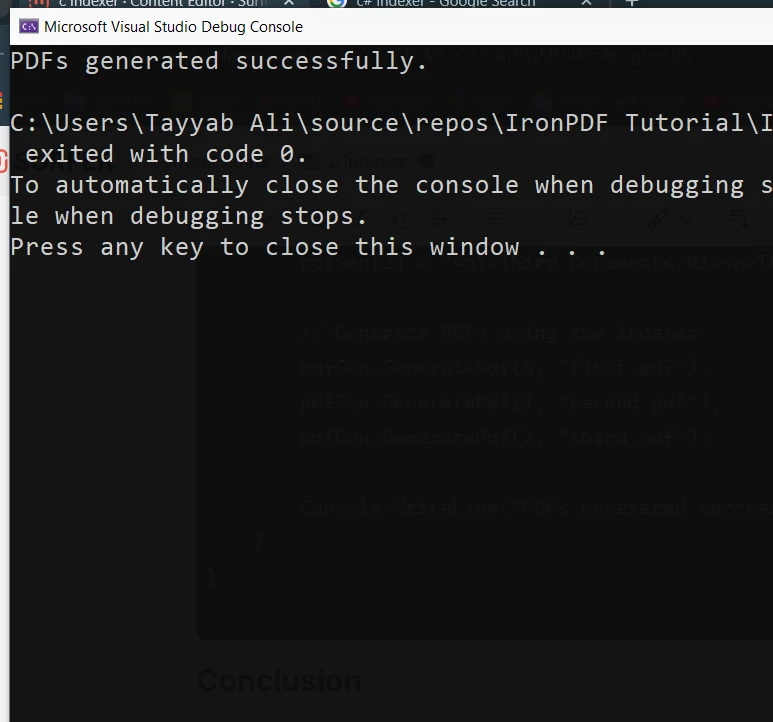
        Console.WriteLine("PDFs generated successfully.");
    }
}
using IronPdf;
using System;

class PdfGenerator
{
    private string[] htmlTemplates = new string[3];
    public string this[int index]
    {
        get { return htmlTemplates[index]; }
        set { htmlTemplates[index] = value; }
    }

    public void GeneratePdf(int index, string outputPath)
    {
        var renderer = new ChromePdfRenderer();
        var pdfDocument = renderer.RenderHtmlAsPdf(this[index]); // Access HTML string using indexer
        pdfDocument.SaveAs(outputPath);
    }
}

class Program
{
    public static void Main()
    {
        PdfGenerator pdfGen = new PdfGenerator();
        // Populate HTML templates
        pdfGen[0] = "<h1>First Document</h1><p>This is the first PDF.</p>";
        pdfGen[1] = "<h1>Second Document</h1><p>This is the second PDF.</p>";
        pdfGen[2] = "<h1>Third Document</h1><p>This is the third PDF.</p>";

        // Generate PDFs using the indexer
        pdfGen.GeneratePdf(0, "first.pdf");
        pdfGen.GeneratePdf(1, "second.pdf");
        pdfGen.GeneratePdf(2, "third.pdf");

        Console.WriteLine("PDFs generated successfully.");
    }
}
Imports IronPdf
Imports System
Friend Class PdfGenerator
Private htmlTemplates(2) As String
Default Public Property Item(ByVal index As Integer) As String
Get
Return htmlTemplates(index)
End Get
Set(ByVal value As String)
htmlTemplates(index) = value
End Set
End Property
Public Sub GeneratePdf(ByVal index As Integer, ByVal outputPath As String)
Dim renderer = New ChromePdfRenderer()
Dim pdfDocument = renderer.RenderHtmlAsPdf(Me(index)) ' Access HTML string using indexer
pdfDocument.SaveAs(outputPath)
End Sub
End Class
Friend Class Program
Public Shared Sub Main()
Dim pdfGen As New PdfGenerator()
' Populate HTML templates
pdfGen(0) = "<h1>First Document</h1><p>This is the first PDF.</p>"
pdfGen(1) = "<h1>Second Document</h1><p>This is the second PDF.</p>"
pdfGen(2) = "<h1>Third Document</h1><p>This is the third PDF.</p>"
' Generate PDFs using the indexer
pdfGen.GeneratePdf(0, "first.pdf")
pdfGen.GeneratePdf(1, "second.pdf")
pdfGen.GeneratePdf(2, "third.pdf")
Console.WriteLine("PDFs generated successfully.")
End Sub
End Class
Imports IronPdf
Imports System

Friend Class PdfGenerator
	Private htmlTemplates(2) As String
	Default Public Property Item(ByVal index As Integer) As String
		Get
			Return htmlTemplates(index)
		End Get
		Set(ByVal value As String)
			htmlTemplates(index) = value
		End Set
	End Property

	Public Sub GeneratePdf(ByVal index As Integer, ByVal outputPath As String)
		Dim renderer = New ChromePdfRenderer()
		Dim pdfDocument = renderer.RenderHtmlAsPdf(Me(index)) ' Access HTML string using indexer
		pdfDocument.SaveAs(outputPath)
	End Sub
End Class

Friend Class Program
	Public Shared Sub Main()
		Dim pdfGen As New PdfGenerator()
		' Populate HTML templates
		pdfGen(0) = "<h1>First Document</h1><p>This is the first PDF.</p>"
		pdfGen(1) = "<h1>Second Document</h1><p>This is the second PDF.</p>"
		pdfGen(2) = "<h1>Third Document</h1><p>This is the third PDF.</p>"

		' Generate PDFs using the indexer
		pdfGen.GeneratePdf(0, "first.pdf")
		pdfGen.GeneratePdf(1, "second.pdf")
		pdfGen.GeneratePdf(2, "third.pdf")

		Console.WriteLine("PDFs generated successfully.")
	End Sub
End Class
Wnioski
Indeksery C# to przydatna funkcja, która pomaga, by Twoje klasy i struktury zachowywały sie jak tablice. Dostarczając uproszczoną składnię i elastyczny dostęp do danych, możesz tworzyć bardziej intuicyjny i czytelny kod. Niezależnie od tego, czy pracujesz z ciągami znaków, liczbami całkowitymi czy jakimkolwiek innym typem danych, indeksatory dają Ci możliwość hermetyzacji struktury danych i uzyskiwania do niej dostępu za pomocą indeksów w przejrzysty i wydajny sposób.
IronPDF ułatwia rozpoczęcie pracy dzięki bezpłatnej wersji próbnej, która zapewnia dostęp do wszystkich funkcji potrzebnych do tworzenia, edycji i renderowania plików PDF. Mozna poswiecic czas na zbadanie oprogramowania, a gdy bedzie sie zadowolonym, licencje sa dostepne od $999.













