


C# Indeksery (Jak to dziala dla programistow)

Indeksator w C# to specjalny typ wlasciwosci, ktory umozliwia dostep do instancji klasy lub struktury za pomoca operatora dostepu do tablic []. Zobacz indeksator w C#. Indeksery mogą być bardzo uzyteczne przy tworzeniu "inteligentnych tablic" lub enkapsulacji danych w uproszczonej skladni. Zapewniaja one sposob używania instancji klasy tak, jakby byly tablicami, gdzie można uzyskać dostep do danych poprzez indeks. Ten artykuł przyblizy, jak deklarowac i używać indeksery C# z praktycznymi przykładami. Na koncu artykułu przyjrzymy sie również bibliotece IronPDF.
Podstawowa skladnia indeksu
Indeksator jest czlonkiem instancji uzywajacym slowa kluczowego this w klasie lub strukturze, po ktorym nastepuje deklaracja indeksatora. Okresla sie również typy parametrow oraz typ zwracany. Ogólna skladnia dla czlonka instancji indeksu wygląda nastepujaco:
public return_type this[parameter_type index]
{
    get
    {
        // Code to return data
    }
    set
    {
        // Code to set data
    }
}
public return_type this[parameter_type index]
{
get
{
// Code to return data
}
set
{
// Code to set data
}
}Default Public Property Item(ByVal index As parameter_type) As return_type
Get
' Code to return data
End Get
Set(ByVal value As return_type)
' Code to set data
End Set
End PropertyTutaj return_type jest typem wartosci, ktora indeksator bedzie zwracac, na przyklad wartosc calkowita, a parameter_type jest typem indeksu, czesto int. Akcesor get zwraca wartosc dla okreslonego indeksu, a akcesor z blokiem kodu set przypisuje wartosc do tego indeksu.
Deklaracja i użycie indeksu
Zbadamy podstawowy przykład implementacji indeksu w klasie C#. Rozwaz klase Program, ktora enkapsuluje tablice ciagow znakow.
class Program
{
    private string[] values = new string[5]; // Array with 5 elements
    public string this[int index]
    {
        get
        {
            return values[index];
        }
        set
        {
            values[index] = value;
        }
    }
}
class Program
{
private string[] values = new string[5]; // Array with 5 elements
public string this[int index]
{
get
{
return values[index];
}
set
{
values[index] = value;
}
}
}Friend Class Program
Private values(4) As String ' Array with 5 elements
Default Public Property Item(ByVal index As Integer) As String
Get
Return values(index)
End Get
Set(ByVal value As String)
values(index) = value
End Set
End Property
End ClassW powyższym kodzie:
- Klasa
Programzawiera tablice ciagow znakow o nazwievalues. string this[int index]to deklaracja indeksatora, w ktorejint indexjest zindeksowana wlasciwoscia z parametrem indeksu uzywana do dostepu do elementow tablicy.- Akcesor
getzwraca zindeksowana wartosc dla okreslonego indeksu, a akcesorsetprzypisuje zindeksowana wartosc do tego indeksu.
Oznacza to, ze mozna utworzyc instancje klasy Program i uzyskac dostep do jej tablicy values za pomoca indeksatora, jak ponizej:
class Program
{
    static void Main()
    {
        Program program = new Program();
        // Set values using indexer
        program[0] = "First";
        program[1] = "Second";
        // Access values using indexer
        Console.WriteLine(program[0]); // Output: First
        Console.WriteLine(program[1]); // Output: Second
    }
}
class Program
{
static void Main()
{
Program program = new Program();
// Set values using indexer
program[0] = "First";
program[1] = "Second";
// Access values using indexer
Console.WriteLine(program[0]); // Output: First
Console.WriteLine(program[1]); // Output: Second
}
}Friend Class Program
Shared Sub Main()
Dim program As New Program()
' Set values using indexer
program(0) = "First"
program(1) = "Second"
' Access values using indexer
Console.WriteLine(program(0)) ' Output: First
Console.WriteLine(program(1)) ' Output: Second
End Sub
End ClassW tym kodzie widac, ze indeksator zapewnia prosty skladniowo sposob dostepu do tablicy values, podobny do tego, jak uzyskuje sie dostep do elementow w tablicy.
Zrozumienie akcesorów get oraz set
Akcesory get i set wewnatrz indeksatora dzialaja jak blok kodu, ktory umozliwia pobieranie i przypisywanie danych w sposob podobny do wlasciwosci. Glowna roznica polega na tym, ze indeksy używają parametru indeksowego do pracy z kolekcjami danych, a nie z poszczegółnymi częściami danych.
Blok get odpowiada za zwracanie danych dla okreslonego indeksu, podczas gdy blok set przypisuje dane do okreslonego indeksu. Oto kolejny przykład, aby utrwalic zrozumienie:
class StudentRecords
{
    private string[] studentNames = new string[3];
    public string this[int index]
    {
        get
        {
            if (index >= 0 && index < studentNames.Length)
            {
                return studentNames[index];
            }
            return "Invalid Index";
        }
        set
        {
            if (index >= 0 && index < studentNames.Length)
            {
                studentNames[index] = value;
            }
        }
    }
    public int Length
    {
        get { return studentNames.Length; }
    }
}
class StudentRecords
{
private string[] studentNames = new string[3];
public string this[int index]
{
get
{
if (index >= 0 && index < studentNames.Length)
{
return studentNames[index];
}
return "Invalid Index";
}
set
{
if (index >= 0 && index < studentNames.Length)
{
studentNames[index] = value;
}
}
}
public int Length
{
get { return studentNames.Length; }
}
}Friend Class StudentRecords
Private studentNames(2) As String
Default Public Property Item(ByVal index As Integer) As String
Get
If index >= 0 AndAlso index < studentNames.Length Then
Return studentNames(index)
End If
Return "Invalid Index"
End Get
Set(ByVal value As String)
If index >= 0 AndAlso index < studentNames.Length Then
studentNames(index) = value
End If
End Set
End Property
Public ReadOnly Property Length() As Integer
Get
Return studentNames.Length
End Get
End Property
End ClassW tym przykładzie:
- Klasa
StudentRecordsposiada prywatna tablicestring[] studentNames, ktora przechowuje imiona studentow. - Indekser sprawdza, czy indeks jest w zakresie tablicy przed ustawieniem lub pobraniem wartosci.
- Wlasciwosc
inttypuLengthzapewnia dostep do dlugosci tablicy.
Mozna uzyc tej klasy w metodzie Main w nastepujacy sposob:
class Program
{
    public static void Main()
    {
        StudentRecords records = new StudentRecords();
        // Set values using indexer
        records[0] = "John";
        records[1] = "Jane";
        records[2] = "Bob";
        // Access values using indexer
        for (int i = 0; i < records.Length; i++)
        {
            Console.WriteLine(records[i]);
        }
    }
}
class Program
{
public static void Main()
{
StudentRecords records = new StudentRecords();
// Set values using indexer
records[0] = "John";
records[1] = "Jane";
records[2] = "Bob";
// Access values using indexer
for (int i = 0; i < records.Length; i++)
{
Console.WriteLine(records[i]);
}
}
}Friend Class Program
Public Shared Sub Main()
Dim records As New StudentRecords()
' Set values using indexer
records(0) = "John"
records(1) = "Jane"
records(2) = "Bob"
' Access values using indexer
For i As Integer = 0 To records.Length - 1
Console.WriteLine(records(i))
Next i
End Sub
End ClassTworzenie generycznego indeksu
Można również tworzyć klasy generyczne z indeksami, pozwalające aby kod obsługiwal wiele typów danych. Oto prosty przykład klasy generycznej z generycznym indeksem:
class GenericClass<t>
{
    private T[] elements = new T[5];
    public T this[int index]
    {
        get
        {
            return elements[index];
        }
        set
        {
            elements[index] = value;
        }
    }
    public int Length
    {
        get { return elements.Length; }
    }
}
class GenericClass<t>
{
private T[] elements = new T[5];
public T this[int index]
{
get
{
return elements[index];
}
set
{
elements[index] = value;
}
}
public int Length
{
get { return elements.Length; }
}
}Option Strict On
Public Class GenericClass(Of T)
Private elements As T() = New T(4) {}
Default Public Property Item(index As Integer) As T
Get
Return elements(index)
End Get
Set(value As T)
elements(index) = value
End Set
End Property
Public ReadOnly Property Length As Integer
Get
Return elements.Length
End Get
End Property
End ClassW tym kodzie:
- Klasa GenericClass definiuje indeksator, ktory moze dzialac z dowolnym typem danych.
- Indeksator
this[int index]pozwala na dostep do elementow w tablicy, niezaleznie od typu.
Teraz mozna uzyc GenericClass z roznymi typami danych w metodzie Main:
class Program
{
    public static void Main()
    {
        GenericClass<int> intArray = new GenericClass<int>();
        intArray[0] = 10;
        intArray[1] = 20;

        GenericClass<string> stringArray = new GenericClass<string>();
        stringArray[0] = "Hello";
        stringArray[1] = "World";

        // Output the integer array values
        for (int i = 0; i < intArray.Length; i++)
        {
            Console.WriteLine(intArray[i]);
        }

        // Output the string array values
        for (int i = 0; i < stringArray.Length; i++)
        {
            Console.WriteLine(stringArray[i]);
        }
    }
}
class Program
{
public static void Main()
{
GenericClass<int> intArray = new GenericClass<int>();
intArray[0] = 10;
intArray[1] = 20;
GenericClass<string> stringArray = new GenericClass<string>();
stringArray[0] = "Hello";
stringArray[1] = "World";
// Output the integer array values
for (int i = 0; i < intArray.Length; i++)
{
Console.WriteLine(intArray[i]);
}
// Output the string array values
for (int i = 0; i < stringArray.Length; i++)
{
Console.WriteLine(stringArray[i]);
}
}
}Friend Class Program
Public Shared Sub Main()
Dim intArray As New GenericClass(Of Integer)()
intArray(0) = 10
intArray(1) = 20
Dim stringArray As New GenericClass(Of String)()
stringArray(0) = "Hello"
stringArray(1) = "World"
' Output the integer array values
For i As Integer = 0 To intArray.Length - 1
Console.WriteLine(intArray(i))
Next i
' Output the string array values
For i As Integer = 0 To stringArray.Length - 1
Console.WriteLine(stringArray(i))
Next i
End Sub
End ClassUzywanie IronPDF z Indeksatorem C
IronPDF to biblioteka C# zaprojektowana do generowania, edycji i konwersji PDF w aplikacjach .NET. Uproszcza ona prace z PDF dla programistów do tworzenia PDF z HTML, manipulacji plikami PDF i obsługi zaawansowanych funkcji, takich jak łączenie, drukowanie i dodawanie podpisow programowo.
Można wykorzystać IronPDF w ramach programow C#, ktore używają indeksow do dynamicznego generowania i zarządzania zawartościa PDF. Na przykład, wyobraz sobie, ze masz klase, która przechowuje ciagi HTML i chcesz generować PDF dla kazdego wpisu HTML przy użyciu indeksu. Podejscie to usprawnia generowanie PDF, utrzymujac jednoczesnie kod zorganizowany i intuicyjny.
using IronPdf;
using System;

class PdfGenerator
{
    private string[] htmlTemplates = new string[3];
    public string this[int index]
    {
        get { return htmlTemplates[index]; }
        set { htmlTemplates[index] = value; }
    }

    public void GeneratePdf(int index, string outputPath)
    {
        var renderer = new ChromePdfRenderer();
        var pdfDocument = renderer.RenderHtmlAsPdf(this[index]); // Access HTML string using indexer
        pdfDocument.SaveAs(outputPath);
    }
}

class Program
{
    public static void Main()
    {
        PdfGenerator pdfGen = new PdfGenerator();
        // Populate HTML templates
        pdfGen[0] = "<h1>First Document</h1><p>This is the first PDF.</p>";
        pdfGen[1] = "<h1>Second Document</h1><p>This is the second PDF.</p>";
        pdfGen[2] = "<h1>Third Document</h1><p>This is the third PDF.</p>";

        // Generate PDFs using the indexer
        pdfGen.GeneratePdf(0, "first.pdf");
        pdfGen.GeneratePdf(1, "second.pdf");
        pdfGen.GeneratePdf(2, "third.pdf");

        Console.WriteLine("PDFs generated successfully.");
    }
}
using IronPdf;
using System;
class PdfGenerator
{
private string[] htmlTemplates = new string[3];
public string this[int index]
{
get { return htmlTemplates[index]; }
set { htmlTemplates[index] = value; }
}
public void GeneratePdf(int index, string outputPath)
{
var renderer = new ChromePdfRenderer();
var pdfDocument = renderer.RenderHtmlAsPdf(this[index]); // Access HTML string using indexer
pdfDocument.SaveAs(outputPath);
}
}
class Program
{
public static void Main()
{
PdfGenerator pdfGen = new PdfGenerator();
// Populate HTML templates
pdfGen[0] = "<h1>First Document</h1><p>This is the first PDF.</p>";
pdfGen[1] = "<h1>Second Document</h1><p>This is the second PDF.</p>";
pdfGen[2] = "<h1>Third Document</h1><p>This is the third PDF.</p>";
// Generate PDFs using the indexer
pdfGen.GeneratePdf(0, "first.pdf");
pdfGen.GeneratePdf(1, "second.pdf");
pdfGen.GeneratePdf(2, "third.pdf");
Console.WriteLine("PDFs generated successfully.");
}
}Imports IronPdf
Imports System
Friend Class PdfGenerator
Private htmlTemplates(2) As String
Default Public Property Item(ByVal index As Integer) As String
Get
Return htmlTemplates(index)
End Get
Set(ByVal value As String)
htmlTemplates(index) = value
End Set
End Property
Public Sub GeneratePdf(ByVal index As Integer, ByVal outputPath As String)
Dim renderer = New ChromePdfRenderer()
Dim pdfDocument = renderer.RenderHtmlAsPdf(Me(index)) ' Access HTML string using indexer
pdfDocument.SaveAs(outputPath)
End Sub
End Class
Friend Class Program
Public Shared Sub Main()
Dim pdfGen As New PdfGenerator()
' Populate HTML templates
pdfGen(0) = "<h1>First Document</h1><p>This is the first PDF.</p>"
pdfGen(1) = "<h1>Second Document</h1><p>This is the second PDF.</p>"
pdfGen(2) = "<h1>Third Document</h1><p>This is the third PDF.</p>"
' Generate PDFs using the indexer
pdfGen.GeneratePdf(0, "first.pdf")
pdfGen.GeneratePdf(1, "second.pdf")
pdfGen.GeneratePdf(2, "third.pdf")
Console.WriteLine("PDFs generated successfully.")
End Sub
End Class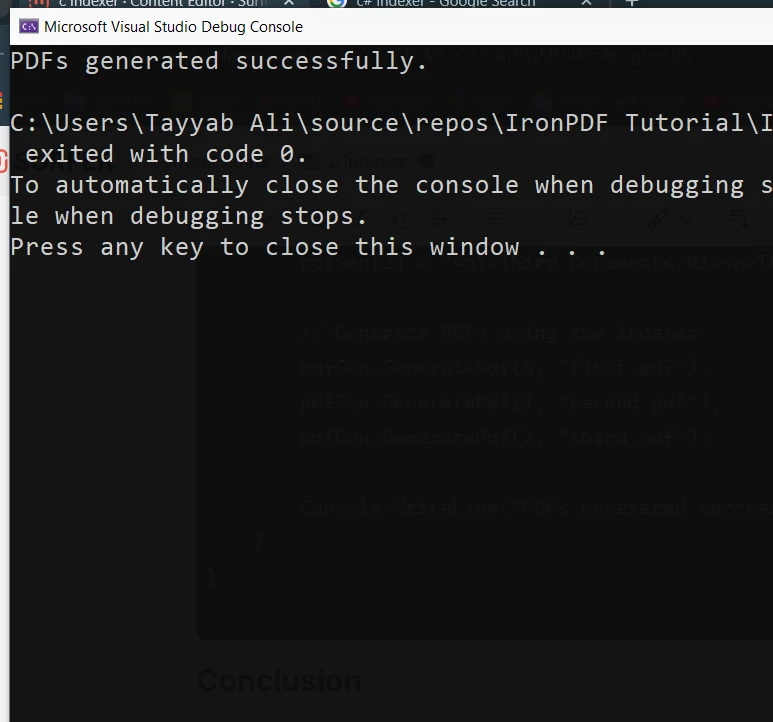
Wnioski
Indeksery C# to przydatna funkcja, która pomaga, by Twoje klasy i struktury zachowywały sie jak tablice. Dostarczając uproszczoną składnię i elastyczny dostęp do danych, możesz tworzyć bardziej intuicyjny i czytelny kod. Niezależnie od tego, czy pracujesz z ciągami znaków, liczbami całkowitymi czy jakimkolwiek innym typem danych, indeksatory dają Ci możliwość hermetyzacji struktury danych i uzyskiwania do niej dostępu za pomocą indeksów w przejrzysty i wydajny sposób.
IronPDF ułatwia rozpoczęcie pracy dzięki bezpłatnej wersji próbnej, która zapewnia dostęp do wszystkich funkcji potrzebnych do tworzenia, edycji i renderowania plików PDF. Mozna poswiecic czas na zbadanie oprogramowania, a gdy bedzie sie zadowolonym, licencje sa dostepne od $999.
Często Zadawane Pytania
Czym jest indeksator w C#?
Indeksator w C# to specjalny typ właściwości, który pozwala na dostęp do instancji klasy lub struktury za pomocą operatora dostępu do tablic []. Umożliwia to używanie instancji klasy tak samo, jak tablic.
Jak zadeklarować podstawowy indeksator w C#?
Podstawowy indeksator w C# deklaruje się używając słowa kluczowego 'this' wraz z deklaracją indeksatora. Należy określić typy parametrów oraz typ zwracany. Na przykład: public return_type this[parameter_type index] { get; set; }.
Jaki jest cel akcesorów 'get' i 'set' w indeksatorze?
Akcesor 'get' w indeksatorze służy do pobierania danych w określonym indeksie, natomiast akcesor 'set' służy do przypisywania danych do określonego indeksu. Działają one podobnie jak akcesory właściwości, ale są używane dla kolekcji danych.
Czy możesz podać przykład indeksatora w klasie C#?
Oczywiście. Rozważ klasę 'Program' z prywatną tablicą stringów. Indeksator pozwala na dostęp do tej tablicy za pomocą indeksu całkowitego. Na przykład: public string this[int index] { get { return values[index]; } set { values[index] = value; } }.
Jak stworzyć generyczny indeksator w C#?
Indeksator ogólny w języku C# można utworzyć w ramach klasy ogólnej. Na przykład, klasa GenericClass zawiera indeksator, który może obsługiwać dowolny typ danych. Indeksator jest zadeklarowany jako public T this[int index] { get; set; }.
Jak można wykorzystać indeksatory w C#, aby usprawnić generowanie PDF?
Używając biblioteki takiej jak IronPDF, można wykorzystać indeksatory do zarządzania i dostępu do szablonów HTML przechowywanych w klasie, które następnie są konwertowane na dokumenty PDF. To podejście upraszcza proces generowania dynamicznych PDF z wielu źródeł HTML.
Czy możesz podać przykład użycia biblioteki PDF z indeksatorem?
Z pewnością. Możesz stworzyć klasę, która przechowuje szablony HTML w tablicy i użyć indeksatora do dostępu do tych szablonów. Następnie, użyć biblioteki PDF do renderowania tych łańcuchów HTML jako dokumentów PDF. Na przykład, klasa PdfGenerator używa indeksatora do dostępu do HTML i generowania PDF.
Jakie są zalety używania indeksatorów w C#?
Indeksatory w języku C# zapewniają uproszczoną składnię dostępu do elementów w kolekcji, dzięki czemu kod staje się bardziej intuicyjny i czytelny. Pozwalają one klasom i strukturom zachowywać się jak tablice, umożliwiając wydajną enkapsulację danych i dostęp do nich.
W jaki sposób indeksatory mogą pomóc w tworzeniu dynamicznych struktur danych w języku C#?
Indeksatory pozwalają programistom tworzyć dynamiczne struktury danych, umożliwiając dostęp do kolekcji i ich modyfikację przy użyciu składni podobnej do tablicowej. Może to być szczególnie przydatne w sytuacjach, w których dane muszą być zarządzane w sposób elastyczny, na przykład podczas dynamicznego generowania treści PDF.










 Rozpocznij za DARMO
 Rozpocznij za DARMO
 Zarezerwuj darmowe Demo na żywo





 Nie wymaga karty kredytowej ani tworzenia konta










