





已更新 2026年4月23日
简化 .NET 与 Microsoft.Extensions.AI 的 LLM 集成
AI正在改变软件开发,但将大型语言模型(LLM)集成到.NET中直到现在一直很复杂。通过IronPdf.AI,将AI集成更进一步,该产品为.NET应用程序带来了OpenAI驱动的PDF解析、数据提取和内容摘要。
阅读更多

C#中的索引器是一种特殊类型的属性,使类或结构的实例可以使用数组访问运算符[]进行访问。 索引器在创建"智能数组"或使用简化语法封装数据时非常有用。 它们提供了一种方法,可以像使用数组一样使用类的实例,从而可以通过索引访问数据。 本文将探讨如何声明和使用 C# 索引器,并提供实际示例。 我们还将在文章的末尾探索 IronPDF库。
索引器是一个实例成员,使用@--CODE-1013--@@关键字在类或结构中定义,后跟索引器声明。 您还需要指定参数类型和返回类型。 索引器实例成员的一般语法如下所示:
public return_type this[parameter_type index]
{
    get
    {
        // Code to return data
    }
    set
    {
        // Code to set data
    }
}Default Public Property Item(ByVal index As parameter_type) As return_type
Get
' Code to return data
End Get
Set(ByVal value As return_type)
' Code to set data
End Set
End PropertyDefault Public Property Item(ByVal index As parameter_type) As return_type
Get
' Code to return data
End Get
Set(ByVal value As return_type)
' Code to set data
End Set
End Property这里,int。 set块代码访问器为该索引分配一个值。
我们将研究在 C# 类中实现索引器的一个基本示例。 考虑一个类Program,它封装了一组字符串。
class Program
{
    private string[] values = new string[5]; // Array with 5 elements
    public string this[int index]
    {
        get
        {
            return values[index];
        }
        set
        {
            values[index] = value;
        }
    }
}
class Program
{
private string[] values = new string[5]; // Array with 5 elements
public string this[int index]
{
get
{
return values[index];
}
set
{
values[index] = value;
}
}
}Friend Class Program
Private values(4) As String ' Array with 5 elements
Default Public Property Item(ByVal index As Integer) As String
Get
Return values(index)
End Get
Set(ByVal value As String)
values(index) = value
End Set
End Property
End ClassFriend Class Program
Private values(4) As String ' Array with 5 elements
Default Public Property Item(ByVal index As Integer) As String
Get
Return values(index)
End Get
Set(ByVal value As String)
values(index) = value
End Set
End Property
End Class在上述代码中
values的字符串数组。int index是用于访问数组元素的索引参数化属性。set访问器为该索引分配一个索引值。这意味着您可以创建values数组,如下所示:
class Program
{
    static void Main()
    {
        Program program = new Program();
        // Set values using indexer
        program[0] = "First";
        program[1] = "Second";
        // Access values using indexer
        Console.WriteLine(program[0]); // Output: First
        Console.WriteLine(program[1]); // Output: Second
    }
}
class Program
{
static void Main()
{
Program program = new Program();
// Set values using indexer
program[0] = "First";
program[1] = "Second";
// Access values using indexer
Console.WriteLine(program[0]); // Output: First
Console.WriteLine(program[1]); // Output: Second
}
}Friend Class Program
Shared Sub Main()
Dim program As New Program()
' Set values using indexer
program(0) = "First"
program(1) = "Second"
' Access values using indexer
Console.WriteLine(program(0)) ' Output: First
Console.WriteLine(program(1)) ' Output: Second
End Sub
End ClassFriend Class Program
Shared Sub Main()
Dim program As New Program()
' Set values using indexer
program(0) = "First"
program(1) = "Second"
' Access values using indexer
Console.WriteLine(program(0)) ' Output: First
Console.WriteLine(program(1)) ' Output: Second
End Sub
End Class在此代码中,您可以看到索引器提供了一种简单的语法来访问values数组,与访问数组中的元素类似。
set访问器索引器内的set访问器像块代码一样,让您可以像使用属性一样检索和分配数据。 主要区别在于索引器使用索引参数来处理数据集合而不是单个数据成员。
set块负责将数据分配到指定索引。 以下是另一个示例,以加深您的理解:
class StudentRecords
{
    private string[] studentNames = new string[3];
    public string this[int index]
    {
        get
        {
            if (index >= 0 && index < studentNames.Length)
            {
                return studentNames[index];
            }
            return "Invalid Index";
        }
        set
        {
            if (index >= 0 && index < studentNames.Length)
            {
                studentNames[index] = value;
            }
        }
    }
    public int Length
    {
        get { return studentNames.Length; }
    }
}
class StudentRecords
{
private string[] studentNames = new string[3];
public string this[int index]
{
get
{
if (index >= 0 && index < studentNames.Length)
{
return studentNames[index];
}
return "Invalid Index";
}
set
{
if (index >= 0 && index < studentNames.Length)
{
studentNames[index] = value;
}
}
}
public int Length
{
get { return studentNames.Length; }
}
}Friend Class StudentRecords
Private studentNames(2) As String
Default Public Property Item(ByVal index As Integer) As String
Get
If index >= 0 AndAlso index < studentNames.Length Then
Return studentNames(index)
End If
Return "Invalid Index"
End Get
Set(ByVal value As String)
If index >= 0 AndAlso index < studentNames.Length Then
studentNames(index) = value
End If
End Set
End Property
Public ReadOnly Property Length() As Integer
Get
Return studentNames.Length
End Get
End Property
End ClassFriend Class StudentRecords
Private studentNames(2) As String
Default Public Property Item(ByVal index As Integer) As String
Get
If index >= 0 AndAlso index < studentNames.Length Then
Return studentNames(index)
End If
Return "Invalid Index"
End Get
Set(ByVal value As String)
If index >= 0 AndAlso index < studentNames.Length Then
studentNames(index) = value
End If
End Set
End Property
Public ReadOnly Property Length() As Integer
Get
Return studentNames.Length
End Get
End Property
End Class在此示例中:
string[] studentNames数组用于存储学生的姓名。Length属性提供对数组长度的访问。您可以在Main方法中使用此类,如下所示:
class Program
{
    public static void Main()
    {
        StudentRecords records = new StudentRecords();
        // Set values using indexer
        records[0] = "John";
        records[1] = "Jane";
        records[2] = "Bob";
        // Access values using indexer
        for (int i = 0; i < records.Length; i++)
        {
            Console.WriteLine(records[i]);
        }
    }
}
class Program
{
public static void Main()
{
StudentRecords records = new StudentRecords();
// Set values using indexer
records[0] = "John";
records[1] = "Jane";
records[2] = "Bob";
// Access values using indexer
for (int i = 0; i < records.Length; i++)
{
Console.WriteLine(records[i]);
}
}
}Friend Class Program
Public Shared Sub Main()
Dim records As New StudentRecords()
' Set values using indexer
records(0) = "John"
records(1) = "Jane"
records(2) = "Bob"
' Access values using indexer
For i As Integer = 0 To records.Length - 1
Console.WriteLine(records(i))
Next i
End Sub
End ClassFriend Class Program
Public Shared Sub Main()
Dim records As New StudentRecords()
' Set values using indexer
records(0) = "John"
records(1) = "Jane"
records(2) = "Bob"
' Access values using indexer
For i As Integer = 0 To records.Length - 1
Console.WriteLine(records(i))
Next i
End Sub
End Class您还可以创建带有索引器的通用类,使您的代码能处理多种数据类型。这是一个具有通用索引器的通用类的简单示例:
class GenericClass<t>
{
    private T[] elements = new T[5];
    public T this[int index]
    {
        get
        {
            return elements[index];
        }
        set
        {
            elements[index] = value;
        }
    }
    public int Length
    {
        get { return elements.Length; }
    }
}
class GenericClass<t>
{
private T[] elements = new T[5];
public T this[int index]
{
get
{
return elements[index];
}
set
{
elements[index] = value;
}
}
public int Length
{
get { return elements.Length; }
}
}Option Strict On
Option Infer On
Public Class GenericClass(Of T)
Private elements As T() = New T(4) {}
Default Public Property Item(index As Integer) As T
Get
Return elements(index)
End Get
Set(value As T)
elements(index) = value
End Set
End Property
Public ReadOnly Property Length As Integer
Get
Return elements.Length
End Get
End Property
End ClassOption Strict On
Option Infer On
Public Class GenericClass(Of T)
Private elements As T() = New T(4) {}
Default Public Property Item(index As Integer) As T
Get
Return elements(index)
End Get
Set(value As T)
elements(index) = value
End Set
End Property
Public ReadOnly Property Length As Integer
Get
Return elements.Length
End Get
End Property
End Class在此代码中:
this[int index]索引器允许您访问数组中的元素,无论类型如何。您现在可以在GenericClass。
class Program
{
    public static void Main()
    {
        GenericClass<int> intArray = new GenericClass<int>();
        intArray[0] = 10;
        intArray[1] = 20;

        GenericClass<string> stringArray = new GenericClass<string>();
        stringArray[0] = "Hello";
        stringArray[1] = "World";

        // Output the integer array values
        for (int i = 0; i < intArray.Length; i++)
        {
            Console.WriteLine(intArray[i]);
        }

        // Output the string array values
        for (int i = 0; i < stringArray.Length; i++)
        {
            Console.WriteLine(stringArray[i]);
        }
    }
}
class Program
{
public static void Main()
{
GenericClass<int> intArray = new GenericClass<int>();
intArray[0] = 10;
intArray[1] = 20;
GenericClass<string> stringArray = new GenericClass<string>();
stringArray[0] = "Hello";
stringArray[1] = "World";
// Output the integer array values
for (int i = 0; i < intArray.Length; i++)
{
Console.WriteLine(intArray[i]);
}
// Output the string array values
for (int i = 0; i < stringArray.Length; i++)
{
Console.WriteLine(stringArray[i]);
}
}
}Friend Class Program
Public Shared Sub Main()
Dim intArray As New GenericClass(Of Integer)()
intArray(0) = 10
intArray(1) = 20
Dim stringArray As New GenericClass(Of String)()
stringArray(0) = "Hello"
stringArray(1) = "World"
' Output the integer array values
For i As Integer = 0 To intArray.Length - 1
Console.WriteLine(intArray(i))
Next i
' Output the string array values
For i As Integer = 0 To stringArray.Length - 1
Console.WriteLine(stringArray(i))
Next i
End Sub
End ClassFriend Class Program
Public Shared Sub Main()
Dim intArray As New GenericClass(Of Integer)()
intArray(0) = 10
intArray(1) = 20
Dim stringArray As New GenericClass(Of String)()
stringArray(0) = "Hello"
stringArray(1) = "World"
' Output the integer array values
For i As Integer = 0 To intArray.Length - 1
Console.WriteLine(intArray(i))
Next i
' Output the string array values
For i As Integer = 0 To stringArray.Length - 1
Console.WriteLine(stringArray(i))
Next i
End Sub
End Class
IronPDF 是一个用于在 .NET 应用程序中生成、编辑和转换 PDF 的 C# 库。 它简化了开发人员操作 PDF 的过程,帮助他们从 HTML 创建 PDF,操作 PDF 文件,并以编程方式处理高级功能,如合并、打印和添加签名。
您可以在使用索引器的 C# 程序中利用 IronPDF 动态生成和管理 PDF 内容。 例如,假设您有一个存储 HTML 字符串的类,并希望使用索引器为每个 HTML 条目生成PDF。 此方法简化了 PDF 的生成,同时保持代码的组织和直观。
using IronPdf;
using System;

class PdfGenerator
{
    private string[] htmlTemplates = new string[3];
    public string this[int index]
    {
        get { return htmlTemplates[index]; }
        set { htmlTemplates[index] = value; }
    }

    public void GeneratePdf(int index, string outputPath)
    {
        var renderer = new ChromePdfRenderer();
        var pdfDocument = renderer.RenderHtmlAsPdf(this[index]); // Access HTML string using indexer
        pdfDocument.SaveAs(outputPath);
    }
}

class Program
{
    public static void Main()
    {
        PdfGenerator pdfGen = new PdfGenerator();
        // Populate HTML templates
        pdfGen[0] = "<h1>First Document</h1><p>This is the first PDF.</p>";
        pdfGen[1] = "<h1>Second Document</h1><p>This is the second PDF.</p>";
        pdfGen[2] = "<h1>Third Document</h1><p>This is the third PDF.</p>";

        // Generate PDFs using the indexer
        pdfGen.GeneratePdf(0, "first.pdf");
        pdfGen.GeneratePdf(1, "second.pdf");
        pdfGen.GeneratePdf(2, "third.pdf");

        Console.WriteLine("PDFs generated successfully.");
    }
}
using IronPdf;
using System;
class PdfGenerator
{
private string[] htmlTemplates = new string[3];
public string this[int index]
{
get { return htmlTemplates[index]; }
set { htmlTemplates[index] = value; }
}
public void GeneratePdf(int index, string outputPath)
{
var renderer = new ChromePdfRenderer();
var pdfDocument = renderer.RenderHtmlAsPdf(this[index]); // Access HTML string using indexer
pdfDocument.SaveAs(outputPath);
}
}
class Program
{
public static void Main()
{
PdfGenerator pdfGen = new PdfGenerator();
// Populate HTML templates
pdfGen[0] = "<h1>First Document</h1><p>This is the first PDF.</p>";
pdfGen[1] = "<h1>Second Document</h1><p>This is the second PDF.</p>";
pdfGen[2] = "<h1>Third Document</h1><p>This is the third PDF.</p>";
// Generate PDFs using the indexer
pdfGen.GeneratePdf(0, "first.pdf");
pdfGen.GeneratePdf(1, "second.pdf");
pdfGen.GeneratePdf(2, "third.pdf");
Console.WriteLine("PDFs generated successfully.");
}
}Imports IronPdf
Imports System
Friend Class PdfGenerator
Private htmlTemplates(2) As String
Default Public Property Item(ByVal index As Integer) As String
Get
Return htmlTemplates(index)
End Get
Set(ByVal value As String)
htmlTemplates(index) = value
End Set
End Property
Public Sub GeneratePdf(ByVal index As Integer, ByVal outputPath As String)
Dim renderer = New ChromePdfRenderer()
Dim pdfDocument = renderer.RenderHtmlAsPdf(Me(index)) ' Access HTML string using indexer
pdfDocument.SaveAs(outputPath)
End Sub
End Class
Friend Class Program
Public Shared Sub Main()
Dim pdfGen As New PdfGenerator()
' Populate HTML templates
pdfGen(0) = "<h1>First Document</h1><p>This is the first PDF.</p>"
pdfGen(1) = "<h1>Second Document</h1><p>This is the second PDF.</p>"
pdfGen(2) = "<h1>Third Document</h1><p>This is the third PDF.</p>"
' Generate PDFs using the indexer
pdfGen.GeneratePdf(0, "first.pdf")
pdfGen.GeneratePdf(1, "second.pdf")
pdfGen.GeneratePdf(2, "third.pdf")
Console.WriteLine("PDFs generated successfully.")
End Sub
End ClassImports IronPdf
Imports System
Friend Class PdfGenerator
Private htmlTemplates(2) As String
Default Public Property Item(ByVal index As Integer) As String
Get
Return htmlTemplates(index)
End Get
Set(ByVal value As String)
htmlTemplates(index) = value
End Set
End Property
Public Sub GeneratePdf(ByVal index As Integer, ByVal outputPath As String)
Dim renderer = New ChromePdfRenderer()
Dim pdfDocument = renderer.RenderHtmlAsPdf(Me(index)) ' Access HTML string using indexer
pdfDocument.SaveAs(outputPath)
End Sub
End Class
Friend Class Program
Public Shared Sub Main()
Dim pdfGen As New PdfGenerator()
' Populate HTML templates
pdfGen(0) = "<h1>First Document</h1><p>This is the first PDF.</p>"
pdfGen(1) = "<h1>Second Document</h1><p>This is the second PDF.</p>"
pdfGen(2) = "<h1>Third Document</h1><p>This is the third PDF.</p>"
' Generate PDFs using the indexer
pdfGen.GeneratePdf(0, "first.pdf")
pdfGen.GeneratePdf(1, "second.pdf")
pdfGen.GeneratePdf(2, "third.pdf")
Console.WriteLine("PDFs generated successfully.")
End Sub
End Class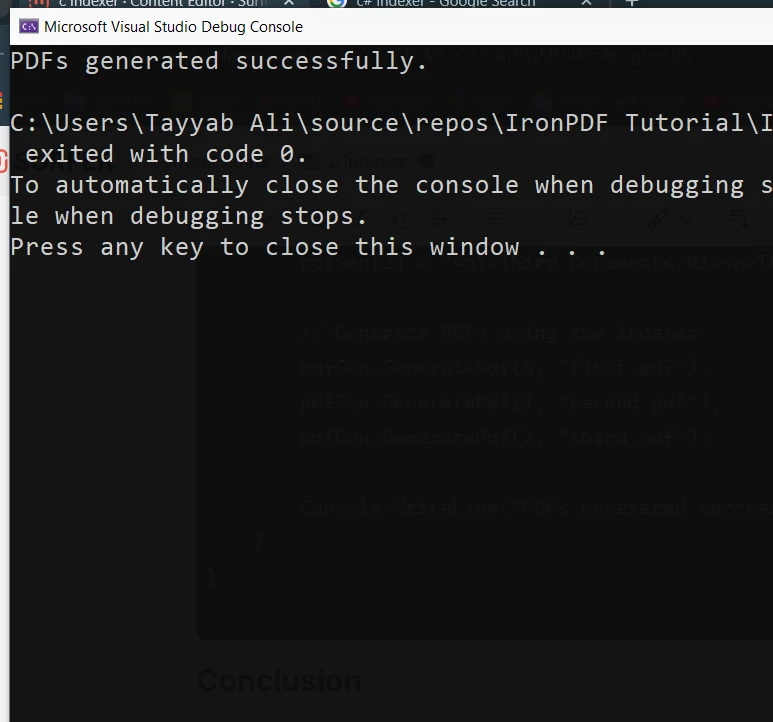
C# 索引器是一个有用的功能,可帮助您使类和结构表现得像数组。 通过提供简化的语法和灵活的数据访问,您可以创建更直观、可读性更强的代码。 无论您正在处理字符串、整数还是任何其他数据类型,索引器都可以让您封装数据结构并以干净有效的方式使用索引访问它。
IronPDF 提供了一种简单 试用版,让您可以访问所需的所有功能,以创建、操作和渲染 PDF。 您可以慢慢探索该软件,一旦您满意,可以从$999开始购买许可证。
Jacob Mellor 是 Iron Software 的首席技术官,也是一位开创 C# PDF 技术的有远见的工程师。作为 Iron Software 核心代码库的原始开发者,他从公司成立之初就开始塑造公司的产品架构,与首席执行官 Cameron Rimington 一起将公司转变为一家拥有 50 多名员工的公司,为 NASA、特斯拉和全球政府机构提供服务。



IronPDF 是 IRONSUITE的一部分
10 个 .NET API 产品用于您的办公文档

当您需要PDF看起来像HTML时,速度快。


