




已更新 2026年4月23日
简化 .NET 与 Microsoft.Extensions.AI 的 LLM 集成
AI正在改变软件开发,但将大型语言模型(LLM)集成到.NET中直到现在一直很复杂。通过IronPdf.AI,将AI集成更进一步,该产品为.NET应用程序带来了OpenAI驱动的PDF解析、数据提取和内容摘要。
阅读更多

在 C# 中,foreach 语句 通常用于遍历数组、列表或其他可枚举类型的集合。然而,foreach 循环的一个限制是没有提供内置的索引变量来跟踪当前迭代。 开发人员通常需要访问当前元素的索引。 下面,我们将探讨实现此功能的各种方法以及 IronPDF 库。
foreach 循环旨在简化通过数组、列表、字典和实现 IEnumerable 的其他类型的迭代。 下面是如何使用 foreach 语句遍历整数数据类型数组的基本示例:
int[] numbers = { 10, 20, 30, 40 };
foreach (int number in numbers)
{
    Console.WriteLine(number);
}Dim numbers() As Integer = { 10, 20, 30, 40 }
For Each number As Integer In numbers
Console.WriteLine(number)
Next number在此示例中,number 代表集合中每次迭代时的元素。 循环会自动遍历数组中的所有元素。 然而,没有内置的方法可以访问当前元素的索引。
虽然 C# 没有在 foreach 循环中直接提供索引,但几种技术可以解决这个问题。 让我们详细讨论这些方法。
获取当前元素索引的最简单方法之一是使用外部索引变量。 您需要在循环内部手动递增它:
int[] numbers = { 10, 20, 30, 40 };
int numberIndex = 0;
foreach (int number in numbers)
{
    Console.WriteLine($"Index: {numberIndex}, Value: {number}");
    numberIndex++;
}Dim numbers() As Integer = { 10, 20, 30, 40 }
Dim numberIndex As Integer = 0
For Each number As Integer In numbers
Console.WriteLine($"Index: {numberIndex}, Value: {number}")
numberIndex += 1
Next number在此代码中,索引变量在循环开始前初始化,然后在每次迭代中在循环内递增。 虽然这种方法有效,但需要手动维护索引,这并不总是理想的。
LINQ的 Select 方法可以用于将集合的每个元素投影为新形式,包括其索引。 下面是一个例子:
int[] numbers = { 10, 20, 30, 40 };
foreach (var item in numbers.Select((value, index) => new { value, index }))
{
    Console.WriteLine($"Index: {item.index}, Value: {item.value}");
}Dim numbers() As Integer = { 10, 20, 30, 40 }
For Each item In numbers.Select(Function(value, index) New With {
Key value,
Key index
})
Console.WriteLine($"Index: {item.index}, Value: {item.value}")
Next item在此示例中,Select 创建了一个匿名对象,其中包含当前元素的值及其索引。 然后 foreach 循环可以迭代这些对象并直接访问索引和值。
您可以使用 yield return 关键字实现一个自定义迭代器扩展方法,以生成一个既返回当前元素及其索引的方法。 这有点更高级,但提供了一种灵活的解决方案。
public static IEnumerable<(int index, T value)> WithIndex<t>(this IEnumerable<t> source)
{
    int index = 0;
    foreach (T value in source)
    {
        yield return (index, value);
        index++;
    }
}Imports System.Collections.Generic
Public Module Extensions
<System.Runtime.CompilerServices.Extension>
Public Iterator Function WithIndex(Of T)(source As IEnumerable(Of T)) As IEnumerable(Of (index As Integer, value As T))
Dim index As Integer = 0
For Each value As T In source
Yield (index, value)
index += 1
Next
End Function
End Module现在,您可以将此扩展方法与您的集合一起使用:
int[] numbers = { 10, 20, 30, 40 };
foreach (var (index, value) in numbers.WithIndex())
{
    Console.WriteLine($"Index: {index}, Value: {value}");
}Dim numbers() As Integer = { 10, 20, 30, 40 }
foreach var(index, value) In numbers.WithIndex()
Console.WriteLine($"Index: {index}, Value: {value}")
Next这种方法通过将手动索引管理抽象为可重用的方法,为具有索引的 foreach 提供了一个更优雅的解决方案。
如果您正在处理数组或列表等集合,可以结合使用 while 循环和索引变量来访问索引和当前元素:
int[] numbers = { 10, 20, 30, 40 };
int index = 0;
while (index < numbers.Length)
{
    Console.WriteLine($"Index: {index}, Value: {numbers[index]}");
    index++;
}Dim numbers() As Integer = { 10, 20, 30, 40 }
Dim index As Integer = 0
Do While index < numbers.Length
Console.WriteLine($"Index: {index}, Value: {numbers(index)}")
index += 1
Loop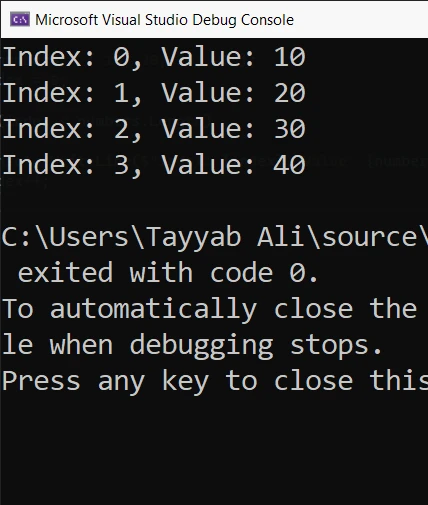
这种方法允许您通过使用索引变量作为数组或列表的下标直接访问索引和当前元素。
如果您正在处理自定义集合,您可以实现自己的迭代器以支持索引访问。 通过实现 IEnumerable 接口并使用 yield return 语句,您可以创建返回元素及其索引的迭代器。
下面是创建实现 IEnumerable 的自定义集合的示例:
public class CustomCollection<t> : IEnumerable<t>
{
    private T[] _items;
    public CustomCollection(T[] items)
    {
        _items = items;
    }
    public IEnumerator<t> GetEnumerator()
    {
        for (int i = 0; i < _items.Length; i++)
        {
            yield return _items[i];
        }
    }
    IEnumerator IEnumerable.GetEnumerator()
    {
        return GetEnumerator();
    }
}Imports System.Collections
Imports System.Collections.Generic
Public Class CustomCollection(Of T)
Implements IEnumerable(Of T)
Private _items As T()
Public Sub New(items As T())
_items = items
End Sub
Public Function GetEnumerator() As IEnumerator(Of T) Implements IEnumerable(Of T).GetEnumerator
For i As Integer = 0 To _items.Length - 1
Yield _items(i)
Next
End Function
Private Function IEnumerable_GetEnumerator() As IEnumerator Implements IEnumerable.GetEnumerator
Return GetEnumerator()
End Function
End Class然后您可以在 foreach 循环中使用此自定义集合:
var customCollection = new CustomCollection<int>(new int[] { 10, 20, 30, 40 });
foreach (int number in customCollection)
{
    Console.WriteLine(number);
}Dim customCollection As New CustomCollection(Of Integer)(New Integer() { 10, 20, 30, 40 })
For Each number As Integer In customCollection
Console.WriteLine(number)
Next number通过实现 GetEnumerator 方法并使用 yield return,您创建了一个允许 foreach 循环像 .NET 中的其他集合一样与您的自定义集合一起工作的迭代器。
在处理字典时,foreach 循环允许您直接遍历键值对。 这是在每次迭代时访问键和值的常见用例:
Dictionary<int, string> dict = new Dictionary<int, string>
{
    { 1, "Apple" },
    { 2, "Banana" },
    { 3, "Cherry" }
};
foreach (var kvp in dict)
{
    Console.WriteLine($"Key: {kvp.Key}, Value: {kvp.Value}");
}Dim dict As New Dictionary(Of Integer, String) From {
{1, "Apple"},
{2, "Banana"},
{3, "Cherry"}
}
For Each kvp In dict
Console.WriteLine($"Key: {kvp.Key}, Value: {kvp.Value}")
Next kvp在此示例中,kvp.Key 提供当前键,kvp.Value 提供当前值。
IronPDF 是一个 PDF 库,用于处理 从 HTML 生成 PDF 及其他与 PDF 相关的任务。 它也兼容最新的 .NET Framework。 使用 IronPDF 生成 PDF 时,您可能需要遍历数据集合并将内容动态插入到 PDF 文件中。结合 foreach 循环与索引处理,可以根据集合中当前项的索引管理位置、编号或自定义逻辑。 以下是使用 IronPDF 创建 PDF 的实际示例,其中集合中的每个项都与其索引一起插入到文档中。
using IronPdf;
class Program
{
    static void Main(string[] args)
    {
        // Create a new PDF document renderer
        var pdf = new ChromePdfRenderer();

        // Sample data array
        string[] items = { "First Item", "Second Item", "Third Item" };

        // Initialize the HTML content with foreach loop and index
        string htmlContent = "<html><body>";
        int index = 0;
        foreach (var item in items)
        {
            htmlContent += $"<h2>Item {index + 1}: {item}</h2>";
            index++;
        }
        htmlContent += "</body></html>";

        // Render the HTML to PDF
        var pdfDocument = pdf.RenderHtmlAsPdf(htmlContent);

        // Save the PDF document
        pdfDocument.SaveAs("output.pdf");

        // Notify completion
        Console.WriteLine("PDF created successfully with indexed items.");
    }
}Imports IronPdf
Class Program
Shared Sub Main(ByVal args As String())
' Create a new PDF document renderer
Dim pdf = New ChromePdfRenderer()
' Sample data array
Dim items As String() = {"First Item", "Second Item", "Third Item"}
' Initialize the HTML content with foreach loop and index
Dim htmlContent As String = "<html><body>"
Dim index As Integer = 0
For Each item In items
htmlContent += $"<h2>Item {index + 1}: {item}</h2>"
index += 1
Next item
htmlContent += "</body></html>"
' Render the HTML to PDF
Dim pdfDocument = pdf.RenderHtmlAsPdf(htmlContent)
' Save the PDF document
pdfDocument.SaveAs("output.pdf")
' Notify completion
Console.WriteLine("PDF created successfully with indexed items.")
End Sub
End Class以下是输出的 PDF 文件:
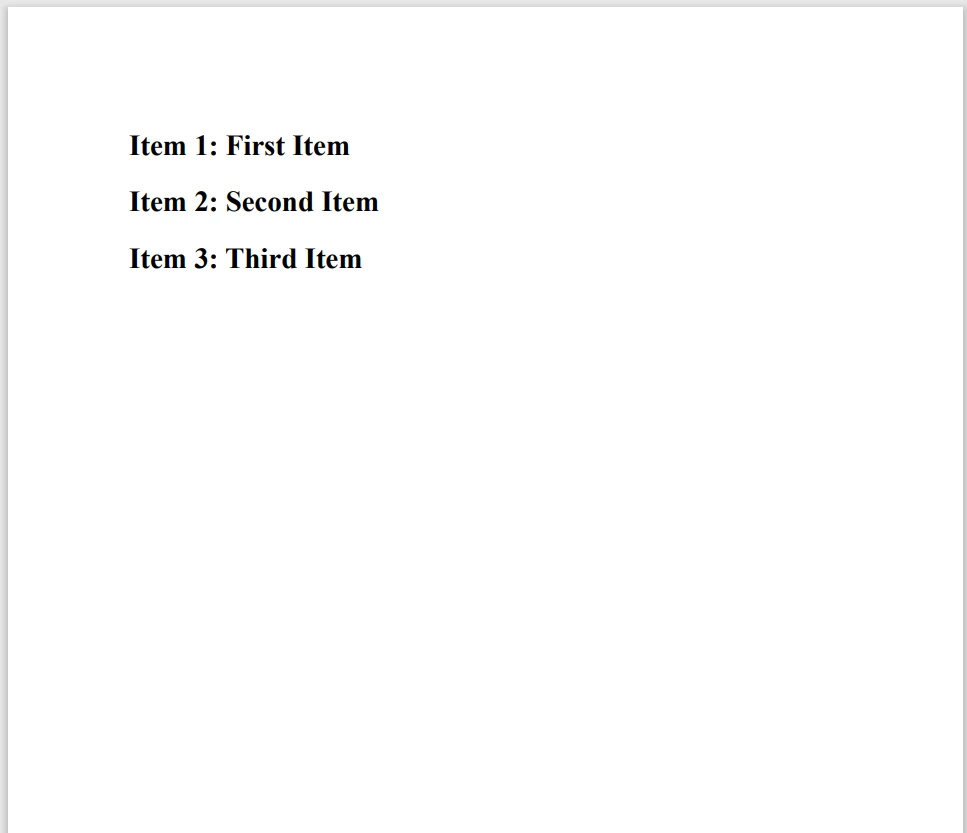
在 C# 中,虽然 foreach 循环是一种便利的遍历集合的方法,但它不支持原生的索引。 然而,有几种方法可以克服这个限制。 无论您使用简单的索引变量,LINQ中的 Select 方法,还是自定义迭代器,您都可以在迭代期间访问当前或下一个元素的索引。 了解这些技术可以帮助您更高效地使用 foreach 循环,尤其是在您需要知道每个元素的索引时。
using IronPDF,您不必立即做出决定。 我们提供免费试用,让您深入探索软件的功能。 如果您喜欢所看到的,许可证起价为 $999。

Jacob Mellor 是 Iron Software 的首席技术官,也是一位开创 C# PDF 技术的有远见的工程师。作为 Iron Software 核心代码库的原始开发者,他从公司成立之初就开始塑造公司的产品架构,与首席执行官 Cameron Rimington 一起将公司转变为一家拥有 50 多名员工的公司,为 NASA、特斯拉和全球政府机构提供服务。



当您需要PDF看起来像HTML时,速度快。













