using IronPdf;

// Disable local disk access or cross-origin requests
Installation.EnableWebSecurity = true;

// Instantiate Renderer
var renderer = new ChromePdfRenderer();

// Create a PDF from a HTML string using C#
var pdf = renderer.RenderHtmlAsPdf("<h1>Hello World</h1>");

// Export to a file or Stream
pdf.SaveAs("output.pdf");

// Advanced Example with HTML Assets
// Load external html assets: Images, CSS and JavaScript.
// An optional BasePath 'C:\site\assets\' is set as the file location to load assets from
var myAdvancedPdf = renderer.RenderHtmlAsPdf("<img src='icons/iron.png'>", @"C:\site\assets\");
myAdvancedPdf.SaveAs("html-with-assets.pdf");
using IronPdf;// Disable local disk access or cross-origin requestsInstallation.EnableWebSecurity = true;// Instantiate Renderervar renderer = new ChromePdfRenderer();// Create a PDF from a HTML string using C#var pdf = renderer.RenderHtmlAsPdf("<h1>Hello World</h1>");// Export to a file or Streampdf.SaveAs("output.pdf");// Advanced Example with HTML Assets// Load external html assets: Images, CSS and JavaScript.// An optional BasePath 'C:\site\assets\' is set as the file location to load assets fromvar myAdvancedPdf = renderer.RenderHtmlAsPdf("<img src='icons/iron.png'>", @"C:\site\assets\");myAdvancedPdf.SaveAs("html-with-assets.pdf");
Zarządzanie współbieżnością jest kluczowym aspektem aplikacji wysokowydajnych w C#. Zapewnia to efektywne wykorzystanie zasobów przy jednoczesnym unikaniu potencjalnych konfliktów lub wąskich gardeł wydajności, dlatego posiadanie lekkiego semafora kontrolującego dostęp może być bardzo pomocne. W tym miejscu do gry wkracza [SemaphoreSlim](https://learn.microsoft.com/en-us/dotnet/api/system.threading.semaphoreslim?view=net-8.0). SemaphoreSlim to lekki prymityw synchronizacji, który kontroluje dostęp do zasobów, ostatecznie zapobiegając sytuacjom wyścigu i zapewniając bezpieczeństwo wątków.
Co jeśli chciałbyś wdrożyć to obok biblioteki PDF do zarządzania procesami generowania PDF? Możesz szukać potężnej biblioteki PDF, gdzie pojawia się [IronPDF](https://ironpdf.com). IronPDF to solidna biblioteka generowania i manipulacji PDF dla programistów .NET, która może wiele zyskać na zarządzaniu współbieżnością, kiedy jest używana w środowiskach wielowątkowych.
Jeśli chcesz zobaczyć SemaphoreSlim i IronPDF w działaniu, koniecznie czytaj dalej, gdy będziemy badać korzyści z używania SemaphoreSlim i jak zintegrować go z IronPDF, aby bezpiecznie obsługiwać równoczesne operacje, poprawiać wydajność i zapewniać niezawodne przetwarzanie PDF.
## Understanding SemaphoreSlim in C#
### Co to jest SemaphoreSlim?
SemaphoreSlim to prymityw synchronizacji w .NET, który ogranicza liczbę wątków mogących równocześnie uzyskiwać dostęp do określonego zasobu lub puli zasobów. Jest lekką wersją pełnej klasy Semaphore, zaprojektowaną do bardziej efektywnego działania w sytuacjach, gdzie wystarcza prostszy i szybszy semafor.
Niektóre korzyści z używania SemaphoreSlim to zmniejszone obciążenie systemu w porównaniu do Semaphore, idealne zarządzanie ograniczonymi zasobami (takimi jak połączenia z bazą danych lub dostęp do plików), oraz obsługa asynchronicznych metod oczekiwania, co czyni go dobrze dopasowanym do nowoczesnych wzorców programowania async/await.
#### Przykład kodu podstawowego użycia SemaphoreSlim
```csharp
using System;
using System.Threading;
using System.Threading.Tasks;

class Program
{
    // Semaphore count
    private static SemaphoreSlim _semaphore = new SemaphoreSlim(3); // Limit to 3 concurrent threads.

    static async Task Main(string[] args)
    {
        // Start tasks that will wait on the semaphore.
        var tasks = new Task[5];

        for (int i = 0; i < tasks.Length; i++)
        {
            tasks[i] = Task.Run(() => AccessResource(i));
        }

        // Simulate some work in the main thread (e.g., initialization).
        Console.WriteLine("Main thread is preparing resources...");
        await Task.Delay(2000);  // Simulate initialization delay.

        // Main thread calls release, releases semaphore permits to allow waiting tasks to proceed.
        Console.WriteLine("Main thread releasing semaphore permits...");
        _semaphore.Release(2);  // Releases 2 permits, allowing up to 2 tasks to proceed.

        // Wait for all tasks to complete.
        await Task.WhenAll(tasks);
        Console.WriteLine("All tasks completed.");
    }

    static async Task AccessResource(int id)
    {
        Console.WriteLine($"Task {id} waiting to enter...");
        await _semaphore.WaitAsync();

        try
        {
            Console.WriteLine($"Current thread successfully entered by Task {id}.");
            await Task.Delay(1000); // Simulate work.
        }
        finally
        {
            Console.WriteLine($"Task {id} releasing.");
            _semaphore.Release();
        }
    }
}
```
Podczas działania programu, liczba semaforów może dynamicznie osiągnąć zero wątków, gdy wszystkie dostępne pozwolenia zostaną pobrane przez wątki. Ten stan oznacza, że osiągnięto maksymalną dopuszczalną liczbę równoczesnych dostępów.
Jeśli byś chciał, mógłbyś ustawić początkową i maksymalną liczbę wątków, zaczynając początkową liczbę semaforów od zera, a następnie użyć osobnego zadania inicjalizacyjnego, które zwiększa liczbę semaforów, gdy zasób jest gotowy, pozwalając wybranej liczbie wątków na kontynuację. Gdy liczba semaforów wynosi zero, wątki będą czekać, próbując wejść do semafora, określane jest to jako "oczekiwanie blokujące".
Mógłbyś śledzić poprzednią liczbę semaforów, aby dostosować zachowanie semafora na podstawie wcześniejszej liczby. Natomiast możesz manipulować semaforem odpowiednio (np. przez zwolnienie lub oczekiwanie). Jak wątki się zwalniają, liczba semaforów jest zmniejszana.
#### Wynik konsoli
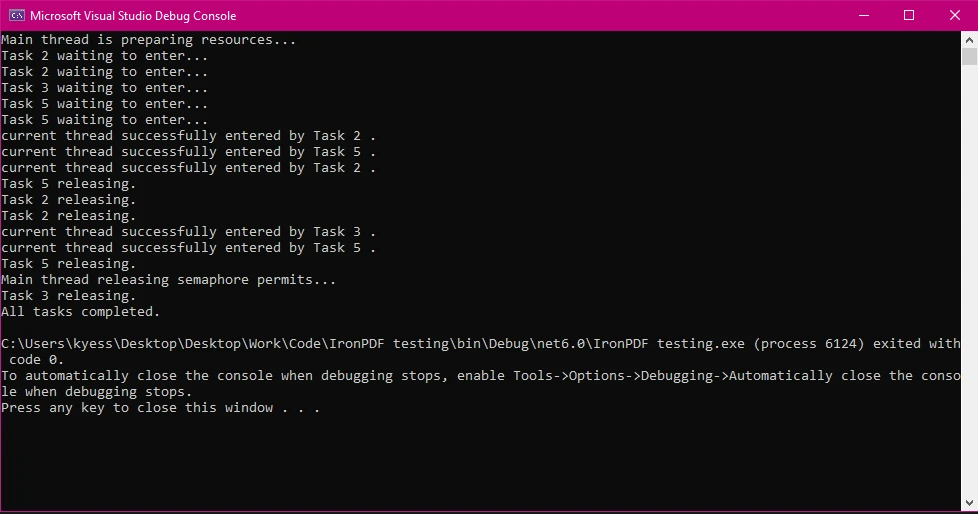
### Typowe przypadki użycia SemaphoreSlim
Niektóre typowe przypadki użycia SemaphoreSlim to:
* **Ograniczenie dostępu do baz danych lub systemów plików:** Zapobiega przeciążeniu tych zasobów zbyt wieloma równoczesnymi żądaniami.
* **Zarządzanie pulą wątków:** Może być używane do kontrolowania liczby wątków wykonujących określoną operację, co poprawia stabilność i wydajność.
## Używanie SemaphoreSlim z IronPDF dla bezpiecznej współbieżności
### Konfigurowanie IronPDF w środowisku wielowątkowym
Aby rozpocząć korzystanie z IronPDF w środowisku wielowątkowym, zacznij od zainstalowania [pakietu IronPDF NuGet](https://www.nuget.org/packages/IronPdf/). Możesz to zrobic przechodzac do Tools > NuGet Package Manager > NuGet Package Manager for Solution i wyszukujac IronPDF:
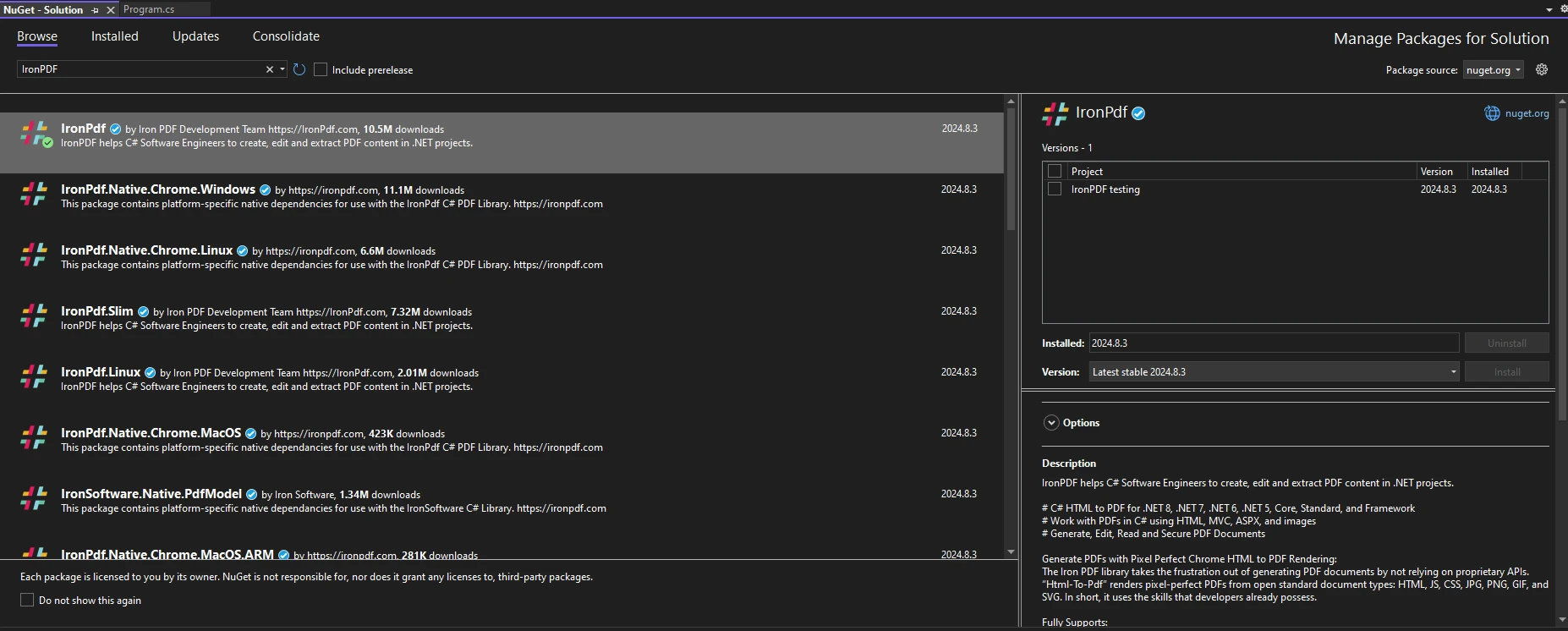
Lub, alternatywnie, uruchomienie poniższej komendy w konsoli Menedżera pakietów:
```shell
:ProductInstall
```
Aby rozpocząć korzystanie z IronPDF w swoim kodzie, upewnij się, że zamieściłeś instrukcję `using IronPdf` na początku pliku kodu. Aby uzyskać bardziej szczegółowy przewodnik dotyczący wprowadzania IronPDF do swojego środowiska, odwiedź stronę [wprowadzenia](/docs/).
### Kontrola dostępu do generowania PDF z SemaphoreSlim
Korzystając z SemaphoreSlim, można efektywnie kontrolować dostęp do zadań generowania PDF. Zapewnia to, że aplikacja nie próbuje generować zbyt wielu PDF jednocześnie, co mogłoby wpływać na wydajność lub powodować niepowodzenia.
Poniższy przykład kodu pokazuje podstawowe użycie SemaphoreSlim z IronPDF.
```csharp
using IronPdf;
using System;
using System.Threading;
using System.Threading.Tasks;
class Program
{
private static SemaphoreSlim _semaphore = new SemaphoreSlim(2); // Limit to 2 concurrent threads.
static async Task Main(string[] args)
{
var tasks = new Task[5];
for (int i = 0; i < tasks.Length; i++)
{
string htmlContent = $"<h1>PDF Document {i}</h1><p>This is a sample PDF content for task {i}.</p>";
string outputPath = $"output_{i}.pdf";
// Start multiple tasks to demonstrate controlled concurrency.
tasks[i] = GeneratePdfAsync(htmlContent, outputPath, i);
}
await Task.WhenAll(tasks);
}
static async Task GeneratePdfAsync(string htmlContent, string outputPath, int taskId)
{
Console.WriteLine($"Task {taskId} is waiting for access...");
// Wait to enter the semaphore.
await _semaphore.WaitAsync();
try
{
Console.WriteLine($"Task {taskId} has started PDF generation.");
ChromePdfRenderer renderer = new ChromePdfRenderer();
PdfDocument pdf = await renderer.RenderHtmlAsPdfAsync(htmlContent);
pdf.SaveAs(outputPath);
Console.WriteLine($"Task {taskId} has completed PDF generation.");
}
finally
{
// Ensure semaphore is released to allow other tasks to proceed.
_semaphore.Release();
Console.WriteLine($"Task {taskId} has released semaphore.");
}
}
}
```
W tym przykładzie najpierw zainicjowaliśmy SemaphoreSlim i ustawiliśmy początkową i maksymalną liczbę SemaphoreSlim na '2', ograniczając ją do dwóch równoczesnych generacji PDF. Następnie stworzyliśmy tablicę zadań, która jest używana do kontrolowania liczby zadań, które program ma wykonać, po czym korzystamy z pętli for, aby dynamicznie tworzyć PDF na podstawie liczby zadań w tablicy zadań.
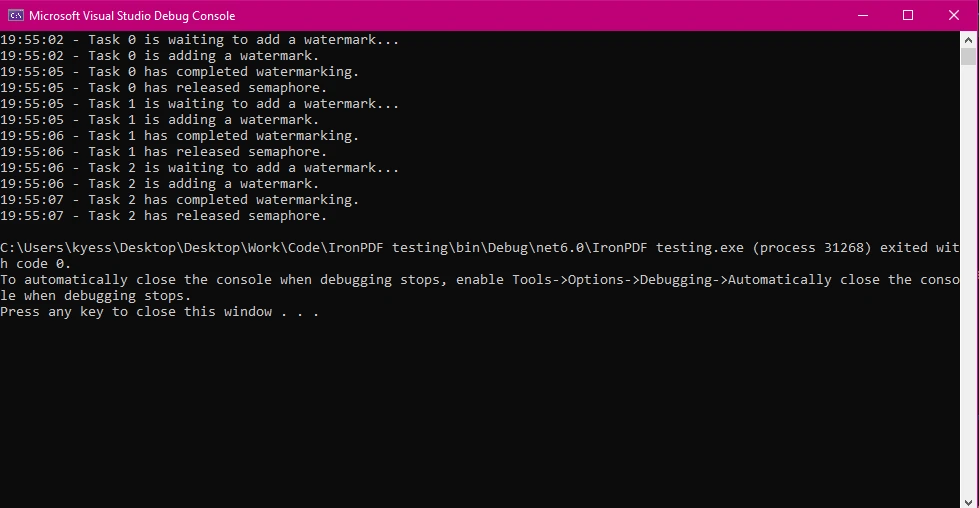
Metoda `WaitAsync()` jest następnie używana do wejścia do semafora, a `Release()` jest używana w bloku finally, aby zagwarantować, że semafor zostanie zawsze zwolniony, nawet jeśli wystąpi wyjątek. Logi wyjściowe konsole pokazują, kiedy każde zadanie się zaczyna, kończy i zwalnia semafor, co pozwala śledzić zachowanie współbieżności.
#### Wyjściowa konsola
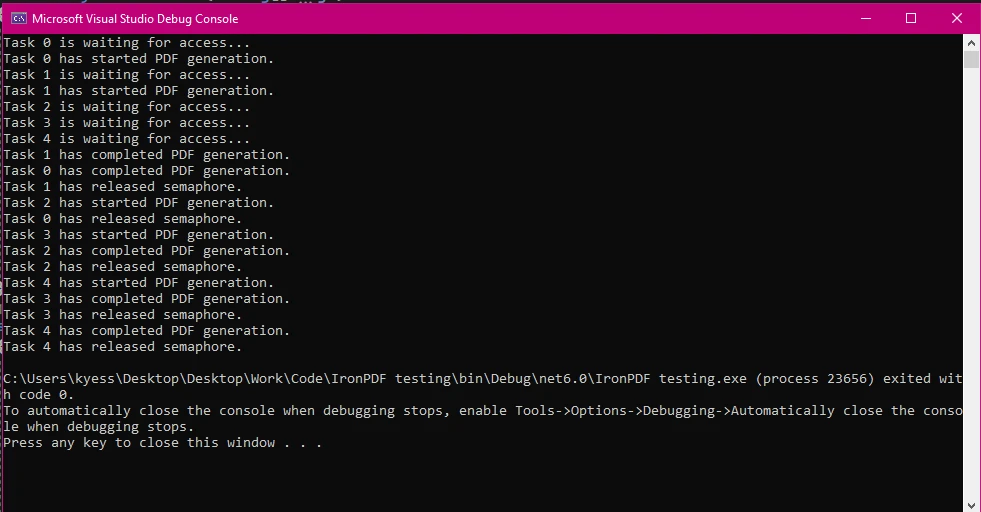
#### Wyjściowe pliki PDF
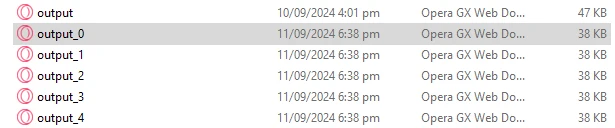
### Zapewnienie bezpieczeństwa wątków w zadaniach manipulacji PDF
Bezpieczeństwo wątków jest kluczowe, gdy wiele wątków wchodzi w interakcje z współdzielonymi zasobami. W manipulacji PDF, SemaphoreSlim zapewnia, że tylko określona liczba wątków może równocześnie modyfikować PDF, co zapobiega sytuacjom wyścigu i zapewnia spójność. W poniższym kodzie symulujemy scenariusz, w którym dodajemy znak wodny do wielu PDF, zapewniając, że tylko jedna operacja odbywa się w danym momencie.
```csharp
using IronPdf;
using System;
using System.Threading;
using System.Threading.Tasks;
class Program
{
private static SemaphoreSlim _semaphore = new SemaphoreSlim(1);
static async Task Main(string[] args)
{
// Setting array of tasks
var tasks = new Task[3];
for (int i = 0; i < tasks.Length; i++)
{
string inputPath = $"input_{i}.pdf"; // Input PDF file path
string outputPath = $"output_{i}.pdf"; // Output PDF file path
string watermarkText = @"
<img src='https://ironsoftware.com/img/products/ironpdf-logo-text-dotnet.svg'>
<h1>Iron Software</h1>";
// Start multiple tasks to add watermarks concurrently.
tasks[i] = AddWatermarkAsync(inputPath, outputPath, watermarkText, i);
}
await Task.WhenAll(tasks); // Wait for all tasks to finish.
}
static async Task AddWatermarkAsync(string input, string outputPath, string watermark, int taskId)
{
Console.WriteLine($"{DateTime.Now:HH:mm:ss} - Task {taskId} is waiting to add a watermark...");
// Wait to enter the semaphore.
await _semaphore.WaitAsync();
try
{
Console.WriteLine($"{DateTime.Now:HH:mm:ss} - Task {taskId} is adding a watermark.");
var pdf = PdfDocument.FromFile(input);
pdf.ApplyWatermark(watermark); // Add watermark
pdf.SaveAs(outputPath); // Save the modified PDF
Console.WriteLine($"{DateTime.Now:HH:mm:ss} - Task {taskId} has completed watermarking.");
}
finally
{
// Release the semaphore after the task is done.
_semaphore.Release();
Console.WriteLine($"{DateTime.Now:HH:mm:ss} - Task {taskId} has released semaphore.");
}
}
}
```
Ustawiając licznik semafora na 1 za pomocą `private static SemaphoreSlim _semaphore = new SemaphoreSlim(1);`, zapewniamy, że tylko jedno zadanie może jednocześnie manipulować plikami PDF.
#### Wynik konsoli
## Optymalizacja wydajności z SemaphoreSlim i IronPDF
### Zarządzanie operacjami wymagającymi dużych zasobów
IronPDF świetnie radzi sobie z operacjami wymagającymi dużych zasobów, takimi jak konwersja dużych plików HTML do PDF, i wyróżnia się w ich wykonywaniu w środowisku asynchronicznym. Używanie SemaphoreSlim do zarządzania tymi operacjami zapewnia, że aplikacja pozostaje responsywna, nie tracąc wydajności, nawet przy dużym obciążeniu.
Poniższy przykład kodu pokazuje scenariusz, w którym musimy ograniczyć liczbę równoczesnych konwersji dużych HTML do PDF, aby uniknąć przeciążenia zasobów systemu.
```csharp
using IronPdf;
using System;
using System.Threading;
using System.Threading.Tasks;
class Program
{
// Limit concurrent large PDF conversions to 2.
private static SemaphoreSlim _semaphore = new SemaphoreSlim(2);
static async Task Main(string[] args)
{
var tasks = new Task[4];
for (int i = 0; i < tasks.Length; i++)
{
string htmlContent = $"<h1>Large Document {i}</h1><p>Content for a large HTML file {i}.</p>";
string outputPath = $"large_output_{i}.pdf";
// Start multiple tasks to convert large HTML files to PDFs.
tasks[i] = ConvertLargeHtmlAsync(htmlContent, outputPath, i);
}
await Task.WhenAll(tasks); // Wait for all tasks to finish.
}
// Method to convert large HTML to PDF using SemaphoreSlim to control resource usage.
public static async Task ConvertLargeHtmlAsync(string htmlContent, string outputPath, int taskId)
{
Console.WriteLine($"Task {taskId} is waiting to start conversion...");
// Wait to enter the semaphore.
await _semaphore.WaitAsync();
try
{
Console.WriteLine($"Task {taskId} is converting large HTML to PDF.");
var renderer = new ChromePdfRenderer();
var pdf = await renderer.RenderHtmlAsPdfAsync(htmlContent); // Convert large HTML to PDF
pdf.SaveAs(outputPath); // Save the PDF file
Console.WriteLine($"Task {taskId} has completed conversion.");
}
finally
{
// Ensure the semaphore is released to allow other tasks to proceed.
_semaphore.Release();
Console.WriteLine($"Task {taskId} has released semaphore.");
}
}
}
```
Podczas pracy z zadaniami wymagającymi dużych zasobów, takimi jak konwersja dużych plików HTML do PDF, SemaphoreSlim może pomóc wyważyć obciążenie i optymalizować zużycie zasobów. Ustawiając limit 2 równoczesnych operacji, zapobiegamy przeciążeniu systemu przez zadania generowania PDF o dużym zużyciu zasobów. To podejście pomaga równomiernie rozłożyć obciążenie, poprawiając ogólną wydajność i stabilność aplikacji.
#### Obraz wyjściowy: Pliki wygenerowane tą metodą

### Unikanie zakleszczeń w zarządzaniu współbieżnością
Zakleszczenia mogą wystąpić, jeśli semafory nie są poprawnie zwalniane. Dobrą praktyką do zapamiętania jest użycie bloków try-finally, aby zapewnić, że semafory są zwalniane, nawet jeśli wystąpi wyjątek, zapobiegając zakleszczeniom i utrzymując płynność działania aplikacji. Niektóre najlepsze praktyki, które należy pamiętać, aby uniknąć zakleszczeń, to zawsze zwalnianie semafora w bloku finally oraz unikanie stosowania blokujących wywołań, takich jak `Wait()` i `Result` w asynchronicznym kodzie.
```csharp
using IronPdf;
using System;
using System.Threading;
using System.Threading.Tasks;
class Program
{
private static SemaphoreSlim _semaphore = new SemaphoreSlim(3);
static async Task Main(string[] args)
{
var tasks = new Task[3];
for (int i = 0; i < tasks.Length; i++)
{
string content = $"<h1>Document {i}</h1><p>Content for PDF {i}.</p>";
string path = $"safe_output_{i}.pdf";
// Start multiple tasks to demonstrate deadlock-free semaphore usage.
tasks[i] = SafePdfTaskAsync(content, path, i);
}
await Task.WhenAll(tasks); // Wait for all tasks to finish.
}
// Method demonstrating best practices for using SemaphoreSlim to avoid deadlocks.
public static async Task SafePdfTaskAsync(string content, string path, int taskId)
{
Console.WriteLine($"Task {taskId} is waiting to generate PDF...");
// Wait to enter the semaphore.
await _semaphore.WaitAsync();
try
{
Console.WriteLine($"Task {taskId} is generating PDF.");
var renderer = new ChromePdfRenderer();
var pdf = await renderer.RenderHtmlAsPdfAsync(content); // Render HTML to PDF
pdf.SaveAs(path); // Save the PDF
Console.WriteLine($"Task {taskId} has completed PDF generation.");
}
catch (Exception ex)
{
Console.WriteLine($"Task {taskId} encountered an error: {ex.Message}");
}
finally
{
// Always release the semaphore, even if an error occurs.
_semaphore.Release();
Console.WriteLine($"Task {taskId} has released semaphore.");
}
}
}
```
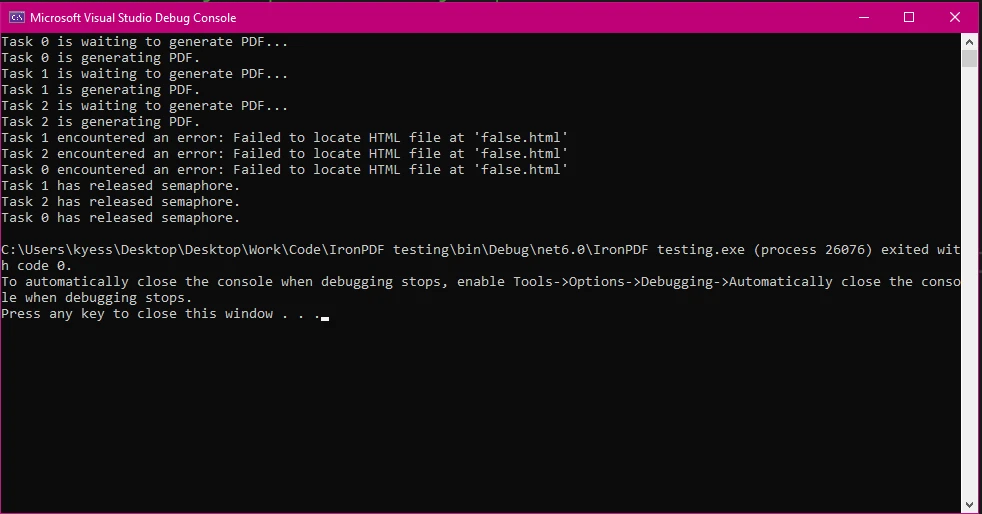
Używając bloku `try-catch-finally`, zagwarantowaliśmy, że obiekt SemaphoreSlim zostanie zawsze zwolniony, nawet jeśli wystąpi wyjątek, dzięki czemu zapobiegamy zakleszczeniom. Rejestrowanie błędów i właściwe zarządzanie zwalnianiem semaforów pozwala utrzymać stabilność programu i zapobiegać nieoczekiwanym zachowaniom.
Jak widać na obrazie wyjściowym poniżej, zasymulowałem błąd, próbując uczynić, aby program załadował plik HTML, który nie istnieje, ale nawet z tym błędem program wyświetla komunikat o błędzie, który mówi co poszło nie tak, a następnie zwalnia semafor za pomocą bloku finally.
## Korzyści z używania IronPDF do równoczesnego przetwarzania PDF
### Efektywne i niezawodne przetwarzanie PDF
IronPDF jest zaprojektowany do efektywnego obsługiwania zadań równoczesnego przetwarzania PDF, oferując wydajność i niezawodność przewyższającą wiele innych bibliotek PDF. Jego solidna architektura pozwala jej skalować się zgodnie z potrzebami aplikacji, co czyni go idealnym dla środowisk wymagających dużej wydajności. W porównaniu do innych bibliotek PDF, opierając się na kryteriach wydajności, łatwości użycia i solidności, IronPDF okazuje się być silnym konkurentem. Aby to pokazać, porównałem IronPDF z kilkoma innymi popularnymi bibliotekami PDF, takimi jak iText, PDFSharp, DinkToPdf i EvoPDF:
#### 1. **Wydajność**
**IronPDF:**
* **Szybkość renderowania:** IronPDF jest znany z szybkich i efektywnych możliwości renderowania, szczególnie podczas konwersji HTML do PDF. Korzysta z renderowania opartego na Chrome, co zapewnia wysoką wierność z oryginalną treścią HTML, w tym egzekucję CSS i JavaScript.
* **Zarządzanie zasobami:** IronPDF jest zoptymalizowany do obsługi dużych i złożonych PDF przy mniejszym użyciu pamięci w porównaniu do innych bibliotek, co czyni go odpowiednim dla aplikacji o dużym wolumenie.
* **Operacje asynchroniczne:** Wspiera asynchroniczne generowanie PDF, co pozwala na lepszą wydajność w aplikacjach webowych, gdzie responsywność jest kluczowa.
**iText:**
* **Szybkość renderowania:** iText oferuje dobrą wydajność dla PDF z dużą ilością tekstu, ale może znacznie zwalniać w przypadku złożonych układów lub obrazów.
* **Zarządzanie zasobami:** Użycie pamięci może być większe przy iText, zwłaszcza przy obsłudze dużych dokumentów lub złożonych manipulacjach, co w niektórych przypadkach prowadzi do wąskich gardeł wydajności.
**PDFSharp:**
* **Szybkość renderowania:** PDFSharp jest generalnie wolniejszy w porównaniu do IronPDF w przypadku złożonych układów lub konwersji z HTML, ponieważ brakuje mu natywnego silnika renderowania HTML.
* **Zarządzanie zasobami:** Mniej zoptymalizowane dla zużycia pamięci i może mieć problemy z obsługą dużych plików lub dokumentów zawierających liczne obrazy.
**DinkToPdf:**
* **Szybkość renderowania:** DinkToPdf wykorzystuje silnik wkhtmltopdf, który sprawdza się w przypadku podstawowej konwersji HTML do PDF, ale może mieć trudności z bardziej złożoną lub dynamiczną treścią.
* **Zarządzanie zasobami:** Często wymaga znacznej ilości pamięci i mocy obliczeniowej, a także nie posiada natywnej obsługi operacji asynchronicznych, co ogranicza jego wydajność w scenariuszach o dużym obciążeniu.
**EvoPDF:**
* **Szybkość renderowania:** EvoPDF, podobnie jak IronPDF, oferuje renderowanie oparte na przeglądarce Chrome, zapewniając dobrą wydajność, zwłaszcza w przypadku konwersji HTML do PDF.
* **Zarządzanie zasobami:** Jest dobrze zoptymalizowane, ale w niektórych scenariuszach może nadal zużywać więcej zasobów w porównaniu z IronPDF ze względu na mniej agresywne optymalizacje.
#### 2. **Łatwość użytkowania**
**IronPDF:**
* **Projekt API:** IronPDF oferuje nowoczesne, intuicyjne API, które jest łatwe w użyciu dla programistów na każdym poziomie zaawansowania. Biblioteka została zaprojektowana tak, aby płynnie współpracować z aplikacjami .NET, co czyni ją doskonałym wyborem dla programistów C#.
* **Dokumentacja i wsparcie:** Kompleksowa dokumentacja, duża liczba przykładów kodu oraz doskonała obsługa klienta ułatwiają rozpoczęcie pracy i szybkie rozwiązywanie problemów.
* **Instalacja i integracja:** Łatwa instalacja za pośrednictwem NuGet i płynna integracja z istniejącymi projektami .NET, wymagająca minimalnej konfiguracji.
**iText:**
* **Projekt API:** iText ma stromy krzywą uczenia się, z bardziej złożonym API, które może być przytłaczające dla początkujących. Jego elastyczność odbywa się kosztem prostoty.
* **Dokumentacja i wsparcie:** Chociaż oprogramowanie jest dobrze udokumentowane, rozbudowane opcje konfiguracyjne mogą utrudniać znalezienie prostych przykładów dotyczących typowych zadań.
* **Instalacja i integracja:** Dostępne za pośrednictwem NuGet, ale skuteczna integracja wymaga głębszego zrozumienia API.
**PDFSharp:**
* **Projekt API:** PDFSharp jest zaprojektowany do prostych zadań PDF, ale brakuje mu zaawansowanych funkcji w pakiecie, co może ograniczać jego użycie w bardziej złożonych scenariuszach.
* **Dokumentacja i wsparcie:** Dostępna jest podstawowa dokumentacja, ale jest ona mniej obszerna i brakuje w niej szczegółowych przykładów zaawansowanego użytkowania w porównaniu z IronPDF.
* **Instalacja i integracja:** Łatwa instalacja za pośrednictwem NuGet, ale oferuje ograniczoną funkcjonalność konwersji HTML do PDF.
**DinkToPdf:**
* **Projekt API:** API DinkToPdf jest stosunkowo proste, ale mniej dopracowane w porównaniu z IronPDF. Narzędzie to służy głównie do konwersji HTML na PDF i oferuje mniej funkcji do bezpośredniej edycji plików PDF.
* **Dokumentacja i wsparcie:** Dokumentacja jest ograniczona, a wsparcie społeczności nie jest tak rozbudowane jak w przypadku innych bibliotek, co utrudnia rozwiązywanie problemów.
* **Instalacja i integracja:** Instalacja może być bardziej złożona i wymagać dodatkowych zależności, takich jak wkhtmltopdf, co może skomplikować konfigurację.
**EvoPDF:**
* **Projekt API:** EvoPDF oferuje proste API podobne do IronPDF, skoncentrowane głównie na konwersji HTML do PDF z myślą o łatwości użytkowania.
* **Dokumentacja i wsparcie:** Dobrze udokumentowane z dobrymi opcjami wsparcia, ale nie tak bogate w przykłady tworzone przez społeczność jak IronPDF.
* **Instalacja i integracja:** Łatwa integracja z projektami .NET dzięki dostępnym pakietom NuGet.
#### 3. **Solidność**
**IronPDF:**
* **Zestaw funkcji:** IronPDF jest niezwykle niezawodny i obsługuje szeroki zakres funkcji, w tym konwersję HTML do PDF, edycję plików PDF, wyodrębnianie tekstu, szyfrowanie, adnotacje i podpisy cyfrowe.
* **Obsługa błędów:** Oferuje solidną obsługę błędów i zarządzanie wyjątkami, dzięki czemu jest niezawodna w środowiskach produkcyjnych.
* **Kompatybilność:** W pełni kompatybilny z .NET Core, .NET 5+ oraz starszymi wersjami .NET Framework, co sprawia, że jest wszechstronny w różnych typach projektów.
**iText:**
* **Zestaw funkcji:** iText jest niezwykle solidny z szerokim zestawem funkcji wspierających prawie każde zadanie związane z PDF, w tym złożone manipulacje i obsługę formularzy.
* **Obsługa błędów:** Dobra obsługa błędów, ale zarządzanie nią może być skomplikowane ze względu na złożoność biblioteki.
* **Kompatybilność:** Doskonale nadaje się do szerokiego zakresu środowisk, w tym .NET Framework i .NET Core.
**PDFSharp:**
* **Zestaw funkcji:** Podstawowe funkcje tworzenia i edycji plików PDF. Brakuje niektórych zaawansowanych funkcji, takich jak konwersja HTML do PDF i bardziej zaawansowana edycja dokumentów.
* **Obsługa błędów:** Podstawowa obsługa błędów; jest mniej niezawodny w złożonych scenariuszach w porównaniu z bardziej rozbudowanymi bibliotekami, takimi jak IronPDF.
* **Kompatybilność:** Kompatybilny z .NET Framework i .NET Core, ale z ograniczoną funkcjonalnością zaawansowaną.
**DinkToPdf:**
* **Zestaw funkcji:** Skupia się głównie na konwersji HTML do PDF. Ograniczone możliwości bezpośredniej edycji plików PDF oraz brak zaawansowanych funkcji, takich jak adnotacje i obsługa formularzy.
* **Obsługa błędów:** Podstawowa obsługa błędów; podatne na awarie lub zawieszanie się w przypadku złożonego kodu HTML lub dużych plików.
* **Kompatybilność:** Działa z .NET Core i .NET Framework, ale wymaga zewnętrznych zależności, co może powodować problemy z kompatybilnością.
**EvoPDF:**
* **Zestaw funkcji:** Oferuje rozbudowany zestaw funkcji podobnych do IronPDF, w tym zaawansowaną konwersję HTML do PDF oraz pewne możliwości edycji dokumentów.
* **Obsługa błędów:** Solidna obsługa błędów i niezawodna wydajność w środowiskach produkcyjnych.
* **Kompatybilność:** W pełni kompatybilny z .NET Core, .NET Framework i nowszymi wersjami .NET, co czyni go wszechstronnym i niezawodnym.
#### Podsumowanie
* **Wydajność:** IronPDF i EvoPDF prowadzą pod względem wydajności dzięki ich silnikom renderowania opartym na Chrome, podczas gdy iText i PDFSharp mogą pozostawać w tyle przy obsłudze złożonych dokumentów.
* **Łatwość użytkowania:** IronPDF wyróżnia się intuicyjnym interfejsem API i obszerną dokumentacją, dzięki czemu jest dostępny dla programistów na każdym poziomie zaawansowania. iText oferuje moc za cenę prostoty, podczas gdy DinkToPdf i PDFSharp są łatwiejsze, ale mniej bogate w funkcje.
* **Solidność:** IronPDF i iText dostarczają najbardziej solidne zestawy funkcji, z IronPDF oferującym prostszą integrację i nowoczesne funkcje, takie jak wsparcie asynchroniczne, podczas gdy iText obejmuje bardziej niszowe przypadki użycia ze stromą krzywą uczenia się.
### Kompleksowa obsługa programowania asynchronicznego
IronPDF płynnie integruje się z modelami programowania [asynchronicznego](https://learn.microsoft.com/en-us/dotnet/csharp/asynchronous-programming/), uzupełniając mechanizmy kontroli współbieżności, takie jak SemaphoreSlim. Dzięki temu programiści mogą tworzyć responsywne i wydajne aplikacje przy minimalnym wysiłku.
IronPDF oferuje również obszerną dokumentację i zasoby wsparcia, które pomagają programistom zrozumieć i wdrożyć skuteczne praktyki obsługi błędów. To kompleksowe wsparcie jest cenne przy rozwiązywaniu problemów i optymalizacji operacji związanych z plikami PDF w projektach .NET.
IronPDF oferuje:
* **Wszechstronna Dokumentacja:** Obszerna i przyjazna dla użytkownika dokumentacja obejmująca wszystkie funkcje.
* **24/5 Wsparcie:** Aktywne wsparcie inżynierów jest dostępne.
* **Samouczki wideo:** Krok po kroku przewodniki wideo dostępne na YouTube.
* **Forum społecznościowe:** Zaangażowana społeczność dla dodatkowego wsparcia.
* **Dokumentacja API:** Oferuje dokumentację API, abyś mógł w pełni korzystać z tego, co nasze narzędzia mają do zaoferowania.
Więcej informacji można znaleźć w obszernej [dokumentacji](/docs/) IronPDF.
## Wnioski
Wykorzystanie SemaphoreSlim do zarządzania współbieżnością w aplikacjach .NET ma kluczowe znaczenie, zwłaszcza w przypadku zadań wymagających dużych zasobów, takich jak przetwarzanie plików PDF. Dzięki integracji SemaphoreSlim z IronPDF programiści mogą uzyskać bezpieczną, wydajną i niezawodną kontrolę współbieżności, zapewniając, że ich aplikacje pozostają responsywne i wydajne.
Dowiedz się, jak IronPDF może usprawnić procesy przetwarzania plików PDF. Wypróbuj je samodzielnie z [bezpłatną wersją próbną](trial-license) zaczynającą się od zaledwie `$liteLicense`, jeśli chcesz nadal korzystać z tego potężnego narzędzia w swoich projektach.
Zarządzanie współbieżnością jest kluczowym aspektem aplikacji wysokowydajnych w C#. Zapewnia to efektywne wykorzystanie zasobów przy jednoczesnym unikaniu potencjalnych konfliktów lub wąskich gardeł wydajności, dlatego posiadanie lekkiego semafora kontrolującego dostęp może być bardzo pomocne. W tym miejscu do gry wkracza SemaphoreSlim. SemaphoreSlim to lekki prymityw synchronizacji, który kontroluje dostęp do zasobów, ostatecznie zapobiegając sytuacjom wyścigu i zapewniając bezpieczeństwo wątków.
Co jeśli chciałbyś wdrożyć to obok biblioteki PDF do zarządzania procesami generowania PDF? Możesz szukać potężnej biblioteki PDF, gdzie pojawia się IronPDF. IronPDF to solidna biblioteka generowania i manipulacji PDF dla programistów .NET, która może wiele zyskać na zarządzaniu współbieżnością, kiedy jest używana w środowiskach wielowątkowych.
Jeśli chcesz zobaczyć SemaphoreSlim i IronPDF w działaniu, koniecznie czytaj dalej, gdy będziemy badać korzyści z używania SemaphoreSlim i jak zintegrować go z IronPDF, aby bezpiecznie obsługiwać równoczesne operacje, poprawiać wydajność i zapewniać niezawodne przetwarzanie PDF.
Understanding SemaphoreSlim in C#
Co to jest SemaphoreSlim?
SemaphoreSlim to prymityw synchronizacji w .NET, który ogranicza liczbę wątków mogących równocześnie uzyskiwać dostęp do określonego zasobu lub puli zasobów. Jest lekką wersją pełnej klasy Semaphore, zaprojektowaną do bardziej efektywnego działania w sytuacjach, gdzie wystarcza prostszy i szybszy semafor.
Niektóre korzyści z używania SemaphoreSlim to zmniejszone obciążenie systemu w porównaniu do Semaphore, idealne zarządzanie ograniczonymi zasobami (takimi jak połączenia z bazą danych lub dostęp do plików), oraz obsługa asynchronicznych metod oczekiwania, co czyni go dobrze dopasowanym do nowoczesnych wzorców programowania async/await.
Przykład kodu podstawowego użycia SemaphoreSlim
using System;using System.Threading;using System.Threading.Tasks;class Program{ // Semaphore count private static SemaphoreSlim _semaphore = new SemaphoreSlim(3); // Limit to 3 concurrent threads. static async TaskMain(string[] args) { // Start tasks that will wait on the semaphore. var tasks = new Task[5]; for (int i = 0; i < tasks.Length; i++) { tasks[i] = Task.Run(() => AccessResource(i)); } // Simulate some work in the main thread (e.g., initialization).Console.WriteLine("Main thread is preparing resources..."); awaitTask.Delay(2000); // Simulate initialization delay. // Main thread calls release, releases semaphore permits to allow waiting tasks to proceed.Console.WriteLine("Main thread releasing semaphore permits..."); _semaphore.Release(2); // Releases 2 permits, allowing up to 2 tasks to proceed. // Wait for all tasks to complete. awaitTask.WhenAll(tasks);Console.WriteLine("All tasks completed."); } static async TaskAccessResource(int id) {Console.WriteLine($"Task {id} waiting to enter..."); await _semaphore.WaitAsync(); try {Console.WriteLine($"Current thread successfully entered by Task {id}."); awaitTask.Delay(1000); // Simulate work. } finally {Console.WriteLine($"Task {id} releasing."); _semaphore.Release(); } }}
using System;
using System.Threading;
using System.Threading.Tasks;

class Program
{
    // Semaphore count
    private static SemaphoreSlim _semaphore = new SemaphoreSlim(3); // Limit to 3 concurrent threads.

    static async Task Main(string[] args)
    {
        // Start tasks that will wait on the semaphore.
        var tasks = new Task[5];

        for (int i = 0; i < tasks.Length; i++)
        {
            tasks[i] = Task.Run(() => AccessResource(i));
        }

        // Simulate some work in the main thread (e.g., initialization).
        Console.WriteLine("Main thread is preparing resources...");
        await Task.Delay(2000);  // Simulate initialization delay.

        // Main thread calls release, releases semaphore permits to allow waiting tasks to proceed.
        Console.WriteLine("Main thread releasing semaphore permits...");
        _semaphore.Release(2);  // Releases 2 permits, allowing up to 2 tasks to proceed.

        // Wait for all tasks to complete.
        await Task.WhenAll(tasks);
        Console.WriteLine("All tasks completed.");
    }

    static async Task AccessResource(int id)
    {
        Console.WriteLine($"Task {id} waiting to enter...");
        await _semaphore.WaitAsync();

        try
        {
            Console.WriteLine($"Current thread successfully entered by Task {id}.");
            await Task.Delay(1000); // Simulate work.
        }
        finally
        {
            Console.WriteLine($"Task {id} releasing.");
            _semaphore.Release();
        }
    }
}
ImportsSystemImportsSystem.ThreadingImportsSystem.Threading.TasksModuleProgram ' Semaphore count Private _semaphore As New SemaphoreSlim(3) ' Limit to 3 concurrent threads.Async Function Main(args AsString()) AsTask ' Start tasks that will wait on the semaphore. Dim tasks(4) AsTask For i AsInteger = 0 To tasks.Length - 1 tasks(i) = Task.Run(Function() AccessResource(i)) Next ' Simulate some work in the main thread (e.g., initialization).Console.WriteLine("Main thread is preparing resources...")AwaitTask.Delay(2000) ' Simulate initialization delay. ' Main thread calls release, releases semaphore permits to allow waiting tasks to proceed.Console.WriteLine("Main thread releasing semaphore permits...") _semaphore.Release(2) ' Releases 2 permits, allowing up to 2 tasks to proceed. ' Wait for all tasks to complete.AwaitTask.WhenAll(tasks)Console.WriteLine("All tasks completed.") End FunctionAsync Function AccessResource(id AsInteger) AsTaskConsole.WriteLine($"Task {id} waiting to enter...")Await _semaphore.WaitAsync()TryConsole.WriteLine($"Current thread successfully entered by Task {id}.")AwaitTask.Delay(1000) ' Simulate work.FinallyConsole.WriteLine($"Task {id} releasing.") _semaphore.Release()EndTry End FunctionEndModule
Imports System
Imports System.Threading
Imports System.Threading.Tasks

Module Program
    ' Semaphore count
    Private _semaphore As New SemaphoreSlim(3) ' Limit to 3 concurrent threads.

    Async Function Main(args As String()) As Task
        ' Start tasks that will wait on the semaphore.
        Dim tasks(4) As Task

        For i As Integer = 0 To tasks.Length - 1
            tasks(i) = Task.Run(Function() AccessResource(i))
        Next

        ' Simulate some work in the main thread (e.g., initialization).
        Console.WriteLine("Main thread is preparing resources...")
        Await Task.Delay(2000)  ' Simulate initialization delay.

        ' Main thread calls release, releases semaphore permits to allow waiting tasks to proceed.
        Console.WriteLine("Main thread releasing semaphore permits...")
        _semaphore.Release(2)  ' Releases 2 permits, allowing up to 2 tasks to proceed.

        ' Wait for all tasks to complete.
        Await Task.WhenAll(tasks)
        Console.WriteLine("All tasks completed.")
    End Function

    Async Function AccessResource(id As Integer) As Task
        Console.WriteLine($"Task {id} waiting to enter...")
        Await _semaphore.WaitAsync()

        Try
            Console.WriteLine($"Current thread successfully entered by Task {id}.")
            Await Task.Delay(1000) ' Simulate work.
        Finally
            Console.WriteLine($"Task {id} releasing.")
            _semaphore.Release()
        End Try
    End Function
End Module
Podczas działania programu, liczba semaforów może dynamicznie osiągnąć zero wątków, gdy wszystkie dostępne pozwolenia zostaną pobrane przez wątki. Ten stan oznacza, że osiągnięto maksymalną dopuszczalną liczbę równoczesnych dostępów.
Jeśli byś chciał, mógłbyś ustawić początkową i maksymalną liczbę wątków, zaczynając początkową liczbę semaforów od zera, a następnie użyć osobnego zadania inicjalizacyjnego, które zwiększa liczbę semaforów, gdy zasób jest gotowy, pozwalając wybranej liczbie wątków na kontynuację. Gdy liczba semaforów wynosi zero, wątki będą czekać, próbując wejść do semafora, określane jest to jako "oczekiwanie blokujące".
Mógłbyś śledzić poprzednią liczbę semaforów, aby dostosować zachowanie semafora na podstawie wcześniejszej liczby. Natomiast możesz manipulować semaforem odpowiednio (np. przez zwolnienie lub oczekiwanie). Jak wątki się zwalniają, liczba semaforów jest zmniejszana.
Wynik konsoli
Typowe przypadki użycia SemaphoreSlim
Niektóre typowe przypadki użycia SemaphoreSlim to:
Ograniczenie dostępu do baz danych lub systemów plików: Zapobiega przeciążeniu tych zasobów zbyt wieloma równoczesnymi żądaniami.
Zarządzanie pulą wątków: Może być używane do kontrolowania liczby wątków wykonujących określoną operację, co poprawia stabilność i wydajność.
Używanie SemaphoreSlim z IronPDF dla bezpiecznej współbieżności
Konfigurowanie IronPDF w środowisku wielowątkowym
Aby rozpocząć korzystanie z IronPDF w środowisku wielowątkowym, zacznij od zainstalowania pakietu IronPDF NuGet. Możesz to zrobic przechodzac do Tools > NuGet Package Manager > NuGet Package Manager for Solution i wyszukujac IronPDF:
Lub, alternatywnie, uruchomienie poniższej komendy w konsoli Menedżera pakietów:
PM > Install-Package IronPdf
Install-Package IronPdf
Aby rozpocząć korzystanie z IronPDF w swoim kodzie, upewnij się, że zamieściłeś instrukcję using IronPdf na początku pliku kodu. Aby uzyskać bardziej szczegółowy przewodnik dotyczący wprowadzania IronPDF do swojego środowiska, odwiedź stronę wprowadzenia.
Kontrola dostępu do generowania PDF z SemaphoreSlim
Korzystając z SemaphoreSlim, można efektywnie kontrolować dostęp do zadań generowania PDF. Zapewnia to, że aplikacja nie próbuje generować zbyt wielu PDF jednocześnie, co mogłoby wpływać na wydajność lub powodować niepowodzenia.
Poniższy przykład kodu pokazuje podstawowe użycie SemaphoreSlim z IronPDF.
using IronPdf;using System;using System.Threading;using System.Threading.Tasks;class Program{ private static SemaphoreSlim _semaphore = new SemaphoreSlim(2); // Limit to 2 concurrent threads. static async TaskMain(string[] args) { var tasks = new Task[5]; for (int i = 0; i < tasks.Length; i++) { string htmlContent = $"<h1>PDF Document {i}</h1><p>This is a sample PDF content for task {i}.</p>"; string outputPath = $"output_{i}.pdf"; // Start multiple tasks to demonstrate controlled concurrency. tasks[i] = GeneratePdfAsync(htmlContent, outputPath, i); } awaitTask.WhenAll(tasks); } static async TaskGeneratePdfAsync(string htmlContent, string outputPath, int taskId) {Console.WriteLine($"Task {taskId} is waiting for access..."); // Wait to enter the semaphore. await _semaphore.WaitAsync(); try {Console.WriteLine($"Task {taskId} has started PDF generation."); ChromePdfRenderer renderer = new ChromePdfRenderer(); PdfDocument pdf = await renderer.RenderHtmlAsPdfAsync(htmlContent); pdf.SaveAs(outputPath);Console.WriteLine($"Task {taskId} has completed PDF generation."); } finally { // Ensure semaphore is released to allow other tasks to proceed. _semaphore.Release();Console.WriteLine($"Task {taskId} has released semaphore."); } }}
using IronPdf;
using System;
using System.Threading;
using System.Threading.Tasks;

class Program
{
    private static SemaphoreSlim _semaphore = new SemaphoreSlim(2); // Limit to 2 concurrent threads.

    static async Task Main(string[] args)
    {
        var tasks = new Task[5];

        for (int i = 0; i < tasks.Length; i++)
        {
            string htmlContent = $"<h1>PDF Document {i}</h1><p>This is a sample PDF content for task {i}.</p>";
            string outputPath = $"output_{i}.pdf";

            // Start multiple tasks to demonstrate controlled concurrency.
            tasks[i] = GeneratePdfAsync(htmlContent, outputPath, i);
        }

        await Task.WhenAll(tasks);
    }

    static async Task GeneratePdfAsync(string htmlContent, string outputPath, int taskId)
    {
        Console.WriteLine($"Task {taskId} is waiting for access...");

        // Wait to enter the semaphore.
        await _semaphore.WaitAsync();

        try
        {
            Console.WriteLine($"Task {taskId} has started PDF generation.");
            ChromePdfRenderer renderer = new ChromePdfRenderer();
            PdfDocument pdf = await renderer.RenderHtmlAsPdfAsync(htmlContent);
            pdf.SaveAs(outputPath);
            Console.WriteLine($"Task {taskId} has completed PDF generation.");
        }
        finally
        {
            // Ensure semaphore is released to allow other tasks to proceed.
            _semaphore.Release();
            Console.WriteLine($"Task {taskId} has released semaphore.");
        }
    }
}
ImportsIronPdfImportsSystemImportsSystem.ThreadingImportsSystem.Threading.TasksModuleProgram Private _semaphore As New SemaphoreSlim(2) ' Limit to 2 concurrent threads. Sub Main(args AsString()) Dim tasks(4) AsTask For i AsInteger = 0 To tasks.Length - 1 Dim htmlContent AsString = $"<h1>PDF Document {i}</h1><p>This is a sample PDF content for task {i}.</p>" Dim outputPath AsString = $"output_{i}.pdf" ' Start multiple tasks to demonstrate controlled concurrency. tasks(i) = GeneratePdfAsync(htmlContent, outputPath, i) NextTask.WhenAll(tasks).Wait() End Sub PrivateAsync Function GeneratePdfAsync(htmlContent AsString, outputPath AsString, taskId AsInteger) AsTaskConsole.WriteLine($"Task {taskId} is waiting for access...") ' Wait to enter the semaphore.Await _semaphore.WaitAsync()TryConsole.WriteLine($"Task {taskId} has started PDF generation.") Dim renderer As New ChromePdfRenderer() Dim pdf AsPdfDocument = Await renderer.RenderHtmlAsPdfAsync(htmlContent) pdf.SaveAs(outputPath)Console.WriteLine($"Task {taskId} has completed PDF generation.")Finally ' Ensure semaphore is released to allow other tasks to proceed. _semaphore.Release()Console.WriteLine($"Task {taskId} has released semaphore.")EndTry End FunctionEndModule
Imports IronPdf
Imports System
Imports System.Threading
Imports System.Threading.Tasks

Module Program
    Private _semaphore As New SemaphoreSlim(2) ' Limit to 2 concurrent threads.

    Sub Main(args As String())
        Dim tasks(4) As Task

        For i As Integer = 0 To tasks.Length - 1
            Dim htmlContent As String = $"<h1>PDF Document {i}</h1><p>This is a sample PDF content for task {i}.</p>"
            Dim outputPath As String = $"output_{i}.pdf"

            ' Start multiple tasks to demonstrate controlled concurrency.
            tasks(i) = GeneratePdfAsync(htmlContent, outputPath, i)
        Next

        Task.WhenAll(tasks).Wait()
    End Sub

    Private Async Function GeneratePdfAsync(htmlContent As String, outputPath As String, taskId As Integer) As Task
        Console.WriteLine($"Task {taskId} is waiting for access...")

        ' Wait to enter the semaphore.
        Await _semaphore.WaitAsync()

        Try
            Console.WriteLine($"Task {taskId} has started PDF generation.")
            Dim renderer As New ChromePdfRenderer()
            Dim pdf As PdfDocument = Await renderer.RenderHtmlAsPdfAsync(htmlContent)
            pdf.SaveAs(outputPath)
            Console.WriteLine($"Task {taskId} has completed PDF generation.")
        Finally
            ' Ensure semaphore is released to allow other tasks to proceed.
            _semaphore.Release()
            Console.WriteLine($"Task {taskId} has released semaphore.")
        End Try
    End Function
End Module
W tym przykładzie najpierw zainicjowaliśmy SemaphoreSlim i ustawiliśmy początkową i maksymalną liczbę SemaphoreSlim na '2', ograniczając ją do dwóch równoczesnych generacji PDF. Następnie stworzyliśmy tablicę zadań, która jest używana do kontrolowania liczby zadań, które program ma wykonać, po czym korzystamy z pętli for, aby dynamicznie tworzyć PDF na podstawie liczby zadań w tablicy zadań.
Metoda WaitAsync() jest następnie używana do wejścia do semafora, a Release() jest używana w bloku finally, aby zagwarantować, że semafor zostanie zawsze zwolniony, nawet jeśli wystąpi wyjątek. Logi wyjściowe konsole pokazują, kiedy każde zadanie się zaczyna, kończy i zwalnia semafor, co pozwala śledzić zachowanie współbieżności.
Wyjściowa konsola
Wyjściowe pliki PDF
Zapewnienie bezpieczeństwa wątków w zadaniach manipulacji PDF
Bezpieczeństwo wątków jest kluczowe, gdy wiele wątków wchodzi w interakcje z współdzielonymi zasobami. W manipulacji PDF, SemaphoreSlim zapewnia, że tylko określona liczba wątków może równocześnie modyfikować PDF, co zapobiega sytuacjom wyścigu i zapewnia spójność. W poniższym kodzie symulujemy scenariusz, w którym dodajemy znak wodny do wielu PDF, zapewniając, że tylko jedna operacja odbywa się w danym momencie.
using IronPdf;using System;using System.Threading;using System.Threading.Tasks;class Program{ private static SemaphoreSlim _semaphore = new SemaphoreSlim(1); static async TaskMain(string[] args) { // Setting array of tasks var tasks = new Task[3]; for (int i = 0; i < tasks.Length; i++) { string inputPath = $"input_{i}.pdf"; // Input PDF file path string outputPath = $"output_{i}.pdf"; // Output PDF file path string watermarkText = @"<img src='https://ironsoftware.com/img/products/ironpdf-logo-text-dotnet.svg'><h1>Iron Software</h1>"; // Start multiple tasks to add watermarks concurrently. tasks[i] = AddWatermarkAsync(inputPath, outputPath, watermarkText, i); } awaitTask.WhenAll(tasks); // Wait for all tasks to finish. } static async TaskAddWatermarkAsync(string input, string outputPath, string watermark, int taskId) {Console.WriteLine($"{DateTime.Now:HH:mm:ss} - Task {taskId} is waiting to add a watermark..."); // Wait to enter the semaphore. await _semaphore.WaitAsync(); try {Console.WriteLine($"{DateTime.Now:HH:mm:ss} - Task {taskId} is adding a watermark."); var pdf = PdfDocument.FromFile(input); pdf.ApplyWatermark(watermark); // Add watermark pdf.SaveAs(outputPath); // Save the modified PDFConsole.WriteLine($"{DateTime.Now:HH:mm:ss} - Task {taskId} has completed watermarking."); } finally { // Release the semaphore after the task is done. _semaphore.Release();Console.WriteLine($"{DateTime.Now:HH:mm:ss} - Task {taskId} has released semaphore."); } }}
using IronPdf;
using System;
using System.Threading;
using System.Threading.Tasks;

class Program
{
    private static SemaphoreSlim _semaphore = new SemaphoreSlim(1);

    static async Task Main(string[] args)
    {
        // Setting array of tasks
        var tasks = new Task[3];

        for (int i = 0; i < tasks.Length; i++)
        {
            string inputPath = $"input_{i}.pdf";  // Input PDF file path
            string outputPath = $"output_{i}.pdf";  // Output PDF file path
            string watermarkText = @"
<img src='https://ironsoftware.com/img/products/ironpdf-logo-text-dotnet.svg'>
<h1>Iron Software</h1>";

            // Start multiple tasks to add watermarks concurrently.
            tasks[i] = AddWatermarkAsync(inputPath, outputPath, watermarkText, i);
        }

        await Task.WhenAll(tasks); // Wait for all tasks to finish.
    }

    static async Task AddWatermarkAsync(string input, string outputPath, string watermark, int taskId)
    {
        Console.WriteLine($"{DateTime.Now:HH:mm:ss} - Task {taskId} is waiting to add a watermark...");

        // Wait to enter the semaphore.
        await _semaphore.WaitAsync();

        try
        {
            Console.WriteLine($"{DateTime.Now:HH:mm:ss} - Task {taskId} is adding a watermark.");
            var pdf = PdfDocument.FromFile(input);
            pdf.ApplyWatermark(watermark); // Add watermark
            pdf.SaveAs(outputPath); // Save the modified PDF
            Console.WriteLine($"{DateTime.Now:HH:mm:ss} - Task {taskId} has completed watermarking.");
        }
        finally
        {
            // Release the semaphore after the task is done.
            _semaphore.Release();
            Console.WriteLine($"{DateTime.Now:HH:mm:ss} - Task {taskId} has released semaphore.");
        }
    }
}
ImportsIronPdfImportsSystemImportsSystem.ThreadingImportsSystem.Threading.TasksModuleProgram Private _semaphore As New SemaphoreSlim(1)Async Function Main(args AsString()) AsTask ' Setting array of tasks Dim tasks(2) AsTask For i AsInteger = 0 To tasks.Length - 1 Dim inputPath AsString = $"input_{i}.pdf" ' Input PDF file path Dim outputPath AsString = $"output_{i}.pdf" ' Output PDF file path Dim watermarkText AsString = "<img src='https://ironsoftware.com/img/products/ironpdf-logo-text-dotnet.svg'><h1>Iron Software</h1>" ' Start multiple tasks to add watermarks concurrently. tasks(i) = AddWatermarkAsync(inputPath, outputPath, watermarkText, i) NextAwaitTask.WhenAll(tasks) ' Wait for all tasks to finish. End FunctionAsync Function AddWatermarkAsync(input AsString, outputPath AsString, watermark AsString, taskId AsInteger) AsTaskConsole.WriteLine($"{DateTime.Now:HH:mm:ss} - Task {taskId} is waiting to add a watermark...") ' Wait to enter the semaphore.Await _semaphore.WaitAsync()TryConsole.WriteLine($"{DateTime.Now:HH:mm:ss} - Task {taskId} is adding a watermark.") Dim pdf = PdfDocument.FromFile(input) pdf.ApplyWatermark(watermark) ' Add watermark pdf.SaveAs(outputPath) ' Save the modified PDFConsole.WriteLine($"{DateTime.Now:HH:mm:ss} - Task {taskId} has completed watermarking.")Finally ' Release the semaphore after the task is done. _semaphore.Release()Console.WriteLine($"{DateTime.Now:HH:mm:ss} - Task {taskId} has released semaphore.")EndTry End FunctionEndModule
Imports IronPdf
Imports System
Imports System.Threading
Imports System.Threading.Tasks

Module Program
    Private _semaphore As New SemaphoreSlim(1)

    Async Function Main(args As String()) As Task
        ' Setting array of tasks
        Dim tasks(2) As Task

        For i As Integer = 0 To tasks.Length - 1
            Dim inputPath As String = $"input_{i}.pdf"  ' Input PDF file path
            Dim outputPath As String = $"output_{i}.pdf"  ' Output PDF file path
            Dim watermarkText As String = "
<img src='https://ironsoftware.com/img/products/ironpdf-logo-text-dotnet.svg'>
<h1>Iron Software</h1>"

            ' Start multiple tasks to add watermarks concurrently.
            tasks(i) = AddWatermarkAsync(inputPath, outputPath, watermarkText, i)
        Next

        Await Task.WhenAll(tasks) ' Wait for all tasks to finish.
    End Function

    Async Function AddWatermarkAsync(input As String, outputPath As String, watermark As String, taskId As Integer) As Task
        Console.WriteLine($"{DateTime.Now:HH:mm:ss} - Task {taskId} is waiting to add a watermark...")

        ' Wait to enter the semaphore.
        Await _semaphore.WaitAsync()

        Try
            Console.WriteLine($"{DateTime.Now:HH:mm:ss} - Task {taskId} is adding a watermark.")
            Dim pdf = PdfDocument.FromFile(input)
            pdf.ApplyWatermark(watermark) ' Add watermark
            pdf.SaveAs(outputPath) ' Save the modified PDF
            Console.WriteLine($"{DateTime.Now:HH:mm:ss} - Task {taskId} has completed watermarking.")
        Finally
            ' Release the semaphore after the task is done.
            _semaphore.Release()
            Console.WriteLine($"{DateTime.Now:HH:mm:ss} - Task {taskId} has released semaphore.")
        End Try
    End Function
End Module
Ustawiając licznik semafora na 1 za pomocą private static SemaphoreSlim _semaphore = new SemaphoreSlim(1);, zapewniamy, że tylko jedno zadanie może jednocześnie manipulować plikami PDF.
Wynik konsoli
Optymalizacja wydajności z SemaphoreSlim i IronPDF
Zarządzanie operacjami wymagającymi dużych zasobów
IronPDF świetnie radzi sobie z operacjami wymagającymi dużych zasobów, takimi jak konwersja dużych plików HTML do PDF, i wyróżnia się w ich wykonywaniu w środowisku asynchronicznym. Używanie SemaphoreSlim do zarządzania tymi operacjami zapewnia, że aplikacja pozostaje responsywna, nie tracąc wydajności, nawet przy dużym obciążeniu.
Poniższy przykład kodu pokazuje scenariusz, w którym musimy ograniczyć liczbę równoczesnych konwersji dużych HTML do PDF, aby uniknąć przeciążenia zasobów systemu.
using IronPdf;using System;using System.Threading;using System.Threading.Tasks;class Program{ // Limit concurrent large PDF conversions to 2. private static SemaphoreSlim _semaphore = new SemaphoreSlim(2); static async TaskMain(string[] args) { var tasks = new Task[4]; for (int i = 0; i < tasks.Length; i++) { string htmlContent = $"<h1>Large Document {i}</h1><p>Content for a large HTML file {i}.</p>"; string outputPath = $"large_output_{i}.pdf"; // Start multiple tasks to convert large HTML files to PDFs. tasks[i] = ConvertLargeHtmlAsync(htmlContent, outputPath, i); } awaitTask.WhenAll(tasks); // Wait for all tasks to finish. } // Method to convert large HTML to PDF using SemaphoreSlim to control resource usage. public static async TaskConvertLargeHtmlAsync(string htmlContent, string outputPath, int taskId) {Console.WriteLine($"Task {taskId} is waiting to start conversion..."); // Wait to enter the semaphore. await _semaphore.WaitAsync(); try {Console.WriteLine($"Task {taskId} is converting large HTML to PDF."); var renderer = new ChromePdfRenderer(); var pdf = await renderer.RenderHtmlAsPdfAsync(htmlContent); // Convert large HTML to PDF pdf.SaveAs(outputPath); // Save the PDF fileConsole.WriteLine($"Task {taskId} has completed conversion."); } finally { // Ensure the semaphore is released to allow other tasks to proceed. _semaphore.Release();Console.WriteLine($"Task {taskId} has released semaphore."); } }}
using IronPdf;
using System;
using System.Threading;
using System.Threading.Tasks;

class Program
{
    // Limit concurrent large PDF conversions to 2.
    private static SemaphoreSlim _semaphore = new SemaphoreSlim(2);

    static async Task Main(string[] args)
    {
        var tasks = new Task[4];

        for (int i = 0; i < tasks.Length; i++)
        {
            string htmlContent = $"<h1>Large Document {i}</h1><p>Content for a large HTML file {i}.</p>";
            string outputPath = $"large_output_{i}.pdf";

            // Start multiple tasks to convert large HTML files to PDFs.
            tasks[i] = ConvertLargeHtmlAsync(htmlContent, outputPath, i);
        }

        await Task.WhenAll(tasks); // Wait for all tasks to finish.
    }

    // Method to convert large HTML to PDF using SemaphoreSlim to control resource usage.
    public static async Task ConvertLargeHtmlAsync(string htmlContent, string outputPath, int taskId)
    {
        Console.WriteLine($"Task {taskId} is waiting to start conversion...");

        // Wait to enter the semaphore.
        await _semaphore.WaitAsync();

        try
        {
            Console.WriteLine($"Task {taskId} is converting large HTML to PDF.");
            var renderer = new ChromePdfRenderer();
            var pdf = await renderer.RenderHtmlAsPdfAsync(htmlContent); // Convert large HTML to PDF
            pdf.SaveAs(outputPath); // Save the PDF file
            Console.WriteLine($"Task {taskId} has completed conversion.");
        }
        finally
        {
            // Ensure the semaphore is released to allow other tasks to proceed.
            _semaphore.Release();
            Console.WriteLine($"Task {taskId} has released semaphore.");
        }
    }
}
ImportsIronPdfImportsSystemImportsSystem.ThreadingImportsSystem.Threading.TasksModuleProgram ' Limit concurrent large PDF conversions to 2. Private _semaphore As New SemaphoreSlim(2)Async Function Main(args AsString()) AsTask Dim tasks(3) AsTask For i AsInteger = 0 To tasks.Length - 1 Dim htmlContent AsString = $"<h1>Large Document {i}</h1><p>Content for a large HTML file {i}.</p>" Dim outputPath AsString = $"large_output_{i}.pdf" ' Start multiple tasks to convert large HTML files to PDFs. tasks(i) = ConvertLargeHtmlAsync(htmlContent, outputPath, i) NextAwaitTask.WhenAll(tasks) ' Wait for all tasks to finish. End Function ' Method to convert large HTML to PDF using SemaphoreSlim to control resource usage. PublicAsync Function ConvertLargeHtmlAsync(htmlContent AsString, outputPath AsString, taskId AsInteger) AsTaskConsole.WriteLine($"Task {taskId} is waiting to start conversion...") ' Wait to enter the semaphore.Await _semaphore.WaitAsync()TryConsole.WriteLine($"Task {taskId} is converting large HTML to PDF.") Dim renderer As New ChromePdfRenderer() Dim pdf = Await renderer.RenderHtmlAsPdfAsync(htmlContent) ' Convert large HTML to PDF pdf.SaveAs(outputPath) ' Save the PDF fileConsole.WriteLine($"Task {taskId} has completed conversion.")Finally ' Ensure the semaphore is released to allow other tasks to proceed. _semaphore.Release()Console.WriteLine($"Task {taskId} has released semaphore.")EndTry End FunctionEndModule
Imports IronPdf
Imports System
Imports System.Threading
Imports System.Threading.Tasks

Module Program
    ' Limit concurrent large PDF conversions to 2.
    Private _semaphore As New SemaphoreSlim(2)

    Async Function Main(args As String()) As Task
        Dim tasks(3) As Task

        For i As Integer = 0 To tasks.Length - 1
            Dim htmlContent As String = $"<h1>Large Document {i}</h1><p>Content for a large HTML file {i}.</p>"
            Dim outputPath As String = $"large_output_{i}.pdf"

            ' Start multiple tasks to convert large HTML files to PDFs.
            tasks(i) = ConvertLargeHtmlAsync(htmlContent, outputPath, i)
        Next

        Await Task.WhenAll(tasks) ' Wait for all tasks to finish.
    End Function

    ' Method to convert large HTML to PDF using SemaphoreSlim to control resource usage.
    Public Async Function ConvertLargeHtmlAsync(htmlContent As String, outputPath As String, taskId As Integer) As Task
        Console.WriteLine($"Task {taskId} is waiting to start conversion...")

        ' Wait to enter the semaphore.
        Await _semaphore.WaitAsync()

        Try
            Console.WriteLine($"Task {taskId} is converting large HTML to PDF.")
            Dim renderer As New ChromePdfRenderer()
            Dim pdf = Await renderer.RenderHtmlAsPdfAsync(htmlContent) ' Convert large HTML to PDF
            pdf.SaveAs(outputPath) ' Save the PDF file
            Console.WriteLine($"Task {taskId} has completed conversion.")
        Finally
            ' Ensure the semaphore is released to allow other tasks to proceed.
            _semaphore.Release()
            Console.WriteLine($"Task {taskId} has released semaphore.")
        End Try
    End Function
End Module
Podczas pracy z zadaniami wymagającymi dużych zasobów, takimi jak konwersja dużych plików HTML do PDF, SemaphoreSlim może pomóc wyważyć obciążenie i optymalizować zużycie zasobów. Ustawiając limit 2 równoczesnych operacji, zapobiegamy przeciążeniu systemu przez zadania generowania PDF o dużym zużyciu zasobów. To podejście pomaga równomiernie rozłożyć obciążenie, poprawiając ogólną wydajność i stabilność aplikacji.
Obraz wyjściowy: Pliki wygenerowane tą metodą
Unikanie zakleszczeń w zarządzaniu współbieżnością
Zakleszczenia mogą wystąpić, jeśli semafory nie są poprawnie zwalniane. Dobrą praktyką do zapamiętania jest użycie bloków try-finally, aby zapewnić, że semafory są zwalniane, nawet jeśli wystąpi wyjątek, zapobiegając zakleszczeniom i utrzymując płynność działania aplikacji. Niektóre najlepsze praktyki, które należy pamiętać, aby uniknąć zakleszczeń, to zawsze zwalnianie semafora w bloku finally oraz unikanie stosowania blokujących wywołań, takich jak Wait() i Result w asynchronicznym kodzie.
using IronPdf;using System;using System.Threading;using System.Threading.Tasks;class Program{ private static SemaphoreSlim _semaphore = new SemaphoreSlim(3); static async TaskMain(string[] args) { var tasks = new Task[3]; for (int i = 0; i < tasks.Length; i++) { string content = $"<h1>Document {i}</h1><p>Content for PDF {i}.</p>"; string path = $"safe_output_{i}.pdf"; // Start multiple tasks to demonstrate deadlock-free semaphore usage. tasks[i] = SafePdfTaskAsync(content, path, i); } awaitTask.WhenAll(tasks); // Wait for all tasks to finish. } // Method demonstrating best practices for using SemaphoreSlim to avoid deadlocks. public static async TaskSafePdfTaskAsync(string content, string path, int taskId) {Console.WriteLine($"Task {taskId} is waiting to generate PDF..."); // Wait to enter the semaphore. await _semaphore.WaitAsync(); try {Console.WriteLine($"Task {taskId} is generating PDF."); var renderer = new ChromePdfRenderer(); var pdf = await renderer.RenderHtmlAsPdfAsync(content); // Render HTML to PDF pdf.SaveAs(path); // Save the PDFConsole.WriteLine($"Task {taskId} has completed PDF generation."); } catch (Exception ex) {Console.WriteLine($"Task {taskId} encountered an error: {ex.Message}"); } finally { // Always release the semaphore, even if an error occurs. _semaphore.Release();Console.WriteLine($"Task {taskId} has released semaphore."); } }}
using IronPdf;
using System;
using System.Threading;
using System.Threading.Tasks;

class Program
{
    private static SemaphoreSlim _semaphore = new SemaphoreSlim(3);

    static async Task Main(string[] args)
    {
        var tasks = new Task[3];

        for (int i = 0; i < tasks.Length; i++)
        {
            string content = $"<h1>Document {i}</h1><p>Content for PDF {i}.</p>";
            string path = $"safe_output_{i}.pdf";

            // Start multiple tasks to demonstrate deadlock-free semaphore usage.
            tasks[i] = SafePdfTaskAsync(content, path, i);
        }

        await Task.WhenAll(tasks); // Wait for all tasks to finish.
    }

    // Method demonstrating best practices for using SemaphoreSlim to avoid deadlocks.
    public static async Task SafePdfTaskAsync(string content, string path, int taskId)
    {
        Console.WriteLine($"Task {taskId} is waiting to generate PDF...");

        // Wait to enter the semaphore.
        await _semaphore.WaitAsync();

        try
        {
            Console.WriteLine($"Task {taskId} is generating PDF.");
            var renderer = new ChromePdfRenderer();
            var pdf = await renderer.RenderHtmlAsPdfAsync(content); // Render HTML to PDF
            pdf.SaveAs(path); // Save the PDF
            Console.WriteLine($"Task {taskId} has completed PDF generation.");
        }
        catch (Exception ex)
        {
            Console.WriteLine($"Task {taskId} encountered an error: {ex.Message}");
        }
        finally
        {
            // Always release the semaphore, even if an error occurs.
            _semaphore.Release();
            Console.WriteLine($"Task {taskId} has released semaphore.");
        }
    }
}
ImportsIronPdfImportsSystemImportsSystem.ThreadingImportsSystem.Threading.TasksModuleProgram Private _semaphore As New SemaphoreSlim(3) Sub Main(args AsString()) Dim tasks(2) AsTask For i AsInteger = 0 To tasks.Length - 1 Dim content AsString = $"<h1>Document {i}</h1><p>Content for PDF {i}.</p>" Dim path AsString = $"safe_output_{i}.pdf" ' Start multiple tasks to demonstrate deadlock-free semaphore usage. tasks(i) = SafePdfTaskAsync(content, path, i) NextTask.WhenAll(tasks).Wait() ' Wait for all tasks to finish. End Sub ' Method demonstrating best practices for using SemaphoreSlim to avoid deadlocks. PublicAsync Function SafePdfTaskAsync(content AsString, path AsString, taskId AsInteger) AsTaskConsole.WriteLine($"Task {taskId} is waiting to generate PDF...") ' Wait to enter the semaphore.Await _semaphore.WaitAsync()TryConsole.WriteLine($"Task {taskId} is generating PDF.") Dim renderer As New ChromePdfRenderer() Dim pdf = Await renderer.RenderHtmlAsPdfAsync(content) ' Render HTML to PDF pdf.SaveAs(path) ' Save the PDFConsole.WriteLine($"Task {taskId} has completed PDF generation.")Catch ex AsExceptionConsole.WriteLine($"Task {taskId} encountered an error: {ex.Message}")Finally ' Always release the semaphore, even if an error occurs. _semaphore.Release()Console.WriteLine($"Task {taskId} has released semaphore.")EndTry End FunctionEndModule
Imports IronPdf
Imports System
Imports System.Threading
Imports System.Threading.Tasks

Module Program
    Private _semaphore As New SemaphoreSlim(3)

    Sub Main(args As String())
        Dim tasks(2) As Task

        For i As Integer = 0 To tasks.Length - 1
            Dim content As String = $"<h1>Document {i}</h1><p>Content for PDF {i}.</p>"
            Dim path As String = $"safe_output_{i}.pdf"

            ' Start multiple tasks to demonstrate deadlock-free semaphore usage.
            tasks(i) = SafePdfTaskAsync(content, path, i)
        Next

        Task.WhenAll(tasks).Wait() ' Wait for all tasks to finish.
    End Sub

    ' Method demonstrating best practices for using SemaphoreSlim to avoid deadlocks.
    Public Async Function SafePdfTaskAsync(content As String, path As String, taskId As Integer) As Task
        Console.WriteLine($"Task {taskId} is waiting to generate PDF...")

        ' Wait to enter the semaphore.
        Await _semaphore.WaitAsync()

        Try
            Console.WriteLine($"Task {taskId} is generating PDF.")
            Dim renderer As New ChromePdfRenderer()
            Dim pdf = Await renderer.RenderHtmlAsPdfAsync(content) ' Render HTML to PDF
            pdf.SaveAs(path) ' Save the PDF
            Console.WriteLine($"Task {taskId} has completed PDF generation.")
        Catch ex As Exception
            Console.WriteLine($"Task {taskId} encountered an error: {ex.Message}")
        Finally
            ' Always release the semaphore, even if an error occurs.
            _semaphore.Release()
            Console.WriteLine($"Task {taskId} has released semaphore.")
        End Try
    End Function
End Module
Używając bloku try-catch-finally, zagwarantowaliśmy, że obiekt SemaphoreSlim zostanie zawsze zwolniony, nawet jeśli wystąpi wyjątek, dzięki czemu zapobiegamy zakleszczeniom. Rejestrowanie błędów i właściwe zarządzanie zwalnianiem semaforów pozwala utrzymać stabilność programu i zapobiegać nieoczekiwanym zachowaniom.
Jak widać na obrazie wyjściowym poniżej, zasymulowałem błąd, próbując uczynić, aby program załadował plik HTML, który nie istnieje, ale nawet z tym błędem program wyświetla komunikat o błędzie, który mówi co poszło nie tak, a następnie zwalnia semafor za pomocą bloku finally.
Korzyści z używania IronPDF do równoczesnego przetwarzania PDF
Efektywne i niezawodne przetwarzanie PDF
IronPDF jest zaprojektowany do efektywnego obsługiwania zadań równoczesnego przetwarzania PDF, oferując wydajność i niezawodność przewyższającą wiele innych bibliotek PDF. Jego solidna architektura pozwala jej skalować się zgodnie z potrzebami aplikacji, co czyni go idealnym dla środowisk wymagających dużej wydajności. W porównaniu do innych bibliotek PDF, opierając się na kryteriach wydajności, łatwości użycia i solidności, IronPDF okazuje się być silnym konkurentem. Aby to pokazać, porównałem IronPDF z kilkoma innymi popularnymi bibliotekami PDF, takimi jak iText, PDFSharp, DinkToPdf i EvoPDF:
1. Wydajność
IronPDF:
Szybkość renderowania: IronPDF jest znany z szybkich i efektywnych możliwości renderowania, szczególnie podczas konwersji HTML do PDF. Korzysta z renderowania opartego na Chrome, co zapewnia wysoką wierność z oryginalną treścią HTML, w tym egzekucję CSS i JavaScript.
Zarządzanie zasobami: IronPDF jest zoptymalizowany do obsługi dużych i złożonych PDF przy mniejszym użyciu pamięci w porównaniu do innych bibliotek, co czyni go odpowiednim dla aplikacji o dużym wolumenie.
Operacje asynchroniczne: Wspiera asynchroniczne generowanie PDF, co pozwala na lepszą wydajność w aplikacjach webowych, gdzie responsywność jest kluczowa.
iText:
Szybkość renderowania: iText oferuje dobrą wydajność dla PDF z dużą ilością tekstu, ale może znacznie zwalniać w przypadku złożonych układów lub obrazów.
Zarządzanie zasobami: Użycie pamięci może być większe przy iText, zwłaszcza przy obsłudze dużych dokumentów lub złożonych manipulacjach, co w niektórych przypadkach prowadzi do wąskich gardeł wydajności.
PDFSharp:
Szybkość renderowania: PDFSharp jest generalnie wolniejszy w porównaniu do IronPDF w przypadku złożonych układów lub konwersji z HTML, ponieważ brakuje mu natywnego silnika renderowania HTML.
Zarządzanie zasobami: Mniej zoptymalizowane dla zużycia pamięci i może mieć problemy z obsługą dużych plików lub dokumentów zawierających liczne obrazy.
DinkToPdf:
Szybkość renderowania: DinkToPdf wykorzystuje silnik wkhtmltopdf, który sprawdza się w przypadku podstawowej konwersji HTML do PDF, ale może mieć trudności z bardziej złożoną lub dynamiczną treścią.
Zarządzanie zasobami: Często wymaga znacznej ilości pamięci i mocy obliczeniowej, a także nie posiada natywnej obsługi operacji asynchronicznych, co ogranicza jego wydajność w scenariuszach o dużym obciążeniu.
EvoPDF:
Szybkość renderowania: EvoPDF, podobnie jak IronPDF, oferuje renderowanie oparte na przeglądarce Chrome, zapewniając dobrą wydajność, zwłaszcza w przypadku konwersji HTML do PDF.
Zarządzanie zasobami: Jest dobrze zoptymalizowane, ale w niektórych scenariuszach może nadal zużywać więcej zasobów w porównaniu z IronPDF ze względu na mniej agresywne optymalizacje.
2. Łatwość użytkowania
IronPDF:
Projekt API: IronPDF oferuje nowoczesne, intuicyjne API, które jest łatwe w użyciu dla programistów na każdym poziomie zaawansowania. Biblioteka została zaprojektowana tak, aby płynnie współpracować z aplikacjami .NET, co czyni ją doskonałym wyborem dla programistów C#.
Dokumentacja i wsparcie: Kompleksowa dokumentacja, duża liczba przykładów kodu oraz doskonała obsługa klienta ułatwiają rozpoczęcie pracy i szybkie rozwiązywanie problemów.
Instalacja i integracja: Łatwa instalacja za pośrednictwem NuGet i płynna integracja z istniejącymi projektami .NET, wymagająca minimalnej konfiguracji.
iText:
Projekt API: iText ma stromy krzywą uczenia się, z bardziej złożonym API, które może być przytłaczające dla początkujących. Jego elastyczność odbywa się kosztem prostoty.
Dokumentacja i wsparcie: Chociaż oprogramowanie jest dobrze udokumentowane, rozbudowane opcje konfiguracyjne mogą utrudniać znalezienie prostych przykładów dotyczących typowych zadań.
Instalacja i integracja: Dostępne za pośrednictwem NuGet, ale skuteczna integracja wymaga głębszego zrozumienia API.
PDFSharp:
Projekt API: PDFSharp jest zaprojektowany do prostych zadań PDF, ale brakuje mu zaawansowanych funkcji w pakiecie, co może ograniczać jego użycie w bardziej złożonych scenariuszach.
Dokumentacja i wsparcie: Dostępna jest podstawowa dokumentacja, ale jest ona mniej obszerna i brakuje w niej szczegółowych przykładów zaawansowanego użytkowania w porównaniu z IronPDF.
Instalacja i integracja: Łatwa instalacja za pośrednictwem NuGet, ale oferuje ograniczoną funkcjonalność konwersji HTML do PDF.
DinkToPdf:
Projekt API: API DinkToPdf jest stosunkowo proste, ale mniej dopracowane w porównaniu z IronPDF. Narzędzie to służy głównie do konwersji HTML na PDF i oferuje mniej funkcji do bezpośredniej edycji plików PDF.
Dokumentacja i wsparcie: Dokumentacja jest ograniczona, a wsparcie społeczności nie jest tak rozbudowane jak w przypadku innych bibliotek, co utrudnia rozwiązywanie problemów.
Instalacja i integracja: Instalacja może być bardziej złożona i wymagać dodatkowych zależności, takich jak wkhtmltopdf, co może skomplikować konfigurację.
EvoPDF:
Projekt API: EvoPDF oferuje proste API podobne do IronPDF, skoncentrowane głównie na konwersji HTML do PDF z myślą o łatwości użytkowania.
Dokumentacja i wsparcie: Dobrze udokumentowane z dobrymi opcjami wsparcia, ale nie tak bogate w przykłady tworzone przez społeczność jak IronPDF.
Instalacja i integracja: Łatwa integracja z projektami .NET dzięki dostępnym pakietom NuGet.
3. Solidność
IronPDF:
Zestaw funkcji: IronPDF jest niezwykle niezawodny i obsługuje szeroki zakres funkcji, w tym konwersję HTML do PDF, edycję plików PDF, wyodrębnianie tekstu, szyfrowanie, adnotacje i podpisy cyfrowe.
Obsługa błędów: Oferuje solidną obsługę błędów i zarządzanie wyjątkami, dzięki czemu jest niezawodna w środowiskach produkcyjnych.
Kompatybilność: W pełni kompatybilny z .NET Core, .NET 5+ oraz starszymi wersjami .NET Framework, co sprawia, że jest wszechstronny w różnych typach projektów.
iText:
Zestaw funkcji: iText jest niezwykle solidny z szerokim zestawem funkcji wspierających prawie każde zadanie związane z PDF, w tym złożone manipulacje i obsługę formularzy.
Obsługa błędów: Dobra obsługa błędów, ale zarządzanie nią może być skomplikowane ze względu na złożoność biblioteki.
Kompatybilność: Doskonale nadaje się do szerokiego zakresu środowisk, w tym .NET Framework i .NET Core.
PDFSharp:
Zestaw funkcji: Podstawowe funkcje tworzenia i edycji plików PDF. Brakuje niektórych zaawansowanych funkcji, takich jak konwersja HTML do PDF i bardziej zaawansowana edycja dokumentów.
Obsługa błędów: Podstawowa obsługa błędów; jest mniej niezawodny w złożonych scenariuszach w porównaniu z bardziej rozbudowanymi bibliotekami, takimi jak IronPDF.
Kompatybilność: Kompatybilny z .NET Framework i .NET Core, ale z ograniczoną funkcjonalnością zaawansowaną.
DinkToPdf:
Zestaw funkcji: Skupia się głównie na konwersji HTML do PDF. Ograniczone możliwości bezpośredniej edycji plików PDF oraz brak zaawansowanych funkcji, takich jak adnotacje i obsługa formularzy.
Obsługa błędów: Podstawowa obsługa błędów; podatne na awarie lub zawieszanie się w przypadku złożonego kodu HTML lub dużych plików.
Kompatybilność: Działa z .NET Core i .NET Framework, ale wymaga zewnętrznych zależności, co może powodować problemy z kompatybilnością.
EvoPDF:
Zestaw funkcji: Oferuje rozbudowany zestaw funkcji podobnych do IronPDF, w tym zaawansowaną konwersję HTML do PDF oraz pewne możliwości edycji dokumentów.
Obsługa błędów: Solidna obsługa błędów i niezawodna wydajność w środowiskach produkcyjnych.
Kompatybilność: W pełni kompatybilny z .NET Core, .NET Framework i nowszymi wersjami .NET, co czyni go wszechstronnym i niezawodnym.
Podsumowanie
Wydajność: IronPDF i EvoPDF prowadzą pod względem wydajności dzięki ich silnikom renderowania opartym na Chrome, podczas gdy iText i PDFSharp mogą pozostawać w tyle przy obsłudze złożonych dokumentów.
Łatwość użytkowania: IronPDF wyróżnia się intuicyjnym interfejsem API i obszerną dokumentacją, dzięki czemu jest dostępny dla programistów na każdym poziomie zaawansowania. iText oferuje moc za cenę prostoty, podczas gdy DinkToPdf i PDFSharp są łatwiejsze, ale mniej bogate w funkcje.
Solidność: IronPDF i iText dostarczają najbardziej solidne zestawy funkcji, z IronPDF oferującym prostszą integrację i nowoczesne funkcje, takie jak wsparcie asynchroniczne, podczas gdy iText obejmuje bardziej niszowe przypadki użycia ze stromą krzywą uczenia się.
IronPDF płynnie integruje się z modelami programowania asynchronicznego, uzupełniając mechanizmy kontroli współbieżności, takie jak SemaphoreSlim. Dzięki temu programiści mogą tworzyć responsywne i wydajne aplikacje przy minimalnym wysiłku.
IronPDF oferuje również obszerną dokumentację i zasoby wsparcia, które pomagają programistom zrozumieć i wdrożyć skuteczne praktyki obsługi błędów. To kompleksowe wsparcie jest cenne przy rozwiązywaniu problemów i optymalizacji operacji związanych z plikami PDF w projektach .NET.
IronPDF oferuje:
Wszechstronna Dokumentacja: Obszerna i przyjazna dla użytkownika dokumentacja obejmująca wszystkie funkcje.
24/5 Wsparcie: Aktywne wsparcie inżynierów jest dostępne.
Samouczki wideo: Krok po kroku przewodniki wideo dostępne na YouTube.
Forum społecznościowe: Zaangażowana społeczność dla dodatkowego wsparcia.
Dokumentacja API: Oferuje dokumentację API, abyś mógł w pełni korzystać z tego, co nasze narzędzia mają do zaoferowania.
Więcej informacji można znaleźć w obszernej dokumentacji IronPDF.
Wnioski
Wykorzystanie SemaphoreSlim do zarządzania współbieżnością w aplikacjach .NET ma kluczowe znaczenie, zwłaszcza w przypadku zadań wymagających dużych zasobów, takich jak przetwarzanie plików PDF. Dzięki integracji SemaphoreSlim z IronPDF programiści mogą uzyskać bezpieczną, wydajną i niezawodną kontrolę współbieżności, zapewniając, że ich aplikacje pozostają responsywne i wydajne.
Dowiedz się, jak IronPDF może usprawnić procesy przetwarzania plików PDF. Wypróbuj je samodzielnie z bezpłatną wersją próbną zaczynającą się od zaledwie $999, jeśli chcesz nadal korzystać z tego potężnego narzędzia w swoich projektach.
Jacob Mellor jest Chief Technology Officer w Iron Software i wizjonerskim inżynierem, pionierem technologii C# PDF. Jako pierwotny deweloper głównej bazy kodowej Iron Software, kształtuje architekturę produktów firmy od jej początku, przekształcając ją wspólnie z CEO Cameron Rimington w firmę liczącą ponad 50 osób, obsługującą NASA, Teslę i światowe agencje rządowe.




















