




更新日 2026年4月23日
Microsoft.Extensions.AIを使用した .NET での LLM 統合の簡素化
AI はソフトウェア開発を変革していますが、.NET への大規模言語モデル (LLM) の統合はこれまで複雑でした。IronPdf.AI を使用して AI 統合をさらに進め、OpenAI を活用した PDF 解析、データ抽出、およびコンテンツの要約を .NET アプリケーションにもたらします。
詳しく読む

C#における高性能アプリケーションの重要な要素としての並行性管理。 リソースの効率的な利用を保証し、潜在的な競合やパフォーマンスボトルネックを避けるため、軽量なセマフォによるアクセス制御が非常に役立ちます。 ここでSemaphoreSlimが登場します。 SemaphoreSlimは、リソースアクセスを制御する軽量な同期ププリミティブで、競合状態を防ぎ、スレッドの安全性を確保します。
PDFライブラリと並行してこれを実装し、PDF生成プロセスを管理したい場合はどうすればよいでしょうか? 強力なPDFライブラリを探しているのなら、IronPDFが役立ちます。 IronPDFは.NET開発者向けの頑丈なPDF生成・操作ライブラリで、マルチスレッド環境で使用する際に並行性管理から大きく恩恵を受けることができます。
SemaphoreSlimとIronPDFを実際に見たい場合は、SemaphoreSlimの利点を探るとともに、IronPDFと統合して並行操作を安全に処理し、性能を向上させ、信頼できるPDF処理を確保する方法を見ていきましょう。
SemaphoreSlimは、特定のリソースまたはリソースのプールに同時にアクセスできるスレッドの数を制限する.NETの同期プリミティブです。 SemaphoreSlimは完全なシグナルクラスの軽量なバージョンで、よりシンプルで高速なシグナルが適している状況で効率的に動作するように設計されています。
SemaphoreSlimを使用する利点の一部として、Semaphoreと比べてシステムのオーバーヘッドが削減され、リソースの制限(データベース接続やファイルアクセスなど)の管理に最適で、非同期待機メソッドをサポートしており、現代のasync/awaitプログラミングパターンに非常に適しています。
using System;
using System.Threading;
using System.Threading.Tasks;

class Program
{
    // Semaphore count
    private static SemaphoreSlim _semaphore = new SemaphoreSlim(3); // Limit to 3 concurrent threads.

    static async Task Main(string[] args)
    {
        // Start tasks that will wait on the semaphore.
        var tasks = new Task[5];

        for (int i = 0; i < tasks.Length; i++)
        {
            tasks[i] = Task.Run(() => AccessResource(i));
        }

        // Simulate some work in the main thread (e.g., initialization).
        Console.WriteLine("Main thread is preparing resources...");
        await Task.Delay(2000);  // Simulate initialization delay.

        // Main thread calls release, releases semaphore permits to allow waiting tasks to proceed.
        Console.WriteLine("Main thread releasing semaphore permits...");
        _semaphore.Release(2);  // Releases 2 permits, allowing up to 2 tasks to proceed.

        // Wait for all tasks to complete.
        await Task.WhenAll(tasks);
        Console.WriteLine("All tasks completed.");
    }

    static async Task AccessResource(int id)
    {
        Console.WriteLine($"Task {id} waiting to enter...");
        await _semaphore.WaitAsync();

        try
        {
            Console.WriteLine($"Current thread successfully entered by Task {id}.");
            await Task.Delay(1000); // Simulate work.
        }
        finally
        {
            Console.WriteLine($"Task {id} releasing.");
            _semaphore.Release();
        }
    }
}Imports System
Imports System.Threading
Imports System.Threading.Tasks
Module Program
' Semaphore count
Private _semaphore As New SemaphoreSlim(3) ' Limit to 3 concurrent threads.
Async Function Main(args As String()) As Task
' Start tasks that will wait on the semaphore.
Dim tasks(4) As Task
For i As Integer = 0 To tasks.Length - 1
tasks(i) = Task.Run(Function() AccessResource(i))
Next
' Simulate some work in the main thread (e.g., initialization).
Console.WriteLine("Main thread is preparing resources...")
Await Task.Delay(2000) ' Simulate initialization delay.
' Main thread calls release, releases semaphore permits to allow waiting tasks to proceed.
Console.WriteLine("Main thread releasing semaphore permits...")
_semaphore.Release(2) ' Releases 2 permits, allowing up to 2 tasks to proceed.
' Wait for all tasks to complete.
Await Task.WhenAll(tasks)
Console.WriteLine("All tasks completed.")
End Function
Async Function AccessResource(id As Integer) As Task
Console.WriteLine($"Task {id} waiting to enter...")
Await _semaphore.WaitAsync()
Try
Console.WriteLine($"Current thread successfully entered by Task {id}.")
Await Task.Delay(1000) ' Simulate work.
Finally
Console.WriteLine($"Task {id} releasing.")
_semaphore.Release()
End Try
End Function
End Moduleプログラムの実行中に、すべての利用可能な許可がスレッドによって取得された場合、セマフォのカウントが動的にゼロスレッドに達することがあります。 この状態は、許可された同時アクセスの最大値に達したことを示します。
必要に応じて、初期および最大スレッド数を設定し、初期セマフォカウントをゼロにしてから、リソースが準備できたときにセマフォカウントを増やす別の初期化タスクを使用して、選択したスレッド数を進行させることができます。 セマフォカウントがゼロの場合、スレッドがセマフォに入ろうとするときに待機することがあり、これは"ブロック待機"と呼ばれます。
前のセマフォカウントを追跡して、以前のカウントに基づいてセマフォの動作を調整することができます。 その後、セマフォを適当に操作できます(例:リリースまたは待機によって)。 スレッドが解放されると、セマフォカウントが減少します。
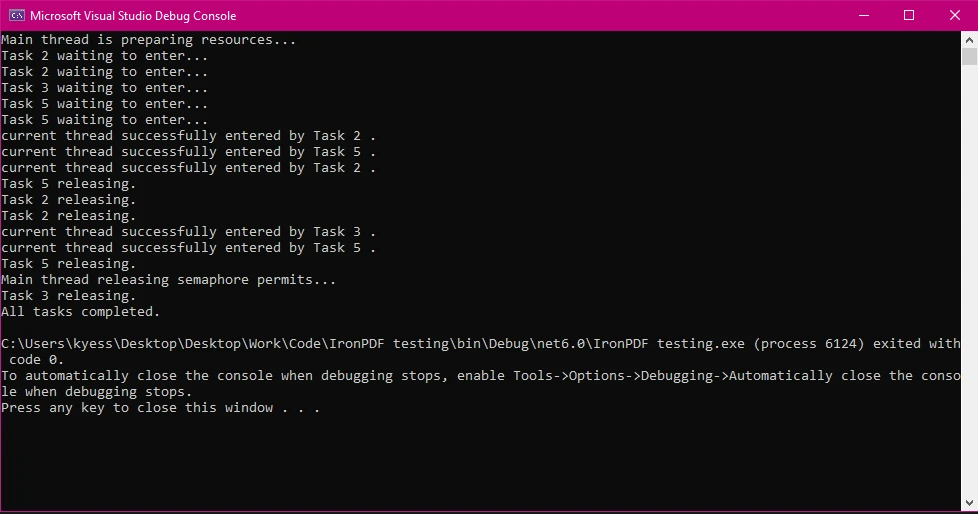
SemaphoreSlimの一般的な使用例としては以下があります。
マルチスレッド環境でIronPDFを使用し始めるには、IronPDF NuGetパッケージをインストールすることから始めます。 これは、[ツール > NuGetパッケージマネージャ > ソリューションのNuGetパッケージマネージャ]に移動してIronPDFを検索することで行うことができます。
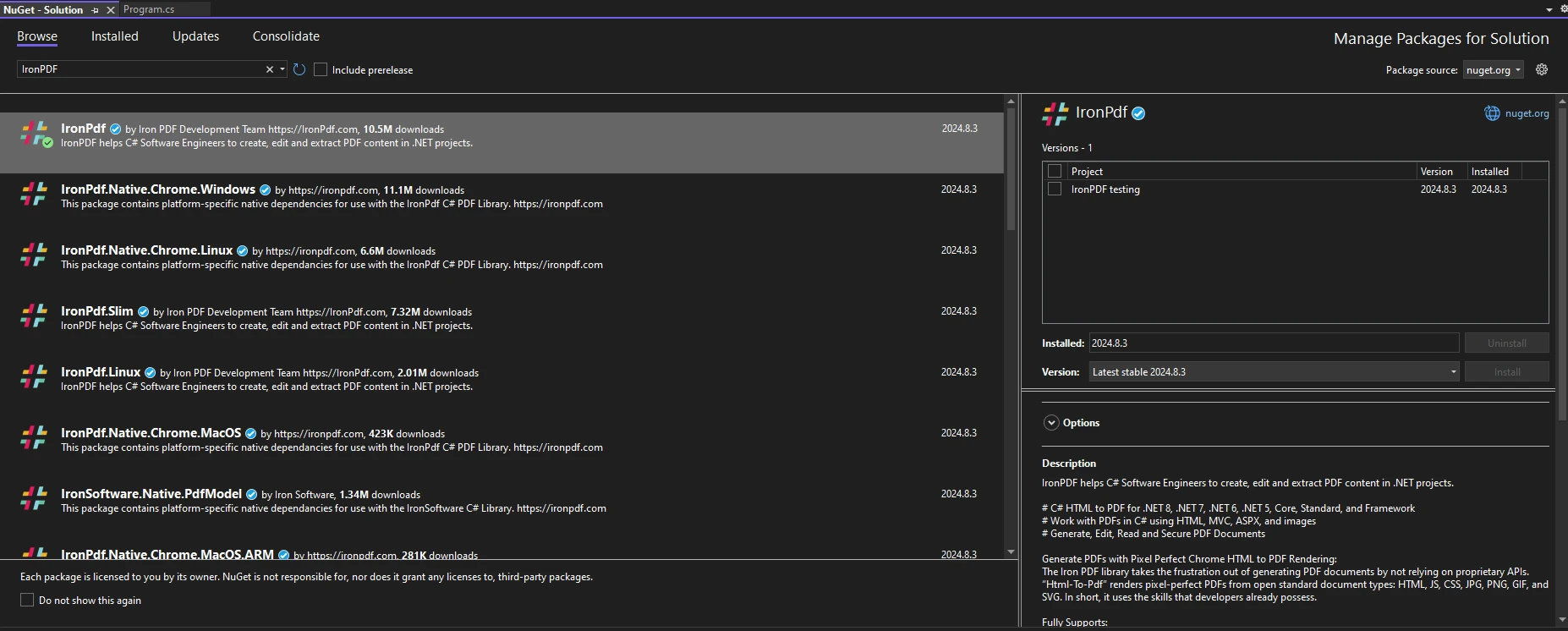
または、パッケージマネージャーコンソールで以下のコマンドを実行することで行えます。
コードでIronPDFを使用し始めるには、using IronPdf文をコードファイルの先頭に置いていることを確認してください。環境でのIronPDFのセットアップに関するより詳細なガイドは、そのはじめにページを確認してください。
SemaphoreSlimを使用することで、PDF生成タスクへのアクセスを効果的に制御できます。 IronPDFデモで製品の特徴や機能を知ることができます。
以下のサンプルコードは、IronPDFとSemaphoreSlimの基本的な使用法を示しています。
using IronPdf;
using System;
using System.Threading;
using System.Threading.Tasks;

class Program
{
    private static SemaphoreSlim _semaphore = new SemaphoreSlim(2); // Limit to 2 concurrent threads.

    static async Task Main(string[] args)
    {
        var tasks = new Task[5];

        for (int i = 0; i < tasks.Length; i++)
        {
            string htmlContent = $"<h1>PDF Document {i}</h1><p>This is a sample PDF content for task {i}.</p>";
            string outputPath = $"output_{i}.pdf";

            // Start multiple tasks to demonstrate controlled concurrency.
            tasks[i] = GeneratePdfAsync(htmlContent, outputPath, i);
        }

        await Task.WhenAll(tasks);
    }

    static async Task GeneratePdfAsync(string htmlContent, string outputPath, int taskId)
    {
        Console.WriteLine($"Task {taskId} is waiting for access...");

        // Wait to enter the semaphore.
        await _semaphore.WaitAsync();

        try
        {
            Console.WriteLine($"Task {taskId} has started PDF generation.");
            ChromePdfRenderer renderer = new ChromePdfRenderer();
            PdfDocument pdf = await renderer.RenderHtmlAsPdfAsync(htmlContent);
            pdf.SaveAs(outputPath);
            Console.WriteLine($"Task {taskId} has completed PDF generation.");
        }
        finally
        {
            // Ensure semaphore is released to allow other tasks to proceed.
            _semaphore.Release();
            Console.WriteLine($"Task {taskId} has released semaphore.");
        }
    }
}Imports IronPdf
Imports System
Imports System.Threading
Imports System.Threading.Tasks
Module Program
Private _semaphore As New SemaphoreSlim(2) ' Limit to 2 concurrent threads.
Sub Main(args As String())
Dim tasks(4) As Task
For i As Integer = 0 To tasks.Length - 1
Dim htmlContent As String = $"<h1>PDF Document {i}</h1><p>This is a sample PDF content for task {i}.</p>"
Dim outputPath As String = $"output_{i}.pdf"
' Start multiple tasks to demonstrate controlled concurrency.
tasks(i) = GeneratePdfAsync(htmlContent, outputPath, i)
Next
Task.WhenAll(tasks).Wait()
End Sub
Private Async Function GeneratePdfAsync(htmlContent As String, outputPath As String, taskId As Integer) As Task
Console.WriteLine($"Task {taskId} is waiting for access...")
' Wait to enter the semaphore.
Await _semaphore.WaitAsync()
Try
Console.WriteLine($"Task {taskId} has started PDF generation.")
Dim renderer As New ChromePdfRenderer()
Dim pdf As PdfDocument = Await renderer.RenderHtmlAsPdfAsync(htmlContent)
pdf.SaveAs(outputPath)
Console.WriteLine($"Task {taskId} has completed PDF generation.")
Finally
' Ensure semaphore is released to allow other tasks to proceed.
_semaphore.Release()
Console.WriteLine($"Task {taskId} has released semaphore.")
End Try
End Function
End Moduleこの例では、最初にSemaphoreSlimを初期化し、SemaphoreSlimの初期カウントと最大カウントを"2"に設定し、同時に2つのPDF生成を制限しました。 次に、タスク配列を作成して、プログラムが行うべきタスク数を制御し、その後、タスク配列内のタスク数に基づいてPDFを動的に作成するためにforループを使用します。
次にRelease()を使用して、例外が発生した場合でも常にセマフォが解放されることを保証します。 コンソール出力ログでは、各タスクが開始され、終了し、セマフォを解放するタイミングを示し、同時実行の動作を追跡することができます。
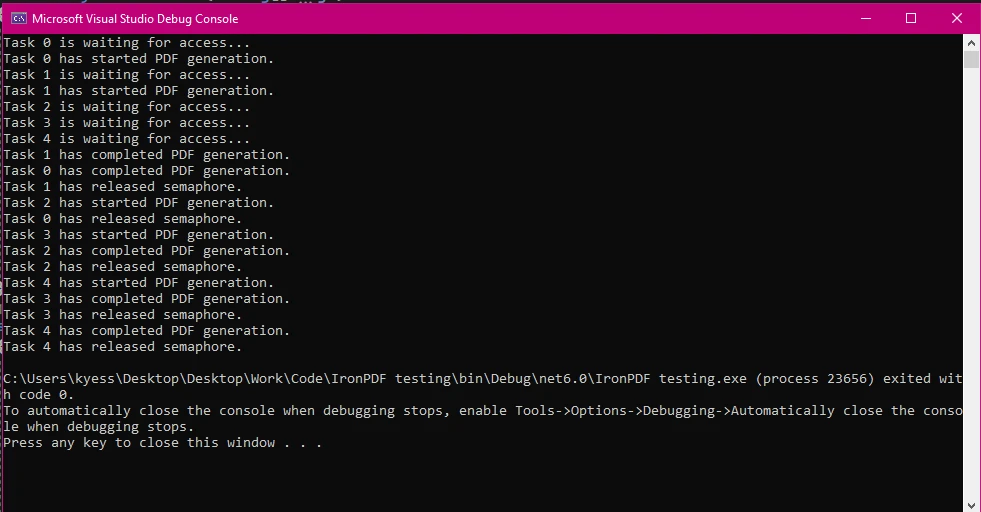
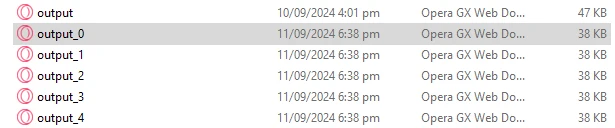
共有リソースと複数のスレッドが相互作用する場合に、スレッドの安全性は重要です。 PDF操作において、SemaphoreSlimは、定義された数のスレッドのみが同時にPDFを変更できるようにし、競合状態を防ぎ、一貫性を確保します。 以下のコードでは、複数のPDFに透かしを追加するシナリオをシミュレートしていますが、その際、同時に1つの操作が行われることを保証しています。
using IronPdf;
using System;
using System.Threading;
using System.Threading.Tasks;

class Program
{
    private static SemaphoreSlim _semaphore = new SemaphoreSlim(1);

    static async Task Main(string[] args)
    {
        // Setting array of tasks
        var tasks = new Task[3];

        for (int i = 0; i < tasks.Length; i++)
        {
            string inputPath = $"input_{i}.pdf";  // Input PDF file path
            string outputPath = $"output_{i}.pdf";  // Output PDF file path
            string watermarkText = @"
<img src='https://ironsoftware.com/img/products/ironpdf-logo-text-dotnet.svg'>
<h1>Iron Software</h1>";

            // Start multiple tasks to add watermarks concurrently.
            tasks[i] = AddWatermarkAsync(inputPath, outputPath, watermarkText, i);
        }

        await Task.WhenAll(tasks); // Wait for all tasks to finish.
    }

    static async Task AddWatermarkAsync(string input, string outputPath, string watermark, int taskId)
    {
        Console.WriteLine($"{DateTime.Now:HH:mm:ss} - Task {taskId} is waiting to add a watermark...");

        // Wait to enter the semaphore.
        await _semaphore.WaitAsync();

        try
        {
            Console.WriteLine($"{DateTime.Now:HH:mm:ss} - Task {taskId} is adding a watermark.");
            var pdf = PdfDocument.FromFile(input);
            pdf.ApplyWatermark(watermark); // Add watermark
            pdf.SaveAs(outputPath); // Save the modified PDF
            Console.WriteLine($"{DateTime.Now:HH:mm:ss} - Task {taskId} has completed watermarking.");
        }
        finally
        {
            // Release the semaphore after the task is done.
            _semaphore.Release();
            Console.WriteLine($"{DateTime.Now:HH:mm:ss} - Task {taskId} has released semaphore.");
        }
    }
}Imports IronPdf
Imports System
Imports System.Threading
Imports System.Threading.Tasks
Module Program
Private _semaphore As New SemaphoreSlim(1)
Async Function Main(args As String()) As Task
' Setting array of tasks
Dim tasks(2) As Task
For i As Integer = 0 To tasks.Length - 1
Dim inputPath As String = $"input_{i}.pdf" ' Input PDF file path
Dim outputPath As String = $"output_{i}.pdf" ' Output PDF file path
Dim watermarkText As String = "
<img src='https://ironsoftware.com/img/products/ironpdf-logo-text-dotnet.svg'>
<h1>Iron Software</h1>"
' Start multiple tasks to add watermarks concurrently.
tasks(i) = AddWatermarkAsync(inputPath, outputPath, watermarkText, i)
Next
Await Task.WhenAll(tasks) ' Wait for all tasks to finish.
End Function
Async Function AddWatermarkAsync(input As String, outputPath As String, watermark As String, taskId As Integer) As Task
Console.WriteLine($"{DateTime.Now:HH:mm:ss} - Task {taskId} is waiting to add a watermark...")
' Wait to enter the semaphore.
Await _semaphore.WaitAsync()
Try
Console.WriteLine($"{DateTime.Now:HH:mm:ss} - Task {taskId} is adding a watermark.")
Dim pdf = PdfDocument.FromFile(input)
pdf.ApplyWatermark(watermark) ' Add watermark
pdf.SaveAs(outputPath) ' Save the modified PDF
Console.WriteLine($"{DateTime.Now:HH:mm:ss} - Task {taskId} has completed watermarking.")
Finally
' Release the semaphore after the task is done.
_semaphore.Release()
Console.WriteLine($"{DateTime.Now:HH:mm:ss} - Task {taskId} has released semaphore.")
End Try
End Function
End Moduleprivate static SemaphoreSlim _semaphore = new SemaphoreSlim(1);を使用してセマフォのカウントを1に設定することで、一度に1つのタスクしかPDFを操作できないことを保証します。
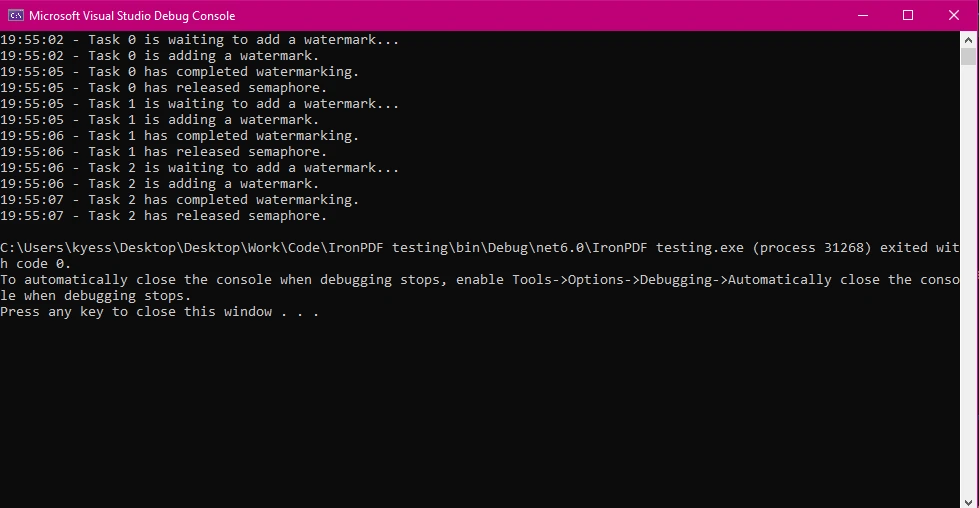
IronPDFはリソース集約型タスクの処理に優れており、多くのHTMLファイルをPDFに変換するなどのタスクを非同期環境で実行することに秀でています。 これらの操作を管理するためにSemaphoreSlimを使用すると、アプリケーションが応答性を保ちつつ、負荷が大きい時でもパフォーマンスを維持できます。
以下の例では、システムリソースの過負荷を避けるために、同時に実行される大きなHTMLからPDFへの変換の数を制限するシナリオを示しています。
using IronPdf;
using System;
using System.Threading;
using System.Threading.Tasks;

class Program
{
    // Limit concurrent large PDF conversions to 2.
    private static SemaphoreSlim _semaphore = new SemaphoreSlim(2);

    static async Task Main(string[] args)
    {
        var tasks = new Task[4];

        for (int i = 0; i < tasks.Length; i++)
        {
            string htmlContent = $"<h1>Large Document {i}</h1><p>Content for a large HTML file {i}.</p>";
            string outputPath = $"large_output_{i}.pdf";

            // Start multiple tasks to convert large HTML files to PDFs.
            tasks[i] = ConvertLargeHtmlAsync(htmlContent, outputPath, i);
        }

        await Task.WhenAll(tasks); // Wait for all tasks to finish.
    }

    // Method to convert large HTML to PDF using SemaphoreSlim to control resource usage.
    public static async Task ConvertLargeHtmlAsync(string htmlContent, string outputPath, int taskId)
    {
        Console.WriteLine($"Task {taskId} is waiting to start conversion...");

        // Wait to enter the semaphore.
        await _semaphore.WaitAsync();

        try
        {
            Console.WriteLine($"Task {taskId} is converting large HTML to PDF.");
            var renderer = new ChromePdfRenderer();
            var pdf = await renderer.RenderHtmlAsPdfAsync(htmlContent); // Convert large HTML to PDF
            pdf.SaveAs(outputPath); // Save the PDF file
            Console.WriteLine($"Task {taskId} has completed conversion.");
        }
        finally
        {
            // Ensure the semaphore is released to allow other tasks to proceed.
            _semaphore.Release();
            Console.WriteLine($"Task {taskId} has released semaphore.");
        }
    }
}Imports IronPdf
Imports System
Imports System.Threading
Imports System.Threading.Tasks
Module Program
' Limit concurrent large PDF conversions to 2.
Private _semaphore As New SemaphoreSlim(2)
Async Function Main(args As String()) As Task
Dim tasks(3) As Task
For i As Integer = 0 To tasks.Length - 1
Dim htmlContent As String = $"<h1>Large Document {i}</h1><p>Content for a large HTML file {i}.</p>"
Dim outputPath As String = $"large_output_{i}.pdf"
' Start multiple tasks to convert large HTML files to PDFs.
tasks(i) = ConvertLargeHtmlAsync(htmlContent, outputPath, i)
Next
Await Task.WhenAll(tasks) ' Wait for all tasks to finish.
End Function
' Method to convert large HTML to PDF using SemaphoreSlim to control resource usage.
Public Async Function ConvertLargeHtmlAsync(htmlContent As String, outputPath As String, taskId As Integer) As Task
Console.WriteLine($"Task {taskId} is waiting to start conversion...")
' Wait to enter the semaphore.
Await _semaphore.WaitAsync()
Try
Console.WriteLine($"Task {taskId} is converting large HTML to PDF.")
Dim renderer As New ChromePdfRenderer()
Dim pdf = Await renderer.RenderHtmlAsPdfAsync(htmlContent) ' Convert large HTML to PDF
pdf.SaveAs(outputPath) ' Save the PDF file
Console.WriteLine($"Task {taskId} has completed conversion.")
Finally
' Ensure the semaphore is released to allow other tasks to proceed.
_semaphore.Release()
Console.WriteLine($"Task {taskId} has released semaphore.")
End Try
End Function
End Module大規模なHTMLファイルをPDFに変換するなどのリソース集約型タスクに対処する際、SemaphoreSlimは負荷を均衡させ、リソース使用量を最適化するのに役立ちます。 同時に実行される操作の制限を2つに設定することで、リソース集約型PDF生成タスクにシステムが圧倒されないようにします。 このアプローチはワークロードをより均等に分配するのに役立ち、アプリケーション全体のパフォーマンスと安定性を向上させます。

セマフォが正しく解放されないとデッドロックが発生する可能性があります。 例外が発生した場合でもセマフォが解放されることを保証するためにtry-finallyブロックを使用するのが良いプラクティスで、デッドロックを防止し、アプリケーションが円滑に動作するようにします。 デッドロックを避けるために覚えておくべきベストプラクティスには、常に最終ブロックでセマフォを解放することや、非同期コード内でResultのようなブロッキングコールを使用しないことが含まれます。
using IronPdf;
using System;
using System.Threading;
using System.Threading.Tasks;

class Program
{
    private static SemaphoreSlim _semaphore = new SemaphoreSlim(3);

    static async Task Main(string[] args)
    {
        var tasks = new Task[3];

        for (int i = 0; i < tasks.Length; i++)
        {
            string content = $"<h1>Document {i}</h1><p>Content for PDF {i}.</p>";
            string path = $"safe_output_{i}.pdf";

            // Start multiple tasks to demonstrate deadlock-free semaphore usage.
            tasks[i] = SafePdfTaskAsync(content, path, i);
        }

        await Task.WhenAll(tasks); // Wait for all tasks to finish.
    }

    // Method demonstrating best practices for using SemaphoreSlim to avoid deadlocks.
    public static async Task SafePdfTaskAsync(string content, string path, int taskId)
    {
        Console.WriteLine($"Task {taskId} is waiting to generate PDF...");

        // Wait to enter the semaphore.
        await _semaphore.WaitAsync();

        try
        {
            Console.WriteLine($"Task {taskId} is generating PDF.");
            var renderer = new ChromePdfRenderer();
            var pdf = await renderer.RenderHtmlAsPdfAsync(content); // Render HTML to PDF
            pdf.SaveAs(path); // Save the PDF
            Console.WriteLine($"Task {taskId} has completed PDF generation.");
        }
        catch (Exception ex)
        {
            Console.WriteLine($"Task {taskId} encountered an error: {ex.Message}");
        }
        finally
        {
            // Always release the semaphore, even if an error occurs.
            _semaphore.Release();
            Console.WriteLine($"Task {taskId} has released semaphore.");
        }
    }
}Imports IronPdf
Imports System
Imports System.Threading
Imports System.Threading.Tasks
Module Program
Private _semaphore As New SemaphoreSlim(3)
Sub Main(args As String())
Dim tasks(2) As Task
For i As Integer = 0 To tasks.Length - 1
Dim content As String = $"<h1>Document {i}</h1><p>Content for PDF {i}.</p>"
Dim path As String = $"safe_output_{i}.pdf"
' Start multiple tasks to demonstrate deadlock-free semaphore usage.
tasks(i) = SafePdfTaskAsync(content, path, i)
Next
Task.WhenAll(tasks).Wait() ' Wait for all tasks to finish.
End Sub
' Method demonstrating best practices for using SemaphoreSlim to avoid deadlocks.
Public Async Function SafePdfTaskAsync(content As String, path As String, taskId As Integer) As Task
Console.WriteLine($"Task {taskId} is waiting to generate PDF...")
' Wait to enter the semaphore.
Await _semaphore.WaitAsync()
Try
Console.WriteLine($"Task {taskId} is generating PDF.")
Dim renderer As New ChromePdfRenderer()
Dim pdf = Await renderer.RenderHtmlAsPdfAsync(content) ' Render HTML to PDF
pdf.SaveAs(path) ' Save the PDF
Console.WriteLine($"Task {taskId} has completed PDF generation.")
Catch ex As Exception
Console.WriteLine($"Task {taskId} encountered an error: {ex.Message}")
Finally
' Always release the semaphore, even if an error occurs.
_semaphore.Release()
Console.WriteLine($"Task {taskId} has released semaphore.")
End Try
End Function
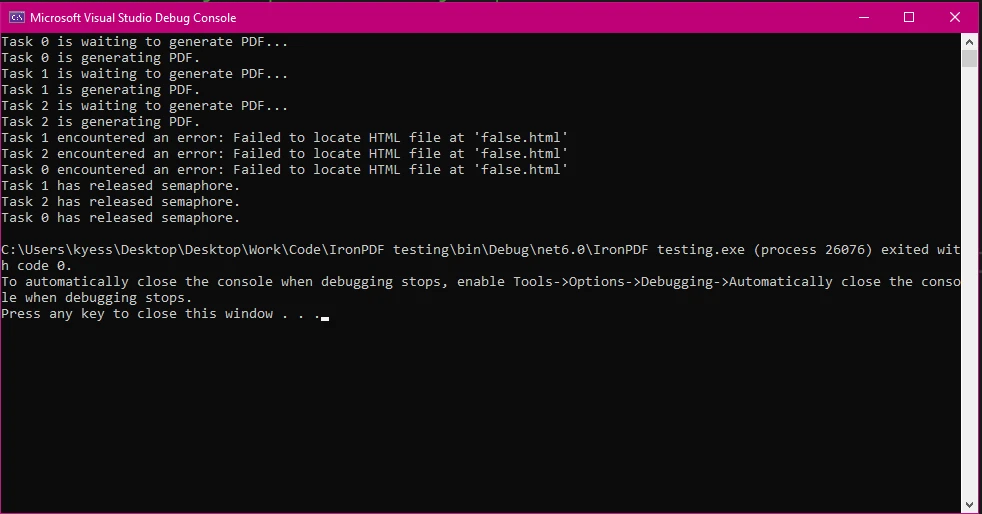
End Moduletry-catch-finallyブロックを使用することで、例外がスローされた場合でも必ずSemaphoreSlimオブジェクトが解放され、デッドロックが防止されることを保証しました。 エラーロギングとセマフォの解放をしっかり管理することで、プログラムを安定させ、予期しない動作を防ぐことができます。
以下の出力画像で見ることができるように、私は存在しないHTMLファイルをロードさせようとしてプログラムにエラーをシミュレートしましたが、このエラーが発生しても、プログラムはエラーメッセージを印字し、その後finallyブロックを使用してセマフォを解放します。
IronPDFは、同時PDF処理タスクを効率的に処理するために設計されており、多くの他のPDFライブラリよりも優れたパフォーマンスと信頼性を提供しています。 その堅牢なアーキテクチャはアプリケーションのニーズにスケールすることができ、需要が高い環境に最適です。 パフォーマンス、使いやすさ、堅牢性の基準に基づいて他のPDFライブラリと比較した際、IronPDFは強力な競争相手であることが証明されました。 これを示すために、IronPDFをiText、PDFSharp、DinkToPdf、EvoPDFなどの他の人気PDFライブラリと比較しました:
IronPDF:
iテキスト:
PDFシャープ:
DinkToPdf:
EvoPDF:
IronPDF:
iテキスト:
PDFシャープ:
DinkToPdf:
EvoPDF:
IronPDF:
iテキスト:
PDFシャープ:
DinkToPdf:
DinkToPdf: 直接的なPDF操作に制限があり、注釈やフォーム処理のような高度な機能が欠けています。
EvoPDF:
IronPDFは、SemaphoreSlimのような並行性制御メカニズムに適合する非同期プログラミングモデルとシームレスに統合します。 これにより開発者は、少ない労力で応答性とパフォーマンスに優れたアプリケーションを構築できます。
IronPDFはまた、開発者が効果的なエラーハンドリングプラクティスを理解し実装するのを助ける豊富なドキュメンテーションとサポートリソースを提供します。 この包括的なサポートは、.NETプロジェクトでPDF操作をトラブルシューティングし最適化するのに価値があります。
IronPDFは次のものを提供します:
詳細については、IronPDFの広範なドキュメンテーションを参照してください。
並行性管理にSemaphoreSlimを使用することは、特にPDF処理のようなリソース集約型タスクに対処する場合、.NETアプリケーションでは不可欠です。 SemaphoreSlimとIronPDFを統合することで、開発者は安全で効率的で信頼性のある並行制御を実現し、アプリケーションが応答性とパフォーマンスを保つことができます。
IronPDFがPDF処理ワークフローを合理化する方法を発見してください。 無料トライアルから始めて、自分で試してみてください。この強力なツールをプロジェクトで継続する場合は、わずか$999から始められます。

ジェイコブ・メラーはIron Softwareの最高技術責任者(CTO)であり、C# PDFテクノロジーを開拓する先見的なエンジニアです。Iron Softwareのコアコードベースを支えるオリジナル開発者として、彼は創業以来、会社の製品アーキテクチャを形成し、CEOのCameron Rimingtonとともに、会社をNASA、Tesla、および世界的な政府機関にサービスを提供する50人以上の会社に変えました。1999年にロンドンで最初のソフトウェアビジネスを開業し、2005年に最初 for .NETコンポーネントを作成した後、Microsoftのエコシステム全体で複雑な問題を解決することを専門としました。



IronPDF はIRONSUITEの一部です
オフィス文書向けの.NET API製品10個

PDFがHTMLのように見える必要があるとき、迅速に。












