




Updated April 23, 2026
在 .NET 中用 Microsoft.Extensions.AI 簡化 LLM 整合
AI 正在改變軟體開發,但將大型語言模型 (LLM) 整合到 .NET 中一直很複雜。利用 IronPdf.AI 將 AI 整合推向更遠,為 .NET 應用程式帶來由 OpenAI 驅動的 PDF 解析、資料擷取和內容總結。
Read More

並發管理是C#高效能應用程式中的關鍵方面。 它確保資源被高效利用,同時避免潛在衝突或性能瓶頸,因此擁有一個輕量級的信號量來控制存取非常有幫助。 這就是SemaphoreSlim派上用場的地方。 SemaphoreSlim 是一個輕量級的同步原語,可以控制資源存取,最終避免競賽條件並確保執行緒安全。
那麼,如果您想將其與 PDF 程式庫一起實現以管理 PDF 生成過程呢? 您可能正在尋找一個強大的 PDF 程式庫,這就是IronPDF的用武之地。 IronPDF 是一個強大的 PDF 生成和操作程式庫,專為.NET開發者設計,在多執行緒環境中使用時可以從並發管理中獲益良多。
如果您想了解 SemaphoreSlim 和 IronPDF 的實際應用,請繼續閱讀,我們將探討使用 SemaphoreSlim 的優勢以及如何將其與 IronPDF 整合以安全處理並發操作,提高性能並確保可靠的 PDF 處理。
SemaphoreSlim 是.NET中的一種同步原語,用於限制能夠同時存取特定資源或資源池的執行緒數量。 它是完整 Semaphore 類別的輕量版本,旨在為需要更簡單、更快的信號量的情況提供更高效的解決方案。 using SemaphoreSlim 的一些好處是與 Semaphore 相比,系統開銷減少了,它非常適合管理有限資源(例如資料庫連接或文件存取),並且支持異步等待方法,使其非常適合現代非同步/等待程式設計模式。
using System;
using System.Threading;
using System.Threading.Tasks;

class Program
{
    // Semaphore count
    private static SemaphoreSlim _semaphore = new SemaphoreSlim(3); // Limit to 3 concurrent threads.

    static async Task Main(string[] args)
    {
        // Start tasks that will wait on the semaphore.
        var tasks = new Task[5];

        for (int i = 0; i < tasks.Length; i++)
        {
            tasks[i] = Task.Run(() => AccessResource(i));
        }

        // Simulate some work in the main thread (e.g., initialization).
        Console.WriteLine("Main thread is preparing resources...");
        await Task.Delay(2000);  // Simulate initialization delay.

        // Main thread calls release, releases semaphore permits to allow waiting tasks to proceed.
        Console.WriteLine("Main thread releasing semaphore permits...");
        _semaphore.Release(2);  // Releases 2 permits, allowing up to 2 tasks to proceed.

        // Wait for all tasks to complete.
        await Task.WhenAll(tasks);
        Console.WriteLine("All tasks completed.");
    }

    static async Task AccessResource(int id)
    {
        Console.WriteLine($"Task {id} waiting to enter...");
        await _semaphore.WaitAsync();

        try
        {
            Console.WriteLine($"Current thread successfully entered by Task {id}.");
            await Task.Delay(1000); // Simulate work.
        }
        finally
        {
            Console.WriteLine($"Task {id} releasing.");
            _semaphore.Release();
        }
    }
}Imports System
Imports System.Threading
Imports System.Threading.Tasks
Module Program
' Semaphore count
Private _semaphore As New SemaphoreSlim(3) ' Limit to 3 concurrent threads.
Async Function Main(args As String()) As Task
' Start tasks that will wait on the semaphore.
Dim tasks(4) As Task
For i As Integer = 0 To tasks.Length - 1
tasks(i) = Task.Run(Function() AccessResource(i))
Next
' Simulate some work in the main thread (e.g., initialization).
Console.WriteLine("Main thread is preparing resources...")
Await Task.Delay(2000) ' Simulate initialization delay.
' Main thread calls release, releases semaphore permits to allow waiting tasks to proceed.
Console.WriteLine("Main thread releasing semaphore permits...")
_semaphore.Release(2) ' Releases 2 permits, allowing up to 2 tasks to proceed.
' Wait for all tasks to complete.
Await Task.WhenAll(tasks)
Console.WriteLine("All tasks completed.")
End Function
Async Function AccessResource(id As Integer) As Task
Console.WriteLine($"Task {id} waiting to enter...")
Await _semaphore.WaitAsync()
Try
Console.WriteLine($"Current thread successfully entered by Task {id}.")
Await Task.Delay(1000) ' Simulate work.
Finally
Console.WriteLine($"Task {id} releasing.")
_semaphore.Release()
End Try
End Function
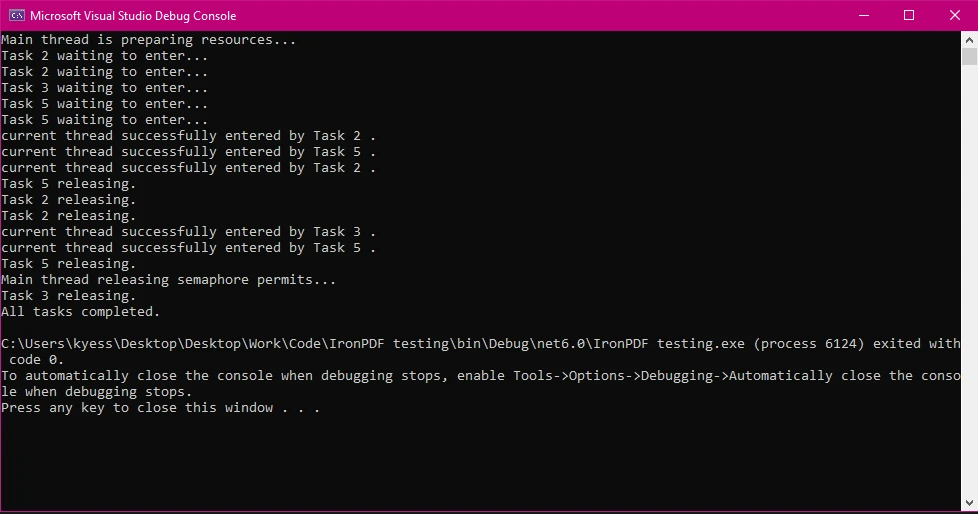
End Module在程式運行過程中,當所有可用許可證都被執行緒獲得時,信號量的計數可以動態地達到零執行緒。 這種狀態表明達到了允許的最大同時存取量。
如果您願意,您可以設置適當的初始和最大執行緒數,將信號量的初始計數設為零,然後使用單獨的初始化任務來增加資源準備就緒時的信號量計數,允許您選擇的執行緒數繼續。 當信號量計數為零時,執行緒將在嘗試進入信號量時等待,這被稱為"阻塞等待"。
您可以通過跟蹤此前的信號量計數來調整信號量行為。 然後可以根據需要操控信號量(例如,通過釋放或等待)。 隨著執行緒釋放,信號量計數減少。
SemaphoreSlim 的一些常見使用場景包括:
要開始在多執行緒環境中使用 IronPDF,首先從IronPDF NuGet 套件進行安裝。 您可以通過導航至工具 > NuGet 套件管理器 > 整個方案的 NuGet 套件管理器並搜尋 IronPDF 來完成此操作:
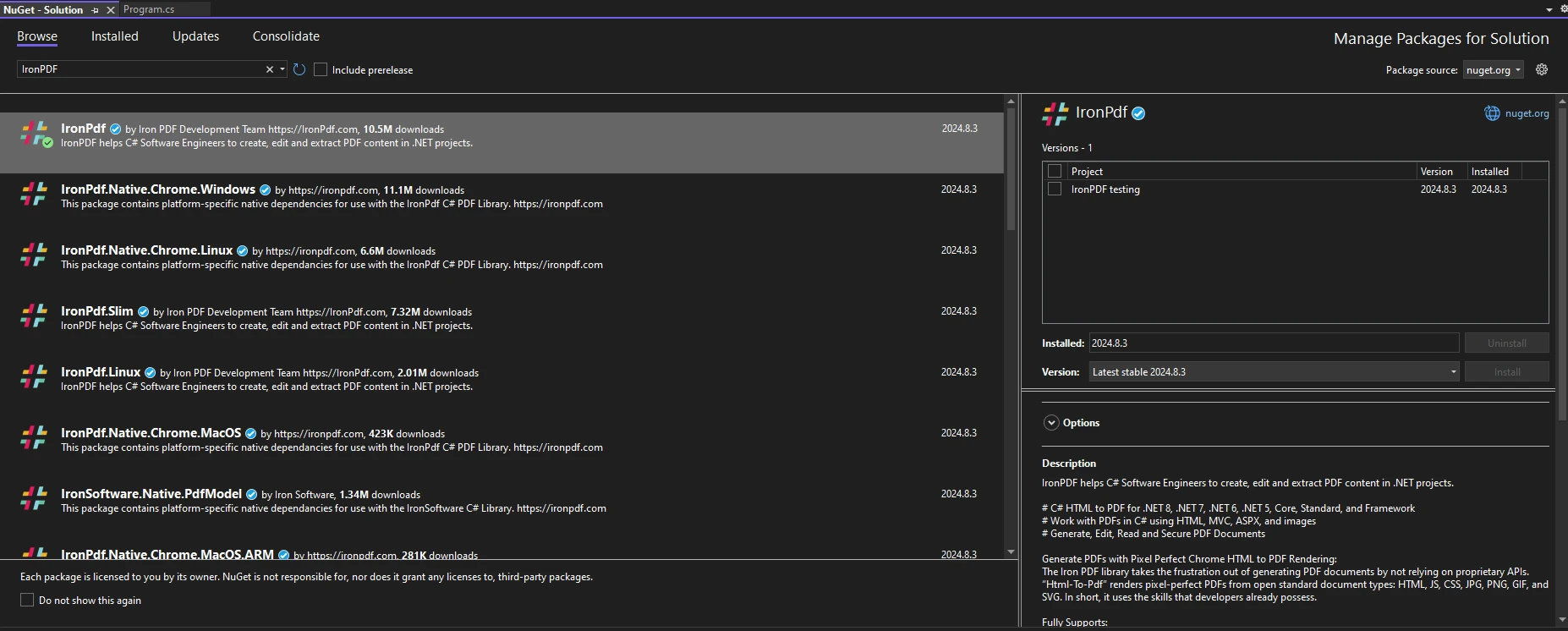
或者,另可在套件管理器控制台中運行以下命令:
PM > Install-Package IronPdf
要在您的程式碼中開始使用 IronPDF,請確保您已將 using IronPdf 語句放置於程式碼文件的頂部。若需更詳盡的 IronPDF 環境設置指南,請查看其快速入門頁面。
當您使用 SemaphoreSlim 時,您可以有效地控制對 PDF 生成任務的存取。 這確保您的應用程式不會嘗試同時生成過多的 PDF,這可能影響性能或導致故障。
以下範例程式碼展示了 SemaphoreSlim 與 IronPDF 的基本用法。
using IronPdf;
using System;
using System.Threading;
using System.Threading.Tasks;

class Program
{
    private static SemaphoreSlim _semaphore = new SemaphoreSlim(2); // Limit to 2 concurrent threads.

    static async Task Main(string[] args)
    {
        var tasks = new Task[5];

        for (int i = 0; i < tasks.Length; i++)
        {
            string htmlContent = $"<h1>PDF Document {i}</h1><p>This is a sample PDF content for task {i}.</p>";
            string outputPath = $"output_{i}.pdf";

            // Start multiple tasks to demonstrate controlled concurrency.
            tasks[i] = GeneratePdfAsync(htmlContent, outputPath, i);
        }

        await Task.WhenAll(tasks);
    }

    static async Task GeneratePdfAsync(string htmlContent, string outputPath, int taskId)
    {
        Console.WriteLine($"Task {taskId} is waiting for access...");

        // Wait to enter the semaphore.
        await _semaphore.WaitAsync();

        try
        {
            Console.WriteLine($"Task {taskId} has started PDF generation.");
            ChromePdfRenderer renderer = new ChromePdfRenderer();
            PdfDocument pdf = await renderer.RenderHtmlAsPdfAsync(htmlContent);
            pdf.SaveAs(outputPath);
            Console.WriteLine($"Task {taskId} has completed PDF generation.");
        }
        finally
        {
            // Ensure semaphore is released to allow other tasks to proceed.
            _semaphore.Release();
            Console.WriteLine($"Task {taskId} has released semaphore.");
        }
    }
}Imports IronPdf
Imports System
Imports System.Threading
Imports System.Threading.Tasks
Module Program
Private _semaphore As New SemaphoreSlim(2) ' Limit to 2 concurrent threads.
Sub Main(args As String())
Dim tasks(4) As Task
For i As Integer = 0 To tasks.Length - 1
Dim htmlContent As String = $"<h1>PDF Document {i}</h1><p>This is a sample PDF content for task {i}.</p>"
Dim outputPath As String = $"output_{i}.pdf"
' Start multiple tasks to demonstrate controlled concurrency.
tasks(i) = GeneratePdfAsync(htmlContent, outputPath, i)
Next
Task.WhenAll(tasks).Wait()
End Sub
Private Async Function GeneratePdfAsync(htmlContent As String, outputPath As String, taskId As Integer) As Task
Console.WriteLine($"Task {taskId} is waiting for access...")
' Wait to enter the semaphore.
Await _semaphore.WaitAsync()
Try
Console.WriteLine($"Task {taskId} has started PDF generation.")
Dim renderer As New ChromePdfRenderer()
Dim pdf As PdfDocument = Await renderer.RenderHtmlAsPdfAsync(htmlContent)
pdf.SaveAs(outputPath)
Console.WriteLine($"Task {taskId} has completed PDF generation.")
Finally
' Ensure semaphore is released to allow other tasks to proceed.
_semaphore.Release()
Console.WriteLine($"Task {taskId} has released semaphore.")
End Try
End Function
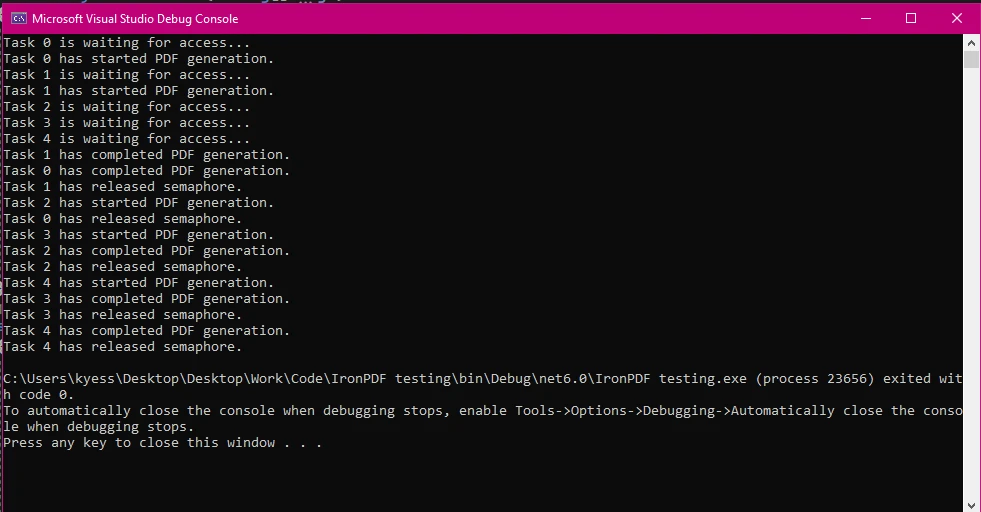
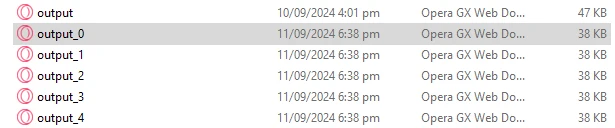
End Module在此範例中,我們首先初始化了 SemaphoreSlim,並將之的初始和最大計數設為 '2',將同時生成的 PDF 限制為兩份。 然後我們建立了一個任務陣列,用於控制程式需執行的任務數量,之後我們使用 for 迴圈來動態建立 PDFs,基於任務陣列中的任務數量。
然後使用 WaitAsync() 方法進入信號量,並在 finally 區塊中使用 Release() 確保即便發生異常,信號量始終被釋放。 控制台輸出日誌顯示了每個任務開始、完成和釋放信號量的時間,這使您能夠跟踪並發行為。
當多個執行緒與共享資源交互時,執行緒安全是至關重要的。 在 PDF 操作中,SemaphoreSlim 確保只有指定數量的執行緒可同時修改 PDF,從而避免競賽條件並確保一致性。 在以下程式碼中,我們模擬了一個場景,即我們正在新增水印到多個PDF中,同時確保一次只有一個操作進行。
using IronPdf;
using System;
using System.Threading;
using System.Threading.Tasks;

class Program
{
    private static SemaphoreSlim _semaphore = new SemaphoreSlim(1);

    static async Task Main(string[] args)
    {
        // Setting array of tasks
        var tasks = new Task[3];

        for (int i = 0; i < tasks.Length; i++)
        {
            string inputPath = $"input_{i}.pdf";  // Input PDF file path
            string outputPath = $"output_{i}.pdf";  // Output PDF file path
            string watermarkText = @"
<img src='https://ironsoftware.com/img/products/ironpdf-logo-text-dotnet.svg'>
<h1>Iron Software</h1>";

            // Start multiple tasks to add watermarks concurrently.
            tasks[i] = AddWatermarkAsync(inputPath, outputPath, watermarkText, i);
        }

        await Task.WhenAll(tasks); // Wait for all tasks to finish.
    }

    static async Task AddWatermarkAsync(string input, string outputPath, string watermark, int taskId)
    {
        Console.WriteLine($"{DateTime.Now:HH:mm:ss} - Task {taskId} is waiting to add a watermark...");

        // Wait to enter the semaphore.
        await _semaphore.WaitAsync();

        try
        {
            Console.WriteLine($"{DateTime.Now:HH:mm:ss} - Task {taskId} is adding a watermark.");
            var pdf = PdfDocument.FromFile(input);
            pdf.ApplyWatermark(watermark); // Add watermark
            pdf.SaveAs(outputPath); // Save the modified PDF
            Console.WriteLine($"{DateTime.Now:HH:mm:ss} - Task {taskId} has completed watermarking.");
        }
        finally
        {
            // Release the semaphore after the task is done.
            _semaphore.Release();
            Console.WriteLine($"{DateTime.Now:HH:mm:ss} - Task {taskId} has released semaphore.");
        }
    }
}Imports IronPdf
Imports System
Imports System.Threading
Imports System.Threading.Tasks
Module Program
Private _semaphore As New SemaphoreSlim(1)
Async Function Main(args As String()) As Task
' Setting array of tasks
Dim tasks(2) As Task
For i As Integer = 0 To tasks.Length - 1
Dim inputPath As String = $"input_{i}.pdf" ' Input PDF file path
Dim outputPath As String = $"output_{i}.pdf" ' Output PDF file path
Dim watermarkText As String = "
<img src='https://ironsoftware.com/img/products/ironpdf-logo-text-dotnet.svg'>
<h1>Iron Software</h1>"
' Start multiple tasks to add watermarks concurrently.
tasks(i) = AddWatermarkAsync(inputPath, outputPath, watermarkText, i)
Next
Await Task.WhenAll(tasks) ' Wait for all tasks to finish.
End Function
Async Function AddWatermarkAsync(input As String, outputPath As String, watermark As String, taskId As Integer) As Task
Console.WriteLine($"{DateTime.Now:HH:mm:ss} - Task {taskId} is waiting to add a watermark...")
' Wait to enter the semaphore.
Await _semaphore.WaitAsync()
Try
Console.WriteLine($"{DateTime.Now:HH:mm:ss} - Task {taskId} is adding a watermark.")
Dim pdf = PdfDocument.FromFile(input)
pdf.ApplyWatermark(watermark) ' Add watermark
pdf.SaveAs(outputPath) ' Save the modified PDF
Console.WriteLine($"{DateTime.Now:HH:mm:ss} - Task {taskId} has completed watermarking.")
Finally
' Release the semaphore after the task is done.
_semaphore.Release()
Console.WriteLine($"{DateTime.Now:HH:mm:ss} - Task {taskId} has released semaphore.")
End Try
End Function
End Module我們將信號量計數設為1,使用 private static SemaphoreSlim _semaphore = new SemaphoreSlim(1); 確保一次只有一個任務可以操作PDF。
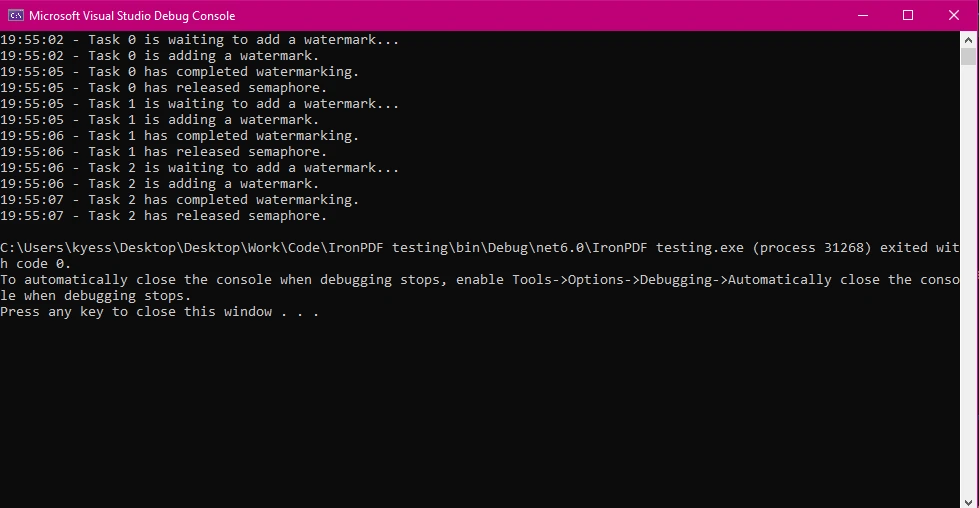
IronPDF 在處理資源密集型任務方面表現卓越,例如將大型 HTML 文件轉換為 PDF,並在非同步環境下執行這些任務時尤為出色。 使用 SemaphoreSlim 來管理這些操作可確保您的應用程式在承受重負載時保持響應性和性能。
以下範例程式碼演示了一個場景,當我們需要限制同時進行的大型 HTML 到 PDF 轉換數量以免系統資源不堪重負。
using IronPdf;
using System;
using System.Threading;
using System.Threading.Tasks;

class Program
{
    // Limit concurrent large PDF conversions to 2.
    private static SemaphoreSlim _semaphore = new SemaphoreSlim(2);

    static async Task Main(string[] args)
    {
        var tasks = new Task[4];

        for (int i = 0; i < tasks.Length; i++)
        {
            string htmlContent = $"<h1>Large Document {i}</h1><p>Content for a large HTML file {i}.</p>";
            string outputPath = $"large_output_{i}.pdf";

            // Start multiple tasks to convert large HTML files to PDFs.
            tasks[i] = ConvertLargeHtmlAsync(htmlContent, outputPath, i);
        }

        await Task.WhenAll(tasks); // Wait for all tasks to finish.
    }

    // Method to convert large HTML to PDF using SemaphoreSlim to control resource usage.
    public static async Task ConvertLargeHtmlAsync(string htmlContent, string outputPath, int taskId)
    {
        Console.WriteLine($"Task {taskId} is waiting to start conversion...");

        // Wait to enter the semaphore.
        await _semaphore.WaitAsync();

        try
        {
            Console.WriteLine($"Task {taskId} is converting large HTML to PDF.");
            var renderer = new ChromePdfRenderer();
            var pdf = await renderer.RenderHtmlAsPdfAsync(htmlContent); // Convert large HTML to PDF
            pdf.SaveAs(outputPath); // Save the PDF file
            Console.WriteLine($"Task {taskId} has completed conversion.");
        }
        finally
        {
            // Ensure the semaphore is released to allow other tasks to proceed.
            _semaphore.Release();
            Console.WriteLine($"Task {taskId} has released semaphore.");
        }
    }
}Imports IronPdf
Imports System
Imports System.Threading
Imports System.Threading.Tasks
Module Program
' Limit concurrent large PDF conversions to 2.
Private _semaphore As New SemaphoreSlim(2)
Async Function Main(args As String()) As Task
Dim tasks(3) As Task
For i As Integer = 0 To tasks.Length - 1
Dim htmlContent As String = $"<h1>Large Document {i}</h1><p>Content for a large HTML file {i}.</p>"
Dim outputPath As String = $"large_output_{i}.pdf"
' Start multiple tasks to convert large HTML files to PDFs.
tasks(i) = ConvertLargeHtmlAsync(htmlContent, outputPath, i)
Next
Await Task.WhenAll(tasks) ' Wait for all tasks to finish.
End Function
' Method to convert large HTML to PDF using SemaphoreSlim to control resource usage.
Public Async Function ConvertLargeHtmlAsync(htmlContent As String, outputPath As String, taskId As Integer) As Task
Console.WriteLine($"Task {taskId} is waiting to start conversion...")
' Wait to enter the semaphore.
Await _semaphore.WaitAsync()
Try
Console.WriteLine($"Task {taskId} is converting large HTML to PDF.")
Dim renderer As New ChromePdfRenderer()
Dim pdf = Await renderer.RenderHtmlAsPdfAsync(htmlContent) ' Convert large HTML to PDF
pdf.SaveAs(outputPath) ' Save the PDF file
Console.WriteLine($"Task {taskId} has completed conversion.")
Finally
' Ensure the semaphore is released to allow other tasks to proceed.
_semaphore.Release()
Console.WriteLine($"Task {taskId} has released semaphore.")
End Try
End Function
End Module在處理資源密集型任務,如將大型 HTML 文件轉換為 PDF 時,SemaphoreSlim 可以幫助平衡負載並優化資源使用。 設置 2 次同時進行的操作限制,避免因資源密集型的PDF生成任務而使系統不堪重負。 此方法有助於更均衡地分配工作負荷,提升整體應用效能和穩定性。

如果信號量未正確釋放,可能會發生死結。 關於這點,需要記住的一個好習慣是使用 try-finally 區塊來確保即便發生異常也能釋放信號量,避免死結並使您的應用程式平穩運行。 避免死結的一些最佳做法包括始終在 finally 區塊中釋放信號量,並避免在非同步程式碼中使用阻塞調用如 Wait() 和 Result。
using IronPdf;
using System;
using System.Threading;
using System.Threading.Tasks;

class Program
{
    private static SemaphoreSlim _semaphore = new SemaphoreSlim(3);

    static async Task Main(string[] args)
    {
        var tasks = new Task[3];

        for (int i = 0; i < tasks.Length; i++)
        {
            string content = $"<h1>Document {i}</h1><p>Content for PDF {i}.</p>";
            string path = $"safe_output_{i}.pdf";

            // Start multiple tasks to demonstrate deadlock-free semaphore usage.
            tasks[i] = SafePdfTaskAsync(content, path, i);
        }

        await Task.WhenAll(tasks); // Wait for all tasks to finish.
    }

    // Method demonstrating best practices for using SemaphoreSlim to avoid deadlocks.
    public static async Task SafePdfTaskAsync(string content, string path, int taskId)
    {
        Console.WriteLine($"Task {taskId} is waiting to generate PDF...");

        // Wait to enter the semaphore.
        await _semaphore.WaitAsync();

        try
        {
            Console.WriteLine($"Task {taskId} is generating PDF.");
            var renderer = new ChromePdfRenderer();
            var pdf = await renderer.RenderHtmlAsPdfAsync(content); // Render HTML to PDF
            pdf.SaveAs(path); // Save the PDF
            Console.WriteLine($"Task {taskId} has completed PDF generation.");
        }
        catch (Exception ex)
        {
            Console.WriteLine($"Task {taskId} encountered an error: {ex.Message}");
        }
        finally
        {
            // Always release the semaphore, even if an error occurs.
            _semaphore.Release();
            Console.WriteLine($"Task {taskId} has released semaphore.");
        }
    }
}Imports IronPdf
Imports System
Imports System.Threading
Imports System.Threading.Tasks
Module Program
Private _semaphore As New SemaphoreSlim(3)
Sub Main(args As String())
Dim tasks(2) As Task
For i As Integer = 0 To tasks.Length - 1
Dim content As String = $"<h1>Document {i}</h1><p>Content for PDF {i}.</p>"
Dim path As String = $"safe_output_{i}.pdf"
' Start multiple tasks to demonstrate deadlock-free semaphore usage.
tasks(i) = SafePdfTaskAsync(content, path, i)
Next
Task.WhenAll(tasks).Wait() ' Wait for all tasks to finish.
End Sub
' Method demonstrating best practices for using SemaphoreSlim to avoid deadlocks.
Public Async Function SafePdfTaskAsync(content As String, path As String, taskId As Integer) As Task
Console.WriteLine($"Task {taskId} is waiting to generate PDF...")
' Wait to enter the semaphore.
Await _semaphore.WaitAsync()
Try
Console.WriteLine($"Task {taskId} is generating PDF.")
Dim renderer As New ChromePdfRenderer()
Dim pdf = Await renderer.RenderHtmlAsPdfAsync(content) ' Render HTML to PDF
pdf.SaveAs(path) ' Save the PDF
Console.WriteLine($"Task {taskId} has completed PDF generation.")
Catch ex As Exception
Console.WriteLine($"Task {taskId} encountered an error: {ex.Message}")
Finally
' Always release the semaphore, even if an error occurs.
_semaphore.Release()
Console.WriteLine($"Task {taskId} has released semaphore.")
End Try
End Function
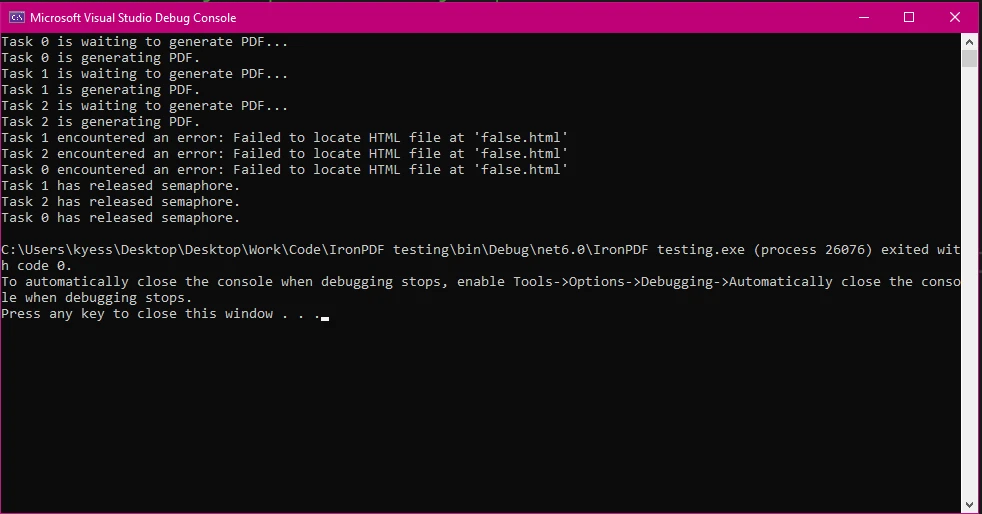
End Module透過使用 try-catch-finally 區塊,我們確保即便拋出異常,也總會釋放 SemaphoreSlim 物件,從而避免死結。 透過日誌錯誤並正確地管理信號量釋放,我們可以使程式保持穩定並防止任何意外行為。
如下圖所示,透過嘗試載入不存在的 HTML 文件,我模擬了一個錯誤,即便產生此錯誤,程式還是會列印錯誤資訊告訴我出了什麼問題,然後使用 finally 區塊釋放信號量。
IronPDF 旨在高效地處理並發 PDF 處理任務,提供的性能和可靠性優於許多其他 PDF 程式庫。 其強大的架構使其能隨著應用程式需求的增長而擴展,這使其非常適合於需求大的環境。 與其他基於性能、易用性和穩健性標準的 PDF 程式庫相比,IronPDF 被證明是一個強有力的競爭對手。 為了說明這一點,我將 IronPDF 與 iText、PDFSharp、DinkToPdf 和 EvoPDF 等其他幾個受歡迎的 PDF 程式庫進行了比較:
IronPDF:
iText:
PDFSharp:
DinkToPdf:
EvoPDF:
IronPDF:
iText:
PDFSharp:
DinkToPdf:
EvoPDF:
IronPDF:
iText:
PDFSharp:
iText 適用於多種環境,包括 .NET Framework 和 .NET Core。 * 功能集: 提供基本的 PDF 建立和操作功能。 缺乏一些高級功能,如 HTML 到 PDF 的轉換和更複雜的文件編輯功能。 * 錯誤處理: 提供基本錯誤處理。 在複雜場景中,可靠性不如 IronPDF 這種較穩健的程式庫。
DinkToPdf:
EvoPDF:
IronPDF 與 非同步 程式設計模型無縫整合,補足了信號量控制機制,如 SemaphoreSlim。 這使得開發者可以建構響應性和友好性能的應用程式,而且所需努力最小。
IronPDF 亦提供詳盡的文件和支持資源,幫助開發人員理解和實施有效的錯誤處理做法。 這種全面支持在.NET專案中的故障排除和優化PDF操作方面非常珍貴。
IronPDF 提供:
欲了解更多資訊,請查看 IronPDF 的詳盡文件。
在.NET應用程式中,使用SemaphoreSlim進行並發管理至關重要,特別是當處理如PDF處理這樣的資源密集型任務時。 通過將 SemaphoreSlim 與 IronPDF 結合,開發人員可以實現安全、高效和可靠的並發控制,確保其應用程式保持響應性和性能友好。
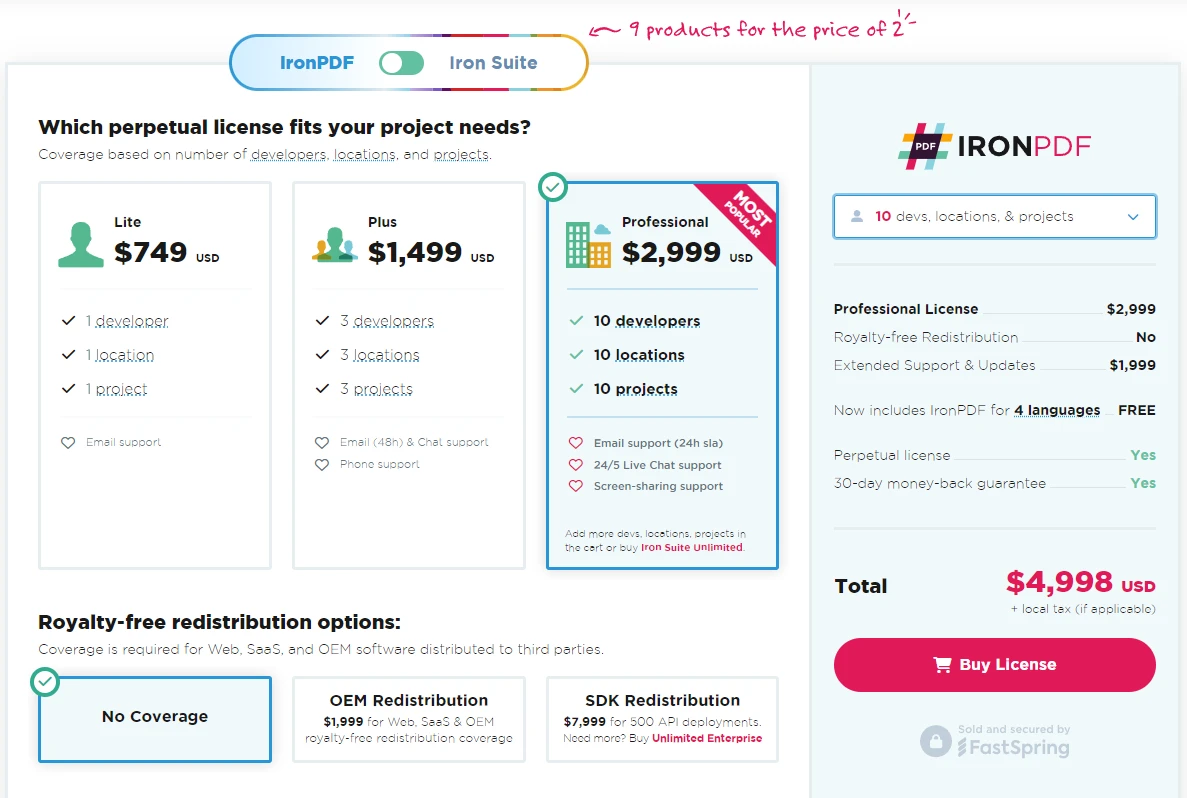
了解 IronPDF 如何簡化您的 PDF 處理工作流程。 透過其免費試用進行親自嘗試,試用從 $999 開始,如要將這個強大的工具持續整合到您的專案中。

Jacob Mellor is Chief Technology Officer at Iron Software and a visionary engineer pioneering C# PDF technology. As the original developer behind Iron Software's core codebase, he has shaped the company's product architecture since its inception, transforming it alongside CEO Cameron Rimington into a 50+ person company serving NASA, Tesla, and global government agencies.



當您需要您的PDF看起來像HTML一樣快速。














