using IronPdf;

// Disable local disk access or cross-origin requests
Installation.EnableWebSecurity = true;

// Instantiate Renderer
var renderer = new ChromePdfRenderer();

// Create a PDF from a HTML string using C#
var pdf = renderer.RenderHtmlAsPdf("<h1>Hello World</h1>");

// Export to a file or Stream
pdf.SaveAs("output.pdf");

// Advanced Example with HTML Assets
// Load external html assets: Images, CSS and JavaScript.
// An optional BasePath 'C:\site\assets\' is set as the file location to load assets from
var myAdvancedPdf = renderer.RenderHtmlAsPdf("<img src='icons/iron.png'>", @"C:\site\assets\");
myAdvancedPdf.SaveAs("html-with-assets.pdf");
using IronPdf;// Disable local disk access or cross-origin requestsInstallation.EnableWebSecurity = true;// Instantiate Renderervar renderer = new ChromePdfRenderer();// Create a PDF from a HTML string using C#var pdf = renderer.RenderHtmlAsPdf("<h1>Hello World</h1>");// Export to a file or Streampdf.SaveAs("output.pdf");// Advanced Example with HTML Assets// Load external html assets: Images, CSS and JavaScript.// An optional BasePath 'C:\site\assets\' is set as the file location to load assets fromvar myAdvancedPdf = renderer.RenderHtmlAsPdf("<img src='icons/iron.png'>", @"C:\site\assets\");myAdvancedPdf.SaveAs("html-with-assets.pdf");
PM >Install-Package IronPdf
Install-Package IronPdf
AKTUALNOŚCI DLA PROGRAMISTÓW
C# try catch finally (Jak to działa dla programistów)
Obsluga bledow jest fundamentalnym aspektem tworzenia solidnych aplikacji. W C# [bloki try-catch-finally](https://learn.microsoft.com/en-us/dotnet/csharp/language-reference/statements/exception-handling-statements) to potężne narzędzia, które zapewniają, że Twoja aplikacja potrafi radzic sobie z nieoczekiwanymi sytuacjami bez zalamania. Efektywna obsluga bledow pomaga nie tylko w zarzadzaniu bledami uruchomieniowymi, ale także w utrzymaniu stabilnosci i niezawodnosci aplikacji.
[IronPDF](https://ironpdf.com) to kompleksowa biblioteka PDF dla .NET, ktora upraszcza tworzenie, manipulację i renderowanie plikow PDF. Podczas integracji IronPDF w projektach .NET, zrozumienie skutecznego wykorzystania obslugi bledow jest kluczowe dla budowania niezawodnych aplikacji opartych na PDF. W tym artykule przyjrzymy się, jak wdrażać instrukcje try-catch-finally w Twoich projektach IronPDF do lepszej obsługi wyjątków i jak może to poprawić efektywność i wydajność Twojego srodowiska PDF.
## Understanding Try, Catch, and Finally in C#
### Co to jest blok Try-Catch?
W C#, blok **try-catch** pozwala na obsluge wyjątków, które występuja podczas wykonywania kodu. Część blok try zawiera kod, który może wywolac wyjątk, podczas gdy blok catch obsługuje wyjątek, jeśli wystąpi. Ta struktura jest niezbędna do zapobiegania awariom aplikacji poprzez łagodną obsługę wyjątków, unikając dopuszczania ich rozprzestrzeniania się w stosie wywołań.
Blok **try** to miejsce, gdzie umieszczasz kod, który potencjalnie może wywolac wyjątek. Ten blok działa jako zabezpieczenie, umożliwiając określenie sekcji kodu, która powinna być monitorowana pod kątem błędów. Jeśli jakieś części bloku try wywolają wyjątki, kontrola jest natychmiast przenoszona do odpowiadającego bloku catch.
Blok **catch** następuje po bloku try i służy do obsługi wyjątków rzuconych przez kod bloku try. Możesz mieć wiele bloków catch skonfigurowanych do osobnej obsługi różnych potencjalnych typów wyjątków. Każdy blok catch określa typ wyjątku, który obsługuje, i zawiera kod do przetwarzania wyjątków, takich jak logowanie błędu lub wyświetlanie przyjaznej dla użytkownika wiadomości o błędzie.
```csharp
using IronPdf;
public static void Main(string[] args)
{
    try
    {
        // Create a PDF renderer using Chrome.
        ChromePdfRenderer renderer = new ChromePdfRenderer();
        // Render an HTML file as a PDF.
        var pdf = renderer.RenderHtmlFileAsPdf("Example.html");
        // Save the PDF to the specified file path.
        pdf.SaveAs("output.pdf");
    }
    catch (FileNotFoundException ex)
    {
        // Handle file not found exception
        Console.WriteLine("File not found: " + ex.Message);
    }
    catch (UnauthorizedAccessException ex)
    {
        // Handle unauthorized access exception
        Console.WriteLine("Error: Access to the file is denied. " + ex.Message);
    }
    catch (Exception ex)
    {
        // Handle any other exceptions
        Console.WriteLine("An unexpected error occurred: " + ex.Message);
    }
}
```
#### Przykład FileNotFoundException
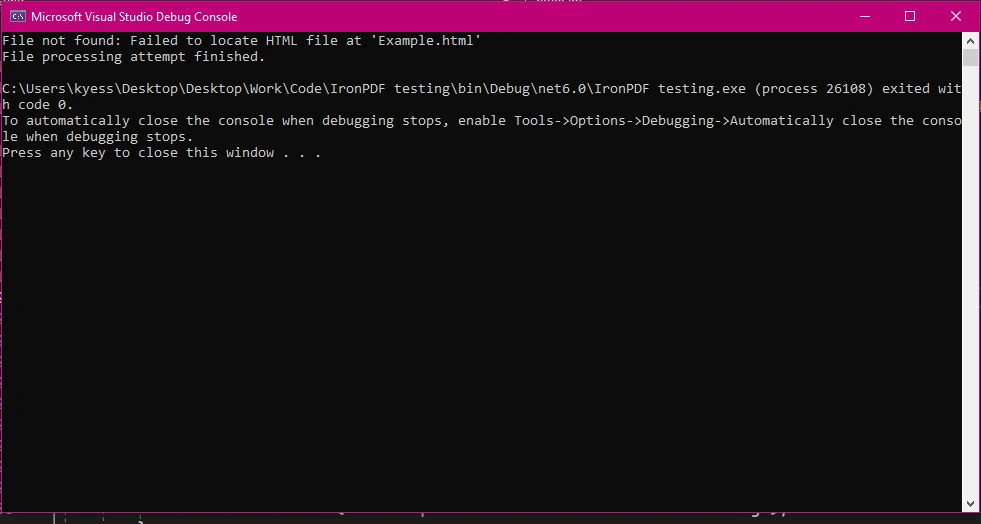
### Rola bloku Finally
Blok finally jest używany do wykonania kodu, który musi działać niezależnie od tego, czy obiekt wyjątku został rzucony, czy nie. To jest zwykle używane do czyszczenia zasobów, takich jak zamykanie strumieni plików lub połączeń z bazą danych, zapewniając odpowiednie zwolnienie tych zasobów. Kod wewnątrz bloku finally jest zawsze wykonywany, co czyni go idealnym do zadań, które muszą być wykonywane bez względu na to, co się dzieje w bloku try.
```csharp
public static void Main(string[] args)
{
try
{
// Example operation that throws an exception
int num = 10;
int result = num / 0;
}
catch (Exception ex)
{
// Handle division by zero exception
Console.WriteLine("Cannot divide by zero. " + ex.Message);
}
finally
{
// This finally block executes regardless of whether an exception was thrown
Console.WriteLine("Cleanup code runs here");
}
}
```
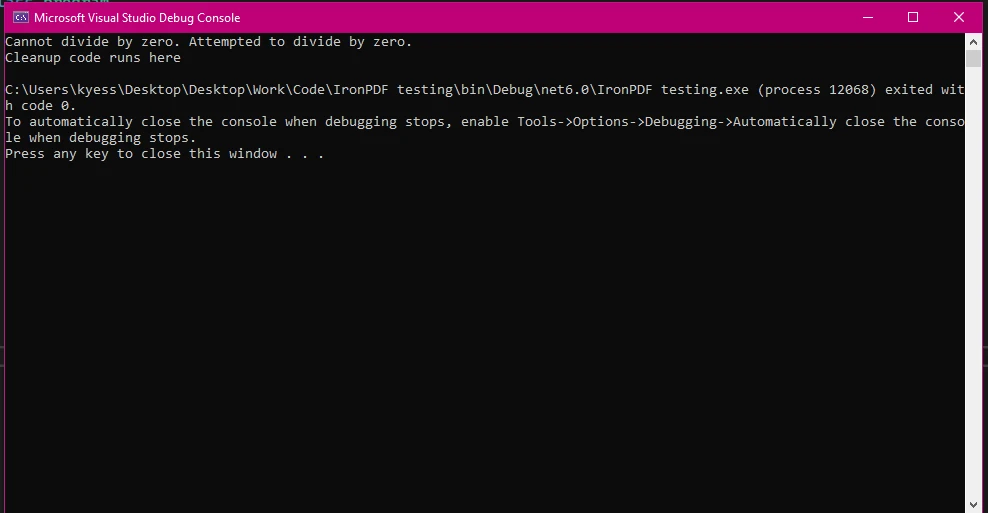
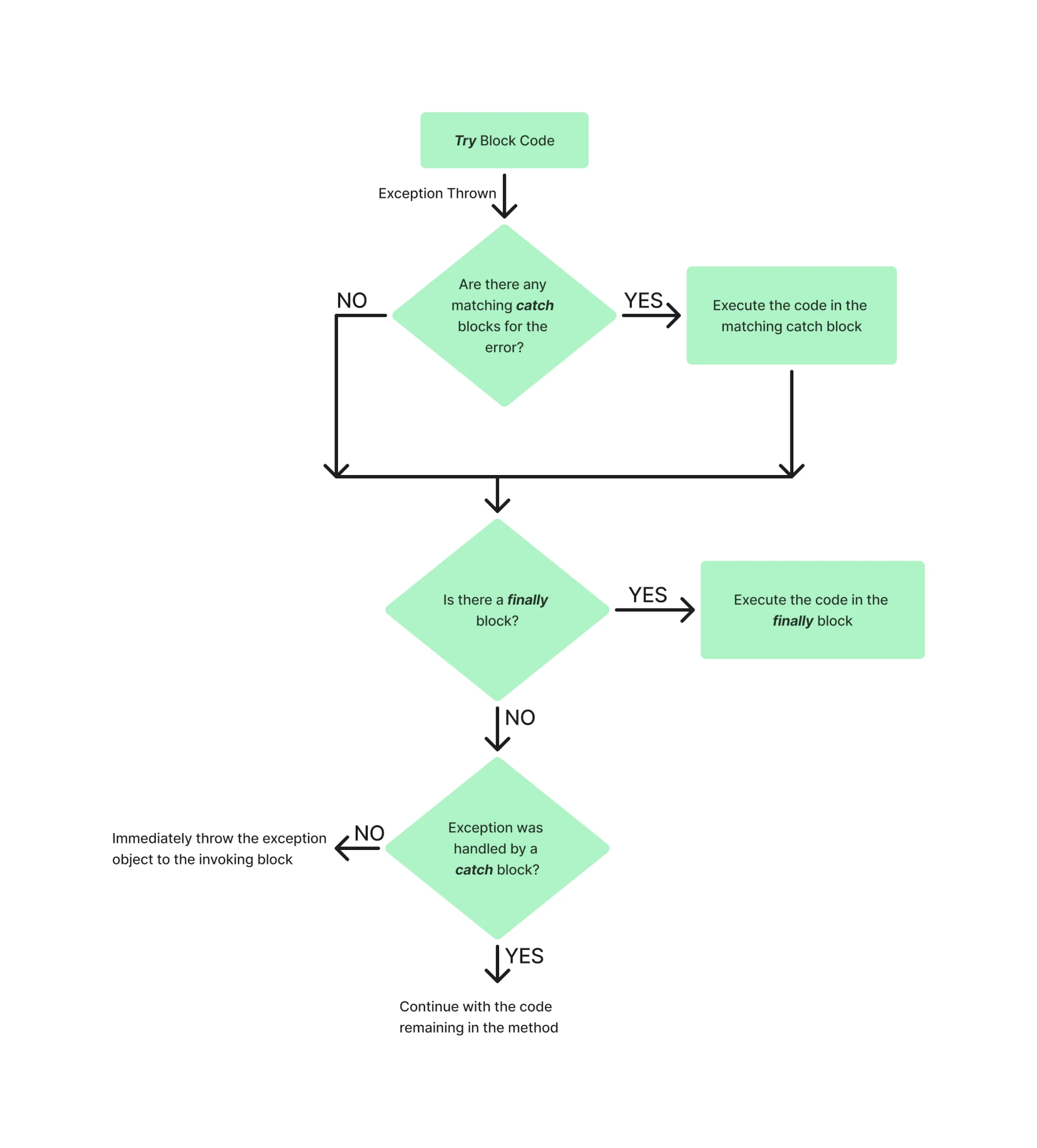
Przykład przepływu bloku try-catch-finally w programie może wyglądać tak:
## Implementing Try-Catch-Finally with IronPDF
### Konfigurowanie IronPDF w projekcie
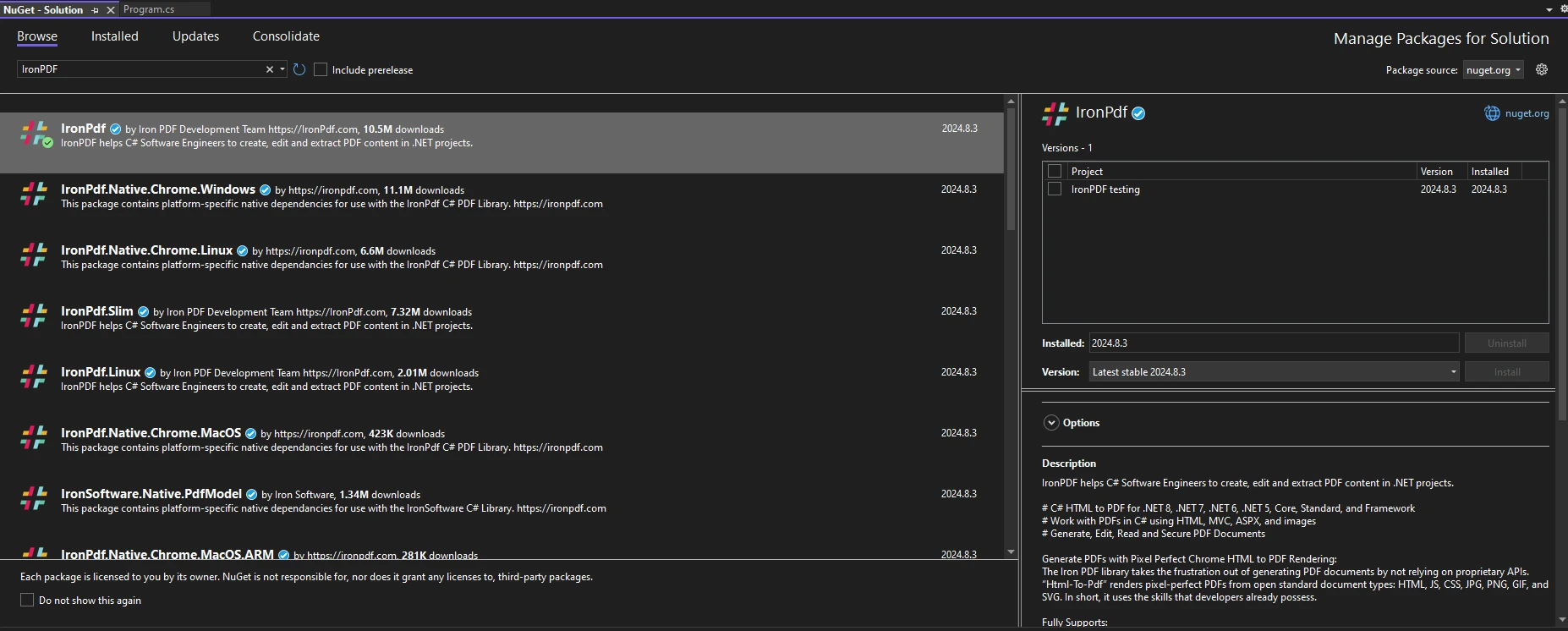
Aby zacząć używać [biblioteki IronPDF](https://www.nuget.org/packages/IronPdf/) w projektach .NET, najpierw musisz ją zainstalować za pomocą Menedżera Pakietów NuGet. Jednym ze sposobów na zrobienie tego jest przejście do Narzędzia > NuGet Package Manager > NuGet Package Manager for Solution i wyszukanie IronPDF:
Alternatywnie, uruchom następujące polecenie w konsoli Package Manager Console:
```shell
:ProductInstall
```
Aby rozpocząć korzystanie z IronPDF w swoim kodzie, upewnij się, że umieściłeś instrukcję `using IronPdf` na początku pliku kodu. Dla bardziej szczegółowego przewodnika po konfigurowaniu IronPDF w Twoim środowisku, sprawdź stronę [pierwsze kroki](/docs/).
### Obsługa wyjątków w generowaniu PDF
Podczas pracy z IronPDF do generowania PDF-ów ważne jest przewidywanie i obsługa różnych wyjątków, które mogą wystąpić w trakcie procesu. Prawidlowe wprowadzenie kodu do obslugi wyjatkow nie tylko zapobiega awarii aplikacji, ale także umożliwia łagodne reagowanie na błędy, poprawiając ogólną niezawodność i experience użytkownika aplikacji. Niektóre często spotykane wyjątki, które mogą zostać rzucone, to:
* **FileNotFoundException:** Ten wyjątek występuje, gdy próbujesz załadować plik z IronPDF, który nie istnieje w określonej ścieżce pliku. Jednym ze sposobów radzenia sobie z tym może być użycie `File.Exists(path)` do weryfikacji istnienia pliku lub otoczenie operacji w bloku instrukcji if, aby sprawdzić, czy plik istnieje.
* **InvalidOperationException:** Ten wyjątek występuje, gdy stan dokumentu PDF jest niewłaściwy do bieżącej operacji. Na przykład, jeśli próbujesz wykonać operacje na PDF, który nie jest w pełni załadowany lub wyrenderowany.
* **UnauthorizedAccessException:** Ten wyjątek występuje, gdy aplikacja nie ma uprawnień do dostępu do określonego pliku lub katalogu. Może to nastąpić z powodu restrykcyjnych uprawnień do plików lub próby zapisania do pliku do odczytu. Na przykład, jeśli próbujesz zapisać wyjściowe pliki PDF do katalogu, w którym aplikacja nie ma uprawnień do zapisu.
Niektóre specyficzne dla IronPDF typy klas wyjątków to:
* **IronPdfAssemblyVersionMismatchException:** Odnosi się to do błędów, które występują podczas ładowania zestawów podczas wdrażania IronPDF.
* **IronPdfNativeException:** Reprezentuje błędy, które mogą wystąpić w rodzimym kodzie IronPDF.
* **IronPdfProductException:** Reprezentuje dowolne błędy, które mogą wystąpić podczas wykonywania IronPDF.
```csharp
using IronPdf;
using IronPdf.Exceptions;
public static void Main(string[] args)
{
try
{
// Set the IronPDF license key
IronPdf.License.LicenseKey = "license-key";
// Create a PDF renderer
ChromePdfRenderer renderer = new ChromePdfRenderer();
// Generate PDF from HTML
var pdf = renderer.RenderHtmlAsPdf("<h1>Hello, World!</h1>");
// Save the PDF
pdf.SaveAs("output.pdf");
}
catch (IronPdfProductException ex)
{
// Handle PDF generation specific exceptions
Console.WriteLine("Error During IronPDF execution: " + ex.Message);
}
catch (Exception ex)
{
// Handle general exceptions
Console.WriteLine("An unexpected error occurred: " + ex.Message);
}
}
```
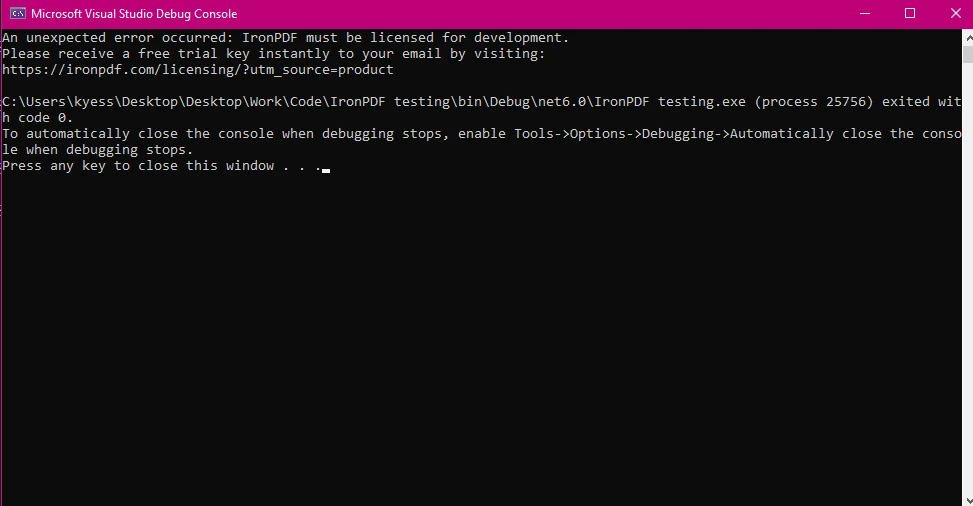
#### Wynik
Przykładem obsługi wyjątków w IronPDF może być sytuacja, gdy klucz licencyjny jest błędny lub nieobecny. W takim przypadku **IronPdfProductException**, jeśli jest używany jako część procesu obsługi wyjątków, będzie używany do wyświetlenia pasującego komunikatu o błędzie.
### Czyszczenie zasobów za pomocą bloku Finally
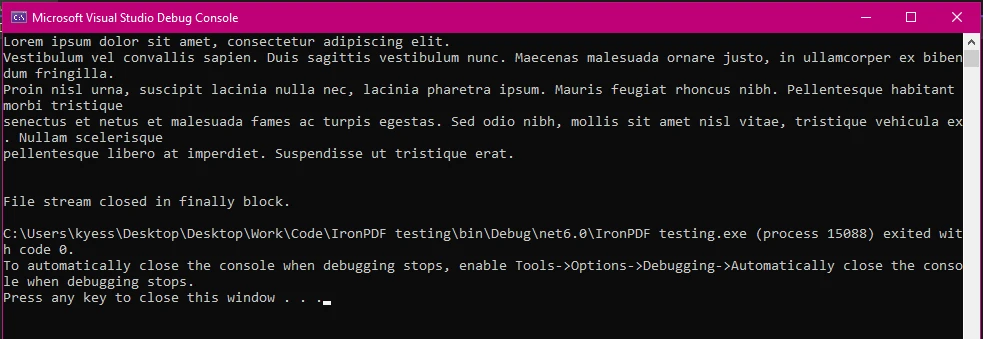
W przypadkach obejmujących operacje na plikach lub zarządzanie zasobami, blok finally zapewnia, że wszystkie zasoby są odpowiednio zwolnione, nawet jeśli w trakcie procesu wystąpi błąd.
Podczas pracy z plikami często otwiera się strumień plików do odczytu lub zapisu. Jeśli podczas przetwarzania pliku wystąpi wyjątek, niezamknięcie strumienia może pozostawić plik zablokowany lub spowodować inne problemy. Blok finally zapewnia zawsze zamknięcie strumienia plików, a zatem zwolnienie zasobu.
```csharp
public static void Main(string[] args)
{
FileStream fileStream = null;
try
{
ChromePdfRenderer renderer = new ChromePdfRenderer();
// Generate PDF from HTML
var pdf = renderer.RenderHtmlAsPdf("<h1>Hello, World!</h1>");
pdf.SaveAs("output.pdf");
pdfGenerated = true;
}
catch (IronPdf.Exceptions.IronPdfProductException ex)
{
// Handle PDF generation specific exceptions
Console.WriteLine("Error During IronPDF execution: " + ex.Message);
}
catch (Exception ex)
{
// Handle general exceptions to avoid any unhandled exception issues
Console.WriteLine("An unexpected error occurred: " + ex.Message);
}
finally
{
// Cleanup resources if necessary
if (fileStream != null)
{
fileStream.Close();
fileStream.Dispose();
}
}
}
```
#### Wyjście z wykonania bloku Finally
## Typowe Scenariusze używania Try-Catch-Finally z IronPDF
### Obsługa błędów File Not Found i Access Denied
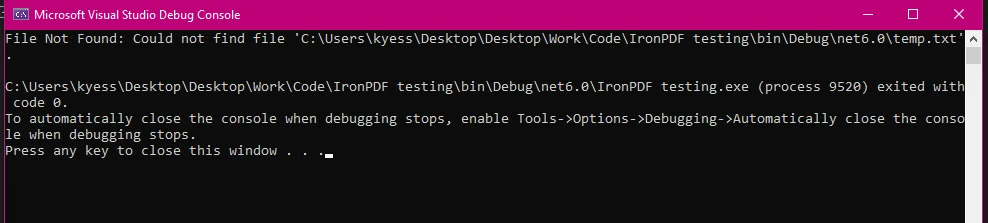
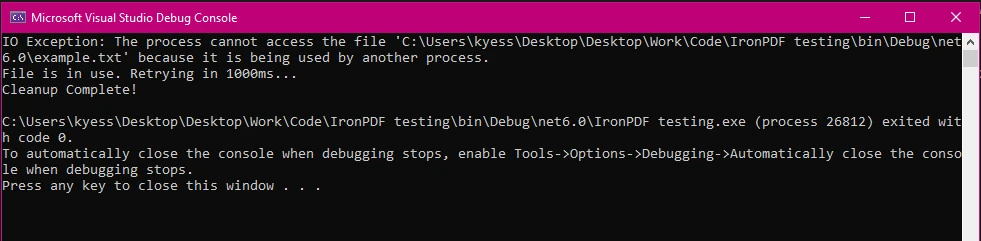
Podczas operacji na plikach w IronPDF kluczowe jest obsługiwanie wyjątków takich jak **FileNotFoundException** i **UnauthorizedAccessException**. Te wyjątki często występują, gdy pliki są brakujące lub uprawnienia są ograniczone. Właściwe obsługiwanie tych wyjątków jest niezbędne do utrzymania stabilności i niezawodności aplikacji, ponieważ często pojawiają się one, gdy występują problemy z ścieżkami plików, dostępnością lub uprawnieniami dostępu.
```csharp
using IronPdf;
using System.IO;
using IronPdf.Exceptions;
public static void Main(string[] args)
{
try
{
// Generate PDF from an RTF file
ChromePdfRenderer renderer = new ChromePdfRenderer();
var pdf = renderer.RenderRtfFileAsPdf("filePath");
pdf.SaveAs("output.pdf");
}
catch (IronPdf.Exceptions.IronPdfProductException ex)
{
// Handle PDF generation specific exceptions
Console.WriteLine("Error During IronPDF execution: " + ex.Message);
}
catch (IOException ex)
{
int retries = 5;
int delay = 1000; // Delay in milliseconds
Console.WriteLine("IO Exception: " + ex.Message);
retries--;
if (retries > 0)
{
Console.WriteLine("File is in use. Retrying in " + delay + "ms...");
System.Threading.Thread.Sleep(delay);
}
else
{
Console.WriteLine("Failed to access the file after multiple attempts.");
}
}
catch (Exception ex)
{
// Handle general exceptions
Console.WriteLine("An unexpected error occurred: " + ex.Message);
}
finally
{
// Delete the temporary file
if (File.Exists("temp.txt"))
{
File.Delete("temp.txt");
Console.WriteLine("Cleanup Complete!");
}
}
}
```
#### Przykład Wyjścia: FileNotFound
#### Przykład Wyjścia: IOException
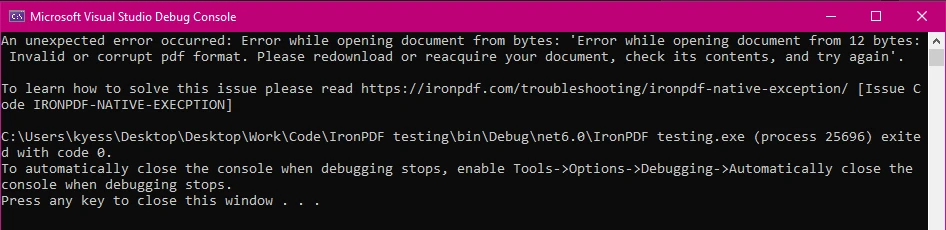
#### Przykład Wyjścia: Nietypowy Błąd z IronPdfNativeException
### Łapanie i Logowanie Błędów Przetwarzania PDF
Logowanie błędów podczas przetwarzania PDF jest niezbędne dla debugowania i monitorowania. Pozwala na uchwycenie szczegółowych informacji o występujących problemach, co może być nieocenione do diagnozowania problemów i poprawy niezawodności aplikacji.
```csharp
using IronPdf;
using IronPdf.Logging;
public static void Main(string[] args)
{
IronPdf.Logging.Logger.LogFilePath = "Default.log";
IronPdf.Logging.Logger.LoggingMode = IronPdf.Logging.Logger.LoggingModes.All;
try
{
ChromePdfRenderer renderer = new ChromePdfRenderer();
var pdf = renderer.RenderHtmlFileAsPdf("report.html");
pdf.SaveAs("output.pdf");
}
catch (Exception ex)
{
// Log the exception
IronSoftware.Logger.Log("PDF processing failed: " + ex.Message);
}
finally
{
Console.WriteLine("PDF processing attempt finished.");
}
}
```
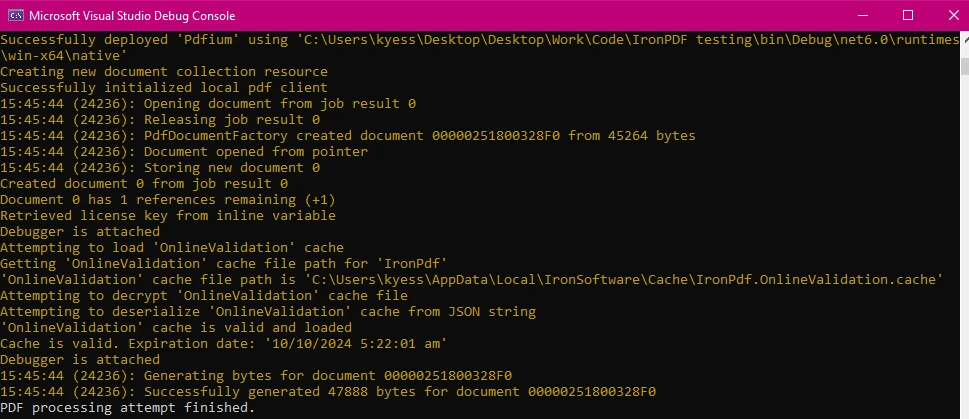
#### Wynik konsoli
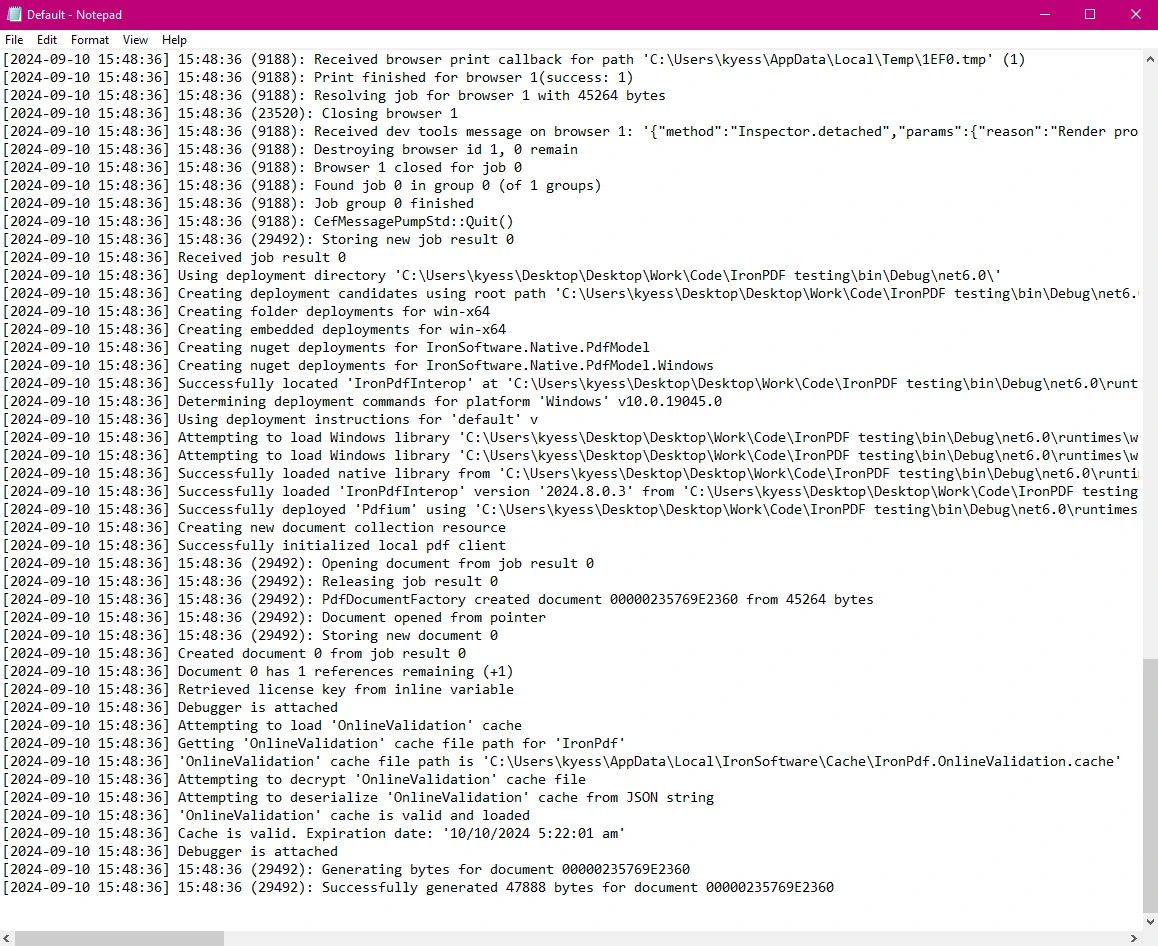
#### Log Wyjściowy
### Zapewnienie Oczyszczenia i Spójności po Błędu
Blok finally pomaga w utrzymaniu spójności stanu aplikacji, zapewniając wykonanie wszystkich operacji czyszczących, nawet po wystąpieniu błędu. Dodanie mechanizmu przywracania w bloku finally zapewnia, że jeśli w trakcie procesu generowania PDF wystąpi błąd, wszelkie wprowadzone zmiany są cofane, co utrzymuje spójność danych.
```csharp
using IronPdf;
using System.IO;
using System;
using IronPdf.Exceptions;
public static void Main(string[] args)
{
string tempFilePath = "temp.txt";
bool pdfGenerated = false; // Flag to track if PDF generation was successful
string backupPdfPath = "backup.pdf";
try
{
File.WriteAllText(tempFilePath, "Temporary content for processing.");
ChromePdfRenderer renderer = new ChromePdfRenderer();
var pdf = renderer.RenderHtmlFileAsPdf("report.html");
pdf.SaveAs("output.pdf");
}
catch (IronPdf.Exceptions.IronPdfProductException ex)
{
Console.WriteLine("IronPDF error: " + ex.Message);
}
catch (IOException ex)
{
Console.WriteLine("IO Exception: " + ex.Message);
}
catch (Exception ex)
{
Console.WriteLine("An unexpected error occurred: " + ex.Message);
}
finally
{
Console.WriteLine("PDF processing attempt finished.");
// Delete the temporary file if it exists
if (File.Exists(tempFilePath))
{
File.Delete(tempFilePath);
Console.WriteLine("Temporary file deleted.");
}
// Rollback operations if PDF generation was not successful
if (!pdfGenerated)
{
if (File.Exists(backupPdfPath))
{
File.Delete(backupPdfPath);
Console.WriteLine("Rolled back: Backup PDF deleted.");
}
}
else
{
// Ensure the backup PDF is deleted after a successful save
if (File.Exists(backupPdfPath))
{
File.Delete(backupPdfPath); // Remove backup after successful save
Console.WriteLine("Backup PDF removed after successful save.");
}
}
}
}
```
### Analiza Logiki Przywracania
1. **Tworzenie Kopii Zapasowej:**
- Na początku PDF jest zapisywany w lokalizacji kopii zapasowej (`backupPdfPath`).
2. **Udana Operacja:**
- Jeśli generowanie PDF zakończy się sukcesem (`pdfGenerated = true`), kopia zapasowa PDF jest przenoszona do finalnej lokalizacji wyjściowej.
3. **Przywracanie po Błędu:**
- Jeśli wystąpi wyjątek i `pdfGenerated` pozostanie fałszywe, kopia zapasowa PDF jest usuwana w bloku finally, aby cofnąć wszelkie częściowe zmiany.
4. **Oczyszczenie:**
- Niezależnie od sukcesu czy porażki, plik tymczasowy jest usuwany w bloku finally, aby zapewnić brak pozostawionych plików.
Dzięki wprowadzeniu tego mechanizmu przywracania zapewniasz, że system plików pozostaje w spójnym stanie, nawet jeśli w trakcie procesie generowania PDF wystąpi błąd.
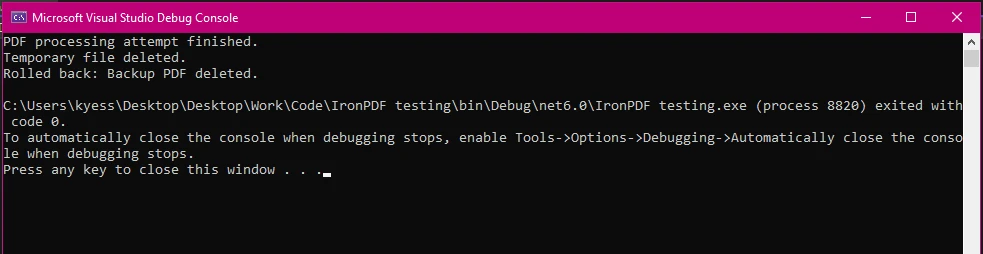
#### Wynik
## Zalety używania IronPDF do Solidnej Obsługi Błędów
### Prosty i Intuicyjny API do Obsługi Wyjątków
API IronPDF jest zaprojektowane, aby upraszczać obsługę błędów, co sprawia, że łatwiej zarządzać wyjątkami podczas skomplikowanych operacji PDF. W porównaniu do innych bibliotek PDF, IronPDF oferuje prostsze podejście do obsługi błędów i zarządzania zasobami. Jego zdolność do definiowania specyficznych typów wyjątków, takich jak **IronPdfProductException** i **IronPdfNativeException**, ułatwia unikanie nieoczekiwanych błędów lub awarii aplikacji podczas generowania lub pracy z plikami PDF z IronPDF.
Dodatkowo, wyjątki rzucane przez IronPDF są zaopatrzone w szczegółowe komunikaty o błędach, które dostarczają wglądu w przyczyny problemów. Ta przejrzystość pomaga w skuteczniejszym diagnozowaniu problemów. Na przykład **IronPdfNativeException** może wskazywać na problemy z komponentami natywnymi, podczas gdy **IronPdfUnsupportedException** zwraca uwagę na nieobsługiwane funkcje lub formaty.
### Kompleksowe wsparcie i dokumentacja
IronPDF zapewnia szczegółową dokumentację i zasoby wsparcia, które pomagają programistom zrozumieć i wdrożyć skuteczne praktyki obsługi błędów. To kompleksowe wsparcie jest cenne przy rozwiązywaniu problemów i optymalizacji operacji związanych z plikami PDF w projektach .NET.
IronPDF oferuje:
* **Wszechstronna Dokumentacja:** Obszerna i przyjazna dla użytkownika dokumentacja obejmująca wszystkie funkcje.
* **24/5 Wsparcie:** Aktywne wsparcie inżynierów jest dostępne.
* **Samouczki wideo:** Krok po kroku przewodniki wideo dostępne na YouTube.
* **Forum społecznościowe:** Zaangażowana społeczność dla dodatkowego wsparcia.
* **Dokumentacja API PDF:** Zawiera informacje o API, dzięki czemu możesz w pełni wykorzystać możliwości naszych narzędzi.
Więcej informacji można znaleźć w obszernej [dokumentacji](/docs/) IronPDF.
### Licencjonowanie
Jeśli chcesz wypróbować IronPDF i poznać jego szeroki zakres funkcji, możesz to łatwo zrobić dzięki [bezpłatnemu](trial-license) okresowi [próbnym](trial-license). Dzięki szybkiej instalacji IronPDF będzie działać w Twoich projektach PDF w mgnieniu oka. Jeśli chcesz nadal z niego korzystać i czerpać korzyści z jego zaawansowanych funkcji w celu ulepszenia swoich projektów PDF, [licencje](trial-license) zaczynają się od zaledwie `$liteLicense`.
## Wnioski
Skuteczne obsługiwanie błędów przy użyciu bloków try-catch-finally w języku C# jest niezbędne do tworzenia solidnych aplikacji, zwłaszcza podczas pracy z bibliotekami takimi jak IronPDF. Dzięki zrozumieniu i wdrożeniu tych mechanizmów obsługi błędów możesz zapewnić, że procesy generowania i przetwarzania plików PDF będą niezawodne i odporne na nieoczekiwane problemy.
[IronPDF](https://ironpdf.com), dzięki kompleksowemu i intuicyjnemu [API](/object-reference/api/), upraszcza ten proces. Dzięki oferowaniu konkretnych typów wyjątków, takich jak [IronPdfProductException](/object-reference/api/IronPdf.Exceptions.IronPdfProductException.html), [IronPdfNativeException](/object-reference/api/IronPdf.Exceptions.IronPdfNativeException.html) i [IronPdfUnsupportedException](/object-reference/api/IronPdf.Exceptions.IronPdfUnsupportedException.html), IronPDF pozwala programistom precyzyjniej identyfikować i zarządzać błędami. Ta specyfika, w połączeniu ze szczegółowymi komunikatami o błędach, pomaga usprawnić proces debugowania i zwiększa ogólną niezawodność aplikacji.
Wykorzystując możliwości IronPDF i stosując się do najlepszych praktyk w zakresie obsługi błędów i zarządzania zasobami, możesz zapewnić niezawodność i odporność operacji związanych z plikami PDF, co przełoży się na większą stabilność i wydajność aplikacji.
Obsluga bledow jest fundamentalnym aspektem tworzenia solidnych aplikacji. W C# bloki try-catch-finally to potężne narzędzia, które zapewniają, że Twoja aplikacja potrafi radzic sobie z nieoczekiwanymi sytuacjami bez zalamania. Efektywna obsluga bledow pomaga nie tylko w zarzadzaniu bledami uruchomieniowymi, ale także w utrzymaniu stabilnosci i niezawodnosci aplikacji.
IronPDF to kompleksowa biblioteka PDF dla .NET, ktora upraszcza tworzenie, manipulację i renderowanie plikow PDF. Podczas integracji IronPDF w projektach .NET, zrozumienie skutecznego wykorzystania obslugi bledow jest kluczowe dla budowania niezawodnych aplikacji opartych na PDF. W tym artykule przyjrzymy się, jak wdrażać instrukcje try-catch-finally w Twoich projektach IronPDF do lepszej obsługi wyjątków i jak może to poprawić efektywność i wydajność Twojego srodowiska PDF.
Understanding Try, Catch, and Finally in C#
Co to jest blok Try-Catch?
W C#, blok try-catch pozwala na obsluge wyjątków, które występuja podczas wykonywania kodu. Część blok try zawiera kod, który może wywolac wyjątk, podczas gdy blok catch obsługuje wyjątek, jeśli wystąpi. Ta struktura jest niezbędna do zapobiegania awariom aplikacji poprzez łagodną obsługę wyjątków, unikając dopuszczania ich rozprzestrzeniania się w stosie wywołań.
Blok try to miejsce, gdzie umieszczasz kod, który potencjalnie może wywolac wyjątek. Ten blok działa jako zabezpieczenie, umożliwiając określenie sekcji kodu, która powinna być monitorowana pod kątem błędów. Jeśli jakieś części bloku try wywolają wyjątki, kontrola jest natychmiast przenoszona do odpowiadającego bloku catch.
Blok catch następuje po bloku try i służy do obsługi wyjątków rzuconych przez kod bloku try. Możesz mieć wiele bloków catch skonfigurowanych do osobnej obsługi różnych potencjalnych typów wyjątków. Każdy blok catch określa typ wyjątku, który obsługuje, i zawiera kod do przetwarzania wyjątków, takich jak logowanie błędu lub wyświetlanie przyjaznej dla użytkownika wiadomości o błędzie.
using IronPdf;public static voidMain(string[] args){ try { // Create a PDF renderer using Chrome. ChromePdfRenderer renderer = new ChromePdfRenderer(); // Render an HTML file as a PDF. var pdf = renderer.RenderHtmlFileAsPdf("Example.html"); // Save the PDF to the specified file path. pdf.SaveAs("output.pdf"); } catch (FileNotFoundException ex) { // Handle file not found exceptionConsole.WriteLine("File not found: " + ex.Message); } catch (UnauthorizedAccessException ex) { // Handle unauthorized access exceptionConsole.WriteLine("Error: Access to the file is denied. " + ex.Message); } catch (Exception ex) { // Handle any other exceptionsConsole.WriteLine("An unexpected error occurred: " + ex.Message); }}
using IronPdf;
public static void Main(string[] args)
{
    try
    {
        // Create a PDF renderer using Chrome.
        ChromePdfRenderer renderer = new ChromePdfRenderer();
        // Render an HTML file as a PDF.
        var pdf = renderer.RenderHtmlFileAsPdf("Example.html");
        // Save the PDF to the specified file path.
        pdf.SaveAs("output.pdf");
    }
    catch (FileNotFoundException ex)
    {
        // Handle file not found exception
        Console.WriteLine("File not found: " + ex.Message);
    }
    catch (UnauthorizedAccessException ex)
    {
        // Handle unauthorized access exception
        Console.WriteLine("Error: Access to the file is denied. " + ex.Message);
    }
    catch (Exception ex)
    {
        // Handle any other exceptions
        Console.WriteLine("An unexpected error occurred: " + ex.Message);
    }
}
ImportsIronPdfPublicShared Sub Main(ByVal args() AsString)Try ' Create a PDF renderer using Chrome. Dim renderer As New ChromePdfRenderer() ' Render an HTML file as a PDF. Dim pdf = renderer.RenderHtmlFileAsPdf("Example.html") ' Save the PDF to the specified file path. pdf.SaveAs("output.pdf")Catch ex AsFileNotFoundException ' Handle file not found exceptionConsole.WriteLine("File not found: " & ex.Message)Catch ex AsUnauthorizedAccessException ' Handle unauthorized access exceptionConsole.WriteLine("Error: Access to the file is denied. " & ex.Message)Catch ex AsException ' Handle any other exceptionsConsole.WriteLine("An unexpected error occurred: " & ex.Message)EndTryEnd Sub
Imports IronPdf
Public Shared Sub Main(ByVal args() As String)
	Try
		' Create a PDF renderer using Chrome.
		Dim renderer As New ChromePdfRenderer()
		' Render an HTML file as a PDF.
		Dim pdf = renderer.RenderHtmlFileAsPdf("Example.html")
		' Save the PDF to the specified file path.
		pdf.SaveAs("output.pdf")
	Catch ex As FileNotFoundException
		' Handle file not found exception
		Console.WriteLine("File not found: " & ex.Message)
	Catch ex As UnauthorizedAccessException
		' Handle unauthorized access exception
		Console.WriteLine("Error: Access to the file is denied. " & ex.Message)
	Catch ex As Exception
		' Handle any other exceptions
		Console.WriteLine("An unexpected error occurred: " & ex.Message)
	End Try
End Sub
Przykład FileNotFoundException
Rola bloku Finally
Blok finally jest używany do wykonania kodu, który musi działać niezależnie od tego, czy obiekt wyjątku został rzucony, czy nie. To jest zwykle używane do czyszczenia zasobów, takich jak zamykanie strumieni plików lub połączeń z bazą danych, zapewniając odpowiednie zwolnienie tych zasobów. Kod wewnątrz bloku finally jest zawsze wykonywany, co czyni go idealnym do zadań, które muszą być wykonywane bez względu na to, co się dzieje w bloku try.
public static voidMain(string[] args){ try { // Example operation that throws an exception int num = 10; int result = num / 0; } catch (Exception ex) { // Handle division by zero exceptionConsole.WriteLine("Cannot divide by zero. " + ex.Message); } finally { // This finally block executes regardless of whether an exception was thrownConsole.WriteLine("Cleanup code runs here"); }}
public static void Main(string[] args)
{
    try
    {
        // Example operation that throws an exception
        int num = 10;
        int result = num / 0;
    }
    catch (Exception ex)
    {
        // Handle division by zero exception
        Console.WriteLine("Cannot divide by zero. " + ex.Message);
    }
    finally
    {
        // This finally block executes regardless of whether an exception was thrown
        Console.WriteLine("Cleanup code runs here");
    }
}
PublicShared Sub Main(ByVal args() AsString)Try ' Example operation that throws an exception Dim num AsInteger = 10 Dim result AsInteger = num \ 0Catch ex AsException ' Handle division by zero exceptionConsole.WriteLine("Cannot divide by zero. " & ex.Message)Finally ' This finally block executes regardless of whether an exception was thrownConsole.WriteLine("Cleanup code runs here")EndTryEnd Sub
Public Shared Sub Main(ByVal args() As String)
	Try
		' Example operation that throws an exception
		Dim num As Integer = 10
		Dim result As Integer = num \ 0
	Catch ex As Exception
		' Handle division by zero exception
		Console.WriteLine("Cannot divide by zero. " & ex.Message)
	Finally
		' This finally block executes regardless of whether an exception was thrown
		Console.WriteLine("Cleanup code runs here")
	End Try
End Sub
Przykład przepływu bloku try-catch-finally w programie może wyglądać tak:
Implementing Try-Catch-Finally with IronPDF
Konfigurowanie IronPDF w projekcie
Aby zacząć używać biblioteki IronPDF w projektach .NET, najpierw musisz ją zainstalować za pomocą Menedżera Pakietów NuGet. Jednym ze sposobów na zrobienie tego jest przejście do Narzędzia > NuGet Package Manager > NuGet Package Manager for Solution i wyszukanie IronPDF:
Alternatywnie, uruchom następujące polecenie w konsoli Package Manager Console:
PM > Install-Package IronPdf
Install-Package IronPdf
Aby rozpocząć korzystanie z IronPDF w swoim kodzie, upewnij się, że umieściłeś instrukcję using IronPdf na początku pliku kodu. Dla bardziej szczegółowego przewodnika po konfigurowaniu IronPDF w Twoim środowisku, sprawdź stronę pierwsze kroki.
Obsługa wyjątków w generowaniu PDF
Podczas pracy z IronPDF do generowania PDF-ów ważne jest przewidywanie i obsługa różnych wyjątków, które mogą wystąpić w trakcie procesu. Prawidlowe wprowadzenie kodu do obslugi wyjatkow nie tylko zapobiega awarii aplikacji, ale także umożliwia łagodne reagowanie na błędy, poprawiając ogólną niezawodność i experience użytkownika aplikacji. Niektóre często spotykane wyjątki, które mogą zostać rzucone, to:
FileNotFoundException: Ten wyjątek występuje, gdy próbujesz załadować plik z IronPDF, który nie istnieje w określonej ścieżce pliku. Jednym ze sposobów radzenia sobie z tym może być użycie File.Exists(path) do weryfikacji istnienia pliku lub otoczenie operacji w bloku instrukcji if, aby sprawdzić, czy plik istnieje.
InvalidOperationException: Ten wyjątek występuje, gdy stan dokumentu PDF jest niewłaściwy do bieżącej operacji. Na przykład, jeśli próbujesz wykonać operacje na PDF, który nie jest w pełni załadowany lub wyrenderowany.
UnauthorizedAccessException: Ten wyjątek występuje, gdy aplikacja nie ma uprawnień do dostępu do określonego pliku lub katalogu. Może to nastąpić z powodu restrykcyjnych uprawnień do plików lub próby zapisania do pliku do odczytu. Na przykład, jeśli próbujesz zapisać wyjściowe pliki PDF do katalogu, w którym aplikacja nie ma uprawnień do zapisu.
Niektóre specyficzne dla IronPDF typy klas wyjątków to:
IronPdfAssemblyVersionMismatchException: Odnosi się to do błędów, które występują podczas ładowania zestawów podczas wdrażania IronPDF.
IronPdfNativeException: Reprezentuje błędy, które mogą wystąpić w rodzimym kodzie IronPDF.
IronPdfProductException: Reprezentuje dowolne błędy, które mogą wystąpić podczas wykonywania IronPDF.
using IronPdf;using IronPdf.Exceptions;public static voidMain(string[] args){ try { // Set the IronPDF license keyIronPdf.License.LicenseKey = "license-key"; // Create a PDF renderer ChromePdfRenderer renderer = new ChromePdfRenderer(); // Generate PDF from HTML var pdf = renderer.RenderHtmlAsPdf("<h1>Hello, World!</h1>"); // Save the PDF pdf.SaveAs("output.pdf"); } catch (IronPdfProductException ex) { // Handle PDF generation specific exceptionsConsole.WriteLine("Error During IronPDF execution: " + ex.Message); } catch (Exception ex) { // Handle general exceptionsConsole.WriteLine("An unexpected error occurred: " + ex.Message); }}
using IronPdf;
using IronPdf.Exceptions;
public static void Main(string[] args)
{
    try
    {
        // Set the IronPDF license key
        IronPdf.License.LicenseKey = "license-key";
        // Create a PDF renderer
        ChromePdfRenderer renderer = new ChromePdfRenderer();
        // Generate PDF from HTML
        var pdf = renderer.RenderHtmlAsPdf("<h1>Hello, World!</h1>");
        // Save the PDF
        pdf.SaveAs("output.pdf");
    }
    catch (IronPdfProductException ex)
    {
        // Handle PDF generation specific exceptions
        Console.WriteLine("Error During IronPDF execution: " + ex.Message);
    }
    catch (Exception ex)
    {
        // Handle general exceptions
        Console.WriteLine("An unexpected error occurred: " + ex.Message);
    }
}
ImportsIronPdfImportsIronPdf.ExceptionsPublicShared Sub Main(ByVal args() AsString)Try ' Set the IronPDF license keyIronPdf.License.LicenseKey = "license-key" ' Create a PDF renderer Dim renderer As New ChromePdfRenderer() ' Generate PDF from HTML Dim pdf = renderer.RenderHtmlAsPdf("<h1>Hello, World!</h1>") ' Save the PDF pdf.SaveAs("output.pdf")Catch ex AsIronPdfProductException ' Handle PDF generation specific exceptionsConsole.WriteLine("Error During IronPDF execution: " & ex.Message)Catch ex AsException ' Handle general exceptionsConsole.WriteLine("An unexpected error occurred: " & ex.Message)EndTryEnd Sub
Imports IronPdf
Imports IronPdf.Exceptions
Public Shared Sub Main(ByVal args() As String)
	Try
		' Set the IronPDF license key
		IronPdf.License.LicenseKey = "license-key"
		' Create a PDF renderer
		Dim renderer As New ChromePdfRenderer()
		' Generate PDF from HTML
		Dim pdf = renderer.RenderHtmlAsPdf("<h1>Hello, World!</h1>")
		' Save the PDF
		pdf.SaveAs("output.pdf")
	Catch ex As IronPdfProductException
		' Handle PDF generation specific exceptions
		Console.WriteLine("Error During IronPDF execution: " & ex.Message)
	Catch ex As Exception
		' Handle general exceptions
		Console.WriteLine("An unexpected error occurred: " & ex.Message)
	End Try
End Sub
Wynik
Przykładem obsługi wyjątków w IronPDF może być sytuacja, gdy klucz licencyjny jest błędny lub nieobecny. W takim przypadku IronPdfProductException, jeśli jest używany jako część procesu obsługi wyjątków, będzie używany do wyświetlenia pasującego komunikatu o błędzie.
Czyszczenie zasobów za pomocą bloku Finally
W przypadkach obejmujących operacje na plikach lub zarządzanie zasobami, blok finally zapewnia, że wszystkie zasoby są odpowiednio zwolnione, nawet jeśli w trakcie procesu wystąpi błąd.
Podczas pracy z plikami często otwiera się strumień plików do odczytu lub zapisu. Jeśli podczas przetwarzania pliku wystąpi wyjątek, niezamknięcie strumienia może pozostawić plik zablokowany lub spowodować inne problemy. Blok finally zapewnia zawsze zamknięcie strumienia plików, a zatem zwolnienie zasobu.
public static voidMain(string[] args){ FileStream fileStream = null; try { ChromePdfRenderer renderer = new ChromePdfRenderer(); // Generate PDF from HTML var pdf = renderer.RenderHtmlAsPdf("<h1>Hello, World!</h1>"); pdf.SaveAs("output.pdf"); pdfGenerated = true; } catch (IronPdf.Exceptions.IronPdfProductException ex) { // Handle PDF generation specific exceptionsConsole.WriteLine("Error During IronPDF execution: " + ex.Message); } catch (Exception ex) { // Handle general exceptions to avoid any unhandled exception issuesConsole.WriteLine("An unexpected error occurred: " + ex.Message); } finally { // Cleanup resources if necessary if (fileStream != null) { fileStream.Close(); fileStream.Dispose(); } }}
public static void Main(string[] args)
{
    FileStream fileStream = null;
    try
    {
        ChromePdfRenderer renderer = new ChromePdfRenderer();
        // Generate PDF from HTML
        var pdf = renderer.RenderHtmlAsPdf("<h1>Hello, World!</h1>");
        pdf.SaveAs("output.pdf");
        pdfGenerated = true;
    }
    catch (IronPdf.Exceptions.IronPdfProductException ex)
    {
        // Handle PDF generation specific exceptions
        Console.WriteLine("Error During IronPDF execution: " + ex.Message);
    }
    catch (Exception ex)
    {
        // Handle general exceptions to avoid any unhandled exception issues
        Console.WriteLine("An unexpected error occurred: " + ex.Message);
    }
    finally
    {
        // Cleanup resources if necessary
        if (fileStream != null)
        {
            fileStream.Close();
            fileStream.Dispose();
        }
    }
}
PublicShared Sub Main(ByVal args() AsString) Dim fileStream AsFileStream = NothingTry Dim renderer As New ChromePdfRenderer() ' Generate PDF from HTML Dim pdf = renderer.RenderHtmlAsPdf("<h1>Hello, World!</h1>") pdf.SaveAs("output.pdf") pdfGenerated = TrueCatch ex AsIronPdf.Exceptions.IronPdfProductException ' Handle PDF generation specific exceptionsConsole.WriteLine("Error During IronPDF execution: " & ex.Message)Catch ex AsException ' Handle general exceptions to avoid any unhandled exception issuesConsole.WriteLine("An unexpected error occurred: " & ex.Message)Finally ' Cleanup resources if necessary If fileStream IsNot Nothing Then fileStream.Close() fileStream.Dispose() End IfEndTryEnd Sub
Public Shared Sub Main(ByVal args() As String)
	Dim fileStream As FileStream = Nothing
	Try
		Dim renderer As New ChromePdfRenderer()
		' Generate PDF from HTML
		Dim pdf = renderer.RenderHtmlAsPdf("<h1>Hello, World!</h1>")
		pdf.SaveAs("output.pdf")
		pdfGenerated = True
	Catch ex As IronPdf.Exceptions.IronPdfProductException
		' Handle PDF generation specific exceptions
		Console.WriteLine("Error During IronPDF execution: " & ex.Message)
	Catch ex As Exception
		' Handle general exceptions to avoid any unhandled exception issues
		Console.WriteLine("An unexpected error occurred: " & ex.Message)
	Finally
		' Cleanup resources if necessary
		If fileStream IsNot Nothing Then
			fileStream.Close()
			fileStream.Dispose()
		End If
	End Try
End Sub
Wyjście z wykonania bloku Finally
Typowe Scenariusze używania Try-Catch-Finally z IronPDF
Obsługa błędów File Not Found i Access Denied
Podczas operacji na plikach w IronPDF kluczowe jest obsługiwanie wyjątków takich jak FileNotFoundException i UnauthorizedAccessException. Te wyjątki często występują, gdy pliki są brakujące lub uprawnienia są ograniczone. Właściwe obsługiwanie tych wyjątków jest niezbędne do utrzymania stabilności i niezawodności aplikacji, ponieważ często pojawiają się one, gdy występują problemy z ścieżkami plików, dostępnością lub uprawnieniami dostępu.
using IronPdf;using System.IO;using IronPdf.Exceptions;public static voidMain(string[] args){ try { // Generate PDF from an RTF file ChromePdfRenderer renderer = new ChromePdfRenderer(); var pdf = renderer.RenderRtfFileAsPdf("filePath"); pdf.SaveAs("output.pdf"); } catch (IronPdf.Exceptions.IronPdfProductException ex) { // Handle PDF generation specific exceptionsConsole.WriteLine("Error During IronPDF execution: " + ex.Message); } catch (IOException ex) { int retries = 5; int delay = 1000; // Delay in millisecondsConsole.WriteLine("IO Exception: " + ex.Message); retries--; if (retries > 0) {Console.WriteLine("File is in use. Retrying in " + delay + "ms...");System.Threading.Thread.Sleep(delay); } else {Console.WriteLine("Failed to access the file after multiple attempts."); } } catch (Exception ex) { // Handle general exceptionsConsole.WriteLine("An unexpected error occurred: " + ex.Message); } finally { // Delete the temporary file if (File.Exists("temp.txt")) {File.Delete("temp.txt");Console.WriteLine("Cleanup Complete!"); } }}
using IronPdf;
using System.IO;
using IronPdf.Exceptions;
public static void Main(string[] args)
{
    try
    {
        // Generate PDF from an RTF file
        ChromePdfRenderer renderer = new ChromePdfRenderer();
        var pdf = renderer.RenderRtfFileAsPdf("filePath");
        pdf.SaveAs("output.pdf");
    }
    catch (IronPdf.Exceptions.IronPdfProductException ex)
    {
        // Handle PDF generation specific exceptions
        Console.WriteLine("Error During IronPDF execution: " + ex.Message);
    }
    catch (IOException ex)
    {
        int retries = 5;
        int delay = 1000; // Delay in milliseconds
        Console.WriteLine("IO Exception: " + ex.Message);
        retries--;
        if (retries > 0)
        {
            Console.WriteLine("File is in use. Retrying in " + delay + "ms...");
            System.Threading.Thread.Sleep(delay);
        }
        else
        {
            Console.WriteLine("Failed to access the file after multiple attempts.");
        }
    }
    catch (Exception ex)
    {
        // Handle general exceptions
        Console.WriteLine("An unexpected error occurred: " + ex.Message);
    }
    finally
    {
        // Delete the temporary file
        if (File.Exists("temp.txt"))
        {
            File.Delete("temp.txt");
            Console.WriteLine("Cleanup Complete!");
        }
    }
}
ImportsIronPdfImportsSystem.IOImportsIronPdf.ExceptionsPublicShared Sub Main(ByVal args() AsString)Try ' Generate PDF from an RTF file Dim renderer As New ChromePdfRenderer() Dim pdf = renderer.RenderRtfFileAsPdf("filePath") pdf.SaveAs("output.pdf")Catch ex AsIronPdf.Exceptions.IronPdfProductException ' Handle PDF generation specific exceptionsConsole.WriteLine("Error During IronPDF execution: " & ex.Message)Catch ex AsIOException Dim retries AsInteger = 5 Dim delay AsInteger = 1000 ' Delay in millisecondsConsole.WriteLine("IO Exception: " & ex.Message) retries -= 1 If retries > 0 ThenConsole.WriteLine("File is in use. Retrying in " & delay & "ms...")System.Threading.Thread.Sleep(delay) ElseConsole.WriteLine("Failed to access the file after multiple attempts.") End IfCatch ex AsException ' Handle general exceptionsConsole.WriteLine("An unexpected error occurred: " & ex.Message)Finally ' Delete the temporary file IfFile.Exists("temp.txt") ThenFile.Delete("temp.txt")Console.WriteLine("Cleanup Complete!") End IfEndTryEnd Sub
Imports IronPdf
Imports System.IO
Imports IronPdf.Exceptions
Public Shared Sub Main(ByVal args() As String)
	Try
		' Generate PDF from an RTF file
		Dim renderer As New ChromePdfRenderer()
		Dim pdf = renderer.RenderRtfFileAsPdf("filePath")
		pdf.SaveAs("output.pdf")
	Catch ex As IronPdf.Exceptions.IronPdfProductException
		' Handle PDF generation specific exceptions
		Console.WriteLine("Error During IronPDF execution: " & ex.Message)
	Catch ex As IOException
		Dim retries As Integer = 5
		Dim delay As Integer = 1000 ' Delay in milliseconds
		Console.WriteLine("IO Exception: " & ex.Message)
		retries -= 1
		If retries > 0 Then
			Console.WriteLine("File is in use. Retrying in " & delay & "ms...")
			System.Threading.Thread.Sleep(delay)
		Else
			Console.WriteLine("Failed to access the file after multiple attempts.")
		End If
	Catch ex As Exception
		' Handle general exceptions
		Console.WriteLine("An unexpected error occurred: " & ex.Message)
	Finally
		' Delete the temporary file
		If File.Exists("temp.txt") Then
			File.Delete("temp.txt")
			Console.WriteLine("Cleanup Complete!")
		End If
	End Try
End Sub
Przykład Wyjścia: FileNotFound
Przykład Wyjścia: IOException
Przykład Wyjścia: Nietypowy Błąd z IronPdfNativeException
Łapanie i Logowanie Błędów Przetwarzania PDF
Logowanie błędów podczas przetwarzania PDF jest niezbędne dla debugowania i monitorowania. Pozwala na uchwycenie szczegółowych informacji o występujących problemach, co może być nieocenione do diagnozowania problemów i poprawy niezawodności aplikacji.
using IronPdf;using IronPdf.Logging;public static voidMain(string[] args){IronPdf.Logging.Logger.LogFilePath = "Default.log";IronPdf.Logging.Logger.LoggingMode = IronPdf.Logging.Logger.LoggingModes.All; try { ChromePdfRenderer renderer = new ChromePdfRenderer(); var pdf = renderer.RenderHtmlFileAsPdf("report.html"); pdf.SaveAs("output.pdf"); } catch (Exception ex) { // Log the exceptionIronSoftware.Logger.Log("PDF processing failed: " + ex.Message); } finally {Console.WriteLine("PDF processing attempt finished."); }}
using IronPdf;
using IronPdf.Logging;
public static void Main(string[] args)
{
    IronPdf.Logging.Logger.LogFilePath = "Default.log";
    IronPdf.Logging.Logger.LoggingMode = IronPdf.Logging.Logger.LoggingModes.All;
    try
    {
        ChromePdfRenderer renderer = new ChromePdfRenderer();
        var pdf = renderer.RenderHtmlFileAsPdf("report.html");
        pdf.SaveAs("output.pdf");
    }
    catch (Exception ex)
    {
        // Log the exception
        IronSoftware.Logger.Log("PDF processing failed: " + ex.Message);
    }
    finally
    {
        Console.WriteLine("PDF processing attempt finished.");
    }
}
ImportsIronPdfImportsIronPdf.LoggingPublicShared Sub Main(ByVal args() AsString)IronPdf.Logging.Logger.LogFilePath = "Default.log"IronPdf.Logging.Logger.LoggingMode = IronPdf.Logging.Logger.LoggingModes.AllTry Dim renderer As New ChromePdfRenderer() Dim pdf = renderer.RenderHtmlFileAsPdf("report.html") pdf.SaveAs("output.pdf")Catch ex AsException ' Log the exceptionIronSoftware.Logger.Log("PDF processing failed: " & ex.Message)FinallyConsole.WriteLine("PDF processing attempt finished.")EndTryEnd Sub
Imports IronPdf
Imports IronPdf.Logging
Public Shared Sub Main(ByVal args() As String)
	IronPdf.Logging.Logger.LogFilePath = "Default.log"
	IronPdf.Logging.Logger.LoggingMode = IronPdf.Logging.Logger.LoggingModes.All
	Try
		Dim renderer As New ChromePdfRenderer()
		Dim pdf = renderer.RenderHtmlFileAsPdf("report.html")
		pdf.SaveAs("output.pdf")
	Catch ex As Exception
		' Log the exception
		IronSoftware.Logger.Log("PDF processing failed: " & ex.Message)
	Finally
		Console.WriteLine("PDF processing attempt finished.")
	End Try
End Sub
Wynik konsoli
Log Wyjściowy
Zapewnienie Oczyszczenia i Spójności po Błędu
Blok finally pomaga w utrzymaniu spójności stanu aplikacji, zapewniając wykonanie wszystkich operacji czyszczących, nawet po wystąpieniu błędu. Dodanie mechanizmu przywracania w bloku finally zapewnia, że jeśli w trakcie procesu generowania PDF wystąpi błąd, wszelkie wprowadzone zmiany są cofane, co utrzymuje spójność danych.
using IronPdf;using System.IO;using System;using IronPdf.Exceptions;public static voidMain(string[] args){ string tempFilePath = "temp.txt"; bool pdfGenerated = false; // Flag to track if PDF generation was successful string backupPdfPath = "backup.pdf"; try {File.WriteAllText(tempFilePath, "Temporary content for processing."); ChromePdfRenderer renderer = new ChromePdfRenderer(); var pdf = renderer.RenderHtmlFileAsPdf("report.html"); pdf.SaveAs("output.pdf"); } catch (IronPdf.Exceptions.IronPdfProductException ex) {Console.WriteLine("IronPDF error: " + ex.Message); } catch (IOException ex) {Console.WriteLine("IO Exception: " + ex.Message); } catch (Exception ex) {Console.WriteLine("An unexpected error occurred: " + ex.Message); } finally {Console.WriteLine("PDF processing attempt finished."); // Delete the temporary file if it exists if (File.Exists(tempFilePath)) {File.Delete(tempFilePath);Console.WriteLine("Temporary file deleted."); } // Rollback operations if PDF generation was not successful if (!pdfGenerated) { if (File.Exists(backupPdfPath)) {File.Delete(backupPdfPath);Console.WriteLine("Rolled back: Backup PDF deleted."); } } else { // Ensure the backup PDF is deleted after a successful save if (File.Exists(backupPdfPath)) {File.Delete(backupPdfPath); // Remove backup after successful saveConsole.WriteLine("Backup PDF removed after successful save."); } } }}
using IronPdf;
using System.IO;
using System;
using IronPdf.Exceptions;
public static void Main(string[] args)
{
    string tempFilePath = "temp.txt";
    bool pdfGenerated = false; // Flag to track if PDF generation was successful
    string backupPdfPath = "backup.pdf";
    try
    {
        File.WriteAllText(tempFilePath, "Temporary content for processing.");
        ChromePdfRenderer renderer = new ChromePdfRenderer();
        var pdf = renderer.RenderHtmlFileAsPdf("report.html");
        pdf.SaveAs("output.pdf");
    }
    catch (IronPdf.Exceptions.IronPdfProductException ex)
    {
        Console.WriteLine("IronPDF error: " + ex.Message);
    }
    catch (IOException ex)
    {
        Console.WriteLine("IO Exception: " + ex.Message);
    }
    catch (Exception ex)
    {
        Console.WriteLine("An unexpected error occurred: " + ex.Message);
    }
    finally
    {
        Console.WriteLine("PDF processing attempt finished.");
        // Delete the temporary file if it exists
        if (File.Exists(tempFilePath))
        {
            File.Delete(tempFilePath);
            Console.WriteLine("Temporary file deleted.");
        }
        // Rollback operations if PDF generation was not successful
        if (!pdfGenerated)
        {
            if (File.Exists(backupPdfPath))
            {
                File.Delete(backupPdfPath);
                Console.WriteLine("Rolled back: Backup PDF deleted.");
            }
        }
        else
        {
            // Ensure the backup PDF is deleted after a successful save
            if (File.Exists(backupPdfPath))
            {
                File.Delete(backupPdfPath); // Remove backup after successful save
                Console.WriteLine("Backup PDF removed after successful save.");
            }
        }
    }
}
ImportsIronPdfImportsSystem.IOImportsSystemImportsIronPdf.ExceptionsPublicShared Sub Main(ByVal args() AsString) Dim tempFilePath AsString = "temp.txt" Dim pdfGenerated AsBoolean = False ' Flag to track if PDF generation was successful Dim backupPdfPath AsString = "backup.pdf"TryFile.WriteAllText(tempFilePath, "Temporary content for processing.") Dim renderer As New ChromePdfRenderer() Dim pdf = renderer.RenderHtmlFileAsPdf("report.html") pdf.SaveAs("output.pdf")Catch ex AsIronPdf.Exceptions.IronPdfProductExceptionConsole.WriteLine("IronPDF error: " & ex.Message)Catch ex AsIOExceptionConsole.WriteLine("IO Exception: " & ex.Message)Catch ex AsExceptionConsole.WriteLine("An unexpected error occurred: " & ex.Message)FinallyConsole.WriteLine("PDF processing attempt finished.") ' Delete the temporary file if it exists IfFile.Exists(tempFilePath) ThenFile.Delete(tempFilePath)Console.WriteLine("Temporary file deleted.") End If ' Rollback operations if PDF generation was not successful IfNot pdfGenerated Then IfFile.Exists(backupPdfPath) ThenFile.Delete(backupPdfPath)Console.WriteLine("Rolled back: Backup PDF deleted.") End If Else ' Ensure the backup PDF is deleted after a successful save IfFile.Exists(backupPdfPath) ThenFile.Delete(backupPdfPath) ' Remove backup after successful saveConsole.WriteLine("Backup PDF removed after successful save.") End If End IfEndTryEnd Sub
Imports IronPdf
Imports System.IO
Imports System
Imports IronPdf.Exceptions
Public Shared Sub Main(ByVal args() As String)
	Dim tempFilePath As String = "temp.txt"
	Dim pdfGenerated As Boolean = False ' Flag to track if PDF generation was successful
	Dim backupPdfPath As String = "backup.pdf"
	Try
		File.WriteAllText(tempFilePath, "Temporary content for processing.")
		Dim renderer As New ChromePdfRenderer()
		Dim pdf = renderer.RenderHtmlFileAsPdf("report.html")
		pdf.SaveAs("output.pdf")
	Catch ex As IronPdf.Exceptions.IronPdfProductException
		Console.WriteLine("IronPDF error: " & ex.Message)
	Catch ex As IOException
		Console.WriteLine("IO Exception: " & ex.Message)
	Catch ex As Exception
		Console.WriteLine("An unexpected error occurred: " & ex.Message)
	Finally
		Console.WriteLine("PDF processing attempt finished.")
		' Delete the temporary file if it exists
		If File.Exists(tempFilePath) Then
			File.Delete(tempFilePath)
			Console.WriteLine("Temporary file deleted.")
		End If
		' Rollback operations if PDF generation was not successful
		If Not pdfGenerated Then
			If File.Exists(backupPdfPath) Then
				File.Delete(backupPdfPath)
				Console.WriteLine("Rolled back: Backup PDF deleted.")
			End If
		Else
			' Ensure the backup PDF is deleted after a successful save
			If File.Exists(backupPdfPath) Then
				File.Delete(backupPdfPath) ' Remove backup after successful save
				Console.WriteLine("Backup PDF removed after successful save.")
			End If
		End If
	End Try
End Sub
Analiza Logiki Przywracania
Tworzenie Kopii Zapasowej:
Na początku PDF jest zapisywany w lokalizacji kopii zapasowej (backupPdfPath).
Udana Operacja:
Jeśli generowanie PDF zakończy się sukcesem (pdfGenerated = true), kopia zapasowa PDF jest przenoszona do finalnej lokalizacji wyjściowej.
Przywracanie po Błędu:
Jeśli wystąpi wyjątek i pdfGenerated pozostanie fałszywe, kopia zapasowa PDF jest usuwana w bloku finally, aby cofnąć wszelkie częściowe zmiany.
Oczyszczenie:
Niezależnie od sukcesu czy porażki, plik tymczasowy jest usuwany w bloku finally, aby zapewnić brak pozostawionych plików.
Dzięki wprowadzeniu tego mechanizmu przywracania zapewniasz, że system plików pozostaje w spójnym stanie, nawet jeśli w trakcie procesie generowania PDF wystąpi błąd.
Wynik
Zalety używania IronPDF do Solidnej Obsługi Błędów
Prosty i Intuicyjny API do Obsługi Wyjątków
API IronPDF jest zaprojektowane, aby upraszczać obsługę błędów, co sprawia, że łatwiej zarządzać wyjątkami podczas skomplikowanych operacji PDF. W porównaniu do innych bibliotek PDF, IronPDF oferuje prostsze podejście do obsługi błędów i zarządzania zasobami. Jego zdolność do definiowania specyficznych typów wyjątków, takich jak IronPdfProductException i IronPdfNativeException, ułatwia unikanie nieoczekiwanych błędów lub awarii aplikacji podczas generowania lub pracy z plikami PDF z IronPDF.
Dodatkowo, wyjątki rzucane przez IronPDF są zaopatrzone w szczegółowe komunikaty o błędach, które dostarczają wglądu w przyczyny problemów. Ta przejrzystość pomaga w skuteczniejszym diagnozowaniu problemów. Na przykład IronPdfNativeException może wskazywać na problemy z komponentami natywnymi, podczas gdy IronPdfUnsupportedException zwraca uwagę na nieobsługiwane funkcje lub formaty.
Kompleksowe wsparcie i dokumentacja
IronPDF zapewnia szczegółową dokumentację i zasoby wsparcia, które pomagają programistom zrozumieć i wdrożyć skuteczne praktyki obsługi błędów. To kompleksowe wsparcie jest cenne przy rozwiązywaniu problemów i optymalizacji operacji związanych z plikami PDF w projektach .NET.
IronPDF oferuje:
Wszechstronna Dokumentacja: Obszerna i przyjazna dla użytkownika dokumentacja obejmująca wszystkie funkcje.
24/5 Wsparcie: Aktywne wsparcie inżynierów jest dostępne.
Samouczki wideo: Krok po kroku przewodniki wideo dostępne na YouTube.
Forum społecznościowe: Zaangażowana społeczność dla dodatkowego wsparcia.
Dokumentacja API PDF: Zawiera informacje o API, dzięki czemu możesz w pełni wykorzystać możliwości naszych narzędzi.
Więcej informacji można znaleźć w obszernej dokumentacji IronPDF.
Licencjonowanie
Jeśli chcesz wypróbować IronPDF i poznać jego szeroki zakres funkcji, możesz to łatwo zrobić dzięki bezpłatnemu okresowi próbnym. Dzięki szybkiej instalacji IronPDF będzie działać w Twoich projektach PDF w mgnieniu oka. Jeśli chcesz nadal z niego korzystać i czerpać korzyści z jego zaawansowanych funkcji w celu ulepszenia swoich projektów PDF, licencje zaczynają się od zaledwie $999.
Wnioski
Skuteczne obsługiwanie błędów przy użyciu bloków try-catch-finally w języku C# jest niezbędne do tworzenia solidnych aplikacji, zwłaszcza podczas pracy z bibliotekami takimi jak IronPDF. Dzięki zrozumieniu i wdrożeniu tych mechanizmów obsługi błędów możesz zapewnić, że procesy generowania i przetwarzania plików PDF będą niezawodne i odporne na nieoczekiwane problemy.
IronPDF, dzięki kompleksowemu i intuicyjnemu API, upraszcza ten proces. Dzięki oferowaniu konkretnych typów wyjątków, takich jak IronPdfProductException, IronPdfNativeException i IronPdfUnsupportedException, IronPDF pozwala programistom precyzyjniej identyfikować i zarządzać błędami. Ta specyfika, w połączeniu ze szczegółowymi komunikatami o błędach, pomaga usprawnić proces debugowania i zwiększa ogólną niezawodność aplikacji.
Wykorzystując możliwości IronPDF i stosując się do najlepszych praktyk w zakresie obsługi błędów i zarządzania zasobami, możesz zapewnić niezawodność i odporność operacji związanych z plikami PDF, co przełoży się na większą stabilność i wydajność aplikacji.
Jacob Mellor jest Chief Technology Officer w Iron Software i wizjonerskim inżynierem, pionierem technologii C# PDF. Jako pierwotny deweloper głównej bazy kodowej Iron Software, kształtuje architekturę produktów firmy od jej początku, przekształcając ją wspólnie z CEO Cameron Rimington w firmę liczącą ponad 50 osób, obsługującą NASA, Teslę i światowe agencje rządowe.

























