using IronPdf;

// Disable local disk access or cross-origin requests
Installation.EnableWebSecurity = true;

// Instantiate Renderer
var renderer = new ChromePdfRenderer();

// Create a PDF from a HTML string using C#
var pdf = renderer.RenderHtmlAsPdf("<h1>Hello World</h1>");

// Export to a file or Stream
pdf.SaveAs("output.pdf");

// Advanced Example with HTML Assets
// Load external html assets: Images, CSS and JavaScript.
// An optional BasePath 'C:\site\assets\' is set as the file location to load assets from
var myAdvancedPdf = renderer.RenderHtmlAsPdf("<img src='icons/iron.png'>", @"C:\site\assets\");
myAdvancedPdf.SaveAs("html-with-assets.pdf");
using IronPdf;// Disable local disk access or cross-origin requestsInstallation.EnableWebSecurity = true;// Instantiate Renderervar renderer = new ChromePdfRenderer();// Create a PDF from a HTML string using C#var pdf = renderer.RenderHtmlAsPdf("<h1>Hello World</h1>");// Export to a file or Streampdf.SaveAs("output.pdf");// Advanced Example with HTML Assets// Load external html assets: Images, CSS and JavaScript.// An optional BasePath 'C:\site\assets\' is set as the file location to load assets fromvar myAdvancedPdf = renderer.RenderHtmlAsPdf("<img src='icons/iron.png'>", @"C:\site\assets\");myAdvancedPdf.SaveAs("html-with-assets.pdf");
PM >Install-Package IronPdf
Install-Package IronPdf
AKTUALNOŚCI DLA PROGRAMISTÓW
Math.Round w języku C# (jak to działa dla programistów)
W sferze programowania w C#, metoda Math.Round odgrywa kluczową rolę w zaokrąglaniu wartości liczbowych, zwłaszcza przy pracy z typami danych double-value i decimal-value. Metoda ta pozwala programistom zaokrąglić daną wartość liczbową do najbliższej wartości całkowitej lub do określonej liczby mniejszej liczby miejsc dziesiętnych, zapewniając elastyczność i precyzję w operacjach matematycznych. Dostępne są różne typy zaokrąglania, takie jak Midpoint Rounding. W tym artykule zagłębimy się w zawiłości metody Math.Round w C#, badając jej różne aspekty i scenariusze użycia. W kolejnych sekcjach tego artykułu omówimy wykorzystanie biblioteki [IronPDF](/) od [Iron Software](https://ironsoftware.com/) do obsługi plików PDF.
## Basics of Math.Round in C#
### Metoda Math.Round
Metoda Math.Round w C# to skuteczne narzędzie do zaokrąglania cyfr ułamkowych przy użyciu określonej konwencji zaokrąglania. Jest częścią przestrzeni nazw System i oferuje kilka przeciążeń do obsługi różnych operacji zaokrąglania.
```csharp
// Methods overloaded by Math.Round
Math.Round(Double)
Math.Round(Double, Int32) // Int32 specifies number of fractional digits
Math.Round(Double, Int32, MidpointRounding)  // Int32 specifies number of fractional digits, MidpointRounding is the type of rounding method
Math.Round(Double, MidpointRounding)  // MidpointRounding is the type of rounding method
Math.Round(Decimal)
Math.Round(Decimal, Int32) // Int32 specifies number of fractional digits
Math.Round(Decimal, Int32, MidpointRounding)
Math.Round(Decimal, MidpointRounding)
```
### Zaokrąglanie wartości double
Przy pracy z wartościami typu double, metoda Math.Round jest często używana do zaokrąglania liczby do najbliższej liczby całkowitej. Na przykład:
```csharp
double originalValue = 3.75;
double roundedValue = Math.Round(originalValue);
// Output: 4
```
W tym przykładzie metoda Math.Round zaokrągliła oryginalną wartość double 3.75 do najbliższej wartości całkowitej, czyli 4.
### Zaokrąglanie wartości decimal
Podobnie, metoda Math.Round stosuje się do wartości typu decimal. Rozważmy następujący przykład:
```csharp
decimal originalValue = 8.625m;
decimal roundedValue = Math.Round(originalValue, 2);
// Output: 8.63
```
Tutaj metoda Math.Round jest używana do zaokrąglenia liczby dziesiętnej 8.625 do dwóch miejsc po przecinku, co daje zaokrągloną wartość 8.63.
### Najbliższa wartość całkowita
Podstawowym celem metody Math.Round jest zaokrąglenie danej wartości liczbowej do najbliższej liczby całkowitej. Kiedy część ułamkowa leży dokładnie w połowie drogi między dwoma liczbami całkowitymi, metoda stosuje określoną konwencję zaokrąglania. Wyliczenie MidpointRounding można użyć jako argument w metodzie Math.Round i decyduje, czy zaokrąglać do najbliższej liczby parzystej, czy od zera.
### Określona konwencja zaokrąglania
Przyjrzyjmy się, jak można wykorzystać tryb MidpointRounding:
```csharp
double originalValue = 5.5;
double roundedValueEven = Math.Round(originalValue, MidpointRounding.ToEven);
double roundedValueOdd = Math.Round(originalValue, MidpointRounding.AwayFromZero);
// Output: roundedValueEven = 6, roundedValueOdd = 6
```
W tym przykładzie, podczas zaokrąglania wartości 5.5, MidpointRounding.ToEven zaokrągla do najbliższej liczby parzystej (dając wynik 6), a MidpointRounding.AwayFromZero zaokrągla od zera, co skutkuje wartością 6.
### Zaokrąglanie do określonej liczby miejsc dziesiętnych
Aby zaokrąglić liczbę do określonej liczby miejsc dziesiętnych, metoda Math.Round umożliwia dodanie dodatkowego parametru reprezentującego liczbę cyfr ułamkowych:
```csharp
decimal originalValue = 9.123456m;
decimal roundedValue = Math.Round(originalValue, 3);
// Output: 9.123
```
Tutaj liczba dziesiętna 9.123456 jest zaokrąglona do trzech miejsc po przecinku, co daje zaokrągloną wartość 9.123.
## Midpoint Values and Rounding Conventions in C#
Wartość środkowa powstaje, gdy wartość po najmniej znaczącej cyfrze w wyniku leży dokładnie w połowie drogi między dwiema liczbami. Na przykład, 2.56500 to wartość środkowa przy zaokrąglaniu do dwóch miejsc po przecinku na 2.57, a 3.500 to wartość środkowa przy zaokrąglaniu do liczby całkowitej 4. Wyzwanie polega na określeniu najbliższej wartości w strategii zaokrąglania do najbliższego dla wartości środkowej bez określonej konwencji zaokrąglania.
Metoda Round w C# wspiera dwie konwencje zaokrąglania dla obsługi wartości środkowych:
- Zaokrąglanie od zera: Wartości środkowe są zaokrąglane do kolejnej liczby dalej od zera. Ta metoda jest reprezentowana przez element wyliczeniowy MidpointRounding.AwayFromZero.
- Zaokrąglanie do najbliższej liczby parzystej (zaokrąglanie bankowe): Wartości środkowe są zaokrąglane do najbliższej liczby parzystej. To podejście do zaokrąglania jest oznaczone przez element wyliczeniowy MidpointRounding.ToEven.
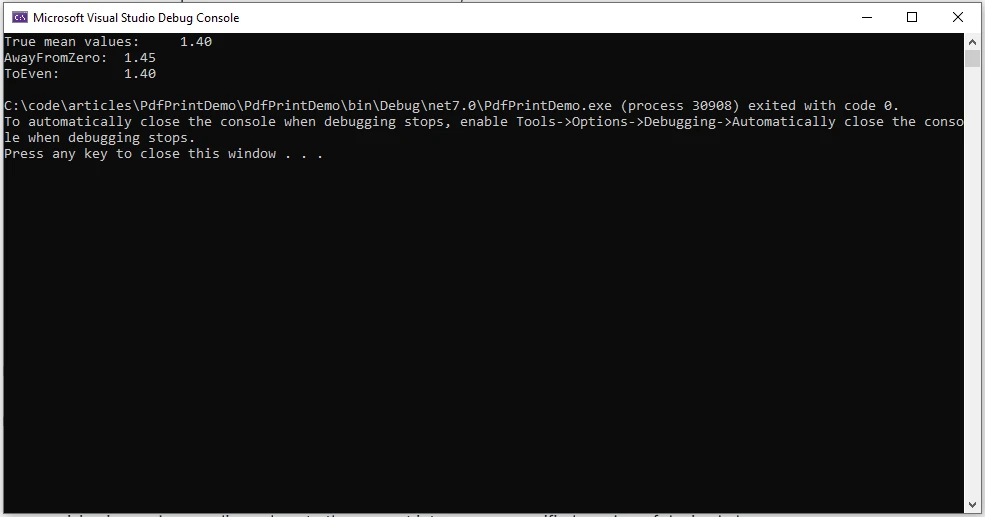
```csharp
decimal[] decimalSampleValues = { 1.15m, 1.25m, 1.35m, 1.45m, 1.55m, 1.65m };
decimal sum = 0;
// Calculate true mean values.
foreach (var value in decimalSampleValues)
{
sum += value;
}
Console.WriteLine("True mean values: {0:N2}", sum / decimalSampleValues.Length);
// Calculate mean values with rounding away from zero.
sum = 0;
foreach (var value in decimalSampleValues)
{
sum += Math.Round(value, 1, MidpointRounding.AwayFromZero);
}
Console.WriteLine("AwayFromZero mean: {0:N2}", sum / decimalSampleValues.Length);
// Calculate mean values with rounding to the nearest even.
sum = 0;
foreach (var value in decimalSampleValues)
{
sum += Math.Round(value, 1, MidpointRounding.ToEven);
}
Console.WriteLine("ToEven mean: {0:N2}", sum / decimalSampleValues.Length);
```
### Wynik
## Tryby MidpointRounding

### OdZero: 1
Strategia zaokrąglania od zera zaokrągla do najbliższej liczby, zaokrąglając liczbę znajdującą się w połowie drogi między dwiema innymi od zera.
### DoZero: 2
Ta strategia charakteryzuje się zaokrąglaniem skierowanym w stronę zera. Wynik jest najbliższy i nie większy w wartości niż wynik o nieskończonej precyzji.
### DoEven: 0
Ta strategia obejmuje zaokrąglanie do najbliższej liczby, a gdy liczba znajduje się w połowie drogi między dwiema innymi, jest zaokrąglana do najbliższej parzystej liczby.
### Do ujemnej nieskończoności: 3
Ta strategia obejmuje zaokrąglanie w dół, przy czym wynik jest najbliższy i nie większy niż wynik o nieskończonej precyzji.
### Do dodatniej nieskończoności: 4
Ta strategia obejmuje zaokrąglanie w górę, przy czym wynik jest najbliższy i nie mniejszy niż wynik o nieskończonej precyzji.
## Precyzja i podwójna precyzja zmiennoprzecinkowa
### Precyzja i wartości podwójne
Podczas pracy z liczbami zmiennoprzecinkowymi o podwójnej precyzji niezbędne jest zrozumienie potencjalnej niedokładności wynikającej z natury reprezentacji zmiennoprzecinkowej. Metoda Math.Round pomaga złagodzić problemy związane z precyzją poprzez zaokrąglanie wartości do najbliższej liczby całkowitej lub określonej liczby miejsc po przecinku.
### Określona dokładność za pomocą Math.Round
Programiści mogą wykorzystać metodę Math.Round, aby uzyskać pożądaną precyzję w swoich obliczeniach:
```csharp
double originalValue = 123.456789;
double result = Math.Round(originalValue, 4);
// Output: 123.4568, rounded value
```
W tym przykładzie wartość typu double 123,456789 jest zaokrąglana do czterech miejsc po przecinku, co daje bardziej precyzyjną wartość 123,4568.
## Strategia zaokrąglania do wartości środkowej
### Obsługa wartości pośrednich
Strategia zaokrąglania do wartości środkowej ma kluczowe znaczenie, gdy wartość ułamkowa znajduje się dokładnie w połowie odległości między dwiema liczbami całkowitymi. Metoda Math.Round wykorzystuje określoną strategię MidpointRounding do rozwiązywania takich przypadków.
### Przykład zaokrąglania do wartości środkowej
Rozważmy następujący przykład, w którym zastosowano zaokrąglenie do wartości środkowej:
```csharp
double originalValue = 7.5;
double roundedValue = Math.Round(originalValue, MidpointRounding.AwayFromZero);
// Output: 8
```
W tym przypadku wartość 7,5 jest zaokrąglana w stronę większą od zera, co daje zaokrągloną wartość 8.
## Zastosowanie w rzeczywistych scenariuszach
Oto kilka przykładów zastosowania w różnych kontekstach:
### Obliczenia finansowe
W aplikacjach finansowych kluczowe znaczenie ma precyzyjne zaokrąglanie. Na przykład podczas obliczania stóp procentowych, przeliczania walut lub wykonywania obliczeń podatkowych można zastosować metodę Math.Round, aby zapewnić zaokrąglenie wyników do odpowiedniej liczby miejsc po przecinku, zgodnie ze standardami finansowymi.
```csharp
double interestRate = 0.04567;
double roundedInterest = Math.Round(interestRate, 4); // Round to 4 decimal places
```
### Wyświetlanie interfejsu użytkownika
Podczas prezentowania wartości liczbowych w interfejsie użytkownika często zaokrągla się liczby, aby zapewnić lepszą czytelność. Zaokrąglenie za pomocą Math.Round może zwiększyć przejrzystość prezentowanych informacji.
```csharp
double temperature = 23.678;
double roundedTemperature = Math.Round(temperature, 1); // Round to 1 decimal place
```
### Analiza statystyczna
W analizie statystycznej precyzyjne zaokrąglanie jest niezbędne, aby uniknąć wprowadzania błędów systematycznych lub nieścisłości. Metoda Math.Round może pomóc w przedstawieniu wyników z pożądanym poziomem precyzji.
```csharp
double meanValue = CalculateMean(data);
double roundedMean = Math.Round(meanValue, 2); // Round mean value to 2 decimal places
```
### Obliczenia naukowe
W zastosowaniach naukowych precyzja ma kluczowe znaczenie. W przypadku danych eksperymentalnych lub obliczeń naukowych zaokrąglanie za pomocą Math.Round gwarantuje, że wyniki są przedstawiane w sposób sensowny i dokładny.
```csharp
double experimentalResult = 9.87654321;
double roundedResult = Math.Round(experimentalResult, 5); // Round to 5 decimal places
```
### Modelowanie matematyczne
Podczas wdrażania modeli matematycznych lub symulacji zaokrąglenie może uprościć złożone obliczenia. Metodę Math.Round można zastosować do kontrolowania precyzji wyników pośrednich w procesie modelowania.
```csharp
double modelResult = SimulatePhysicalSystem(parameters);
double roundedModelResult = Math.Round(modelResult, 3); // Round to 3 decimal places
```
### Tworzenie gier
W tworzeniu gier precyzja numeryczna ma kluczowe znaczenie dla obliczeń fizycznych, pozycjonowania i innych operacji matematycznych. Metoda Math.Round zapewnia, że wartości związane z grą są zaokrąglane do odpowiedniego poziomu dokładności.
```csharp
double playerPosition = CalculatePlayerPosition();
double roundedPosition = Math.Round(playerPosition, 2); // Round to 2 decimal places
```
W każdym z tych scenariuszy metoda Math.Round pozwala programistom kontrolować precyzję wartości liczbowych, zwiększając dokładność i czytelność ich aplikacji.
## Przedstawiamy IronPDF
Podstawową funkcją IronPDF jest konwersja [HTML do PDF](/tutorials/html-to-pdf/) z zachowaniem układu i stylów. Konwertuje treści internetowe na pliki PDF, co świetnie sprawdza się w przypadku raportów, faktur i dokumentacji. Możesz łatwo konwertować pliki HTML, adresy URL i ciągi znaków HTML do formatu PDF.
```csharp
using IronPdf;
class Program
{
static void Main(string[] args)
{
var renderer = new ChromePdfRenderer();
// Convert HTML String to PDF
var htmlContent = "<h1>Hello, IronPDF!</h1><p>This is a PDF from an HTML string.</p>";
var pdfFromHtmlString = renderer.RenderHtmlAsPdf(htmlContent);
pdfFromHtmlString.SaveAs("HTMLStringToPDF.pdf");
// Convert HTML File to PDF
var htmlFilePath = "path_to_your_html_file.html"; // Specify the path to your HTML file
var pdfFromHtmlFile = renderer.RenderHtmlFileAsPdf(htmlFilePath);
pdfFromHtmlFile.SaveAs("HTMLFileToPDF.pdf");
// Convert URL to PDF
var url = "http://ironpdf.com"; // Specify the URL
var pdfFromUrl = renderer.RenderUrlAsPdf(url);
pdfFromUrl.SaveAs("URLToPDF.pdf");
}
}
```
Zobaczmy teraz, jak możemy generować dokumenty PDF przy użyciu biblioteki [**IronPDF**](/) C# PDF firmy [**Iron Software**](https://ironsoftware.com/).
### Instalacja
Możesz zainstalować IronPDF za pomocą konsoli NuGet Package Manager albo menedżera pakietów Visual Studio.
```shell
:ProductInstall
```
Zainstaluj IronPDF za pomocą Menedżera pakietów NuGet, wyszukując "IronPDF" na pasku wyszukiwania.
### Wykorzystanie IronPDF do generowania pliku PDF
```csharp
using IronPdf;
List<string> cart = new List<string>();
void AddItems(params string[] items)
{
for (int i = 0; i < items.Length; i++)
{
cart.Add(items[i]);
}
}
Console.WriteLine("Enter the cart items as comma-separated values:");
var itemsString = Console.ReadLine();
if (itemsString != null)
{
var items = itemsString.Split(",").ToArray();
AddItems(items);
}
AddItems("Sample1", "Sample2");
Console.WriteLine("-------------------------------------------------------");
Console.WriteLine("Display Cart");
string name = "Sam";
var count = cart.Count;
string content = $@"
<!DOCTYPE html>
<html>
<body>
<h1>Hello, {name}!</h1>
<p>You have {count} items in the cart.</p>
" + string.Join("\n", cart.Select(x => $"<p>{x}</p>"))
+ @"
</body>
</html>";
var pdfRenderer = new ChromePdfRenderer();
pdfRenderer.RenderHtmlAsPdf(content).SaveAs("cart.pdf");
```
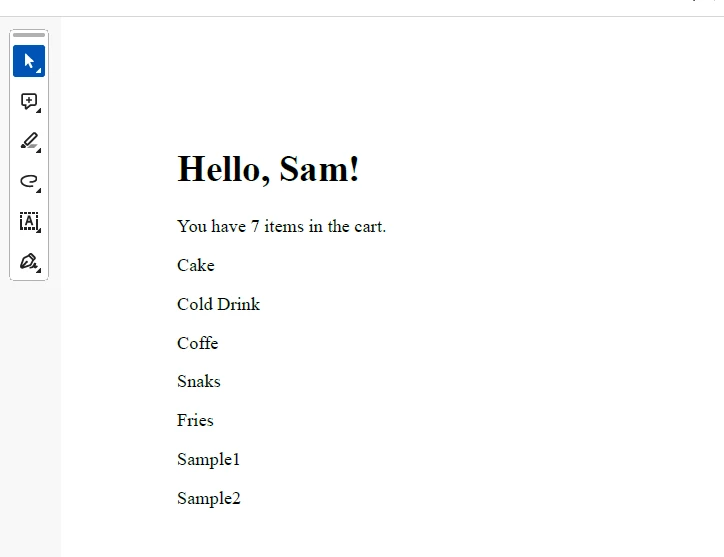
W powyższym kodzie generujemy dokument HTML dla pozycji w koszyku, a następnie zapisujemy go jako dokument PDF przy użyciu IronPDF.
### Wynik
### Licencjonowanie (dostępna bezpłatna wersja próbna)
Aby umożliwić działanie dostarczonego kodu, konieczne jest uzyskanie klucza licencyjnego. Klucz próbny można uzyskać [**tutaj**](trial-license) i należy go wstawić do pliku appsettings.json.
```json
"IronPdf.LicenseKey": "your license key"
```
Podaj swój adres e-mail, aby otrzymać Licencję Trial.
## Wnioski
Podsumowując, metoda Math.Round w języku C# jest wszechstronnym narzędziem do zaokrąglania wartości typu double i dziesiętnych, oferującym programistom elastyczność w zakresie zaokrąglania do najbliższej liczby całkowitej lub określonej liczby miejsc po przecinku. Zrozumienie zawiłości funkcji Math.Round, w tym sposobu traktowania wartości środkowych i stosowania strategii zaokrąglania MidpointRounding, jest niezbędne do wykonywania dokładnych i niezawodnych operacji matematycznych w programowaniu w języku C#. Niezależnie od tego, czy chodzi o obliczenia finansowe, wyświetlanie interfejsu użytkownika, czy inne scenariusze wymagające precyzyjnego przedstawienia liczbowego, metoda Math.Round okazuje się nieodzownym elementem zestawu narzędzi programisty. Ponadto widzieliśmy, jak wszechstronną biblioteką do generowania dokumentów PDF jest IronPDF.
W sferze programowania w C#, metoda Math.Round odgrywa kluczową rolę w zaokrąglaniu wartości liczbowych, zwłaszcza przy pracy z typami danych double-value i decimal-value. Metoda ta pozwala programistom zaokrąglić daną wartość liczbową do najbliższej wartości całkowitej lub do określonej liczby mniejszej liczby miejsc dziesiętnych, zapewniając elastyczność i precyzję w operacjach matematycznych. Dostępne są różne typy zaokrąglania, takie jak Midpoint Rounding. W tym artykule zagłębimy się w zawiłości metody Math.Round w C#, badając jej różne aspekty i scenariusze użycia. W kolejnych sekcjach tego artykułu omówimy wykorzystanie biblioteki IronPDF od Iron Software do obsługi plików PDF.
Basics of Math.Round in C#
Metoda Math.Round
Metoda Math.Round w C# to skuteczne narzędzie do zaokrąglania cyfr ułamkowych przy użyciu określonej konwencji zaokrąglania. Jest częścią przestrzeni nazw System i oferuje kilka przeciążeń do obsługi różnych operacji zaokrąglania.
// Methods overloaded by Math.RoundMath.Round(Double)Math.Round(Double, Int32) // Int32 specifies number of fractional digitsMath.Round(Double, Int32, MidpointRounding) // Int32 specifies number of fractional digits, MidpointRounding is the type of rounding methodMath.Round(Double, MidpointRounding) // MidpointRounding is the type of rounding methodMath.Round(Decimal)Math.Round(Decimal, Int32) // Int32 specifies number of fractional digitsMath.Round(Decimal, Int32, MidpointRounding)Math.Round(Decimal, MidpointRounding)
// Methods overloaded by Math.Round
Math.Round(Double)
Math.Round(Double, Int32) // Int32 specifies number of fractional digits
Math.Round(Double, Int32, MidpointRounding)  // Int32 specifies number of fractional digits, MidpointRounding is the type of rounding method
Math.Round(Double, MidpointRounding)  // MidpointRounding is the type of rounding method
Math.Round(Decimal)
Math.Round(Decimal, Int32) // Int32 specifies number of fractional digits
Math.Round(Decimal, Int32, MidpointRounding)
Math.Round(Decimal, MidpointRounding)
' Methods overloaded by Math.Round'INSTANT VB TODO TASK: The following line uses invalid syntax:'Math.Round(Double) Math.Round(Double, Int32) Math.Round(Double, Int32, MidpointRounding) Math.Round(Double, MidpointRounding) Math.Round(Decimal) Math.Round(Decimal, Int32) Math.Round(Decimal, Int32, MidpointRounding) Math.Round(Decimal, MidpointRounding)
' Methods overloaded by Math.Round
'INSTANT VB TODO TASK: The following line uses invalid syntax:
'Math.Round(Double) Math.Round(Double, Int32) Math.Round(Double, Int32, MidpointRounding) Math.Round(Double, MidpointRounding) Math.Round(Decimal) Math.Round(Decimal, Int32) Math.Round(Decimal, Int32, MidpointRounding) Math.Round(Decimal, MidpointRounding)
Zaokrąglanie wartości double
Przy pracy z wartościami typu double, metoda Math.Round jest często używana do zaokrąglania liczby do najbliższej liczby całkowitej. Na przykład:
Dim originalValue As Decimal = 8.625D
Dim roundedValue As Decimal = Math.Round(originalValue, 2)
' Output: 8.63
Tutaj metoda Math.Round jest używana do zaokrąglenia liczby dziesiętnej 8.625 do dwóch miejsc po przecinku, co daje zaokrągloną wartość 8.63.
Najbliższa wartość całkowita
Podstawowym celem metody Math.Round jest zaokrąglenie danej wartości liczbowej do najbliższej liczby całkowitej. Kiedy część ułamkowa leży dokładnie w połowie drogi między dwoma liczbami całkowitymi, metoda stosuje określoną konwencję zaokrąglania. Wyliczenie MidpointRounding można użyć jako argument w metodzie Math.Round i decyduje, czy zaokrąglać do najbliższej liczby parzystej, czy od zera.
Określona konwencja zaokrąglania
Przyjrzyjmy się, jak można wykorzystać tryb MidpointRounding:
Dim originalValue As Double = 5.5
Dim roundedValueEven As Double = Math.Round(originalValue, MidpointRounding.ToEven)
Dim roundedValueOdd As Double = Math.Round(originalValue, MidpointRounding.AwayFromZero)
' Output: roundedValueEven = 6, roundedValueOdd = 6
W tym przykładzie, podczas zaokrąglania wartości 5.5, MidpointRounding.ToEven zaokrągla do najbliższej liczby parzystej (dając wynik 6), a MidpointRounding.AwayFromZero zaokrągla od zera, co skutkuje wartością 6.
Zaokrąglanie do określonej liczby miejsc dziesiętnych
Aby zaokrąglić liczbę do określonej liczby miejsc dziesiętnych, metoda Math.Round umożliwia dodanie dodatkowego parametru reprezentującego liczbę cyfr ułamkowych:
Dim originalValue As Decimal = 9.123456D
Dim roundedValue As Decimal = Math.Round(originalValue, 3)
' Output: 9.123
Tutaj liczba dziesiętna 9.123456 jest zaokrąglona do trzech miejsc po przecinku, co daje zaokrągloną wartość 9.123.
Midpoint Values and Rounding Conventions in C#
Wartość środkowa powstaje, gdy wartość po najmniej znaczącej cyfrze w wyniku leży dokładnie w połowie drogi między dwiema liczbami. Na przykład, 2.56500 to wartość środkowa przy zaokrąglaniu do dwóch miejsc po przecinku na 2.57, a 3.500 to wartość środkowa przy zaokrąglaniu do liczby całkowitej 4. Wyzwanie polega na określeniu najbliższej wartości w strategii zaokrąglania do najbliższego dla wartości środkowej bez określonej konwencji zaokrąglania.
Metoda Round w C# wspiera dwie konwencje zaokrąglania dla obsługi wartości środkowych:
Zaokrąglanie od zera: Wartości środkowe są zaokrąglane do kolejnej liczby dalej od zera. Ta metoda jest reprezentowana przez element wyliczeniowy MidpointRounding.AwayFromZero.
Zaokrąglanie do najbliższej liczby parzystej (zaokrąglanie bankowe): Wartości środkowe są zaokrąglane do najbliższej liczby parzystej. To podejście do zaokrąglania jest oznaczone przez element wyliczeniowy MidpointRounding.ToEven.
decimal[] decimalSampleValues = { 1.15m, 1.25m, 1.35m, 1.45m, 1.55m, 1.65m };decimal sum = 0;// Calculate true mean values.foreach (var value in decimalSampleValues){ sum += value; }Console.WriteLine("True mean values: {0:N2}", sum / decimalSampleValues.Length);// Calculate mean values with rounding away from zero.sum = 0;foreach (var value in decimalSampleValues){ sum += Math.Round(value, 1, MidpointRounding.AwayFromZero); }Console.WriteLine("AwayFromZero mean: {0:N2}", sum / decimalSampleValues.Length);// Calculate mean values with rounding to the nearest even.sum = 0;foreach (var value in decimalSampleValues){ sum += Math.Round(value, 1, MidpointRounding.ToEven); }Console.WriteLine("ToEven mean: {0:N2}", sum / decimalSampleValues.Length);
decimal[] decimalSampleValues = { 1.15m, 1.25m, 1.35m, 1.45m, 1.55m, 1.65m };
decimal sum = 0;

// Calculate true mean values.
foreach (var value in decimalSampleValues)
{
    sum += value;
}
Console.WriteLine("True mean values: {0:N2}", sum / decimalSampleValues.Length);

// Calculate mean values with rounding away from zero.
sum = 0;
foreach (var value in decimalSampleValues)
{
    sum += Math.Round(value, 1, MidpointRounding.AwayFromZero);
}
Console.WriteLine("AwayFromZero mean: {0:N2}", sum / decimalSampleValues.Length);

// Calculate mean values with rounding to the nearest even.
sum = 0;
foreach (var value in decimalSampleValues)
{
    sum += Math.Round(value, 1, MidpointRounding.ToEven);
}
Console.WriteLine("ToEven mean: {0:N2}", sum / decimalSampleValues.Length);
Dim decimalSampleValues() AsDecimal = { 1.15D, 1.25D, 1.35D, 1.45D, 1.55D, 1.65D }Dim sum AsDecimal = 0' Calculate true mean values.For Each value In decimalSampleValues sum += valueNext valueConsole.WriteLine("True mean values: {0:N2}", sum / decimalSampleValues.Length)' Calculate mean values with rounding away from zero.sum = 0For Each value In decimalSampleValues sum += Math.Round(value, 1, MidpointRounding.AwayFromZero)Next valueConsole.WriteLine("AwayFromZero mean: {0:N2}", sum / decimalSampleValues.Length)' Calculate mean values with rounding to the nearest even.sum = 0For Each value In decimalSampleValues sum += Math.Round(value, 1, MidpointRounding.ToEven)Next valueConsole.WriteLine("ToEven mean: {0:N2}", sum / decimalSampleValues.Length)
Dim decimalSampleValues() As Decimal = { 1.15D, 1.25D, 1.35D, 1.45D, 1.55D, 1.65D }
Dim sum As Decimal = 0

' Calculate true mean values.
For Each value In decimalSampleValues
	sum += value
Next value
Console.WriteLine("True mean values: {0:N2}", sum / decimalSampleValues.Length)

' Calculate mean values with rounding away from zero.
sum = 0
For Each value In decimalSampleValues
	sum += Math.Round(value, 1, MidpointRounding.AwayFromZero)
Next value
Console.WriteLine("AwayFromZero mean: {0:N2}", sum / decimalSampleValues.Length)

' Calculate mean values with rounding to the nearest even.
sum = 0
For Each value In decimalSampleValues
	sum += Math.Round(value, 1, MidpointRounding.ToEven)
Next value
Console.WriteLine("ToEven mean: {0:N2}", sum / decimalSampleValues.Length)
Wynik
Tryby MidpointRounding
OdZero: 1
Strategia zaokrąglania od zera zaokrągla do najbliższej liczby, zaokrąglając liczbę znajdującą się w połowie drogi między dwiema innymi od zera.
DoZero: 2
Ta strategia charakteryzuje się zaokrąglaniem skierowanym w stronę zera. Wynik jest najbliższy i nie większy w wartości niż wynik o nieskończonej precyzji.
DoEven: 0
Ta strategia obejmuje zaokrąglanie do najbliższej liczby, a gdy liczba znajduje się w połowie drogi między dwiema innymi, jest zaokrąglana do najbliższej parzystej liczby.
Do ujemnej nieskończoności: 3
Ta strategia obejmuje zaokrąglanie w dół, przy czym wynik jest najbliższy i nie większy niż wynik o nieskończonej precyzji.
Do dodatniej nieskończoności: 4
Ta strategia obejmuje zaokrąglanie w górę, przy czym wynik jest najbliższy i nie mniejszy niż wynik o nieskończonej precyzji.
Precyzja i podwójna precyzja zmiennoprzecinkowa
Precyzja i wartości podwójne
Podczas pracy z liczbami zmiennoprzecinkowymi o podwójnej precyzji niezbędne jest zrozumienie potencjalnej niedokładności wynikającej z natury reprezentacji zmiennoprzecinkowej. Metoda Math.Round pomaga złagodzić problemy związane z precyzją poprzez zaokrąglanie wartości do najbliższej liczby całkowitej lub określonej liczby miejsc po przecinku.
Określona dokładność za pomocą Math.Round
Programiści mogą wykorzystać metodę Math.Round, aby uzyskać pożądaną precyzję w swoich obliczeniach:
double originalValue = 123.456789;double result = Math.Round(originalValue, 4);// Output: 123.4568, rounded value
double originalValue = 123.456789;
double result = Math.Round(originalValue, 4);
// Output: 123.4568, rounded value
Dim originalValue AsDouble = 123.456789Dim result AsDouble = Math.Round(originalValue, 4)' Output: 123.4568, rounded value
Dim originalValue As Double = 123.456789
Dim result As Double = Math.Round(originalValue, 4)
' Output: 123.4568, rounded value
W tym przykładzie wartość typu double 123,456789 jest zaokrąglana do czterech miejsc po przecinku, co daje bardziej precyzyjną wartość 123,4568.
Strategia zaokrąglania do wartości środkowej
Obsługa wartości pośrednich
Strategia zaokrąglania do wartości środkowej ma kluczowe znaczenie, gdy wartość ułamkowa znajduje się dokładnie w połowie odległości między dwiema liczbami całkowitymi. Metoda Math.Round wykorzystuje określoną strategię MidpointRounding do rozwiązywania takich przypadków.
Przykład zaokrąglania do wartości środkowej
Rozważmy następujący przykład, w którym zastosowano zaokrąglenie do wartości środkowej:
Dim originalValue As Double = 7.5
Dim roundedValue As Double = Math.Round(originalValue, MidpointRounding.AwayFromZero)
' Output: 8
W tym przypadku wartość 7,5 jest zaokrąglana w stronę większą od zera, co daje zaokrągloną wartość 8.
Zastosowanie w rzeczywistych scenariuszach
Oto kilka przykładów zastosowania w różnych kontekstach:
Obliczenia finansowe
W aplikacjach finansowych kluczowe znaczenie ma precyzyjne zaokrąglanie. Na przykład podczas obliczania stóp procentowych, przeliczania walut lub wykonywania obliczeń podatkowych można zastosować metodę Math.Round, aby zapewnić zaokrąglenie wyników do odpowiedniej liczby miejsc po przecinku, zgodnie ze standardami finansowymi.
Dim interestRate AsDouble = 0.04567Dim roundedInterest AsDouble = Math.Round(interestRate, 4) ' Round to 4 decimal places
Dim interestRate As Double = 0.04567
Dim roundedInterest As Double = Math.Round(interestRate, 4) ' Round to 4 decimal places
Wyświetlanie interfejsu użytkownika
Podczas prezentowania wartości liczbowych w interfejsie użytkownika często zaokrągla się liczby, aby zapewnić lepszą czytelność. Zaokrąglenie za pomocą Math.Round może zwiększyć przejrzystość prezentowanych informacji.
double temperature = 23.678;double roundedTemperature = Math.Round(temperature, 1); // Round to 1 decimal place
double temperature = 23.678;
double roundedTemperature = Math.Round(temperature, 1); // Round to 1 decimal place
Dim temperature AsDouble = 23.678Dim roundedTemperature AsDouble = Math.Round(temperature, 1) ' Round to 1 decimal place
Dim temperature As Double = 23.678
Dim roundedTemperature As Double = Math.Round(temperature, 1) ' Round to 1 decimal place
Analiza statystyczna
W analizie statystycznej precyzyjne zaokrąglanie jest niezbędne, aby uniknąć wprowadzania błędów systematycznych lub nieścisłości. Metoda Math.Round może pomóc w przedstawieniu wyników z pożądanym poziomem precyzji.
double meanValue = CalculateMean(data);double roundedMean = Math.Round(meanValue, 2); // Round mean value to 2 decimal places
double meanValue = CalculateMean(data);
double roundedMean = Math.Round(meanValue, 2); // Round mean value to 2 decimal places
Dim meanValue AsDouble = CalculateMean(data)Dim roundedMean AsDouble = Math.Round(meanValue, 2) ' Round mean value to 2 decimal places
Dim meanValue As Double = CalculateMean(data)
Dim roundedMean As Double = Math.Round(meanValue, 2) ' Round mean value to 2 decimal places
Obliczenia naukowe
W zastosowaniach naukowych precyzja ma kluczowe znaczenie. W przypadku danych eksperymentalnych lub obliczeń naukowych zaokrąglanie za pomocą Math.Round gwarantuje, że wyniki są przedstawiane w sposób sensowny i dokładny.
Dim experimentalResult AsDouble = 9.87654321Dim roundedResult AsDouble = Math.Round(experimentalResult, 5) ' Round to 5 decimal places
Dim experimentalResult As Double = 9.87654321
Dim roundedResult As Double = Math.Round(experimentalResult, 5) ' Round to 5 decimal places
Modelowanie matematyczne
Podczas wdrażania modeli matematycznych lub symulacji zaokrąglenie może uprościć złożone obliczenia. Metodę Math.Round można zastosować do kontrolowania precyzji wyników pośrednich w procesie modelowania.
Dim modelResult AsDouble = SimulatePhysicalSystem(parameters)Dim roundedModelResult AsDouble = Math.Round(modelResult, 3) ' Round to 3 decimal places
Dim modelResult As Double = SimulatePhysicalSystem(parameters)
Dim roundedModelResult As Double = Math.Round(modelResult, 3) ' Round to 3 decimal places
Tworzenie gier
W tworzeniu gier precyzja numeryczna ma kluczowe znaczenie dla obliczeń fizycznych, pozycjonowania i innych operacji matematycznych. Metoda Math.Round zapewnia, że wartości związane z grą są zaokrąglane do odpowiedniego poziomu dokładności.
Dim playerPosition AsDouble = CalculatePlayerPosition()Dim roundedPosition AsDouble = Math.Round(playerPosition, 2) ' Round to 2 decimal places
Dim playerPosition As Double = CalculatePlayerPosition()
Dim roundedPosition As Double = Math.Round(playerPosition, 2) ' Round to 2 decimal places
W każdym z tych scenariuszy metoda Math.Round pozwala programistom kontrolować precyzję wartości liczbowych, zwiększając dokładność i czytelność ich aplikacji.
Przedstawiamy IronPDF
Podstawową funkcją IronPDF jest konwersja HTML do PDF z zachowaniem układu i stylów. Konwertuje treści internetowe na pliki PDF, co świetnie sprawdza się w przypadku raportów, faktur i dokumentacji. Możesz łatwo konwertować pliki HTML, adresy URL i ciągi znaków HTML do formatu PDF.
using IronPdf;class Program{ static voidMain(string[] args) { var renderer = new ChromePdfRenderer(); // Convert HTML String to PDF var htmlContent = "<h1>Hello, IronPDF!</h1><p>This is a PDF from an HTML string.</p>"; var pdfFromHtmlString = renderer.RenderHtmlAsPdf(htmlContent); pdfFromHtmlString.SaveAs("HTMLStringToPDF.pdf"); // Convert HTML File to PDF var htmlFilePath = "path_to_your_html_file.html"; // Specify the path to your HTML file var pdfFromHtmlFile = renderer.RenderHtmlFileAsPdf(htmlFilePath); pdfFromHtmlFile.SaveAs("HTMLFileToPDF.pdf"); // Convert URL to PDF var url = "http://ironpdf.com"; // Specify the URL var pdfFromUrl = renderer.RenderUrlAsPdf(url); pdfFromUrl.SaveAs("URLToPDF.pdf"); }}
using IronPdf;

class Program
{
    static void Main(string[] args)
    {
        var renderer = new ChromePdfRenderer();

        // Convert HTML String to PDF
        var htmlContent = "<h1>Hello, IronPDF!</h1><p>This is a PDF from an HTML string.</p>";
        var pdfFromHtmlString = renderer.RenderHtmlAsPdf(htmlContent);
        pdfFromHtmlString.SaveAs("HTMLStringToPDF.pdf");

        // Convert HTML File to PDF
        var htmlFilePath = "path_to_your_html_file.html"; // Specify the path to your HTML file
        var pdfFromHtmlFile = renderer.RenderHtmlFileAsPdf(htmlFilePath);
        pdfFromHtmlFile.SaveAs("HTMLFileToPDF.pdf");

        // Convert URL to PDF
        var url = "http://ironpdf.com"; // Specify the URL
        var pdfFromUrl = renderer.RenderUrlAsPdf(url);
        pdfFromUrl.SaveAs("URLToPDF.pdf");
    }
}
ImportsIronPdfFriend Class ProgramShared Sub Main(ByVal args() AsString) Dim renderer = New ChromePdfRenderer() ' Convert HTML String to PDF Dim htmlContent = "<h1>Hello, IronPDF!</h1><p>This is a PDF from an HTML string.</p>" Dim pdfFromHtmlString = renderer.RenderHtmlAsPdf(htmlContent) pdfFromHtmlString.SaveAs("HTMLStringToPDF.pdf") ' Convert HTML File to PDF Dim htmlFilePath = "path_to_your_html_file.html" ' Specify the path to your HTML file Dim pdfFromHtmlFile = renderer.RenderHtmlFileAsPdf(htmlFilePath) pdfFromHtmlFile.SaveAs("HTMLFileToPDF.pdf") ' Convert URL to PDF Dim url = "http://ironpdf.com" ' Specify the URL Dim pdfFromUrl = renderer.RenderUrlAsPdf(url) pdfFromUrl.SaveAs("URLToPDF.pdf") End SubEnd Class
Imports IronPdf

Friend Class Program
	Shared Sub Main(ByVal args() As String)
		Dim renderer = New ChromePdfRenderer()

		' Convert HTML String to PDF
		Dim htmlContent = "<h1>Hello, IronPDF!</h1><p>This is a PDF from an HTML string.</p>"
		Dim pdfFromHtmlString = renderer.RenderHtmlAsPdf(htmlContent)
		pdfFromHtmlString.SaveAs("HTMLStringToPDF.pdf")

		' Convert HTML File to PDF
		Dim htmlFilePath = "path_to_your_html_file.html" ' Specify the path to your HTML file
		Dim pdfFromHtmlFile = renderer.RenderHtmlFileAsPdf(htmlFilePath)
		pdfFromHtmlFile.SaveAs("HTMLFileToPDF.pdf")

		' Convert URL to PDF
		Dim url = "http://ironpdf.com" ' Specify the URL
		Dim pdfFromUrl = renderer.RenderUrlAsPdf(url)
		pdfFromUrl.SaveAs("URLToPDF.pdf")
	End Sub
End Class
Zobaczmy teraz, jak możemy generować dokumenty PDF przy użyciu biblioteki IronPDF C# PDF firmy Iron Software.
Instalacja
Możesz zainstalować IronPDF za pomocą konsoli NuGet Package Manager albo menedżera pakietów Visual Studio.
PM > Install-Package IronPdf
Install-Package IronPdf
Zainstaluj IronPDF za pomocą Menedżera pakietów NuGet, wyszukując "IronPDF" na pasku wyszukiwania.
Wykorzystanie IronPDF do generowania pliku PDF
using IronPdf;List<string> cart = new List<string>();voidAddItems(params string[] items){ for (int i = 0; i < items.Length; i++) { cart.Add(items[i]); }}Console.WriteLine("Enter the cart items as comma-separated values:");var itemsString = Console.ReadLine();if (itemsString != null){ var items = itemsString.Split(",").ToArray();AddItems(items);}AddItems("Sample1", "Sample2");Console.WriteLine("-------------------------------------------------------");Console.WriteLine("Display Cart");string name = "Sam";var count = cart.Count;string content = $@"<!DOCTYPE html><html><body><h1>Hello, {name}!</h1><p>You have {count} items in the cart.</p>" + string.Join("\n", cart.Select(x => $"<p>{x}</p>"))+ @"</body></html>";var pdfRenderer = new ChromePdfRenderer();pdfRenderer.RenderHtmlAsPdf(content).SaveAs("cart.pdf");
using IronPdf;

List<string> cart = new List<string>();

void AddItems(params string[] items)
{
    for (int i = 0; i < items.Length; i++)
    {
        cart.Add(items[i]);
    }
}

Console.WriteLine("Enter the cart items as comma-separated values:");
var itemsString = Console.ReadLine();
if (itemsString != null)
{
    var items = itemsString.Split(",").ToArray();
    AddItems(items);
}

AddItems("Sample1", "Sample2");

Console.WriteLine("-------------------------------------------------------");
Console.WriteLine("Display Cart");

string name = "Sam";
var count = cart.Count;
string content = $@"
<!DOCTYPE html>
<html>
<body>
<h1>Hello, {name}!</h1>
<p>You have {count} items in the cart.</p>
" + string.Join("\n", cart.Select(x => $"<p>{x}</p>"))
+ @"
</body>
</html>";

var pdfRenderer = new ChromePdfRenderer();
pdfRenderer.RenderHtmlAsPdf(content).SaveAs("cart.pdf");
ImportsMicrosoft.VisualBasicImportsIronPdfPrivate cart As New List(OfString)()Private Sub AddItems(ParamArrayByVal items() AsString) For i AsInteger = 0 To items.Length - 1 cart.Add(items(i)) Next iEnd SubConsole.WriteLine("Enter the cart items as comma-separated values:")Dim itemsString = Console.ReadLine()If itemsString IsNot Nothing Then Dim items = itemsString.Split(",").ToArray()AddItems(items)End IfAddItems("Sample1", "Sample2")Console.WriteLine("-------------------------------------------------------")Console.WriteLine("Display Cart")Dim name AsString = "Sam"Dim count = cart.CountDim content AsString = $"<!DOCTYPE html><html><body><h1>Hello, {name}!</h1><p>You have {count} items in the cart.</p>" & String.Join(vbLf, cart.Select(Function(x) $"<p>{x}</p>")) & "</body></html>"Dim pdfRenderer = New ChromePdfRenderer()pdfRenderer.RenderHtmlAsPdf(content).SaveAs("cart.pdf")
Imports Microsoft.VisualBasic
Imports IronPdf

Private cart As New List(Of String)()

Private Sub AddItems(ParamArray ByVal items() As String)
	For i As Integer = 0 To items.Length - 1
		cart.Add(items(i))
	Next i
End Sub

Console.WriteLine("Enter the cart items as comma-separated values:")
Dim itemsString = Console.ReadLine()
If itemsString IsNot Nothing Then
	Dim items = itemsString.Split(",").ToArray()
	AddItems(items)
End If

AddItems("Sample1", "Sample2")

Console.WriteLine("-------------------------------------------------------")
Console.WriteLine("Display Cart")

Dim name As String = "Sam"
Dim count = cart.Count
Dim content As String = $"
<!DOCTYPE html>
<html>
<body>
<h1>Hello, {name}!</h1>
<p>You have {count} items in the cart.</p>
" & String.Join(vbLf, cart.Select(Function(x) $"<p>{x}</p>")) & "
</body>
</html>"

Dim pdfRenderer = New ChromePdfRenderer()
pdfRenderer.RenderHtmlAsPdf(content).SaveAs("cart.pdf")
W powyższym kodzie generujemy dokument HTML dla pozycji w koszyku, a następnie zapisujemy go jako dokument PDF przy użyciu IronPDF.
Wynik
Licencjonowanie (dostępna bezpłatna wersja próbna)
Aby umożliwić działanie dostarczonego kodu, konieczne jest uzyskanie klucza licencyjnego. Klucz próbny można uzyskać tutaj i należy go wstawić do pliku appsettings.json.
"IronPdf.LicenseKey": "your license key"
"IronPdf.LicenseKey": "your license key"
JSON
Podaj swój adres e-mail, aby otrzymać Licencję Trial.
Wnioski
Podsumowując, metoda Math.Round w języku C# jest wszechstronnym narzędziem do zaokrąglania wartości typu double i dziesiętnych, oferującym programistom elastyczność w zakresie zaokrąglania do najbliższej liczby całkowitej lub określonej liczby miejsc po przecinku. Zrozumienie zawiłości funkcji Math.Round, w tym sposobu traktowania wartości środkowych i stosowania strategii zaokrąglania MidpointRounding, jest niezbędne do wykonywania dokładnych i niezawodnych operacji matematycznych w programowaniu w języku C#. Niezależnie od tego, czy chodzi o obliczenia finansowe, wyświetlanie interfejsu użytkownika, czy inne scenariusze wymagające precyzyjnego przedstawienia liczbowego, metoda Math.Round okazuje się nieodzownym elementem zestawu narzędzi programisty. Ponadto widzieliśmy, jak wszechstronną biblioteką do generowania dokumentów PDF jest IronPDF.
Jacob Mellor jest Chief Technology Officer w Iron Software i wizjonerskim inżynierem, pionierem technologii C# PDF. Jako pierwotny deweloper głównej bazy kodowej Iron Software, kształtuje architekturę produktów firmy od jej początku, przekształcając ją wspólnie z CEO Cameron Rimington w firmę liczącą ponad 50 osób, obsługującą NASA, Teslę i światowe agencje rządowe.
















