using IronPdf;

// Disable local disk access or cross-origin requests
Installation.EnableWebSecurity = true;

// Instantiate Renderer
var renderer = new ChromePdfRenderer();

// Create a PDF from a HTML string using C#
var pdf = renderer.RenderHtmlAsPdf("<h1>Hello World</h1>");

// Export to a file or Stream
pdf.SaveAs("output.pdf");

// Advanced Example with HTML Assets
// Load external html assets: Images, CSS and JavaScript.
// An optional BasePath 'C:\site\assets\' is set as the file location to load assets from
var myAdvancedPdf = renderer.RenderHtmlAsPdf("<img src='icons/iron.png'>", @"C:\site\assets\");
myAdvancedPdf.SaveAs("html-with-assets.pdf");
using IronPdf;// Disable local disk access or cross-origin requestsInstallation.EnableWebSecurity = true;// Instantiate Renderervar renderer = new ChromePdfRenderer();// Create a PDF from a HTML string using C#var pdf = renderer.RenderHtmlAsPdf("<h1>Hello World</h1>");// Export to a file or Streampdf.SaveAs("output.pdf");// Advanced Example with HTML Assets// Load external html assets: Images, CSS and JavaScript.// An optional BasePath 'C:\site\assets\' is set as the file location to load assets fromvar myAdvancedPdf = renderer.RenderHtmlAsPdf("<img src='icons/iron.png'>", @"C:\site\assets\");myAdvancedPdf.SaveAs("html-with-assets.pdf");
# Integracja Stripe.Net z IronPDF
`Stripe.Net` to potężna biblioteka .NET, która pozwala programistom integrować możliwości przetwarzania płatności Stripe w aplikacjach .NET. Stripe to popularna bramka płatności, która umożliwia firmom akceptowanie płatności online. Z `Stripe.Net` programiści mogą zarządzać transakcjami, klientami, subskrypcjami i nie tylko, korzystając z solidnych funkcji oferowanych przez Stripe API. W tym artykułe omówimy, jak korzystać ze Stripe w połączeniu z IronPDF do tworzenia plików PDF.
## Pierwsze kroki ze Stripe.Net
### Tworzenie nowego projektu w Visual Studio
Aby rozpocząć pracę z `Stripe.Net`, musimy utworzyć nowy projekt w Visual Studio lub otworzyć istniejący. W tym samouczku wykorzystamy projekt aplikacji konsolowej.
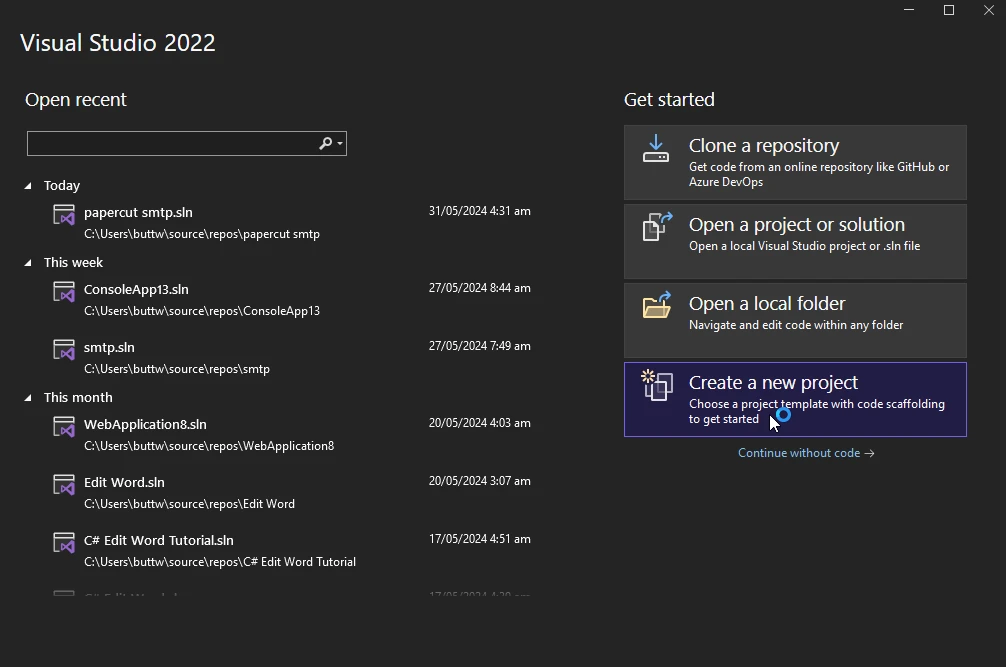
1. Otwórz Visual Studio i kliknij "Utwórz nowy projekt".
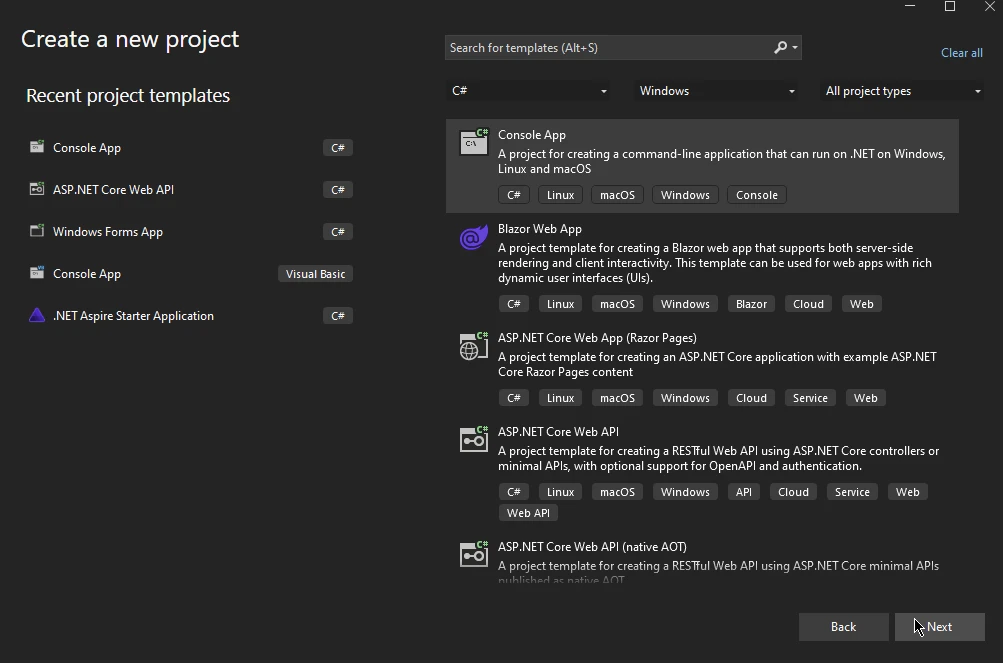
2. Pojawi się nowe okno. Wybierz opcję Aplikacja konsolowa i kliknij Dalej.
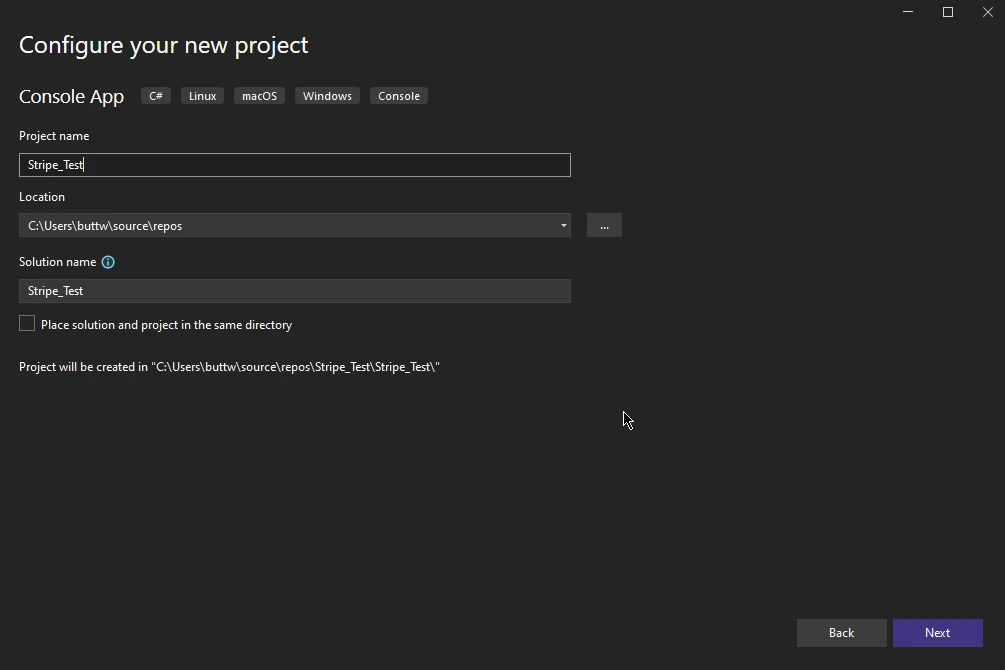
3. W kolejnym oknie wprowadź nazwę projektu i wybierz lokalizację, a następnie kliknij Dalej.
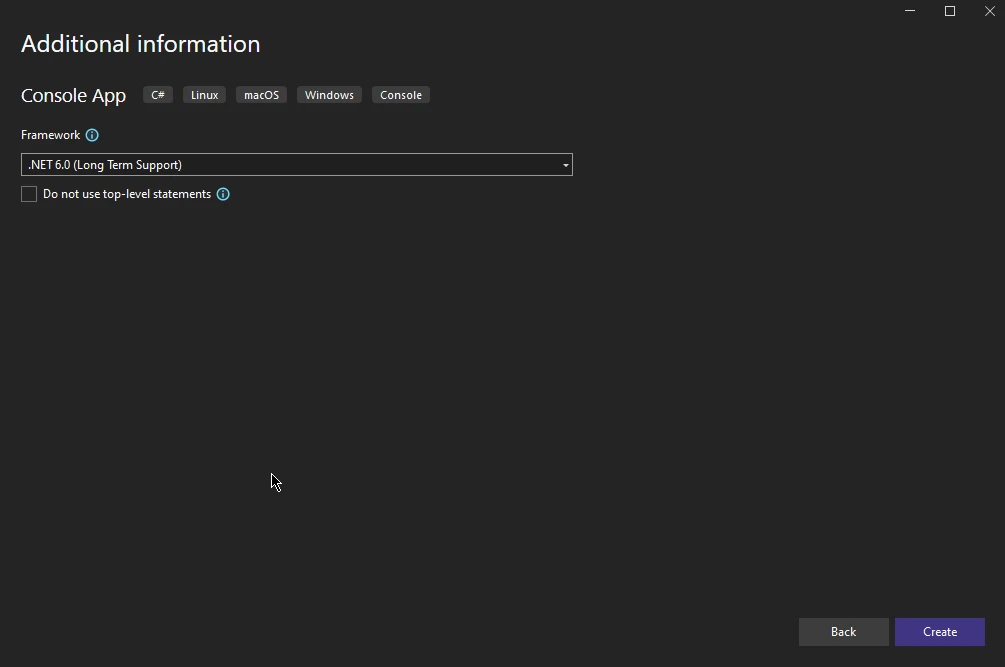
4. W kolejnym oknie wybierz framework i kliknij Utwórz.
W ten sposób tworzony jest nowy projekt aplikacji konsolowej Visual Studio.
### Instalacja
Aby rozpocząć używanie `Stripe.Net` w swoim projekcie, musisz zainstalować pakiet Stripe.Net za pośrednictwem NuGet. Można to zrobić za pomocą konsoli menedżera pakietów lub menedżera pakietów NuGet w programie Visual Studio.
Korzystanie z konsoli menedżera pakietów:
```shell
:InstallCmd Install-Package Stripe.net
```
Lub
```shell
:InstallCmd dotnet add package Stripe.net
```
Za pomocą menedżera pakietów NuGet wyszukaj "Stripe.net" i zainstaluj pakiet.
### Konfiguracja
Po zainstalowaniu należy skonfigurować klucz API Stripe, który można znaleźć na koncie Stripe. Ten klucz jest niezbędny do uwierzytelniania żądań kierowanych do API Stripe. Zazwyczaj klucz ten jest przechowywany w pliku konfiguracyjnym lub zmiennej środowiskowej ze względów bezpieczeństwa.
Oto przykład konfiguracji klucza API:
```csharp
StripeConfiguration.ApiKey = "your_secret_api_key";
```
## Podstawowe operacje w Stripe.Net
### Tworzenie klienta
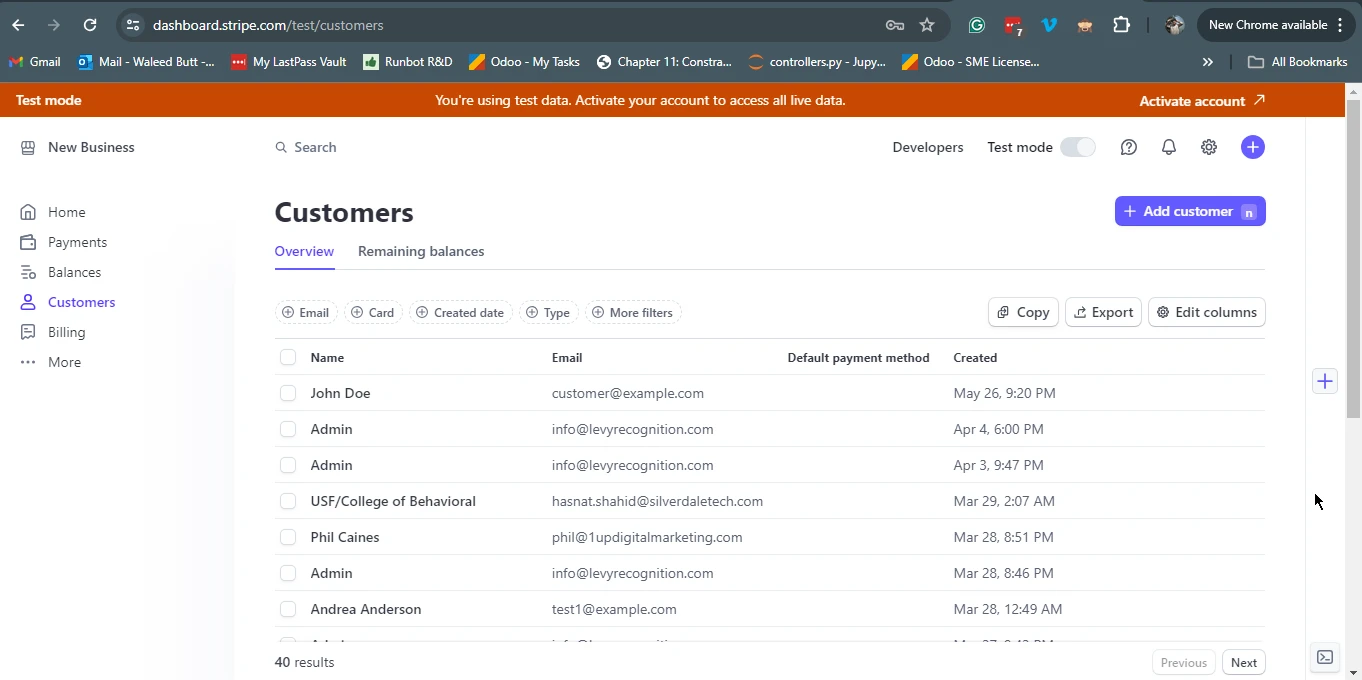
Tworzenie klienta to jedna z podstawowych operacji podczas pracy z `Stripe.Net`. Klienci mogą być powiązani z metodami płatności i subskrypcjami.
```csharp
var options = new CustomerCreateOptions
{
    Email = "customer@example.com",
    Name = "John Doe",
};
var service = new CustomerService();
Customer customer = service.Create(options);
```
#### Wynik: Pulpit nawigacyjny Stripe
### Tworzenie intencji płatności
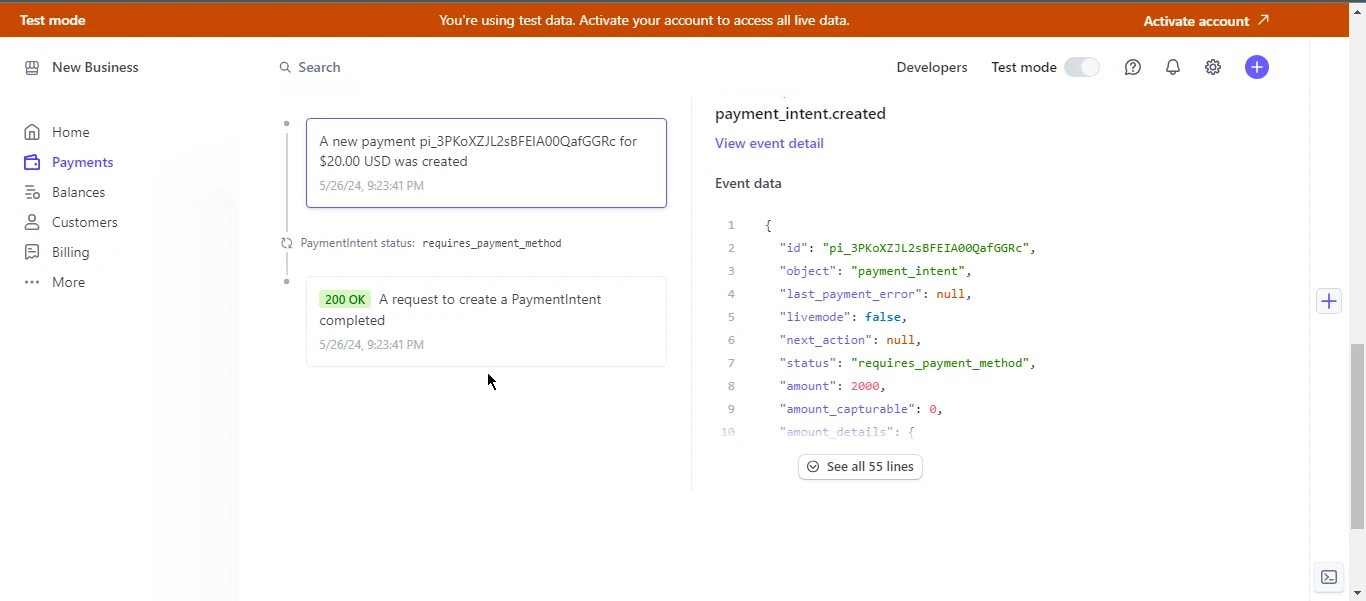
`PaymentIntent` to obiekt reprezentujący proces płatności w Stripe. Został zaprojektowany do śledzenia cyklu życia płatności od utworzenia do zakończenia.
```csharp
var options = new PaymentIntentCreateOptions
{
Amount = 2000,
Currency = "usd",
PaymentMethodTypes = new List<string>
{
"card",
},
};
var service = new PaymentIntentService();
PaymentIntent paymentIntent = service.Create(options);
```
## Zaawansowane funkcje
### Subskrypcje
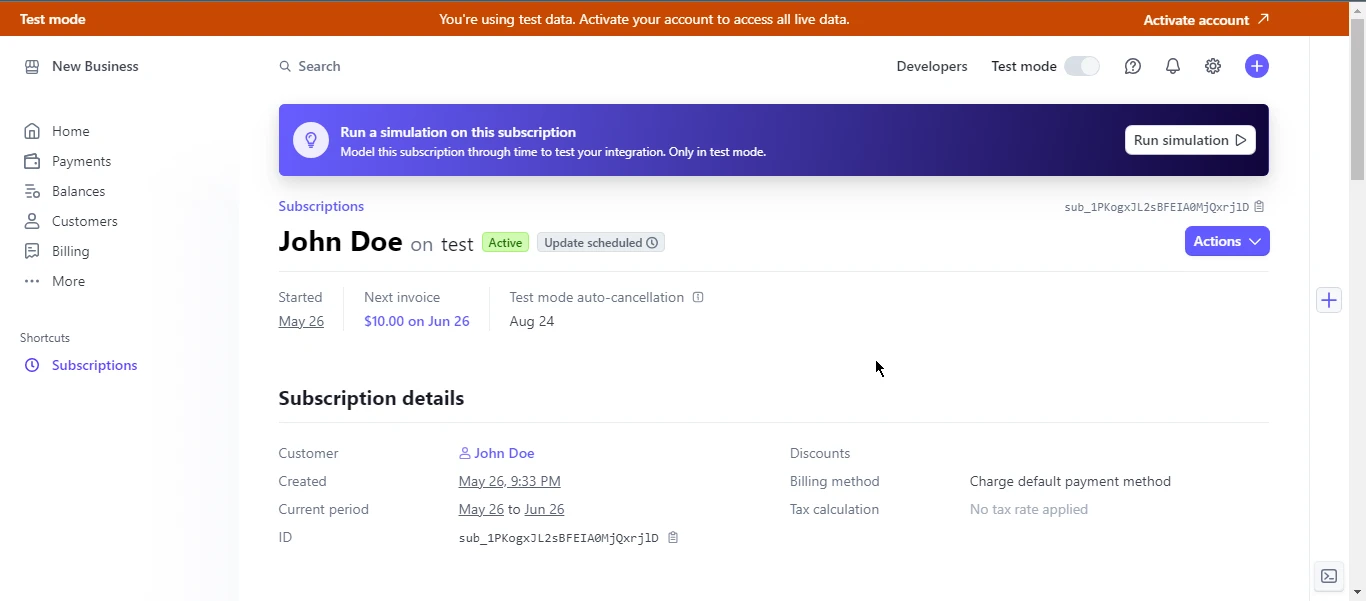
Stripe obsługuje różne modele subskrypcji, a zarządzanie subskrypcjami za pośrednictwem `Stripe.Net` jest proste. Możesz tworzyć, aktualizować i anulować subskrypcje.
```csharp
var options = new SubscriptionCreateOptions
{
Customer = "cus_123456789",
Items = new List<SubscriptionItemOptions>
{
new SubscriptionItemOptions
{
Plan = "plan_123456789",
},
},
};
var service = new SubscriptionService();
Subscription subscription = service.Create(options);
```
### Rozstrzyganie sporów
Spory mają miejsce, gdy klient kwestionuje opłatę w swoim banku lub firmie obsługującej kartę kredytową. `Stripe.Net` pozwala na listowanie, pobieranie i odpowiadanie na spory.
```csharp
var service = new DisputeService();
Dispute dispute = service.Get("dp_123456789");
```
### Najlepsze praktyki
1. **Bezpieczeństwo:** Zawsze zabezpieczaj swoje klucze API i nigdy nie zapisuj ich na stałe w plikach źródłowych.
2. **Obsługa błędów:** Wprowadź solidną obsługę błędów w celu zarządzania wyjątkami i nieudanymi wywołaniami API.
3. **Testowanie:** Skorzystaj z trybu testowego Stripe i podaj numery kart testowych, aby dokładnie przetestować integrację.
4. **Dokumentacja:** Odwiedź oficjalną dokumentację Stripe API i dokumentację biblioteki `Stripe.Net`, aby uzyskać aktualne informacje i przykłady.
## Introducing IronPDF for C#
`IronPDF` to biblioteka C#, która pozwala programistom tworzyć, edytować i wyodrębniać treści z dokumentów PDF. Jest to idealne narzędzie do generowania plików PDF w aplikacjach .NET, zarówno w przypadku raportów, faktur, jak i innych potrzeb związanych z dokumentacją.
IronPDF może dokładnie konwertować strony internetowe, adresy URL i [kod HTML do](/tutorials/html-to-pdf/) formatu [PDF](/tutorials/html-to-pdf/), co czyni go idealnym narzędziem do tworzenia dokumentów PDF z treści internetowych, takich jak raporty i faktury.
```csharp
using IronPdf;
class Program
{
static void Main(string[] args)
{
var renderer = new ChromePdfRenderer();
// 1. Convert HTML String to PDF
var htmlContent = "<h1>Hello, IronPDF!</h1><p>This is a PDF from an HTML string.</p>";
var pdfFromHtmlString = renderer.RenderHtmlAsPdf(htmlContent);
pdfFromHtmlString.SaveAs("HTMLStringToPDF.pdf");
// 2. Convert HTML File to PDF
var htmlFilePath = "path_to_your_html_file.html"; // Specify the path to your HTML file
var pdfFromHtmlFile = renderer.RenderHtmlFileAsPdf(htmlFilePath);
pdfFromHtmlFile.SaveAs("HTMLFileToPDF.pdf");
// 3. Convert URL to PDF
var url = "http://ironpdf.com"; // Specify the URL
var pdfFromUrl = renderer.RenderUrlAsPdf(url);
pdfFromUrl.SaveAs("URLToPDF.pdf");
}
}
```
### Najważniejsze cechy
#### 1. HTML do PDF
IronPDF pozwala programistom na łatwe tworzenie dokumentów PDF poprzez konwersję ciągów znaków HTML, adresów URL i plików HTML do formatu PDF.
#### 2. Edycja plików PDF
Z łatwością edytuj istniejące dokumenty PDF. IronPDF umożliwia manipulowanie istniejącymi plikami PDF, pozwalając użytkownikom dodawać strony w określonych miejscach, kopiować lub usuwać strony, dzielić pliki PDF oraz wyodrębniać strony w celu tworzenia nowych plików PDF itp.
#### 3. Łączenie plików PDF
Funkcja scałania IronPDF pozwala programistom łączyć dwa lub więcej dokumentów PDF w jeden.
#### 4. Zabezpieczenia plików PDF
IronPDF umożliwia użytkownikom dodawanie haseł i uprawnień do plików PDF w celu zwiększenia ich bezpieczeństwa.
#### 5. Szyfrowanie i deszyfrowanie plików PDF
IronPDF obsługuje 128-bitowe szyfrowanie, deszyfrowanie oraz ochronę hasłem dokumentów PDF.
#### 6. Podpisywanie cyfrowym podpisem dokumentu PDF
Programiści mogą programowo dodawać podpisy cyfrowe do plików PDF za pomocą IronPDF. Obsługuje wiele sposobów podpisywania PDF za pomocą certyfikatu podpisu cyfrowego w formatach `.pfx` i `.p12`.
## Przykład: Generowanie faktury w formacie PDF za pomocą Stripe.Net i IronPDF
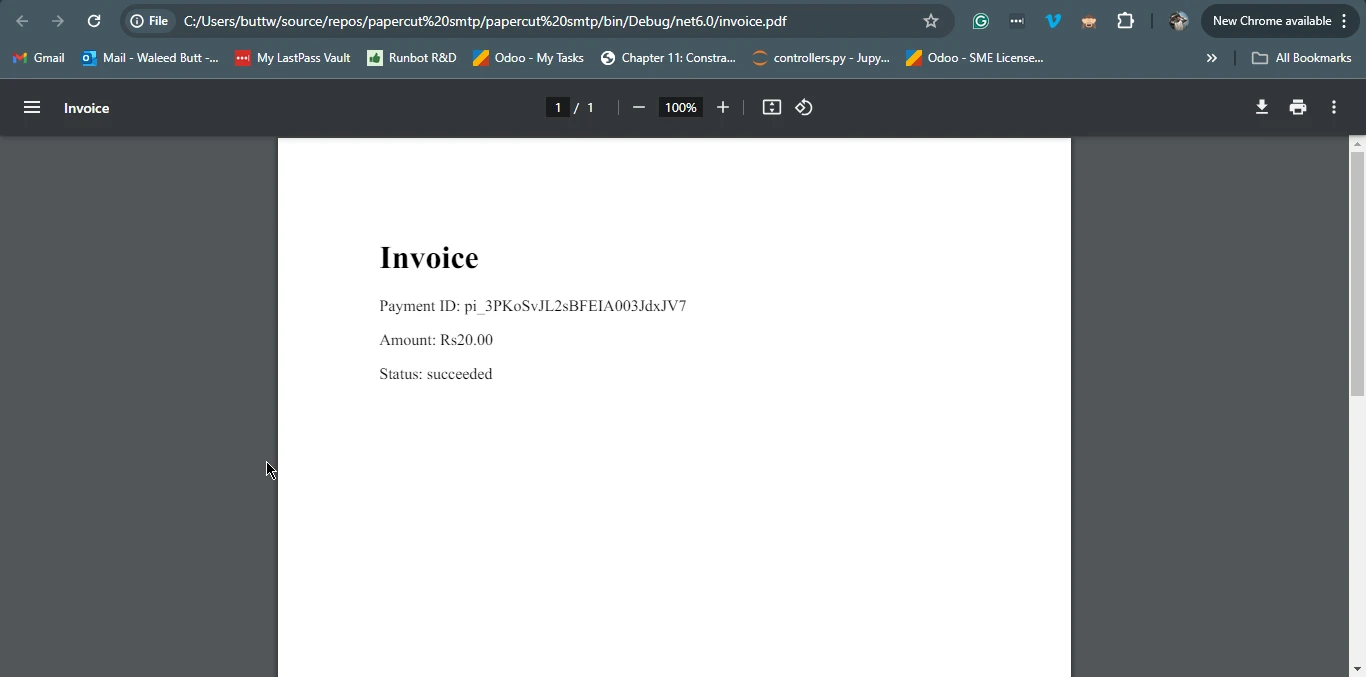
Utwórzmy praktyczny przykład, w którym generujemy fakturę PDF za pomocą IronPDF po przetworzeniu płatności za pomocą `Stripe.Net`.
### Zainstaluj bibliotekę IronPDF .NET
Kroki instalacji IronPDF przy użyciu menedżera pakietów NuGet:
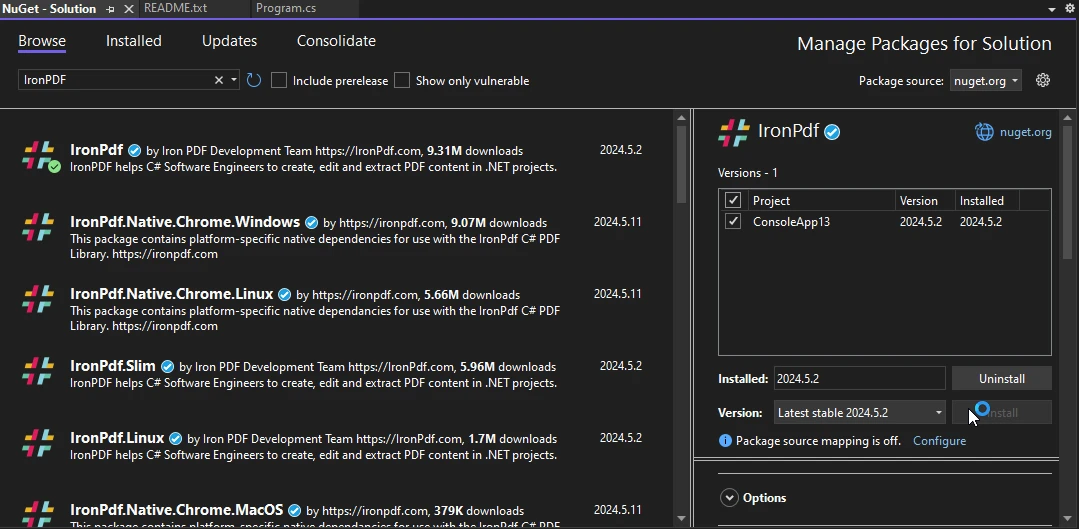
1. Otwórz projekt ASP.NET w programie Visual Studio i przejdź do menu "Narzędzia".
2. Wybierz "NuGet Package Manager", a następnie kliknij "Manage NuGet Packages for Solution".
3. W zakładce "Przeglądaj" wyszukaj "IronPDF" i wybierz żądaną wersję. Kliknij "Zainstaluj", aby dodać pakiet do swojego projektu. IronPDF i jego zależności zostaną automatycznie pobrane i zintegrowane, co pozwoli na płynne wykorzystanie jego funkcjonalności w aplikacji ASP.NET.
### Przetwarzanie płatności i generowanie faktur
Oto kompletny przykład, który demonstruje tworzenie nowej płatności za pomocą API `Stripe.Net` i generowanie faktury PDF za pomocą `IronPDF`.
```csharp
using Stripe;
using IronPdf;
using System;
using System.Collections.Generic;
public class PaymentService
{
public void ProcessPaymentAndGenerateInvoice()
{
// Configure Stripe API key
StripeConfiguration.ApiKey = "your_secret_key";
// Create a PaymentIntent
var paymentIntentOptions = new PaymentIntentCreateOptions
{
Amount = 2000, // Amount in cents
Currency = "usd",
PaymentMethodTypes = new List<string> { "card" },
};
var paymentIntentService = new PaymentIntentService();
PaymentIntent paymentIntent = paymentIntentService.Create(paymentIntentOptions);
// Assuming payment succeeded, create a PDF invoice
GeneratePdfInvoice(paymentIntent);
}
private void GeneratePdfInvoice(PaymentIntent paymentIntent)
{
// Create HTML content for the invoice
var htmlContent = $@"
<html>
<head>
<title>Invoice</title>
</head>
<body>
<h1>Invoice</h1>
<p>Payment ID: {paymentIntent.Id}</p>
<p>Amount: {paymentIntent.Amount / 100.0:C}</p>
<p>Status: {paymentIntent.Status}</p>
</body>
</html>";
// Convert the HTML content to a PDF document
var renderer = new ChromePdfRenderer();
var pdfDocument = renderer.RenderHtmlAsPdf(htmlContent);
// Save the PDF document to a file
var filePath = "invoice.pdf";
pdfDocument.SaveAs(filePath);
Console.WriteLine($"Invoice saved to {filePath}");
}
}
class Program
{
static void Main(string[] args)
{
var service = new PaymentService();
service.ProcessPaymentAndGenerateInvoice();
}
}
```
#### Wynik
### Wnioski
`Stripe.Net` to wszechstronna i potężna biblioteka, która upraszcza integrację przetwarzania płatności Stripe z aplikacjami .NET. Dzięki funkcjom obejmującym zarówno podstawową obsługę transakcji, jak i zarządzanie subskrypcjami oraz sporami, rozwiązanie to zaspokaja szeroki zakres potrzeb związanych z płatnościami.
`IronPDF` uzupełnia `Stripe.Net`, umożliwiając programistom generowanie, edytowanie i zarządzanie dokumentami PDF. W połączeniu biblioteki te stanowią solidne rozwiązanie do obsługi płatności i generowania odpowiedniej dokumentacji w aplikacjach .NET.
Wykorzystując możliwości `Stripe.Net` i `IronPDF`, programiści mogą tworzyć płynne i wydajne przepływy pracy obsługujące wszystko, od przetwarzania płatności po generowanie dokumentów, co zwiększa ogólną funkcjonalność i doświadczenie użytkownika aplikacji.
IronPDF oferuje programistom możliwość przetestowania swoich rozbudowanych funkcji, udostępniając [bezpłatną](trial-license) wersję [próbną IronPDF](trial-license).
IronPDF zapewnia obsługę klienta i aktualizacje, a także przykłady kodu i obszerną dokumentację, aby pomóc użytkownikom w jak najlepszym wykorzystaniu produktu. Aby zgłębić ten temat, zapoznaj się z naszym obszernym samouczkiem dotyczącym [konwersji HTML do PDF za pomocą IronPDF](/tutorials/html-to-pdf/).
Stripe.Net to potężna biblioteka .NET, która pozwala programistom integrować możliwości przetwarzania płatności Stripe w aplikacjach .NET. Stripe to popularna bramka płatności, która umożliwia firmom akceptowanie płatności online. Z Stripe.Net programiści mogą zarządzać transakcjami, klientami, subskrypcjami i nie tylko, korzystając z solidnych funkcji oferowanych przez Stripe API. W tym artykułe omówimy, jak korzystać ze Stripe w połączeniu z IronPDF do tworzenia plików PDF.
Pierwsze kroki ze Stripe.Net
Tworzenie nowego projektu w Visual Studio
Aby rozpocząć pracę z Stripe.Net, musimy utworzyć nowy projekt w Visual Studio lub otworzyć istniejący. W tym samouczku wykorzystamy projekt aplikacji konsolowej.
Otwórz Visual Studio i kliknij "Utwórz nowy projekt".
Pojawi się nowe okno. Wybierz opcję Aplikacja konsolowa i kliknij Dalej.
W kolejnym oknie wprowadź nazwę projektu i wybierz lokalizację, a następnie kliknij Dalej.
W kolejnym oknie wybierz framework i kliknij Utwórz.
W ten sposób tworzony jest nowy projekt aplikacji konsolowej Visual Studio.
Instalacja
Aby rozpocząć używanie Stripe.Net w swoim projekcie, musisz zainstalować pakiet Stripe.Net za pośrednictwem NuGet. Można to zrobić za pomocą konsoli menedżera pakietów lub menedżera pakietów NuGet w programie Visual Studio.
Korzystanie z konsoli menedżera pakietów:
PM > Install-Package Stripe.net
Install-Package Stripe.net
Lub
> dotnet add package Stripe.net
dotnet add package Stripe.net
Za pomocą menedżera pakietów NuGet wyszukaj "Stripe.net" i zainstaluj pakiet.
Konfiguracja
Po zainstalowaniu należy skonfigurować klucz API Stripe, który można znaleźć na koncie Stripe. Ten klucz jest niezbędny do uwierzytelniania żądań kierowanych do API Stripe. Zazwyczaj klucz ten jest przechowywany w pliku konfiguracyjnym lub zmiennej środowiskowej ze względów bezpieczeństwa.
Tworzenie klienta to jedna z podstawowych operacji podczas pracy z Stripe.Net. Klienci mogą być powiązani z metodami płatności i subskrypcjami.
var options = new CustomerCreateOptions{Email = "customer@example.com",Name = "John Doe",};var service = new CustomerService();Customer customer = service.Create(options);
var options = new CustomerCreateOptions
{
    Email = "customer@example.com",
    Name = "John Doe",
};
var service = new CustomerService();
Customer customer = service.Create(options);
Dim options = New CustomerCreateOptionsWith { .Email = "customer@example.com", .Name = "John Doe"}Dim service = New CustomerService()Dim customer AsCustomer = service.Create(options)
Dim options = New CustomerCreateOptions With {
	.Email = "customer@example.com",
	.Name = "John Doe"
}
Dim service = New CustomerService()
Dim customer As Customer = service.Create(options)
Wynik: Pulpit nawigacyjny Stripe
Tworzenie intencji płatności
PaymentIntent to obiekt reprezentujący proces płatności w Stripe. Został zaprojektowany do śledzenia cyklu życia płatności od utworzenia do zakończenia.
var options = new PaymentIntentCreateOptions{Amount = 2000,Currency = "usd",PaymentMethodTypes = new List<string> { "card", },};var service = new PaymentIntentService();PaymentIntent paymentIntent = service.Create(options);
var options = new PaymentIntentCreateOptions
{
    Amount = 2000,
    Currency = "usd",
    PaymentMethodTypes = new List<string>
    {
        "card",
    },
};
var service = new PaymentIntentService();
PaymentIntent paymentIntent = service.Create(options);
Dim options = New PaymentIntentCreateOptionsWith { .Amount = 2000, .Currency = "usd", .PaymentMethodTypes = New List(OfString) From {"card"}}Dim service = New PaymentIntentService()Dim paymentIntent AsPaymentIntent = service.Create(options)
Dim options = New PaymentIntentCreateOptions With {
	.Amount = 2000,
	.Currency = "usd",
	.PaymentMethodTypes = New List(Of String) From {"card"}
}
Dim service = New PaymentIntentService()
Dim paymentIntent As PaymentIntent = service.Create(options)
Zaawansowane funkcje
Subskrypcje
Stripe obsługuje różne modele subskrypcji, a zarządzanie subskrypcjami za pośrednictwem Stripe.Net jest proste. Możesz tworzyć, aktualizować i anulować subskrypcje.
var options = new SubscriptionCreateOptions{Customer = "cus_123456789",Items = new List<SubscriptionItemOptions> { new SubscriptionItemOptions {Plan = "plan_123456789", }, },};var service = new SubscriptionService();Subscription subscription = service.Create(options);
var options = new SubscriptionCreateOptions
{
    Customer = "cus_123456789",
    Items = new List<SubscriptionItemOptions>
    {
        new SubscriptionItemOptions
        {
            Plan = "plan_123456789",
        },
    },
};
var service = new SubscriptionService();
Subscription subscription = service.Create(options);
Dim options = New SubscriptionCreateOptionsWith { .Customer = "cus_123456789", .Items = New List(OfSubscriptionItemOptions) From { New SubscriptionItemOptionsWith {.Plan = "plan_123456789"} }}Dim service = New SubscriptionService()Dim subscription AsSubscription = service.Create(options)
Dim options = New SubscriptionCreateOptions With {
	.Customer = "cus_123456789",
	.Items = New List(Of SubscriptionItemOptions) From {
		New SubscriptionItemOptions With {.Plan = "plan_123456789"}
	}
}
Dim service = New SubscriptionService()
Dim subscription As Subscription = service.Create(options)
Rozstrzyganie sporów
Spory mają miejsce, gdy klient kwestionuje opłatę w swoim banku lub firmie obsługującej kartę kredytową. Stripe.Net pozwala na listowanie, pobieranie i odpowiadanie na spory.
var service = new DisputeService();Dispute dispute = service.Get("dp_123456789");
var service = new DisputeService();
Dispute dispute = service.Get("dp_123456789");
Dim service = New DisputeService()Dim dispute AsDispute = service.Get("dp_123456789")
Dim service = New DisputeService()
Dim dispute As Dispute = service.Get("dp_123456789")
Najlepsze praktyki
Bezpieczeństwo: Zawsze zabezpieczaj swoje klucze API i nigdy nie zapisuj ich na stałe w plikach źródłowych.
Obsługa błędów: Wprowadź solidną obsługę błędów w celu zarządzania wyjątkami i nieudanymi wywołaniami API.
Testowanie: Skorzystaj z trybu testowego Stripe i podaj numery kart testowych, aby dokładnie przetestować integrację.
Dokumentacja: Odwiedź oficjalną dokumentację Stripe API i dokumentację biblioteki Stripe.Net, aby uzyskać aktualne informacje i przykłady.
Introducing IronPDF for C#
IronPDF to biblioteka C#, która pozwala programistom tworzyć, edytować i wyodrębniać treści z dokumentów PDF. Jest to idealne narzędzie do generowania plików PDF w aplikacjach .NET, zarówno w przypadku raportów, faktur, jak i innych potrzeb związanych z dokumentacją.
IronPDF może dokładnie konwertować strony internetowe, adresy URL i kod HTML do formatu PDF, co czyni go idealnym narzędziem do tworzenia dokumentów PDF z treści internetowych, takich jak raporty i faktury.
using IronPdf;class Program{ static voidMain(string[] args) { var renderer = new ChromePdfRenderer(); // 1. Convert HTML String to PDF var htmlContent = "<h1>Hello, IronPDF!</h1><p>This is a PDF from an HTML string.</p>"; var pdfFromHtmlString = renderer.RenderHtmlAsPdf(htmlContent); pdfFromHtmlString.SaveAs("HTMLStringToPDF.pdf"); // 2. Convert HTML File to PDF var htmlFilePath = "path_to_your_html_file.html"; // Specify the path to your HTML file var pdfFromHtmlFile = renderer.RenderHtmlFileAsPdf(htmlFilePath); pdfFromHtmlFile.SaveAs("HTMLFileToPDF.pdf"); // 3. Convert URL to PDF var url = "http://ironpdf.com"; // Specify the URL var pdfFromUrl = renderer.RenderUrlAsPdf(url); pdfFromUrl.SaveAs("URLToPDF.pdf"); }}
using IronPdf;

class Program
{
    static void Main(string[] args)
    {
        var renderer = new ChromePdfRenderer();

        // 1. Convert HTML String to PDF
        var htmlContent = "<h1>Hello, IronPDF!</h1><p>This is a PDF from an HTML string.</p>";
        var pdfFromHtmlString = renderer.RenderHtmlAsPdf(htmlContent);
        pdfFromHtmlString.SaveAs("HTMLStringToPDF.pdf");

        // 2. Convert HTML File to PDF
        var htmlFilePath = "path_to_your_html_file.html"; // Specify the path to your HTML file
        var pdfFromHtmlFile = renderer.RenderHtmlFileAsPdf(htmlFilePath);
        pdfFromHtmlFile.SaveAs("HTMLFileToPDF.pdf");

        // 3. Convert URL to PDF
        var url = "http://ironpdf.com"; // Specify the URL
        var pdfFromUrl = renderer.RenderUrlAsPdf(url);
        pdfFromUrl.SaveAs("URLToPDF.pdf");
    }
}
ImportsIronPdfFriend Class ProgramShared Sub Main(ByVal args() AsString) Dim renderer = New ChromePdfRenderer() ' 1. Convert HTML String to PDF Dim htmlContent = "<h1>Hello, IronPDF!</h1><p>This is a PDF from an HTML string.</p>" Dim pdfFromHtmlString = renderer.RenderHtmlAsPdf(htmlContent) pdfFromHtmlString.SaveAs("HTMLStringToPDF.pdf") ' 2. Convert HTML File to PDF Dim htmlFilePath = "path_to_your_html_file.html" ' Specify the path to your HTML file Dim pdfFromHtmlFile = renderer.RenderHtmlFileAsPdf(htmlFilePath) pdfFromHtmlFile.SaveAs("HTMLFileToPDF.pdf") ' 3. Convert URL to PDF Dim url = "http://ironpdf.com" ' Specify the URL Dim pdfFromUrl = renderer.RenderUrlAsPdf(url) pdfFromUrl.SaveAs("URLToPDF.pdf") End SubEnd Class
Imports IronPdf

Friend Class Program
	Shared Sub Main(ByVal args() As String)
		Dim renderer = New ChromePdfRenderer()

		' 1. Convert HTML String to PDF
		Dim htmlContent = "<h1>Hello, IronPDF!</h1><p>This is a PDF from an HTML string.</p>"
		Dim pdfFromHtmlString = renderer.RenderHtmlAsPdf(htmlContent)
		pdfFromHtmlString.SaveAs("HTMLStringToPDF.pdf")

		' 2. Convert HTML File to PDF
		Dim htmlFilePath = "path_to_your_html_file.html" ' Specify the path to your HTML file
		Dim pdfFromHtmlFile = renderer.RenderHtmlFileAsPdf(htmlFilePath)
		pdfFromHtmlFile.SaveAs("HTMLFileToPDF.pdf")

		' 3. Convert URL to PDF
		Dim url = "http://ironpdf.com" ' Specify the URL
		Dim pdfFromUrl = renderer.RenderUrlAsPdf(url)
		pdfFromUrl.SaveAs("URLToPDF.pdf")
	End Sub
End Class
Najważniejsze cechy
1. HTML do PDF
IronPDF pozwala programistom na łatwe tworzenie dokumentów PDF poprzez konwersję ciągów znaków HTML, adresów URL i plików HTML do formatu PDF.
2. Edycja plików PDF
Z łatwością edytuj istniejące dokumenty PDF. IronPDF umożliwia manipulowanie istniejącymi plikami PDF, pozwalając użytkownikom dodawać strony w określonych miejscach, kopiować lub usuwać strony, dzielić pliki PDF oraz wyodrębniać strony w celu tworzenia nowych plików PDF itp.
3. Łączenie plików PDF
Funkcja scałania IronPDF pozwala programistom łączyć dwa lub więcej dokumentów PDF w jeden.
4. Zabezpieczenia plików PDF
IronPDF umożliwia użytkownikom dodawanie haseł i uprawnień do plików PDF w celu zwiększenia ich bezpieczeństwa.
5. Szyfrowanie i deszyfrowanie plików PDF
IronPDF obsługuje 128-bitowe szyfrowanie, deszyfrowanie oraz ochronę hasłem dokumentów PDF.
6. Podpisywanie cyfrowym podpisem dokumentu PDF
Programiści mogą programowo dodawać podpisy cyfrowe do plików PDF za pomocą IronPDF. Obsługuje wiele sposobów podpisywania PDF za pomocą certyfikatu podpisu cyfrowego w formatach .pfx i .p12.
Przykład: Generowanie faktury w formacie PDF za pomocą Stripe.Net i IronPDF
Utwórzmy praktyczny przykład, w którym generujemy fakturę PDF za pomocą IronPDF po przetworzeniu płatności za pomocą Stripe.Net.
Zainstaluj bibliotekę IronPDF .NET
Kroki instalacji IronPDF przy użyciu menedżera pakietów NuGet:
Otwórz projekt ASP.NET w programie Visual Studio i przejdź do menu "Narzędzia".
Wybierz "NuGet Package Manager", a następnie kliknij "Manage NuGet Packages for Solution".
W zakładce "Przeglądaj" wyszukaj "IronPDF" i wybierz żądaną wersję. Kliknij "Zainstaluj", aby dodać pakiet do swojego projektu. IronPDF i jego zależności zostaną automatycznie pobrane i zintegrowane, co pozwoli na płynne wykorzystanie jego funkcjonalności w aplikacji ASP.NET.
Przetwarzanie płatności i generowanie faktur
Oto kompletny przykład, który demonstruje tworzenie nowej płatności za pomocą API Stripe.Net i generowanie faktury PDF za pomocą IronPDF.
using Stripe;using IronPdf;using System;using System.Collections.Generic;public class PaymentService{ public voidProcessPaymentAndGenerateInvoice() { // Configure Stripe API keyStripeConfiguration.ApiKey = "your_secret_key"; // Create a PaymentIntent var paymentIntentOptions = new PaymentIntentCreateOptions {Amount = 2000, // Amount in centsCurrency = "usd",PaymentMethodTypes = new List<string> { "card" }, }; var paymentIntentService = new PaymentIntentService(); PaymentIntent paymentIntent = paymentIntentService.Create(paymentIntentOptions); // Assuming payment succeeded, create a PDF invoiceGeneratePdfInvoice(paymentIntent); } private voidGeneratePdfInvoice(PaymentIntent paymentIntent) { // Create HTML content for the invoice var htmlContent = $@" <html> <head> <title>Invoice</title> </head> <body> <h1>Invoice</h1> <p>Payment ID: {paymentIntent.Id}</p> <p>Amount: {paymentIntent.Amount / 100.0:C}</p> <p>Status: {paymentIntent.Status}</p> </body> </html>"; // Convert the HTML content to a PDF document var renderer = new ChromePdfRenderer(); var pdfDocument = renderer.RenderHtmlAsPdf(htmlContent); // Save the PDF document to a file var filePath = "invoice.pdf"; pdfDocument.SaveAs(filePath);Console.WriteLine($"Invoice saved to {filePath}"); }}class Program{ static voidMain(string[] args) { var service = new PaymentService(); service.ProcessPaymentAndGenerateInvoice(); }}
using Stripe;
using IronPdf;
using System;
using System.Collections.Generic;

public class PaymentService
{
    public void ProcessPaymentAndGenerateInvoice()
    {
        // Configure Stripe API key
        StripeConfiguration.ApiKey = "your_secret_key";

        // Create a PaymentIntent
        var paymentIntentOptions = new PaymentIntentCreateOptions
        {
            Amount = 2000, // Amount in cents
            Currency = "usd",
            PaymentMethodTypes = new List<string> { "card" },
        };
        var paymentIntentService = new PaymentIntentService();
        PaymentIntent paymentIntent = paymentIntentService.Create(paymentIntentOptions);

        // Assuming payment succeeded, create a PDF invoice
        GeneratePdfInvoice(paymentIntent);
    }

    private void GeneratePdfInvoice(PaymentIntent paymentIntent)
    {
        // Create HTML content for the invoice
        var htmlContent = $@"
        <html>
        <head>
            <title>Invoice</title>
        </head>
        <body>
            <h1>Invoice</h1>
            <p>Payment ID: {paymentIntent.Id}</p>
            <p>Amount: {paymentIntent.Amount / 100.0:C}</p>
            <p>Status: {paymentIntent.Status}</p>
        </body>
        </html>";

        // Convert the HTML content to a PDF document
        var renderer = new ChromePdfRenderer();
        var pdfDocument = renderer.RenderHtmlAsPdf(htmlContent);

        // Save the PDF document to a file
        var filePath = "invoice.pdf";
        pdfDocument.SaveAs(filePath);
        Console.WriteLine($"Invoice saved to {filePath}");
    }
}

class Program
{
    static void Main(string[] args)
    {
        var service = new PaymentService();
        service.ProcessPaymentAndGenerateInvoice();
    }
}
ImportsStripeImportsIronPdfImportsSystemImportsSystem.Collections.GenericPublic Class PaymentService Public Sub ProcessPaymentAndGenerateInvoice() ' Configure Stripe API keyStripeConfiguration.ApiKey = "your_secret_key" ' Create a PaymentIntent Dim paymentIntentOptions = New PaymentIntentCreateOptionsWith { .Amount = 2000, .Currency = "usd", .PaymentMethodTypes = New List(OfString) From {"card"} } Dim paymentIntentService As New PaymentIntentService() Dim paymentIntent AsPaymentIntent = paymentIntentService.Create(paymentIntentOptions) ' Assuming payment succeeded, create a PDF invoiceGeneratePdfInvoice(paymentIntent) End Sub Private Sub GeneratePdfInvoice(ByVal paymentIntent AsPaymentIntent) ' Create HTML content for the invoice'INSTANT VB WARNING: Instant VB cannot determine whether both operands of this division are integer types - if they are then you should use the VB integer division operator: Dim htmlContent = $" <html> <head> <title>Invoice</title> </head> <body> <h1>Invoice</h1> <p>Payment ID: {paymentIntent.Id}</p> <p>Amount: {paymentIntent.Amount / 100.0:C}</p> <p>Status: {paymentIntent.Status}</p> </body> </html>" ' Convert the HTML content to a PDF document Dim renderer = New ChromePdfRenderer() Dim pdfDocument = renderer.RenderHtmlAsPdf(htmlContent) ' Save the PDF document to a file Dim filePath = "invoice.pdf" pdfDocument.SaveAs(filePath)Console.WriteLine($"Invoice saved to {filePath}") End SubEnd ClassFriend Class ProgramShared Sub Main(ByVal args() AsString) Dim service = New PaymentService() service.ProcessPaymentAndGenerateInvoice() End SubEnd Class
Imports Stripe
Imports IronPdf
Imports System
Imports System.Collections.Generic

Public Class PaymentService
	Public Sub ProcessPaymentAndGenerateInvoice()
		' Configure Stripe API key
		StripeConfiguration.ApiKey = "your_secret_key"

		' Create a PaymentIntent
		Dim paymentIntentOptions = New PaymentIntentCreateOptions With {
			.Amount = 2000,
			.Currency = "usd",
			.PaymentMethodTypes = New List(Of String) From {"card"}
		}
		Dim paymentIntentService As New PaymentIntentService()
		Dim paymentIntent As PaymentIntent = paymentIntentService.Create(paymentIntentOptions)

		' Assuming payment succeeded, create a PDF invoice
		GeneratePdfInvoice(paymentIntent)
	End Sub

	Private Sub GeneratePdfInvoice(ByVal paymentIntent As PaymentIntent)
		' Create HTML content for the invoice
'INSTANT VB WARNING: Instant VB cannot determine whether both operands of this division are integer types - if they are then you should use the VB integer division operator:
		Dim htmlContent = $"
        <html>
        <head>
            <title>Invoice</title>
        </head>
        <body>
            <h1>Invoice</h1>
            <p>Payment ID: {paymentIntent.Id}</p>
            <p>Amount: {paymentIntent.Amount / 100.0:C}</p>
            <p>Status: {paymentIntent.Status}</p>
        </body>
        </html>"

		' Convert the HTML content to a PDF document
		Dim renderer = New ChromePdfRenderer()
		Dim pdfDocument = renderer.RenderHtmlAsPdf(htmlContent)

		' Save the PDF document to a file
		Dim filePath = "invoice.pdf"
		pdfDocument.SaveAs(filePath)
		Console.WriteLine($"Invoice saved to {filePath}")
	End Sub
End Class

Friend Class Program
	Shared Sub Main(ByVal args() As String)
		Dim service = New PaymentService()
		service.ProcessPaymentAndGenerateInvoice()
	End Sub
End Class
Wynik
Wnioski
Stripe.Net to wszechstronna i potężna biblioteka, która upraszcza integrację przetwarzania płatności Stripe z aplikacjami .NET. Dzięki funkcjom obejmującym zarówno podstawową obsługę transakcji, jak i zarządzanie subskrypcjami oraz sporami, rozwiązanie to zaspokaja szeroki zakres potrzeb związanych z płatnościami.
IronPDF uzupełnia Stripe.Net, umożliwiając programistom generowanie, edytowanie i zarządzanie dokumentami PDF. W połączeniu biblioteki te stanowią solidne rozwiązanie do obsługi płatności i generowania odpowiedniej dokumentacji w aplikacjach .NET.
Wykorzystując możliwości Stripe.Net i IronPDF, programiści mogą tworzyć płynne i wydajne przepływy pracy obsługujące wszystko, od przetwarzania płatności po generowanie dokumentów, co zwiększa ogólną funkcjonalność i doświadczenie użytkownika aplikacji.
IronPDF oferuje programistom możliwość przetestowania swoich rozbudowanych funkcji, udostępniając bezpłatną wersję próbną IronPDF.
IronPDF zapewnia obsługę klienta i aktualizacje, a także przykłady kodu i obszerną dokumentację, aby pomóc użytkownikom w jak najlepszym wykorzystaniu produktu. Aby zgłębić ten temat, zapoznaj się z naszym obszernym samouczkiem dotyczącym konwersji HTML do PDF za pomocą IronPDF.
Jacob Mellor jest Chief Technology Officer w Iron Software i wizjonerskim inżynierem, pionierem technologii C# PDF. Jako pierwotny deweloper głównej bazy kodowej Iron Software, kształtuje architekturę produktów firmy od jej początku, przekształcając ją wspólnie z CEO Cameron Rimington w firmę liczącą ponad 50 osób, obsługującą NASA, Teslę i światowe agencje rządowe.























