


Stripe .NET(开发人员如何使用)

Stripe.Net 与 IronPDF 的集成
Stripe.Net 是一个强大的.NET库,允许开发人员将Stripe的支付处理功能集成到.NET应用程序中。 Stripe是一个流行的支付网关,使企业能够在线接受付款。 使用Stripe.Net,开发人员可以使用Stripe API提供的强大功能管理交易、客户、订阅等。 在本文中,我们将讨论如何使用 Stripe 与 IronPDF 创建 PDF。
开始使用 Stripe.Net
创建一个新的Visual Studio项目
要开始使用Stripe.Net,我们需要创建一个新的Visual Studio项目或打开一个现有项目。 在本教程中,我们将使用控制台应用程序项目。
-
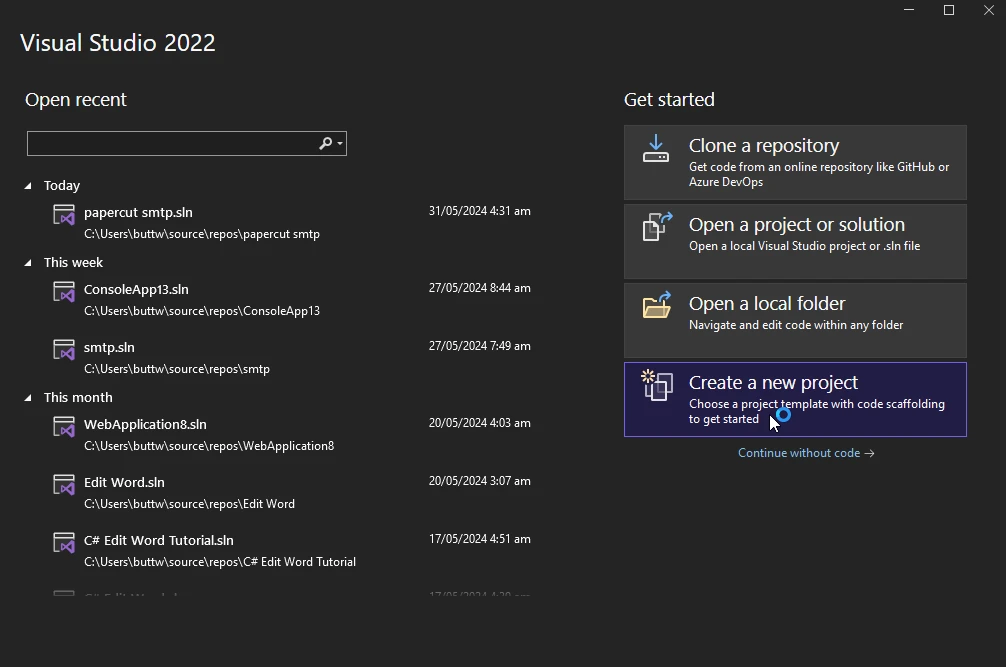
打开 Visual Studio 并点击"创建新项目"。
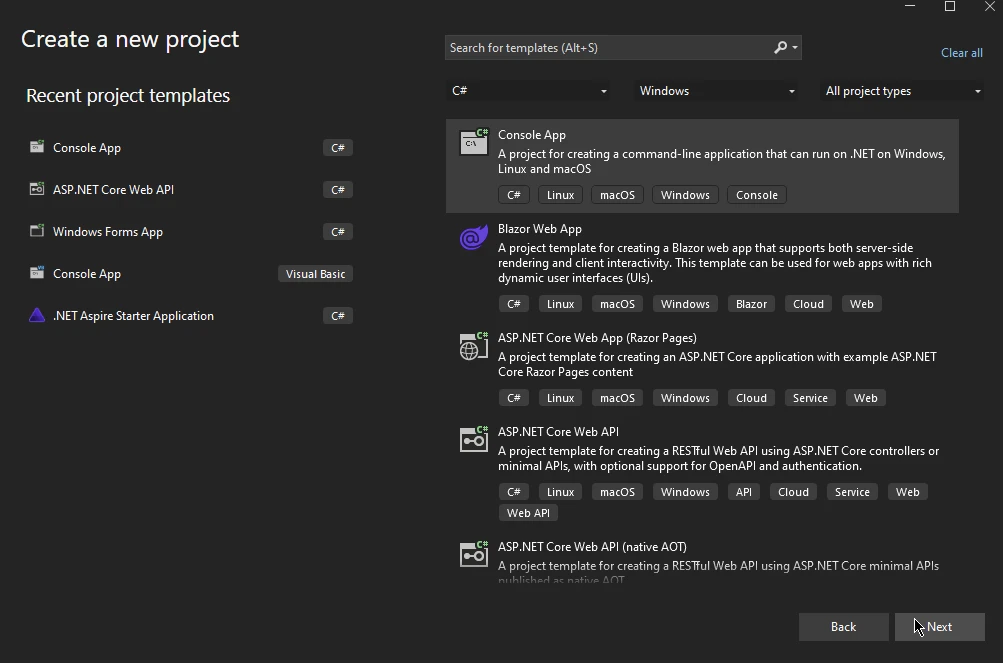
- 一个新窗口将出现。 选择控制台应用程序并点击下一步。
- 在下一个窗口,输入项目名称并选择位置,然后点击下一步。

-
在下一个窗口,选择框架并点击创建。

就这样,您的新 Visual Studio 控制台应用程序项目已经创建。
安装
要在您的项目中开始使用Stripe.Net,您需要通过NuGet安装Stripe.Net包。 您可以使用包管理器控制台或 Visual Studio 的 NuGet 包管理器来完成此操作。
使用包管理器控制台:
Install-Package Stripe.net
或者
dotnet add package Stripe.net
using NuGet 包管理器,搜索"Stripe.net"并安装该包。
配置
安装完成后,您需要配置您的 Stripe API 密钥,您可以在您的 Stripe 账户中找到此密钥。 此密钥对于验证您向 Stripe API 发送的请求至关重要。 通常,此密钥存储在配置文件或环境变量中以确保安全。
这是如何设置您的 API 密钥的示例:
StripeConfiguration.ApiKey = "your_secret_api_key";StripeConfiguration.ApiKey = "your_secret_api_key";StripeConfiguration.ApiKey = "your_secret_api_key"使用 Stripe.Net 的基本操作
创建一个客户
创建客户是使用Stripe.Net时的基本操作之一。 客户可以与支付方法和订阅关联。
var options = new CustomerCreateOptions
{
    Email = "customer@example.com",
    Name = "John Doe",
};
var service = new CustomerService();
Customer customer = service.Create(options);
var options = new CustomerCreateOptions
{
Email = "customer@example.com",
Name = "John Doe",
};
var service = new CustomerService();
Customer customer = service.Create(options);Dim options = New CustomerCreateOptions With {
.Email = "customer@example.com",
.Name = "John Doe"
}
Dim service = New CustomerService()
Dim customer As Customer = service.Create(options)输出 Stripe 仪表板
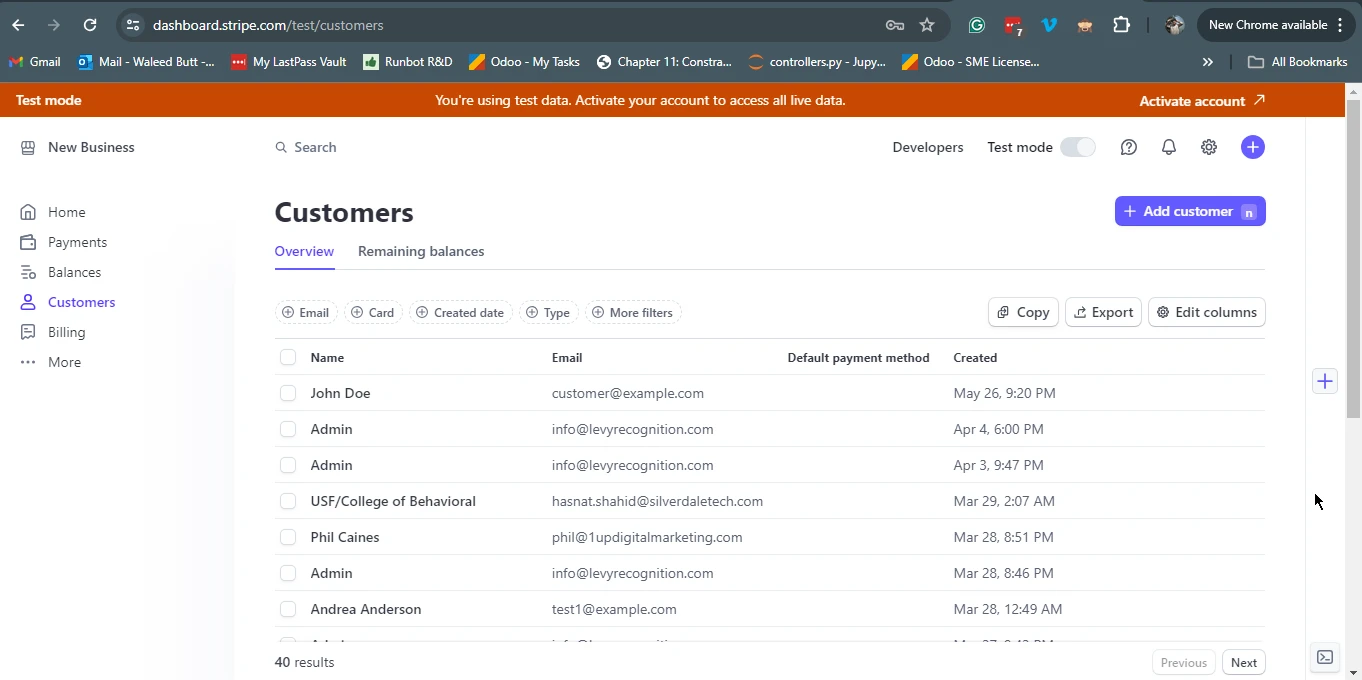创建支付意图
一个PaymentIntent是Stripe中表示支付过程的对象。它被设计用来跟踪支付从创建到完成的整个生命周期。
var options = new PaymentIntentCreateOptions
{
    Amount = 2000,
    Currency = "usd",
    PaymentMethodTypes = new List<string>
    {
        "card",
    },
};
var service = new PaymentIntentService();
PaymentIntent paymentIntent = service.Create(options);
var options = new PaymentIntentCreateOptions
{
Amount = 2000,
Currency = "usd",
PaymentMethodTypes = new List<string>
{
"card",
},
};
var service = new PaymentIntentService();
PaymentIntent paymentIntent = service.Create(options);Dim options = New PaymentIntentCreateOptions With {
.Amount = 2000,
.Currency = "usd",
.PaymentMethodTypes = New List(Of String) From {"card"}
}
Dim service = New PaymentIntentService()
Dim paymentIntent As PaymentIntent = service.Create(options)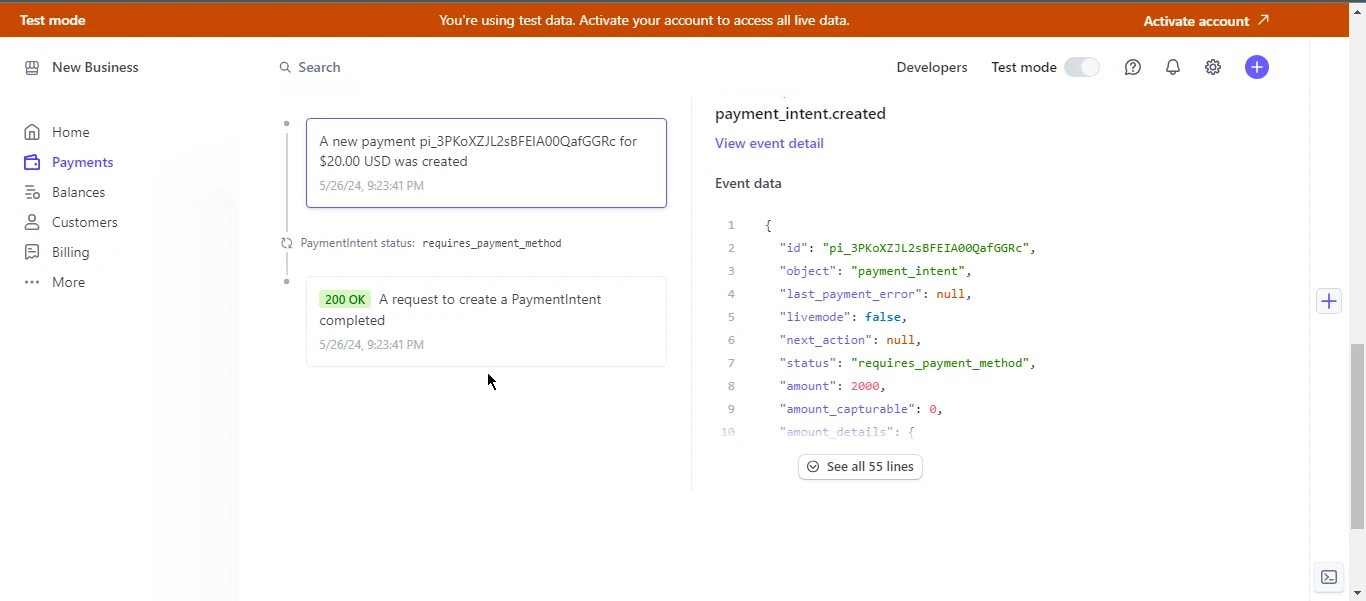高级功能
订阅
Stripe支持各种订阅模型,通过Stripe.Net管理订阅很简单。 您可以创建、更新和取消订阅。
var options = new SubscriptionCreateOptions
{
    Customer = "cus_123456789",
    Items = new List<SubscriptionItemOptions>
    {
        new SubscriptionItemOptions
        {
            Plan = "plan_123456789",
        },
    },
};
var service = new SubscriptionService();
Subscription subscription = service.Create(options);
var options = new SubscriptionCreateOptions
{
Customer = "cus_123456789",
Items = new List<SubscriptionItemOptions>
{
new SubscriptionItemOptions
{
Plan = "plan_123456789",
},
},
};
var service = new SubscriptionService();
Subscription subscription = service.Create(options);Dim options = New SubscriptionCreateOptions With {
.Customer = "cus_123456789",
.Items = New List(Of SubscriptionItemOptions) From {
New SubscriptionItemOptions With {.Plan = "plan_123456789"}
}
}
Dim service = New SubscriptionService()
Dim subscription As Subscription = service.Create(options)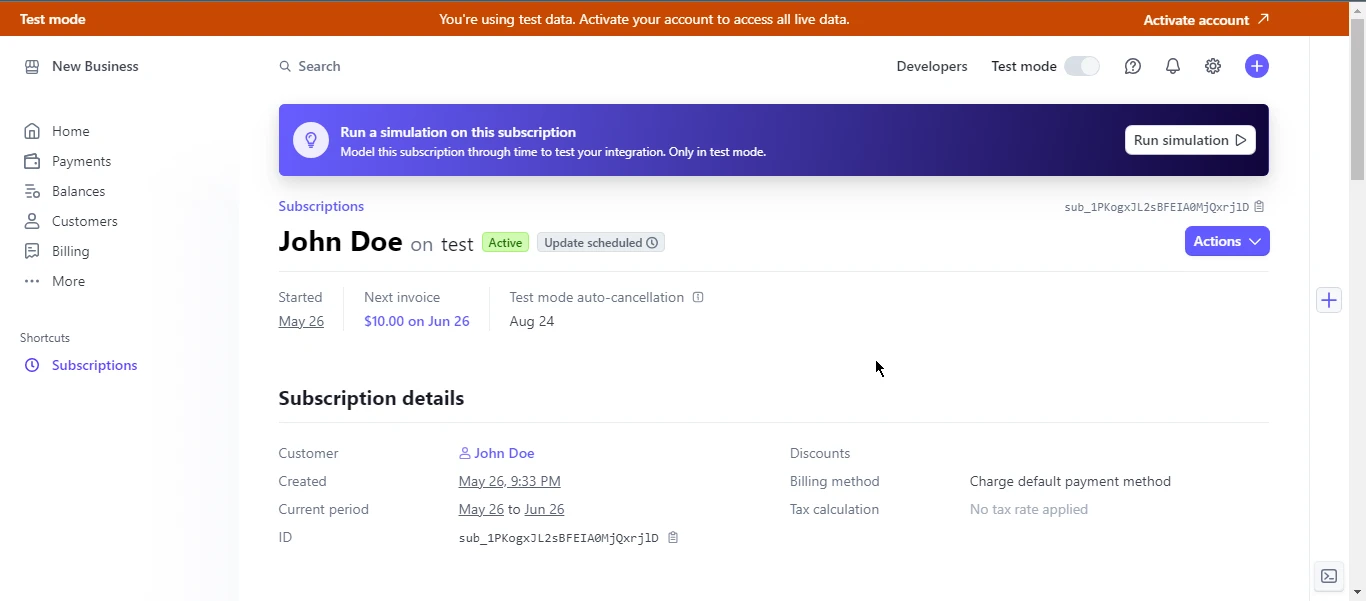处理争议
当客户对其银行或信用卡公司的收费提出质疑时,会发生争议。 Stripe.Net允许您列出、检索和响应争议。
var service = new DisputeService();
Dispute dispute = service.Get("dp_123456789");
var service = new DisputeService();
Dispute dispute = service.Get("dp_123456789");Dim service = New DisputeService()
Dim dispute As Dispute = service.Get("dp_123456789")最佳实践
1.安全性:务必保护好您的 API 密钥,切勿将其硬编码到源文件中。 2.错误处理:实现强大的错误处理机制来管理异常和失败的 API 调用。 3.测试:使用 Stripe 的测试模式并提供测试卡号,以彻底测试您的集成。
- 文档: 查阅官方的Stripe API文档和
Stripe.Net库文档以获取最新信息和示例。
Introducing IronPDF for C
IronPDF是一个C#库,允许开发人员创建、编辑和提取PDF文档的内容。 它是 .NET 应用程序中生成 PDF 的理想工具,无论是用于报告、发票还是其他文档需求。
IronPDF 可以准确地将网页、网址和 HTML 转换为 PDF 格式,使其成为从在线内容(如报告和发票)创建 PDF 文档的完美工具。
using IronPdf;

class Program
{
    static void Main(string[] args)
    {
        var renderer = new ChromePdfRenderer();

        // 1. Convert HTML String to PDF
        var htmlContent = "<h1>Hello, IronPDF!</h1><p>This is a PDF from an HTML string.</p>";
        var pdfFromHtmlString = renderer.RenderHtmlAsPdf(htmlContent);
        pdfFromHtmlString.SaveAs("HTMLStringToPDF.pdf");

        // 2. Convert HTML File to PDF
        var htmlFilePath = "path_to_your_html_file.html"; // Specify the path to your HTML file
        var pdfFromHtmlFile = renderer.RenderHtmlFileAsPdf(htmlFilePath);
        pdfFromHtmlFile.SaveAs("HTMLFileToPDF.pdf");

        // 3. Convert URL to PDF
        var url = "http://ironpdf.com"; // Specify the URL
        var pdfFromUrl = renderer.RenderUrlAsPdf(url);
        pdfFromUrl.SaveAs("URLToPDF.pdf");
    }
}
using IronPdf;
class Program
{
static void Main(string[] args)
{
var renderer = new ChromePdfRenderer();
// 1. Convert HTML String to PDF
var htmlContent = "<h1>Hello, IronPDF!</h1><p>This is a PDF from an HTML string.</p>";
var pdfFromHtmlString = renderer.RenderHtmlAsPdf(htmlContent);
pdfFromHtmlString.SaveAs("HTMLStringToPDF.pdf");
// 2. Convert HTML File to PDF
var htmlFilePath = "path_to_your_html_file.html"; // Specify the path to your HTML file
var pdfFromHtmlFile = renderer.RenderHtmlFileAsPdf(htmlFilePath);
pdfFromHtmlFile.SaveAs("HTMLFileToPDF.pdf");
// 3. Convert URL to PDF
var url = "http://ironpdf.com"; // Specify the URL
var pdfFromUrl = renderer.RenderUrlAsPdf(url);
pdfFromUrl.SaveAs("URLToPDF.pdf");
}
}Imports IronPdf
Friend Class Program
Shared Sub Main(ByVal args() As String)
Dim renderer = New ChromePdfRenderer()
' 1. Convert HTML String to PDF
Dim htmlContent = "<h1>Hello, IronPDF!</h1><p>This is a PDF from an HTML string.</p>"
Dim pdfFromHtmlString = renderer.RenderHtmlAsPdf(htmlContent)
pdfFromHtmlString.SaveAs("HTMLStringToPDF.pdf")
' 2. Convert HTML File to PDF
Dim htmlFilePath = "path_to_your_html_file.html" ' Specify the path to your HTML file
Dim pdfFromHtmlFile = renderer.RenderHtmlFileAsPdf(htmlFilePath)
pdfFromHtmlFile.SaveAs("HTMLFileToPDF.pdf")
' 3. Convert URL to PDF
Dim url = "http://ironpdf.com" ' Specify the URL
Dim pdfFromUrl = renderer.RenderUrlAsPdf(url)
pdfFromUrl.SaveAs("URLToPDF.pdf")
End Sub
End Class主要功能
1. HTML 转换为 PDF
IronPDF 允许开发人员轻松创建 PDF 文档,方法是将 HTML 字符串、网址和 HTML 文件转换为 PDF。
2. PDF编辑
轻松编辑现有 PDF 文档。 IronPDF 允许您操作现有 PDF,用户可以在特定索引处添加页面、复制或删除页面、拆分 PDF 以及提取页面以创建新 PDF 等。
3. PDF 合并
IronPDF 的合并功能允许开发人员将两个或多个 PDF 文档合并为一个。
4. PDF安全
IronPDF 允许用户向 PDF 添加密码和权限以增强 PDF 安全性。
5. PDF 加密和解密
IronPDF 支持 128 位加密、解密和 PDF 文档的密码保护。
6. 给 PDF 文档签名
开发人员可以使用 IronPDF 以编程方式向 PDF 添加数字签名。 它支持多种方式使用.p12格式的数字签名证书签署PDF。
示例:使用 Stripe.Net 和 IronPDF 生成 PDF 发票
让我们创建一个实用的示例,其中在使用Stripe.Net处理付款后,使用IronPDF生成PDF发票。
它们结合提供了强大的解决方案,用于在 .NET 应用程序中处理支付和生成文档。
通过利用 Stripe.Net 和 IronPDF 的功能,开发人员可以建立高效的工作流程,处理支付和文档生成。
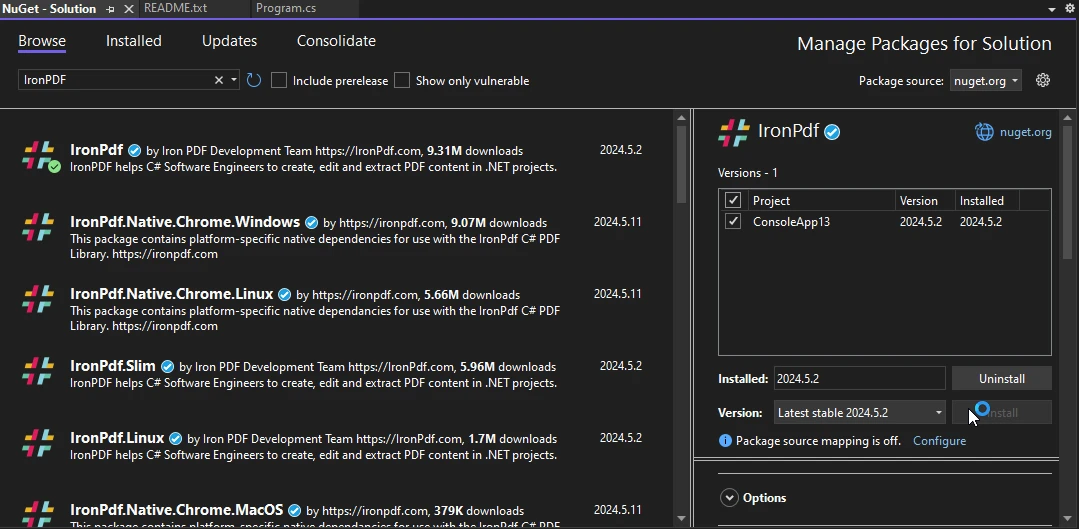
- 在Visual Studio中打开您的ASP.NET项目并导航到"工具"菜单。
- 选择"NuGet包管理器",然后单击"为解决方案管理NuGet包"。
-
在"浏览"选项卡中,搜索"IronPDF"并选择所需版本。 点击"安装"将包添加到您的项目。 IronPDF及其依赖项将自动下载和集成,允许您无缝地在ASP.NET应用程序中开始利用它的功能。
处理支付并生成发票
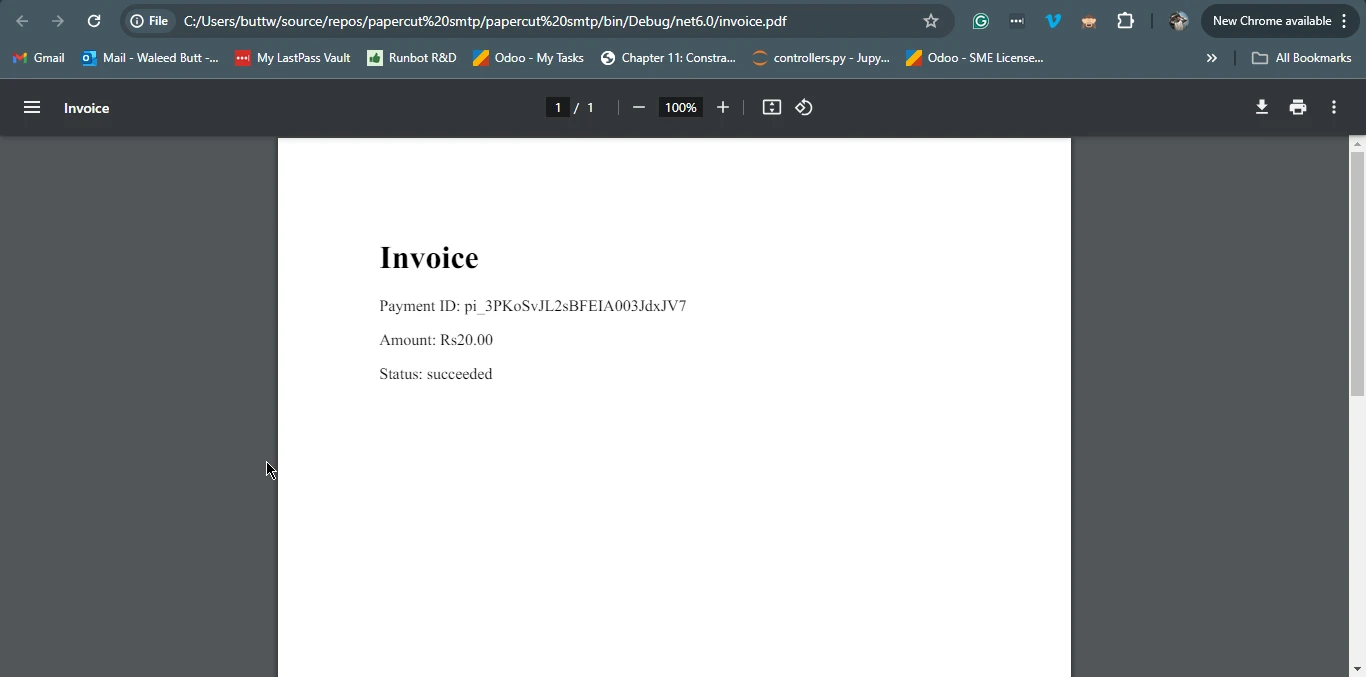
这是一个完整的示例,演示如何使用Stripe.Net API创建新付款,并使用IronPDF生成PDF发票。
using Stripe;
using IronPdf;
using System;
using System.Collections.Generic;

public class PaymentService
{
    public void ProcessPaymentAndGenerateInvoice()
    {
        // Configure Stripe API key
        StripeConfiguration.ApiKey = "your_secret_key";

        // Create a PaymentIntent
        var paymentIntentOptions = new PaymentIntentCreateOptions
        {
            Amount = 2000, // Amount in cents
            Currency = "usd",
            PaymentMethodTypes = new List<string> { "card" },
        };
        var paymentIntentService = new PaymentIntentService();
        PaymentIntent paymentIntent = paymentIntentService.Create(paymentIntentOptions);

        // Assuming payment succeeded, create a PDF invoice
        GeneratePdfInvoice(paymentIntent);
    }

    private void GeneratePdfInvoice(PaymentIntent paymentIntent)
    {
        // Create HTML content for the invoice
        var htmlContent = $@"
        <html>
        <head>
            <title>Invoice</title>
        </head>
        <body>
            <h1>Invoice</h1>
            <p>Payment ID: {paymentIntent.Id}</p>
            <p>Amount: {paymentIntent.Amount / 100.0:C}</p>
            <p>Status: {paymentIntent.Status}</p>
        </body>
        </html>";

        // Convert the HTML content to a PDF document
        var renderer = new ChromePdfRenderer();
        var pdfDocument = renderer.RenderHtmlAsPdf(htmlContent);

        // Save the PDF document to a file
        var filePath = "invoice.pdf";
        pdfDocument.SaveAs(filePath);
        Console.WriteLine($"Invoice saved to {filePath}");
    }
}

class Program
{
    static void Main(string[] args)
    {
        var service = new PaymentService();
        service.ProcessPaymentAndGenerateInvoice();
    }
}
using Stripe;
using IronPdf;
using System;
using System.Collections.Generic;
public class PaymentService
{
public void ProcessPaymentAndGenerateInvoice()
{
// Configure Stripe API key
StripeConfiguration.ApiKey = "your_secret_key";
// Create a PaymentIntent
var paymentIntentOptions = new PaymentIntentCreateOptions
{
Amount = 2000, // Amount in cents
Currency = "usd",
PaymentMethodTypes = new List<string> { "card" },
};
var paymentIntentService = new PaymentIntentService();
PaymentIntent paymentIntent = paymentIntentService.Create(paymentIntentOptions);
// Assuming payment succeeded, create a PDF invoice
GeneratePdfInvoice(paymentIntent);
}
private void GeneratePdfInvoice(PaymentIntent paymentIntent)
{
// Create HTML content for the invoice
var htmlContent = $@"
<html>
<head>
<title>Invoice</title>
</head>
<body>
<h1>Invoice</h1>
<p>Payment ID: {paymentIntent.Id}</p>
<p>Amount: {paymentIntent.Amount / 100.0:C}</p>
<p>Status: {paymentIntent.Status}</p>
</body>
</html>";
// Convert the HTML content to a PDF document
var renderer = new ChromePdfRenderer();
var pdfDocument = renderer.RenderHtmlAsPdf(htmlContent);
// Save the PDF document to a file
var filePath = "invoice.pdf";
pdfDocument.SaveAs(filePath);
Console.WriteLine($"Invoice saved to {filePath}");
}
}
class Program
{
static void Main(string[] args)
{
var service = new PaymentService();
service.ProcessPaymentAndGenerateInvoice();
}
}Imports Stripe
Imports IronPdf
Imports System
Imports System.Collections.Generic
Public Class PaymentService
Public Sub ProcessPaymentAndGenerateInvoice()
' Configure Stripe API key
StripeConfiguration.ApiKey = "your_secret_key"
' Create a PaymentIntent
Dim paymentIntentOptions = New PaymentIntentCreateOptions With {
.Amount = 2000,
.Currency = "usd",
.PaymentMethodTypes = New List(Of String) From {"card"}
}
Dim paymentIntentService As New PaymentIntentService()
Dim paymentIntent As PaymentIntent = paymentIntentService.Create(paymentIntentOptions)
' Assuming payment succeeded, create a PDF invoice
GeneratePdfInvoice(paymentIntent)
End Sub
Private Sub GeneratePdfInvoice(ByVal paymentIntent As PaymentIntent)
' Create HTML content for the invoice
'INSTANT VB WARNING: Instant VB cannot determine whether both operands of this division are integer types - if they are then you should use the VB integer division operator:
Dim htmlContent = $"
<html>
<head>
<title>Invoice</title>
</head>
<body>
<h1>Invoice</h1>
<p>Payment ID: {paymentIntent.Id}</p>
<p>Amount: {paymentIntent.Amount / 100.0:C}</p>
<p>Status: {paymentIntent.Status}</p>
</body>
</html>"
' Convert the HTML content to a PDF document
Dim renderer = New ChromePdfRenderer()
Dim pdfDocument = renderer.RenderHtmlAsPdf(htmlContent)
' Save the PDF document to a file
Dim filePath = "invoice.pdf"
pdfDocument.SaveAs(filePath)
Console.WriteLine($"Invoice saved to {filePath}")
End Sub
End Class
Friend Class Program
Shared Sub Main(ByVal args() As String)
Dim service = New PaymentService()
service.ProcessPaymentAndGenerateInvoice()
End Sub
End Class输出
结论
Stripe.Net是一个全面而强大的库,简化了将Stripe的支付处理集成到.NET应用程序中。 涵盖从基本交易处理到管理订阅和争议的功能,它涵盖了广泛的支付相关需求。
Stripe.Net。 它们结合提供了一个强大的解决方案,用于处理支付和生成相应文档在 .NET 应用程序中。
通过利用IronPDF的功能,开发人员可以创建无缝且高效的工作流程,从支付处理到文档生成,增强了应用程序的整体功能和用户体验。
IronPDF 提供开发人员一个测试其广泛功能的机会,提供 IronPDF 的免费试用版。
IronPDF 提供客户支持和更新,以及代码示例和详尽文档,以帮助用户最大限度利用它。 要进一步探索该主题,请参考我们关于 IronPDF 的 HTML 到 PDF 转换 的详细教程。
常见问题解答
如何将支付处理集成到 .NET 应用程序中?
您可以使用 `Stripe.Net` 库将支付处理集成到 .NET 应用程序中,该库允许您管理支付、创建客户,并在应用程序中处理账单。
在新的 Visual Studio 项目中设置 Stripe.Net 涉及哪些步骤?
要在新的 Visual Studio 项目中设置 Stripe.Net,首先创建一个新项目,通过 NuGet 安装 `Stripe.Net` 包,并配置您的 Stripe API 密钥以验证 API 请求。
我如何在 .NET 应用程序中处理订阅管理?
Stripe.Net 提供内置方法来管理订阅,使您能够通过 API 直接创建、更新和取消订阅。
Stripe.Net 中保护 API 密钥的最佳实践是什么?
在 Stripe.Net 中保护 API 密钥的最佳实践包括使用环境变量或配置文件安全地存储密钥,并确保它们不在源代码中硬编码。
如何在 .NET 应用程序中处理支付后生成文档或发票?
通过 Stripe.Net 处理支付后,您可以使用 IronPDF 将 HTML 内容转换为 PDF 文件,提供专业的账单输出。
using C# PDF 库与 Stripe.Net 的好处是什么?
使用像 IronPDF 这样的 C# PDF 库与 Stripe.Net 可以轻松创建、管理和自定义 PDF 文档,如发票,增强您的 .NET 应用程序的功能。
我如何在 Stripe.Net 中创建 PaymentIntent?
要在 Stripe.Net 中创建 PaymentIntent,请使用 `PaymentIntentService` 类和 `PaymentIntentCreateOptions` 来指定支付细节并跟踪支付生命周期。
整合 Stripe.Net 常见问题应如何排查?
解决整合 Stripe.Net 的常见问题可以通过检查 API 密钥配置,确保正确使用 Stripe 库方法,并查看错误信息以获得具体指导。
Stripe.Net 提供哪些高级功能?
Stripe.Net 提供的高级功能包括处理支付争议、管理定期计费和实现带有强大错误处理的安全支付处理。
如何在 .NET 应用程序中将 HTML 内容转换为 PDF?
您可以使用 IronPDF 的方法在 .NET 应用程序中将 HTML 内容转换为 PDF,例如用于 HTML 字符串的 RenderHtmlAsPdf 或用于 HTML 文件的 RenderHtmlFileAsPdf。










 免费开始
免费开始 免费开始
免费开始 预定免费现场演示
















