


TensorFlow .NET(开发人员如何使用)

机器学习 (ML) 通过实现智能决策和自动化,已经彻底改变了从医疗到金融的各个行业。 Google 的开源机器学习和深度学习框架 TensorFlow,一直处于这场革命的前沿。 借助 TensorFlow.NET,.NET 开发人员可以在 C# 生态系统中利用 TensorFlow 的强大功能。 在本文中,我们将探讨 TensorFlow.NET 及其特性、优势和在 C# 开发中的实际应用。 此外,我们将通过一个实际示例来学习一个名为 IronPDF 的 PDF 生成库,来自 Iron Software。
了解 TensorFlow.NET
TensorFlow.NET 是 TensorFlow 的 .NET 绑定,允许开发人员直接在 C# 和 .NET 应用程序层中使用 TensorFlow 功能。 由社区开发并由 SciSharp 组织维护的 TensorFlow.NET 将 TensorFlow 的机器学习和神经网络功能与 .NET 平台的多功能性无缝集成。 它使 C# 开发人员能够构建神经网络、训练模型,并使用 TensorFlow 的广泛系统 API 和工具部署机器学习模型。
TensorFlow.NET 的关键功能
- TensorFlow 兼容性:
TensorFlow.NET提供与 TensorFlow 的 API 和操作的完全兼容性,包括张量操作、神经网络层、损失函数、优化器以及用于数据预处理和评估的实用程序。 2.高性能:TensorFlow.NET利用 TensorFlow 高效的计算图执行引擎和优化的内核,在 CPU 和 GPU 上提供高性能的机器学习推理和训练。 3.轻松集成:TensorFlow.NET与现有的 .NET 应用程序和库无缝集成,使开发人员能够在不离开熟悉的 C# 开发环境的情况下利用 TensorFlow 的功能。 4.模型可移植性:TensorFlow.NET允许开发人员导入预训练的 TensorFlow 模型,并将训练好的模型导出到其他基于 TensorFlow 的环境(例如 Python 或移动设备)中进行推理。 5.灵活性和可扩展性:TensorFlow.NET提供了使用 C# 语言特性(例如用于数据操作的 LINQ(语言集成查询)和用于模型组合的函数式编程范式)来定制和扩展机器学习模型的灵活性。 6.社区支持和文档:TensorFlow.NET受益于活跃的贡献者社区,他们提供文档、教程和示例,以帮助开发人员使用 TensorFlow 在 C# 世界中开始机器学习。
TensorFlow.NET 的实际示例
让我们探讨一些实际场景,在这些场景中,TensorFlow.NET 可以用于在 C# 中构建和部署机器学习模型:
1.加载和使用预训练模型:
```csharp
// Load a pre-trained TensorFlow model
var model = TensorFlowModel.LoadModel("model.pb");
// Perform inference on input data
var input = new float[,] { { 1.0f, 2.0f, 3.0f } };
var output = model.Predict(input);
```2.训练自定义模型:
```csharp
// Create a neural network model using TensorFlow.NET APIs
var input = new Input(Shape.Scalar);
var output = new Dense(1, Activation.ReLU).Forward(input);
// Compile the model with loss function and optimizer algorithms
var model = new Model(input, output);
model.Compile(optimizer: new SGD(), loss: Losses.MeanSquaredError);
// Train the model with training data
model.Fit(x_train, y_train, epochs: 10, batchSize: 32);
```3.评估与部署:
```csharp
// Evaluate the trained model on test data
var evaluation = model.Evaluate(x_test, y_test);
// Export the trained model for deployment
model.SaveModel("trained_model.pb");
```
更多 TensorFlow 的示例可以在 TensorFlow.NET Examples 页面上找到。
// Use static TensorFlow
using static Tensorflow.Binding;

namespace IronPdfDemos
{
    public class TensorFlow
    {
        public static void Execute()
        {
            // Create a TensorFlow constant
            var hello = tf.constant("Hello, TensorFlow!");
            Console.WriteLine(hello);
        }
    }
}
// Use static TensorFlow
using static Tensorflow.Binding;
namespace IronPdfDemos
{
public class TensorFlow
{
public static void Execute()
{
// Create a TensorFlow constant
var hello = tf.constant("Hello, TensorFlow!");
Console.WriteLine(hello);
}
}
}' Use static TensorFlow
Imports Tensorflow.Binding
Namespace IronPdfDemos
Public Class TensorFlow
Public Shared Sub Execute()
' Create a TensorFlow constant
Dim hello = tf.constant("Hello, TensorFlow!")
Console.WriteLine(hello)
End Sub
End Class
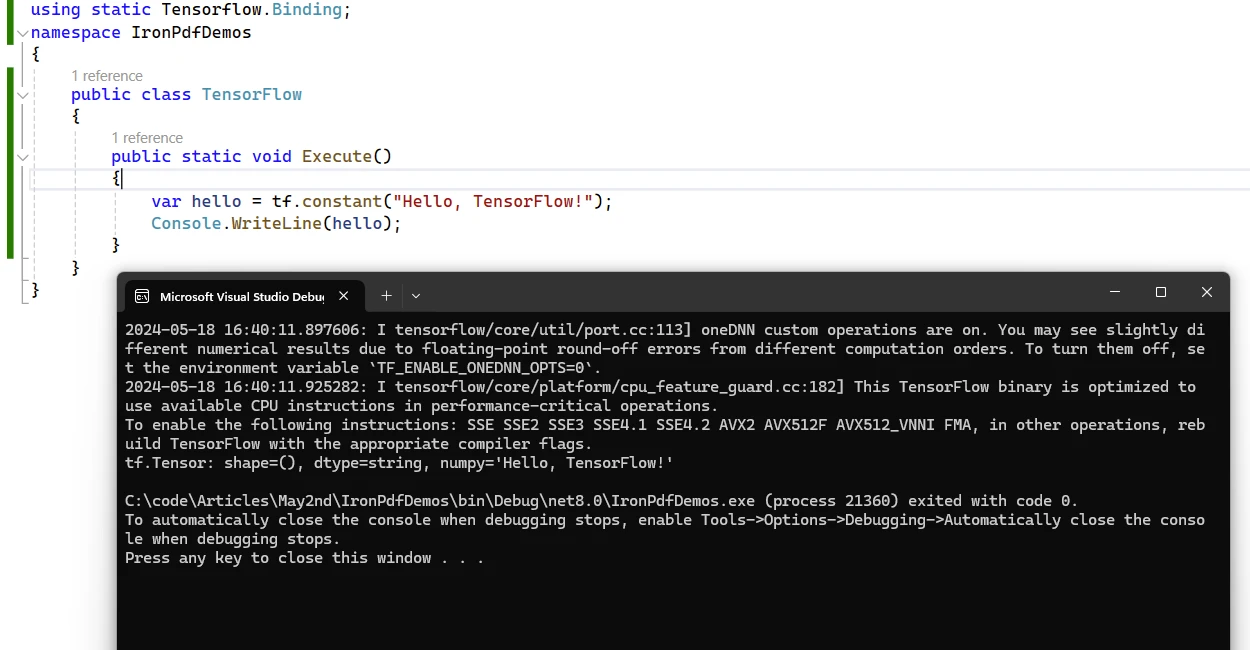
End Namespace示例 Hello TensorFlow 输出
使用 TensorFlow.NET 的好处
1.无缝集成: TensorFlow.NET 将 TensorFlow 的强大功能引入 .NET 生态系统,使 C# 开发人员能够在他们的应用程序中利用最先进的机器学习技术和算法。
2.性能和可扩展性: TensorFlow.NET 利用 TensorFlow 的优化执行引擎提供高性能的机器学习计算,使其适合处理大规模数据集和复杂模型。
3.熟悉的开发环境: TensorFlow.NET API 允许开发人员使用熟悉的 C# 语言特性和开发工具构建和部署机器学习模型,从而降低在 C# 应用程序中采用机器学习的学习曲线。
4.互操作性和可移植性: TensorFlow.NET 促进了与其他基于 TensorFlow 的环境的互操作性,从而实现了基于 C# 的机器学习模型与 Python、TensorFlow Serving 和 TensorFlow Lite 的无缝集成。
5.社区驱动发展: TensorFlow.NET 受益于活跃的贡献者和用户社区,他们为项目提供支持、反馈和贡献,确保项目的持续增长和改进。
TensorFlow.NET 许可证
它是一个开源 Apache 许可证包,可以自由使用。 有关许可证的更多信息,可以在 TensorFlow.NET License 页面上阅读。
IronPDF 简介
IronPDF 是一个功能强大的 C# PDF 库,允许开发人员直接从 HTML、CSS、图像和 JavaScript 输入创建、编辑和签署 PDF。 它是一个商业级别的解决方案,具有高性能和低内存占用。 以下是一些关键功能:
- HTML 转 PDF 转换:
IronPDF可以将 HTML 文件、HTML 字符串和 URL 转换为 PDF。 例如,您可以使用 Chrome PDF 渲染器将网页渲染为 PDF。 2.跨平台支持:IronPDF可在各种 .NET 平台上运行,包括 .NET Core、.NET Standard 和 .NET Framework。 它兼容于 Windows、Linux 和 macOS。 3.编辑和签名:您可以设置属性、添加安全措施(密码和权限),甚至可以对 PDF 应用数字签名。 4.页面模板和设置:通过添加页眉、页脚和页码以及调整页边距来自定义您的 PDF。IronPDF还支持响应式布局和自定义纸张尺寸。 5.标准符合性:IronPDF符合 PDF/A 和 PDF/UA 等 PDF 标准。 它支持UTF-8字符编码,并且可以处理像图像、CSS和字体这样的资产。
使用 TensorFlow.NET 和 IronPDF 生成 PDF 文档
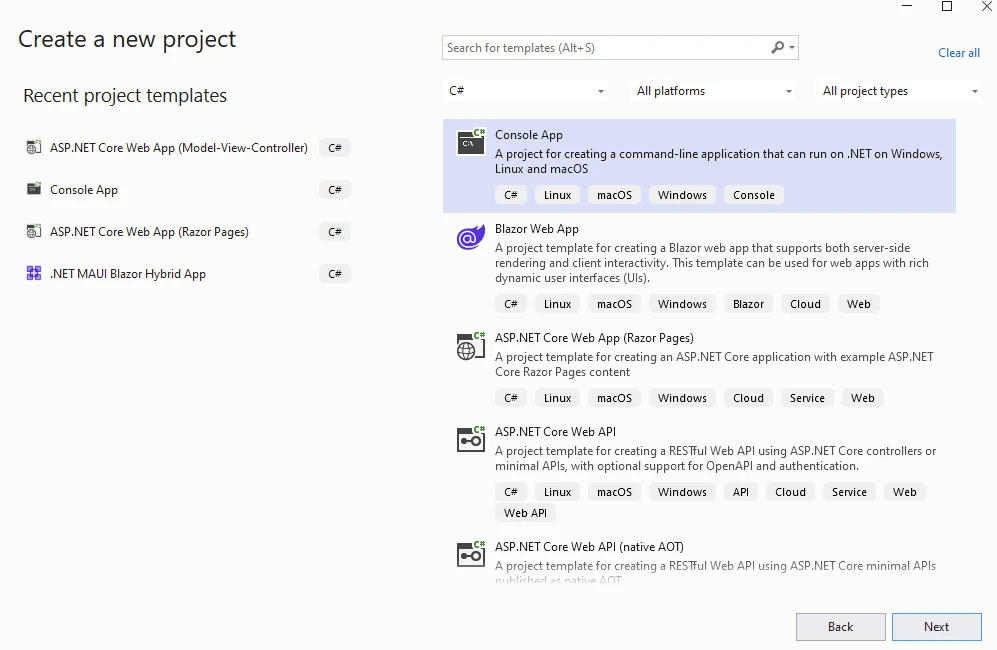
首先,创建一个 Visual Studio 项目并选择下面的控制台应用模板。
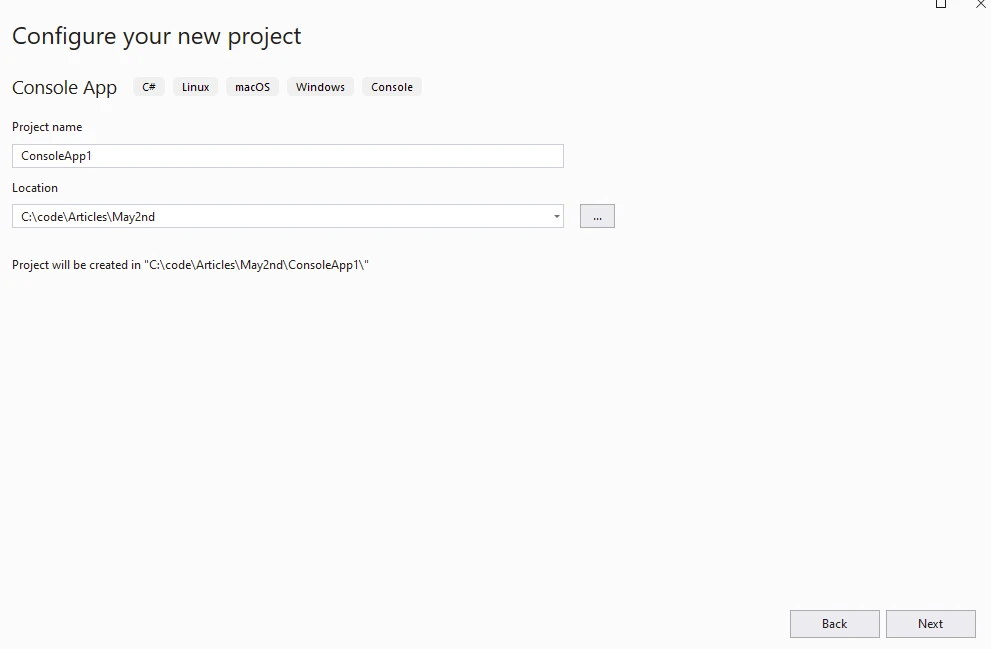
提供项目名称和位置。
在下一步中选择所需的 .NET 版本并点击创建按钮。
从 Visual Studio 程序包管理器中的 NuGet 程序包安装 IronPDF。
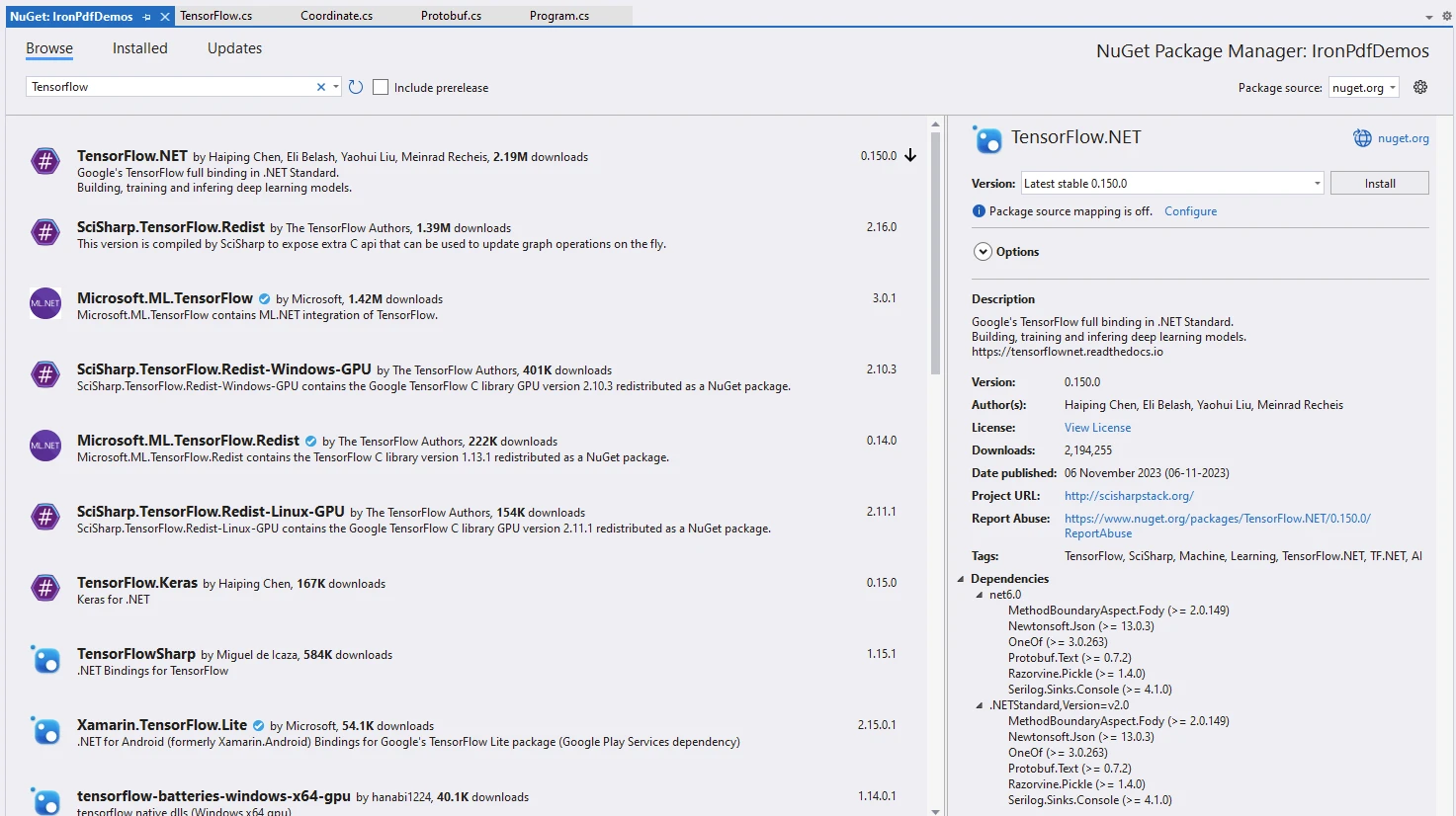
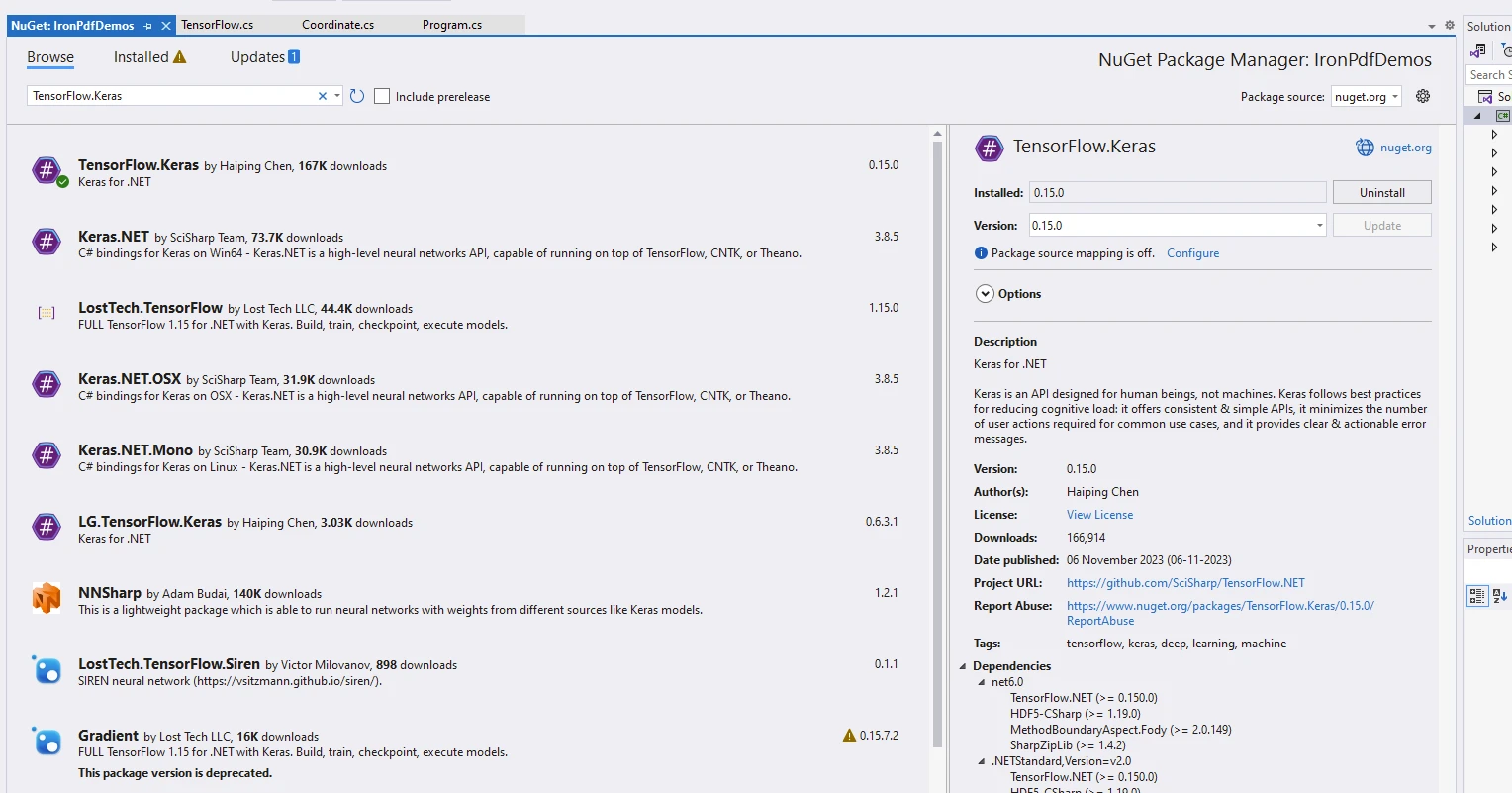
安装软件包 TensorFlow.NET 和 TensorFlow.Keras,这是一个用于运行模型的独立软件包。
using IronPdf;
using static Tensorflow.Binding;

namespace IronPdfDemos
{
    public class Program
    {
        public static void Main()
        {
            // Instantiate Cache and ChromePdfRenderer
            var renderer = new ChromePdfRenderer();

            // Prepare HTML content for the PDF
            var content = "<h1>Demonstrate TensorFlow with IronPDF</h1>";
            content += "<h2>Enable Eager Execution</h2>";
            content += "<p>tf.enable_eager_execution();</p>";

            // Enable eager execution mode in TensorFlow
            tf.enable_eager_execution();

            // Define tensor constants
            content += "<h2>Define Tensor Constants</h2>";
            var a = tf.constant(5);
            var b = tf.constant(6);
            var c = tf.constant(7);

            // Perform various tensor operations
            content += "<h2>Various Tensor Operations</h2>";
            var add = tf.add(a, b);
            var sub = tf.subtract(a, b);
            var mul = tf.multiply(a, b);
            var div = tf.divide(a, b);

            content += $"<p>var add = tf.add(a, b);</p>";
            content += $"<p>var sub = tf.subtract(a, b);</p>";
            content += $"<p>var mul = tf.multiply(a, b);</p>";
            content += $"<p>var div = tf.divide(a, b);</p>";

            // Output tensor values to HTML content
            content += "<h2>Access Tensor Values</h2>";
            content += $"<p>{a.numpy()} + {b.numpy()} = {add.numpy()}</p>";
            content += $"<p>{a.numpy()} - {b.numpy()} = {sub.numpy()}</p>";
            content += $"<p>{a.numpy()} * {b.numpy()} = {mul.numpy()}</p>";
            content += $"<p>{a.numpy()} / {b.numpy()} = {div.numpy()}</p>";

            // Perform additional operations
            var mean = tf.reduce_mean(tf.constant(new[] { a, b, c }));
            var sum = tf.reduce_sum(tf.constant(new[] { a, b, c }));

            content += "<h2>Additional Operations</h2>";
            content += $"<p>mean = {mean.numpy()}</p>";
            content += $"<p>sum = {sum.numpy()}</p>";

            // Perform matrix multiplication
            var matrix1 = tf.constant(new float[,] { { 1, 2 }, { 3, 4 } });
            var matrix2 = tf.constant(new float[,] { { 5, 6 }, { 7, 8 } });
            var product = tf.matmul(matrix1, matrix2);

            content += "<h2>Matrix Multiplications</h2>";
            content += "<p>Multiplication Result:</p>";
            content += $"<p>product = {product.numpy()}</p>";

            // Render HTML content to PDF
            var pdf = renderer.RenderHtmlAsPdf(content);
            // Save PDF to file
            pdf.SaveAs("tensorflow.pdf");
        }
    }
}
using IronPdf;
using static Tensorflow.Binding;
namespace IronPdfDemos
{
public class Program
{
public static void Main()
{
// Instantiate Cache and ChromePdfRenderer
var renderer = new ChromePdfRenderer();
// Prepare HTML content for the PDF
var content = "<h1>Demonstrate TensorFlow with IronPDF</h1>";
content += "<h2>Enable Eager Execution</h2>";
content += "<p>tf.enable_eager_execution();</p>";
// Enable eager execution mode in TensorFlow
tf.enable_eager_execution();
// Define tensor constants
content += "<h2>Define Tensor Constants</h2>";
var a = tf.constant(5);
var b = tf.constant(6);
var c = tf.constant(7);
// Perform various tensor operations
content += "<h2>Various Tensor Operations</h2>";
var add = tf.add(a, b);
var sub = tf.subtract(a, b);
var mul = tf.multiply(a, b);
var div = tf.divide(a, b);
content += $"<p>var add = tf.add(a, b);</p>";
content += $"<p>var sub = tf.subtract(a, b);</p>";
content += $"<p>var mul = tf.multiply(a, b);</p>";
content += $"<p>var div = tf.divide(a, b);</p>";
// Output tensor values to HTML content
content += "<h2>Access Tensor Values</h2>";
content += $"<p>{a.numpy()} + {b.numpy()} = {add.numpy()}</p>";
content += $"<p>{a.numpy()} - {b.numpy()} = {sub.numpy()}</p>";
content += $"<p>{a.numpy()} * {b.numpy()} = {mul.numpy()}</p>";
content += $"<p>{a.numpy()} / {b.numpy()} = {div.numpy()}</p>";
// Perform additional operations
var mean = tf.reduce_mean(tf.constant(new[] { a, b, c }));
var sum = tf.reduce_sum(tf.constant(new[] { a, b, c }));
content += "<h2>Additional Operations</h2>";
content += $"<p>mean = {mean.numpy()}</p>";
content += $"<p>sum = {sum.numpy()}</p>";
// Perform matrix multiplication
var matrix1 = tf.constant(new float[,] { { 1, 2 }, { 3, 4 } });
var matrix2 = tf.constant(new float[,] { { 5, 6 }, { 7, 8 } });
var product = tf.matmul(matrix1, matrix2);
content += "<h2>Matrix Multiplications</h2>";
content += "<p>Multiplication Result:</p>";
content += $"<p>product = {product.numpy()}</p>";
// Render HTML content to PDF
var pdf = renderer.RenderHtmlAsPdf(content);
// Save PDF to file
pdf.SaveAs("tensorflow.pdf");
}
}
}Imports IronPdf
Imports Tensorflow.Binding
Namespace IronPdfDemos
Public Class Program
Public Shared Sub Main()
' Instantiate Cache and ChromePdfRenderer
Dim renderer = New ChromePdfRenderer()
' Prepare HTML content for the PDF
Dim content = "<h1>Demonstrate TensorFlow with IronPDF</h1>"
content &= "<h2>Enable Eager Execution</h2>"
content &= "<p>tf.enable_eager_execution();</p>"
' Enable eager execution mode in TensorFlow
tf.enable_eager_execution()
' Define tensor constants
content &= "<h2>Define Tensor Constants</h2>"
Dim a = tf.constant(5)
Dim b = tf.constant(6)
Dim c = tf.constant(7)
' Perform various tensor operations
content &= "<h2>Various Tensor Operations</h2>"
Dim add = tf.add(a, b)
Dim [sub] = tf.subtract(a, b)
Dim mul = tf.multiply(a, b)
Dim div = tf.divide(a, b)
content &= $"<p>var add = tf.add(a, b);</p>"
content &= $"<p>var sub = tf.subtract(a, b);</p>"
content &= $"<p>var mul = tf.multiply(a, b);</p>"
content &= $"<p>var div = tf.divide(a, b);</p>"
' Output tensor values to HTML content
content &= "<h2>Access Tensor Values</h2>"
content &= $"<p>{a.numpy()} + {b.numpy()} = {add.numpy()}</p>"
content &= $"<p>{a.numpy()} - {b.numpy()} = {[sub].numpy()}</p>"
content &= $"<p>{a.numpy()} * {b.numpy()} = {mul.numpy()}</p>"
content &= $"<p>{a.numpy()} / {b.numpy()} = {div.numpy()}</p>"
' Perform additional operations
Dim mean = tf.reduce_mean(tf.constant( { a, b, c }))
Dim sum = tf.reduce_sum(tf.constant( { a, b, c }))
content &= "<h2>Additional Operations</h2>"
content &= $"<p>mean = {mean.numpy()}</p>"
content &= $"<p>sum = {sum.numpy()}</p>"
' Perform matrix multiplication
Dim matrix1 = tf.constant(New Single(, ) {
{ 1, 2 },
{ 3, 4 }
})
Dim matrix2 = tf.constant(New Single(, ) {
{ 5, 6 },
{ 7, 8 }
})
Dim product = tf.matmul(matrix1, matrix2)
content &= "<h2>Matrix Multiplications</h2>"
content &= "<p>Multiplication Result:</p>"
content &= $"<p>product = {product.numpy()}</p>"
' Render HTML content to PDF
Dim pdf = renderer.RenderHtmlAsPdf(content)
' Save PDF to file
pdf.SaveAs("tensorflow.pdf")
End Sub
End Class
End Namespace代码解释
让我们分解一下代码片段:
1.进口声明:
代码首先导入必要的库。 具体来说:

```csharp
using IronPdf; // This imports the IronPDF package, which is used for working with PDF files.
using static Tensorflow.Binding; // This imports the TensorFlow library, specifically the .NET standard binding.
```2.急于执行:
行 `tf.enable_eager_execution();` 启用 TensorFlow 的 eager 执行模式。 在即时执行中,操作会被立即评价,使其更容易调试和与张量互动。3.定义张量常量:
该代码定义了三个张量常量:`a`、`b` 和 `c`。 这些常量分别初始化为值 5、6 和 7。4.各种张量运算:
执行以下张量操作:

```csharp
var add = tf.add(a, b); // Adds a and b.
var sub = tf.subtract(a, b); // Subtracts b from a.
var mul = tf.multiply(a, b); // Multiplies a and b.
var div = tf.divide(a, b); // Divides a by b.
```5.访问张量值:
张量操作的结果包含在 HTML 内容中:

```csharp
content += $"<p>{a.numpy()} + {b.numpy()} = {add.numpy()}</p>";
content += $"<p>{a.numpy()} - {b.numpy()} = {sub.numpy()}</p>";
content += $"<p>{a.numpy()} * {b.numpy()} = {mul.numpy()}</p>";
content += $"<p>{a.numpy()} / {b.numpy()} = {div.numpy()}</p>";
```6.其他操作:
该代码计算常量的平均值和总和 `[a, b, c]`。7.矩阵乘法:
它对 `matrix1` 和 `matrix2` 进行矩阵乘法运算,并显示结果。-
PDF 生成:
来自
ChromePdfRenderer和RenderHtmlAsPdf的IronPDF用于将 HTML 字符串渲染成 PDF 文档。
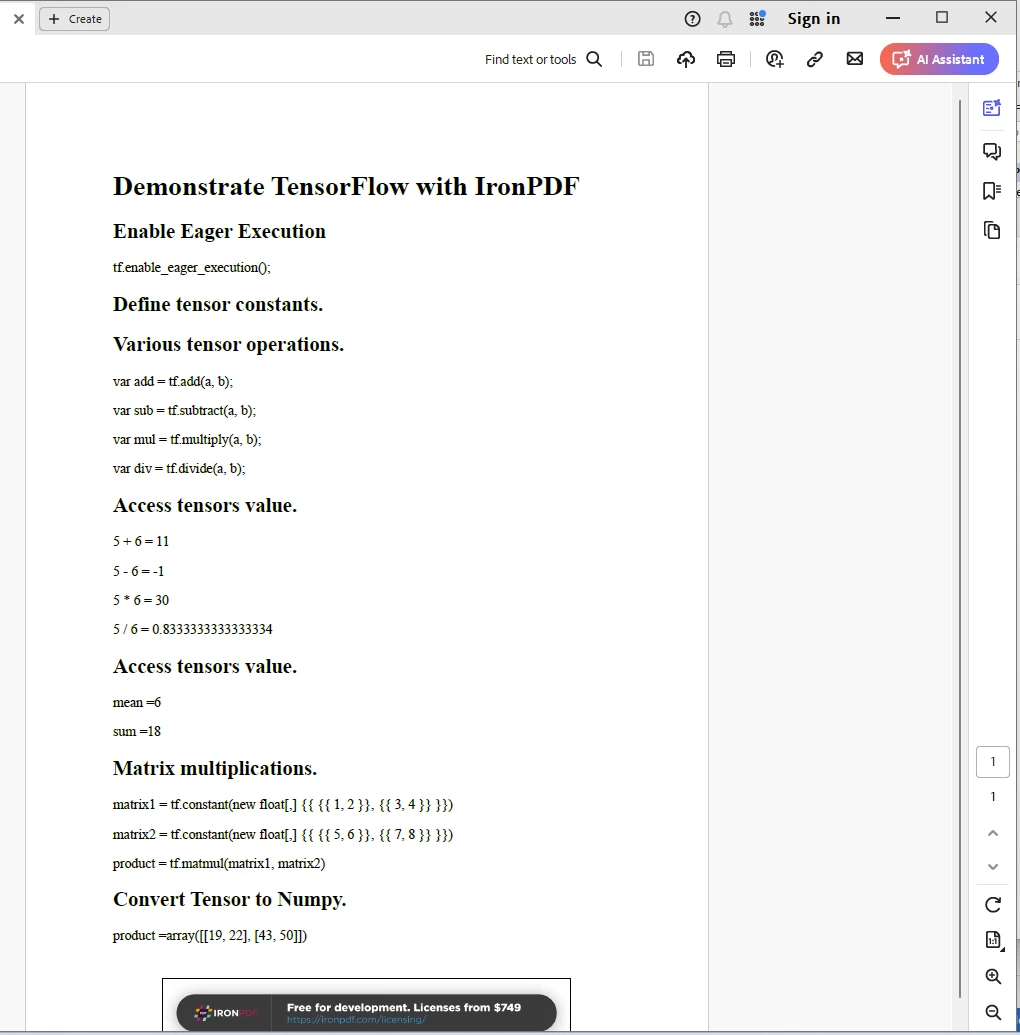
输出
IronPDF 许可证
IronPDF 需要许可证才能运行。 更多关于许可的信息可以在 IronPDF Licensing 页面上找到。 将密钥放入 appSettings.json 文件中,如下所示。
{
  "IronPdf.License.LicenseKey": "The Key Here"
}
结论
总之,TensorFlow.NET 使 C# 开发人员能够利用 .NET 生态系统的多功能性和生产力来探索机器学习和人工智能的世界。 无论您是在构建智能应用程序、预测分析工具还是自动化决策系统,TensorFlow.NET 都提供了一个强大而灵活的框架,以释放 C# 中机器学习的潜力。 结合来自 Iron Software 的 IronPDF 库,开发人员可以获得开发现代应用程序的高级技能。
常见问题解答
如何将机器学习集成到我的 C# 应用程序中?
您可以使用 TensorFlow.NET,这是一个 TensorFlow 的 .NET 绑定,它允许您在 C# 应用程序中构建、训练和部署机器学习模型。 它与 TensorFlow 的强大 API 完全兼容。
TensorFlow.NET 的关键功能是什么?
TensorFlow.NET 提供全兼容 TensorFlow API、高性能计算引擎、轻松与 .NET 系统集成、模型可移植性和强大的社区支持等功能。
如何在.NET应用程序中将HTML转换为PDF?
您可以使用 IronPDF 将 HTML 转换为 .NET 应用程序中的 PDF。 IronPDF 允许从 HTML、CSS 和 JavaScript 输入转换为 PDF 文档,提供跨平台兼容性和高级 PDF 操作功能。
可以使用 TensorFlow.NET 导入来自 Python 的模型吗?
是的,TensorFlow.NET 支持模型可移植性,允许您导入在 Python 等环境中创建的模型,并在您的 .NET 应用程序中使用。
结合 TensorFlow.NET 和 IronPDF 的潜力是什么?
结合 TensorFlow.NET 和 IronPDF 使开发人员能够构建智能应用程序,可以执行复杂的机器学习计算,并将结果呈现为格式良好的 PDF 文档,从而增强文档和报告流程。
TensorFlow.NET 适合跨平台开发吗?
是的,TensorFlow.NET 可用于跨平台的 .NET 环境,允许开发人员构建与各种操作系统兼容的应用程序。
如何在 C# 应用程序中编辑和签署 PDF?
IronPDF 提供在 C# 应用程序中编辑和签署 PDF 文档的功能,支持强大的 PDF 操作和管理。
TensorFlow.NET 为开发人员提供了哪些支持?
TensorFlow.NET 由强大的社区和全面的文档支持,使开发人员更容易找到资源和示例来帮助他们的开发过程。
TensorFlow.NET 如何增强 C# 开发环境?
TensorFlow.NET 通过集成 TensorFlow 的机器学习能力增强 C# 开发环境,允许开发人员在不离开 .NET 生态系统的情况下充分利用 TensorFlow 的强大功能。
开发人员在哪里可以找到使用 IronPDF 的实际示例?
开发人员可以在 IronPDF 文档页面以及各种在线资源和专注于 .NET PDF 操作的社区论坛上找到使用 IronPDF 的实际示例。



















 免费开始
免费开始 免费开始
免费开始 预定免费现场演示





 无需信用卡或创建账户










