


TensorFlow .NET(對於開發者的運行原理)

機器學習 (ML) 透過實現智慧型決策和自動化,已為從醫療保健到金融等各行各業帶來了革命性的變化。 TensorFlow 是 Google 的開放源碼 ML 和深度學習框架,一直走在這場革命的最前端。 借助 TensorFlow.NET,.NET 開發人員可以在 C# 生態系統中利用 TensorFlow 的強大功能。 在本文中,我們將探討 TensorFlow.NET,它的特性、優點以及在 C# 開發中的實際應用。 此外,我們將透過一個實際範例來學習一個名為 IronPDF 的 PDF 生成庫 Iron Software。
瞭解 TensorFlow.NET
TensorFlow.NET 是 TensorFlow 的 .NET 綁定,讓開發人員直接在 C# 和 .NET 應用程式層中使用 TensorFlow 功能。 由社群開發並由 SciSharp 組織維護的 TensorFlow.NET 將 TensorFlow 的機器學習和神經網路功能與 .NET 平台的多功能性無縫整合。 它能讓 C# 開發人員使用 TensorFlow 廣泛的系統 API 和工具來建立神經網路、訓練模型和部署 ML 模型。
TensorFlow.NET 的主要功能
- TensorFlow 相容性:
TensorFlow.NET提供與 TensorFlow 的 API 和操作的完全相容性,包括張量操作、神經網路層、損失函數、最佳化器以及用於資料預處理和評估的實用程式。 2.高性能:TensorFlow.NET利用 TensorFlow 高效的計算圖執行引擎和優化的內核,在 CPU 和 GPU 上提供高性能的機器學習推理和訓練。 3.輕鬆集成:TensorFlow.NET與現有的 .NET 應用程式和函式庫無縫集成,使開發人員能夠在不離開熟悉的 C# 開發環境的情況下利用 TensorFlow 的功能。 4.模型可移植性:TensorFlow.NET允許開發人員匯入預先訓練的 TensorFlow 模型,並將訓練好的模型匯出到其他基於 TensorFlow 的環境(例如 Python 或行動裝置)中進行推理。 5.靈活性和可擴展性:TensorFlow.NET提供了使用 C# 語言特性(例如用於資料操作的 LINQ(語言整合查詢)和用於模型組合的函數式程式設計範式)來客製化和擴展機器學習模型的靈活性。 6.社區支援和文件:TensorFlow.NET受益於活躍的貢獻者社區,他們提供文件、教程和範例,以幫助開發人員使用 TensorFlow 在 C# 世界中開始機器學習。
使用 TensorFlow.NET 的實例
讓我們探討一些實際場景,在這些場景中,TensorFlow.NET 可以用於在 C# 中建立和部署機器學習模型:
1.載入和使用預訓練模型:
```csharp
// Load a pre-trained TensorFlow model
var model = TensorFlowModel.LoadModel("model.pb");
// Perform inference on input data
var input = new float[,] { { 1.0f, 2.0f, 3.0f } };
var output = model.Predict(input);
```2.訓練自訂模型:
```csharp
// Create a neural network model using TensorFlow.NET APIs
var input = new Input(Shape.Scalar);
var output = new Dense(1, Activation.ReLU).Forward(input);
// Compile the model with loss function and optimizer algorithms
var model = new Model(input, output);
model.Compile(optimizer: new SGD(), loss: Losses.MeanSquaredError);
// Train the model with training data
model.Fit(x_train, y_train, epochs: 10, batchSize: 32);
```3.評估與部署:
```csharp
// Evaluate the trained model on test data
var evaluation = model.Evaluate(x_test, y_test);
// Export the trained model for deployment
model.SaveModel("trained_model.pb");
```
更多 TensorFlow 的範例可在 TensorFlow.NET Examples 頁面找到。
// Use static TensorFlow
using static Tensorflow.Binding;

namespace IronPdfDemos
{
    public class TensorFlow
    {
        public static void Execute()
        {
            // Create a TensorFlow constant
            var hello = tf.constant("Hello, TensorFlow!");
            Console.WriteLine(hello);
        }
    }
}
// Use static TensorFlow
using static Tensorflow.Binding;
namespace IronPdfDemos
{
public class TensorFlow
{
public static void Execute()
{
// Create a TensorFlow constant
var hello = tf.constant("Hello, TensorFlow!");
Console.WriteLine(hello);
}
}
}' Use static TensorFlow
Imports Tensorflow.Binding
Namespace IronPdfDemos
Public Class TensorFlow
Public Shared Sub Execute()
' Create a TensorFlow constant
Dim hello = tf.constant("Hello, TensorFlow!")
Console.WriteLine(hello)
End Sub
End Class
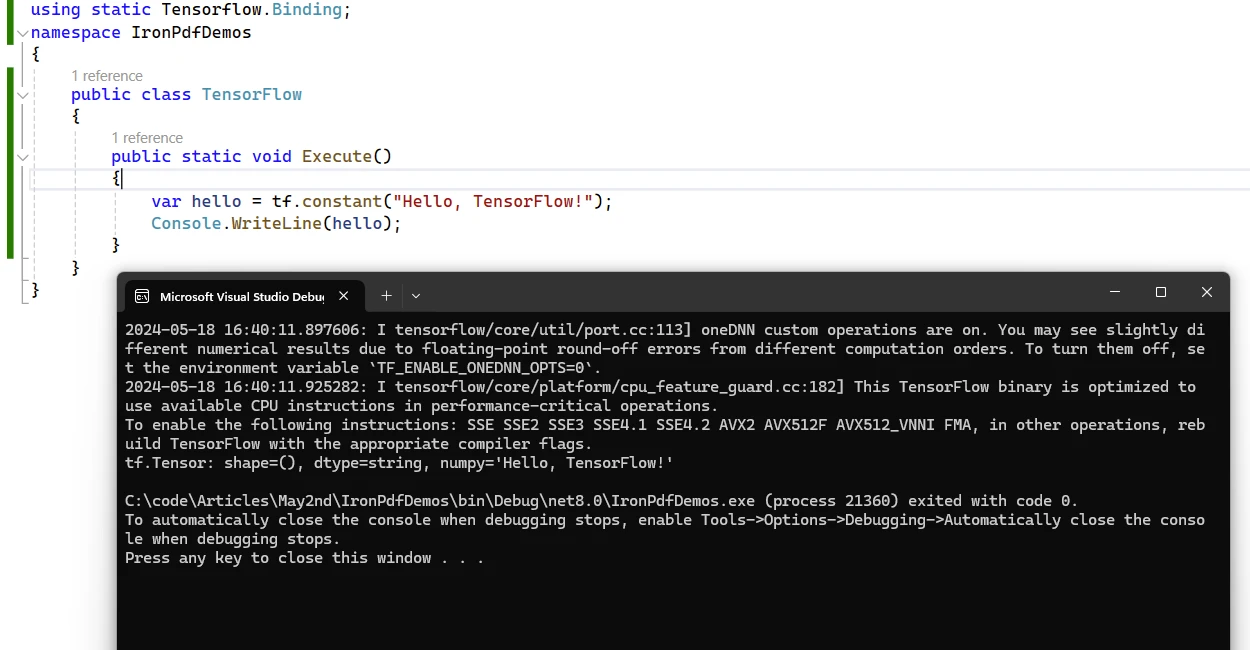
End NamespaceHello TensorFlow 輸出範例
使用 TensorFlow.NET 的好處
1.無縫整合: TensorFlow.NET 將 TensorFlow 的強大功能引入 .NET 生態系統,使 C# 開發人員能夠在他們的應用程式中利用最先進的機器學習技術和演算法。
2.效能和可擴展性: TensorFlow.NET 利用 TensorFlow 的最佳化執行引擎提供高效能的機器學習計算,使其適合處理大規模資料集和複雜模型。
3.熟悉的開發環境: TensorFlow.NET API 允許開發人員使用熟悉的 C# 語言特性和開發工具來建立和部署機器學習模型,從而降低在 C# 應用程式中採用機器學習的學習曲線。
4.互通性和可移植性: TensorFlow.NET 促進了與其他基於 TensorFlow 的環境的互通性,從而實現了基於 C# 的機器學習模型與 Python、TensorFlow Serving 和 TensorFlow Lite 的無縫集成。
5.社群驅動發展: TensorFlow.NET 受益於活躍的貢獻者和使用者社區,他們為專案提供支援、回饋和貢獻,確保專案的持續成長和改進。
TensorFlow.NET 授權
這是一個可自由使用的開放原始碼 Apache 授權套件。 更多關於許可證的資訊,請參閱 TensorFlow.NET License 頁面。
介紹 IronPDF
IronPDF 是一個功能強大的 C# PDF 程式庫,可讓開發人員直接從 HTML、CSS、圖像和 JavaScript 輸入建立、編輯和簽署 PDF。 這是一個具有高效能和低記憶體佔用量的商業級解決方案。 以下是一些主要特點:
- HTML 轉 PDF 轉換:
IronPDF可以將 HTML 檔案、HTML 字串和 URL 轉換為 PDF。 例如,您可以使用 Chrome PDF 渲染器將網頁渲染為 PDF。 2.跨平台支援:IronPDF可在各種 .NET 平台上運行,包括 .NET Core、.NET Standard 和 .NET Framework。 它與 Windows、Linux 和 macOS 相容。 3.編輯和簽名:您可以設定屬性、新增安全措施(密碼和權限),甚至可以對 PDF 應用數位簽章。 4.頁面範本和設定:透過新增頁首、頁尾和頁碼以及調整頁邊距來自訂您的 PDF。IronPDF也支援響應式佈局和自訂紙張尺寸。 5.標準符合性:IronPDF符合 PDF/A 和 PDF/UA 等 PDF 標準。 它支援 UTF-8 字元編碼,並能處理圖片、CSS 和字型等資產。
使用 TensorFlow.NET 和 IronPDF 生成 PDF 文件
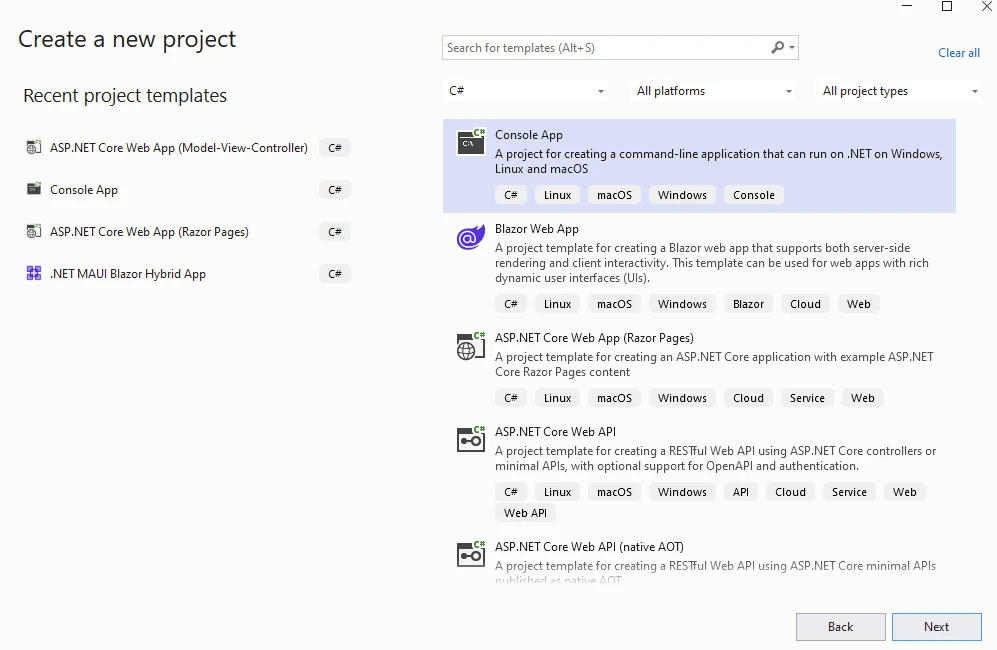
首先,建立一個 Visual Studio 專案,並選擇下方的 Console App 模版。
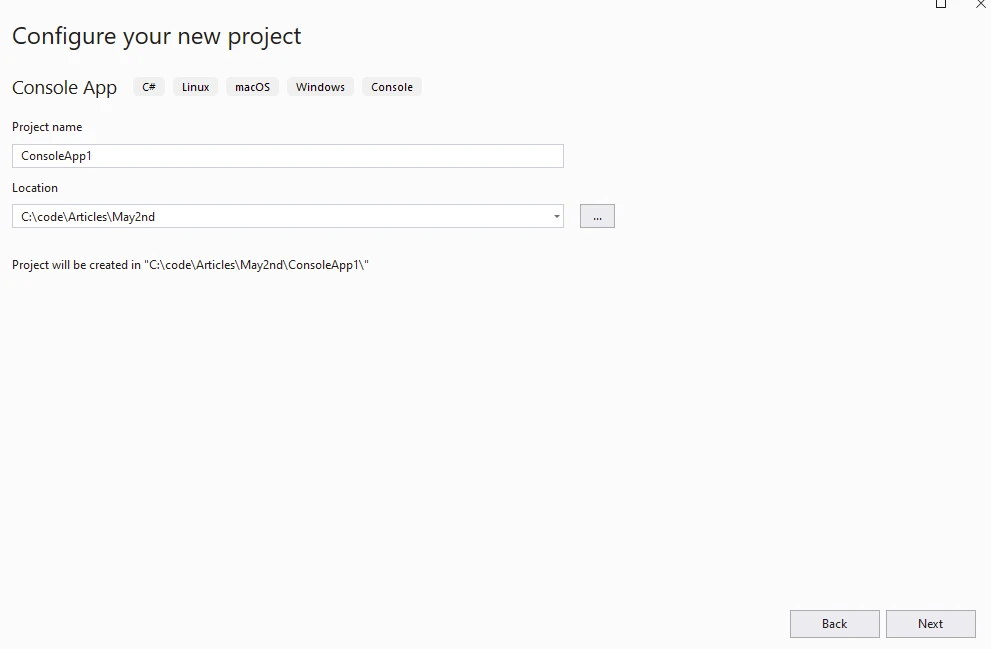
提供專案名稱和地點。
在下一步中選擇所需的 .NET 版本,然後按一下建立按鈕。
從 Visual Studio 套件管理員中的 NuGet 套件安裝 IronPDF。
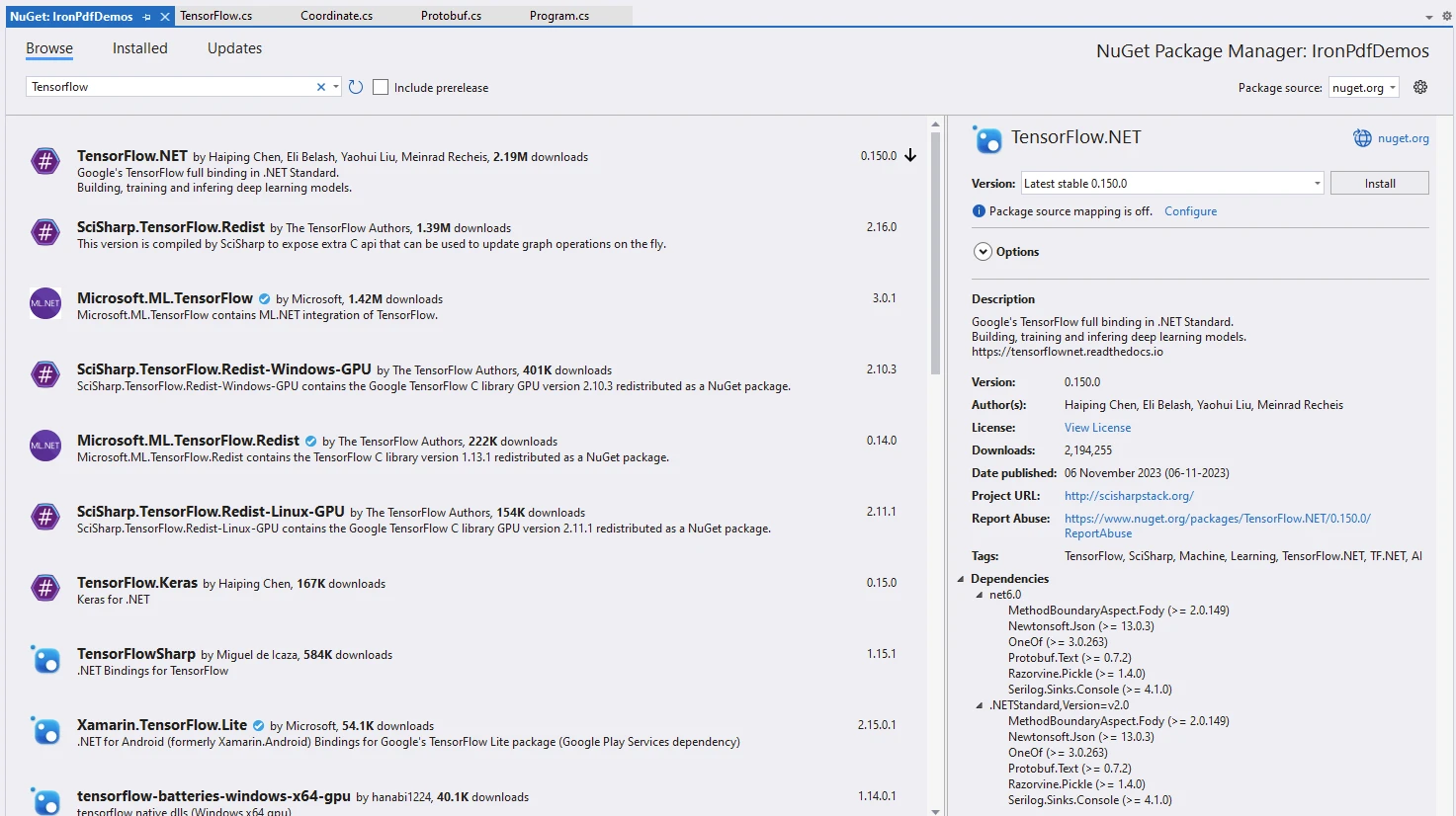
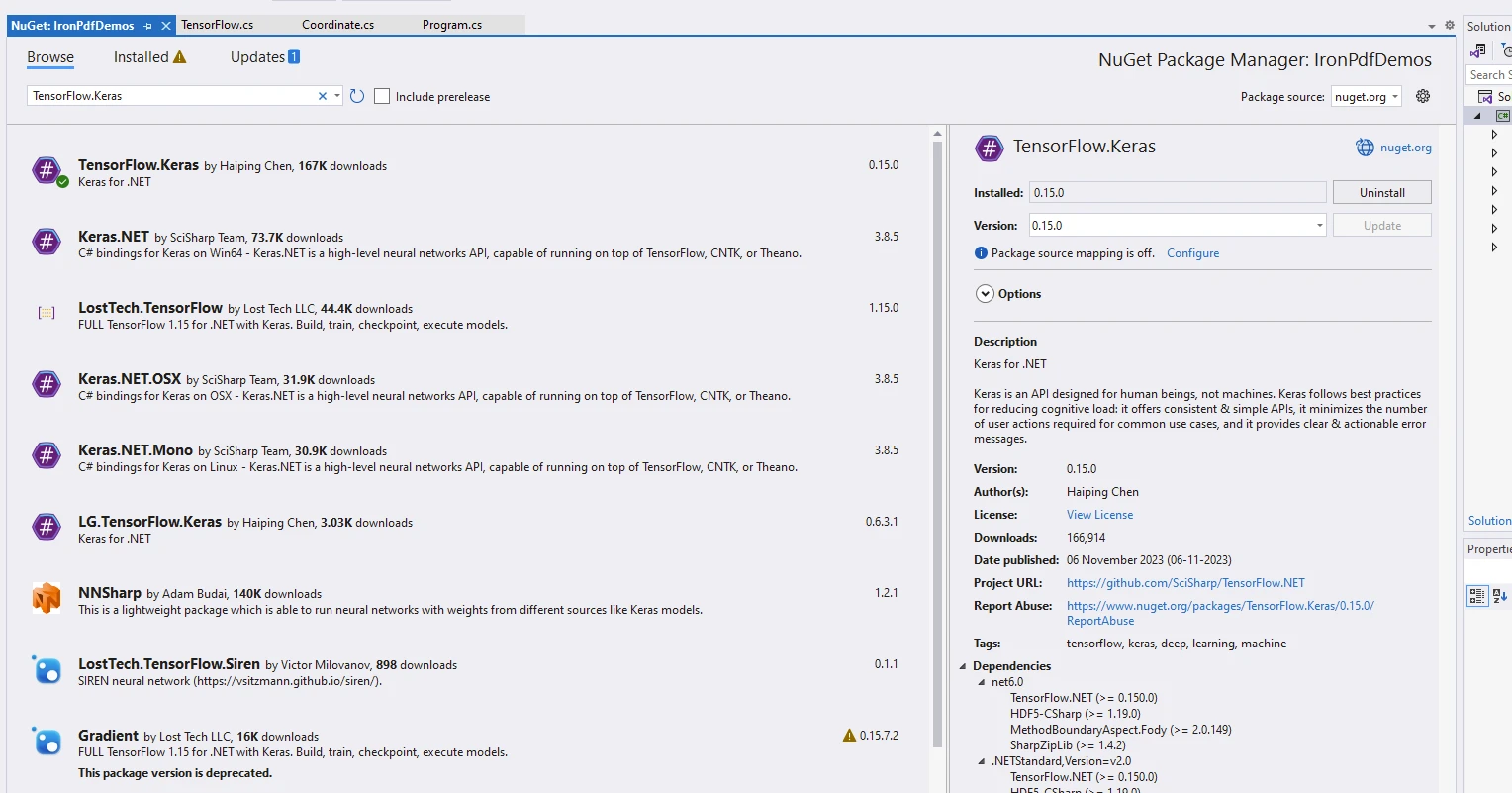
安裝軟體包 TensorFlow.NET 和 TensorFlow.Keras,這是用於運行模型的獨立軟體包。
using IronPdf;
using static Tensorflow.Binding;

namespace IronPdfDemos
{
    public class Program
    {
        public static void Main()
        {
            // Instantiate Cache and ChromePdfRenderer
            var renderer = new ChromePdfRenderer();

            // Prepare HTML content for the PDF
            var content = "<h1>Demonstrate TensorFlow with IronPDF</h1>";
            content += "<h2>Enable Eager Execution</h2>";
            content += "<p>tf.enable_eager_execution();</p>";

            // Enable eager execution mode in TensorFlow
            tf.enable_eager_execution();

            // Define tensor constants
            content += "<h2>Define Tensor Constants</h2>";
            var a = tf.constant(5);
            var b = tf.constant(6);
            var c = tf.constant(7);

            // Perform various tensor operations
            content += "<h2>Various Tensor Operations</h2>";
            var add = tf.add(a, b);
            var sub = tf.subtract(a, b);
            var mul = tf.multiply(a, b);
            var div = tf.divide(a, b);

            content += $"<p>var add = tf.add(a, b);</p>";
            content += $"<p>var sub = tf.subtract(a, b);</p>";
            content += $"<p>var mul = tf.multiply(a, b);</p>";
            content += $"<p>var div = tf.divide(a, b);</p>";

            // Output tensor values to HTML content
            content += "<h2>Access Tensor Values</h2>";
            content += $"<p>{a.numpy()} + {b.numpy()} = {add.numpy()}</p>";
            content += $"<p>{a.numpy()} - {b.numpy()} = {sub.numpy()}</p>";
            content += $"<p>{a.numpy()} * {b.numpy()} = {mul.numpy()}</p>";
            content += $"<p>{a.numpy()} / {b.numpy()} = {div.numpy()}</p>";

            // Perform additional operations
            var mean = tf.reduce_mean(tf.constant(new[] { a, b, c }));
            var sum = tf.reduce_sum(tf.constant(new[] { a, b, c }));

            content += "<h2>Additional Operations</h2>";
            content += $"<p>mean = {mean.numpy()}</p>";
            content += $"<p>sum = {sum.numpy()}</p>";

            // Perform matrix multiplication
            var matrix1 = tf.constant(new float[,] { { 1, 2 }, { 3, 4 } });
            var matrix2 = tf.constant(new float[,] { { 5, 6 }, { 7, 8 } });
            var product = tf.matmul(matrix1, matrix2);

            content += "<h2>Matrix Multiplications</h2>";
            content += "<p>Multiplication Result:</p>";
            content += $"<p>product = {product.numpy()}</p>";

            // Render HTML content to PDF
            var pdf = renderer.RenderHtmlAsPdf(content);
            // Save PDF to file
            pdf.SaveAs("tensorflow.pdf");
        }
    }
}
using IronPdf;
using static Tensorflow.Binding;
namespace IronPdfDemos
{
public class Program
{
public static void Main()
{
// Instantiate Cache and ChromePdfRenderer
var renderer = new ChromePdfRenderer();
// Prepare HTML content for the PDF
var content = "<h1>Demonstrate TensorFlow with IronPDF</h1>";
content += "<h2>Enable Eager Execution</h2>";
content += "<p>tf.enable_eager_execution();</p>";
// Enable eager execution mode in TensorFlow
tf.enable_eager_execution();
// Define tensor constants
content += "<h2>Define Tensor Constants</h2>";
var a = tf.constant(5);
var b = tf.constant(6);
var c = tf.constant(7);
// Perform various tensor operations
content += "<h2>Various Tensor Operations</h2>";
var add = tf.add(a, b);
var sub = tf.subtract(a, b);
var mul = tf.multiply(a, b);
var div = tf.divide(a, b);
content += $"<p>var add = tf.add(a, b);</p>";
content += $"<p>var sub = tf.subtract(a, b);</p>";
content += $"<p>var mul = tf.multiply(a, b);</p>";
content += $"<p>var div = tf.divide(a, b);</p>";
// Output tensor values to HTML content
content += "<h2>Access Tensor Values</h2>";
content += $"<p>{a.numpy()} + {b.numpy()} = {add.numpy()}</p>";
content += $"<p>{a.numpy()} - {b.numpy()} = {sub.numpy()}</p>";
content += $"<p>{a.numpy()} * {b.numpy()} = {mul.numpy()}</p>";
content += $"<p>{a.numpy()} / {b.numpy()} = {div.numpy()}</p>";
// Perform additional operations
var mean = tf.reduce_mean(tf.constant(new[] { a, b, c }));
var sum = tf.reduce_sum(tf.constant(new[] { a, b, c }));
content += "<h2>Additional Operations</h2>";
content += $"<p>mean = {mean.numpy()}</p>";
content += $"<p>sum = {sum.numpy()}</p>";
// Perform matrix multiplication
var matrix1 = tf.constant(new float[,] { { 1, 2 }, { 3, 4 } });
var matrix2 = tf.constant(new float[,] { { 5, 6 }, { 7, 8 } });
var product = tf.matmul(matrix1, matrix2);
content += "<h2>Matrix Multiplications</h2>";
content += "<p>Multiplication Result:</p>";
content += $"<p>product = {product.numpy()}</p>";
// Render HTML content to PDF
var pdf = renderer.RenderHtmlAsPdf(content);
// Save PDF to file
pdf.SaveAs("tensorflow.pdf");
}
}
}Imports IronPdf
Imports Tensorflow.Binding
Namespace IronPdfDemos
Public Class Program
Public Shared Sub Main()
' Instantiate Cache and ChromePdfRenderer
Dim renderer = New ChromePdfRenderer()
' Prepare HTML content for the PDF
Dim content = "<h1>Demonstrate TensorFlow with IronPDF</h1>"
content &= "<h2>Enable Eager Execution</h2>"
content &= "<p>tf.enable_eager_execution();</p>"
' Enable eager execution mode in TensorFlow
tf.enable_eager_execution()
' Define tensor constants
content &= "<h2>Define Tensor Constants</h2>"
Dim a = tf.constant(5)
Dim b = tf.constant(6)
Dim c = tf.constant(7)
' Perform various tensor operations
content &= "<h2>Various Tensor Operations</h2>"
Dim add = tf.add(a, b)
Dim [sub] = tf.subtract(a, b)
Dim mul = tf.multiply(a, b)
Dim div = tf.divide(a, b)
content &= $"<p>var add = tf.add(a, b);</p>"
content &= $"<p>var sub = tf.subtract(a, b);</p>"
content &= $"<p>var mul = tf.multiply(a, b);</p>"
content &= $"<p>var div = tf.divide(a, b);</p>"
' Output tensor values to HTML content
content &= "<h2>Access Tensor Values</h2>"
content &= $"<p>{a.numpy()} + {b.numpy()} = {add.numpy()}</p>"
content &= $"<p>{a.numpy()} - {b.numpy()} = {[sub].numpy()}</p>"
content &= $"<p>{a.numpy()} * {b.numpy()} = {mul.numpy()}</p>"
content &= $"<p>{a.numpy()} / {b.numpy()} = {div.numpy()}</p>"
' Perform additional operations
Dim mean = tf.reduce_mean(tf.constant( { a, b, c }))
Dim sum = tf.reduce_sum(tf.constant( { a, b, c }))
content &= "<h2>Additional Operations</h2>"
content &= $"<p>mean = {mean.numpy()}</p>"
content &= $"<p>sum = {sum.numpy()}</p>"
' Perform matrix multiplication
Dim matrix1 = tf.constant(New Single(, ) {
{ 1, 2 },
{ 3, 4 }
})
Dim matrix2 = tf.constant(New Single(, ) {
{ 5, 6 },
{ 7, 8 }
})
Dim product = tf.matmul(matrix1, matrix2)
content &= "<h2>Matrix Multiplications</h2>"
content &= "<p>Multiplication Result:</p>"
content &= $"<p>product = {product.numpy()}</p>"
' Render HTML content to PDF
Dim pdf = renderer.RenderHtmlAsPdf(content)
' Save PDF to file
pdf.SaveAs("tensorflow.pdf")
End Sub
End Class
End Namespace程式碼解釋
讓我們來分解程式碼片段:
1.匯入宣告:
程式碼一開始會匯入必要的程式庫。 具體而言:

```csharp
using IronPdf; // This imports the IronPDF package, which is used for working with PDF files.
using static Tensorflow.Binding; // This imports the TensorFlow library, specifically the .NET standard binding.
```2.急於執行:
行 `tf.enable_eager_execution();` 啟用 TensorFlow 的 eager 執行模式。 在急切執行中,操作會立即進行評估,讓調試和與張量互動變得更容易。3.定義張量常數:
程式碼定義了三個張量常數:`a`、`b` 和 `c`。 這些初始化值分別為 5、6 和 7。4.各種張量運算:
執行下列張量運算:

```csharp
var add = tf.add(a, b); // Adds a and b.
var sub = tf.subtract(a, b); // Subtracts b from a.
var mul = tf.multiply(a, b); // Multiplies a and b.
var div = tf.divide(a, b); // Divides a by b.
```5.訪問張量值:
張量運算的結果包含在 HTML 內容中:

```csharp
content += $"<p>{a.numpy()} + {b.numpy()} = {add.numpy()}</p>";
content += $"<p>{a.numpy()} - {b.numpy()} = {sub.numpy()}</p>";
content += $"<p>{a.numpy()} * {b.numpy()} = {mul.numpy()}</p>";
content += $"<p>{a.numpy()} / {b.numpy()} = {div.numpy()}</p>";
```6.其他操作:
程式碼計算常數的平均值和總和 `[a, b, c]`。7.矩陣乘法:
它對 `matrix1` 和 `matrix2` 進行矩陣乘法運算,並顯示結果。-
PDF 生成:
來自
IronPDF的RenderHtmlAsPdf用於將 HTML 字串渲染成 PDF 文件。
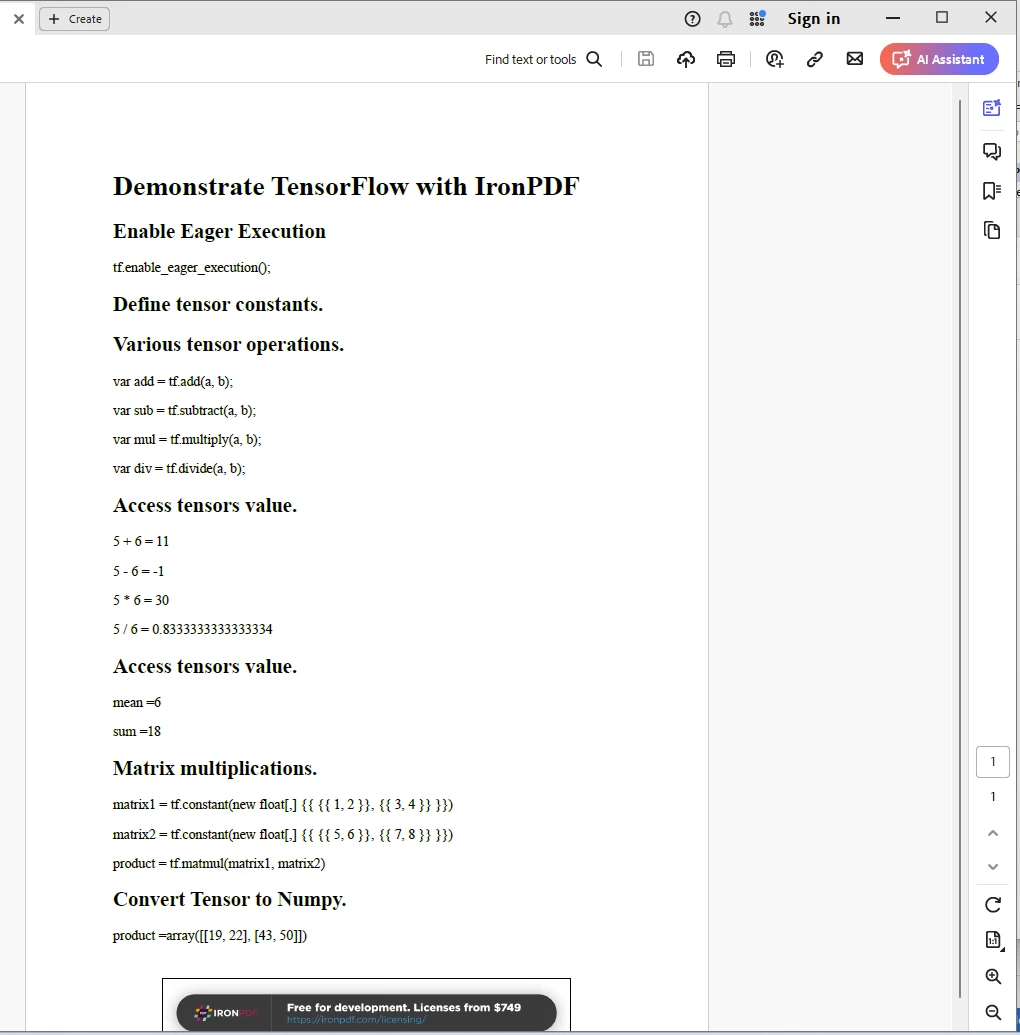
輸出
IronPDF 授權
IronPDF 需要許可證才能運作。 有關授權的更多資訊,請參閱 IronPDF Licensing 頁面。 將金鑰放入 appSettings.json 檔案中,如下所示。
{
  "IronPdf.License.LicenseKey": "The Key Here"
}
結論
總之,TensorFlow.NET 使 C# 開發人員能夠利用 .NET 生態系統的多功能性和生產力來探索機器學習和人工智慧的世界。 無論您是在建立智慧應用程式、預測分析工具或自動化決策系統,TensorFlow.NET 都提供了一個強大且靈活的框架,以釋放 C# 中機器學習的潛力。 結合 Iron Software 中的 IronPDF 庫,開發人員可以獲得開發現代應用程式的高級技能。
常見問題解答
如何將機器學習整合到我的 C# 應用程式中?
您可以使用 TensorFlow.NET,這是一個 TensorFlow 的 .NET 綁定,可讓您在 C# 應用程式中構建、訓練和部署機器學習模型。它提供了與 TensorFlow 強大 API 完全兼容的機能。
TensorFlow.NET 的主要功能有哪些?
TensorFlow.NET 提供功能,包括與 TensorFlow API 完全兼容、高效能的計算引擎、易於整合 .NET 系統、模型可移植性和強大的社區支持。
如何在 .NET 應用程序中將 HTML 轉換為 PDF?
您可以使用 IronPDF 在 .NET 應用程式中將 HTML 轉換為 PDF。IronPDF 支援從 HTML、CSS 和 JavaScript 輸入轉換為 PDF 文件,提供跨平台兼容性和進階的 PDF 操作能力。
TensorFlow.NET 可以用於從 Python 導入模型嗎?
是的,TensorFlow.NET 支援模型的可移植性,使您能夠導入在 Python 等環境中創建的模型,並在 .NET 應用程式中使用。
結合 TensorFlow.NET 與 IronPDF 的潛力是什麼?
結合 TensorFlow.NET 與 IronPDF 可讓開發者構建智能應用程式,可以執行複雜的機器學習計算,並以格式良好的 PDF 文件呈現結果,增強文件和報告流程。
TensorFlow.NET 適用於跨平台開發嗎?
是的,TensorFlow.NET 可在跨平台的 .NET 環境中使用,允許開發人員構建與各種作業系統相容的應用程式。
如何在 C# 應用程式中編輯和簽署 PDF?
IronPDF 提供在 C# 應用程式中編輯和簽署 PDF 文件的功能,允許強大的 PDF 操作和管理。
開發者使用 TensorFlow.NET 可獲得何種支持?
TensorFlow.NET 擁有強大的社區支持和詳盡的文件,讓開發者更容易找到資源和範例,以協助其開發過程。
TensorFlow.NET 如何增強 C# 開發環境?
TensorFlow.NET 通過整合 TensorFlow 的機器學習能力增強了 C# 開發環境,允許開發人員在不離開 .NET 生態系統的情況下充分利用 TensorFlow 的強大功能。
開發者在哪裡可以找到使用 IronPDF 的實際範例?
開發者可以在 IronPDF 文件頁面和各種線上資源、以及專於 .NET PDF 操作的社區論壇中找到使用 IronPDF 的實際範例。


















 免費開始使用
 免費開始使用
 預約免費現場演示





 無需信用卡或創建帳戶










