


Humanizer C#(對於開發者的運行原理)

Humanizer 是一個功能強大且靈活的 .NET 函式庫,可簡化資料處理流程並使其人性化,尤其是在以使用者友善的格式顯示資訊時。 無論您是需要將日期轉換為相對時間字串 ("3天前")、複數化字詞、將數字格式化為字詞,或是處理枚舉、顯示字串、將 Pascal 大小寫輸入字串轉換為具有自訂說明的句子、將下劃線輸入字串轉換為正常標題大小寫字串,以及長文字截斷,Humanizer 都能提供大量的工具與擴充方法,讓您在 C#.NET 中優雅地處理這些工作,將非人性化的輸入字串轉換為句子。
在本文中,我們將討論 C# 語言中 Humanizer 的詳細教學。 我們還將討論如何使用 Humanizer 和 IronPDF 產生 C# PDF Library 的 PDF 文件。
在 C# 中設定 Humanizer
要開始使用 Humanizer,您需要透過 NuGet 安裝函式庫。 在您的專案中,您可以透過套件管理員控制台,使用下列指令完成此工作:
Install-Package Humanizer
另外,如果您使用的是 .NET Core CLI,您也可以將 Humanizer 加入:
dotnet add package Humanizer
安裝完成後,只要在 C# 檔案中加入適當的名稱空間,即可開始使用 Humanizer:
using Humanizer;using Humanizer;Imports Humanizer日期和時間的人性化
Humanizer 最常見的用途之一是使用 Humanize 方法將日期和時間轉換為人類可讀的格式、時間跨度、數字和數量。 這對於顯示相對時間特別有用,例如"2 小時前"或"5 天後"。
範例:相對時間的人性化
using System;

class HumanizerDemo
{
    static void Main()
    {
        DateTime pastDate = DateTime.Now.AddDays(-3);
        // Humanize the past date, which converts it to a relative time format
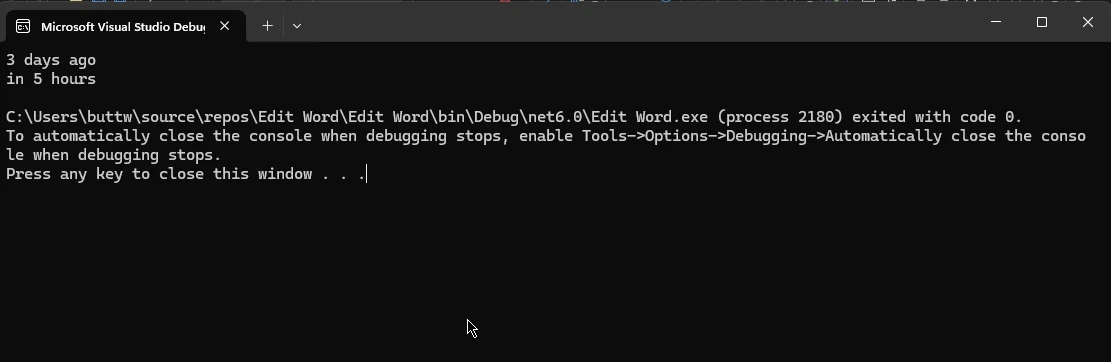
        string humanizedTime = pastDate.Humanize(); // Output: "3 days ago"

        DateTime futureDate = DateTime.Now.AddHours(5);
        // Humanize the future date, presenting it in relative time
        string futureHumanizedTime = futureDate.Humanize(); // Output: "in 5 hours"

        Console.WriteLine("Humanized Past Date: " + humanizedTime);
        Console.WriteLine("Humanized Future Date: " + futureHumanizedTime);
    }
}
using System;
class HumanizerDemo
{
static void Main()
{
DateTime pastDate = DateTime.Now.AddDays(-3);
// Humanize the past date, which converts it to a relative time format
string humanizedTime = pastDate.Humanize(); // Output: "3 days ago"
DateTime futureDate = DateTime.Now.AddHours(5);
// Humanize the future date, presenting it in relative time
string futureHumanizedTime = futureDate.Humanize(); // Output: "in 5 hours"
Console.WriteLine("Humanized Past Date: " + humanizedTime);
Console.WriteLine("Humanized Future Date: " + futureHumanizedTime);
}
}Imports System
Friend Class HumanizerDemo
Shared Sub Main()
Dim pastDate As DateTime = DateTime.Now.AddDays(-3)
' Humanize the past date, which converts it to a relative time format
Dim humanizedTime As String = pastDate.Humanize() ' Output: "3 days ago"
Dim futureDate As DateTime = DateTime.Now.AddHours(5)
' Humanize the future date, presenting it in relative time
Dim futureHumanizedTime As String = futureDate.Humanize() ' Output: "in 5 hours"
Console.WriteLine("Humanized Past Date: " & humanizedTime)
Console.WriteLine("Humanized Future Date: " & futureHumanizedTime)
End Sub
End ClassHumanizer 延伸方法可自動處理不同的時間單位,甚至調整語法的正確性。
人性化的時間跨度
Humanizer 還可以使 TimeSpan 物件人性化,從而可以輕鬆地以易讀的格式顯示持續時間。
範例:人性化 TimeSpan
using System;

class TimeSpanHumanizerDemo
{
    static void Main()
    {
        TimeSpan timeSpan = TimeSpan.FromMinutes(123);
        // Humanizing the TimeSpan into hours and minutes
        string humanizedTimeSpan = timeSpan.Humanize(2); // Output: "2 hours, 3 minutes"
        Console.WriteLine("Humanized TimeSpan: " + humanizedTimeSpan);
    }
}
using System;
class TimeSpanHumanizerDemo
{
static void Main()
{
TimeSpan timeSpan = TimeSpan.FromMinutes(123);
// Humanizing the TimeSpan into hours and minutes
string humanizedTimeSpan = timeSpan.Humanize(2); // Output: "2 hours, 3 minutes"
Console.WriteLine("Humanized TimeSpan: " + humanizedTimeSpan);
}
}Imports System
Friend Class TimeSpanHumanizerDemo
Shared Sub Main()
Dim timeSpan As TimeSpan = System.TimeSpan.FromMinutes(123)
' Humanizing the TimeSpan into hours and minutes
Dim humanizedTimeSpan As String = timeSpan.Humanize(2) ' Output: "2 hours, 3 minutes"
Console.WriteLine("Humanized TimeSpan: " & humanizedTimeSpan)
End Sub
End Class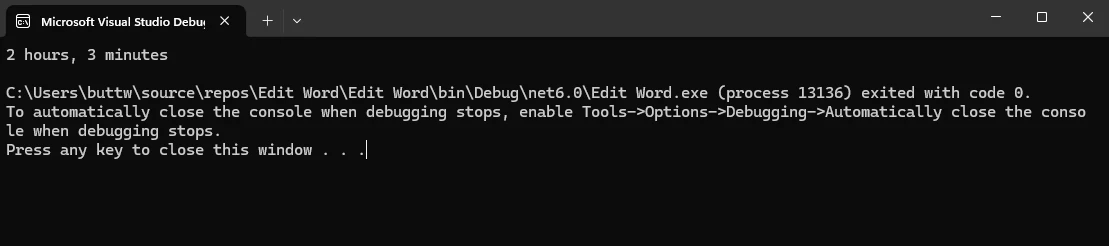
使用數字工作
Humanizer 提供多種方法將數字轉換為人類可讀的文字,並處理序數。
範例:將數字轉換為文字。
using System;

class NumberHumanizerDemo
{
    static void Main()
    {
        int number = 123;
        // Convert number to words
        string words = number.ToWords(); // Output: "one hundred and twenty-three"
        Console.WriteLine("Number in Words: " + words);
    }
}
using System;
class NumberHumanizerDemo
{
static void Main()
{
int number = 123;
// Convert number to words
string words = number.ToWords(); // Output: "one hundred and twenty-three"
Console.WriteLine("Number in Words: " + words);
}
}Imports System
Friend Class NumberHumanizerDemo
Shared Sub Main()
Dim number As Integer = 123
' Convert number to words
Dim words As String = number.ToWords() ' Output: "one hundred and twenty-three"
Console.WriteLine("Number in Words: " & words)
End Sub
End Class
範例:將數字轉換為順序數。
using System;

class OrdinalHumanizerDemo
{
    static void Main()
    {
        int number = 21;
        // Convert number to ordinal words
        string ordinal = number.ToOrdinalWords(); // Output: "twenty-first"
        Console.WriteLine("Ordinal Number: " + ordinal);
    }
}
using System;
class OrdinalHumanizerDemo
{
static void Main()
{
int number = 21;
// Convert number to ordinal words
string ordinal = number.ToOrdinalWords(); // Output: "twenty-first"
Console.WriteLine("Ordinal Number: " + ordinal);
}
}Imports System
Friend Class OrdinalHumanizerDemo
Shared Sub Main()
Dim number As Integer = 21
' Convert number to ordinal words
Dim ordinal As String = number.ToOrdinalWords() ' Output: "twenty-first"
Console.WriteLine("Ordinal Number: " & ordinal)
End Sub
End Class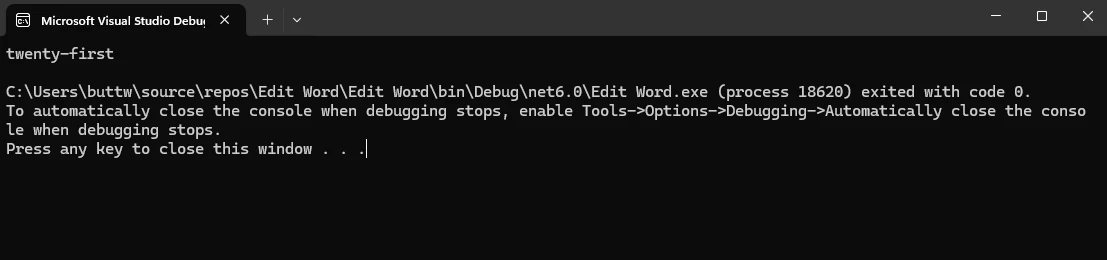
複數化和單數化
Humanizer 可以輕鬆地在單數和複數形式之間轉換詞彙,這對於根據數量動態產生長文字非常有用。
範例:詞的複數化和單數化
using System;

class PluralizationDemo
{
    static void Main()
    {
        string singular = "car";
        // Pluralize the word
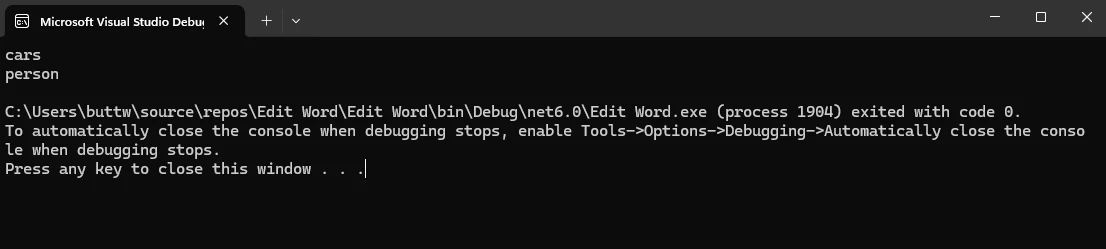
        string plural = singular.Pluralize(); // Output: "cars"

        string word = "people";
        // Singularize the word
        string singularForm = word.Singularize(); // Output: "person"

        Console.WriteLine("Plural of 'car': " + plural);
        Console.WriteLine("Singular of 'people': " + singularForm);
    }
}
using System;
class PluralizationDemo
{
static void Main()
{
string singular = "car";
// Pluralize the word
string plural = singular.Pluralize(); // Output: "cars"
string word = "people";
// Singularize the word
string singularForm = word.Singularize(); // Output: "person"
Console.WriteLine("Plural of 'car': " + plural);
Console.WriteLine("Singular of 'people': " + singularForm);
}
}Imports System
Friend Class PluralizationDemo
Shared Sub Main()
Dim singular As String = "car"
' Pluralize the word
Dim plural As String = singular.Pluralize() ' Output: "cars"
Dim word As String = "people"
' Singularize the word
Dim singularForm As String = word.Singularize() ' Output: "person"
Console.WriteLine("Plural of 'car': " & plural)
Console.WriteLine("Singular of 'people': " & singularForm)
End Sub
End ClassHumanizer 也能處理不規則的複數化和單數化,使其在各種使用情況下都能運作良好。
枚舉格式化
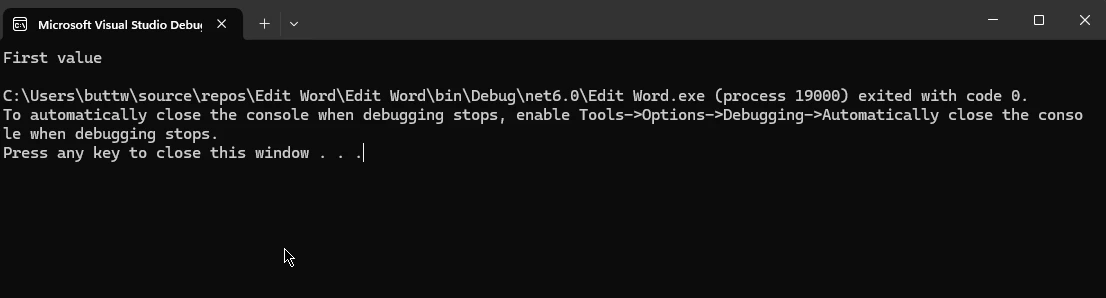
C# 應用程式中經常使用 Enums 來表示一組已命名的常量。 Humanizer 可將枚舉值轉換為人類可讀的字串。
範例:人性化枚舉
using System;

public enum MyEnum
{
    FirstValue,
    SecondValue
}

class EnumHumanizerDemo
{
    static void Main()
    {
        MyEnum enumValue = MyEnum.FirstValue;
        // Humanizing enum to a readable format
        string humanizedEnum = enumValue.Humanize(); // Output: "First value"

        Console.WriteLine("Humanized Enum: " + humanizedEnum);
    }
}
using System;
public enum MyEnum
{
FirstValue,
SecondValue
}
class EnumHumanizerDemo
{
static void Main()
{
MyEnum enumValue = MyEnum.FirstValue;
// Humanizing enum to a readable format
string humanizedEnum = enumValue.Humanize(); // Output: "First value"
Console.WriteLine("Humanized Enum: " + humanizedEnum);
}
}Imports System
Public Enum MyEnum
FirstValue
SecondValue
End Enum
Friend Class EnumHumanizerDemo
Shared Sub Main()
Dim enumValue As MyEnum = MyEnum.FirstValue
' Humanizing enum to a readable format
Dim humanizedEnum As String = enumValue.Humanize() ' Output: "First value"
Console.WriteLine("Humanized Enum: " & humanizedEnum)
End Sub
End Class此方法對於在使用者介面中顯示使用者友善的標籤特別有用。
人性化的位元組大小
Humanizer 的另一項便利功能是將位元組大小人性化,將大型位元組值轉換為 KB、MB 或 GB 等可讀格式。
範例:人性化的位元組大小
using System;

class ByteSizeHumanizerDemo
{
    static void Main()
    {
        long bytes = 1048576;
        // Humanize bytes to a readable size format
        string humanizedBytes = bytes.Bytes().Humanize(); // Output: "1 MB"

        Console.WriteLine("Humanized Byte Size: " + humanizedBytes);
    }
}
using System;
class ByteSizeHumanizerDemo
{
static void Main()
{
long bytes = 1048576;
// Humanize bytes to a readable size format
string humanizedBytes = bytes.Bytes().Humanize(); // Output: "1 MB"
Console.WriteLine("Humanized Byte Size: " + humanizedBytes);
}
}Imports System
Friend Class ByteSizeHumanizerDemo
Shared Sub Main()
Dim bytes As Long = 1048576
' Humanize bytes to a readable size format
Dim humanizedBytes As String = bytes.Bytes().Humanize() ' Output: "1 MB"
Console.WriteLine("Humanized Byte Size: " & humanizedBytes)
End Sub
End Class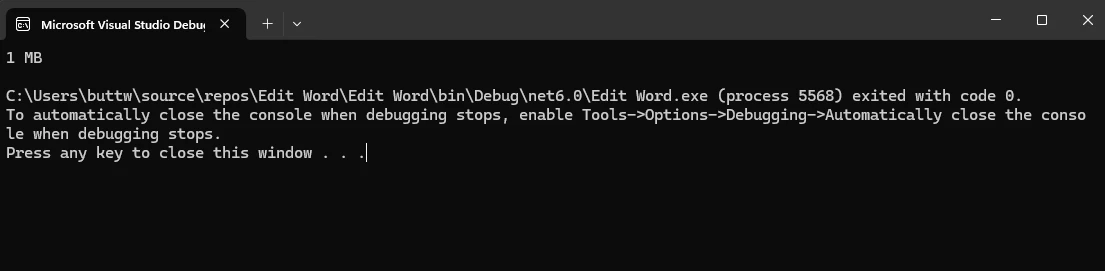
進階方案
Humanizer 並不局限於上述的基本情境。 它支援各種高級功能,例如 Truncate 方法以及多種語言和擴展。
範例:人性化日期時間偏移
Humanizer 也可以處理 DateTimeOffset,這對於處理時區的應用程式很有用。
using System;

class DateTimeOffsetHumanizerDemo
{
    static void Main()
    {
        DateTimeOffset dateTimeOffset = DateTimeOffset.Now.AddDays(-2);
        // Humanize DateTimeOffset
        string humanizedDateTimeOffset = dateTimeOffset.Humanize(); // Output: "2 days ago"

        Console.WriteLine("Humanized DateTimeOffset: " + humanizedDateTimeOffset);
    }
}
using System;
class DateTimeOffsetHumanizerDemo
{
static void Main()
{
DateTimeOffset dateTimeOffset = DateTimeOffset.Now.AddDays(-2);
// Humanize DateTimeOffset
string humanizedDateTimeOffset = dateTimeOffset.Humanize(); // Output: "2 days ago"
Console.WriteLine("Humanized DateTimeOffset: " + humanizedDateTimeOffset);
}
}Imports System
Friend Class DateTimeOffsetHumanizerDemo
Shared Sub Main()
Dim dateTimeOffset As DateTimeOffset = System.DateTimeOffset.Now.AddDays(-2)
' Humanize DateTimeOffset
Dim humanizedDateTimeOffset As String = dateTimeOffset.Humanize() ' Output: "2 days ago"
Console.WriteLine("Humanized DateTimeOffset: " & humanizedDateTimeOffset)
End Sub
End Class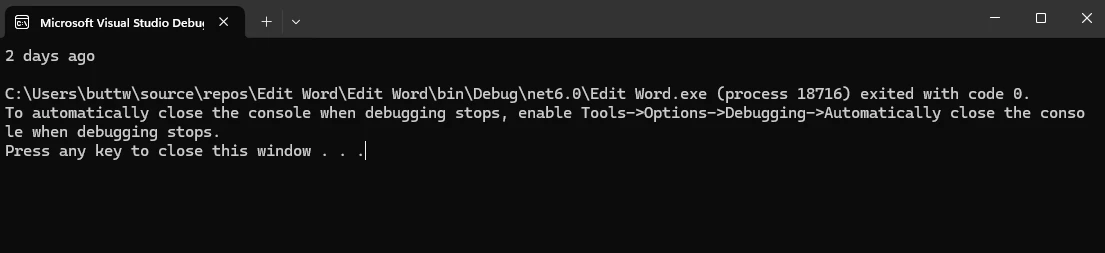
效能考量
Humanizer 的設計非常有效率,但就像任何函式庫一樣,其效能取決於使用方式。 對於需要高效能的應用程式,尤其是處理大型資料集或即時處理的應用程式,必須考慮頻繁人性化作業的影響。
IronPDF for C#
IronPDF 是適用於 .NET 應用程式的全面 PDF 產生與處理函式庫。 它能讓開發人員輕鬆地從 PDF 檔案中建立、閱讀、編輯和擷取內容。 IronPDF 的設計易於使用,提供廣泛的功能,包括將 HTML 轉換為 PDF、合併文件、新增水印等。 其多功能性和強大的功能使其成為在 C# 專案中處理 PDF 文件的絕佳選擇。
透過 NuGet 套件管理員安裝 IronPDF。
按照以下步驟使用 NuGet Package Manager 安裝 IronPDF:
1.在 Visual Studio 中開啟您的專案:
- 啟動 Visual Studio 並開啟您現有的 C# 專案或建立新專案。
2.開啟 NuGet 套件管理器:
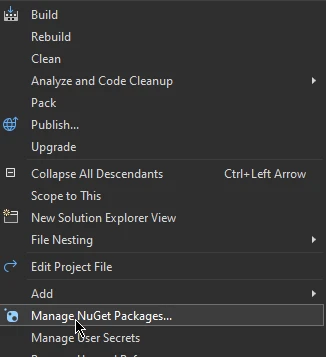
- 在"解決方案總管"中的專案上按一下滑鼠右鍵。
- 從上下文功能表中選擇"管理 NuGet 套件..."。
 。
。
3.安裝 IronPDF:
- 在 NuGet Package Manager 中,移至"瀏覽"標籤。
- 搜尋 IronPDF。
- 從搜尋結果中選擇 IronPDF 套件。
- 點擊"安裝"按鈕,將 IronPDF 加入您的專案。
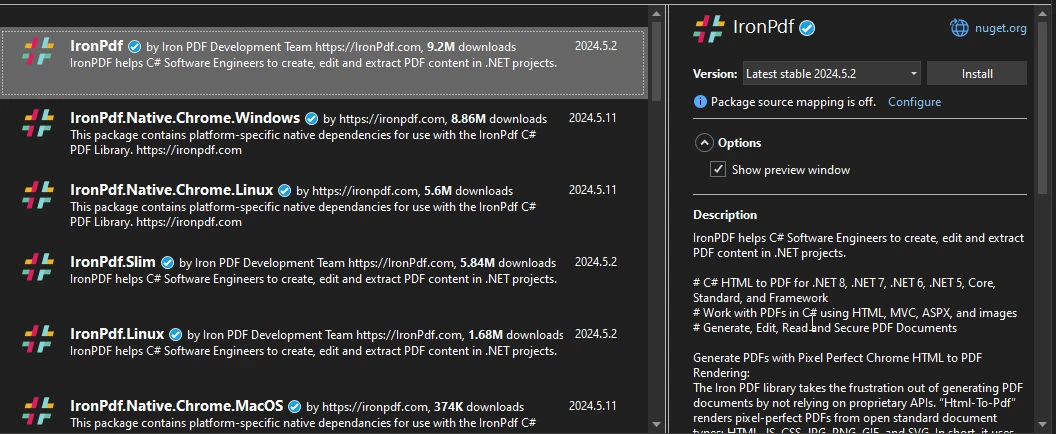
按照這些步驟,IronPDF 將會安裝完成,並可在您的 C# 專案中使用,讓您充分利用其強大的 PDF 處理功能。
C# Humanizer 和 IronPDF 程式碼範例。
using Humanizer;
using IronPdf;
using System;
using System.Collections.Generic;

class PDFGenerationDemo
{
    static void Main()
    {
        // Instantiate the PDF renderer
        var renderer = new ChromePdfRenderer();

        // Generate humanized content
        List<string> content = GenerateHumanizedContent();

        // HTML content template for the PDF
        string htmlContent = "<h1>Humanizer Examples</h1><ul>";

        // Build the list items to add to the HTML content
        foreach (var item in content)
        {
            htmlContent += $"<li>{item}</li>";
        }
        htmlContent += "</ul>";

        // Render the HTML into a PDF document
        var pdf = renderer.RenderHtmlAsPdf(htmlContent);

        // Save the PDF to a file
        pdf.SaveAs("output.pdf");

        Console.WriteLine("PDF document generated successfully: output.pdf");
    }

    /// <summary>
    /// Generates a list of humanized content examples
    /// </summary>
    /// <returns>List of humanized content as strings</returns>
    static List<string> GenerateHumanizedContent()
    {
        List<string> content = new List<string>();

        // DateTime examples
        DateTime pastDate = DateTime.Now.AddDays(-3);
        DateTime futureDate = DateTime.Now.AddHours(5);
        content.Add($"DateTime.Now: {DateTime.Now}");
        content.Add($"3 days ago: {pastDate.Humanize()}");
        content.Add($"In 5 hours: {futureDate.Humanize()}");

        // TimeSpan examples
        TimeSpan timeSpan = TimeSpan.FromMinutes(123);
        content.Add($"TimeSpan of 123 minutes: {timeSpan.Humanize()}");

        // Number examples
        int number = 12345;
        content.Add($"Number 12345 in words: {number.ToWords()}");
        content.Add($"Ordinal of 21: {21.ToOrdinalWords()}");

        // Pluralization examples
        string singular = "car";
        content.Add($"Plural of 'car': {singular.Pluralize()}");
        string plural = "children";
        content.Add($"Singular of 'children': {plural.Singularize()}");

        // Byte size examples
        long bytes = 1048576;
        content.Add($"1,048,576 bytes: {bytes.Bytes().Humanize()}");

        return content;
    }
}
using Humanizer;
using IronPdf;
using System;
using System.Collections.Generic;
class PDFGenerationDemo
{
static void Main()
{
// Instantiate the PDF renderer
var renderer = new ChromePdfRenderer();
// Generate humanized content
List<string> content = GenerateHumanizedContent();
// HTML content template for the PDF
string htmlContent = "<h1>Humanizer Examples</h1><ul>";
// Build the list items to add to the HTML content
foreach (var item in content)
{
htmlContent += $"<li>{item}</li>";
}
htmlContent += "</ul>";
// Render the HTML into a PDF document
var pdf = renderer.RenderHtmlAsPdf(htmlContent);
// Save the PDF to a file
pdf.SaveAs("output.pdf");
Console.WriteLine("PDF document generated successfully: output.pdf");
}
/// <summary>
/// Generates a list of humanized content examples
/// </summary>
/// <returns>List of humanized content as strings</returns>
static List<string> GenerateHumanizedContent()
{
List<string> content = new List<string>();
// DateTime examples
DateTime pastDate = DateTime.Now.AddDays(-3);
DateTime futureDate = DateTime.Now.AddHours(5);
content.Add($"DateTime.Now: {DateTime.Now}");
content.Add($"3 days ago: {pastDate.Humanize()}");
content.Add($"In 5 hours: {futureDate.Humanize()}");
// TimeSpan examples
TimeSpan timeSpan = TimeSpan.FromMinutes(123);
content.Add($"TimeSpan of 123 minutes: {timeSpan.Humanize()}");
// Number examples
int number = 12345;
content.Add($"Number 12345 in words: {number.ToWords()}");
content.Add($"Ordinal of 21: {21.ToOrdinalWords()}");
// Pluralization examples
string singular = "car";
content.Add($"Plural of 'car': {singular.Pluralize()}");
string plural = "children";
content.Add($"Singular of 'children': {plural.Singularize()}");
// Byte size examples
long bytes = 1048576;
content.Add($"1,048,576 bytes: {bytes.Bytes().Humanize()}");
return content;
}
}Imports Humanizer
Imports IronPdf
Imports System
Imports System.Collections.Generic
Friend Class PDFGenerationDemo
Shared Sub Main()
' Instantiate the PDF renderer
Dim renderer = New ChromePdfRenderer()
' Generate humanized content
Dim content As List(Of String) = GenerateHumanizedContent()
' HTML content template for the PDF
Dim htmlContent As String = "<h1>Humanizer Examples</h1><ul>"
' Build the list items to add to the HTML content
For Each item In content
htmlContent &= $"<li>{item}</li>"
Next item
htmlContent &= "</ul>"
' Render the HTML into a PDF document
Dim pdf = renderer.RenderHtmlAsPdf(htmlContent)
' Save the PDF to a file
pdf.SaveAs("output.pdf")
Console.WriteLine("PDF document generated successfully: output.pdf")
End Sub
''' <summary>
''' Generates a list of humanized content examples
''' </summary>
''' <returns>List of humanized content as strings</returns>
Private Shared Function GenerateHumanizedContent() As List(Of String)
Dim content As New List(Of String)()
' DateTime examples
Dim pastDate As DateTime = DateTime.Now.AddDays(-3)
Dim futureDate As DateTime = DateTime.Now.AddHours(5)
content.Add($"DateTime.Now: {DateTime.Now}")
content.Add($"3 days ago: {pastDate.Humanize()}")
content.Add($"In 5 hours: {futureDate.Humanize()}")
' TimeSpan examples
Dim timeSpan As TimeSpan = System.TimeSpan.FromMinutes(123)
content.Add($"TimeSpan of 123 minutes: {timeSpan.Humanize()}")
' Number examples
Dim number As Integer = 12345
content.Add($"Number 12345 in words: {number.ToWords()}")
content.Add($"Ordinal of 21: {21.ToOrdinalWords()}")
' Pluralization examples
Dim singular As String = "car"
content.Add($"Plural of 'car': {singular.Pluralize()}")
Dim plural As String = "children"
content.Add($"Singular of 'children': {plural.Singularize()}")
' Byte size examples
Dim bytes As Long = 1048576
content.Add($"1,048,576 bytes: {bytes.Bytes().Humanize()}")
Return content
End Function
End Class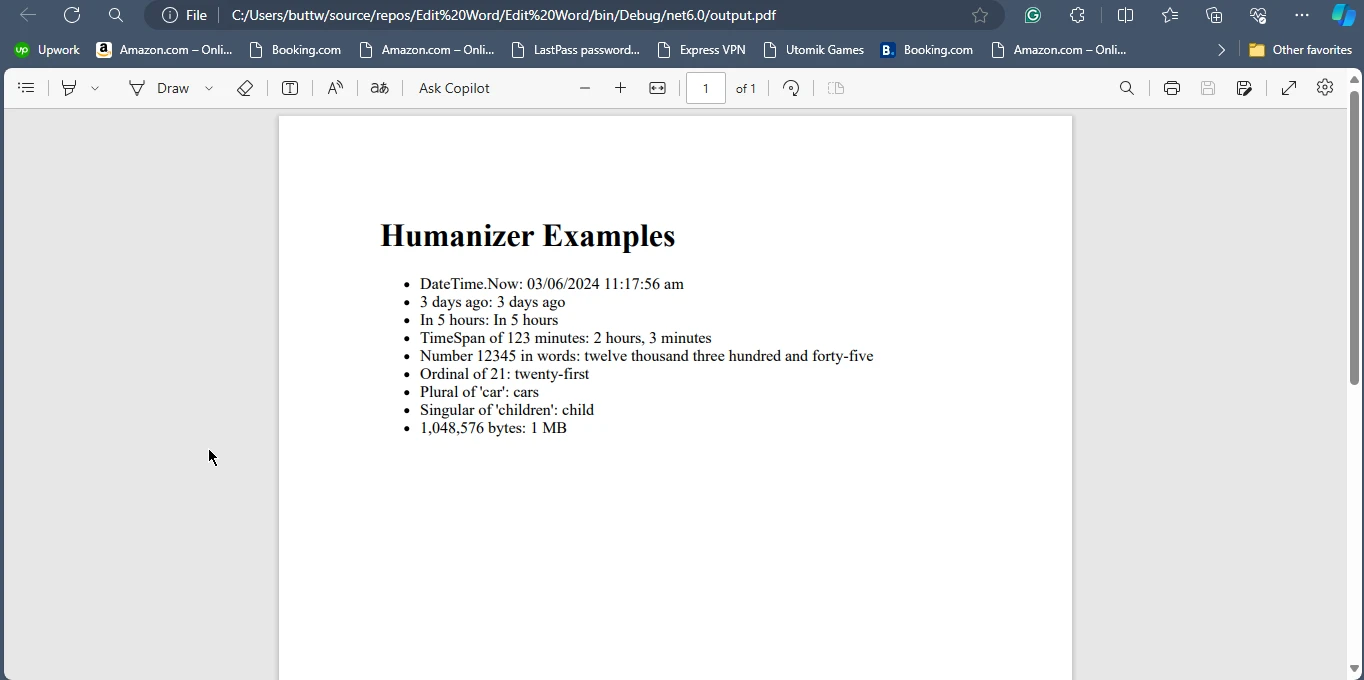
結論
Humanizer 是 .NET 開發人員不可或缺的函式庫,其目的在於建立能以友善且人類可讀的格式呈現資訊的應用程式。 其功能廣泛,從日期和時間人性化到數字和枚舉格式化,使其成為改善應用程式可用性的多功能工具。 利用 Humanizer,開發人員可以節省實施自訂格式化邏輯的時間和精力,確保他們的應用程式能更有效地向終端使用者傳達資料。
同樣地,IronPDF 提供全面的 PDF 產生與處理功能,使其成為在 C# 專案中建立與處理 PDF 文件的絕佳選擇。 Humanizer 和 IronPDF 可共同顯著增強 .NET 應用程式的功能和表現方式。 有關 IronPDF 授權的詳細資訊,請參閱 IronPDF授權資訊。 若要進一步探討,請參閱我們的 HTML轉換為PDF的詳細教學。
常見問題解答
Humanizer 庫在 C# 中的目的是什麼?
Humanizer 庫在 C# 中設計用於將資料轉換為人類友好的格式,例如將日期轉換為相對時間字符串,將單詞複數化,將數字格式化為單詞,並處理枚舉。它可以幫助開發人員以更易讀和可訪問的方式呈現資料。
如何在 C# 中將 DateTime 轉換為相對時間字符串?
您可以使用 Humanizer 的Humanize方法將 DateTime 物件轉換為相對時間字符串,例如“3 天前”或“5 小時後”。
如何在 C# 項目中安裝 Humanizer 庫?
要在 C# 項目中安裝 Humanizer 庫,可以使用 NuGet 套件管理器控制台,命令為Install-Package Humanizer,或者使用 .NET Core CLI 命令dotnet add package Humanizer。
使用 Humanizer 可以進行哪些資料轉換示例?
Humanizer 可以執行多種資料轉換,例如將 Pascal 大小寫字符串轉換為句子,將下劃線字符串轉換為標題大小寫,以及將長文字截斷為指定長度。
Humanizer 是否可以在 C# 中幫助進行單詞的複數化?
是的,Humanizer 提供方法來將單詞複數化和單數化,有效處理規則和不規則形式,例如將“car”轉換為“cars”或“people”轉換為“person”。
Humanizer 如何在 C# 中處理枚舉?
Humanizer 可以將枚舉值轉換為人類可讀的字符串,使在界面中顯示用戶友好的標籤變得更容易。
C# PDF 庫提供哪些功能?
像 IronPDF 這樣的 C# PDF 庫提供創建、閱讀、編輯和從 PDF 文件中提取內容等功能。它還可以將 HTML 轉換為 PDF,合併文檔,並添加水印。
如何在我的項目中安裝 C# PDF 庫?
要安裝 C# PDF 庫,可以使用 NuGet 套件管理器,在“浏覽”選項卡中搜索庫名,例如 IronPDF,然後點擊“安裝”。
將 Humanizer 與 C# 中的 PDF 庫結合使用有哪些好處?
通過將 Humanizer 與 IronPDF 這樣的 PDF 庫結合使用,開發人員可以使用 Humanizer 生成人類可讀的內容,然後將其渲染到 PDF 文檔中,從而促進生成用戶友好的 PDF 報告和文檔。
使用 Humanizer 時應考慮哪些性能方面的問題?
雖然 Humanizer 設計上是高效的,但開發人員應考慮在需要高性能的大型資料集或實時處理的應用中頻繁人性化操作的影響。


















 免費開始使用
 免費開始使用
 預約免費現場演示





 無需信用卡或創建帳戶










