


Humanizador C# (Como funciona para desenvolvedores)

Humanizer é uma biblioteca .NET poderosa e flexível que simplifica e humaniza o processo de trabalho com dados, especialmente quando se trata de exibir informações em um formato amigável ao usuário. Seja para converter datas em strings de tempo relativo ("há 3 dias"), pluralizar palavras, formatar números como palavras ou trabalhar com enumerações, exibir strings, converter strings de entrada em PascalCase em frases com descrições personalizadas, converter strings de entrada com sublinhados em strings com letras maiúsculas e minúsculas e truncar textos longos, o Humanizer oferece uma variedade de ferramentas e métodos de extensão para lidar com essas tarefas de forma elegante em C# .NET , convertendo strings de entrada desumanizadas em frases.
Neste artigo, discutiremos um tutorial detalhado sobre o Humanizer em C#. Também discutiremos como gerar documentos PDF usando o Humanizer e o IronPDF para a biblioteca PDF em C#.
Configurando o Humanizador em C
Para começar a usar o Humanizer, você precisa instalar a biblioteca via NuGet. No seu projeto, você pode fazer isso através do Console do Gerenciador de Pacotes com o seguinte comando:
Install-Package Humanizer
Alternativamente, se você estiver usando a CLI do .NET Core , poderá adicionar o Humanizer com:
dotnet add package Humanizer
Após a instalação, você pode começar a usar o Humanizer incluindo o namespace apropriado em seus arquivos C#:
using Humanizer;using Humanizer;Imports HumanizerHumanizando datas e horários
Um dos usos mais comuns do Humanizer é converter datas e horários em formatos legíveis para humanos, períodos de tempo, números e quantidades usando o método Humanize. Isso é particularmente útil para exibir tempos relativos, como "2 horas atrás" ou "em 5 dias".
Exemplo: Humanizando o Tempo Relativo
using System;

class HumanizerDemo
{
    static void Main()
    {
        DateTime pastDate = DateTime.Now.AddDays(-3);
        // Humanize the past date, which converts it to a relative time format
        string humanizedTime = pastDate.Humanize(); // Output: "3 days ago"

        DateTime futureDate = DateTime.Now.AddHours(5);
        // Humanize the future date, presenting it in relative time
        string futureHumanizedTime = futureDate.Humanize(); // Output: "in 5 hours"

        Console.WriteLine("Humanized Past Date: " + humanizedTime);
        Console.WriteLine("Humanized Future Date: " + futureHumanizedTime);
    }
}
using System;
class HumanizerDemo
{
static void Main()
{
DateTime pastDate = DateTime.Now.AddDays(-3);
// Humanize the past date, which converts it to a relative time format
string humanizedTime = pastDate.Humanize(); // Output: "3 days ago"
DateTime futureDate = DateTime.Now.AddHours(5);
// Humanize the future date, presenting it in relative time
string futureHumanizedTime = futureDate.Humanize(); // Output: "in 5 hours"
Console.WriteLine("Humanized Past Date: " + humanizedTime);
Console.WriteLine("Humanized Future Date: " + futureHumanizedTime);
}
}Imports System
Friend Class HumanizerDemo
Shared Sub Main()
Dim pastDate As DateTime = DateTime.Now.AddDays(-3)
' Humanize the past date, which converts it to a relative time format
Dim humanizedTime As String = pastDate.Humanize() ' Output: "3 days ago"
Dim futureDate As DateTime = DateTime.Now.AddHours(5)
' Humanize the future date, presenting it in relative time
Dim futureHumanizedTime As String = futureDate.Humanize() ' Output: "in 5 hours"
Console.WriteLine("Humanized Past Date: " & humanizedTime)
Console.WriteLine("Humanized Future Date: " & futureHumanizedTime)
End Sub
End ClassO método de extensão Humanizer lida automaticamente com diferentes unidades de tempo e até mesmo ajusta a correção gramatical.
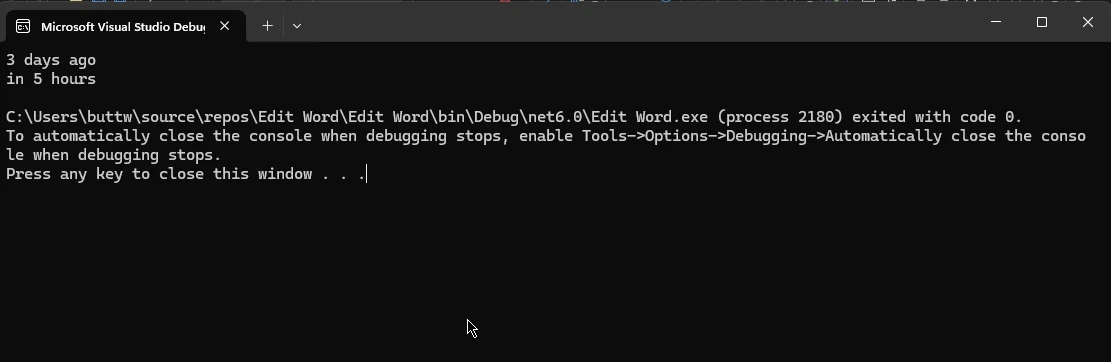
Humanizando os intervalos de tempo
O Humanizer também pode humanizar objetos TimeSpan, facilitando a exibição de durações em um formato legível.
Exemplo: Humanizando o período de tempo
using System;

class TimeSpanHumanizerDemo
{
    static void Main()
    {
        TimeSpan timeSpan = TimeSpan.FromMinutes(123);
        // Humanizing the TimeSpan into hours and minutes
        string humanizedTimeSpan = timeSpan.Humanize(2); // Output: "2 hours, 3 minutes"
        Console.WriteLine("Humanized TimeSpan: " + humanizedTimeSpan);
    }
}
using System;
class TimeSpanHumanizerDemo
{
static void Main()
{
TimeSpan timeSpan = TimeSpan.FromMinutes(123);
// Humanizing the TimeSpan into hours and minutes
string humanizedTimeSpan = timeSpan.Humanize(2); // Output: "2 hours, 3 minutes"
Console.WriteLine("Humanized TimeSpan: " + humanizedTimeSpan);
}
}Imports System
Friend Class TimeSpanHumanizerDemo
Shared Sub Main()
Dim timeSpan As TimeSpan = System.TimeSpan.FromMinutes(123)
' Humanizing the TimeSpan into hours and minutes
Dim humanizedTimeSpan As String = timeSpan.Humanize(2) ' Output: "2 hours, 3 minutes"
Console.WriteLine("Humanized TimeSpan: " & humanizedTimeSpan)
End Sub
End Class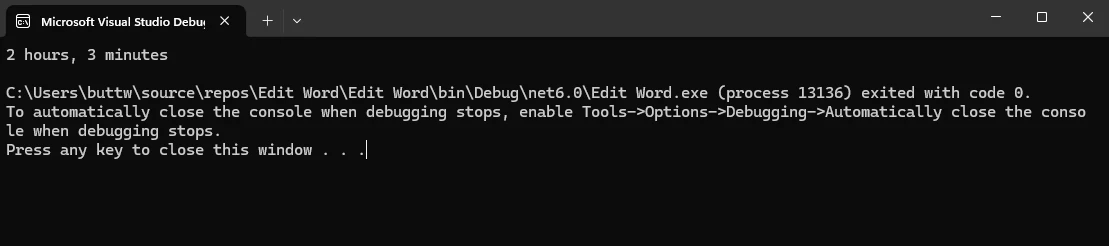
Trabalhando com Números
O Humanizer oferece diversos métodos para converter números em palavras legíveis para humanos e para lidar com números ordinais.
Exemplo: Convertendo números em palavras
using System;

class NumberHumanizerDemo
{
    static void Main()
    {
        int number = 123;
        // Convert number to words
        string words = number.ToWords(); // Output: "one hundred and twenty-three"
        Console.WriteLine("Number in Words: " + words);
    }
}
using System;
class NumberHumanizerDemo
{
static void Main()
{
int number = 123;
// Convert number to words
string words = number.ToWords(); // Output: "one hundred and twenty-three"
Console.WriteLine("Number in Words: " + words);
}
}Imports System
Friend Class NumberHumanizerDemo
Shared Sub Main()
Dim number As Integer = 123
' Convert number to words
Dim words As String = number.ToWords() ' Output: "one hundred and twenty-three"
Console.WriteLine("Number in Words: " & words)
End Sub
End Class
Exemplo: Convertendo números em ordinais
using System;

class OrdinalHumanizerDemo
{
    static void Main()
    {
        int number = 21;
        // Convert number to ordinal words
        string ordinal = number.ToOrdinalWords(); // Output: "twenty-first"
        Console.WriteLine("Ordinal Number: " + ordinal);
    }
}
using System;
class OrdinalHumanizerDemo
{
static void Main()
{
int number = 21;
// Convert number to ordinal words
string ordinal = number.ToOrdinalWords(); // Output: "twenty-first"
Console.WriteLine("Ordinal Number: " + ordinal);
}
}Imports System
Friend Class OrdinalHumanizerDemo
Shared Sub Main()
Dim number As Integer = 21
' Convert number to ordinal words
Dim ordinal As String = number.ToOrdinalWords() ' Output: "twenty-first"
Console.WriteLine("Ordinal Number: " & ordinal)
End Sub
End Class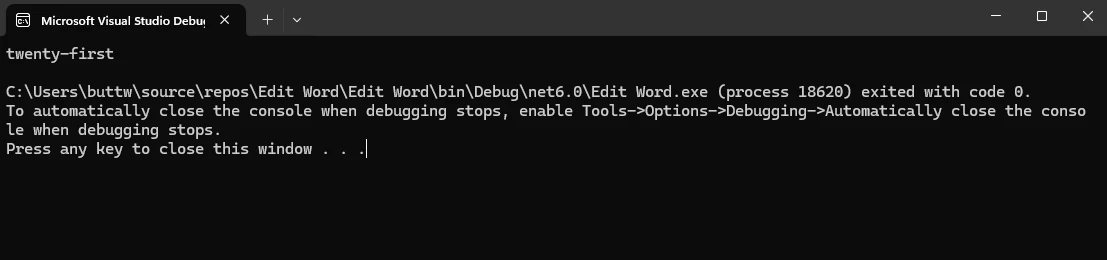
Pluralização e Singularização
O Humanizer facilita a conversão de palavras entre suas formas singular e plural, o que é útil para gerar textos longos dinamicamente com base na quantidade.
Exemplo: Pluralização e Singularização de Palavras
using System;

class PluralizationDemo
{
    static void Main()
    {
        string singular = "car";
        // Pluralize the word
        string plural = singular.Pluralize(); // Output: "cars"

        string word = "people";
        // Singularize the word
        string singularForm = word.Singularize(); // Output: "person"

        Console.WriteLine("Plural of 'car': " + plural);
        Console.WriteLine("Singular of 'people': " + singularForm);
    }
}
using System;
class PluralizationDemo
{
static void Main()
{
string singular = "car";
// Pluralize the word
string plural = singular.Pluralize(); // Output: "cars"
string word = "people";
// Singularize the word
string singularForm = word.Singularize(); // Output: "person"
Console.WriteLine("Plural of 'car': " + plural);
Console.WriteLine("Singular of 'people': " + singularForm);
}
}Imports System
Friend Class PluralizationDemo
Shared Sub Main()
Dim singular As String = "car"
' Pluralize the word
Dim plural As String = singular.Pluralize() ' Output: "cars"
Dim word As String = "people"
' Singularize the word
Dim singularForm As String = word.Singularize() ' Output: "person"
Console.WriteLine("Plural of 'car': " & plural)
Console.WriteLine("Singular of 'people': " & singularForm)
End Sub
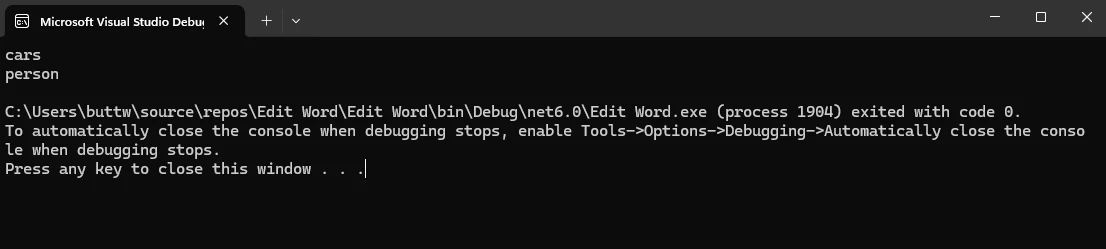
End ClassO Humanizer também lida com pluralizações e singularizações irregulares, tornando-o robusto para diversos casos de uso.
Formatação de Enums
Enums são frequentemente usados em aplicações C# para representar um conjunto de constantes nomeadas. O Humanizer pode converter valores de enumeração em strings legíveis para humanos.
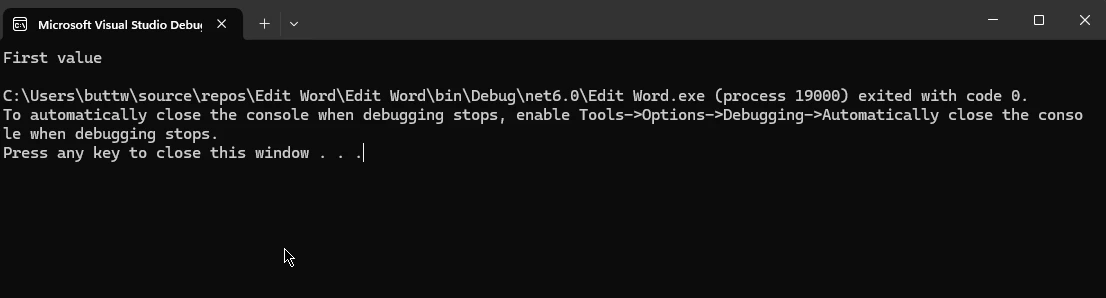
Exemplo: Humanizando Enums
using System;

public enum MyEnum
{
    FirstValue,
    SecondValue
}

class EnumHumanizerDemo
{
    static void Main()
    {
        MyEnum enumValue = MyEnum.FirstValue;
        // Humanizing enum to a readable format
        string humanizedEnum = enumValue.Humanize(); // Output: "First value"

        Console.WriteLine("Humanized Enum: " + humanizedEnum);
    }
}
using System;
public enum MyEnum
{
FirstValue,
SecondValue
}
class EnumHumanizerDemo
{
static void Main()
{
MyEnum enumValue = MyEnum.FirstValue;
// Humanizing enum to a readable format
string humanizedEnum = enumValue.Humanize(); // Output: "First value"
Console.WriteLine("Humanized Enum: " + humanizedEnum);
}
}Imports System
Public Enum MyEnum
FirstValue
SecondValue
End Enum
Friend Class EnumHumanizerDemo
Shared Sub Main()
Dim enumValue As MyEnum = MyEnum.FirstValue
' Humanizing enum to a readable format
Dim humanizedEnum As String = enumValue.Humanize() ' Output: "First value"
Console.WriteLine("Humanized Enum: " & humanizedEnum)
End Sub
End ClassEsse método pode ser particularmente útil para exibir rótulos fáceis de usar em interfaces de usuário.
Humanizando os tamanhos de byte
Outra funcionalidade útil do Humanizer é a capacidade de humanizar tamanhos de bytes, convertendo valores grandes em formatos legíveis como KB, MB ou GB.
Exemplo: Humanizando os tamanhos de bytes
using System;

class ByteSizeHumanizerDemo
{
    static void Main()
    {
        long bytes = 1048576;
        // Humanize bytes to a readable size format
        string humanizedBytes = bytes.Bytes().Humanize(); // Output: "1 MB"

        Console.WriteLine("Humanized Byte Size: " + humanizedBytes);
    }
}
using System;
class ByteSizeHumanizerDemo
{
static void Main()
{
long bytes = 1048576;
// Humanize bytes to a readable size format
string humanizedBytes = bytes.Bytes().Humanize(); // Output: "1 MB"
Console.WriteLine("Humanized Byte Size: " + humanizedBytes);
}
}Imports System
Friend Class ByteSizeHumanizerDemo
Shared Sub Main()
Dim bytes As Long = 1048576
' Humanize bytes to a readable size format
Dim humanizedBytes As String = bytes.Bytes().Humanize() ' Output: "1 MB"
Console.WriteLine("Humanized Byte Size: " & humanizedBytes)
End Sub
End Class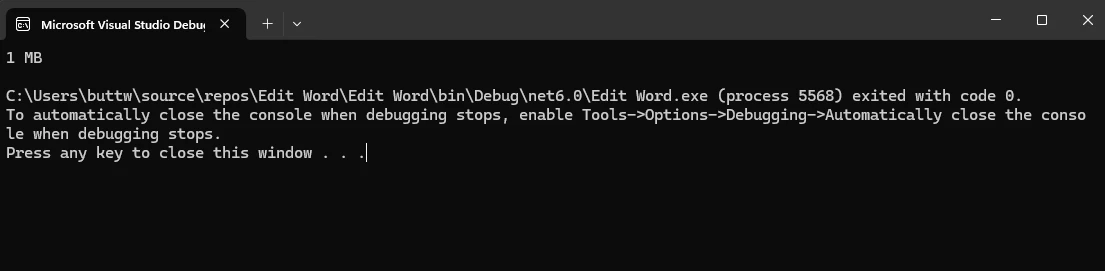
Cenários Avançados
O Humanizer não se limita aos cenários básicos descritos acima. Ele suporta uma ampla gama de recursos avançados, como o método Truncate e múltiplos idiomas e extensões.
Exemplo: Humanizando os deslocamentos de data e hora
O Humanizer também pode lidar com DateTimeOffset, o que é útil para aplicações que lidam com fusos horários.
using System;

class DateTimeOffsetHumanizerDemo
{
    static void Main()
    {
        DateTimeOffset dateTimeOffset = DateTimeOffset.Now.AddDays(-2);
        // Humanize DateTimeOffset
        string humanizedDateTimeOffset = dateTimeOffset.Humanize(); // Output: "2 days ago"

        Console.WriteLine("Humanized DateTimeOffset: " + humanizedDateTimeOffset);
    }
}
using System;
class DateTimeOffsetHumanizerDemo
{
static void Main()
{
DateTimeOffset dateTimeOffset = DateTimeOffset.Now.AddDays(-2);
// Humanize DateTimeOffset
string humanizedDateTimeOffset = dateTimeOffset.Humanize(); // Output: "2 days ago"
Console.WriteLine("Humanized DateTimeOffset: " + humanizedDateTimeOffset);
}
}Imports System
Friend Class DateTimeOffsetHumanizerDemo
Shared Sub Main()
Dim dateTimeOffset As DateTimeOffset = System.DateTimeOffset.Now.AddDays(-2)
' Humanize DateTimeOffset
Dim humanizedDateTimeOffset As String = dateTimeOffset.Humanize() ' Output: "2 days ago"
Console.WriteLine("Humanized DateTimeOffset: " & humanizedDateTimeOffset)
End Sub
End Class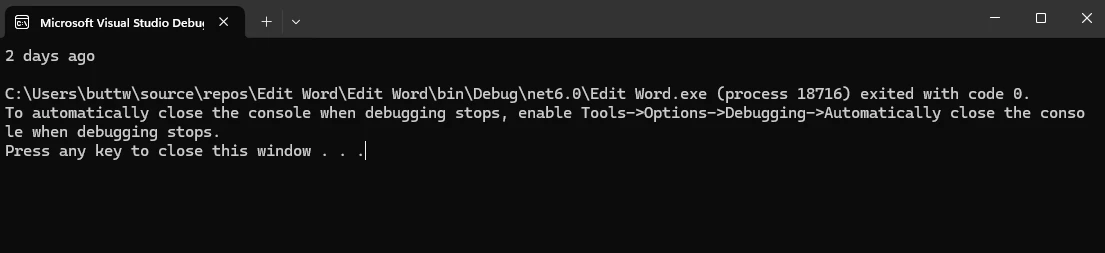
Considerações sobre o desempenho
O Humanizer foi projetado para ser eficiente, mas, como qualquer biblioteca, seu desempenho depende de como é utilizado. Para aplicações que exigem alto desempenho, especialmente aquelas que lidam com grandes conjuntos de dados ou processamento em tempo real, é essencial considerar o impacto de operações frequentes de humanização.
IronPDF for C
IronPDF é uma biblioteca completa para geração e manipulação de PDFs em aplicações .NET . Permite aos desenvolvedores criar, ler, editar e extrair conteúdo de arquivos PDF com facilidade. O IronPDF foi projetado para ser fácil de usar, oferecendo uma ampla gama de funcionalidades, incluindo conversão de HTML para PDF, mesclagem de documentos, adição de marcas d'água e muito mais. Sua versatilidade e recursos poderosos fazem dele uma excelente escolha para lidar com documentos PDF em projetos C#.
Instalando o IronPDF via Gerenciador de Pacotes NuGet
Siga estes passos para instalar o IronPDF usando o Gerenciador de Pacotes NuGet :
-
Abra seu projeto no Visual Studio:
- Inicie o Visual Studio e abra seu projeto C# existente ou crie um novo.
-
Abra o Gerenciador de Pacotes NuGet :
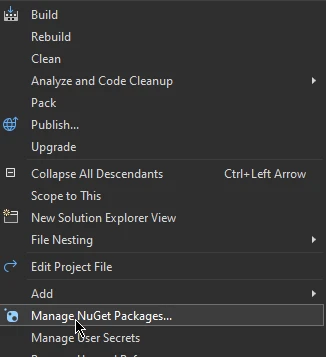
- Clique com o botão direito do mouse no seu projeto no Explorador de Soluções.
- Selecione "Gerenciar pacotes NuGet ..." no menu de contexto.
-
Instale o IronPDF:
- No Gerenciador de Pacotes NuGet , acesse a guia "Procurar".
- Pesquise por IronPDF .
- Selecione o pacote IronPDF nos resultados da pesquisa.
- Clique no botão "Instalar" para adicionar o IronPDF ao seu projeto.
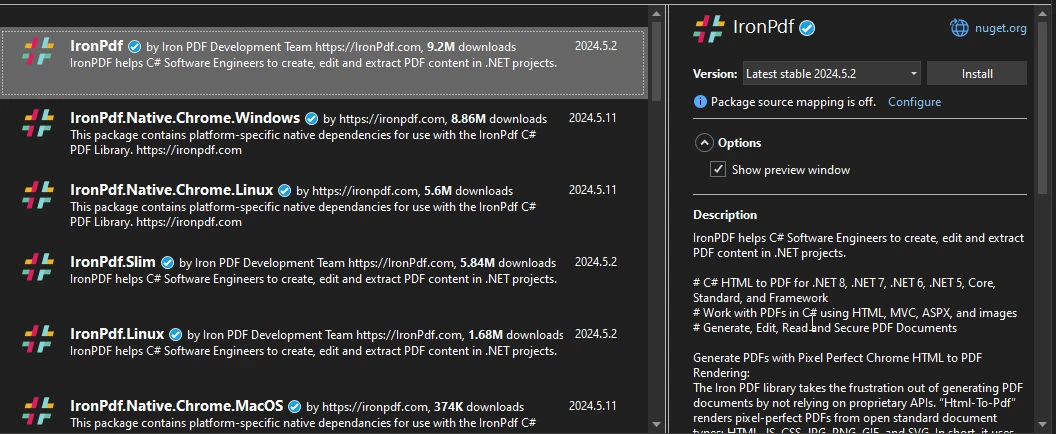
Seguindo estes passos, o IronPDF será instalado e estará pronto para uso em seu projeto C#, permitindo que você aproveite seus poderosos recursos de manipulação de PDF.
Exemplo de Código C# Humanizer e IronPDF
using Humanizer;
using IronPdf;
using System;
using System.Collections.Generic;

class PDFGenerationDemo
{
    static void Main()
    {
        // Instantiate the PDF renderer
        var renderer = new ChromePdfRenderer();

        // Generate humanized content
        List<string> content = GenerateHumanizedContent();

        // HTML content template for the PDF
        string htmlContent = "<h1>Humanizer Examples</h1><ul>";

        // Build the list items to add to the HTML content
        foreach (var item in content)
        {
            htmlContent += $"<li>{item}</li>";
        }
        htmlContent += "</ul>";

        // Render the HTML into a PDF document
        var pdf = renderer.RenderHtmlAsPdf(htmlContent);

        // Save the PDF to a file
        pdf.SaveAs("output.pdf");

        Console.WriteLine("PDF document generated successfully: output.pdf");
    }

    /// <summary>
    /// Generates a list of humanized content examples
    /// </summary>
    /// <returns>List of humanized content as strings</returns>
    static List<string> GenerateHumanizedContent()
    {
        List<string> content = new List<string>();

        // DateTime examples
        DateTime pastDate = DateTime.Now.AddDays(-3);
        DateTime futureDate = DateTime.Now.AddHours(5);
        content.Add($"DateTime.Now: {DateTime.Now}");
        content.Add($"3 days ago: {pastDate.Humanize()}");
        content.Add($"In 5 hours: {futureDate.Humanize()}");

        // TimeSpan examples
        TimeSpan timeSpan = TimeSpan.FromMinutes(123);
        content.Add($"TimeSpan of 123 minutes: {timeSpan.Humanize()}");

        // Number examples
        int number = 12345;
        content.Add($"Number 12345 in words: {number.ToWords()}");
        content.Add($"Ordinal of 21: {21.ToOrdinalWords()}");

        // Pluralization examples
        string singular = "car";
        content.Add($"Plural of 'car': {singular.Pluralize()}");
        string plural = "children";
        content.Add($"Singular of 'children': {plural.Singularize()}");

        // Byte size examples
        long bytes = 1048576;
        content.Add($"1,048,576 bytes: {bytes.Bytes().Humanize()}");

        return content;
    }
}
using Humanizer;
using IronPdf;
using System;
using System.Collections.Generic;
class PDFGenerationDemo
{
static void Main()
{
// Instantiate the PDF renderer
var renderer = new ChromePdfRenderer();
// Generate humanized content
List<string> content = GenerateHumanizedContent();
// HTML content template for the PDF
string htmlContent = "<h1>Humanizer Examples</h1><ul>";
// Build the list items to add to the HTML content
foreach (var item in content)
{
htmlContent += $"<li>{item}</li>";
}
htmlContent += "</ul>";
// Render the HTML into a PDF document
var pdf = renderer.RenderHtmlAsPdf(htmlContent);
// Save the PDF to a file
pdf.SaveAs("output.pdf");
Console.WriteLine("PDF document generated successfully: output.pdf");
}
/// <summary>
/// Generates a list of humanized content examples
/// </summary>
/// <returns>List of humanized content as strings</returns>
static List<string> GenerateHumanizedContent()
{
List<string> content = new List<string>();
// DateTime examples
DateTime pastDate = DateTime.Now.AddDays(-3);
DateTime futureDate = DateTime.Now.AddHours(5);
content.Add($"DateTime.Now: {DateTime.Now}");
content.Add($"3 days ago: {pastDate.Humanize()}");
content.Add($"In 5 hours: {futureDate.Humanize()}");
// TimeSpan examples
TimeSpan timeSpan = TimeSpan.FromMinutes(123);
content.Add($"TimeSpan of 123 minutes: {timeSpan.Humanize()}");
// Number examples
int number = 12345;
content.Add($"Number 12345 in words: {number.ToWords()}");
content.Add($"Ordinal of 21: {21.ToOrdinalWords()}");
// Pluralization examples
string singular = "car";
content.Add($"Plural of 'car': {singular.Pluralize()}");
string plural = "children";
content.Add($"Singular of 'children': {plural.Singularize()}");
// Byte size examples
long bytes = 1048576;
content.Add($"1,048,576 bytes: {bytes.Bytes().Humanize()}");
return content;
}
}Imports Humanizer
Imports IronPdf
Imports System
Imports System.Collections.Generic
Friend Class PDFGenerationDemo
Shared Sub Main()
' Instantiate the PDF renderer
Dim renderer = New ChromePdfRenderer()
' Generate humanized content
Dim content As List(Of String) = GenerateHumanizedContent()
' HTML content template for the PDF
Dim htmlContent As String = "<h1>Humanizer Examples</h1><ul>"
' Build the list items to add to the HTML content
For Each item In content
htmlContent &= $"<li>{item}</li>"
Next item
htmlContent &= "</ul>"
' Render the HTML into a PDF document
Dim pdf = renderer.RenderHtmlAsPdf(htmlContent)
' Save the PDF to a file
pdf.SaveAs("output.pdf")
Console.WriteLine("PDF document generated successfully: output.pdf")
End Sub
''' <summary>
''' Generates a list of humanized content examples
''' </summary>
''' <returns>List of humanized content as strings</returns>
Private Shared Function GenerateHumanizedContent() As List(Of String)
Dim content As New List(Of String)()
' DateTime examples
Dim pastDate As DateTime = DateTime.Now.AddDays(-3)
Dim futureDate As DateTime = DateTime.Now.AddHours(5)
content.Add($"DateTime.Now: {DateTime.Now}")
content.Add($"3 days ago: {pastDate.Humanize()}")
content.Add($"In 5 hours: {futureDate.Humanize()}")
' TimeSpan examples
Dim timeSpan As TimeSpan = System.TimeSpan.FromMinutes(123)
content.Add($"TimeSpan of 123 minutes: {timeSpan.Humanize()}")
' Number examples
Dim number As Integer = 12345
content.Add($"Number 12345 in words: {number.ToWords()}")
content.Add($"Ordinal of 21: {21.ToOrdinalWords()}")
' Pluralization examples
Dim singular As String = "car"
content.Add($"Plural of 'car': {singular.Pluralize()}")
Dim plural As String = "children"
content.Add($"Singular of 'children': {plural.Singularize()}")
' Byte size examples
Dim bytes As Long = 1048576
content.Add($"1,048,576 bytes: {bytes.Bytes().Humanize()}")
Return content
End Function
End Class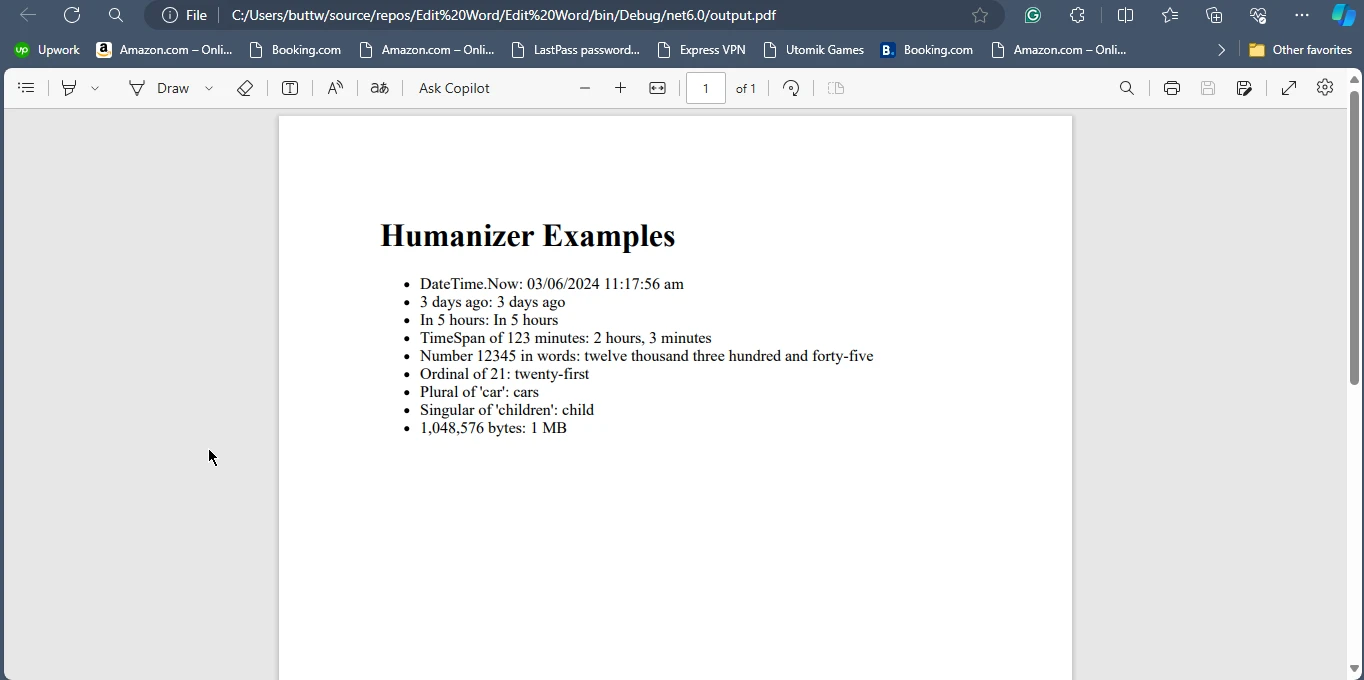
Conclusão
Humanizer é uma biblioteca indispensável para desenvolvedores .NET que desejam criar aplicativos que apresentem informações em um formato amigável e legível para humanos. Sua ampla gama de recursos, desde a humanização de datas e horas até a formatação de números e enumerações, a torna uma ferramenta versátil para melhorar a usabilidade de aplicativos. Ao utilizar o Humanizer, os desenvolvedores podem economizar tempo e esforço na implementação de lógica de formatação personalizada, garantindo que seus aplicativos comuniquem dados de forma mais eficaz aos usuários finais.
Da mesma forma, o IronPDF oferece recursos abrangentes de geração e manipulação de PDFs, tornando-o uma excelente opção para criar e gerenciar documentos PDF em projetos C#. Em conjunto, o Humanizer e o IronPDF podem melhorar significativamente a funcionalidade e a apresentação de aplicações .NET . Para obter mais detalhes sobre o licenciamento do IronPDF , consulte as Informações de Licenciamento do IronPDF . Para explorar mais a fundo, confira nosso Tutorial Detalhado sobre Conversão de HTML para PDF .
Perguntas frequentes
Qual é a finalidade da biblioteca Humanizer em C#?
A biblioteca Humanizer em C# foi projetada para transformar dados em formatos mais amigáveis para humanos, como converter datas em strings de tempo relativo, pluralizar palavras, formatar números por extenso e manipular enumerações. Ela ajuda os desenvolvedores a apresentar dados de forma mais legível e acessível.
Como posso converter um objeto DateTime em uma string de tempo relativo em C#?
Você pode usar o método Humanize do Humanizer para converter um objeto DateTime em uma string de tempo relativo, como 'há 3 dias' ou 'em 5 horas'.
Como faço para instalar a biblioteca Humanizer em um projeto C#?
Para instalar a biblioteca Humanizer em um projeto C#, você pode usar o Console do Gerenciador de Pacotes NuGet com o comando Install-Package Humanizer ou usar a CLI do .NET Core com dotnet add package Humanizer .
Quais são alguns exemplos de transformações de dados possíveis com o Humanizer?
O Humanizer pode realizar diversas transformações de dados, como converter strings em PascalCase em frases, transformar strings com sublinhados em maiúsculas apenas no início de cada palavra e truncar textos longos para um comprimento especificado.
O Humanizer pode ajudar na pluralização de palavras em C#?
Sim, o Humanizer oferece métodos para pluralizar e singularizar palavras, lidando eficazmente com formas regulares e irregulares, como converter 'car' em 'cars' ou 'people' em 'person'.
Como o Humanizer lida com enums em C#?
O Humanizer pode converter valores de enumeração em strings legíveis para humanos, facilitando a exibição de rótulos amigáveis ao usuário em interfaces.
Que funcionalidades oferece uma biblioteca PDF em C#?
Bibliotecas para PDF em AC#, como o IronPDF, oferecem recursos como criação, leitura, edição e extração de conteúdo de arquivos PDF. Elas também podem converter HTML para PDF, mesclar documentos e adicionar marcas d'água.
Como faço para instalar uma biblioteca PDF em C# no meu projeto?
Para instalar uma biblioteca PDF em C#, você pode usar o Gerenciador de Pacotes NuGet, pesquisando o nome da biblioteca, como IronPDF, na guia "Procurar" e clicando em "Instalar".
Quais são os benefícios de combinar o Humanizer com uma biblioteca PDF em C#?
Ao combinar o Humanizer com uma biblioteca PDF como o IronPDF, os desenvolvedores podem gerar conteúdo legível para humanos com o Humanizer e, em seguida, renderizá-lo em um documento PDF, facilitando a criação de relatórios e documentação em PDF fáceis de usar.
O que devo levar em consideração em relação ao desempenho ao usar o Humanizer?
Embora o Humanizer seja projetado para ser eficiente, os desenvolvedores devem considerar o impacto de operações frequentes de humanização em aplicativos que exigem alto desempenho com grandes conjuntos de dados ou processamento em tempo real.










 Comece GRATUITAMENTE
 Comece GRATUITAMENTE
 Agende uma demonstração ao vivo gratuita





 Não é necessário cartão de crédito nem criação de conta.










