




已更新 2026年4月23日
在 .NET 中用 Microsoft.Extensions.AI 簡化 LLM 整合
AI 正在改變軟體開發,但將大型語言模型 (LLM) 整合到 .NET 中一直很複雜。利用 IronPdf.AI 將 AI 整合推向更遠,為 .NET 應用程式帶來由 OpenAI 驅動的 PDF 解析、資料擷取和內容總結。
閱讀更多

OpenAPI,以前稱為Swagger,是用於構建和描述RESTful API的規範。它允許開發人員以標準化格式定義API的結構,使各種工具和服務能夠有效地理解和互動REST API並提供反饋。 在.NET生態系統中,OpenAPI .NET整合通過多個庫和工具來促進,使建立、記錄和使用API變得更加容易。
在這篇文章中,我們將了解OpenAPI支持規範以及如何使用IronPDF建立PDF文件並將其作為API呼叫響應返回。
要開始OpenAPI .NET項目,您通常會使用Swashbuckle庫,它為您的ASP.NET Core API生成OpenAPI規範或文件。
首先,您需要通過Visual Studio中的NuGet安裝Swashbuckle.AspNetCore包。 您可以使用NuGet包管理器控制台來完成此操作:
也可以使用.NET CLI:
dotnet add package Swashbuckle.AspNetCore接下來,您需要在ASP.NET Core項目中配置Swashbuckle。 這涉及更新Program.cs文件以新增Swagger服務和配置Swagger中介軟體。
var builder = WebApplication.CreateBuilder(args);

// Add services to the container.
builder.Services.AddControllers();
// Configures Swagger/OpenAPI descriptions.
builder.Services.AddEndpointsApiExplorer();
builder.Services.AddSwaggerGen();

var app = builder.Build();

// Configure the HTTP request pipeline.
if (app.Environment.IsDevelopment())
{
    app.UseSwagger();
    app.UseSwaggerUI();
}

app.UseHttpsRedirection();
app.UseAuthorization();
app.MapControllers();
app.Run();Dim builder = WebApplication.CreateBuilder(args)
' Add services to the container.
builder.Services.AddControllers()
' Configures Swagger/OpenAPI descriptions.
builder.Services.AddEndpointsApiExplorer()
builder.Services.AddSwaggerGen()
Dim app = builder.Build()
' Configure the HTTP request pipeline.
If app.Environment.IsDevelopment() Then
app.UseSwagger()
app.UseSwaggerUI()
End If
app.UseHttpsRedirection()
app.UseAuthorization()
app.MapControllers()
app.Run()一旦配置Swashbuckle,運行您的應用程式將自動生成OpenAPI文件。 您可以通過導航到Swagger UI介面來查看這些OpenAPI描述。
OpenAPI定義是強大的工具,可用於生成客戶端SDK、測試API、並確保跨不同服務的一致性。 OpenAPI規範定義了一個標準、語言中立的API介面,允許人和計算機在無需存取源程式碼的情況下瞭解服務的功能。
Swashbuckle允許您通過自定義註釋增強您的OpenAPI文件。 這些註釋可以直接新增到您的控制器和模型中,以提供關於API行為和資料結構的附加資訊。
using Microsoft.AspNetCore.Mvc;

namespace WebApplication8.Controllers
{
    [ApiController]
    [Route("[controller]")]
    public class WeatherForecastController : ControllerBase
    {
        private static readonly string[] Summaries = new[]
        {
            "Freezing", "Bracing", "Chilly", "Cool", "Mild", "Warm", "Balmy", "Hot", "Sweltering", "Scorching"
        };

        private readonly ILogger<WeatherForecastController> _logger;

        public WeatherForecastController(ILogger<WeatherForecastController> logger)
        {
            _logger = logger;
        }

        [HttpGet(Name = "GetWeatherForecast")]
        [SwaggerOperation(Summary = "Gets the weather forecast for the next 5 days")]
        [SwaggerResponse(200, "Successfully retrieved weather forecast")]
        public IEnumerable<WeatherForecast> Get()
        {
            return Enumerable.Range(1, 5).Select(index => new WeatherForecast
            {
                Date = DateTime.Now.AddDays(index),
                TemperatureC = Random.Shared.Next(-20, 55),
                Summary = Summaries[Random.Shared.Next(Summaries.Length)]
            })
            .ToArray();
        }
    }
}Imports Microsoft.AspNetCore.Mvc
Namespace WebApplication8.Controllers
<ApiController>
<Route("[controller]")>
Public Class WeatherForecastController
Inherits ControllerBase
Private Shared ReadOnly Summaries() As String = { "Freezing", "Bracing", "Chilly", "Cool", "Mild", "Warm", "Balmy", "Hot", "Sweltering", "Scorching" }
Private ReadOnly _logger As ILogger(Of WeatherForecastController)
Public Sub New(ByVal logger As ILogger(Of WeatherForecastController))
_logger = logger
End Sub
<HttpGet(Name := "GetWeatherForecast")>
<SwaggerOperation(Summary := "Gets the weather forecast for the next 5 days")>
<SwaggerResponse(200, "Successfully retrieved weather forecast")>
Public Function [Get]() As IEnumerable(Of WeatherForecast)
Return Enumerable.Range(1, 5).Select(Function(index) New WeatherForecast With {
.Date = DateTime.Now.AddDays(index),
.TemperatureC = Random.Shared.Next(-20, 55),
.Summary = Summaries(Random.Shared.Next(Summaries.Length))
}).ToArray()
End Function
End Class
End Namespace在此範例中,使用SwaggerResponse屬性來為端點提供詳細的OpenAPI描述和響應碼。
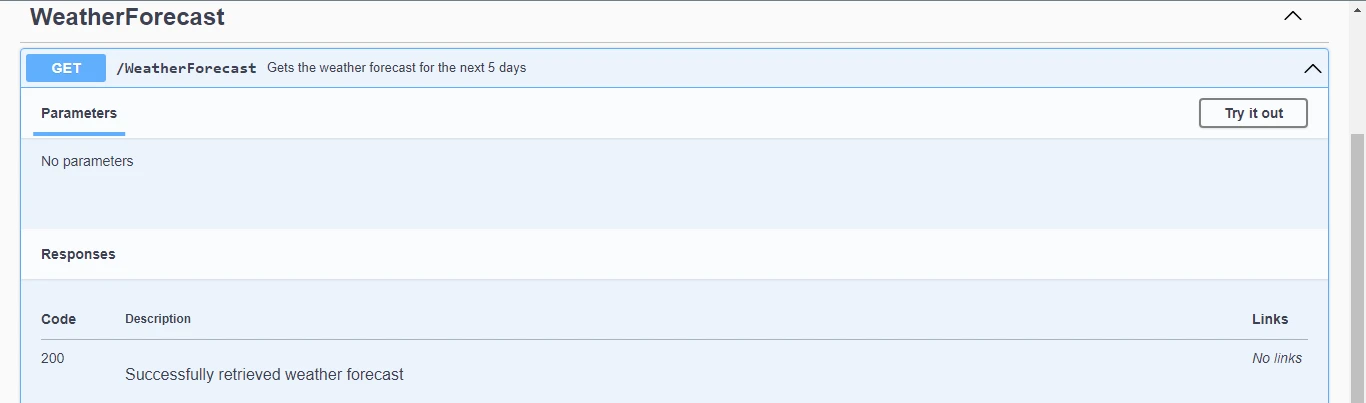
點擊執行按鈕,您將獲得以下響應。
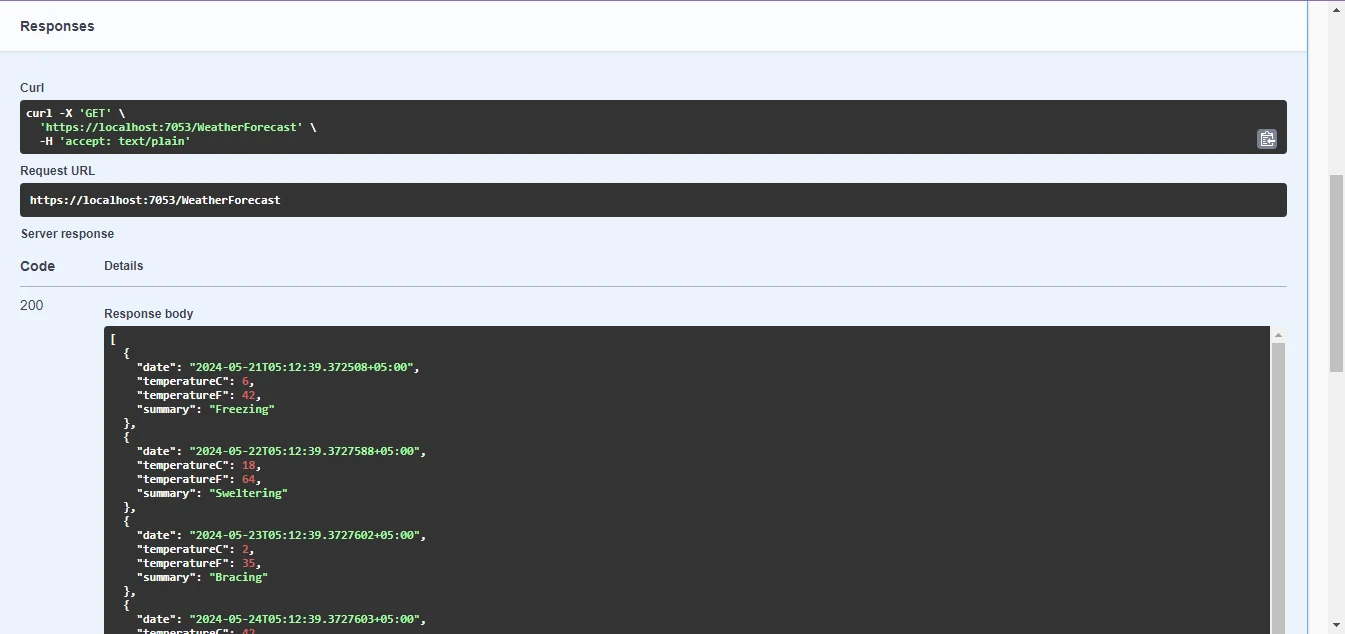
IronPDF for ASP.NET 是一個強大的工具,能夠在ASP.NET應用程式中無縫地生成和操作PDF文件。 憑藉其直觀的API和強大的功能,開發人員可以輕鬆地將PDF生成整合到其網路項目中,為使用者提供增強的文件管理能力。 無論是從頭建立PDF、將HTML內容轉換為PDF,還是新增圖像和文字等動態元素,IronPDF簡化了過程,確保高效和專業的文件生成。
使用NuGet包管理器安裝的步驟:
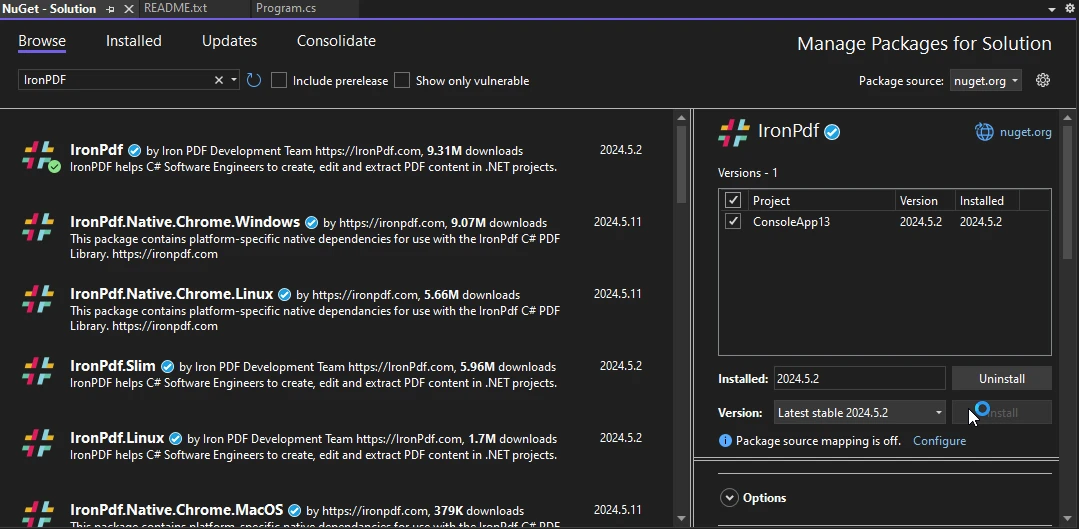
將以下程式碼新增到您的控制器文件中,它使用IronPDF建立PDF文件並將其作為API呼叫的回應返回。
using Microsoft.AspNetCore.Mvc;
using IronPdf;

namespace WebApplication8.Controllers
{
    [ApiController]
    [Route("[controller]")]
    public class WeatherForecastController : ControllerBase
    {
        private static readonly string[] Summaries = new[]
        {
            "Freezing", "Bracing", "Chilly", "Cool", "Mild", "Warm", "Balmy", "Hot", "Sweltering", "Scorching"
        };

        private readonly ILogger<WeatherForecastController> _logger;

        public WeatherForecastController(ILogger<WeatherForecastController> logger)
        {
            _logger = logger;
        }

        [HttpGet(Name = "GetWeatherForecast")]
        public IActionResult GetWeatherForecastPdf()
        {
            var htmlContent = @"
        <html>
        <head>
            <title>Weather Forecast</title>
        </head>
        <body>
            <h1>Weather Forecast</h1>
            <table>
                <tr>
                    <th>Date</th>
                    <th>Temperature (Celsius)</th>
                    <th>Summary</th>
                </tr>";

            var forecasts = Enumerable.Range(1, 5).Select(index => new WeatherForecast
            {
                Date = DateTime.Now.AddDays(index),
                TemperatureC = Random.Shared.Next(-20, 55),
                Summary = Summaries[Random.Shared.Next(Summaries.Length)]
            });

            // Iterate over the forecasts and add data to the HTML string
            foreach (var forecast in forecasts)
            {
                htmlContent += $@"
            <tr>
                <td>{forecast.Date.ToShortDateString()}</td>
                <td>{forecast.TemperatureC}</td>
                <td>{forecast.Summary}</td>
            </tr>";
            }

            htmlContent += @"
            </table>
        </body>
        </html>";

            // Convert the HTML string to a PDF using IronPDF
            var renderer = new ChromePdfRenderer();
            var pdfDocument = renderer.RenderHtmlAsPdf(htmlContent);

            // Retrieve the byte array of the generated PDF
            var pdfBytes = pdfDocument.BinaryData;
            // Return the PDF file to the client
            return File(pdfBytes, "application/pdf", "WeatherForecast.pdf");
        }
    }
}Imports Microsoft.AspNetCore.Mvc
Imports IronPdf
Namespace WebApplication8.Controllers
<ApiController>
<Route("[controller]")>
Public Class WeatherForecastController
Inherits ControllerBase
Private Shared ReadOnly Summaries() As String = { "Freezing", "Bracing", "Chilly", "Cool", "Mild", "Warm", "Balmy", "Hot", "Sweltering", "Scorching" }
Private ReadOnly _logger As ILogger(Of WeatherForecastController)
Public Sub New(ByVal logger As ILogger(Of WeatherForecastController))
_logger = logger
End Sub
<HttpGet(Name := "GetWeatherForecast")>
Public Function GetWeatherForecastPdf() As IActionResult
Dim htmlContent = "
<html>
<head>
<title>Weather Forecast</title>
</head>
<body>
<h1>Weather Forecast</h1>
<table>
<tr>
<th>Date</th>
<th>Temperature (Celsius)</th>
<th>Summary</th>
</tr>"
Dim forecasts = Enumerable.Range(1, 5).Select(Function(index) New WeatherForecast With {
.Date = DateTime.Now.AddDays(index),
.TemperatureC = Random.Shared.Next(-20, 55),
.Summary = Summaries(Random.Shared.Next(Summaries.Length))
})
' Iterate over the forecasts and add data to the HTML string
For Each forecast In forecasts
htmlContent &= $"
<tr>
<td>{forecast.Date.ToShortDateString()}</td>
<td>{forecast.TemperatureC}</td>
<td>{forecast.Summary}</td>
</tr>"
Next forecast
htmlContent &= "
</table>
</body>
</html>"
' Convert the HTML string to a PDF using IronPDF
Dim renderer = New ChromePdfRenderer()
Dim pdfDocument = renderer.RenderHtmlAsPdf(htmlContent)
' Retrieve the byte array of the generated PDF
Dim pdfBytes = pdfDocument.BinaryData
' Return the PDF file to the client
Return File(pdfBytes, "application/pdf", "WeatherForecast.pdf")
End Function
End Class
End Namespace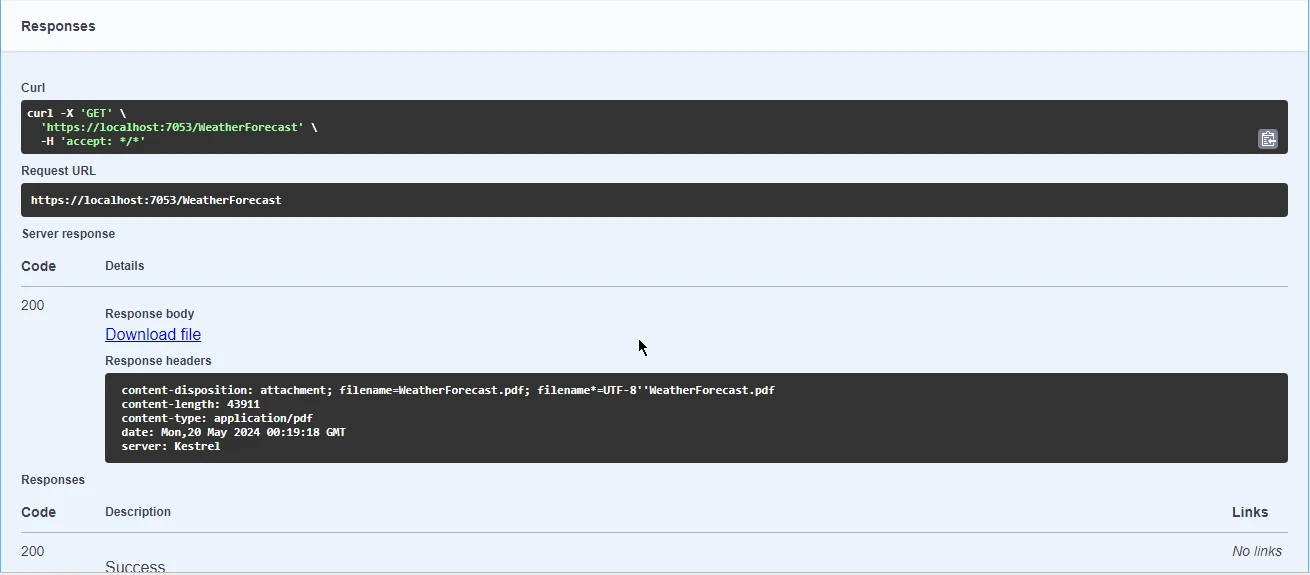
下載並打開附加的PDF文件。
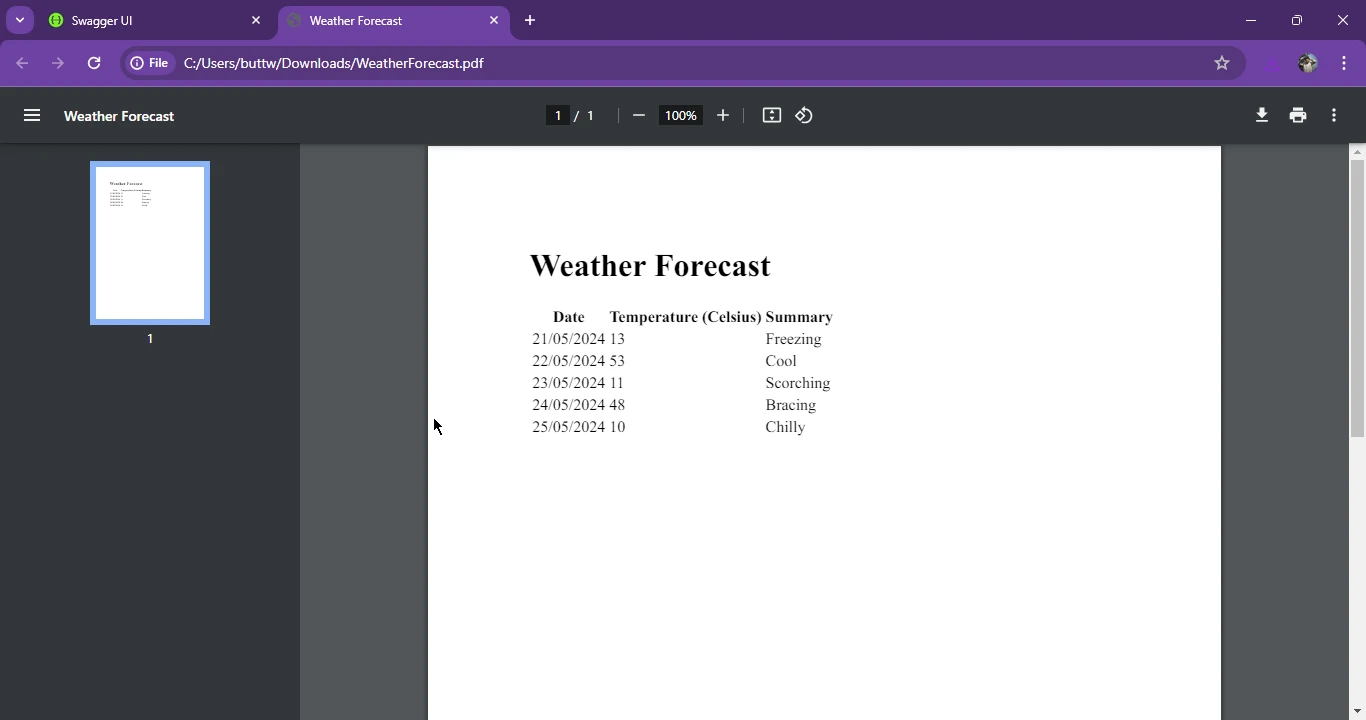
OpenAPI,以前稱為Swagger,在.NET生態系統中通過Swashbuckle等庫簡化了RESTful API的設計和文件,促進了自動API文件生成,適用於ASP.NET Core項目。 展示OpenAPI和IronPDF之間的協同效應,我們展示了如何利用IronPDF的功能生成HTML內容的PDF文件並將其作為API回應返回,提升ASP.NET應用程式的功能。 通過採納OpenAPI標準並利用IronPDF的強大功能,開發人員可以增強其API文件實踐,向使用者提供完善、功能豐富的應用程式。
有關IronPDF授權的詳細資訊,請參閱IronPDF授權詳細資訊。 此外,您可以探索我們的HTML轉PDF轉換教程以獲取更多指導。

Jacob Mellor是Iron Software的首席技術官,一位在C# PDF技術上開創先河的遠見工程師。作為Iron Software核心程式碼庫的原開發者,他從創立以來就一直在塑造公司的產品架構,與首席執行官Cameron Rimington一起將公司轉變為服務於NASA、特斯拉和全球政府公司的50多名人員的公司。



IronPDF 是 IRONSUITE 的一部分
10 款適用於辦公室文件的 .NET API 產品

當您需要您的PDF看起來像HTML一樣快速。












