


OpenAPI .NET (How It Works For Developers)

OpenAPI, formerly known as Swagger, is a specification for building and describing RESTful APIs. It allows developers to define the structure of their APIs in a standardized format, enabling various tools and services to understand and interact with the REST API effectively and provide feedback. In the .NET ecosystem, OpenAPI .NET integration is facilitated through several libraries and tools that make it easier to create, document, and consume APIs.
In this article, we will learn about OpenAPI support specifications and how to create a PDF file using IronPDF and return it as an API call response.
Setting Up OpenAPI in .NET
To get started with the OpenAPI .NET project, you typically use the Swashbuckle library, which generates OpenAPI specification or documentation for your ASP.NET Core APIs.
Step 1: Install Swashbuckle
First, you need to install the Swashbuckle.AspNetCore package via NuGet in Visual Studio. You can do this using the NuGet Package Manager Console:
Install-Package Swashbuckle.AspNetCore
Or by using the .NET CLI:
dotnet add package Swashbuckle.AspNetCoredotnet add package Swashbuckle.AspNetCoreStep 2: Configure Swashbuckle
Next, you need to configure Swashbuckle in your ASP.NET Core project. This involves updating the Program.cs file to add Swagger services and configure the Swagger middleware.
var builder = WebApplication.CreateBuilder(args);

// Add services to the container.
builder.Services.AddControllers();
// Configures Swagger/OpenAPI descriptions.
builder.Services.AddEndpointsApiExplorer();
builder.Services.AddSwaggerGen();

var app = builder.Build();

// Configure the HTTP request pipeline.
if (app.Environment.IsDevelopment())
{
    app.UseSwagger();
    app.UseSwaggerUI();
}

app.UseHttpsRedirection();
app.UseAuthorization();
app.MapControllers();
app.Run();
var builder = WebApplication.CreateBuilder(args);
// Add services to the container.
builder.Services.AddControllers();
// Configures Swagger/OpenAPI descriptions.
builder.Services.AddEndpointsApiExplorer();
builder.Services.AddSwaggerGen();
var app = builder.Build();
// Configure the HTTP request pipeline.
if (app.Environment.IsDevelopment())
{
app.UseSwagger();
app.UseSwaggerUI();
}
app.UseHttpsRedirection();
app.UseAuthorization();
app.MapControllers();
app.Run();Dim builder = WebApplication.CreateBuilder(args)
' Add services to the container.
builder.Services.AddControllers()
' Configures Swagger/OpenAPI descriptions.
builder.Services.AddEndpointsApiExplorer()
builder.Services.AddSwaggerGen()
Dim app = builder.Build()
' Configure the HTTP request pipeline.
If app.Environment.IsDevelopment() Then
app.UseSwagger()
app.UseSwaggerUI()
End If
app.UseHttpsRedirection()
app.UseAuthorization()
app.MapControllers()
app.Run()Generating and Viewing API Documentation
Once Swashbuckle is configured, running your application will automatically generate OpenAPI documentation. You can view these OpenAPI descriptions by navigating to the Swagger UI interface.
Using OpenAPI Definitions
OpenAPI definitions are powerful tools that can be used for generating client SDKs, testing APIs, and ensuring consistency across different services. The OpenAPI specification defines a standard, language-agnostic interface to APIs, which allows both humans and computers to understand the capabilities of a service without access to the source code.
Extending OpenAPI with Custom Annotations
Swashbuckle allows you to enhance your OpenAPI documentation with custom annotations. These annotations can be added directly to your controllers and models to provide additional information about the API's behavior and data structures.
Example: Custom Annotations
using Microsoft.AspNetCore.Mvc;

namespace WebApplication8.Controllers
{
    [ApiController]
    [Route("[controller]")]
    public class WeatherForecastController : ControllerBase
    {
        private static readonly string[] Summaries = new[]
        {
            "Freezing", "Bracing", "Chilly", "Cool", "Mild", "Warm", "Balmy", "Hot", "Sweltering", "Scorching"
        };

        private readonly ILogger<WeatherForecastController> _logger;

        public WeatherForecastController(ILogger<WeatherForecastController> logger)
        {
            _logger = logger;
        }

        [HttpGet(Name = "GetWeatherForecast")]
        [SwaggerOperation(Summary = "Gets the weather forecast for the next 5 days")]
        [SwaggerResponse(200, "Successfully retrieved weather forecast")]
        public IEnumerable<WeatherForecast> Get()
        {
            return Enumerable.Range(1, 5).Select(index => new WeatherForecast
            {
                Date = DateTime.Now.AddDays(index),
                TemperatureC = Random.Shared.Next(-20, 55),
                Summary = Summaries[Random.Shared.Next(Summaries.Length)]
            })
            .ToArray();
        }
    }
}
using Microsoft.AspNetCore.Mvc;
namespace WebApplication8.Controllers
{
[ApiController]
[Route("[controller]")]
public class WeatherForecastController : ControllerBase
{
private static readonly string[] Summaries = new[]
{
"Freezing", "Bracing", "Chilly", "Cool", "Mild", "Warm", "Balmy", "Hot", "Sweltering", "Scorching"
};
private readonly ILogger<WeatherForecastController> _logger;
public WeatherForecastController(ILogger<WeatherForecastController> logger)
{
_logger = logger;
}
[HttpGet(Name = "GetWeatherForecast")]
[SwaggerOperation(Summary = "Gets the weather forecast for the next 5 days")]
[SwaggerResponse(200, "Successfully retrieved weather forecast")]
public IEnumerable<WeatherForecast> Get()
{
return Enumerable.Range(1, 5).Select(index => new WeatherForecast
{
Date = DateTime.Now.AddDays(index),
TemperatureC = Random.Shared.Next(-20, 55),
Summary = Summaries[Random.Shared.Next(Summaries.Length)]
})
.ToArray();
}
}
}Imports Microsoft.AspNetCore.Mvc
Namespace WebApplication8.Controllers
<ApiController>
<Route("[controller]")>
Public Class WeatherForecastController
Inherits ControllerBase
Private Shared ReadOnly Summaries() As String = { "Freezing", "Bracing", "Chilly", "Cool", "Mild", "Warm", "Balmy", "Hot", "Sweltering", "Scorching" }
Private ReadOnly _logger As ILogger(Of WeatherForecastController)
Public Sub New(ByVal logger As ILogger(Of WeatherForecastController))
_logger = logger
End Sub
<HttpGet(Name := "GetWeatherForecast")>
<SwaggerOperation(Summary := "Gets the weather forecast for the next 5 days")>
<SwaggerResponse(200, "Successfully retrieved weather forecast")>
Public Function [Get]() As IEnumerable(Of WeatherForecast)
Return Enumerable.Range(1, 5).Select(Function(index) New WeatherForecast With {
.Date = DateTime.Now.AddDays(index),
.TemperatureC = Random.Shared.Next(-20, 55),
.Summary = Summaries(Random.Shared.Next(Summaries.Length))
}).ToArray()
End Function
End Class
End NamespaceIn this example, the SwaggerOperation and SwaggerResponse attributes are used to provide detailed OpenAPI descriptions and response codes for the endpoint.
Output
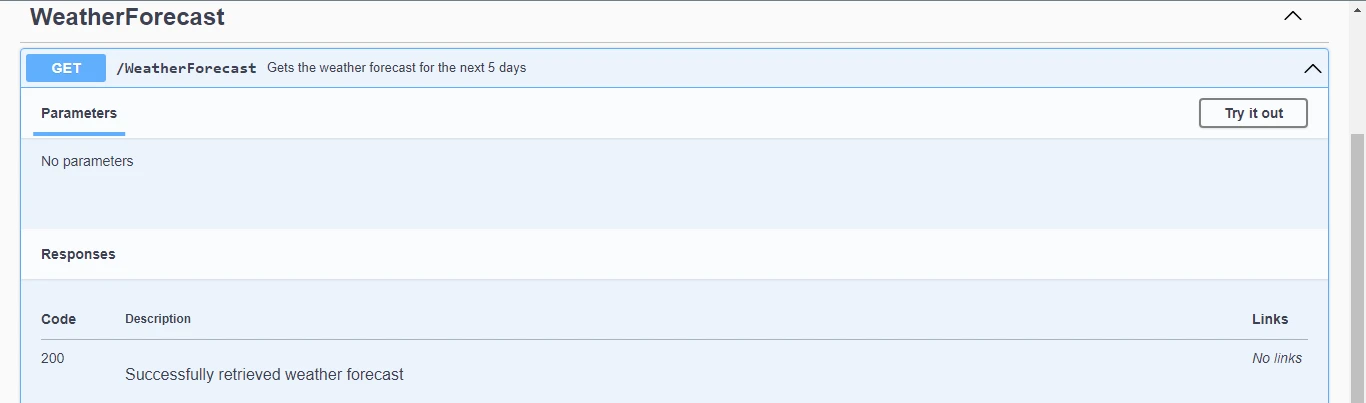
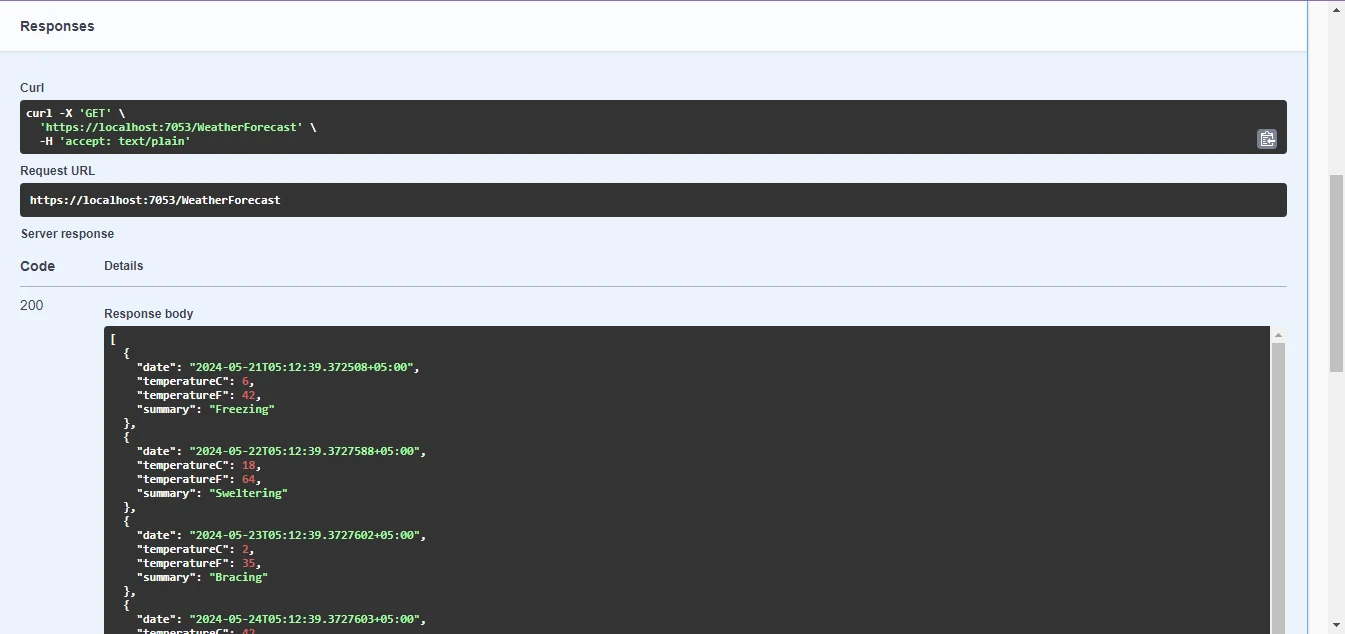
Click on the Execute button, and you will get the following response.
IronPDF
IronPDF for ASP.NET is a powerful tool that enables seamless generation and manipulation of PDF documents within ASP.NET applications. With its intuitive API and robust functionality, developers can effortlessly integrate PDF generation into their web projects, offering enhanced document management capabilities to users. Whether it's creating PDFs from scratch, converting HTML content to PDF, or adding dynamic elements like images and text, IronPDF simplifies the process, ensuring efficient and professional document generation.
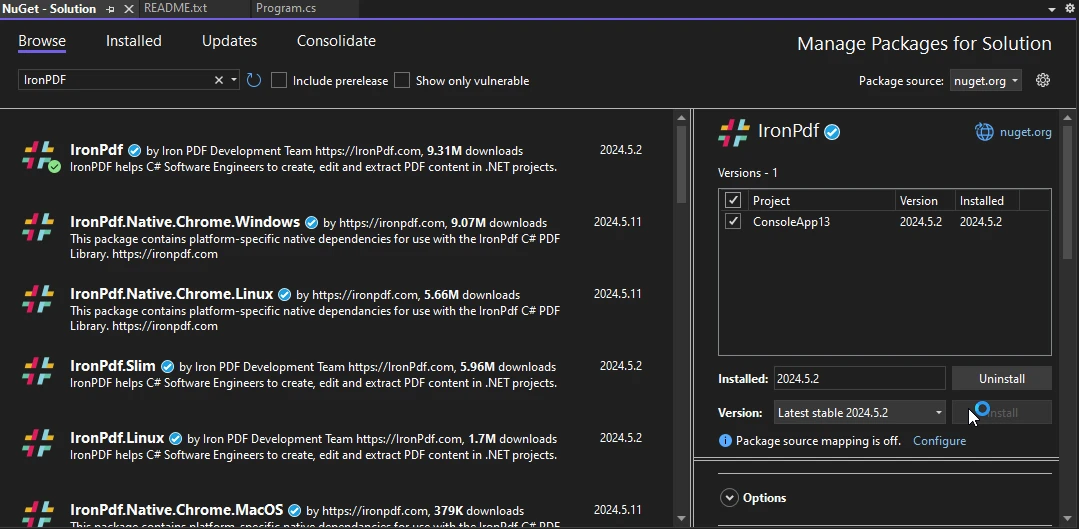
Steps to install using NuGet Package Manager:
- Open your ASP.NET project in Visual Studio and navigate to the "Tools" menu.
- Select "NuGet Package Manager" and then click on "Manage NuGet Packages for Solution."
- In the "Browse" tab, search for "IronPDF" and select the desired version. Click on "Install" to add the package to your project. IronPDF and its dependencies will be automatically downloaded and integrated, allowing you to start leveraging its functionality in your ASP.NET application seamlessly.
Get PDF File in Response to API Call
Add the following code to your controller file, it uses IronPDF to create a PDF file and return it as a response to the API call.
using Microsoft.AspNetCore.Mvc;
using IronPdf;

namespace WebApplication8.Controllers
{
    [ApiController]
    [Route("[controller]")]
    public class WeatherForecastController : ControllerBase
    {
        private static readonly string[] Summaries = new[]
        {
            "Freezing", "Bracing", "Chilly", "Cool", "Mild", "Warm", "Balmy", "Hot", "Sweltering", "Scorching"
        };

        private readonly ILogger<WeatherForecastController> _logger;

        public WeatherForecastController(ILogger<WeatherForecastController> logger)
        {
            _logger = logger;
        }

        [HttpGet(Name = "GetWeatherForecast")]
        public IActionResult GetWeatherForecastPdf()
        {
            var htmlContent = @"
        <html>
        <head>
            <title>Weather Forecast</title>
        </head>
        <body>
            <h1>Weather Forecast</h1>
            <table>
                <tr>
                    <th>Date</th>
                    <th>Temperature (Celsius)</th>
                    <th>Summary</th>
                </tr>";

            var forecasts = Enumerable.Range(1, 5).Select(index => new WeatherForecast
            {
                Date = DateTime.Now.AddDays(index),
                TemperatureC = Random.Shared.Next(-20, 55),
                Summary = Summaries[Random.Shared.Next(Summaries.Length)]
            });

            // Iterate over the forecasts and add data to the HTML string
            foreach (var forecast in forecasts)
            {
                htmlContent += $@"
            <tr>
                <td>{forecast.Date.ToShortDateString()}</td>
                <td>{forecast.TemperatureC}</td>
                <td>{forecast.Summary}</td>
            </tr>";
            }

            htmlContent += @"
            </table>
        </body>
        </html>";

            // Convert the HTML string to a PDF using IronPDF
            var renderer = new ChromePdfRenderer();
            var pdfDocument = renderer.RenderHtmlAsPdf(htmlContent);

            // Retrieve the byte array of the generated PDF
            var pdfBytes = pdfDocument.BinaryData;
            // Return the PDF file to the client
            return File(pdfBytes, "application/pdf", "WeatherForecast.pdf");
        }
    }
}
using Microsoft.AspNetCore.Mvc;
using IronPdf;
namespace WebApplication8.Controllers
{
[ApiController]
[Route("[controller]")]
public class WeatherForecastController : ControllerBase
{
private static readonly string[] Summaries = new[]
{
"Freezing", "Bracing", "Chilly", "Cool", "Mild", "Warm", "Balmy", "Hot", "Sweltering", "Scorching"
};
private readonly ILogger<WeatherForecastController> _logger;
public WeatherForecastController(ILogger<WeatherForecastController> logger)
{
_logger = logger;
}
[HttpGet(Name = "GetWeatherForecast")]
public IActionResult GetWeatherForecastPdf()
{
var htmlContent = @"
<html>
<head>
<title>Weather Forecast</title>
</head>
<body>
<h1>Weather Forecast</h1>
<table>
<tr>
<th>Date</th>
<th>Temperature (Celsius)</th>
<th>Summary</th>
</tr>";
var forecasts = Enumerable.Range(1, 5).Select(index => new WeatherForecast
{
Date = DateTime.Now.AddDays(index),
TemperatureC = Random.Shared.Next(-20, 55),
Summary = Summaries[Random.Shared.Next(Summaries.Length)]
});
// Iterate over the forecasts and add data to the HTML string
foreach (var forecast in forecasts)
{
htmlContent += $@"
<tr>
<td>{forecast.Date.ToShortDateString()}</td>
<td>{forecast.TemperatureC}</td>
<td>{forecast.Summary}</td>
</tr>";
}
htmlContent += @"
</table>
</body>
</html>";
// Convert the HTML string to a PDF using IronPDF
var renderer = new ChromePdfRenderer();
var pdfDocument = renderer.RenderHtmlAsPdf(htmlContent);
// Retrieve the byte array of the generated PDF
var pdfBytes = pdfDocument.BinaryData;
// Return the PDF file to the client
return File(pdfBytes, "application/pdf", "WeatherForecast.pdf");
}
}
}Imports Microsoft.AspNetCore.Mvc
Imports IronPdf
Namespace WebApplication8.Controllers
<ApiController>
<Route("[controller]")>
Public Class WeatherForecastController
Inherits ControllerBase
Private Shared ReadOnly Summaries() As String = { "Freezing", "Bracing", "Chilly", "Cool", "Mild", "Warm", "Balmy", "Hot", "Sweltering", "Scorching" }
Private ReadOnly _logger As ILogger(Of WeatherForecastController)
Public Sub New(ByVal logger As ILogger(Of WeatherForecastController))
_logger = logger
End Sub
<HttpGet(Name := "GetWeatherForecast")>
Public Function GetWeatherForecastPdf() As IActionResult
Dim htmlContent = "
<html>
<head>
<title>Weather Forecast</title>
</head>
<body>
<h1>Weather Forecast</h1>
<table>
<tr>
<th>Date</th>
<th>Temperature (Celsius)</th>
<th>Summary</th>
</tr>"
Dim forecasts = Enumerable.Range(1, 5).Select(Function(index) New WeatherForecast With {
.Date = DateTime.Now.AddDays(index),
.TemperatureC = Random.Shared.Next(-20, 55),
.Summary = Summaries(Random.Shared.Next(Summaries.Length))
})
' Iterate over the forecasts and add data to the HTML string
For Each forecast In forecasts
htmlContent &= $"
<tr>
<td>{forecast.Date.ToShortDateString()}</td>
<td>{forecast.TemperatureC}</td>
<td>{forecast.Summary}</td>
</tr>"
Next forecast
htmlContent &= "
</table>
</body>
</html>"
' Convert the HTML string to a PDF using IronPDF
Dim renderer = New ChromePdfRenderer()
Dim pdfDocument = renderer.RenderHtmlAsPdf(htmlContent)
' Retrieve the byte array of the generated PDF
Dim pdfBytes = pdfDocument.BinaryData
' Return the PDF file to the client
Return File(pdfBytes, "application/pdf", "WeatherForecast.pdf")
End Function
End Class
End Namespace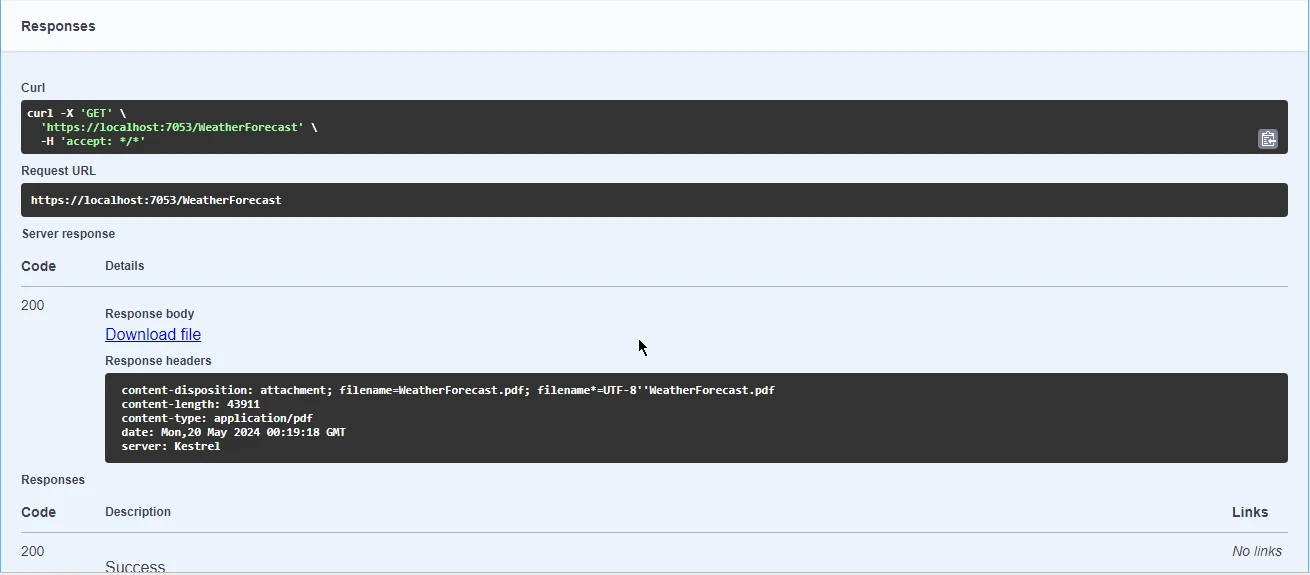
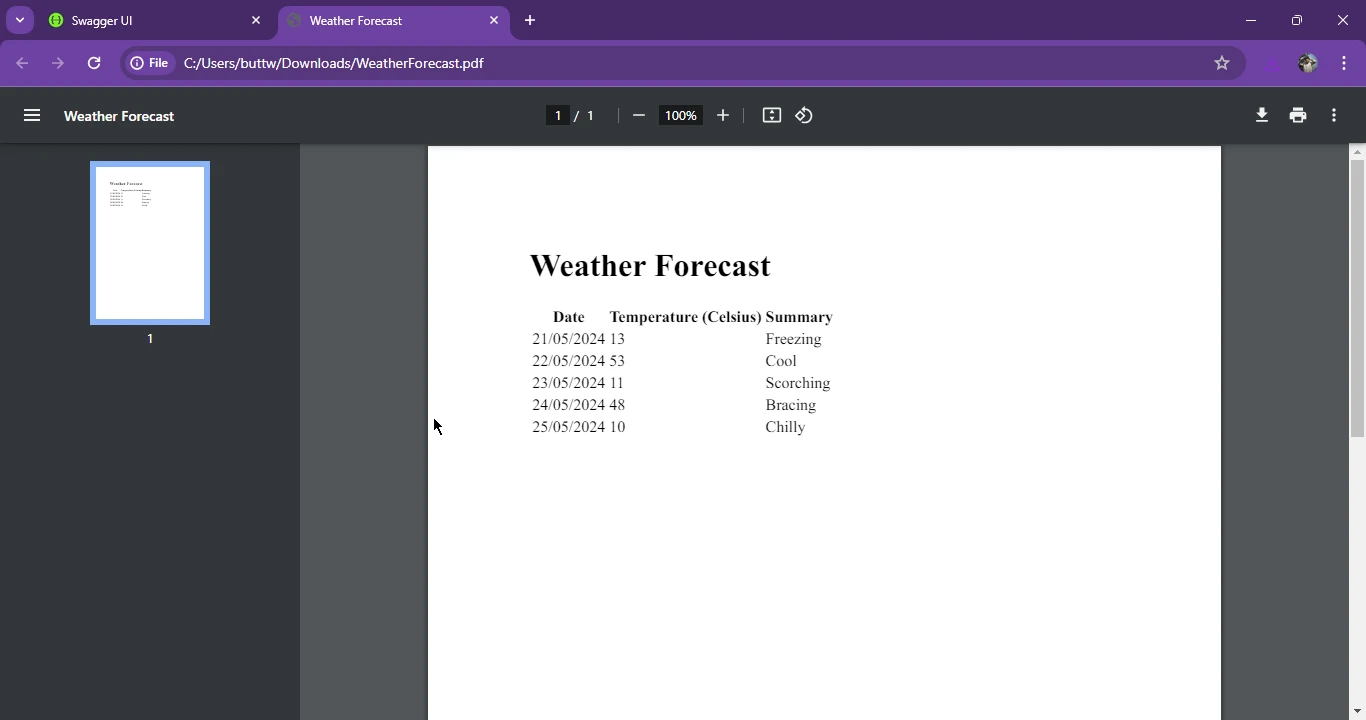
Download and open the attached PDF file.
Conclusion
OpenAPI, formerly known as Swagger, streamlines RESTful API design and documentation in the .NET ecosystem through libraries like Swashbuckle, facilitating automatic API documentation generation for ASP.NET Core projects. Demonstrating the synergy between OpenAPI and IronPDF, we showcased how to utilize IronPDF's capabilities to generate PDF files from HTML content and return them as API responses, enriching the functionality of ASP.NET applications. By embracing OpenAPI standards and leveraging IronPDF's robust features, developers can enhance their API documentation practices and deliver polished, feature-rich applications to users.
For detailed information on IronPDF licensing, please refer to the IronPDF licensing details. Additionally, you can explore our HTML to PDF conversion tutorial for further guidance.
Frequently Asked Questions
How can I convert HTML content to a PDF in an ASP.NET application?
You can use IronPDF in an ASP.NET application to convert HTML content to a PDF. By leveraging IronPDF's capabilities, you can render HTML strings or files into PDF documents, which can then be served as API responses or saved for document management purposes.
What is the role of OpenAPI in the .NET ecosystem?
OpenAPI plays a crucial role in the .NET ecosystem by providing a standardized way to define and document RESTful APIs. This integration is often facilitated through tools like Swashbuckle, which helps generate OpenAPI specifications and enables easy API consumption within ASP.NET Core projects.
How do I set up Swagger UI in a .NET project using Swashbuckle?
To set up Swagger UI in a .NET project using Swashbuckle, install the Swashbuckle.AspNetCore package via NuGet. Then, configure the Swagger services in your Program.cs file and set up the Swagger middleware to enable automatic generation and access of API documentation through Swagger UI.
How can I generate client SDKs from OpenAPI definitions in .NET?
OpenAPI definitions can be used to generate client SDKs, which facilitate the consumption of APIs by abstracting the complexity of API calls. In .NET, tools such as Swashbuckle can generate these definitions, which can then be used with tools like AutoRest to create client SDKs in various programming languages.
What are the advantages of using custom annotations in OpenAPI documentation?
Custom annotations in OpenAPI documentation enhance the clarity and detail of API specifications. In .NET, Swashbuckle allows you to use attributes like SwaggerOperation and SwaggerResponse to add descriptions and response codes, making the API documentation more informative and easier to understand for developers.
How can I deliver a PDF file as an API response in ASP.NET Core?
You can deliver a PDF file as an API response in ASP.NET Core by using IronPDF. Generate the PDF from HTML content using IronPDF's rendering methods, and return the PDF file in your API controller action using ASP.NET Core's IActionResult to output the file as part of the response.
What benefits does combining OpenAPI and PDF generation tools bring to ASP.NET applications?
Combining OpenAPI and PDF generation tools like IronPDF in ASP.NET applications provides comprehensive API documentation and enhances functionality by allowing APIs to return professional PDF documents. This integration supports efficient document management and enriches the overall capabilities of the application.










 Get started for FREE
 Get started for FREE
 Book Free Live Demo
















