




已更新 2026年4月23日
在 .NET 中用 Microsoft.Extensions.AI 簡化 LLM 整合
AI 正在改變軟體開發,但將大型語言模型 (LLM) 整合到 .NET 中一直很複雜。利用 IronPdf.AI 將 AI 整合推向更遠,為 .NET 應用程式帶來由 OpenAI 驅動的 PDF 解析、資料擷取和內容總結。
閱讀更多

為了建構具有回應性和有效率的應用程式,.NET 應用程式通常需要優化方法。 快取是一種強大的方法,涉及暫時將經常請求的材料儲存在分佈式快取中,以促進更快速的檢索。 通過此策略降低處理時間和伺服器負載可以顯著提高應用程式性能。 此外,可以實施性能計數器來監控和增強快取系統。
[快取](https://en.wikipedia.org/wiki/Cache_(computing)在此情境中是一種強大的優化策略。 Microsoft.Extensions.Caching.Memory 為 .NET 應用程式提供了一種高效的記憶體內物件快取解決方案。 如果您策略性地使用 MemoryCache 快取以及 IronPDF,您的以 PDF 為中心的應用程式將更快地運作和回應。
我們探討如何高效地將 Microsoft.Extensions.Caching.Memory C# 範例整合到 IronPDF 中。 在本文中,我們將討論快取對於 IronPDF HTML 到 PDF 轉換 過程的優勢,介紹一些有用的實施技巧,並提供一個詳細的快取配置步驟指南。 完成所有操作後,您將擁有開發高效和直觀的 PDF 應用程式所需的技能和資源。
Microsoft.Extensions.Caching.Memory:.NET 中快取的基礎快取是一種用於許多高性能.NET應用程式的方法,將經常存取的資料儲存在記憶體中以便快速檢索。 Microsoft.Extensions 是許多可存取的快取選項之一。 Caching.Memory 是特別強大且可調整的選項。 這個程式庫是更廣泛的 Microsoft.Extensions.Caching 命名空間的一部分,提供了一個簡單而高效的記憶體內快取方法。
Microsoft.Extensions.Caching.Memory" 中的關鍵型別IMemoryCacheMemoryCacheIMemoryCache 的實際實現就在這個類別中。 它提供了對快取項目的管理和真實的記憶體記憶體儲。MemoryCache 的實例。MemoryCacheEntryOptions您可以使用此類別為特定的快取項目指定配置設置。 這些設置控制如下事項:
CacheEntryICacheEntryCacheEntry 類別實現,並提供了這些功能的實用實現。Microsoft.Extensions.Caching.Memory在應用程式啟動期間,記憶體被用來配置 ASP.NET Core 應用程式的服務集合內的快取服務。 以下是一個配置了 Microsoft.Extensions.Caching.Memory 的 ASP.NET Core 應用程式:
首先,確保為您的專案安裝了 Microsoft.Extensions.Caching.Memory。 您可以用以下命令在 NuGet 套件管理器控制台中安裝它:
或者,我們可以使用 NuGet 套件管理器來安裝此套件:
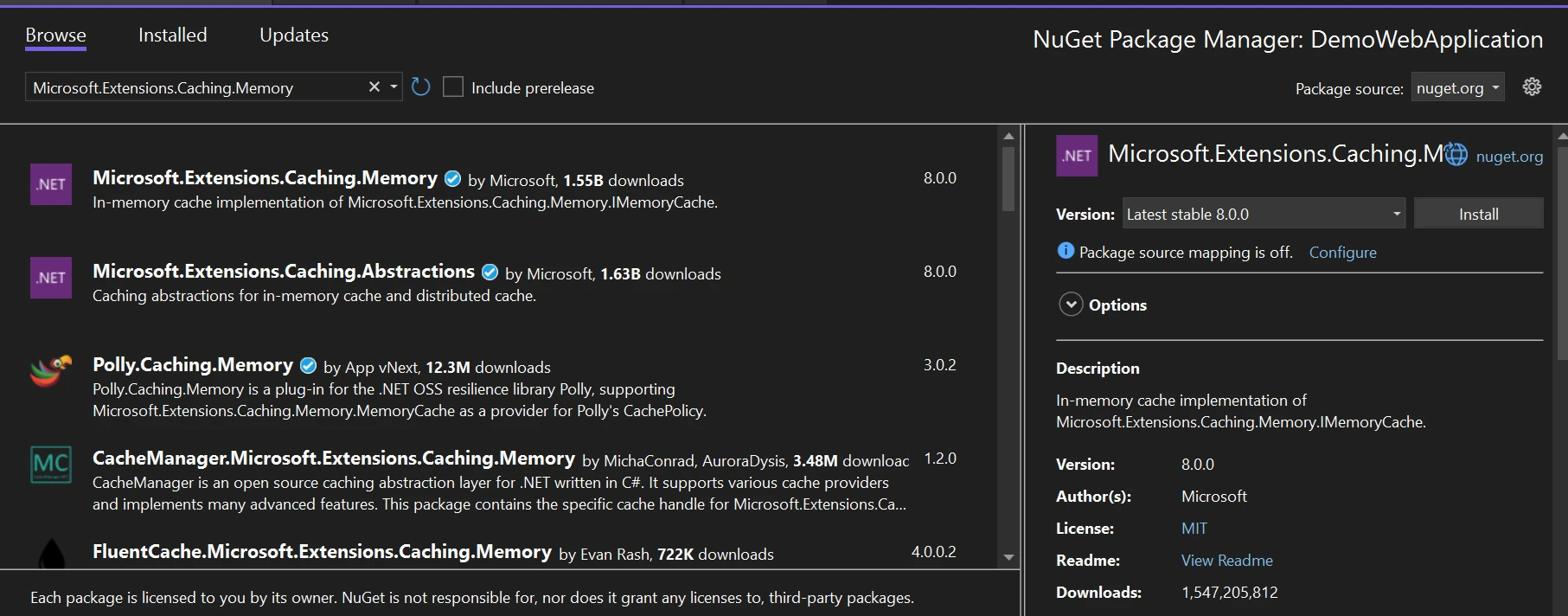
打開 ASP.NET Core 應用程式中的 ConfigureServices 方法,然後轉到 Startup.cs 文件。要設置記憶體快取服務,請新增以下程式碼:
using Microsoft.Extensions.Caching.Memory;
public void ConfigureServices(IServiceCollection services)
{
    // Add memory cache service
    services.AddMemoryCache();
    // Other service configurations...
}Imports Microsoft.Extensions.Caching.Memory
Public Sub ConfigureServices(ByVal services As IServiceCollection)
' Add memory cache service
services.AddMemoryCache()
' Other service configurations...
End Sub此程式碼將快取服務物件新增到應用程式的服務集合並進行配置。 記憶體快取系統服務使用其預設配置透過 AddMemoryCache 函式註冊。
IMemoryCache一旦設置好快取儲存,任何需要快取的類別或元件都可以將 IMemoryCache 介面注入其中。 例如,在控制器或服務類中:
public class MyService
{
    private readonly IMemoryCache _cache;
    public MyService(IMemoryCache cache)
    {
        _cache = cache;
    }
    // Use _cache to perform caching operations...
}Public Class MyService
Private ReadOnly _cache As IMemoryCache
Public Sub New(ByVal cache As IMemoryCache)
_cache = cache
End Sub
' Use _cache to perform caching operations...
End ClassIMemoryCache 介面提供從記憶體中快取和檢索資料的方法。
通過設置快取參數,您可以更改記憶體快取的行為,包括大小限制、快取條目驅逐策略和快取值的到期規則。 以下是一個如何設置快取選項的範例:
public void ConfigureServices(IServiceCollection services)
{
    // Configure cache options
    services.AddMemoryCache(options =>
    {
        options.SizeLimit = 1024; // Set the maximum size limit for the cache
        options.CompactionPercentage = 0.75; // Set the percentage of memory to free up when the cache size exceeds the limit
        options.ExpirationScanFrequency = TimeSpan.FromMinutes(5); // Set how often the cache should scan for expired items
    });
    // Other service configurations...
}Public Sub ConfigureServices(ByVal services As IServiceCollection)
' Configure cache options
services.AddMemoryCache(Sub(options)
options.SizeLimit = 1024 ' Set the maximum size limit for the cache
options.CompactionPercentage = 0.75 ' Set the percentage of memory to free up when the cache size exceeds the limit
options.ExpirationScanFrequency = TimeSpan.FromMinutes(5) ' Set how often the cache should scan for expired items
End Sub)
' Other service configurations...
End Sub根據您的應用程式規格調整設置。
這些指示將幫助您在 ASP.NET Core 應用程式中配置 Microsoft.Extensions.Caching.Memory,以便透過儲存和檢索經常存取的資料來啟動更快速和高效的運作。
借助著名的 .NET 函式庫 IronPDF,程式設計師可以在 .NET 應用程式內生成、編輯和顯示 PDF 文件。 從 HTML 內容、圖像或原始資料建立 PDF 只是其提供的許多處理 PDF 功能之一。 其他功能包括向現有 PDF 檔案新增文字、圖像和形狀,將 HTML 頁面轉換為 PDF,並從 PDF 中提取文字和圖像。
以下是 IronPDF 的一些功能:
在您的專案中,請確保已安裝 IronPDF 套件。 可以使用 NuGet 套件管理器控制台將其安裝:
要存取 ConfigureServices 函式,請在 ASP.NET Core 應用程式中打開 Startup.cs 文件。 要配置 IronPDF,請新增以下程式碼。
using IronPdf;
public void ConfigureServices(IServiceCollection services)
{
    // Configure IronPDF
    services.AddSingleton<HtmlToPdf>();
    // Other service configurations...
}Imports IronPdf
Public Sub ConfigureServices(ByVal services As IServiceCollection)
' Configure IronPDF
services.AddSingleton(Of HtmlToPdf)()
' Other service configurations...
End Sub透過設定 IronPDF 的 HtmlToPdf 服務為單例,這段程式碼確保應用程式僅建立和使用一個 HtmlToPdf 實例。
Microsoft.Extensions.Caching.Memory在 .NET 應用程式中,Microsoft.Extensions.Caching.Memory 提供了一種實用的方法來儲存經常請求的資料以便更快速地檢索。
using Microsoft.AspNetCore.Mvc;
using Microsoft.Extensions.Caching.Memory;
using System.Net;
using System.Net.Http.Headers;
using IronPdf;

namespace DemoWebApplication.Controllers
{
    [ApiController]
    [Route("[controller]")]
    public class DemoController : ControllerBase
    {
        private readonly IMemoryCache _cache;
        private readonly HtmlToPdf _htmlToPdf;
        private readonly ILogger<DemoController> _logger;

        public DemoController(ILogger<DemoController> logger, IMemoryCache cache, HtmlToPdf htmlToPdf)
        {
            _logger = logger;
            _cache = cache;
            _htmlToPdf = htmlToPdf;
        }

        [HttpGet]
        public FileContentResult Generate()
        {
            string fileName = "Sample.pdf";
            var stream = GeneratePdf("Hello IronPDF");
            return new FileContentResult(stream, "application/octet-stream")
            {
                FileDownloadName = fileName
            };
        }

        private byte[] GeneratePdf(string htmlContent)
        {
            // Object key
            string cacheKey = "GeneratedPdf";
            if (!_cache.TryGetValue(cacheKey, out byte[] pdfBytes))
            {
                // PDF not found in cache, generate it
                var pdfDocument = _htmlToPdf.RenderHtmlAsPdf(htmlContent);
                pdfBytes = pdfDocument.BinaryData;
                // Cache the generated PDF with a sliding expiration of 1 hour
                _cache.Set(cacheKey, pdfBytes, TimeSpan.FromHours(1));
            }
            return pdfBytes;
        }
    }
}Imports Microsoft.AspNetCore.Mvc
Imports Microsoft.Extensions.Caching.Memory
Imports System.Net
Imports System.Net.Http.Headers
Imports IronPdf
Namespace DemoWebApplication.Controllers
<ApiController>
<Route("[controller]")>
Public Class DemoController
Inherits ControllerBase
Private ReadOnly _cache As IMemoryCache
Private ReadOnly _htmlToPdf As HtmlToPdf
Private ReadOnly _logger As ILogger(Of DemoController)
Public Sub New(ByVal logger As ILogger(Of DemoController), ByVal cache As IMemoryCache, ByVal htmlToPdf As HtmlToPdf)
_logger = logger
_cache = cache
_htmlToPdf = htmlToPdf
End Sub
<HttpGet>
Public Function Generate() As FileContentResult
Dim fileName As String = "Sample.pdf"
Dim stream = GeneratePdf("Hello IronPDF")
Return New FileContentResult(stream, "application/octet-stream") With {.FileDownloadName = fileName}
End Function
Private Function GeneratePdf(ByVal htmlContent As String) As Byte()
' Object key
Dim cacheKey As String = "GeneratedPdf"
Dim pdfBytes() As Byte
If Not _cache.TryGetValue(cacheKey, pdfBytes) Then
' PDF not found in cache, generate it
Dim pdfDocument = _htmlToPdf.RenderHtmlAsPdf(htmlContent)
pdfBytes = pdfDocument.BinaryData
' Cache the generated PDF with a sliding expiration of 1 hour
_cache.Set(cacheKey, pdfBytes, TimeSpan.FromHours(1))
End If
Return pdfBytes
End Function
End Class
End Namespace我們導入了與 Microsoft 和 ASP.NET Microsoft.Extensions.Caching.Memory 合作所需的命名空間。 我們建立了從 ControllerBase 派生的 DemoController 控制器。 此控制器將響應通過 HTTP 發送的查詢。可在控制器的構造函式中注入 IMemoryCache 的實例。
為控制服務的生存期,包括記憶體快取,ASP.NET Core 提供了依賴注入。 以應用 [HttpGet] 屬性,Generate 方法標記以處理從指定路由(/Demo)存取儲存的 HTTP GET 請求。 我們嘗試使用給定的快取鍵從快取中獲取 PDF 資料。 如果在快取中找不到資料,我們使用 GeneratePdf 函式建立新的 PDF。
在具有多個應用伺服器的情境中,請確保配置分佈式快取以在所有伺服器中保持一致的快取處理。
要利用 Microsoft.Extensions.Caching.Memory,請參閱提供的文件和範例程式碼以快取資料並提升 ASP.NET Core 應用程式的性能。 實際上,您可以根據應用程式需要調整到期策略、快取鍵和快取行為。 快取生成開銷較高或經常被多個執行緒存取的資料可以改善整體使用者體驗並顯著減少響應時間。
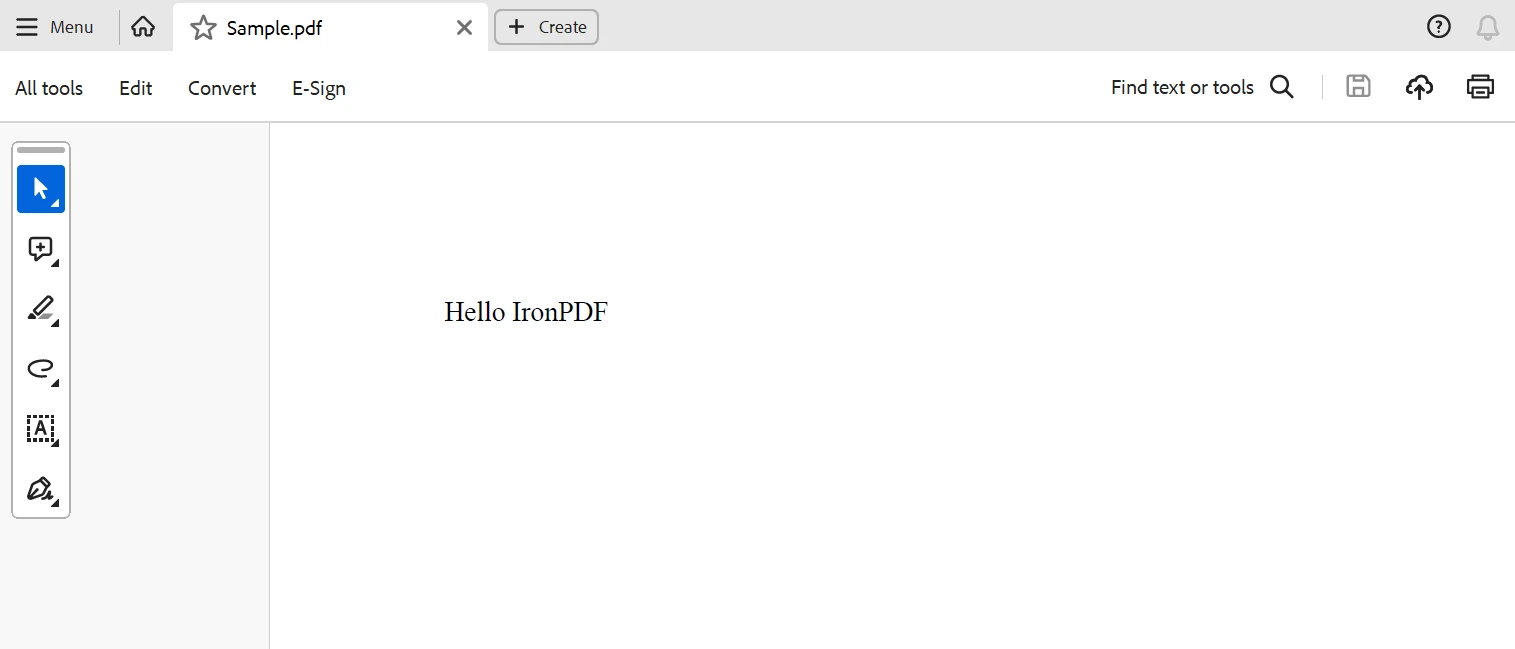
總體而言,Microsoft.Extensions.Caching.Memory 可用於提高.NET應用程式的可擴展性和效能,特別是那些基於 ASP.NET Core 框架的應用程式。 開發人員可以透過使用記憶體內快取來改善使用者體驗、最小化延遲和優化資料存取。 無論是為快取參考資料、查詢結果還是計算值,該函式庫提供了靈活且易於使用的 API,以開發針對特定應用程式需求的快取策略。 通過採用最佳快取實踐並將 Microsoft.Extensions.Caching.Memory 新增到您的 .NET 應用中,您可以實現顯著的速度提升和改善的應用程式響應能力。
透過利用Microsoft.Extensions功能,結合 IronPDF 以動態生成 PDF 和 Caching.Memory 用於有效的資料快取,.NET 開發人員可以大大提升應用程式的速度。這種強大的組合可以幫助開發人員輕鬆設計高性能、可擴展且具有良好響應能力的應用程式,減少伺服器負載、提升使用者體驗並消除處理開銷。
IronPDF 可以以合理的價格購買,並且獲得套件還包括終身授權。 該套件提供了卓越的價值,因為它以 $999 起價,為多個系統提供一次性收費。 對於擁有許可證的使用者,它提供24小時線上工程幫助。 有關收費的更多詳情,請存取 IronPDF 授權頁面。 存取此 Iron Software 的相關頁面 以了解由 Iron Software 製作的產品的更多資訊。

Jacob Mellor是Iron Software的首席技術官,一位在C# PDF技術上開創先河的遠見工程師。作為Iron Software核心程式碼庫的原開發者,他從創立以來就一直在塑造公司的產品架構,與首席執行官Cameron Rimington一起將公司轉變為服務於NASA、特斯拉和全球政府公司的50多名人員的公司。



IronPDF 是 IRONSUITE 的一部分
10 款適用於辦公室文件的 .NET API 產品

當您需要您的PDF看起來像HTML一樣快速。












