


TensorFlow .NET (개발자에게 어떻게 작동하는가)

기계 학습(ML)은 지능형 의사 결정과 자동화를 가능하게 하여 건강 관리에서 금융까지 다양한 산업을 혁신해왔습니다. 구글의 오픈소스 기계 학습 및 딥러닝 프레임워크인 TensorFlow는 이 혁명의 선두에 서 있습니다. .NET 개발자는 TensorFlow.NET를 사용하여 C# 생태계 내에서 TensorFlow의 힘을 활용할 수 있습니다. 이 기사에서는 TensorFlow.NET, 그 기능, 이점 및 C# 개발에서의 실용적인 적용에 대해 탐구할 것입니다. 또한, 우리는 Iron Software의 IronPDF라는 PDF 생성 라이브러리에 대해 실용적인 예제를 통해 배울 것입니다.
TensorFlow.NET 이해하기
TensorFlow.NET는 TensorFlow를 위한 .NET 바인딩으로, 개발자가 C# 및 .NET 응용 프로그램 레이어 내에서 TensorFlow 기능을 직접 사용할 수 있게 해줍니다. 커뮤니티에 의해 개발되고 SciSharp 조직에서 유지 관리하는 TensorFlow.NET는 TensorFlow의 기계 학습 및 신경망 기능을 .NET 플랫폼의 유연성과 원활하게 통합합니다. 이는 C# 개발자들이 신경망을 구축하고 모델을 훈련하며, TensorFlow의 광범위한 시스템 API와 도구를 사용하여 기계 학습 모델을 배포할 수 있게 합니다.
TensorFlow.NET의 주요 기능
- TensorFlow 호환성:
TensorFlow.NET는 TensorFlow의 API 및 작업과의 완전한 호환성을 제공합니다. 이는 텐서 조작, 신경망 레이어, 손실 함수, 최적화기 및 데이터 전처리 및 평가를 위한 유틸리티를 포함합니다. - 고성능:
TensorFlow.NET는 TensorFlow의 효율적인 계산 그래프 실행 엔진과 최적화된 커널을 활용하여 CPU 및 GPU에서 고성능 기계 학습 추론 및 훈련을 제공합니다. - 쉬운 통합:
TensorFlow.NET는 기존 .NET 응용 프로그램 및 라이브러리와 원활하게 통합하여 개발자가 익숙한 C# 개발 환경을 벗어나지 않고 TensorFlow의 기능을 활용할 수 있게 해줍니다. - 모델 이식성:
TensorFlow.NET를 사용하면 개발자는 사전 학습된 TensorFlow 모델을 가져오고, 훈련된 모델을 Python이나 모바일 장치와 같은 다른 TensorFlow 기반 환경에서 추론을 위해 내보낼 수 있습니다. - 유연성과 확장성:
TensorFlow.NET는 LINQ(언어 통합 쿼리)와 같은 C# 언어 기능을 사용하여 데이터 조작 및 모델 구성을 위한 기능적 프로그래밍 패러다임을 통해 기계 학습 모델을 사용자 정의 및 확장할 수 있는 유연성을 제공합니다. - 커뮤니티 지원 및 문서화:
TensorFlow.NET는 활발한 기여자 커뮤니티로부터 이점을 얻어 개발자가 C# 세계에서 TensorFlow를 사용한 기계 학습에 빠르게 시작할 수 있도록 문서, 튜토리얼 및 예제를 제공합니다.
TensorFlow.NET를 사용한 실질적인 예제들
C#에서 기계 학습 모델을 구축하고 배포하는 데 사용할 수 있는 몇 가지 실용적인 시나리오를 탐구해 봅시다: TensorFlow.NET
-
사전 훈련된 모델 로드 및 사용:
// Load a pre-trained TensorFlow model
var model = TensorFlowModel.LoadModel("model.pb");
// Perform inference on input data
var input = new float[,] { { 1.0f, 2.0f, 3.0f } };
var output = model.Predict(input);
// Load a pre-trained TensorFlow model var model = TensorFlowModel.LoadModel("model.pb"); // Perform inference on input data var input = new float[,] { { 1.0f, 2.0f, 3.0f } }; var output = model.Predict(input);' Load a pre-trained TensorFlow model Dim model = TensorFlowModel.LoadModel("model.pb") ' Perform inference on input data Dim input = New Single(, ) { { 1.0F, 2.0F, 3.0F } } Dim output = model.Predict(input)$vbLabelText $csharpLabel -
맞춤형 모델 훈련:
// Create a neural network model using TensorFlow.NET APIs
var input = new Input(Shape.Scalar);
var output = new Dense(1, Activation.ReLU).Forward(input);
// Compile the model with loss function and optimizer algorithms
var model = new Model(input, output);
model.Compile(optimizer: new SGD(), loss: Losses.MeanSquaredError);
// Train the model with training data
model.Fit(x_train, y_train, epochs: 10, batchSize: 32);
// Create a neural network model using TensorFlow.NET APIs var input = new Input(Shape.Scalar); var output = new Dense(1, Activation.ReLU).Forward(input); // Compile the model with loss function and optimizer algorithms var model = new Model(input, output); model.Compile(optimizer: new SGD(), loss: Losses.MeanSquaredError); // Train the model with training data model.Fit(x_train, y_train, epochs: 10, batchSize: 32);' Create a neural network model using TensorFlow.NET APIs Dim input As New Input(Shape.Scalar) Dim output = (New Dense(1, Activation.ReLU)).Forward(input) ' Compile the model with loss function and optimizer algorithms Dim model As New Model(input, output) model.Compile(optimizer:= New SGD(), loss:= Losses.MeanSquaredError) ' Train the model with training data model.Fit(x_train, y_train, epochs:= 10, batchSize:= 32)$vbLabelText $csharpLabel -
평가 및 배포:
// Evaluate the trained model on test data
var evaluation = model.Evaluate(x_test, y_test);
// Export the trained model for deployment
model.SaveModel("trained_model.pb");
// Evaluate the trained model on test data var evaluation = model.Evaluate(x_test, y_test); // Export the trained model for deployment model.SaveModel("trained_model.pb");' Evaluate the trained model on test data Dim evaluation = model.Evaluate(x_test, y_test) ' Export the trained model for deployment model.SaveModel("trained_model.pb")$vbLabelText $csharpLabel
TensorFlow의 더 많은 예제는 TensorFlow.NET Examples 페이지에서 찾을 수 있습니다.
// Use static TensorFlow
using static Tensorflow.Binding;

namespace IronPdfDemos
{
    public class TensorFlow
    {
        public static void Execute()
        {
            // Create a TensorFlow constant
            var hello = tf.constant("Hello, TensorFlow!");
            Console.WriteLine(hello);
        }
    }
}
// Use static TensorFlow
using static Tensorflow.Binding;
namespace IronPdfDemos
{
public class TensorFlow
{
public static void Execute()
{
// Create a TensorFlow constant
var hello = tf.constant("Hello, TensorFlow!");
Console.WriteLine(hello);
}
}
}' Use static TensorFlow
Imports Tensorflow.Binding
Namespace IronPdfDemos
Public Class TensorFlow
Public Shared Sub Execute()
' Create a TensorFlow constant
Dim hello = tf.constant("Hello, TensorFlow!")
Console.WriteLine(hello)
End Sub
End Class
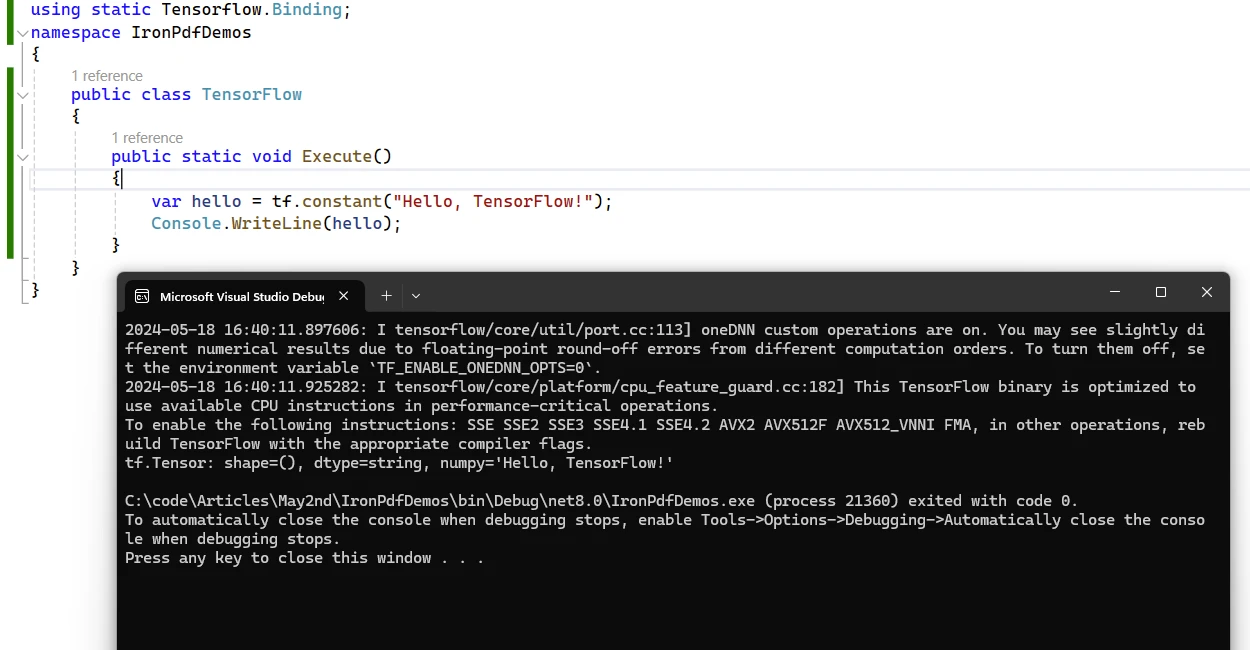
End Namespace샘플 Hello TensorFlow 출력
TensorFlow.NET을 사용하는 이점
- 원활한 통합:
TensorFlow.NET는 .NET 생태계에 TensorFlow의 힘을 가져오며, C# 개발자가 최첨단 기계 학습 기술 및 알고리즘을 응용 프로그램에서 활용할 수 있게 합니다. - 성능 및 확장성:
TensorFlow.NETTensorFlow의 최적화된 실행 엔진을 활용하여 대규모 데이터 세트 및 복잡한 모델을 처리할 수 있는 고성능 기계 학습 계산을 제공합니다. - 익숙한 개발 환경:
TensorFlow.NETAPI를 사용하여 개발자는 익숙한 C# 언어 기능 및 개발 도구를 사용하여 기계 학습 모델을 구축하고 배포할 수 있으며, C# 응용 프로그램에서 기계 학습을 채택하기 위한 학습 곡선을 줄일 수 있습니다. - 상호 운용성과 이식성:
TensorFlow.NET는 다른 TensorFlow 기반 환경과의 상호 운용성을 촉진하여 C# 기반 기계 학습 모델이 Python, TensorFlow Serving 및 TensorFlow Lite와 원활하게 통합될 수 있도록 합니다. - 커뮤니티 기반 개발:
TensorFlow.NET는 활발한 기여자 및 사용자 커뮤니티로부터 이점을 얻어 지원, 피드백 및 프로젝트에 대한 기여를 제공하여 지속적인 성장 및 개선을 보장합니다.
TensorFlow.NET 라이선스
이것은 자유롭게 사용할 수 있는 오픈소스 Apache 라이선스 패키지입니다. 라이선스에 대한 자세한 내용은 TensorFlow.NET License 페이지에서 읽을 수 있습니다.
IronPDF 소개합니다
IronPDF는 HTML, CSS, 이미지 및 JavaScript 입력으로부터 직접 PDF를 생성, 편집 및 서명할 수 있는 강력한 C# PDF 라이브러리입니다. 상용 등급의 솔루션으로 높은 성능과 낮은 메모리 사용량을 자랑합니다. 다음은 몇 가지 주요 기능입니다:
- HTML을 PDF로 변환:
IronPDF는 HTML 파일, HTML 문자열 및 URL을 PDF로 변환할 수 있습니다. 예를 들어, Chrome PDF 렌더러를 사용하여 웹 페이지를 PDF로 렌더링할 수 있습니다. - 크로스 플랫폼 지원:
IronPDF는 .NET Core, .NET Standard 및 .NET Framework를 비롯한 다양한 .NET 플랫폼에서 동작합니다. Windows, Linux, macOS에서 호환됩니다. - 편집 및 서명: PDF에 속성을 설정하고, 보안(비밀번호 및 권한)을 추가하며, 디지털 서명까지 적용할 수 있습니다.
- 페이지 템플릿과 설정: 페이지 상단 정보, 하단 정보, 페이지 번호를 추가하고 여백을 조정하여 PDF를 사용자 정의하세요.
IronPDF는 반응형 레이아웃 및 사용자 지정 용지 크기를 지원합니다. - 표준 준수:
IronPDF는 PDF/A 및 PDF/UA와 같은 PDF 표준을 준수합니다. 이 라이브러리는 UTF-8 문자 인코딩을 지원하며 이미지, CSS, 글꼴과 같은 자산을 처리합니다.
TensorFlow.NET과 IronPDF를 사용하여 PDF 문서 생성하기
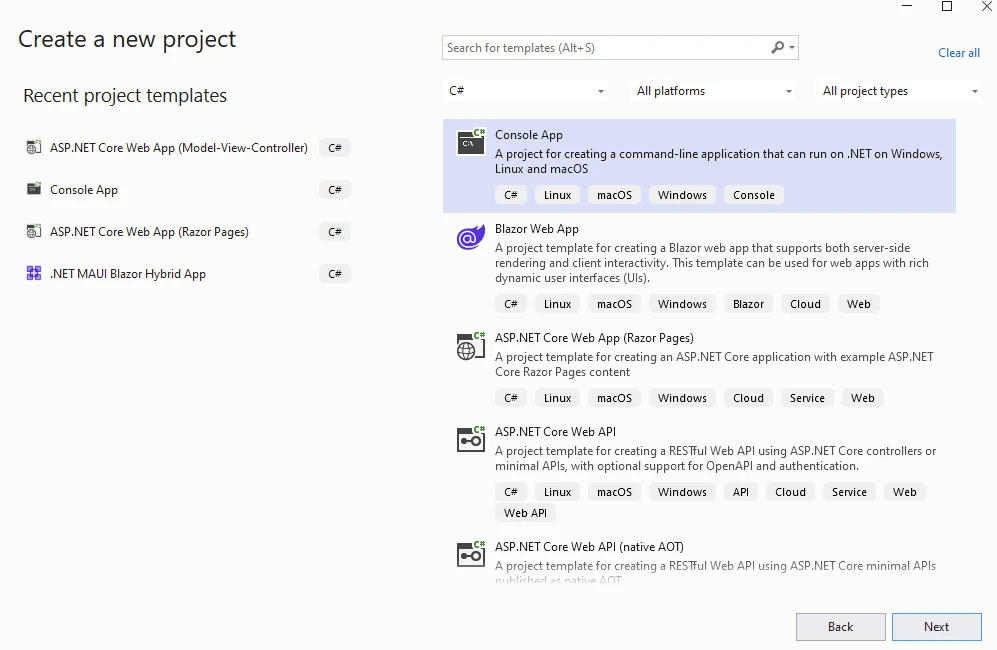
먼저, Visual Studio 프로젝트를 생성하고 아래의 콘솔 앱 템플릿을 선택하세요.
프로젝트 이름과 위치 제공.
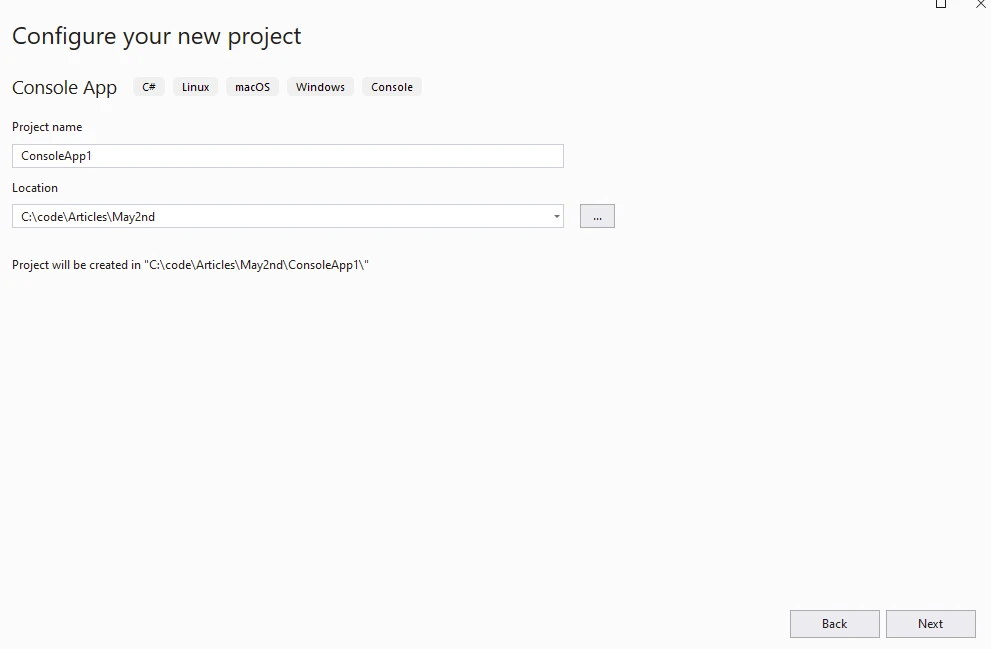
다음 단계에서 필요한 .NET 버전을 선택하고 생성 버튼을 클릭하세요.
NuGet 패키지의 Visual Studio 패키지 관리자를 통해 IronPDF를 설치합니다.
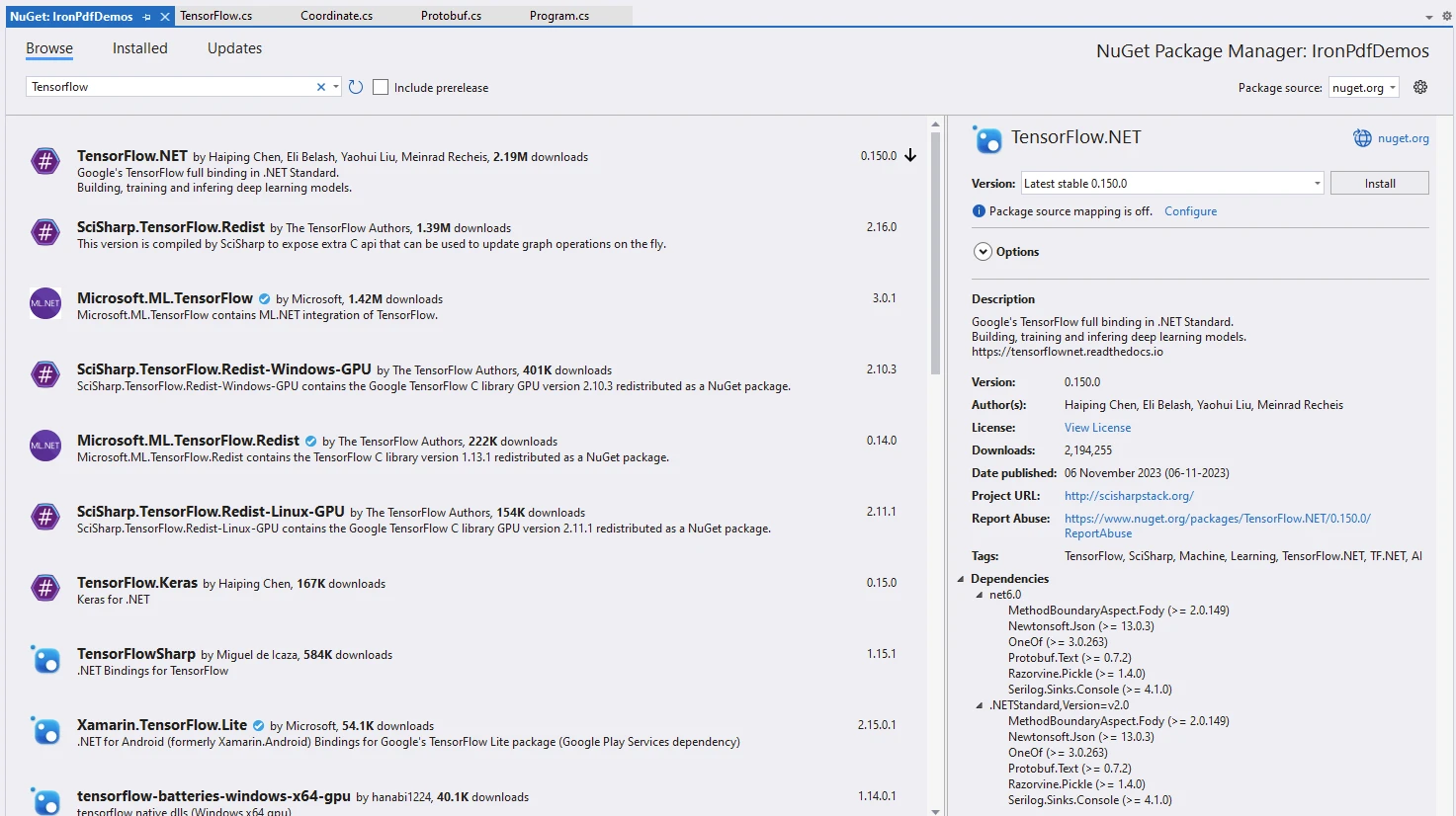
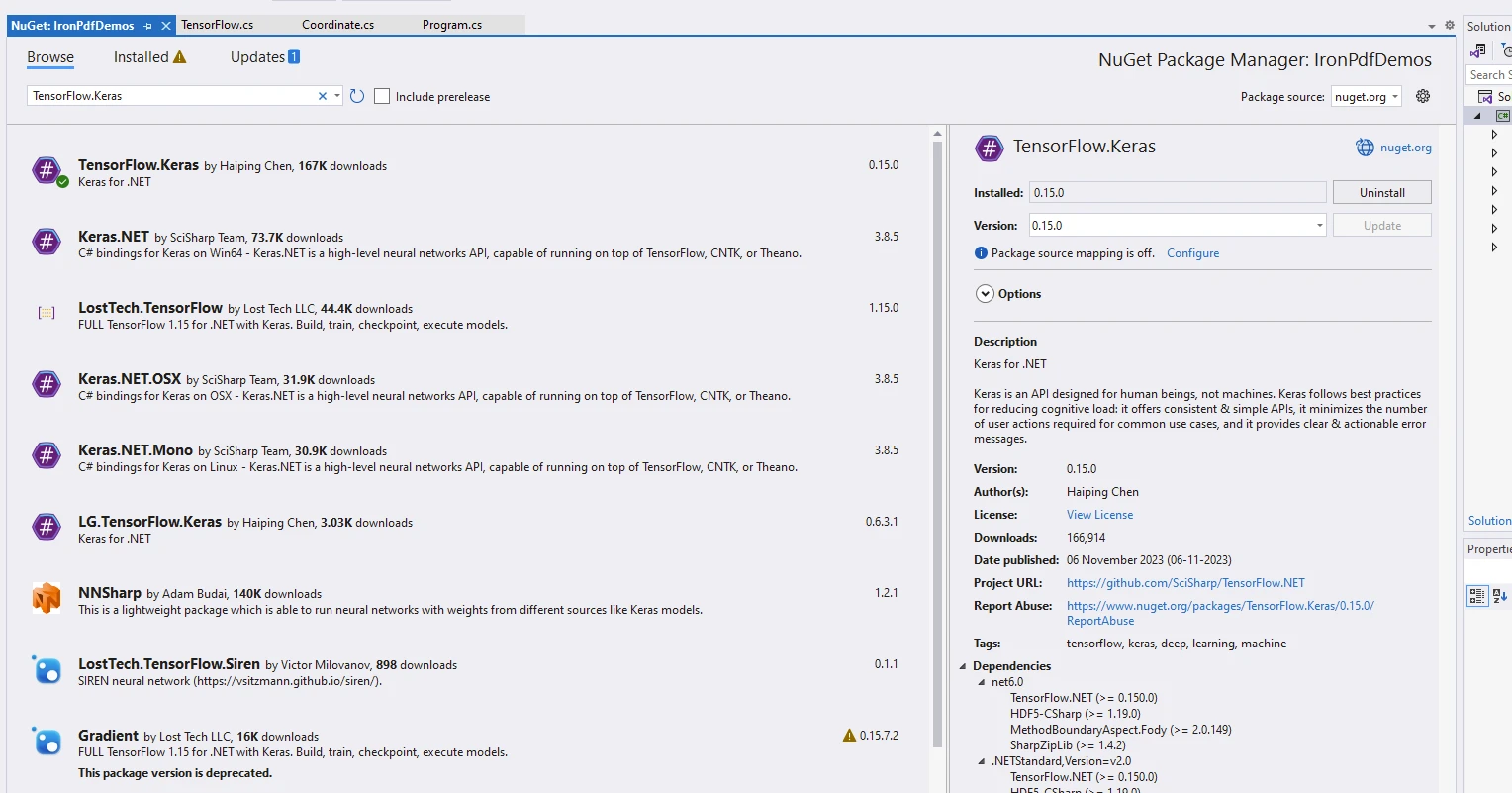
독립적 패키지인 TensorFlow.NET 및 모델 실행에 사용되는 TensorFlow.Keras 패키지를 설치합니다.
using IronPdf;
using static Tensorflow.Binding;

namespace IronPdfDemos
{
    public class Program
    {
        public static void Main()
        {
            // Instantiate Cache and ChromePdfRenderer
            var renderer = new ChromePdfRenderer();

            // Prepare HTML content for the PDF
            var content = "<h1>Demonstrate TensorFlow with IronPDF</h1>";
            content += "<h2>Enable Eager Execution</h2>";
            content += "<p>tf.enable_eager_execution();</p>";

            // Enable eager execution mode in TensorFlow
            tf.enable_eager_execution();

            // Define tensor constants
            content += "<h2>Define Tensor Constants</h2>";
            var a = tf.constant(5);
            var b = tf.constant(6);
            var c = tf.constant(7);

            // Perform various tensor operations
            content += "<h2>Various Tensor Operations</h2>";
            var add = tf.add(a, b);
            var sub = tf.subtract(a, b);
            var mul = tf.multiply(a, b);
            var div = tf.divide(a, b);

            content += $"<p>var add = tf.add(a, b);</p>";
            content += $"<p>var sub = tf.subtract(a, b);</p>";
            content += $"<p>var mul = tf.multiply(a, b);</p>";
            content += $"<p>var div = tf.divide(a, b);</p>";

            // Output tensor values to HTML content
            content += "<h2>Access Tensor Values</h2>";
            content += $"<p>{a.numpy()} + {b.numpy()} = {add.numpy()}</p>";
            content += $"<p>{a.numpy()} - {b.numpy()} = {sub.numpy()}</p>";
            content += $"<p>{a.numpy()} * {b.numpy()} = {mul.numpy()}</p>";
            content += $"<p>{a.numpy()} / {b.numpy()} = {div.numpy()}</p>";

            // Perform additional operations
            var mean = tf.reduce_mean(tf.constant(new[] { a, b, c }));
            var sum = tf.reduce_sum(tf.constant(new[] { a, b, c }));

            content += "<h2>Additional Operations</h2>";
            content += $"<p>mean = {mean.numpy()}</p>";
            content += $"<p>sum = {sum.numpy()}</p>";

            // Perform matrix multiplication
            var matrix1 = tf.constant(new float[,] { { 1, 2 }, { 3, 4 } });
            var matrix2 = tf.constant(new float[,] { { 5, 6 }, { 7, 8 } });
            var product = tf.matmul(matrix1, matrix2);

            content += "<h2>Matrix Multiplications</h2>";
            content += "<p>Multiplication Result:</p>";
            content += $"<p>product = {product.numpy()}</p>";

            // Render HTML content to PDF
            var pdf = renderer.RenderHtmlAsPdf(content);
            // Save PDF to file
            pdf.SaveAs("tensorflow.pdf");
        }
    }
}
using IronPdf;
using static Tensorflow.Binding;
namespace IronPdfDemos
{
public class Program
{
public static void Main()
{
// Instantiate Cache and ChromePdfRenderer
var renderer = new ChromePdfRenderer();
// Prepare HTML content for the PDF
var content = "<h1>Demonstrate TensorFlow with IronPDF</h1>";
content += "<h2>Enable Eager Execution</h2>";
content += "<p>tf.enable_eager_execution();</p>";
// Enable eager execution mode in TensorFlow
tf.enable_eager_execution();
// Define tensor constants
content += "<h2>Define Tensor Constants</h2>";
var a = tf.constant(5);
var b = tf.constant(6);
var c = tf.constant(7);
// Perform various tensor operations
content += "<h2>Various Tensor Operations</h2>";
var add = tf.add(a, b);
var sub = tf.subtract(a, b);
var mul = tf.multiply(a, b);
var div = tf.divide(a, b);
content += $"<p>var add = tf.add(a, b);</p>";
content += $"<p>var sub = tf.subtract(a, b);</p>";
content += $"<p>var mul = tf.multiply(a, b);</p>";
content += $"<p>var div = tf.divide(a, b);</p>";
// Output tensor values to HTML content
content += "<h2>Access Tensor Values</h2>";
content += $"<p>{a.numpy()} + {b.numpy()} = {add.numpy()}</p>";
content += $"<p>{a.numpy()} - {b.numpy()} = {sub.numpy()}</p>";
content += $"<p>{a.numpy()} * {b.numpy()} = {mul.numpy()}</p>";
content += $"<p>{a.numpy()} / {b.numpy()} = {div.numpy()}</p>";
// Perform additional operations
var mean = tf.reduce_mean(tf.constant(new[] { a, b, c }));
var sum = tf.reduce_sum(tf.constant(new[] { a, b, c }));
content += "<h2>Additional Operations</h2>";
content += $"<p>mean = {mean.numpy()}</p>";
content += $"<p>sum = {sum.numpy()}</p>";
// Perform matrix multiplication
var matrix1 = tf.constant(new float[,] { { 1, 2 }, { 3, 4 } });
var matrix2 = tf.constant(new float[,] { { 5, 6 }, { 7, 8 } });
var product = tf.matmul(matrix1, matrix2);
content += "<h2>Matrix Multiplications</h2>";
content += "<p>Multiplication Result:</p>";
content += $"<p>product = {product.numpy()}</p>";
// Render HTML content to PDF
var pdf = renderer.RenderHtmlAsPdf(content);
// Save PDF to file
pdf.SaveAs("tensorflow.pdf");
}
}
}Imports IronPdf
Imports Tensorflow.Binding
Namespace IronPdfDemos
Public Class Program
Public Shared Sub Main()
' Instantiate Cache and ChromePdfRenderer
Dim renderer = New ChromePdfRenderer()
' Prepare HTML content for the PDF
Dim content = "<h1>Demonstrate TensorFlow with IronPDF</h1>"
content &= "<h2>Enable Eager Execution</h2>"
content &= "<p>tf.enable_eager_execution();</p>"
' Enable eager execution mode in TensorFlow
tf.enable_eager_execution()
' Define tensor constants
content &= "<h2>Define Tensor Constants</h2>"
Dim a = tf.constant(5)
Dim b = tf.constant(6)
Dim c = tf.constant(7)
' Perform various tensor operations
content &= "<h2>Various Tensor Operations</h2>"
Dim add = tf.add(a, b)
Dim [sub] = tf.subtract(a, b)
Dim mul = tf.multiply(a, b)
Dim div = tf.divide(a, b)
content &= $"<p>var add = tf.add(a, b);</p>"
content &= $"<p>var sub = tf.subtract(a, b);</p>"
content &= $"<p>var mul = tf.multiply(a, b);</p>"
content &= $"<p>var div = tf.divide(a, b);</p>"
' Output tensor values to HTML content
content &= "<h2>Access Tensor Values</h2>"
content &= $"<p>{a.numpy()} + {b.numpy()} = {add.numpy()}</p>"
content &= $"<p>{a.numpy()} - {b.numpy()} = {[sub].numpy()}</p>"
content &= $"<p>{a.numpy()} * {b.numpy()} = {mul.numpy()}</p>"
content &= $"<p>{a.numpy()} / {b.numpy()} = {div.numpy()}</p>"
' Perform additional operations
Dim mean = tf.reduce_mean(tf.constant( { a, b, c }))
Dim sum = tf.reduce_sum(tf.constant( { a, b, c }))
content &= "<h2>Additional Operations</h2>"
content &= $"<p>mean = {mean.numpy()}</p>"
content &= $"<p>sum = {sum.numpy()}</p>"
' Perform matrix multiplication
Dim matrix1 = tf.constant(New Single(, ) {
{ 1, 2 },
{ 3, 4 }
})
Dim matrix2 = tf.constant(New Single(, ) {
{ 5, 6 },
{ 7, 8 }
})
Dim product = tf.matmul(matrix1, matrix2)
content &= "<h2>Matrix Multiplications</h2>"
content &= "<p>Multiplication Result:</p>"
content &= $"<p>product = {product.numpy()}</p>"
' Render HTML content to PDF
Dim pdf = renderer.RenderHtmlAsPdf(content)
' Save PDF to file
pdf.SaveAs("tensorflow.pdf")
End Sub
End Class
End Namespace코드 설명
코드 스니펫을 설명하겠습니다:
-
임포트 문:
코드가 필요한 라이브러리를 임포트하면서 시작됩니다. 특히:
using IronPdf; // This imports the IronPDF package, which is used for working with PDF files.
using static Tensorflow.Binding; // This imports the TensorFlow library, specifically the .NET standard binding.
using IronPdf; // This imports the IronPDF package, which is used for working with PDF files. using static Tensorflow.Binding; // This imports the TensorFlow library, specifically the .NET standard binding.Imports IronPdf ' This imports the IronPDF package, which is used for working with PDF files. Imports Tensorflow.Binding ' This imports the TensorFlow library, specifically the .NET standard binding.$vbLabelText $csharpLabel - 즉시 실행:
tf.enable_eager_execution();는 TensorFlow의 즉시 실행 모드를 활성화합니다. 즉시 실행 모드에서는 연산이 즉시 평가되어 디버그와 텐서를 사용하기가 더 쉬워집니다.
- 텐서 상수 정의:
이 코드는 세 개의 텐서 상수를 정의합니다: a, b, 및 c. 이들은 각각 5, 6, 7의 값으로 초기화됩니다.
-
여러 텐서 연산:
다음과 같은 텐서 연산이 수행됩니다:
var add = tf.add(a, b); // Adds a and b.
var sub = tf.subtract(a, b); // Subtracts b from a.
var mul = tf.multiply(a, b); // Multiplies a and b.
var div = tf.divide(a, b); // Divides a by b.
var add = tf.add(a, b); // Adds a and b. var sub = tf.subtract(a, b); // Subtracts b from a. var mul = tf.multiply(a, b); // Multiplies a and b. var div = tf.divide(a, b); // Divides a by b.Dim add = tf.add(a, b) ' Adds a and b. Dim [sub] = tf.subtract(a, b) ' Subtracts b from a. Dim mul = tf.multiply(a, b) ' Multiplies a and b. Dim div = tf.divide(a, b) ' Divides a by b.$vbLabelText $csharpLabel -
텐서 값 접근:
텐서 연산의 결과는 HTML 콘텐츠에 포함됩니다:
content += $"<p>{a.numpy()} + {b.numpy()} = {add.numpy()}</p>";
content += $"<p>{a.numpy()} - {b.numpy()} = {sub.numpy()}</p>";
content += $"<p>{a.numpy()} * {b.numpy()} = {mul.numpy()}</p>";
content += $"<p>{a.numpy()} / {b.numpy()} = {div.numpy()}</p>";
content += $"<p>{a.numpy()} + {b.numpy()} = {add.numpy()}</p>"; content += $"<p>{a.numpy()} - {b.numpy()} = {sub.numpy()}</p>"; content += $"<p>{a.numpy()} * {b.numpy()} = {mul.numpy()}</p>"; content += $"<p>{a.numpy()} / {b.numpy()} = {div.numpy()}</p>";content += $"<p>{a.numpy()} + {b.numpy()} = {add.numpy()}</p>" content += $"<p>{a.numpy()} - {b.numpy()} = {[sub].numpy()}</p>" content += $"<p>{a.numpy()} * {b.numpy()} = {mul.numpy()}</p>" content += $"<p>{a.numpy()} / {b.numpy()} = {div.numpy()}</p>"$vbLabelText $csharpLabel - 추가 연산:
이 코드는 상수 [a, b, c]의 평균 및 합계를 계산합니다.
- 행렬 곱셈:
matrix1와 matrix2 간의 행렬 곱셈을 수행하고 결과를 표시합니다.
- PDF 생성:
ChromePdfRenderer 및 RenderHtmlAsPdf는 IronPDF에서 가져와 HTML 문자열을 PDF 문서로 렌더링하는 데 사용됩니다.
산출
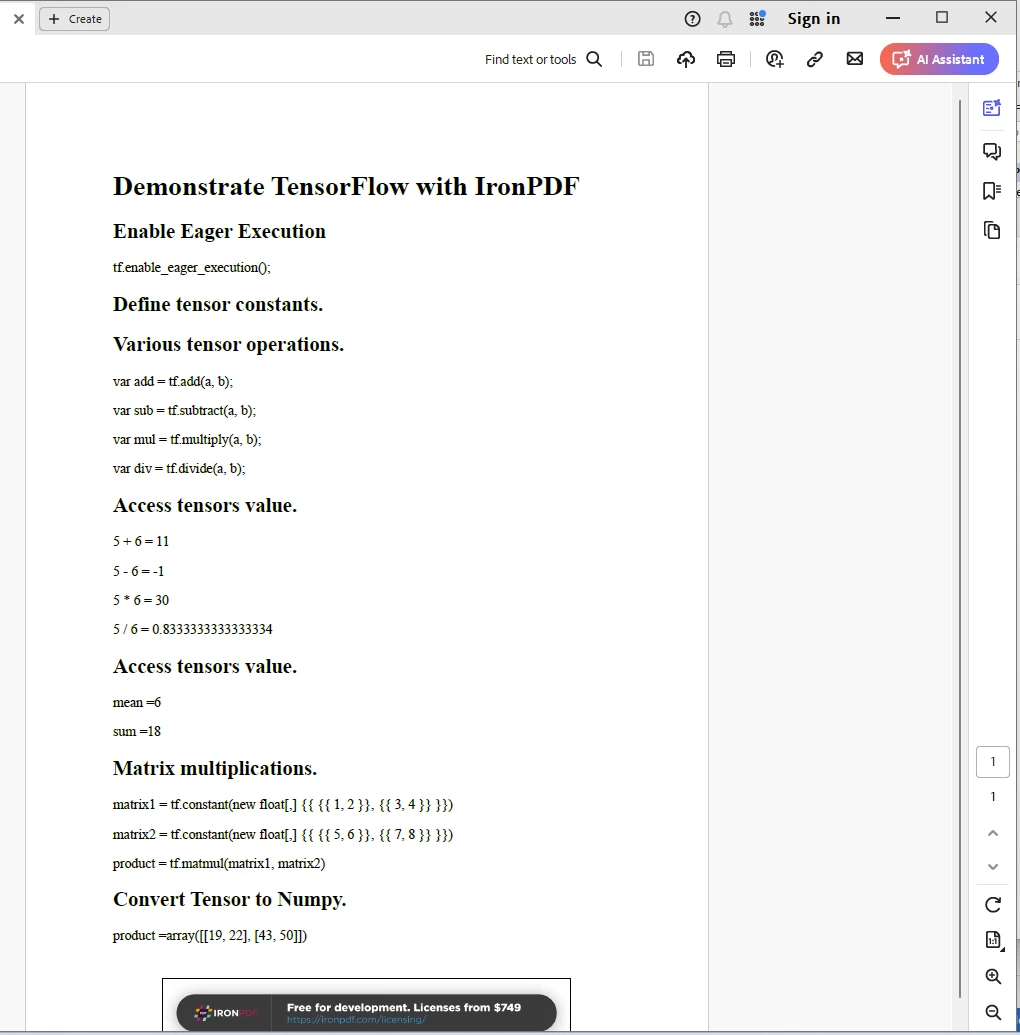
IronPDF 라이선스
IronPDF는 실행에 라이센스가 필요합니다. 라이센싱에 대한 자세한 내용은 IronPDF 라이센싱 페이지에서 확인할 수 있습니다. 키를 아래와 같이 appSettings.json 파일에 배치합니다.
{
  "IronPdf.License.LicenseKey": "The Key Here"
}
결론
결론적으로 TensorFlow.NET는 .NET 생태계의 다양성과 생산성을 통해 C# 개발자가 기계 학습 및 인공 지능 세계를 탐구할 수 있도록합니다. 지능형 응용 프로그램, 예측 분석 도구 또는 자동화된 의사 결정 시스템을 구축하든 관계없이 TensorFlow.NET은 C#에서 기계 학습의 잠재력을 발산할 수 있는 강력하고 유연한 프레임워크를 제공합니다. Iron Software의 IronPDF 라이브러리와 함께 개발자는 현대적인 응용 프로그램을 개발할 수 있는 고급 기술을 습득할 수 있습니다.
자주 묻는 질문
내 C# 애플리케이션에 기계 학습을 어떻게 통합할 수 있나요?
TensorFlow.NET을 사용할 수 있습니다. 이는 .NET 용 TensorFlow 바인딩으로 기계 학습 모델을 빌드, 훈련, 배포할 수 있게 해주며, TensorFlow의 강력한 API와 완벽한 호환성을 제공합니다.
TensorFlow.NET의 주요 기능은 무엇인가요?
TensorFlow.NET은 TensorFlow API와의 완전한 호환성, TensorFlow 계산 엔진을 통한 높은 성능, .NET 시스템과의 쉬운 통합, 모델 이식성, 강력한 커뮤니티 지원과 같은 기능을 제공합니다.
.NET 애플리케이션에서 HTML을 PDF로 변환하는 방법은 무엇입니까?
.NET 애플리케이션에서 HTML을 PDF로 변환하려면 IronPDF를 사용할 수 있습니다. IronPDF는 HTML, CSS, JavaScript 입력을 PDF 문서로 변환하여 플랫폼 간 호환성과 고급 PDF 조작 기능을 제공합니다.
TensorFlow.NET을 사용하여 Python에서 모델을 가져올 수 있나요?
네, TensorFlow.NET은 모델의 이식성을 지원하여 Python과 같은 환경에서 생성된 모델을 가져와 .NET 애플리케이션에서 사용할 수 있습니다.
TensorFlow.NET과 IronPDF를 결합하면 어떤 잠재력을 가지고 있나요?
TensorFlow.NET과 IronPDF를 결합하면 복잡한 기계 학습 계산을 수행하고 잘 포맷된 PDF 문서로 결과를 표현하는 지능형 애플리케이션을 개발할 수 있어 문서화 및 보고 프로세스를 강화합니다.
TensorFlow.NET은 크로스 플랫폼 개발에 적합한가요?
네, TensorFlow.NET은 다양한 운영 체제에 호환되는 애플리케이션을 구축할 수 있도록 크로스 플랫폼 .NET 환경에서 사용할 수 있습니다.
C# 애플리케이션에서 PDF를 편집하고 서명할 수 있나요?
IronPDF는 C# 애플리케이션 내에서 PDF 문서를 편집하고 서명할 수 있는 기능을 제공하여 강력한 PDF 조작 및 관리를 가능하게 합니다.
TensorFlow.NET을 사용하는 개발자를 위한 지원은 어떤 것이 있나요?
TensorFlow.NET은 강력한 커뮤니티와 포괄적인 문서 지원을 통해 개발자들이 개발 과정을 지원할 자원과 예제를 쉽게 찾을 수 있도록 합니다.
TensorFlow.NET이 C# 개발 환경을 어떻게 향상시키나요?
TensorFlow.NET은 TensorFlow의 기계 학습 기능을 통합하여, 개발자가 .NET 에코시스템을 벗어나지 않고 TensorFlow의 모든 힘을 활용할 수 있도록 함으로써 C# 개발 환경을 강화합니다.
IronPDF를 사용하는 실제 예제는 어디서 찾을 수 있나요?
IronPDF 문서 페이지와 .NET PDF 조작에 전념하는 다양한 온라인 리소스 및 커뮤니티 포럼에서 IronPDF를 사용하는 실제 예제를 찾을 수 있습니다.










 무료로 시작하세요
 무료로 시작하세요
 무료 라이브 데모 예약하기





 신용카드나 계정 생성은 필요하지 않습니다.










