using IronPdf;

// Disable local disk access or cross-origin requests
Installation.EnableWebSecurity = true;

// Instantiate Renderer
var renderer = new ChromePdfRenderer();

// Create a PDF from a HTML string using C#
var pdf = renderer.RenderHtmlAsPdf("<h1>Hello World</h1>");

// Export to a file or Stream
pdf.SaveAs("output.pdf");

// Advanced Example with HTML Assets
// Load external html assets: Images, CSS and JavaScript.
// An optional BasePath 'C:\site\assets\' is set as the file location to load assets from
var myAdvancedPdf = renderer.RenderHtmlAsPdf("<img src='icons/iron.png'>", @"C:\site\assets\");
myAdvancedPdf.SaveAs("html-with-assets.pdf");
using IronPdf;// Disable local disk access or cross-origin requestsInstallation.EnableWebSecurity = true;// Instantiate Renderervar renderer = new ChromePdfRenderer();// Create a PDF from a HTML string using C#var pdf = renderer.RenderHtmlAsPdf("<h1>Hello World</h1>");// Export to a file or Streampdf.SaveAs("output.pdf");// Advanced Example with HTML Assets// Load external html assets: Images, CSS and JavaScript.// An optional BasePath 'C:\site\assets\' is set as the file location to load assets fromvar myAdvancedPdf = renderer.RenderHtmlAsPdf("<img src='icons/iron.png'>", @"C:\site\assets\");myAdvancedPdf.SaveAs("html-with-assets.pdf");
## Czym jest Fluent Validation?
[FluentValidation](https://www.nuget.org/packages/FluentValidation/) to biblioteka walidacyjna .NET, która pomaga w tworzeniu reguł walidacji silnie typowanych. Wykorzystuje płynny interfejs i wyrażenia lambda, dzięki czemu kod jest bardziej czytelny i łatwiejszy w utrzymaniu. Zamiast używać adnotacji danych lub ręcznej walidacji w klasach modeli, możesz skorzystać z Fluent Validation, aby zbudować oddzielną klasę dla logiki walidacji.
Fluent Validation zapewnia większą elastyczność w zakresie walidacji. Dzięki wbudowanym walidatorom dla typowych scenariuszy, możliwości tworzenia niestandardowych walidacji oraz prostemu sposobowi łączenia reguł walidacji, Fluent Validation jest potężnym narzędziem w zestawie narzędzi .NET Core.
### Zrozumienie płynnej walidacji
Fluent Validation to biblioteka open source dla platformy .NET, która ułatwia tworzenie reguł walidacji dla klas modeli.
1. **Walidatory:** Walidatory to klasy, które hermetyzują logikę walidacji. Zazwyczaj są tworzone przez dziedziczenie z klasy bazowej `AbstractValidator<t>`.
2. **Reguły:** Reguła to warunek walidacji, który musi spełniać dana właściwość. Zasady są definiowane za pomocą metody `RuleFor` w klasie walidatora.
3. **Niepowodzenia Walidacji:** Jeśli zasada zawiedzie, Fluent Validation tworzy obiekt `ValidationFailure`, który zawiera szczegóły dotyczące błędu, w tym nazwę właściwości i komunikat o błędzie.
## Czym jest IronPDF?
[IronPDF - Convert HTML to PDF in C#](/) to potężna biblioteka .NET, która pozwala generować dokumenty PDF na podstawie treści HTML. Niezależnie od tego, czy potrzebujesz tworzyć faktury, raporty czy jakikolwiek inny rodzaj dokumentu, IronPDF zapewnia łatwe w użyciu rozwiązanie. Integruje się płynnie z aplikacjami .NET Core, umożliwiając generowanie wysokiej jakości plików PDF za pomocą zaledwie kilku linii kodu.
## Korzystanie z Fluent Validation z IronPDF
Teraz, gdy wiemy już, czym są Fluent Validation i IronPDF, zobaczmy, jak można je wykorzystać razem. Ten samouczek pomoże w stworzeniu generatora faktur, w którym zawartość faktury będzie sprawdzana przy użyciu FluentValidation w ASP.NET Core przed wygenerowaniem pliku PDF za pomocą IronPDF.
### Konfiguracja projektu
Na początek utwórzmy nową aplikację konsolową w Visual Studio lub innym preferowanym środowisku programistycznym.
1. Otwórz Visual Studio i przejdź do **Plik > Nowy > Projekt**.
2. Wybierz "Aplikacja konsolowa (ASP.NET Core)" jako szablon projektu i nadaj nazwę swojemu projektowi.
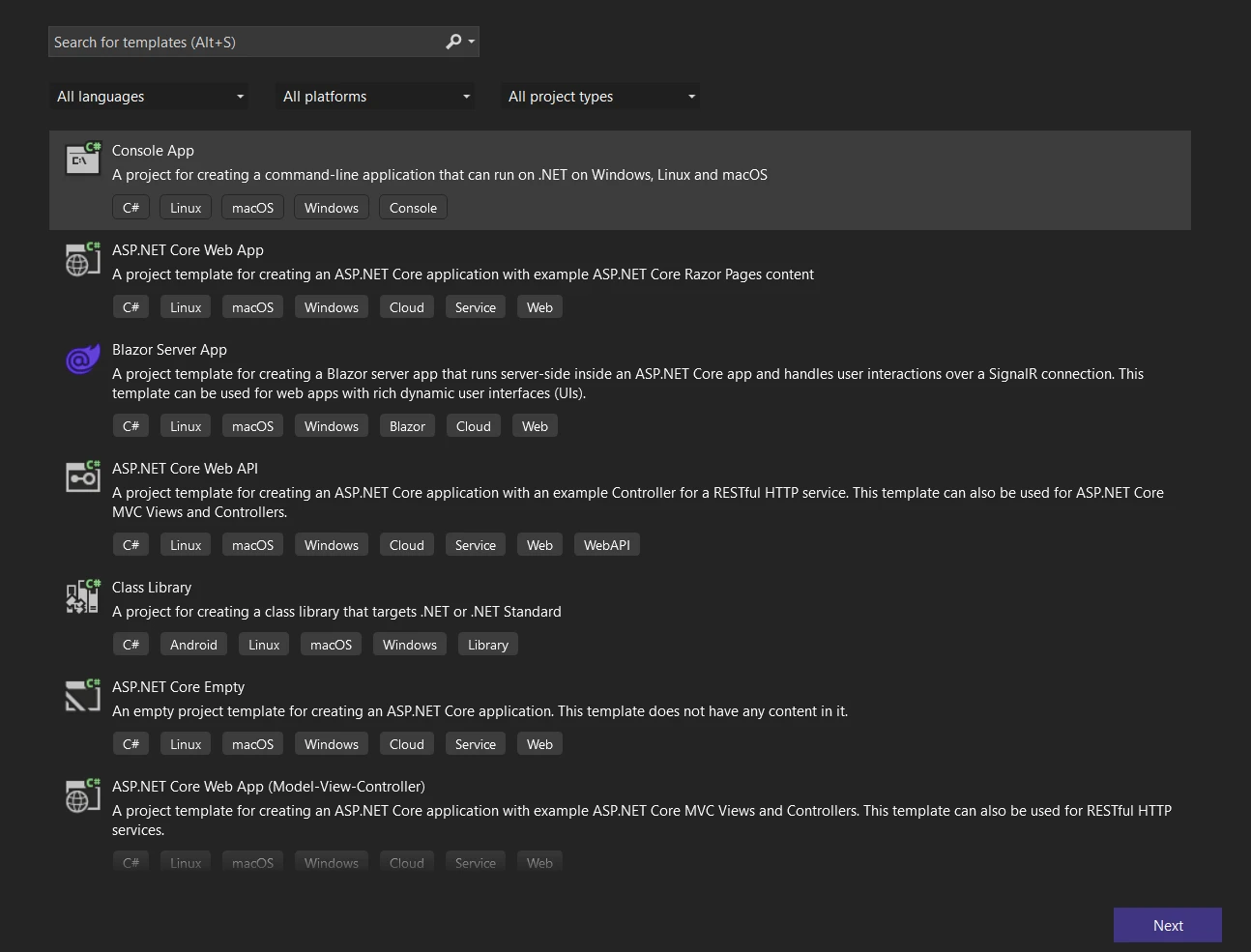
**Utwórz nową aplikację konsolową**
3. Kliknij przycisk **Dalej** i skonfiguruj projekt, nadając mu nazwę oraz wybierając lokalizację repozytorium.
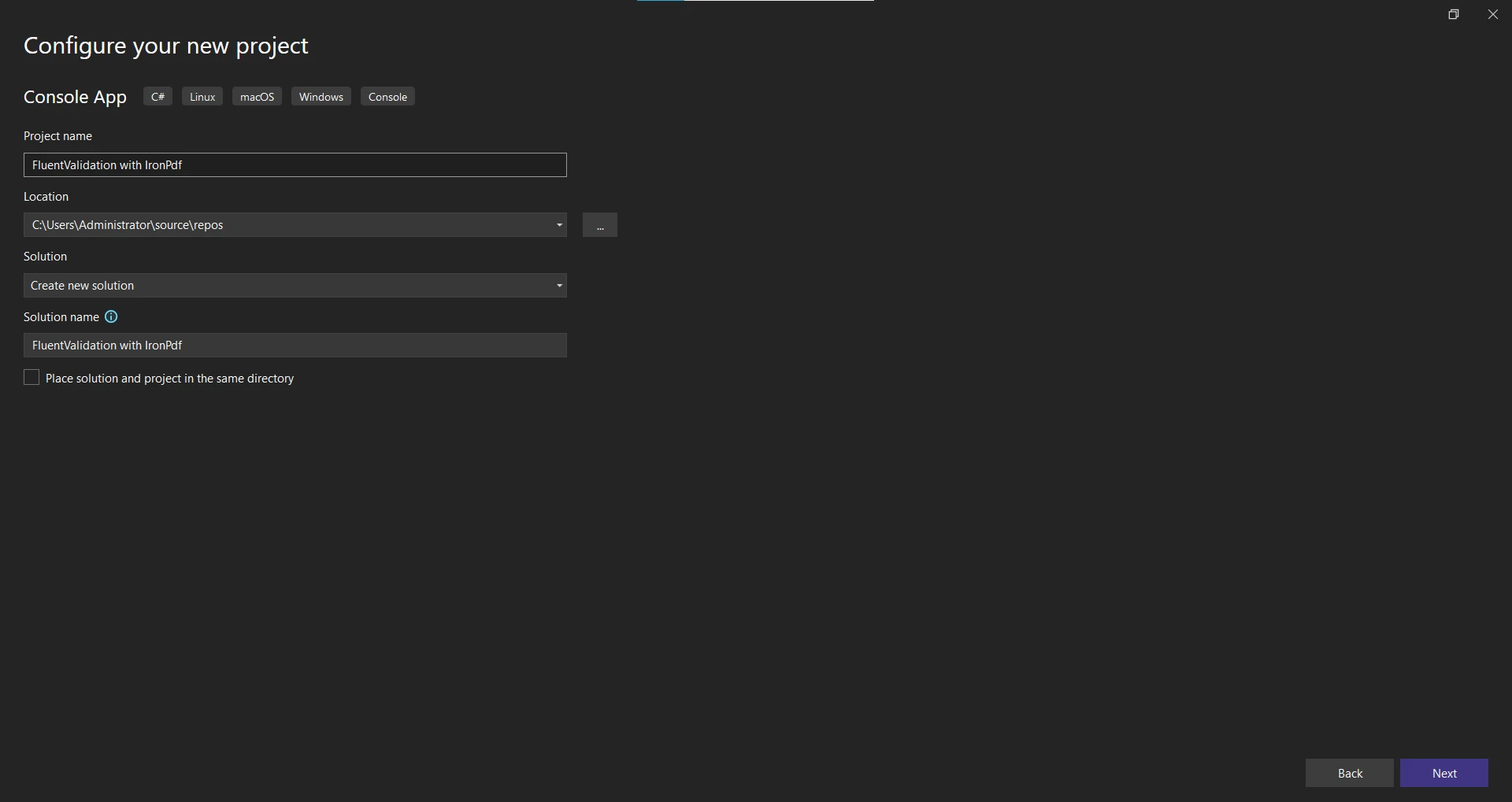
**Skonfiguruj nową aplikację**
4. Kliknij przycisk **Dalej** i wybierz .NET Framework. Zalecane jest użycie najnowszej wersji .NET Framework (7).
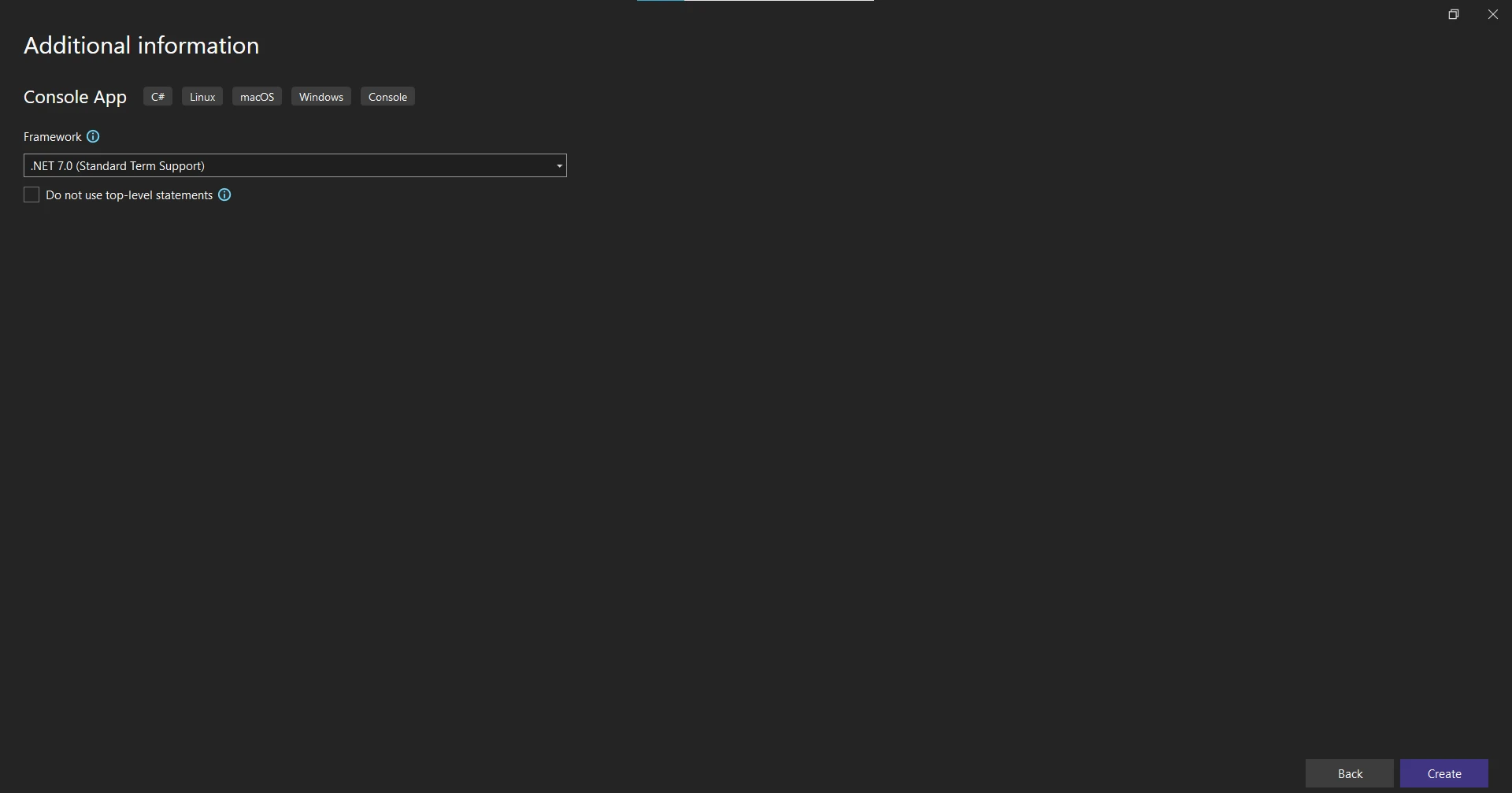
**Wybór platformy .NET Framework**
5. Kliknij przycisk **Utwórz**, aby utworzyć projekt.
### Zainstaluj wymagane pakiety
Po utworzeniu projektu dodaj niezbędne pakiety NuGet dla Fluent Validation i IronPDF.
1. Kliknij prawym przyciskiem myszy projekt w Eksploratorze rozwiązań i wybierz opcję "Zarządzaj pakietami NuGet".
2. Wyszukaj "FluentValidation" i kliknij "Zainstaluj", aby dodać pakiet do swojego projektu.
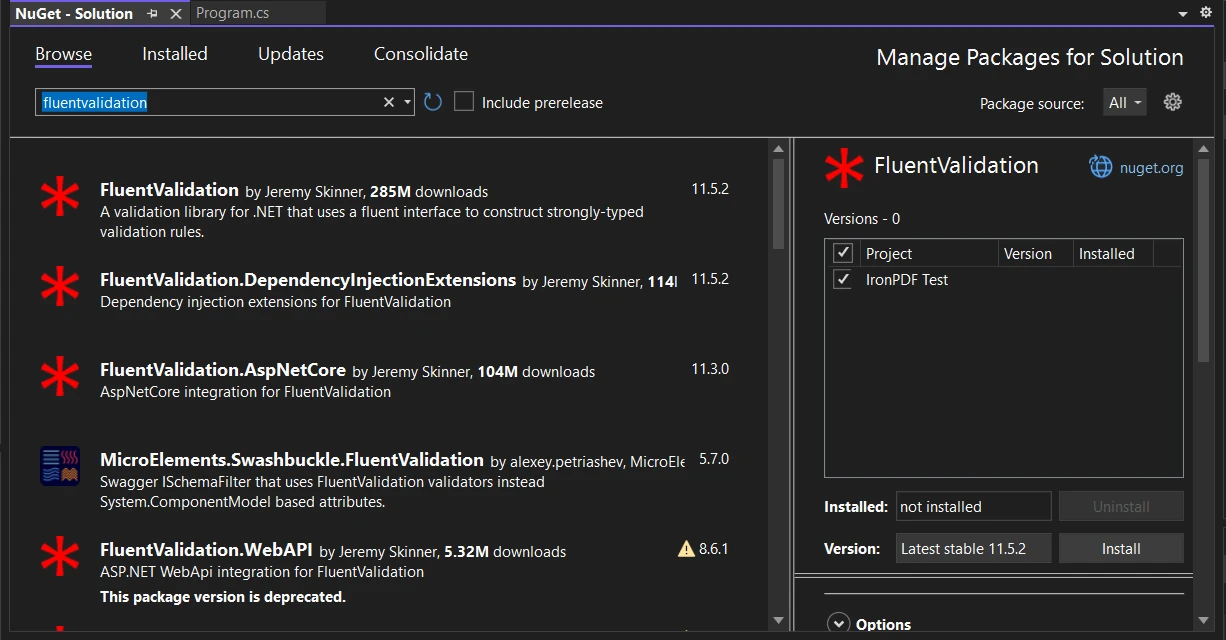
**Zainstaluj pakiet FluentValidation w interfejsie użytkownika menedżera pakietów NuGet**
3. Podobnie, wyszukaj "[IronPDF – Potężna biblioteka PDF dla .NET](/)" i zainstaluj pakiet IronPDF.
Alternatywnie można zainstalować IronPDF za pomocą **konsoli NuGet Package Manager Console**, używając następującego polecenia:
```shell
:ProductInstall
```

**Zainstaluj pakiet IronPDF w konsoli menedżera pakietów**
Po skonfigurowaniu projektu i zainstalowaniu wymaganych pakietów przejdźmy do zdefiniowania klasy treści PDF.
### Określenie treści pliku PDF
W tym przykładzie zostanie utworzony prosty PDF faktury z kodów HTML w dwóch klasach: `InvoiceContent` i `InvoiceItem`.
```csharp
using System.Collections.Generic;
using System.Linq;

public abstract class PdfContent
{
    // Abstract method to generate the HTML string
    public abstract string RenderHtml();
}

public class InvoiceContent : PdfContent
{
    public string CustomerName { get; set; }
    public string Address { get; set; }
    public List<InvoiceItem> InvoiceItems { get; set; }

    // Constructs the HTML representation of the invoice
    public override string RenderHtml()
    {
        string invoiceItemsHtml = string.Join("", InvoiceItems.Select(item => $"<li>{item.Description}: {item.Price}</li>"));
        return $"<h1>Invoice for {CustomerName}</h1><p>{Address}</p><ul>{invoiceItemsHtml}</ul>";
    }
}

public class InvoiceItem
{
    public string Description { get; set; }
    public decimal Price { get; set; }
}
```
W powyższym kodzie zdefiniowano abstrakcyjną klasę `PdfContent` z abstrakcyjną metodą o nazwie `RenderHtml`. Klasa `InvoiceContent` rozszerza `PdfContent` i reprezentuje zawartość faktury PDF. Zawiera pola dotyczące nazwy klienta, adresu oraz listy pozycji na fakturze. Klasa `InvoiceItem` zawiera dwie właściwości: 'Opis' i 'Cena'. Metoda `RenderHtml` generuje znacznik HTML faktury na podstawie zawartości.
Teraz, gdy zawartość pliku PDF została zdefiniowana, przejdźmy do tworzenia reguł walidacji przy użyciu Fluent Validation.
### Tworzenie reguł walidacji
Aby zbudować zasady walidacji dla klasy `InvoiceContent`, utwórz klasę walidatora o nazwie `InvoiceContentValidator`. Ta klasa będzie dziedziczyć po `AbstractValidator<InvoiceContent>`, który jest dostarczany przez FluentValidation.
```csharp
using FluentValidation;
public class InvoiceContentValidator : AbstractValidator<InvoiceContent>
{
public InvoiceContentValidator()
{
RuleFor(content => content.CustomerName).NotEmpty().WithMessage("Customer name is required.");
RuleFor(content => content.Address).NotEmpty().WithMessage("Address is required.");
RuleFor(content => content.InvoiceItems).NotEmpty().WithMessage("At least one invoice item is required.");
RuleForEach(content => content.InvoiceItems).SetValidator(new InvoiceItemValidator());
}
}
public class InvoiceItemValidator : AbstractValidator<InvoiceItem>
{
public InvoiceItemValidator()
{
RuleFor(item => item.Description).NotEmpty().WithMessage("Description is required.");
RuleFor(item => item.Price).GreaterThanOrEqualTo(0).WithMessage("Price must be greater than or equal to 0.");
}
}
```
W kodzie źródłowym zdefiniowano klasę `InvoiceContentValidator`, która dziedziczy po `AbstractValidator<InvoiceContent>`. W konstruktorze klasy walidatora metoda `RuleFor` definiuje zasady walidacji dla każdej właściwości klasy `InvoiceContent`.
Na przykład, `RuleFor(content => content.CustomerName)` określa, że nazwa klienta nie powinna być pusta. Podobnie zdefiniowano reguły walidacji dla właściwości pozycji adresu i faktury.
Metoda `RuleForEach` iteruje przez każdy element na liście `InvoiceItems` i stosuje `InvoiceItemValidator`. Klasa `InvoiceItemValidator` zawiera zasady walidacji dla klasy `InvoiceItem`.
Mając te zasady walidacji, przejdźmy do generowania pliku PDF przy użyciu IronPDF.
### Generowanie plików PDF za pomocą IronPDF
[IronPDF – Generowanie i edycja dokumentów PDF](/tutorials/html-to-pdf/) to popularna biblioteka .NET służąca do tworzenia i edycji dokumentów PDF. Do wygenerowania pliku PDF na podstawie zweryfikowanej treści faktury zostanie użyty IronPDF.
```csharp
using IronPdf;
using FluentValidation;
public class PdfService
{
// Generates a PDF document for the provided content
public PdfDocument GeneratePdf<t>(T content) where T : PdfContent
{
// Validate the content using the appropriate validator
var validator = GetValidatorForContent(content);
var validationResult = validator.Validate(content);
// Check if validation is successful
if (!validationResult.IsValid)
{
throw new FluentValidation.ValidationException(validationResult.Errors);
}
// Generate the PDF using IronPDF
var renderer = new ChromePdfRenderer();
return renderer.RenderHtmlAsPdf(content.RenderHtml());
}
// Retrieves the appropriate validator for the content
private IValidator<t> GetValidatorForContent<t>(T content) where T : PdfContent
{
if (content is InvoiceContent)
{
return (IValidator<t>)new InvoiceContentValidator();
}
else
{
throw new NotSupportedException("Unsupported content type.");
}
}
}
```
Klasa `PdfService` udostępnia metodę `GeneratePdf`. Ta metoda przyjmuje obiekt `PdfContent` jako dane wejściowe i generuje dokument PDF na podstawie zweryfikowanej zawartości.
Najpierw pobiera odpowiedni walidator dla zawartości, wywołując metodę `GetValidatorForContent`, która sprawdza rodzaj zawartości i zwraca odpowiedni walidator. W naszym przypadku obsługujemy `InvoiceContent` i używamy `InvoiceContentValidator`.
Następnie zawartość jest weryfikowana za pomocą walidatora, wywołując jego metodę `Validate`. Wynik walidacji jest przechowywany w obiekcie `ValidationResult`.
Jeśli walidacja nie powiedzie się (`!validationResult.IsValid`), zgłaszane jest `FluentValidation.ValidationException` z błędami walidacyjnymi. W przeciwnym razie PDF jest generowany przy użyciu IronPDF.
Tworzona jest instancja [ChromePdfRenderer](/object-reference/api/IronPdf.ChromePdfRenderer.html) do renderowania zawartości HTML jako PDF. Metoda [RenderHtmlAsPdf](/object-reference/api/IronPdf.ChromePdfRenderer.html#IronPdf_ChromePdfRenderer_RenderHtmlAsPdf_System_String_System_String_System_String_) jest wywoływana na obiekcie `renderer`, przekazując w wygenerowany przez metodę `content.RenderHtml` HTML, generując dokument PDF.
Teraz, gdy zdefiniowaliśmy logikę generowania PDF, zajmijmy się wszelkimi błędami walidacji, które mogą wystąpić.
### Obsługa błędów walidacji
Kiedy występuje błąd walidacji, chcemy wyświetlić komunikat o błędzie i obsłużyć go z gracją. Zmodyfikujmy metodę `Main` klasy `Program`, aby obsłużyć wszelkie wyjątki i wyświetlać użytkownikowi znaczące komunikaty.
```csharp
using System;
using System.Collections.Generic;
public class Program
{
static void Main(string[] args)
{
var pdfService = new PdfService();
// Test 1: Empty Customer Name
try
{
var invoiceContent = new InvoiceContent
{
CustomerName = "",
Address = "123 Main St, Anytown, USA",
InvoiceItems = new List<InvoiceItem> {
new InvoiceItem { Description = "Item 1", Price = 19.99M },
new InvoiceItem { Description = "Item 2", Price = 29.99M }
}
};
var pdfDocument = pdfService.GeneratePdf(invoiceContent);
pdfDocument.SaveAs("C:\\TestInvoice.pdf");
Console.WriteLine("PDF generated successfully!");
}
catch (Exception ex)
{
Console.WriteLine("Error generating PDF: " + ex.Message);
}
// Test 2: Empty InvoiceItems
try
{
var invoiceContent = new InvoiceContent
{
CustomerName = "John Doe",
Address = "123 Main St, Anytown, USA",
InvoiceItems = new List<InvoiceItem>() // Empty list
};
var pdfDocument = pdfService.GeneratePdf(invoiceContent);
pdfDocument.SaveAs("C:\\TestInvoice.pdf");
Console.WriteLine("PDF generated successfully!");
}
catch (Exception ex)
{
Console.WriteLine("Error generating PDF: " + ex.Message);
}
// Successful generation
try
{
var invoiceContent = new InvoiceContent
{
CustomerName = "John Doe",
Address = "123 Main St, Anytown, USA",
InvoiceItems = new List<InvoiceItem> {
new InvoiceItem { Description = "Item 1", Price = 19.99M },
new InvoiceItem { Description = "Item 2", Price = 29.99M }
}
};
var pdfDocument = pdfService.GeneratePdf(invoiceContent);
pdfDocument.SaveAs("C:\\TestInvoice.pdf");
Console.WriteLine("PDF generated successfully!");
}
catch (Exception ex)
{
Console.WriteLine("Error generating PDF: " + ex.Message);
}
}
}
```
W powyższym kodzie stosowane są bloki `try-catch`, aby przechwycić wszelkie wyjątki, które mogą wystąpić. Jeśli wyjątek zostanie przechwycony, zostanie wyświetlony komunikat o błędzie dla użytkownika za pomocą `Console.WriteLine`.
Przetestujmy teraz tę aplikację w różnych scenariuszach, aby zweryfikować generowanie PDF i zasady walidacji.
### Testowanie aplikacji
W przykładzie kodu są trzy scenariusze do przetestowania:
1. Puste imię klienta: Pozostawienie pustego imienia klienta, aby wywołać błąd walidacji.
2. Puste pozycje faktury: Dostarczenie pustej listy pozycji faktury, aby wywołać błąd walidacji.
3. Pomyślne generowanie: Dostarczenie prawidłowej zawartości, aby pomyślnie wygenerować PDF.
Uruchom aplikację i obserwuj wynik w konsoli.
```plaintext
Error generating PDF: Validation failed:
-- CustomerName: Customer name is required. Severity: Error
Error generating PDF: Validation failed:
-- InvoiceItems: At least one invoice item is required. Severity: Error
PDF generated successfully!
```
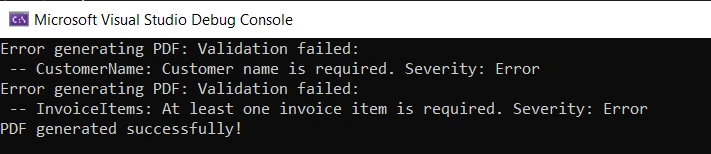
**Wynik błędu w konsoli**
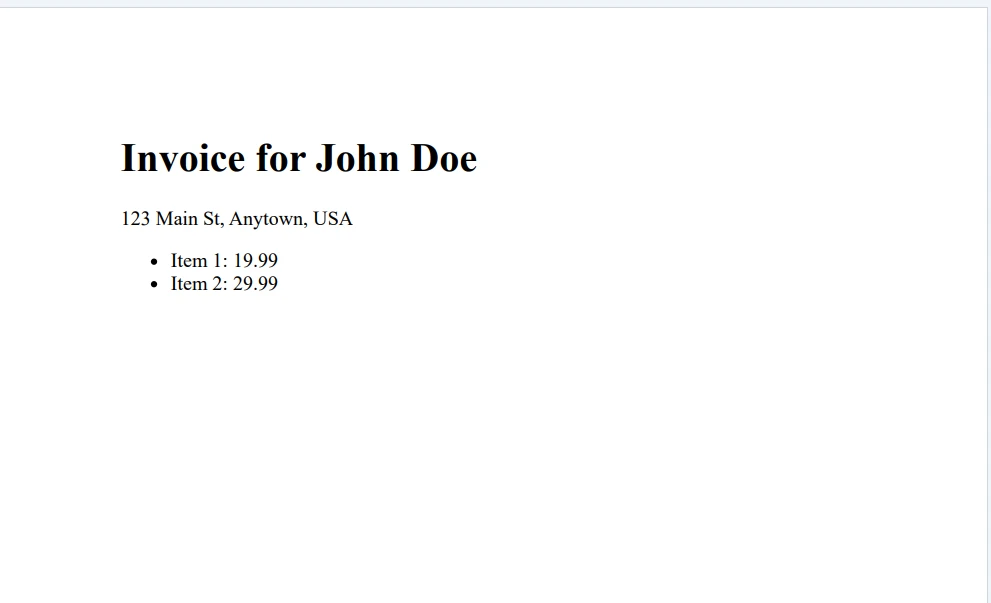
**Plik PDF wynikowy**
Zgodnie z oczekiwaniami, w przypadku dwóch pierwszych scenariuszy pokazane są błędy walidacyjne, a w przypadku trzeciego scenariusza pokazana jest wiadomość o sukcesie.
## Wnioski
Ten poradnik zbadał Fluent Validation i jak używać go z IronPDF do generowania dokumentów PDF. Zaczynając od ustawienia aplikacji konsolowej i zdefiniowania klasy zawartości PDF. Następnie, utworzono zasady walidacji przy użyciu Fluent Validation i przetestowano generowanie PDF w różnych scenariuszach.
Fluent Validation zapewnia elastyczne i łatwe do użycia podejście do walidacji obiektów w aplikacjach .NET. Pozwala na definiowanie zasad walidacji w sposób silnie typizowany, dostosowywanie komunikatów o błędach i z gracją obsługiwanie błędów walidacji.
[IronPDF Free Trial & Licensing Information](trial-license) oferuje bezpłatną wersję próbną, a licencja zaczyna się od $499 na dewelopera.
FluentValidation to biblioteka walidacyjna .NET, która pomaga w tworzeniu reguł walidacji silnie typowanych. Wykorzystuje płynny interfejs i wyrażenia lambda, dzięki czemu kod jest bardziej czytelny i łatwiejszy w utrzymaniu. Zamiast używać adnotacji danych lub ręcznej walidacji w klasach modeli, możesz skorzystać z Fluent Validation, aby zbudować oddzielną klasę dla logiki walidacji.
Fluent Validation zapewnia większą elastyczność w zakresie walidacji. Dzięki wbudowanym walidatorom dla typowych scenariuszy, możliwości tworzenia niestandardowych walidacji oraz prostemu sposobowi łączenia reguł walidacji, Fluent Validation jest potężnym narzędziem w zestawie narzędzi .NET Core.
Zrozumienie płynnej walidacji
Fluent Validation to biblioteka open source dla platformy .NET, która ułatwia tworzenie reguł walidacji dla klas modeli.
Walidatory: Walidatory to klasy, które hermetyzują logikę walidacji. Zazwyczaj są tworzone przez dziedziczenie z klasy bazowej AbstractValidator<t>.
Reguły: Reguła to warunek walidacji, który musi spełniać dana właściwość. Zasady są definiowane za pomocą metody RuleFor w klasie walidatora.
Niepowodzenia Walidacji: Jeśli zasada zawiedzie, Fluent Validation tworzy obiekt ValidationFailure, który zawiera szczegóły dotyczące błędu, w tym nazwę właściwości i komunikat o błędzie.
Czym jest IronPDF?
IronPDF - Convert HTML to PDF in C# to potężna biblioteka .NET, która pozwala generować dokumenty PDF na podstawie treści HTML. Niezależnie od tego, czy potrzebujesz tworzyć faktury, raporty czy jakikolwiek inny rodzaj dokumentu, IronPDF zapewnia łatwe w użyciu rozwiązanie. Integruje się płynnie z aplikacjami .NET Core, umożliwiając generowanie wysokiej jakości plików PDF za pomocą zaledwie kilku linii kodu.
Korzystanie z Fluent Validation z IronPDF
Teraz, gdy wiemy już, czym są Fluent Validation i IronPDF, zobaczmy, jak można je wykorzystać razem. Ten samouczek pomoże w stworzeniu generatora faktur, w którym zawartość faktury będzie sprawdzana przy użyciu FluentValidation w ASP.NET Core przed wygenerowaniem pliku PDF za pomocą IronPDF.
Konfiguracja projektu
Na początek utwórzmy nową aplikację konsolową w Visual Studio lub innym preferowanym środowisku programistycznym.
Otwórz Visual Studio i przejdź do Plik > Nowy > Projekt.
Wybierz "Aplikacja konsolowa (ASP.NET Core)" jako szablon projektu i nadaj nazwę swojemu projektowi.
Utwórz nową aplikację konsolową
Kliknij przycisk Dalej i skonfiguruj projekt, nadając mu nazwę oraz wybierając lokalizację repozytorium.
Skonfiguruj nową aplikację
Kliknij przycisk Dalej i wybierz .NET Framework. Zalecane jest użycie najnowszej wersji .NET Framework (7).
Wybór platformy .NET Framework
Kliknij przycisk Utwórz, aby utworzyć projekt.
Zainstaluj wymagane pakiety
Po utworzeniu projektu dodaj niezbędne pakiety NuGet dla Fluent Validation i IronPDF.
Kliknij prawym przyciskiem myszy projekt w Eksploratorze rozwiązań i wybierz opcję "Zarządzaj pakietami NuGet".
Wyszukaj "FluentValidation" i kliknij "Zainstaluj", aby dodać pakiet do swojego projektu.
Zainstaluj pakiet FluentValidation w interfejsie użytkownika menedżera pakietów NuGet
Alternatywnie można zainstalować IronPDF za pomocą konsoli NuGet Package Manager Console, używając następującego polecenia:
PM > Install-Package IronPdf
Install-Package IronPdf
Zainstaluj pakiet IronPDF w konsoli menedżera pakietów
Po skonfigurowaniu projektu i zainstalowaniu wymaganych pakietów przejdźmy do zdefiniowania klasy treści PDF.
Określenie treści pliku PDF
W tym przykładzie zostanie utworzony prosty PDF faktury z kodów HTML w dwóch klasach: InvoiceContent i InvoiceItem.
using System.Collections.Generic;using System.Linq;public abstract class PdfContent{ // Abstract method to generate the HTML string public abstract stringRenderHtml();}public class InvoiceContent : PdfContent{ public stringCustomerName { get; set; } public stringAddress { get; set; } public List<InvoiceItem> InvoiceItems { get; set; } // Constructs the HTML representation of the invoice public override stringRenderHtml() { string invoiceItemsHtml = string.Join("", InvoiceItems.Select(item => $"<li>{item.Description}: {item.Price}</li>")); return $"<h1>Invoice for {CustomerName}</h1><p>{Address}</p><ul>{invoiceItemsHtml}</ul>"; }}public class InvoiceItem{ public stringDescription { get; set; } public decimalPrice { get; set; }}
using System.Collections.Generic;
using System.Linq;

public abstract class PdfContent
{
    // Abstract method to generate the HTML string
    public abstract string RenderHtml();
}

public class InvoiceContent : PdfContent
{
    public string CustomerName { get; set; }
    public string Address { get; set; }
    public List<InvoiceItem> InvoiceItems { get; set; }

    // Constructs the HTML representation of the invoice
    public override string RenderHtml()
    {
        string invoiceItemsHtml = string.Join("", InvoiceItems.Select(item => $"<li>{item.Description}: {item.Price}</li>"));
        return $"<h1>Invoice for {CustomerName}</h1><p>{Address}</p><ul>{invoiceItemsHtml}</ul>";
    }
}

public class InvoiceItem
{
    public string Description { get; set; }
    public decimal Price { get; set; }
}
ImportsSystem.Collections.GenericImportsSystem.LinqPublicMustInherit Class PdfContent ' Abstract method to generate the HTML string PublicMustOverride Function RenderHtml() AsStringEnd ClassPublic Class InvoiceContentInheritsPdfContent Public Property CustomerName() AsString Public Property Address() AsString Public Property InvoiceItems() AsList(OfInvoiceItem) ' Constructs the HTML representation of the invoice PublicOverrides Function RenderHtml() AsString Dim invoiceItemsHtml AsString = String.Join("", InvoiceItems.Select(Function(item) $"<li>{item.Description}: {item.Price}</li>")) Return $"<h1>Invoice for {CustomerName}</h1><p>{Address}</p><ul>{invoiceItemsHtml}</ul>" End FunctionEnd ClassPublic Class InvoiceItem Public Property Description() AsString Public Property Price() AsDecimalEnd Class
Imports System.Collections.Generic
Imports System.Linq

Public MustInherit Class PdfContent
	' Abstract method to generate the HTML string
	Public MustOverride Function RenderHtml() As String
End Class

Public Class InvoiceContent
	Inherits PdfContent

	Public Property CustomerName() As String
	Public Property Address() As String
	Public Property InvoiceItems() As List(Of InvoiceItem)

	' Constructs the HTML representation of the invoice
	Public Overrides Function RenderHtml() As String
		Dim invoiceItemsHtml As String = String.Join("", InvoiceItems.Select(Function(item) $"<li>{item.Description}: {item.Price}</li>"))
		Return $"<h1>Invoice for {CustomerName}</h1><p>{Address}</p><ul>{invoiceItemsHtml}</ul>"
	End Function
End Class

Public Class InvoiceItem
	Public Property Description() As String
	Public Property Price() As Decimal
End Class
W powyższym kodzie zdefiniowano abstrakcyjną klasę PdfContent z abstrakcyjną metodą o nazwie RenderHtml. Klasa InvoiceContent rozszerza PdfContent i reprezentuje zawartość faktury PDF. Zawiera pola dotyczące nazwy klienta, adresu oraz listy pozycji na fakturze. Klasa InvoiceItem zawiera dwie właściwości: 'Opis' i 'Cena'. Metoda RenderHtml generuje znacznik HTML faktury na podstawie zawartości.
Teraz, gdy zawartość pliku PDF została zdefiniowana, przejdźmy do tworzenia reguł walidacji przy użyciu Fluent Validation.
Tworzenie reguł walidacji
Aby zbudować zasady walidacji dla klasy InvoiceContent, utwórz klasę walidatora o nazwie InvoiceContentValidator. Ta klasa będzie dziedziczyć po AbstractValidator<InvoiceContent>, który jest dostarczany przez FluentValidation.
using FluentValidation;public class InvoiceContentValidator : AbstractValidator<InvoiceContent>{ publicInvoiceContentValidator() {RuleFor(content => content.CustomerName).NotEmpty().WithMessage("Customer name is required.");RuleFor(content => content.Address).NotEmpty().WithMessage("Address is required.");RuleFor(content => content.InvoiceItems).NotEmpty().WithMessage("At least one invoice item is required.");RuleForEach(content => content.InvoiceItems).SetValidator(new InvoiceItemValidator()); }}public class InvoiceItemValidator : AbstractValidator<InvoiceItem>{ publicInvoiceItemValidator() {RuleFor(item => item.Description).NotEmpty().WithMessage("Description is required.");RuleFor(item => item.Price).GreaterThanOrEqualTo(0).WithMessage("Price must be greater than or equal to 0."); }}
using FluentValidation;

public class InvoiceContentValidator : AbstractValidator<InvoiceContent>
{
    public InvoiceContentValidator()
    {
        RuleFor(content => content.CustomerName).NotEmpty().WithMessage("Customer name is required.");
        RuleFor(content => content.Address).NotEmpty().WithMessage("Address is required.");
        RuleFor(content => content.InvoiceItems).NotEmpty().WithMessage("At least one invoice item is required.");
        RuleForEach(content => content.InvoiceItems).SetValidator(new InvoiceItemValidator());
    }
}

public class InvoiceItemValidator : AbstractValidator<InvoiceItem>
{
    public InvoiceItemValidator()
    {
        RuleFor(item => item.Description).NotEmpty().WithMessage("Description is required.");
        RuleFor(item => item.Price).GreaterThanOrEqualTo(0).WithMessage("Price must be greater than or equal to 0.");
    }
}
ImportsFluentValidationPublic Class InvoiceContentValidatorInheritsAbstractValidator(OfInvoiceContent) Public Sub New()RuleFor(Function(content) content.CustomerName).NotEmpty().WithMessage("Customer name is required.")RuleFor(Function(content) content.Address).NotEmpty().WithMessage("Address is required.")RuleFor(Function(content) content.InvoiceItems).NotEmpty().WithMessage("At least one invoice item is required.")RuleForEach(Function(content) content.InvoiceItems).SetValidator(New InvoiceItemValidator()) End SubEnd ClassPublic Class InvoiceItemValidatorInheritsAbstractValidator(OfInvoiceItem) Public Sub New()RuleFor(Function(item) item.Description).NotEmpty().WithMessage("Description is required.")RuleFor(Function(item) item.Price).GreaterThanOrEqualTo(0).WithMessage("Price must be greater than or equal to 0.") End SubEnd Class
Imports FluentValidation

Public Class InvoiceContentValidator
	Inherits AbstractValidator(Of InvoiceContent)

	Public Sub New()
		RuleFor(Function(content) content.CustomerName).NotEmpty().WithMessage("Customer name is required.")
		RuleFor(Function(content) content.Address).NotEmpty().WithMessage("Address is required.")
		RuleFor(Function(content) content.InvoiceItems).NotEmpty().WithMessage("At least one invoice item is required.")
		RuleForEach(Function(content) content.InvoiceItems).SetValidator(New InvoiceItemValidator())
	End Sub
End Class

Public Class InvoiceItemValidator
	Inherits AbstractValidator(Of InvoiceItem)

	Public Sub New()
		RuleFor(Function(item) item.Description).NotEmpty().WithMessage("Description is required.")
		RuleFor(Function(item) item.Price).GreaterThanOrEqualTo(0).WithMessage("Price must be greater than or equal to 0.")
	End Sub
End Class
W kodzie źródłowym zdefiniowano klasę InvoiceContentValidator, która dziedziczy po AbstractValidator<InvoiceContent>. W konstruktorze klasy walidatora metoda RuleFor definiuje zasady walidacji dla każdej właściwości klasy InvoiceContent.
Na przykład, RuleFor(content => content.CustomerName) określa, że nazwa klienta nie powinna być pusta. Podobnie zdefiniowano reguły walidacji dla właściwości pozycji adresu i faktury.
Metoda RuleForEach iteruje przez każdy element na liście InvoiceItems i stosuje InvoiceItemValidator. Klasa InvoiceItemValidator zawiera zasady walidacji dla klasy InvoiceItem.
Mając te zasady walidacji, przejdźmy do generowania pliku PDF przy użyciu IronPDF.
Generowanie plików PDF za pomocą IronPDF
IronPDF – Generowanie i edycja dokumentów PDF to popularna biblioteka .NET służąca do tworzenia i edycji dokumentów PDF. Do wygenerowania pliku PDF na podstawie zweryfikowanej treści faktury zostanie użyty IronPDF.
using IronPdf;using FluentValidation;public class PdfService{ // Generates a PDF document for the provided content public PdfDocumentGeneratePdf<t>(T content) where T : PdfContent { // Validate the content using the appropriate validator var validator = GetValidatorForContent(content); var validationResult = validator.Validate(content); // Check if validation is successful if (!validationResult.IsValid) { throw new FluentValidation.ValidationException(validationResult.Errors); } // Generate the PDF using IronPDF var renderer = new ChromePdfRenderer(); return renderer.RenderHtmlAsPdf(content.RenderHtml()); } // Retrieves the appropriate validator for the content private IValidator<t> GetValidatorForContent<t>(T content) where T : PdfContent { if (content is InvoiceContent) { return (IValidator<t>)new InvoiceContentValidator(); } else { throw new NotSupportedException("Unsupported content type."); } }}
using IronPdf;
using FluentValidation;

public class PdfService
{
    // Generates a PDF document for the provided content
    public PdfDocument GeneratePdf<t>(T content) where T : PdfContent
    {
        // Validate the content using the appropriate validator
        var validator = GetValidatorForContent(content);
        var validationResult = validator.Validate(content);

        // Check if validation is successful
        if (!validationResult.IsValid)
        {
            throw new FluentValidation.ValidationException(validationResult.Errors);
        }

        // Generate the PDF using IronPDF
        var renderer = new ChromePdfRenderer();
        return renderer.RenderHtmlAsPdf(content.RenderHtml());
    }

    // Retrieves the appropriate validator for the content
    private IValidator<t> GetValidatorForContent<t>(T content) where T : PdfContent
    {
        if (content is InvoiceContent)
        {
            return (IValidator<t>)new InvoiceContentValidator();
        }
        else
        {
            throw new NotSupportedException("Unsupported content type.");
        }
    }
}
ImportsIronPdfImportsFluentValidationPublic Class PdfService ' Generates a PDF document for the provided content Public Function GeneratePdf(OfTAsPdfContent)(content AsT) AsPdfDocument ' Validate the content using the appropriate validator Dim validator = GetValidatorForContent(content) Dim validationResult = validator.Validate(content) ' Check if validation is successful IfNot validationResult.IsValidThenThrow New FluentValidation.ValidationException(validationResult.Errors) End If ' Generate the PDF using IronPDF Dim renderer = New ChromePdfRenderer() Return renderer.RenderHtmlAsPdf(content.RenderHtml()) End Function ' Retrieves the appropriate validator for the content Private Function GetValidatorForContent(OfTAsPdfContent)(content AsT) AsIValidator(OfT) IfTypeOf content IsInvoiceContentThen ReturnCType(New InvoiceContentValidator(), IValidator(OfT)) ElseThrow New NotSupportedException("Unsupported content type.") End If End FunctionEnd Class
Imports IronPdf
Imports FluentValidation

Public Class PdfService
    ' Generates a PDF document for the provided content
    Public Function GeneratePdf(Of T As PdfContent)(content As T) As PdfDocument
        ' Validate the content using the appropriate validator
        Dim validator = GetValidatorForContent(content)
        Dim validationResult = validator.Validate(content)

        ' Check if validation is successful
        If Not validationResult.IsValid Then
            Throw New FluentValidation.ValidationException(validationResult.Errors)
        End If

        ' Generate the PDF using IronPDF
        Dim renderer = New ChromePdfRenderer()
        Return renderer.RenderHtmlAsPdf(content.RenderHtml())
    End Function

    ' Retrieves the appropriate validator for the content
    Private Function GetValidatorForContent(Of T As PdfContent)(content As T) As IValidator(Of T)
        If TypeOf content Is InvoiceContent Then
            Return CType(New InvoiceContentValidator(), IValidator(Of T))
        Else
            Throw New NotSupportedException("Unsupported content type.")
        End If
    End Function
End Class
Klasa PdfService udostępnia metodę GeneratePdf. Ta metoda przyjmuje obiekt PdfContent jako dane wejściowe i generuje dokument PDF na podstawie zweryfikowanej zawartości.
Najpierw pobiera odpowiedni walidator dla zawartości, wywołując metodę GetValidatorForContent, która sprawdza rodzaj zawartości i zwraca odpowiedni walidator. W naszym przypadku obsługujemy InvoiceContent i używamy InvoiceContentValidator.
Następnie zawartość jest weryfikowana za pomocą walidatora, wywołując jego metodę Validate. Wynik walidacji jest przechowywany w obiekcie ValidationResult.
Jeśli walidacja nie powiedzie się (!validationResult.IsValid), zgłaszane jest FluentValidation.ValidationException z błędami walidacyjnymi. W przeciwnym razie PDF jest generowany przy użyciu IronPDF.
Tworzona jest instancja ChromePdfRenderer do renderowania zawartości HTML jako PDF. Metoda RenderHtmlAsPdf jest wywoływana na obiekcie renderer, przekazując w wygenerowany przez metodę content.RenderHtml HTML, generując dokument PDF.
Teraz, gdy zdefiniowaliśmy logikę generowania PDF, zajmijmy się wszelkimi błędami walidacji, które mogą wystąpić.
Obsługa błędów walidacji
Kiedy występuje błąd walidacji, chcemy wyświetlić komunikat o błędzie i obsłużyć go z gracją. Zmodyfikujmy metodę Main klasy Program, aby obsłużyć wszelkie wyjątki i wyświetlać użytkownikowi znaczące komunikaty.
using System;using System.Collections.Generic;public class Program{ static voidMain(string[] args) { var pdfService = new PdfService(); // Test 1: Empty Customer Name try { var invoiceContent = new InvoiceContent {CustomerName = "",Address = "123 Main St, Anytown, USA",InvoiceItems = new List<InvoiceItem> { new InvoiceItem { Description = "Item 1", Price = 19.99M }, new InvoiceItem { Description = "Item 2", Price = 29.99M } } }; var pdfDocument = pdfService.GeneratePdf(invoiceContent); pdfDocument.SaveAs("C:\\TestInvoice.pdf");Console.WriteLine("PDF generated successfully!"); } catch (Exception ex) {Console.WriteLine("Error generating PDF: " + ex.Message); } // Test 2: Empty InvoiceItems try { var invoiceContent = new InvoiceContent {CustomerName = "John Doe",Address = "123 Main St, Anytown, USA",InvoiceItems = new List<InvoiceItem>() // Empty list }; var pdfDocument = pdfService.GeneratePdf(invoiceContent); pdfDocument.SaveAs("C:\\TestInvoice.pdf");Console.WriteLine("PDF generated successfully!"); } catch (Exception ex) {Console.WriteLine("Error generating PDF: " + ex.Message); } // Successful generation try { var invoiceContent = new InvoiceContent {CustomerName = "John Doe",Address = "123 Main St, Anytown, USA",InvoiceItems = new List<InvoiceItem> { new InvoiceItem { Description = "Item 1", Price = 19.99M }, new InvoiceItem { Description = "Item 2", Price = 29.99M } } }; var pdfDocument = pdfService.GeneratePdf(invoiceContent); pdfDocument.SaveAs("C:\\TestInvoice.pdf");Console.WriteLine("PDF generated successfully!"); } catch (Exception ex) {Console.WriteLine("Error generating PDF: " + ex.Message); } }}
using System;
using System.Collections.Generic;

public class Program
{
    static void Main(string[] args)
    {
        var pdfService = new PdfService();

        // Test 1: Empty Customer Name
        try
        {
            var invoiceContent = new InvoiceContent
            {
                CustomerName = "",
                Address = "123 Main St, Anytown, USA",
                InvoiceItems = new List<InvoiceItem> {
                    new InvoiceItem { Description = "Item 1", Price = 19.99M },
                    new InvoiceItem { Description = "Item 2", Price = 29.99M }
                }
            };

            var pdfDocument = pdfService.GeneratePdf(invoiceContent);
            pdfDocument.SaveAs("C:\\TestInvoice.pdf");
            Console.WriteLine("PDF generated successfully!");
        }
        catch (Exception ex)
        {
            Console.WriteLine("Error generating PDF: " + ex.Message);
        }

        // Test 2: Empty InvoiceItems
        try
        {
            var invoiceContent = new InvoiceContent
            {
                CustomerName = "John Doe",
                Address = "123 Main St, Anytown, USA",
                InvoiceItems = new List<InvoiceItem>()  // Empty list
            };

            var pdfDocument = pdfService.GeneratePdf(invoiceContent);
            pdfDocument.SaveAs("C:\\TestInvoice.pdf");
            Console.WriteLine("PDF generated successfully!");
        }
        catch (Exception ex)
        {
            Console.WriteLine("Error generating PDF: " + ex.Message);
        }

        // Successful generation
        try
        {
            var invoiceContent = new InvoiceContent
            {
                CustomerName = "John Doe",
                Address = "123 Main St, Anytown, USA",
                InvoiceItems = new List<InvoiceItem> {
                    new InvoiceItem { Description = "Item 1", Price = 19.99M },
                    new InvoiceItem { Description = "Item 2", Price = 29.99M }
                }
            };
            var pdfDocument = pdfService.GeneratePdf(invoiceContent);
            pdfDocument.SaveAs("C:\\TestInvoice.pdf");
            Console.WriteLine("PDF generated successfully!");
        }
        catch (Exception ex)
        {
            Console.WriteLine("Error generating PDF: " + ex.Message);
        }
    }
}
ImportsSystemImportsSystem.Collections.GenericPublic Class ProgramShared Sub Main(ByVal args() AsString) Dim pdfService As New PdfService() ' Test 1: Empty Customer NameTry Dim invoiceContent As New InvoiceContentWith { .CustomerName = "", .Address = "123 Main St, Anytown, USA", .InvoiceItems = New List(OfInvoiceItem) From { New InvoiceItemWith { .Description = "Item 1", .Price = 19.99D }, New InvoiceItemWith { .Description = "Item 2", .Price = 29.99D } } } Dim pdfDocument = pdfService.GeneratePdf(invoiceContent) pdfDocument.SaveAs("C:\TestInvoice.pdf")Console.WriteLine("PDF generated successfully!")Catch ex AsExceptionConsole.WriteLine("Error generating PDF: " & ex.Message)EndTry ' Test 2: Empty InvoiceItemsTry Dim invoiceContent As New InvoiceContentWith { .CustomerName = "John Doe", .Address = "123 Main St, Anytown, USA", .InvoiceItems = New List(OfInvoiceItem)() } Dim pdfDocument = pdfService.GeneratePdf(invoiceContent) pdfDocument.SaveAs("C:\TestInvoice.pdf")Console.WriteLine("PDF generated successfully!")Catch ex AsExceptionConsole.WriteLine("Error generating PDF: " & ex.Message)EndTry ' Successful generationTry Dim invoiceContent As New InvoiceContentWith { .CustomerName = "John Doe", .Address = "123 Main St, Anytown, USA", .InvoiceItems = New List(OfInvoiceItem) From { New InvoiceItemWith { .Description = "Item 1", .Price = 19.99D }, New InvoiceItemWith { .Description = "Item 2", .Price = 29.99D } } } Dim pdfDocument = pdfService.GeneratePdf(invoiceContent) pdfDocument.SaveAs("C:\TestInvoice.pdf")Console.WriteLine("PDF generated successfully!")Catch ex AsExceptionConsole.WriteLine("Error generating PDF: " & ex.Message)EndTry End SubEnd Class
Imports System
Imports System.Collections.Generic

Public Class Program
	Shared Sub Main(ByVal args() As String)
		Dim pdfService As New PdfService()

		' Test 1: Empty Customer Name
		Try
			Dim invoiceContent As New InvoiceContent With {
				.CustomerName = "",
				.Address = "123 Main St, Anytown, USA",
				.InvoiceItems = New List(Of InvoiceItem) From {
					New InvoiceItem With {
						.Description = "Item 1",
						.Price = 19.99D
					},
					New InvoiceItem With {
						.Description = "Item 2",
						.Price = 29.99D
					}
				}
			}

			Dim pdfDocument = pdfService.GeneratePdf(invoiceContent)
			pdfDocument.SaveAs("C:\TestInvoice.pdf")
			Console.WriteLine("PDF generated successfully!")
		Catch ex As Exception
			Console.WriteLine("Error generating PDF: " & ex.Message)
		End Try

		' Test 2: Empty InvoiceItems
		Try
			Dim invoiceContent As New InvoiceContent With {
				.CustomerName = "John Doe",
				.Address = "123 Main St, Anytown, USA",
				.InvoiceItems = New List(Of InvoiceItem)()
			}

			Dim pdfDocument = pdfService.GeneratePdf(invoiceContent)
			pdfDocument.SaveAs("C:\TestInvoice.pdf")
			Console.WriteLine("PDF generated successfully!")
		Catch ex As Exception
			Console.WriteLine("Error generating PDF: " & ex.Message)
		End Try

		' Successful generation
		Try
			Dim invoiceContent As New InvoiceContent With {
				.CustomerName = "John Doe",
				.Address = "123 Main St, Anytown, USA",
				.InvoiceItems = New List(Of InvoiceItem) From {
					New InvoiceItem With {
						.Description = "Item 1",
						.Price = 19.99D
					},
					New InvoiceItem With {
						.Description = "Item 2",
						.Price = 29.99D
					}
				}
			}
			Dim pdfDocument = pdfService.GeneratePdf(invoiceContent)
			pdfDocument.SaveAs("C:\TestInvoice.pdf")
			Console.WriteLine("PDF generated successfully!")
		Catch ex As Exception
			Console.WriteLine("Error generating PDF: " & ex.Message)
		End Try
	End Sub
End Class
W powyższym kodzie stosowane są bloki try-catch, aby przechwycić wszelkie wyjątki, które mogą wystąpić. Jeśli wyjątek zostanie przechwycony, zostanie wyświetlony komunikat o błędzie dla użytkownika za pomocą Console.WriteLine.
Przetestujmy teraz tę aplikację w różnych scenariuszach, aby zweryfikować generowanie PDF i zasady walidacji.
Testowanie aplikacji
W przykładzie kodu są trzy scenariusze do przetestowania:
Puste imię klienta: Pozostawienie pustego imienia klienta, aby wywołać błąd walidacji.
Puste pozycje faktury: Dostarczenie pustej listy pozycji faktury, aby wywołać błąd walidacji.
Pomyślne generowanie: Dostarczenie prawidłowej zawartości, aby pomyślnie wygenerować PDF.
Uruchom aplikację i obserwuj wynik w konsoli.
Error generating PDF: Validation failed: -- CustomerName: Customer name is required. Severity: ErrorError generating PDF: Validation failed: -- InvoiceItems: At least one invoice item is required. Severity: ErrorPDF generated successfully!
Error generating PDF: Validation failed:
    -- CustomerName: Customer name is required. Severity: Error
Error generating PDF: Validation failed:
    -- InvoiceItems: At least one invoice item is required. Severity: Error
PDF generated successfully!
Text
Wynik błędu w konsoli
Plik PDF wynikowy
Zgodnie z oczekiwaniami, w przypadku dwóch pierwszych scenariuszy pokazane są błędy walidacyjne, a w przypadku trzeciego scenariusza pokazana jest wiadomość o sukcesie.
Wnioski
Ten poradnik zbadał Fluent Validation i jak używać go z IronPDF do generowania dokumentów PDF. Zaczynając od ustawienia aplikacji konsolowej i zdefiniowania klasy zawartości PDF. Następnie, utworzono zasady walidacji przy użyciu Fluent Validation i przetestowano generowanie PDF w różnych scenariuszach.
Fluent Validation zapewnia elastyczne i łatwe do użycia podejście do walidacji obiektów w aplikacjach .NET. Pozwala na definiowanie zasad walidacji w sposób silnie typizowany, dostosowywanie komunikatów o błędach i z gracją obsługiwanie błędów walidacji.
Curtis Chau posiada tytuł licencjata z informatyki (Uniwersytet Carleton) i specjalizuje się w front-endowym rozwoju, z ekspertką w Node.js, TypeScript, JavaScript i React. Pasjonuje się tworzeniem intuicyjnych i estetycznie przyjemnych interfejsów użytkownika, Curtis cieszy się pracą z nowoczesnymi frameworkami i tworzeniem dobrze zorganizowanych, atrakcyjnych wizualnie podręczników.





 Utwórz nową aplikację konsolową
 Skonfiguruj nową aplikację
 Wybór platformy .NET Framework
 Zainstaluj pakiet FluentValidation w interfejsie użytkownika menedżera pakietów NuGet
 Zainstaluj pakiet IronPDF w konsoli menedżera pakietów
 Wynik błędu w konsoli
 Plik PDF wynikowy







