




업데이트됨 2026년 9월 4일
월별 계정 명세서를 PDF 문서로 생성하기
개발자는 IronPDF C# PDF 라이브러리를 사용하여 외부 서비스에 의존하지 않고도 .NET 프로젝트 내에서 HTML을 신뢰할 수 있는 PDF 파일로 변환할 수 있습니다.
더 읽어보기

FluentValidation은 강력한 형식의 검증 규칙을 구축하는 데 도움을 주는 .NET 검증 라이브러리입니다. 유창한 인터페이스와 람다 표현식을 사용하여 코드를 더욱 읽기 쉽고 유지 관리할 수 있게 만듭니다. 모델 클래스에서 데이터 주석이나 수동 검증을 사용하는 대신, Fluent Validation을 사용하여 검증 로직을 위한 별도의 클래스를 구축할 수 있습니다.
Fluent Validation은 검증 게임에 더 많은 유연성을 제공합니다. 일반적인 시나리오에 대한 내장 검증기, 사용자 정의 검증을 구축할 수 있는 기능, 검증 규칙을 연결하는 간단한 방식을 통해 Fluent Validation은 .NET Core 도구 키트의 강력한 도구입니다.
Fluent Validation은 .NET용 오픈 소스 라이브러리로, 모델 클래스에 대한 검증 규칙을 쉽게 구축할 수 있게 합니다.
AbstractValidator<t> 기본 클래스를 상속하여 생성됩니다.RuleFor 메서드를 사용하여 정의됩니다.ValidationFailure 객체를 생성합니다.IronPDF - C#에서 HTML을 PDF로 변환하기은 HTML 콘텐츠로부터 PDF 문서를 생성할 수 있게 해주는 강력한 .NET 라이브러리입니다. 청구서, 보고서 또는 기타 문서를 생성해야 하는지에 관계없이, IronPDF는 사용하기 쉬운 솔루션을 제공합니다. ASP.NET Core 응용 프로그램과 매끄럽게 통합되어 몇 줄의 코드로 고품질 PDF 파일을 생성할 수 있습니다.
이제 Fluent Validation 및 IronPDF가 무엇인지 이해했으므로, 이들이 어떻게 함께 사용될 수 있는지 살펴봅시다. 이 튜토리얼은 ASP.NET Core에서 FluentValidation을 사용하여 송장 내용을 검증한 후 IronPDF를 사용하여 PDF를 생성하는 송장 생성기를 구축하는 데 도움이 될 것입니다.
시작하기 위해 Visual Studio 또는 선호하는 개발 환경에서 새 콘솔 응용 프로그램을 만듭니다.
Visual Studio를 열고 파일 > 새로 만들기 > 프로젝트로 이동합니다.
프로젝트 템플릿으로 'Console App (ASP.NET Core)'를 선택하고 프로젝트 이름을 지정하세요.
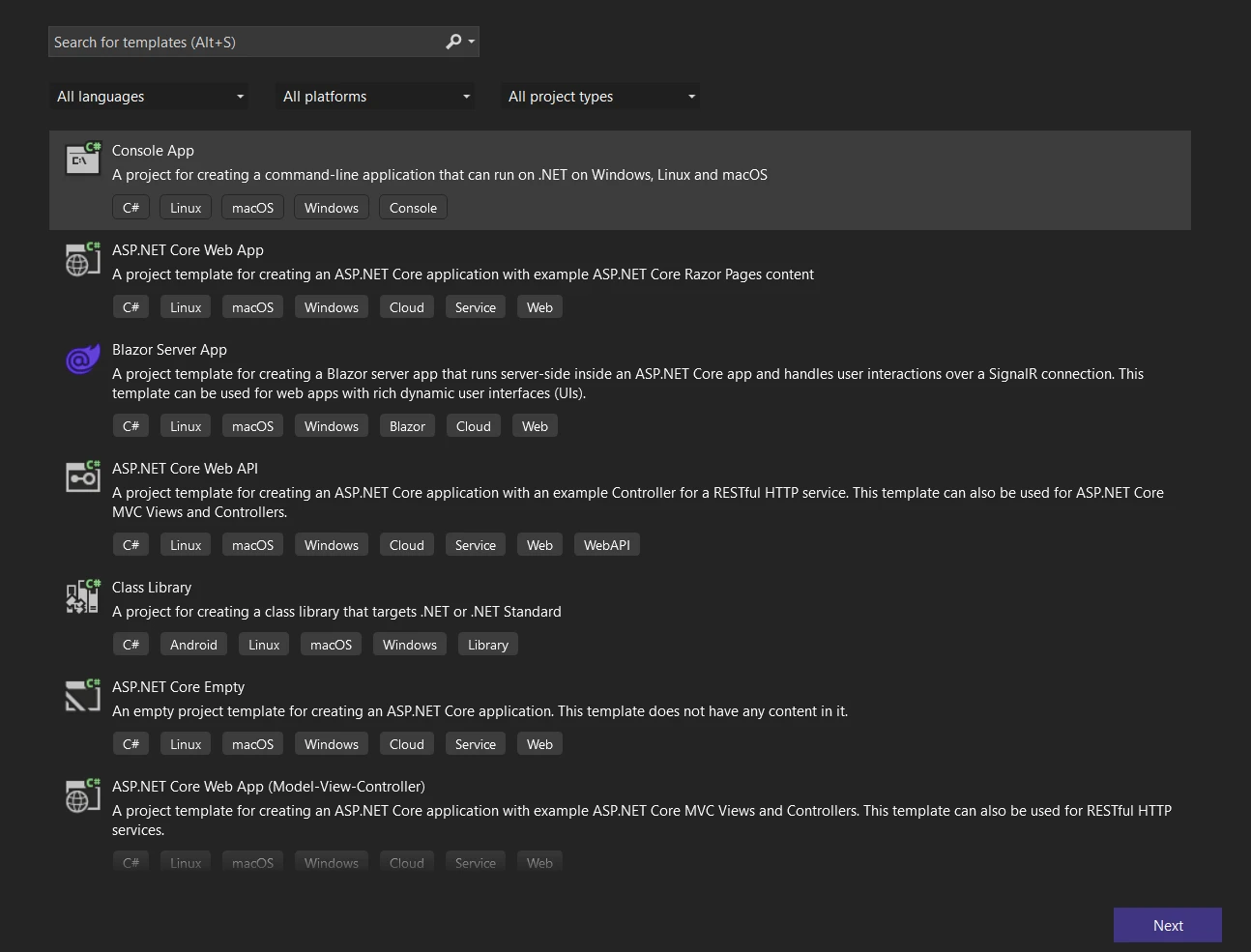 새 콘솔 애플리케이션 생성
다음 버튼을 클릭하고 프로젝트 이름과 저장소 위치를 선택하여 구성하세요.
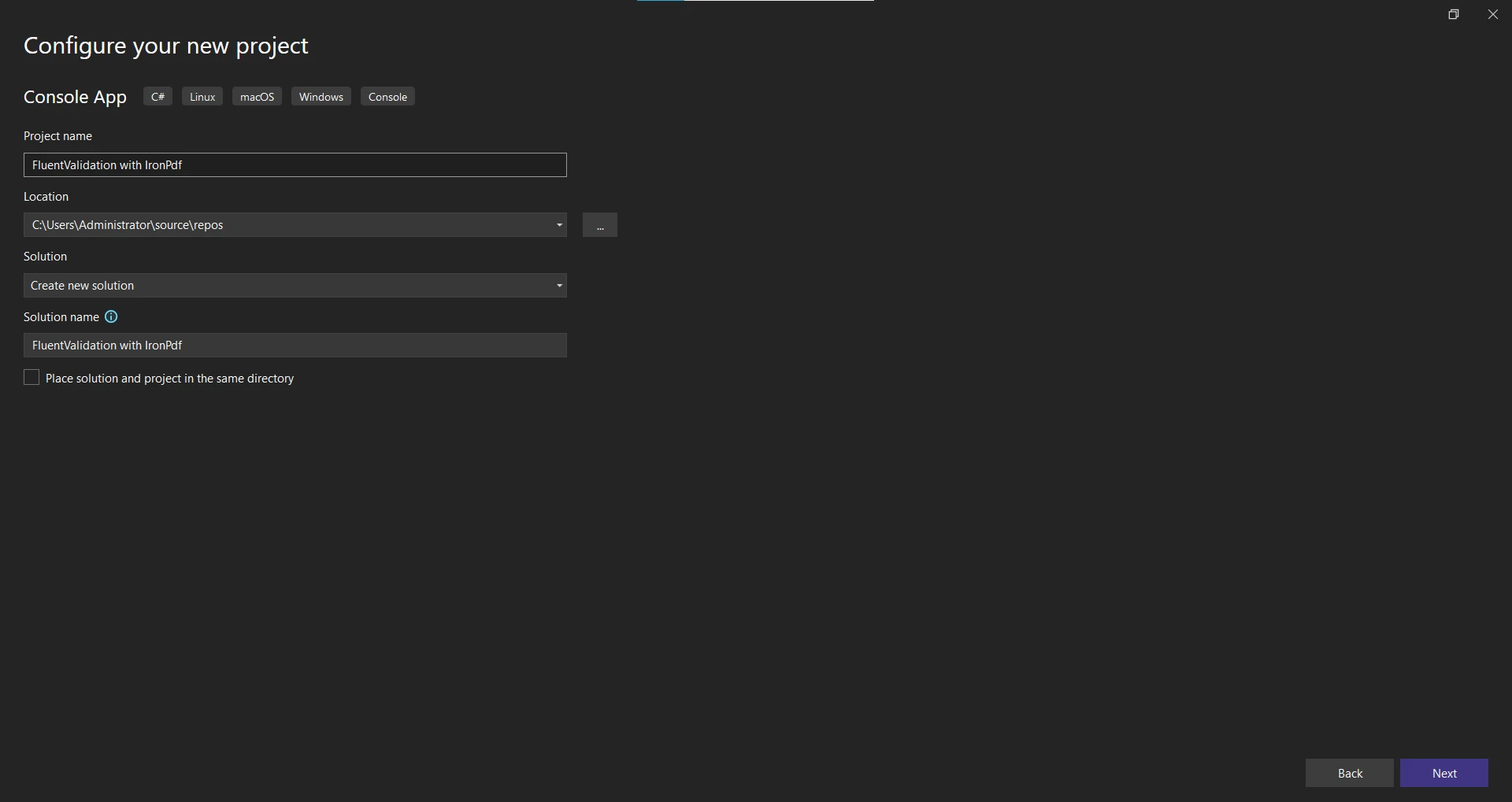 새로운 애플리케이션 구성
다음 버튼을 클릭하고 .NET Framework를 선택하세요. 최신 .NET Framework (7)를 권장합니다.
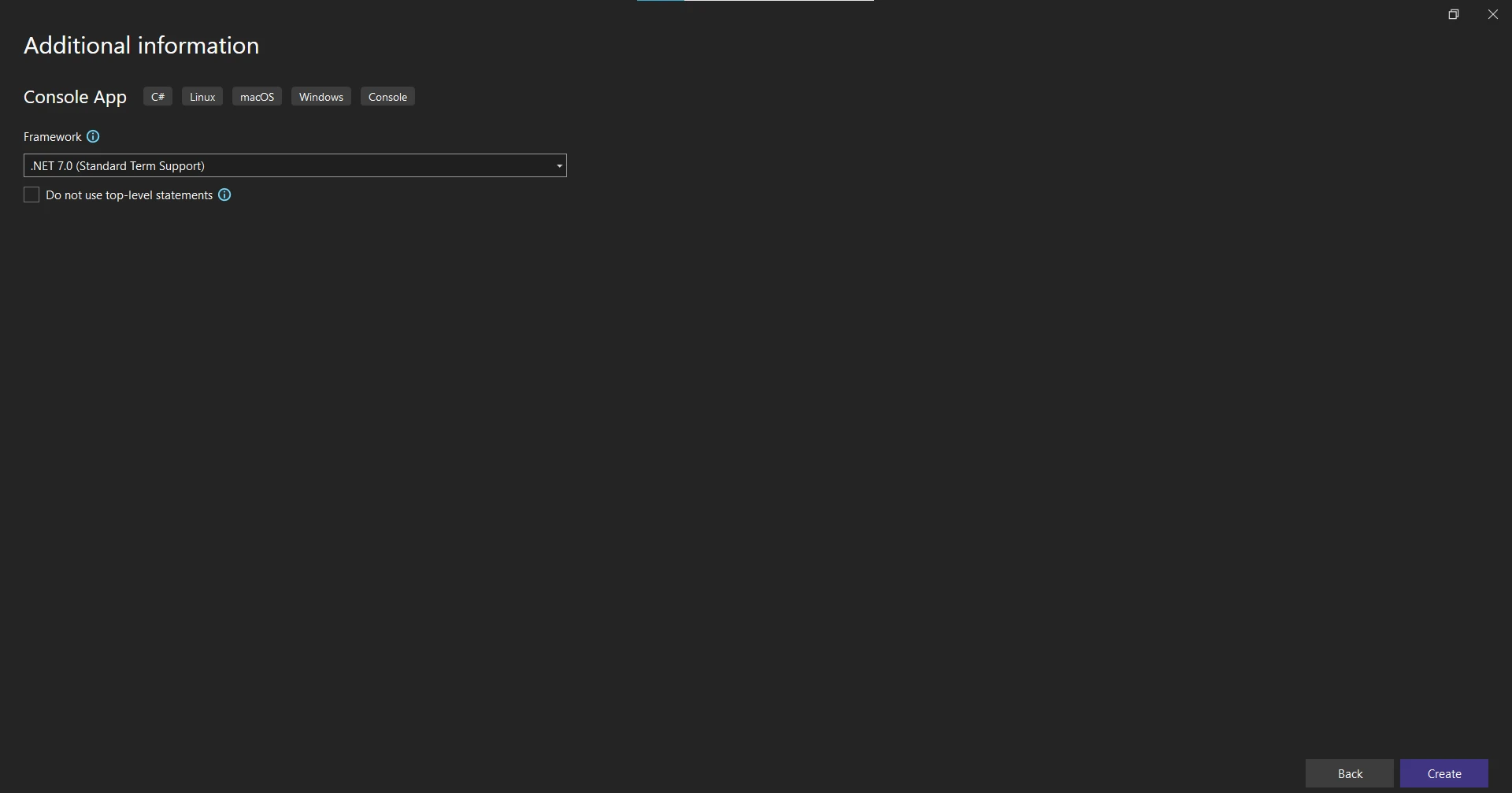 .NET Framework 선택
생성 버튼을 클릭하여 프로젝트를 생성하세요.
프로젝트가 생성되면 Fluent Validation과 IronPDF에 필요한 NuGet 패키지를 추가하세요.
Solution Explorer에서 프로젝트를 마우스 오른쪽 버튼으로 클릭하고 'Manage NuGet Packages'를 선택하세요.
'FluentValidation'을 검색하고 '설치'를 클릭하여 패키지를 프로젝트에 추가하세요.
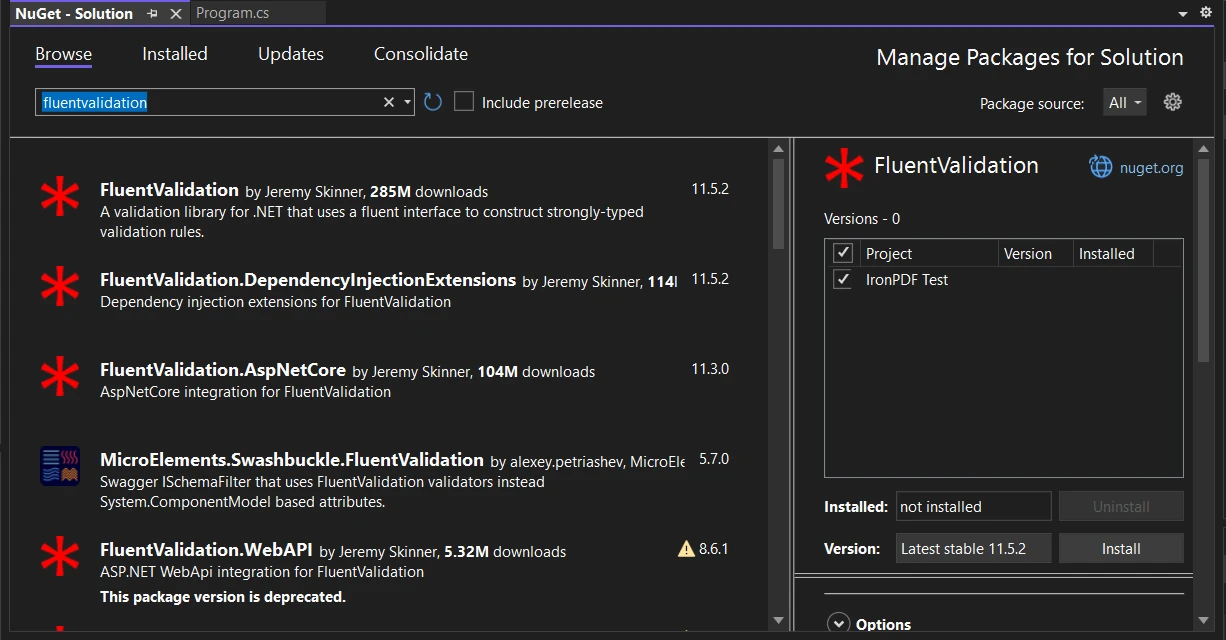 NuGet 패키지 관리자 UI에서 FluentValidation Install-Package
마찬가지로 'IronPDF - 강력한 .NET PDF 라이브러리'를 검색하고 IronPDF 패키지를 설치하세요.
대안으로, NuGet 패키지 관리자 콘솔을 사용하여 다음 명령어로 IronPDF를 설치할 수 있습니다:
 패키지 관리자 콘솔에서 IronPDF Install-Package
프로젝트와 필요한 Install-Package가 완료되면 PDF 콘텐츠 클래스를 정의합니다.
이 예제에서는 두 클래스의 HTML 코드에서 간단한 청구서 PDF가 생성됩니다: InvoiceContent 및 InvoiceItem.
using System.Collections.Generic;
using System.Linq;

public abstract class PdfContent
{
    // Abstract method to generate the HTML string
    public abstract string RenderHtml();
}

public class InvoiceContent : PdfContent
{
    public string CustomerName { get; set; }
    public string Address { get; set; }
    public List<InvoiceItem> InvoiceItems { get; set; }

    // Constructs the HTML representation of the invoice
    public override string RenderHtml()
    {
        string invoiceItemsHtml = string.Join("", InvoiceItems.Select(item => $"<li>{item.Description}: {item.Price}</li>"));
        return $"<h1>Invoice for {CustomerName}</h1><p>{Address}</p><ul>{invoiceItemsHtml}</ul>";
    }
}

public class InvoiceItem
{
    public string Description { get; set; }
    public decimal Price { get; set; }
}Imports System.Collections.Generic
Imports System.Linq
Public MustInherit Class PdfContent
' Abstract method to generate the HTML string
Public MustOverride Function RenderHtml() As String
End Class
Public Class InvoiceContent
Inherits PdfContent
Public Property CustomerName() As String
Public Property Address() As String
Public Property InvoiceItems() As List(Of InvoiceItem)
' Constructs the HTML representation of the invoice
Public Overrides Function RenderHtml() As String
Dim invoiceItemsHtml As String = String.Join("", InvoiceItems.Select(Function(item) $"<li>{item.Description}: {item.Price}</li>"))
Return $"<h1>Invoice for {CustomerName}</h1><p>{Address}</p><ul>{invoiceItemsHtml}</ul>"
End Function
End Class
Public Class InvoiceItem
Public Property Description() As String
Public Property Price() As Decimal
End Class위 코드에서 추상 메서드 RenderHtml가 있는 추상 PdfContent 클래스가 정의되었습니다. The InvoiceContent 클래스는 PdfContent를 확장하고 청구서 PDF의 내용을 나타냅니다. 이는 고객의 이름, 주소 및 송장 항목 목록에 대한 속성을 가지고 있습니다. InvoiceItem 클래스는 두 가지 속성: 'Description'과 'Price'를 포함합니다. RenderHtml 메서드는 내용을 기반으로 청구서를 위한 HTML 마크업을 생성합니다.
이제 PDF 콘텐츠 정의가 완료되었으니 Fluent Validation을 사용하여 검증 규칙을 생성합니다.
InvoiceContent 클래스의 유효성 검사 규칙을 만들기 위해 InvoiceContentValidator라는 유효성 검사기를 만드십시오. 이 클래스는 FluentValidation에서 제공하는 AbstractValidator<InvoiceContent>을 상속받습니다.
using FluentValidation;

public class InvoiceContentValidator : AbstractValidator<InvoiceContent>
{
    public InvoiceContentValidator()
    {
        RuleFor(content => content.CustomerName).NotEmpty().WithMessage("Customer name is required.");
        RuleFor(content => content.Address).NotEmpty().WithMessage("Address is required.");
        RuleFor(content => content.InvoiceItems).NotEmpty().WithMessage("At least one invoice item is required.");
        RuleForEach(content => content.InvoiceItems).SetValidator(new InvoiceItemValidator());
    }
}

public class InvoiceItemValidator : AbstractValidator<InvoiceItem>
{
    public InvoiceItemValidator()
    {
        RuleFor(item => item.Description).NotEmpty().WithMessage("Description is required.");
        RuleFor(item => item.Price).GreaterThanOrEqualTo(0).WithMessage("Price must be greater than or equal to 0.");
    }
}Imports FluentValidation
Public Class InvoiceContentValidator
Inherits AbstractValidator(Of InvoiceContent)
Public Sub New()
RuleFor(Function(content) content.CustomerName).NotEmpty().WithMessage("Customer name is required.")
RuleFor(Function(content) content.Address).NotEmpty().WithMessage("Address is required.")
RuleFor(Function(content) content.InvoiceItems).NotEmpty().WithMessage("At least one invoice item is required.")
RuleForEach(Function(content) content.InvoiceItems).SetValidator(New InvoiceItemValidator())
End Sub
End Class
Public Class InvoiceItemValidator
Inherits AbstractValidator(Of InvoiceItem)
Public Sub New()
RuleFor(Function(item) item.Description).NotEmpty().WithMessage("Description is required.")
RuleFor(Function(item) item.Price).GreaterThanOrEqualTo(0).WithMessage("Price must be greater than or equal to 0.")
End Sub
End Class소스 코드에서 InvoiceContentValidator 클래스가 정의되어 있으며, 이는 AbstractValidator<InvoiceContent>를 상속합니다. 유효성 검사 클래스의 생성자 안에는 RuleFor 메서드가 InvoiceContent 클래스의 각 속성에 대한 유효성 검사 규칙을 정의합니다.
예를 들어 RuleFor(content => content.CustomerName)은 고객 이름이 비어 있지 않아야 한다고 지정합니다. 마찬가지로 주소와 송장 항목 속성에 대한 검증 규칙을 정의합니다.
RuleForEach 메서드는 InvoiceItems 목록의 각 항목을 반복 처리하고 InvoiceItemValidator을 적용합니다. InvoiceItemValidator 클래스는 InvoiceItem 클래스에 대한 유효성 검사 규칙을 포함합니다.
이러한 검증 규칙이 설정되면 IronPDF를 사용하여 PDF를 생성합니다.
IronPDF - PDF 문서 생성 및 편집은 PDF 문서를 생성하고 조작하는 데 널리 사용되는 .NET 라이브러리입니다. IronPDF는 검증된 인보이스 콘텐츠를 기반으로 PDF를 생성하는 데 사용됩니다.
using IronPdf;
using FluentValidation;

public class PdfService
{
    // Generates a PDF document for the provided content
    public PdfDocument GeneratePdf<t>(T content) where T : PdfContent
    {
        // Validate the content using the appropriate validator
        var validator = GetValidatorForContent(content);
        var validationResult = validator.Validate(content);

        // Check if validation is successful
        if (!validationResult.IsValid)
        {
            throw new FluentValidation.ValidationException(validationResult.Errors);
        }

        // Generate the PDF using IronPDF
        var renderer = new ChromePdfRenderer();
        return renderer.RenderHtmlAsPdf(content.RenderHtml());
    }

    // Retrieves the appropriate validator for the content
    private IValidator<t> GetValidatorForContent<t>(T content) where T : PdfContent
    {
        if (content is InvoiceContent)
        {
            return (IValidator<t>)new InvoiceContentValidator();
        }
        else
        {
            throw new NotSupportedException("Unsupported content type.");
        }
    }
}Imports IronPdf
Imports FluentValidation
Public Class PdfService
' Generates a PDF document for the provided content
Public Function GeneratePdf(Of T As PdfContent)(content As T) As PdfDocument
' Validate the content using the appropriate validator
Dim validator = GetValidatorForContent(content)
Dim validationResult = validator.Validate(content)
' Check if validation is successful
If Not validationResult.IsValid Then
Throw New FluentValidation.ValidationException(validationResult.Errors)
End If
' Generate the PDF using IronPDF
Dim renderer = New ChromePdfRenderer()
Return renderer.RenderHtmlAsPdf(content.RenderHtml())
End Function
' Retrieves the appropriate validator for the content
Private Function GetValidatorForContent(Of T As PdfContent)(content As T) As IValidator(Of T)
If TypeOf content Is InvoiceContent Then
Return CType(New InvoiceContentValidator(), IValidator(Of T))
Else
Throw New NotSupportedException("Unsupported content type.")
End If
End Function
End ClassPdfService 클래스는 GeneratePdf 메서드를 제공합니다. 이 메서드는 PdfContent 객체를 입력으로 받고 유효성 검사가 완료된 콘텐츠를 기반으로 PDF 문서를 생성합니다.
첫째, GetValidatorForContent 메서드를 호출하여 콘텐츠 유형을 검사하고 해당 유효성 검사기를 반환하여 콘텐츠에 적합한 유효성 검사기를 가져옵니다. 우리의 경우, 우리는 InvoiceContent을 지원하고 InvoiceContentValidator을 사용합니다.
다음으로, 콘텐츠는 유효성 검사기의 Validate 메서드를 호출하여 유효성 검사를 완료합니다. 유효성 검사 결과는 ValidationResult 객체에 저장됩니다.
유효성 검사가 실패하면 (!validationResult.IsValid), 유효성 검사 오류로 FluentValidation.ValidationException이 발생됩니다. 그렇지 않으면, IronPDF를 사용하여 PDF가 생성됩니다.
ChromePdfRenderer 인스턴스가 HTML 콘텐츠를 PDF로 렌더링하기 위해 생성됩니다. The RenderHtmlAsPdf 메서드는 renderer 객체에서 호출되어 content.RenderHtml 메서드가 생성한 HTML을 전달함으로써 PDF 문서를 생성합니다.
이제 PDF 생성 논리를 정의했으니 발생할 수 있는 모든 유효성 검사 오류를 처리해 보겠습니다.
유효성 검사 오류가 발생하면 오류 메시지를 표시하고 유연하게 처리하고자 합니다. Main 메서드를 수정하여 예외를 처리하고 사용자에게 의미 있는 메시지를 표시하도록 Program 클래스를 수정합시다.
using System;
using System.Collections.Generic;

public class Program
{
    static void Main(string[] args)
    {
        var pdfService = new PdfService();

        // Test 1: Empty Customer Name
        try
        {
            var invoiceContent = new InvoiceContent
            {
                CustomerName = "",
                Address = "123 Main St, Anytown, USA",
                InvoiceItems = new List<InvoiceItem> {
                    new InvoiceItem { Description = "Item 1", Price = 19.99M },
                    new InvoiceItem { Description = "Item 2", Price = 29.99M }
                }
            };

            var pdfDocument = pdfService.GeneratePdf(invoiceContent);
            pdfDocument.SaveAs("C:\\TestInvoice.pdf");
            Console.WriteLine("PDF generated successfully!");
        }
        catch (Exception ex)
        {
            Console.WriteLine("Error generating PDF: " + ex.Message);
        }

        // Test 2: Empty InvoiceItems
        try
        {
            var invoiceContent = new InvoiceContent
            {
                CustomerName = "John Doe",
                Address = "123 Main St, Anytown, USA",
                InvoiceItems = new List<InvoiceItem>()  // Empty list
            };

            var pdfDocument = pdfService.GeneratePdf(invoiceContent);
            pdfDocument.SaveAs("C:\\TestInvoice.pdf");
            Console.WriteLine("PDF generated successfully!");
        }
        catch (Exception ex)
        {
            Console.WriteLine("Error generating PDF: " + ex.Message);
        }

        // Successful generation
        try
        {
            var invoiceContent = new InvoiceContent
            {
                CustomerName = "John Doe",
                Address = "123 Main St, Anytown, USA",
                InvoiceItems = new List<InvoiceItem> {
                    new InvoiceItem { Description = "Item 1", Price = 19.99M },
                    new InvoiceItem { Description = "Item 2", Price = 29.99M }
                }
            };
            var pdfDocument = pdfService.GeneratePdf(invoiceContent);
            pdfDocument.SaveAs("C:\\TestInvoice.pdf");
            Console.WriteLine("PDF generated successfully!");
        }
        catch (Exception ex)
        {
            Console.WriteLine("Error generating PDF: " + ex.Message);
        }
    }
}Imports System
Imports System.Collections.Generic
Public Class Program
Shared Sub Main(ByVal args() As String)
Dim pdfService As New PdfService()
' Test 1: Empty Customer Name
Try
Dim invoiceContent As New InvoiceContent With {
.CustomerName = "",
.Address = "123 Main St, Anytown, USA",
.InvoiceItems = New List(Of InvoiceItem) From {
New InvoiceItem With {
.Description = "Item 1",
.Price = 19.99D
},
New InvoiceItem With {
.Description = "Item 2",
.Price = 29.99D
}
}
}
Dim pdfDocument = pdfService.GeneratePdf(invoiceContent)
pdfDocument.SaveAs("C:\TestInvoice.pdf")
Console.WriteLine("PDF generated successfully!")
Catch ex As Exception
Console.WriteLine("Error generating PDF: " & ex.Message)
End Try
' Test 2: Empty InvoiceItems
Try
Dim invoiceContent As New InvoiceContent With {
.CustomerName = "John Doe",
.Address = "123 Main St, Anytown, USA",
.InvoiceItems = New List(Of InvoiceItem)()
}
Dim pdfDocument = pdfService.GeneratePdf(invoiceContent)
pdfDocument.SaveAs("C:\TestInvoice.pdf")
Console.WriteLine("PDF generated successfully!")
Catch ex As Exception
Console.WriteLine("Error generating PDF: " & ex.Message)
End Try
' Successful generation
Try
Dim invoiceContent As New InvoiceContent With {
.CustomerName = "John Doe",
.Address = "123 Main St, Anytown, USA",
.InvoiceItems = New List(Of InvoiceItem) From {
New InvoiceItem With {
.Description = "Item 1",
.Price = 19.99D
},
New InvoiceItem With {
.Description = "Item 2",
.Price = 29.99D
}
}
}
Dim pdfDocument = pdfService.GeneratePdf(invoiceContent)
pdfDocument.SaveAs("C:\TestInvoice.pdf")
Console.WriteLine("PDF generated successfully!")
Catch ex As Exception
Console.WriteLine("Error generating PDF: " & ex.Message)
End Try
End Sub
End Class위 코드에서는 try-catch 블록이 발생할 수 있는 예외를 잡는 데 사용됩니다. 예외가 잡히면, Console.WriteLine을 사용하여 사용자에게 오류 메시지가 표시됩니다.
이제 다양한 시나리오로 이 애플리케이션을 테스트하여 PDF 생성과 유효성 검사 규칙을 검증해 봅시다.
코드 예제에서는 테스트할 세 개의 시나리오가 있습니다:
애플리케이션을 실행하고 콘솔의 출력을 확인하십시오.
Error generating PDF: Validation failed:
    -- CustomerName: Customer name is required. Severity: Error
Error generating PDF: Validation failed:
    -- InvoiceItems: At least one invoice item is required. Severity: Error
PDF generated successfully!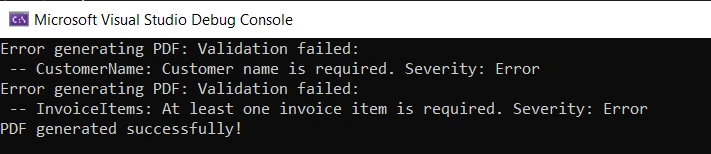 콘솔의 출력 오류
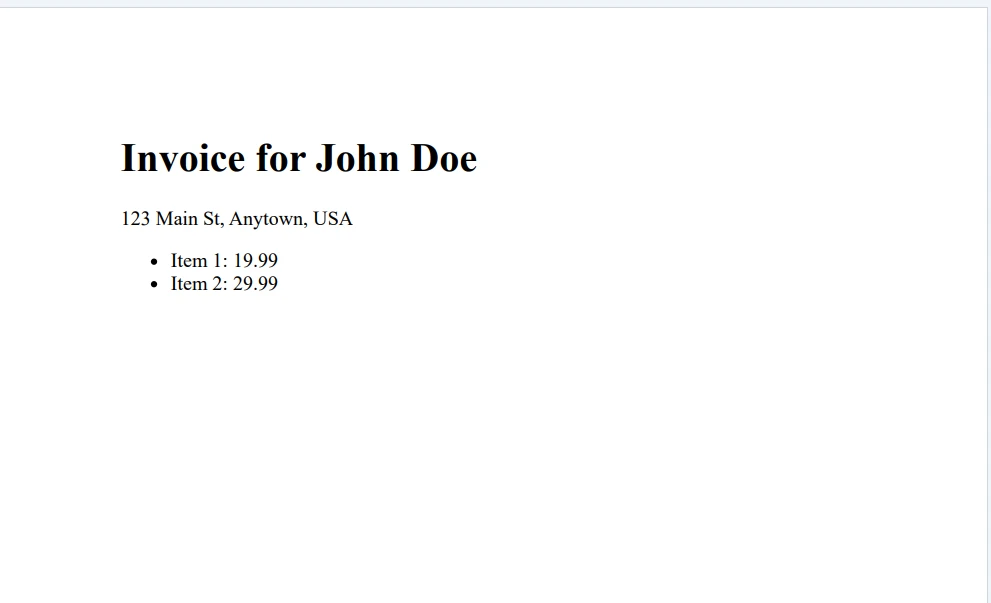 출력 PDF 파일
예상대로 첫 두 가지 시나리오에는 유효성 검사 오류가 표시되고, 세 번째 시나리오에는 성공 메시지가 표시됩니다.
이 튜토리얼에서는 유창한 유효성 검사와 이를 IronPDF와 결합하여 PDF 문서를 생성하는 방법을 탐구했습니다. 콘솔 애플리케이션을 설정하고 PDF 콘텐츠 클래스를 정의하는 것으로 시작합니다. 그런 다음 유창한 유효성 검사로 유효성 검사 규칙을 만들어 다양한 시나리오로 PDF 생성을 테스트합니다.
유창한 유효성 검사는 .NET 애플리케이션에서 객체를 유효성 검사하는 유연하고 사용하기 쉬운 방법을 제공합니다. 유형을 명확히 지정하여 유효성 검사 규칙을 정의하고, 오류 메시지를 사용자 정의하며, 유효성 검사 오류를 유연하게 처리할 수 있습니다.
IronPDF 무료 체험판 및 라이센스 정보는 무료 체험판을 제공하며, 개발자당 라이센스 비용은 $499부터 시작합니다.

커티스 차우는 칼턴 대학교에서 컴퓨터 과학 학사 학위를 취득했으며, Node.js, TypeScript, JavaScript, React를 전문으로 하는 프론트엔드 개발자입니다. 직관적이고 미적으로 뛰어난 사용자 인터페이스를 만드는 데 열정을 가진 그는 최신 프레임워크를 활용하고, 잘 구성되고 시각적으로 매력적인 매뉴얼을 제작하는 것을 즐깁니다.



IronPDF는 IRON SUITE 의 일부입니다.
10개의 .NET API 제품, 당신의 사무 문서를 위해











PDF 파일을 HTML처럼 빠르게 변환해야 할 때.


