




已更新 2026年5月8日
生成每月账户报表(PDF 文档)
using IronPDF C# PDF 库,开发人员可以在 .NET 项目中将 HTML 转换为可靠的 PDF 文件,而无需依赖外部服务。
阅读更多

FluentValidation是一个.NET验证库,帮助构建强类型的验证规则。 它使用流畅的接口和lambda表达式,使代码更具可读性和可维护性。 比起在模型类中使用数据注解或手动验证,您可以使用Fluent Validation为验证逻辑构建单独的类。
Fluent Validation为验证过程带来了更大的灵活性。 凭借内置的常见场景验证器、构建自定义验证的能力和简易的验证规则链方式,Fluent Validation是.NET Core工具包中强大的工具。
Fluent Validation是一个.NET的开源库,使为模型类构建验证规则变得简单。
AbstractValidator<t>基类来创建。RuleFor方法定义的。ValidationFailure对象,其中包含错误的详细信息,包括属性名称和错误信息。IronPDF - 在C#中将HTML转换为PDF是一个强大的.NET库,允许您从HTML内容生成PDF文档。 无论您需要创建发票、报告或其他类型的文档,IronPDF都提供了一种易于使用的解决方案。 它无缝集成到ASP.NET Core应用程序中,使您可以仅用几行代码生成高质量的PDF文件。
现在我们了解了Fluent Validation和IronPDF是什么,我们来看一下它们如何一起使用。 本教程将帮助构建一个发票生成器,其中的发票内容将在使用IronPDF生成PDF之前在ASP.NET Core中使用FluentValidation进行验证。
首先,让我们在Visual Studio或您喜欢的开发环境中创建一个新的控制台应用程序。
打开Visual Studio并转到文件 > 新建 > 项目。
选择"控制台应用程序(ASP.NET Core)"作为项目模板,并为您的项目提供一个名称。
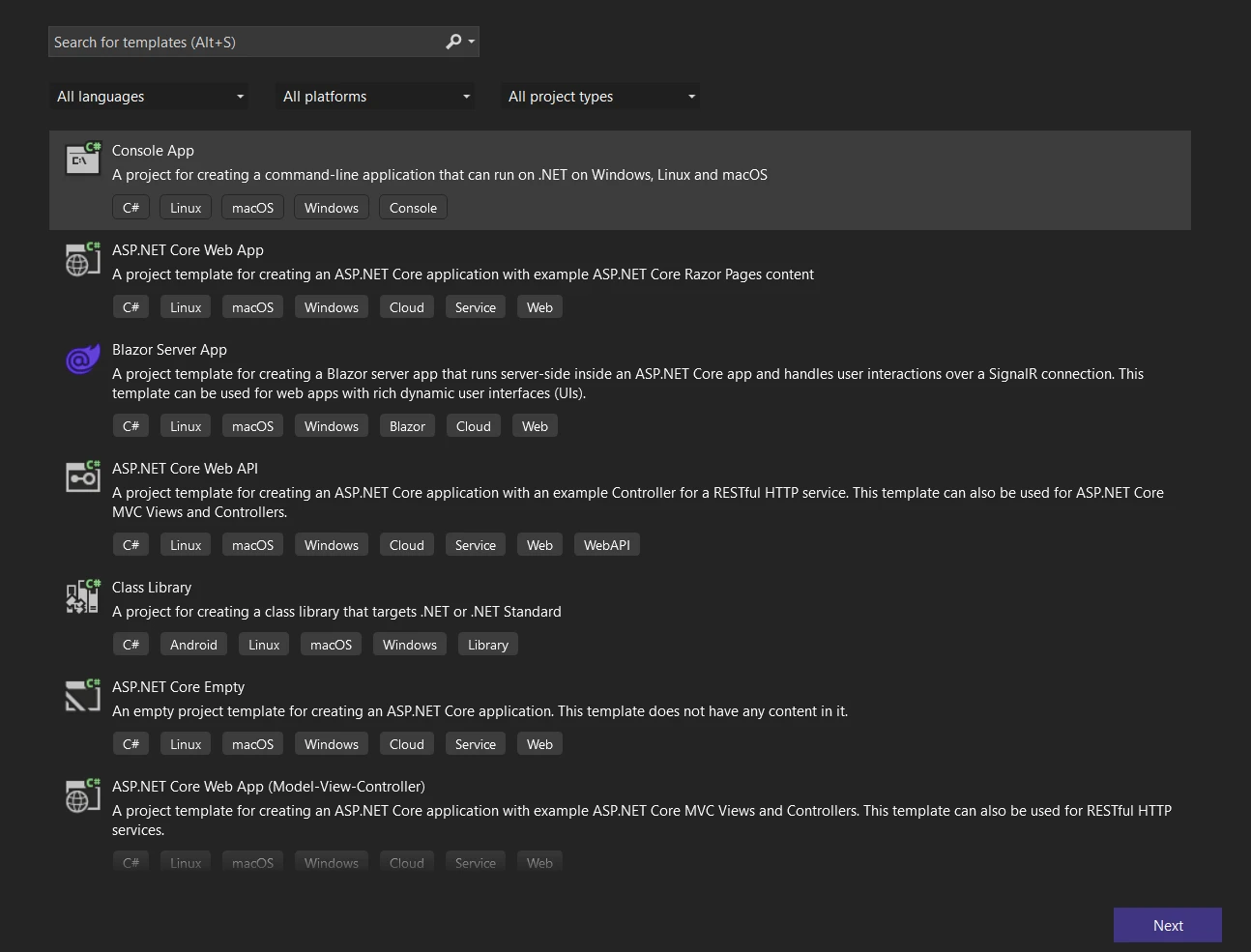 创建新的控制台应用程序
点击下一步按钮,并通过命名并选择存储库位置来配置您的项目。
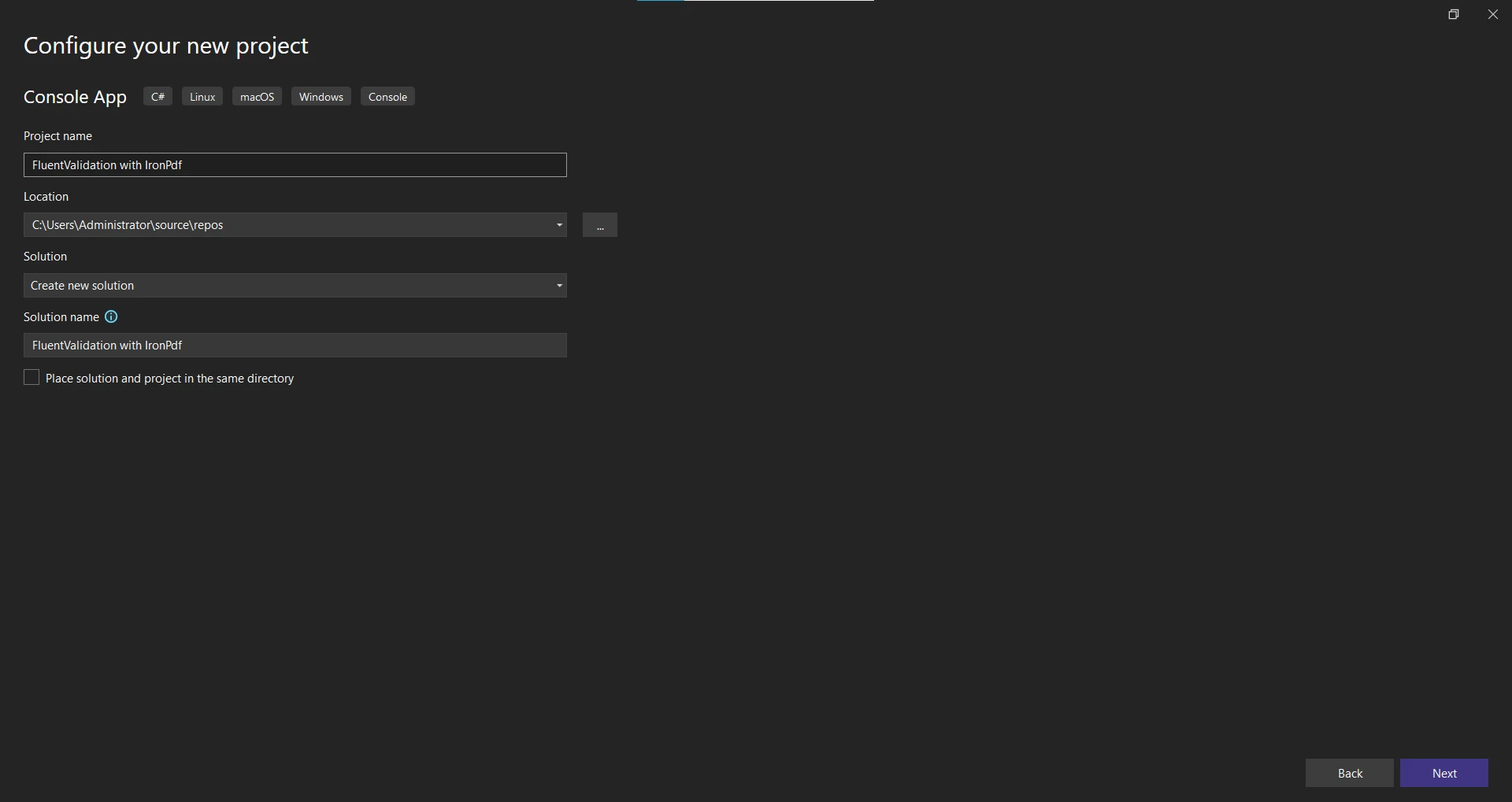 配置新应用程序
点击下一步按钮并选择.NET Framework。 推荐使用最新的.NET Framework(7)。
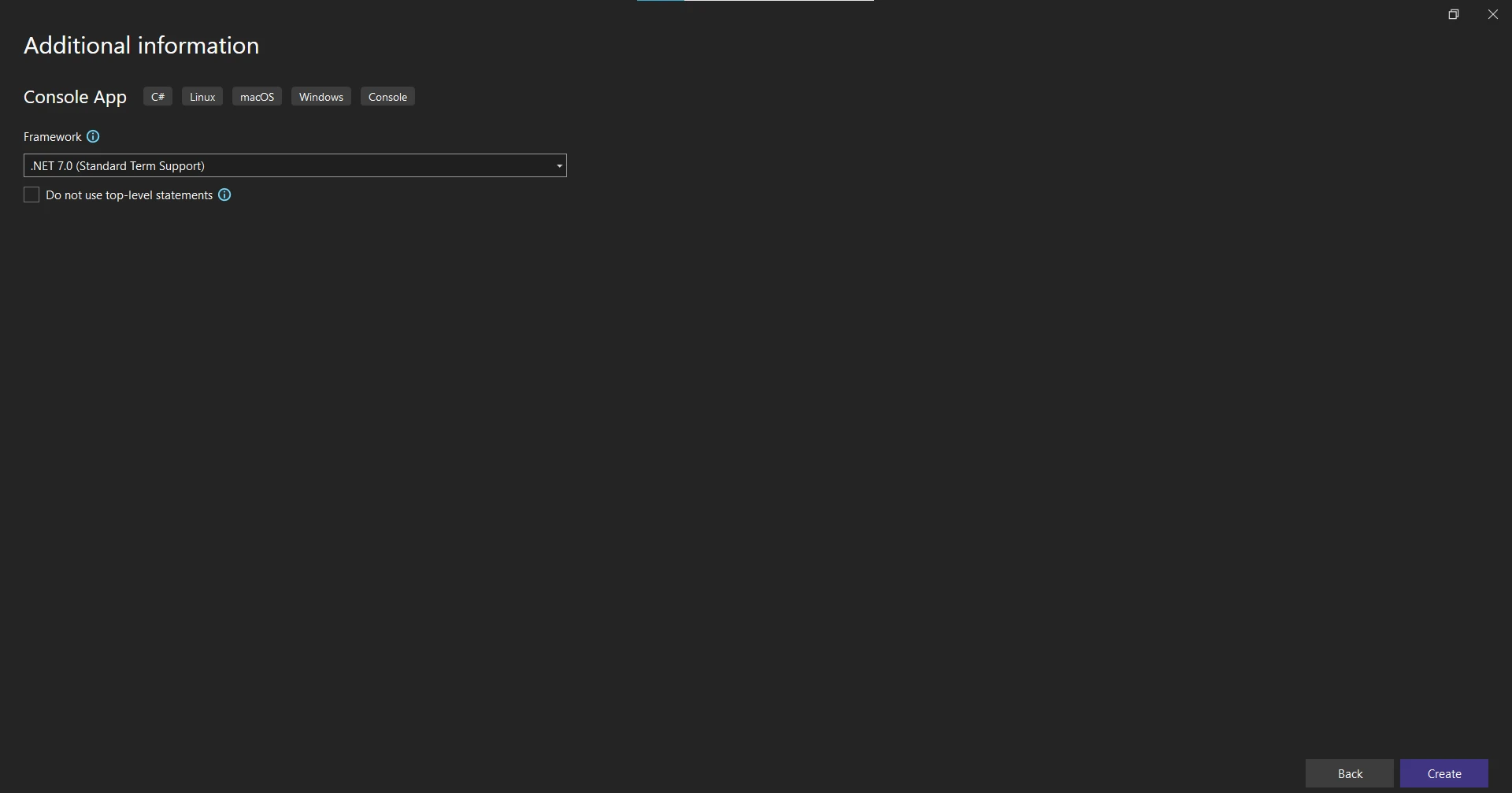 .NET Framework 选择
点击创建按钮以创建项目。
项目创建完成后,添加Fluent Validation和IronPDF所需的NuGet包。
右键点击解决方案资源管理器中的项目并选择"管理NuGet包"。
搜索"FluentValidation"并点击"安装"以将包添加到您的项目中。
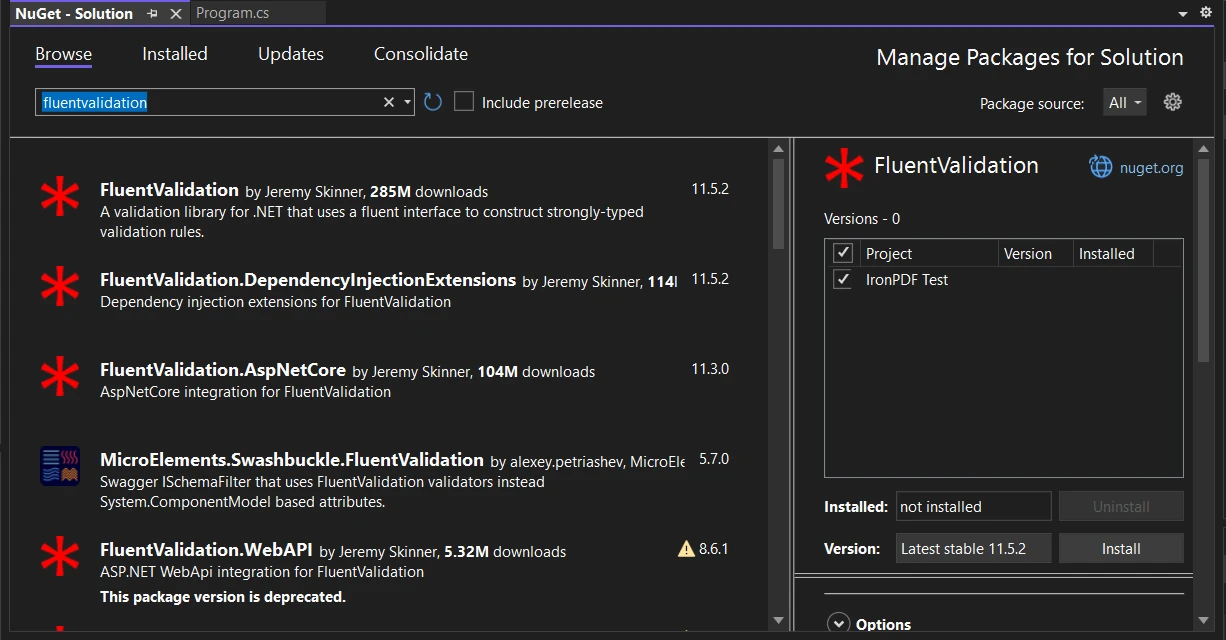 在NuGet包管理器UI中安装FluentValidation包
同样,搜索"IronPDF - 强大的.NET PDF库"并安装IronPDF包。
或者,您可以使用NuGet包管理器控制台通过以下命令安装IronPDF:
 在包管理器控制台中安装IronPDF包
在设置好项目并安装所需包后,让我们继续定义PDF内容类。
在此示例中,简单的发票PDF将从两个类中的HTML代码创建:InvoiceItem。
using System.Collections.Generic;
using System.Linq;

public abstract class PdfContent
{
    // Abstract method to generate the HTML string
    public abstract string RenderHtml();
}

public class InvoiceContent : PdfContent
{
    public string CustomerName { get; set; }
    public string Address { get; set; }
    public List<InvoiceItem> InvoiceItems { get; set; }

    // Constructs the HTML representation of the invoice
    public override string RenderHtml()
    {
        string invoiceItemsHtml = string.Join("", InvoiceItems.Select(item => $"<li>{item.Description}: {item.Price}</li>"));
        return $"<h1>Invoice for {CustomerName}</h1><p>{Address}</p><ul>{invoiceItemsHtml}</ul>";
    }
}

public class InvoiceItem
{
    public string Description { get; set; }
    public decimal Price { get; set; }
}Imports System.Collections.Generic
Imports System.Linq
Public MustInherit Class PdfContent
' Abstract method to generate the HTML string
Public MustOverride Function RenderHtml() As String
End Class
Public Class InvoiceContent
Inherits PdfContent
Public Property CustomerName() As String
Public Property Address() As String
Public Property InvoiceItems() As List(Of InvoiceItem)
' Constructs the HTML representation of the invoice
Public Overrides Function RenderHtml() As String
Dim invoiceItemsHtml As String = String.Join("", InvoiceItems.Select(Function(item) $"<li>{item.Description}: {item.Price}</li>"))
Return $"<h1>Invoice for {CustomerName}</h1><p>{Address}</p><ul>{invoiceItemsHtml}</ul>"
End Function
End Class
Public Class InvoiceItem
Public Property Description() As String
Public Property Price() As Decimal
End Class在上面的代码中,定义了一个名为PdfContent类。 PdfContent并表示发票PDF的内容。 它具有客户姓名、地址和发票项目列表的属性。 InvoiceItem类包含两个属性:'Description'和'Price'。 RenderHtml方法根据内容生成发票的HTML标记。
既然PDF内容已定义,让我们继续使用Fluent Validation创建验证规则。
要为InvoiceContentValidator的验证器类。 此类将继承自AbstractValidator<InvoiceContent>,这是FluentValidation提供的。
using FluentValidation;

public class InvoiceContentValidator : AbstractValidator<InvoiceContent>
{
    public InvoiceContentValidator()
    {
        RuleFor(content => content.CustomerName).NotEmpty().WithMessage("Customer name is required.");
        RuleFor(content => content.Address).NotEmpty().WithMessage("Address is required.");
        RuleFor(content => content.InvoiceItems).NotEmpty().WithMessage("At least one invoice item is required.");
        RuleForEach(content => content.InvoiceItems).SetValidator(new InvoiceItemValidator());
    }
}

public class InvoiceItemValidator : AbstractValidator<InvoiceItem>
{
    public InvoiceItemValidator()
    {
        RuleFor(item => item.Description).NotEmpty().WithMessage("Description is required.");
        RuleFor(item => item.Price).GreaterThanOrEqualTo(0).WithMessage("Price must be greater than or equal to 0.");
    }
}Imports FluentValidation
Public Class InvoiceContentValidator
Inherits AbstractValidator(Of InvoiceContent)
Public Sub New()
RuleFor(Function(content) content.CustomerName).NotEmpty().WithMessage("Customer name is required.")
RuleFor(Function(content) content.Address).NotEmpty().WithMessage("Address is required.")
RuleFor(Function(content) content.InvoiceItems).NotEmpty().WithMessage("At least one invoice item is required.")
RuleForEach(Function(content) content.InvoiceItems).SetValidator(New InvoiceItemValidator())
End Sub
End Class
Public Class InvoiceItemValidator
Inherits AbstractValidator(Of InvoiceItem)
Public Sub New()
RuleFor(Function(item) item.Description).NotEmpty().WithMessage("Description is required.")
RuleFor(Function(item) item.Price).GreaterThanOrEqualTo(0).WithMessage("Price must be greater than or equal to 0.")
End Sub
End Class在源代码中,定义了AbstractValidator<InvoiceContent>。 在验证器类的构造函数内,InvoiceContent类每个属性的验证规则。
例如,RuleFor(content => content.CustomerName)指定客户名称不应为空。 类似地,为地址和发票项目属性定义了验证规则。
InvoiceItemValidator。 InvoiceItem类的验证规则。
随着这些验证规则的到位,让我们继续使用IronPDF生成PDF。
IronPDF - 生成和编辑PDF文档是一个流行的.NET库,用于创建和操作PDF文档。 IronPDF将用于基于经过验证的发票内容生成PDF。
using IronPdf;
using FluentValidation;

public class PdfService
{
    // Generates a PDF document for the provided content
    public PdfDocument GeneratePdf<t>(T content) where T : PdfContent
    {
        // Validate the content using the appropriate validator
        var validator = GetValidatorForContent(content);
        var validationResult = validator.Validate(content);

        // Check if validation is successful
        if (!validationResult.IsValid)
        {
            throw new FluentValidation.ValidationException(validationResult.Errors);
        }

        // Generate the PDF using IronPDF
        var renderer = new ChromePdfRenderer();
        return renderer.RenderHtmlAsPdf(content.RenderHtml());
    }

    // Retrieves the appropriate validator for the content
    private IValidator<t> GetValidatorForContent<t>(T content) where T : PdfContent
    {
        if (content is InvoiceContent)
        {
            return (IValidator<t>)new InvoiceContentValidator();
        }
        else
        {
            throw new NotSupportedException("Unsupported content type.");
        }
    }
}Imports IronPdf
Imports FluentValidation
Public Class PdfService
' Generates a PDF document for the provided content
Public Function GeneratePdf(Of T As PdfContent)(content As T) As PdfDocument
' Validate the content using the appropriate validator
Dim validator = GetValidatorForContent(content)
Dim validationResult = validator.Validate(content)
' Check if validation is successful
If Not validationResult.IsValid Then
Throw New FluentValidation.ValidationException(validationResult.Errors)
End If
' Generate the PDF using IronPDF
Dim renderer = New ChromePdfRenderer()
Return renderer.RenderHtmlAsPdf(content.RenderHtml())
End Function
' Retrieves the appropriate validator for the content
Private Function GetValidatorForContent(Of T As PdfContent)(content As T) As IValidator(Of T)
If TypeOf content Is InvoiceContent Then
Return CType(New InvoiceContentValidator(), IValidator(Of T))
Else
Throw New NotSupportedException("Unsupported content type.")
End If
End Function
End ClassGeneratePdf方法。 此方法将一个PdfContent对象作为输入,并根据经过验证的内容生成PDF文档。
首先,通过调用GetValidatorForContent方法获取内容的适当验证器,该方法检查内容类型并返回相应的验证器。 在我们的情况下,我们支持InvoiceContentValidator。
接下来,通过调用其Validate方法使用验证器验证内容。 验证结果存储在ValidationResult对象中。
如果验证失败(FluentValidation.ValidationException。 否则,使用IronPDF生成PDF。
创建ChromePdfRenderer实例来将HTML内容渲染为PDF。 RenderHtmlAsPdf方法在content.RenderHtml方法生成的HTML,从而生成PDF文档。
既然我们已经定义了PDF生成逻辑,让我们处理可能出现的任何验证错误。
当验证错误发生时,我们希望显示一个错误消息并优雅地处理它。 让我们修改Main方法以处理任何异常并向用户显示有意义的消息。
using System;
using System.Collections.Generic;

public class Program
{
    static void Main(string[] args)
    {
        var pdfService = new PdfService();

        // Test 1: Empty Customer Name
        try
        {
            var invoiceContent = new InvoiceContent
            {
                CustomerName = "",
                Address = "123 Main St, Anytown, USA",
                InvoiceItems = new List<InvoiceItem> {
                    new InvoiceItem { Description = "Item 1", Price = 19.99M },
                    new InvoiceItem { Description = "Item 2", Price = 29.99M }
                }
            };

            var pdfDocument = pdfService.GeneratePdf(invoiceContent);
            pdfDocument.SaveAs("C:\\TestInvoice.pdf");
            Console.WriteLine("PDF generated successfully!");
        }
        catch (Exception ex)
        {
            Console.WriteLine("Error generating PDF: " + ex.Message);
        }

        // Test 2: Empty InvoiceItems
        try
        {
            var invoiceContent = new InvoiceContent
            {
                CustomerName = "John Doe",
                Address = "123 Main St, Anytown, USA",
                InvoiceItems = new List<InvoiceItem>()  // Empty list
            };

            var pdfDocument = pdfService.GeneratePdf(invoiceContent);
            pdfDocument.SaveAs("C:\\TestInvoice.pdf");
            Console.WriteLine("PDF generated successfully!");
        }
        catch (Exception ex)
        {
            Console.WriteLine("Error generating PDF: " + ex.Message);
        }

        // Successful generation
        try
        {
            var invoiceContent = new InvoiceContent
            {
                CustomerName = "John Doe",
                Address = "123 Main St, Anytown, USA",
                InvoiceItems = new List<InvoiceItem> {
                    new InvoiceItem { Description = "Item 1", Price = 19.99M },
                    new InvoiceItem { Description = "Item 2", Price = 29.99M }
                }
            };
            var pdfDocument = pdfService.GeneratePdf(invoiceContent);
            pdfDocument.SaveAs("C:\\TestInvoice.pdf");
            Console.WriteLine("PDF generated successfully!");
        }
        catch (Exception ex)
        {
            Console.WriteLine("Error generating PDF: " + ex.Message);
        }
    }
}Imports System
Imports System.Collections.Generic
Public Class Program
Shared Sub Main(ByVal args() As String)
Dim pdfService As New PdfService()
' Test 1: Empty Customer Name
Try
Dim invoiceContent As New InvoiceContent With {
.CustomerName = "",
.Address = "123 Main St, Anytown, USA",
.InvoiceItems = New List(Of InvoiceItem) From {
New InvoiceItem With {
.Description = "Item 1",
.Price = 19.99D
},
New InvoiceItem With {
.Description = "Item 2",
.Price = 29.99D
}
}
}
Dim pdfDocument = pdfService.GeneratePdf(invoiceContent)
pdfDocument.SaveAs("C:\TestInvoice.pdf")
Console.WriteLine("PDF generated successfully!")
Catch ex As Exception
Console.WriteLine("Error generating PDF: " & ex.Message)
End Try
' Test 2: Empty InvoiceItems
Try
Dim invoiceContent As New InvoiceContent With {
.CustomerName = "John Doe",
.Address = "123 Main St, Anytown, USA",
.InvoiceItems = New List(Of InvoiceItem)()
}
Dim pdfDocument = pdfService.GeneratePdf(invoiceContent)
pdfDocument.SaveAs("C:\TestInvoice.pdf")
Console.WriteLine("PDF generated successfully!")
Catch ex As Exception
Console.WriteLine("Error generating PDF: " & ex.Message)
End Try
' Successful generation
Try
Dim invoiceContent As New InvoiceContent With {
.CustomerName = "John Doe",
.Address = "123 Main St, Anytown, USA",
.InvoiceItems = New List(Of InvoiceItem) From {
New InvoiceItem With {
.Description = "Item 1",
.Price = 19.99D
},
New InvoiceItem With {
.Description = "Item 2",
.Price = 29.99D
}
}
}
Dim pdfDocument = pdfService.GeneratePdf(invoiceContent)
pdfDocument.SaveAs("C:\TestInvoice.pdf")
Console.WriteLine("PDF generated successfully!")
Catch ex As Exception
Console.WriteLine("Error generating PDF: " & ex.Message)
End Try
End Sub
End Class在上面的代码中,使用try-catch块来捕获可能发生的任何异常。 如果捕获到异常,将使用Console.WriteLine向用户显示错误消息。
现在让我们用不同的场景来测试这个应用程序,以验证PDF生成和验证规则。
在代码示例中,有三个场景需要测试:
运行应用程序并观察控制台中的输出。
Error generating PDF: Validation failed:
    -- CustomerName: Customer name is required. Severity: Error
Error generating PDF: Validation failed:
    -- InvoiceItems: At least one invoice item is required. Severity: Error
PDF generated successfully!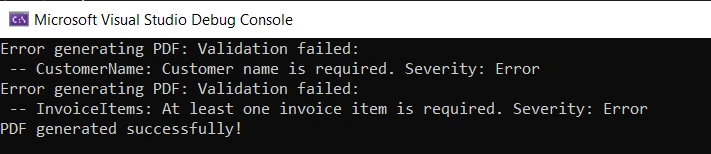 控制台中的输出错误
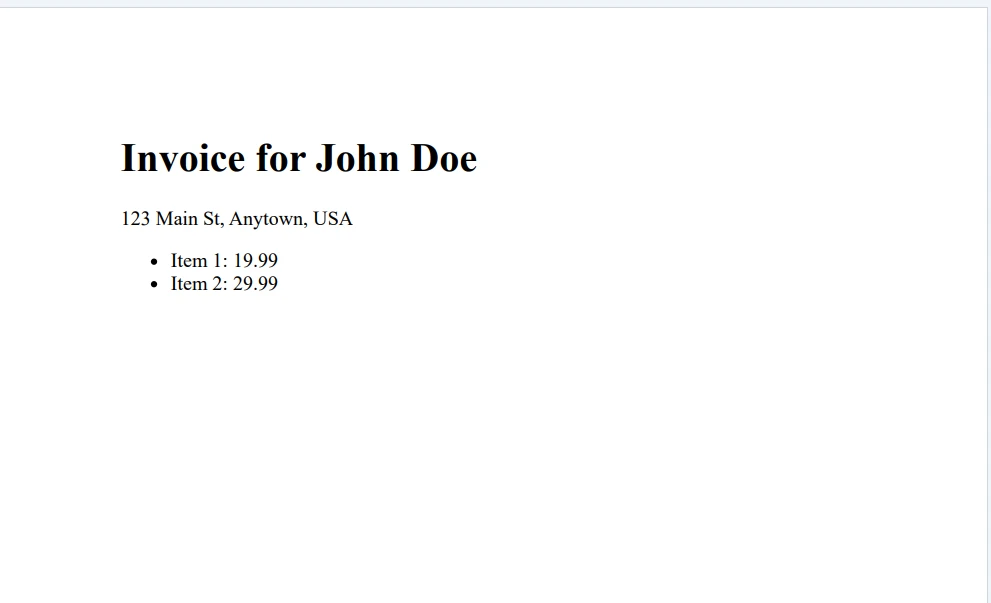 输出 PDF 文件
正如预期的那样,前两个场景显示验证错误,第三个场景显示成功消息。
本教程探讨了Fluent Validation,以及如何使用它与IronPDF生成PDF文档。 首先通过设置控制台应用和定义PDF内容类开始。 然后,使用Fluent Validation创建验证规则,并通过不同场景测试PDF生成。
Fluent Validation为.NET应用程序中的对象验证提供了一种灵活且易于使用的方法。 它允许您以强类型的方式定义验证规则,自定义错误消息,并优雅地处理验证错误。
IronPDF Free Trial & Licensing Information提供免费试用,许可证起价为每位开发者$499。

Curtis Chau 拥有卡尔顿大学的计算机科学学士学位,专注于前端开发,精通 Node.js、TypeScript、JavaScript 和 React。他热衷于打造直观且美观的用户界面,喜欢使用现代框架并创建结构良好、视觉吸引力强的手册。

当您需要PDF看起来像HTML时,速度快。















