


C#でIronPDFを使用してFluent Validationを使用する方法

Fluent Validationとは?
FluentValidationは、強く型指定された検証ルールの作成を手助けする.NET検証ライブラリです。 流暢なインターフェースとラムダ式を使い、コードをより読みやすく、保守しやすくします。 モデルクラスでデータ注釈や手動検証を使用する代わりに、Fluent Validationを使用して検証論理のための別のクラスを作成できます。
Fluent Validationは検証における柔軟性を向上させます。 一般的なシナリオに対応したビルドインバリデーター、カスタムバリデーションの作成機能、バリデーションルールを簡単に連鎖する方法を提供し、Fluent Validationは.NET Coreツールキットの強力なツールです。
Fluent Validationの理解
Fluent Validationは、モデルクラスのための検証ルールを簡単に作成するため for .NET向けオープンソースライブラリです。
- バリデーター: バリデーターは検証ロジックをカプセル化するクラスです。 これらは通常、
AbstractValidator<t>基本クラスから継承して作成されます。 - ルール: ルールはプロパティが満たすべき条件です。 ルールは、バリデータ クラスの
RuleForメソッドを使用して定義されます。 3.検証の失敗:ルールが失敗した場合、Fluent Validation は、プロパティ名やエラー メッセージなどのエラーの詳細を含むValidationFailureオブジェクトを作成します。
IronPDFとは何ですか?
IronPDF - Convert HTML to PDF in C#はHTMLコンテンツからPDFドキュメントを生成できる強力な.NETライブラリです。 請求書やレポート、その他の文書を作成する必要がある場合、IronPDFは使いやすいソリューションを提供します。 ASP.NET Coreアプリケーションとシームレスに統合され、わずか数行のコードで高品質なPDFファイルを生成できます。
Fluent ValidationとIronPDFの使用法
Fluent ValidationとIronPDFが何であるかを理解したところで、それらを一緒に使用する方法を見てみましょう。 このチュートリアルでは、FluentValidationをASP.NET Coreで使用して請求書の内容を検証し、IronPDFを使ってPDFを生成する請求書ジェネレーターを構築します。
プロジェクトのセットアップ
まず、Visual Studioまたはお好みの開発環境で新しいコンソールアプリケーションを作成します。
- Visual Studioを開き、ファイル > 新規作成 > プロジェクトに進みます。
-
プロジェクトテンプレートとして"Console App (ASP.NET Core)"を選択し、プロジェクトの名前を指定します。
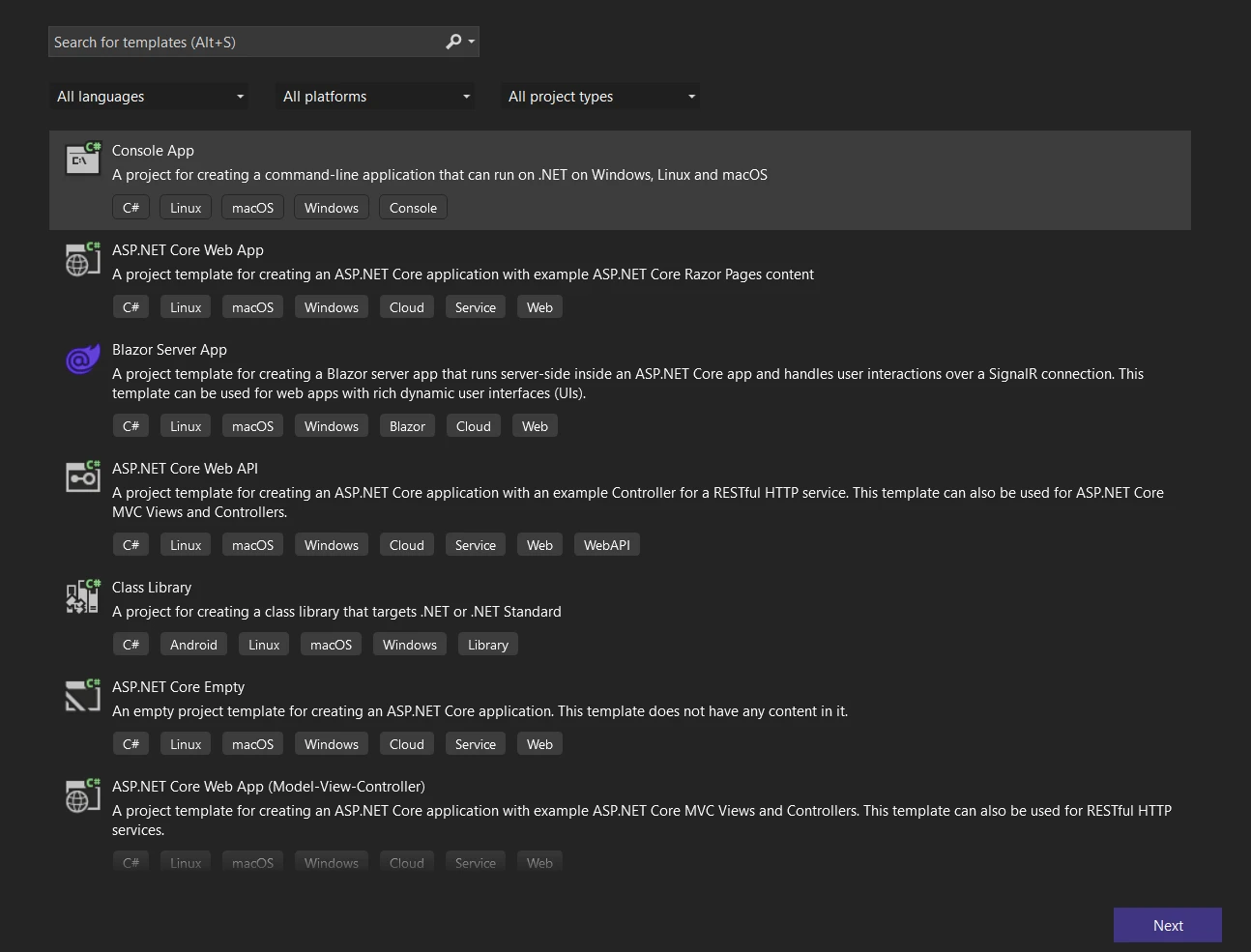 新しいコンソール アプリケーションを作成する
 -
次へボタンをクリックし、プロジェクトを命名してリポジトリの場所を選択して構成します。
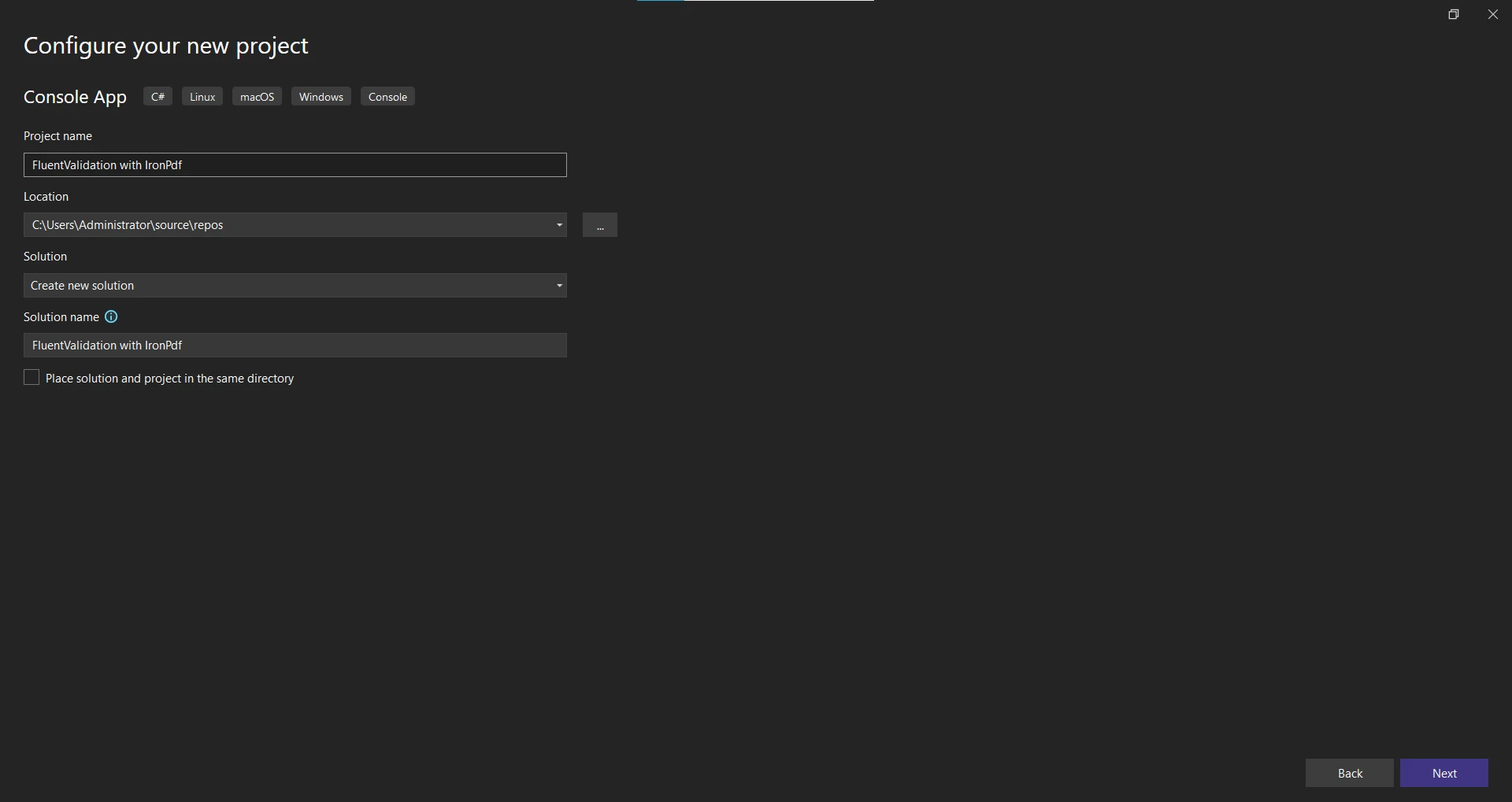 新しいアプリケーションの構成
 -
次へボタンをクリックし、.NETフレームワークを選択します。 最新 for .NETフレームワーク(7)が推奨されます。
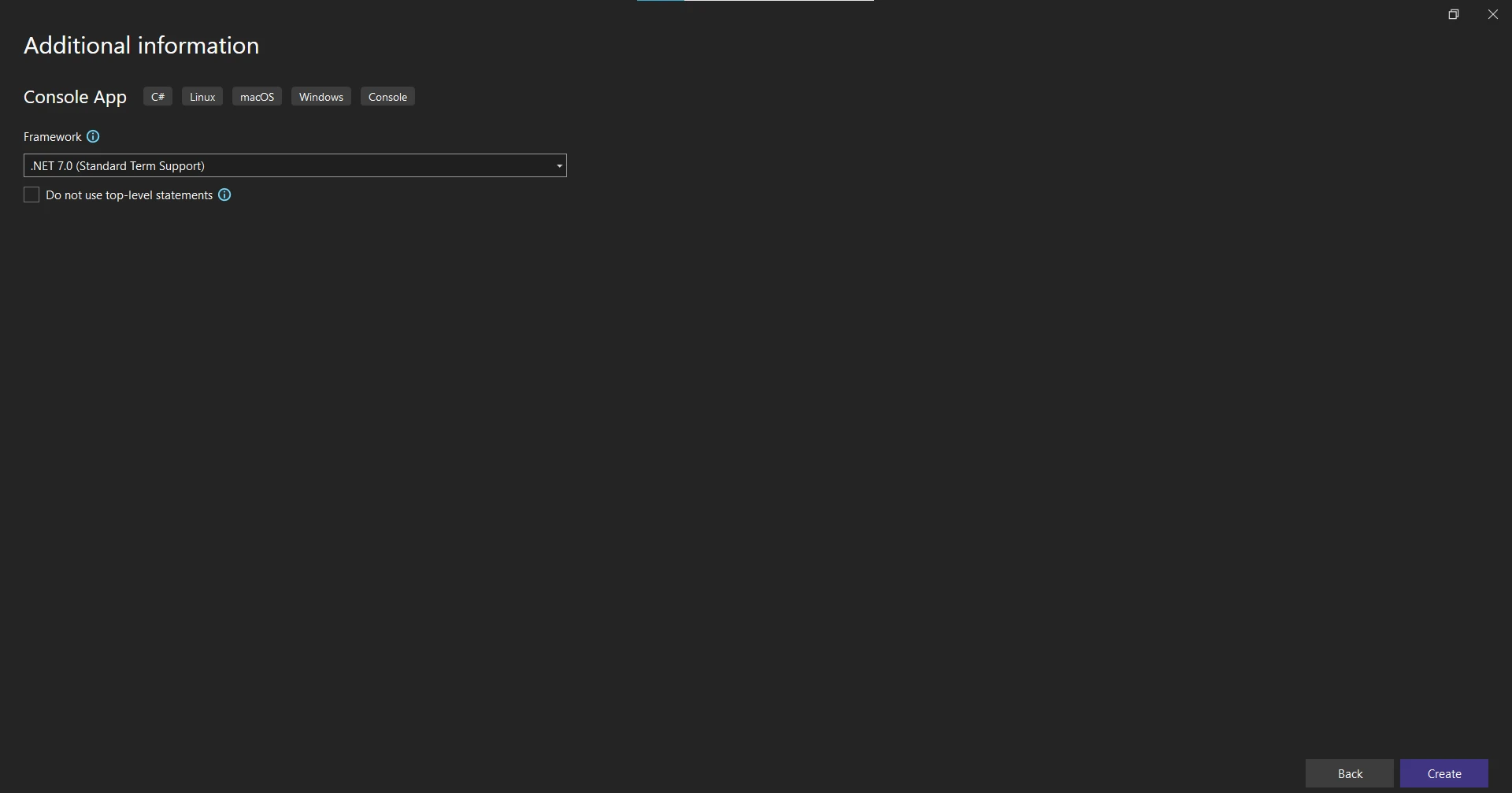 .NET Framework の選択
 - 作成ボタンをクリックしてプロジェクトを作成します。
必要なパッケージのインストール
プロジェクトが作成されたら、Fluent ValidationとIronPDFのための必要なNuGetパッケージを追加します。
- ソリューションエクスプローラーでプロジェクトを右クリックし、"NuGetパッケージの管理"を選択します。
-
"FluentValidation"を検索し、"インストール"をクリックしてパッケージをプロジェクトに追加します。
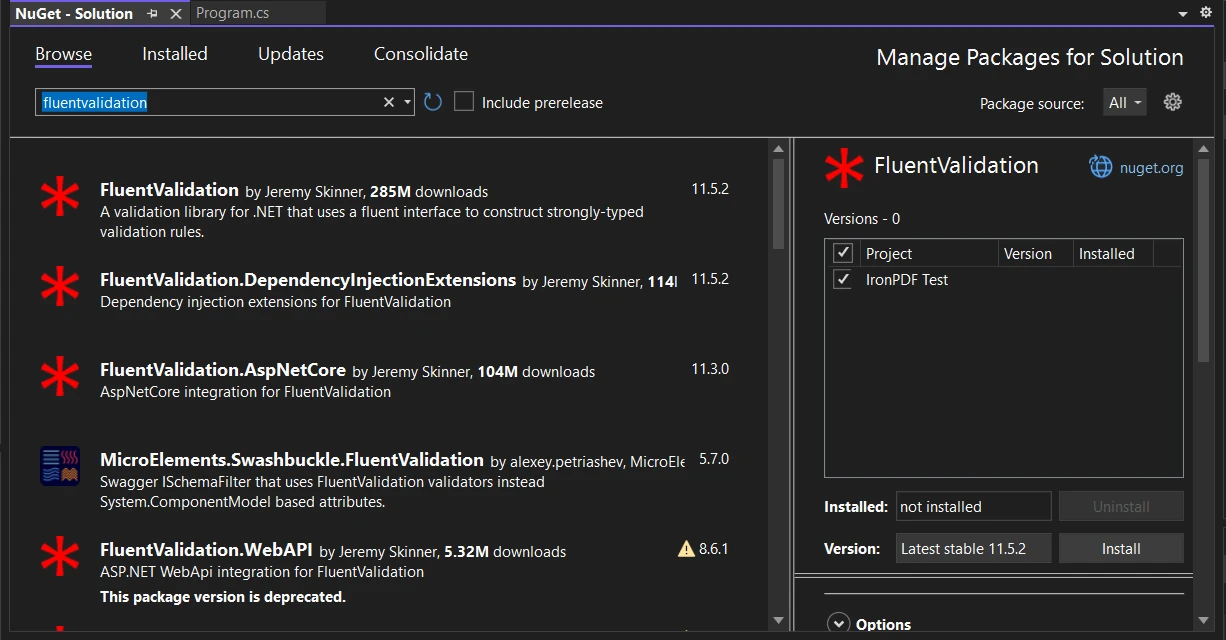 NuGetパッケージマネージャーUIでFluentValidationパッケージをインストールします
 - 同様にして"IronPDF - Powerful .NET PDF Library"を検索し、IronPDFパッケージをインストールします。
あるいは、NuGetパッケージマネージャーコンソールを使用してIronPDFをインストールできます。以下のコマンドを使用します:
Install-Package IronPdf
 パッケージマネージャーコンソールでIronPdfパッケージをインストールします
プロジェクトがセットアップされ、必要なパッケージがインストールされたので、PDFコンテンツクラスの定義に進みましょう。
PDF コンテンツの定義
この例では、2 つのクラス InvoiceContent と InvoiceItem の HTML コードから簡単な請求書 PDF が作成されます。
using System.Collections.Generic;
using System.Linq;

public abstract class PdfContent
{
    // Abstract method to generate the HTML string
    public abstract string RenderHtml();
}

public class InvoiceContent : PdfContent
{
    public string CustomerName { get; set; }
    public string Address { get; set; }
    public List<InvoiceItem> InvoiceItems { get; set; }

    // Constructs the HTML representation of the invoice
    public override string RenderHtml()
    {
        string invoiceItemsHtml = string.Join("", InvoiceItems.Select(item => $"<li>{item.Description}: {item.Price}</li>"));
        return $"<h1>Invoice for {CustomerName}</h1><p>{Address}</p><ul>{invoiceItemsHtml}</ul>";
    }
}

public class InvoiceItem
{
    public string Description { get; set; }
    public decimal Price { get; set; }
}
using System.Collections.Generic;
using System.Linq;
public abstract class PdfContent
{
// Abstract method to generate the HTML string
public abstract string RenderHtml();
}
public class InvoiceContent : PdfContent
{
public string CustomerName { get; set; }
public string Address { get; set; }
public List<InvoiceItem> InvoiceItems { get; set; }
// Constructs the HTML representation of the invoice
public override string RenderHtml()
{
string invoiceItemsHtml = string.Join("", InvoiceItems.Select(item => $"<li>{item.Description}: {item.Price}</li>"));
return $"<h1>Invoice for {CustomerName}</h1><p>{Address}</p><ul>{invoiceItemsHtml}</ul>";
}
}
public class InvoiceItem
{
public string Description { get; set; }
public decimal Price { get; set; }
}Imports System.Collections.Generic
Imports System.Linq
Public MustInherit Class PdfContent
' Abstract method to generate the HTML string
Public MustOverride Function RenderHtml() As String
End Class
Public Class InvoiceContent
Inherits PdfContent
Public Property CustomerName() As String
Public Property Address() As String
Public Property InvoiceItems() As List(Of InvoiceItem)
' Constructs the HTML representation of the invoice
Public Overrides Function RenderHtml() As String
Dim invoiceItemsHtml As String = String.Join("", InvoiceItems.Select(Function(item) $"<li>{item.Description}: {item.Price}</li>"))
Return $"<h1>Invoice for {CustomerName}</h1><p>{Address}</p><ul>{invoiceItemsHtml}</ul>"
End Function
End Class
Public Class InvoiceItem
Public Property Description() As String
Public Property Price() As Decimal
End Class上記のコードでは、抽象 PdfContent クラスが、RenderHtml という抽象メソッドで定義されています。 InvoiceContent クラスは PdfContent を拡張し、請求書 PDF の内容を表します。 顧客の名前、住所、および請求書項目のリストのプロパティを持っています。 InvoiceItem クラスには、"Description"と"Price"という 2 つのプロパティが含まれています。 RenderHtml メソッドは、コンテンツに基づいて請求書の HTML マークアップを生成します。
PDFコンテンツが定義されたので、Fluent Validationを使用して検証ルールを作成しましょう。
検証ルールの作成
InvoiceContent クラスの検証ルールを構築するには、InvoiceContentValidator という検証クラスを作成します。 このクラスは、FluentValidation によって提供される AbstractValidator<InvoiceContent> から継承されます。
using FluentValidation;

public class InvoiceContentValidator : AbstractValidator<InvoiceContent>
{
    public InvoiceContentValidator()
    {
        RuleFor(content => content.CustomerName).NotEmpty().WithMessage("Customer name is required.");
        RuleFor(content => content.Address).NotEmpty().WithMessage("Address is required.");
        RuleFor(content => content.InvoiceItems).NotEmpty().WithMessage("At least one invoice item is required.");
        RuleForEach(content => content.InvoiceItems).SetValidator(new InvoiceItemValidator());
    }
}

public class InvoiceItemValidator : AbstractValidator<InvoiceItem>
{
    public InvoiceItemValidator()
    {
        RuleFor(item => item.Description).NotEmpty().WithMessage("Description is required.");
        RuleFor(item => item.Price).GreaterThanOrEqualTo(0).WithMessage("Price must be greater than or equal to 0.");
    }
}
using FluentValidation;
public class InvoiceContentValidator : AbstractValidator<InvoiceContent>
{
public InvoiceContentValidator()
{
RuleFor(content => content.CustomerName).NotEmpty().WithMessage("Customer name is required.");
RuleFor(content => content.Address).NotEmpty().WithMessage("Address is required.");
RuleFor(content => content.InvoiceItems).NotEmpty().WithMessage("At least one invoice item is required.");
RuleForEach(content => content.InvoiceItems).SetValidator(new InvoiceItemValidator());
}
}
public class InvoiceItemValidator : AbstractValidator<InvoiceItem>
{
public InvoiceItemValidator()
{
RuleFor(item => item.Description).NotEmpty().WithMessage("Description is required.");
RuleFor(item => item.Price).GreaterThanOrEqualTo(0).WithMessage("Price must be greater than or equal to 0.");
}
}Imports FluentValidation
Public Class InvoiceContentValidator
Inherits AbstractValidator(Of InvoiceContent)
Public Sub New()
RuleFor(Function(content) content.CustomerName).NotEmpty().WithMessage("Customer name is required.")
RuleFor(Function(content) content.Address).NotEmpty().WithMessage("Address is required.")
RuleFor(Function(content) content.InvoiceItems).NotEmpty().WithMessage("At least one invoice item is required.")
RuleForEach(Function(content) content.InvoiceItems).SetValidator(New InvoiceItemValidator())
End Sub
End Class
Public Class InvoiceItemValidator
Inherits AbstractValidator(Of InvoiceItem)
Public Sub New()
RuleFor(Function(item) item.Description).NotEmpty().WithMessage("Description is required.")
RuleFor(Function(item) item.Price).GreaterThanOrEqualTo(0).WithMessage("Price must be greater than or equal to 0.")
End Sub
End Classソース コードでは、AbstractValidator<InvoiceContent> から継承された InvoiceContentValidator クラスが定義されています。 バリデータ クラスのコンストラクター内では、RuleFor メソッドが InvoiceContent クラスの各プロパティの検証ルールを定義します。
たとえば、RuleFor(content => content.CustomerName) は顧客名が空であってはならないことを指定します。 同様に、住所および請求書項目のプロパティに対しても検証ルールが定義されています。
RuleForEach メソッドは、InvoiceItems リスト内の各項目を反復処理し、InvoiceItemValidator を適用します。 InvoiceItemValidator クラスには、InvoiceItem クラスの検証ルールが含まれています。
これらの検証ルールが整ったら、IronPDFを使用したPDF生成に進みましょう。
IronPDFを使用してPDFを生成する
IronPDF - Generate and Edit PDF Documentsは、PDFドキュメントの作成および操作のための人気のある.NETライブラリです。 IronPDFは、検証済みの請求書内容に基づいてPDFを生成するために使用されます。
using IronPdf;
using FluentValidation;

public class PdfService
{
    // Generates a PDF document for the provided content
    public PdfDocument GeneratePdf<t>(T content) where T : PdfContent
    {
        // Validate the content using the appropriate validator
        var validator = GetValidatorForContent(content);
        var validationResult = validator.Validate(content);

        // Check if validation is successful
        if (!validationResult.IsValid)
        {
            throw new FluentValidation.ValidationException(validationResult.Errors);
        }

        // Generate the PDF using IronPDF
        var renderer = new ChromePdfRenderer();
        return renderer.RenderHtmlAsPdf(content.RenderHtml());
    }

    // Retrieves the appropriate validator for the content
    private IValidator<t> GetValidatorForContent<t>(T content) where T : PdfContent
    {
        if (content is InvoiceContent)
        {
            return (IValidator<t>)new InvoiceContentValidator();
        }
        else
        {
            throw new NotSupportedException("Unsupported content type.");
        }
    }
}
using IronPdf;
using FluentValidation;
public class PdfService
{
// Generates a PDF document for the provided content
public PdfDocument GeneratePdf<t>(T content) where T : PdfContent
{
// Validate the content using the appropriate validator
var validator = GetValidatorForContent(content);
var validationResult = validator.Validate(content);
// Check if validation is successful
if (!validationResult.IsValid)
{
throw new FluentValidation.ValidationException(validationResult.Errors);
}
// Generate the PDF using IronPDF
var renderer = new ChromePdfRenderer();
return renderer.RenderHtmlAsPdf(content.RenderHtml());
}
// Retrieves the appropriate validator for the content
private IValidator<t> GetValidatorForContent<t>(T content) where T : PdfContent
{
if (content is InvoiceContent)
{
return (IValidator<t>)new InvoiceContentValidator();
}
else
{
throw new NotSupportedException("Unsupported content type.");
}
}
}Imports IronPdf
Imports FluentValidation
Public Class PdfService
' Generates a PDF document for the provided content
Public Function GeneratePdf(Of T As PdfContent)(content As T) As PdfDocument
' Validate the content using the appropriate validator
Dim validator = GetValidatorForContent(content)
Dim validationResult = validator.Validate(content)
' Check if validation is successful
If Not validationResult.IsValid Then
Throw New FluentValidation.ValidationException(validationResult.Errors)
End If
' Generate the PDF using IronPDF
Dim renderer = New ChromePdfRenderer()
Return renderer.RenderHtmlAsPdf(content.RenderHtml())
End Function
' Retrieves the appropriate validator for the content
Private Function GetValidatorForContent(Of T As PdfContent)(content As T) As IValidator(Of T)
If TypeOf content Is InvoiceContent Then
Return CType(New InvoiceContentValidator(), IValidator(Of T))
Else
Throw New NotSupportedException("Unsupported content type.")
End If
End Function
End ClassPdfService クラスは GeneratePdf メソッドを提供します。 このメソッドは、PdfContent オブジェクトを入力として受け取り、検証されたコンテンツに基づいて PDF ドキュメントを生成します。
まず、コンテンツの種類をチェックし、対応するバリデータを返す GetValidatorForContent メソッドを呼び出して、コンテンツに適切なバリデータを取得します。 私たちの場合、InvoiceContent をサポートし、InvoiceContentValidator を使用します。
次に、バリデーターの Validate メソッドを呼び出して、コンテンツが検証されます。 検証結果は ValidationResult オブジェクトに保存されます。
検証が失敗した場合 (!validationResult.IsValid)、検証エラーとともに FluentValidation.ValidationException がスローされます。 それ以外の場合、IronPDFを使用してPDFが生成されます。
ChromePdfRendererのインスタンスを作成して、HTMLコンテンツをPDFとしてレンダリングします。 RenderHtmlAsPdfメソッドは renderer オブジェクトで呼び出され、 content.RenderHtml メソッドによって生成された HTML を渡して PDF ドキュメントを生成します。
PDF生成ロジックを定義したので、発生する可能性のある検証エラーを処理しましょう。
検証エラーの処理
検証エラーが発生した場合は、ユーザーにエラーメッセージを表示し、優雅に処理したいです。 例外を処理し、ユーザーに意味のあるメッセージを表示するように、Program クラスの Main メソッドを変更してみましょう。
using System;
using System.Collections.Generic;

public class Program
{
    static void Main(string[] args)
    {
        var pdfService = new PdfService();

        // Test 1: Empty Customer Name
        try
        {
            var invoiceContent = new InvoiceContent
            {
                CustomerName = "",
                Address = "123 Main St, Anytown, USA",
                InvoiceItems = new List<InvoiceItem> {
                    new InvoiceItem { Description = "Item 1", Price = 19.99M },
                    new InvoiceItem { Description = "Item 2", Price = 29.99M }
                }
            };

            var pdfDocument = pdfService.GeneratePdf(invoiceContent);
            pdfDocument.SaveAs("C:\\TestInvoice.pdf");
            Console.WriteLine("PDF generated successfully!");
        }
        catch (Exception ex)
        {
            Console.WriteLine("Error generating PDF: " + ex.Message);
        }

        // Test 2: Empty InvoiceItems
        try
        {
            var invoiceContent = new InvoiceContent
            {
                CustomerName = "John Doe",
                Address = "123 Main St, Anytown, USA",
                InvoiceItems = new List<InvoiceItem>()  // Empty list
            };

            var pdfDocument = pdfService.GeneratePdf(invoiceContent);
            pdfDocument.SaveAs("C:\\TestInvoice.pdf");
            Console.WriteLine("PDF generated successfully!");
        }
        catch (Exception ex)
        {
            Console.WriteLine("Error generating PDF: " + ex.Message);
        }

        // Successful generation
        try
        {
            var invoiceContent = new InvoiceContent
            {
                CustomerName = "John Doe",
                Address = "123 Main St, Anytown, USA",
                InvoiceItems = new List<InvoiceItem> {
                    new InvoiceItem { Description = "Item 1", Price = 19.99M },
                    new InvoiceItem { Description = "Item 2", Price = 29.99M }
                }
            };
            var pdfDocument = pdfService.GeneratePdf(invoiceContent);
            pdfDocument.SaveAs("C:\\TestInvoice.pdf");
            Console.WriteLine("PDF generated successfully!");
        }
        catch (Exception ex)
        {
            Console.WriteLine("Error generating PDF: " + ex.Message);
        }
    }
}
using System;
using System.Collections.Generic;
public class Program
{
static void Main(string[] args)
{
var pdfService = new PdfService();
// Test 1: Empty Customer Name
try
{
var invoiceContent = new InvoiceContent
{
CustomerName = "",
Address = "123 Main St, Anytown, USA",
InvoiceItems = new List<InvoiceItem> {
new InvoiceItem { Description = "Item 1", Price = 19.99M },
new InvoiceItem { Description = "Item 2", Price = 29.99M }
}
};
var pdfDocument = pdfService.GeneratePdf(invoiceContent);
pdfDocument.SaveAs("C:\\TestInvoice.pdf");
Console.WriteLine("PDF generated successfully!");
}
catch (Exception ex)
{
Console.WriteLine("Error generating PDF: " + ex.Message);
}
// Test 2: Empty InvoiceItems
try
{
var invoiceContent = new InvoiceContent
{
CustomerName = "John Doe",
Address = "123 Main St, Anytown, USA",
InvoiceItems = new List<InvoiceItem>() // Empty list
};
var pdfDocument = pdfService.GeneratePdf(invoiceContent);
pdfDocument.SaveAs("C:\\TestInvoice.pdf");
Console.WriteLine("PDF generated successfully!");
}
catch (Exception ex)
{
Console.WriteLine("Error generating PDF: " + ex.Message);
}
// Successful generation
try
{
var invoiceContent = new InvoiceContent
{
CustomerName = "John Doe",
Address = "123 Main St, Anytown, USA",
InvoiceItems = new List<InvoiceItem> {
new InvoiceItem { Description = "Item 1", Price = 19.99M },
new InvoiceItem { Description = "Item 2", Price = 29.99M }
}
};
var pdfDocument = pdfService.GeneratePdf(invoiceContent);
pdfDocument.SaveAs("C:\\TestInvoice.pdf");
Console.WriteLine("PDF generated successfully!");
}
catch (Exception ex)
{
Console.WriteLine("Error generating PDF: " + ex.Message);
}
}
}Imports System
Imports System.Collections.Generic
Public Class Program
Shared Sub Main(ByVal args() As String)
Dim pdfService As New PdfService()
' Test 1: Empty Customer Name
Try
Dim invoiceContent As New InvoiceContent With {
.CustomerName = "",
.Address = "123 Main St, Anytown, USA",
.InvoiceItems = New List(Of InvoiceItem) From {
New InvoiceItem With {
.Description = "Item 1",
.Price = 19.99D
},
New InvoiceItem With {
.Description = "Item 2",
.Price = 29.99D
}
}
}
Dim pdfDocument = pdfService.GeneratePdf(invoiceContent)
pdfDocument.SaveAs("C:\TestInvoice.pdf")
Console.WriteLine("PDF generated successfully!")
Catch ex As Exception
Console.WriteLine("Error generating PDF: " & ex.Message)
End Try
' Test 2: Empty InvoiceItems
Try
Dim invoiceContent As New InvoiceContent With {
.CustomerName = "John Doe",
.Address = "123 Main St, Anytown, USA",
.InvoiceItems = New List(Of InvoiceItem)()
}
Dim pdfDocument = pdfService.GeneratePdf(invoiceContent)
pdfDocument.SaveAs("C:\TestInvoice.pdf")
Console.WriteLine("PDF generated successfully!")
Catch ex As Exception
Console.WriteLine("Error generating PDF: " & ex.Message)
End Try
' Successful generation
Try
Dim invoiceContent As New InvoiceContent With {
.CustomerName = "John Doe",
.Address = "123 Main St, Anytown, USA",
.InvoiceItems = New List(Of InvoiceItem) From {
New InvoiceItem With {
.Description = "Item 1",
.Price = 19.99D
},
New InvoiceItem With {
.Description = "Item 2",
.Price = 29.99D
}
}
}
Dim pdfDocument = pdfService.GeneratePdf(invoiceContent)
pdfDocument.SaveAs("C:\TestInvoice.pdf")
Console.WriteLine("PDF generated successfully!")
Catch ex As Exception
Console.WriteLine("Error generating PDF: " & ex.Message)
End Try
End Sub
End Class上記のコードでは、発生する可能性のある例外をキャッチするために try-catch ブロックが使用されています。 例外が発生した場合、Console.WriteLine を使用してエラー メッセージがユーザーに表示されます。
このアプリケーションを異なるシナリオでテストして、PDF生成と検証ルールを確認しましょう。
アプリケーションのテスト
コード例では、テストする3つのシナリオがあります:
- 顧客名が空である場合:顧客名を空にして検証エラーを引き起こします。
- 請求書項目が空である場合:請求書項目のリストを空にして検証エラーを引き起こします。
- 成功した生成:有効なコンテンツを提供してPDFを正常に生成します。
アプリケーションを実行し、コンソールに出力を観察してください。
Error generating PDF: Validation failed:
-- CustomerName: Customer name is required. Severity: Error
Error generating PDF: Validation failed:
-- InvoiceItems: At least one invoice item is required. Severity: Error
PDF generated successfully!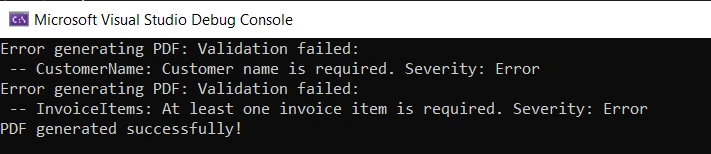 コンソールの出力エラー
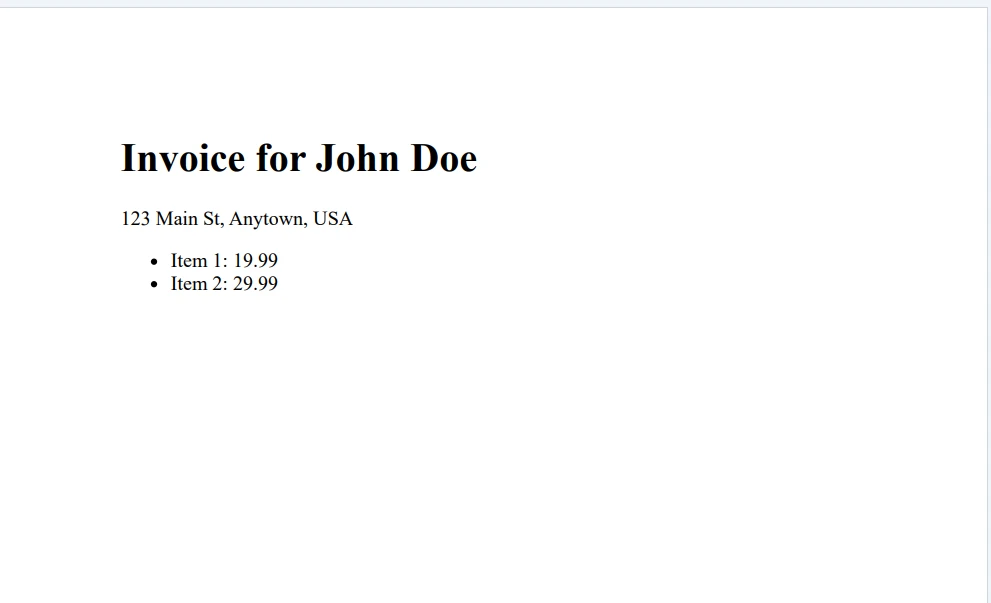 出力PDFファイル
予想通り、最初の2つのシナリオでは検証エラーが表示され、3番目のシナリオでは成功メッセージが表示されます。
結論
このチュートリアルでは、Fluent ValidationとそれをIronPDFで使用してPDF文書を生成する方法を探りました。 コンソールアプリケーションを設定し、PDFコンテンツクラスを定義することから始めました。 次に、Fluent Validationを使用して検証ルールを作成し、さまざまなシナリオでPDF生成をテストしました。
Fluent Validationは.NETアプリケーションでオブジェクトを検証するための柔軟で使いやすいアプローチを提供します。 強く型付けされた方法で検証ルールを定義し、エラーメッセージをカスタマイズし、検証エラーを優雅に処理することができます。
IronPDF Free Trial & Licensing Information は無料トライアルを提供し、ライセンスは1人の開発者あたり499ドルから始まります。
よくある質問
C#でFluent ValidationをPDF生成に統合するにはどうすればよいですか?
C#でFluent ValidationをPDF生成に統合するには、Visual Studioでコンソールアプリケーションをセットアップし、NuGetを通じてFluentValidationとIronPDFのパッケージをインストールし、Fluent Validationでモデル検証ロジックを定義しながら、IronPDFでPDFを生成します。
PDF生成と検証のためにプロジェクトを設定するにはどのような手順がありますか?
プロジェクトをセットアップするには、Visual Studioで新しいコンソールアプリケーションを作成し、NuGetを通じてIronPDFとFluentValidationのパッケージをインストールし、各ライブラリを使用してPDFコンテンツと検証ルールを定義します。
.NETライブラリを使用してHTMLコンテンツからPDFを生成するにはどうすればよいですか?
IronPDFのRenderHtmlAsPdfメソッドを使用すると、HTML文字列やファイルを高品質のPDFに変換することができます。
チュートリアルでのPdfServiceクラスの目的は何ですか?
チュートリアルのPdfServiceクラスは、最初にFluent Validationでコンテンツを検証した後、PDFを生成する管理を目的としています。検証に成功した場合、IronPDFのChromePdfRendererとRenderHtmlAsPdfメソッドを使用してPDFを作成します。
Fluent Validationを使用した検証ルールはどのように定義されますか?
Fluent Validationでは、AbstractValidatorから継承したバリデータークラスを作成し、その中でRuleForメソッドを使用して各プロパティに対する条件を指定し、カスタムエラーメッセージやルールのチェーンを可能にします。
PDF生成中に検証に失敗するとどうなりますか?
検証に失敗すると、Fluent ValidationはValidationExceptionをスローし、詳細な検証エラー情報を含むので、何が問題だったかをユーザーに知らせることができます。
Fluent Validationは複雑なオブジェクトの検証に使用できますか?
はい、Fluent Validationは子バリデーターを使用して複雑なオブジェクトを検証することができ、モデル内のネストされたプロパティやコレクションを検証することを可能にします。
Fluent Validationでエラーメッセージをカスタマイズするにはどうすればよいですか?
Fluent Validationでのカスタムエラーメッセージは、RuleForで指定された各検証ルールに対してWithMessageメソッドを使用して定義できます。
PDF生成ライブラリの無料試用版はありますか?
はい、IronPDFはライブラリの機能をテストするための無料試用版を開発者に提供しており、ライセンスオプションは開発者あたり$499から始まります。
IronPDF は .NET 10 と完全に互換性がありますか?
はい。IronPDFは.NET 10と完全に互換性があり、Windows、Linux、macOSを含むプラットフォームを、様々なプロジェクトタイプ(コンソール、Web、デスクトップ、Blazorなど)でサポートしています。最新のランタイムでも、特別な回避策を必要とせずにすぐに使用できます。
















 無料で始めましょう
 無料で始めましょう
 無料ライブデモを予約





 クレジットカードやアカウントの作成は不要です。










