using IronPdf;

// Disable local disk access or cross-origin requests
Installation.EnableWebSecurity = true;

// Instantiate Renderer
var renderer = new ChromePdfRenderer();

// Create a PDF from a HTML string using C#
var pdf = renderer.RenderHtmlAsPdf("<h1>Hello World</h1>");

// Export to a file or Stream
pdf.SaveAs("output.pdf");

// Advanced Example with HTML Assets
// Load external html assets: Images, CSS and JavaScript.
// An optional BasePath 'C:\site\assets\' is set as the file location to load assets from
var myAdvancedPdf = renderer.RenderHtmlAsPdf("<img src='icons/iron.png'>", @"C:\site\assets\");
myAdvancedPdf.SaveAs("html-with-assets.pdf");
using IronPdf;// Disable local disk access or cross-origin requestsInstallation.EnableWebSecurity = true;// Instantiate Renderervar renderer = new ChromePdfRenderer();// Create a PDF from a HTML string using C#var pdf = renderer.RenderHtmlAsPdf("<h1>Hello World</h1>");// Export to a file or Streampdf.SaveAs("output.pdf");// Advanced Example with HTML Assets// Load external html assets: Images, CSS and JavaScript.// An optional BasePath 'C:\site\assets\' is set as the file location to load assets fromvar myAdvancedPdf = renderer.RenderHtmlAsPdf("<img src='icons/iron.png'>", @"C:\site\assets\");myAdvancedPdf.SaveAs("html-with-assets.pdf");
PM >Install-Package IronPdf
Install-Package IronPdf
GELIŞTIRICI GÜNCELLEMELERI
C# LINQ Distinct (Geliştiriciler için Nasıl Çalışır)
Dil-tümleştirilmiş sorgu (LINQ), C#'da güçlü bir dil özelliği olarak, programcılara çeşitli veri kaynakları için açık ve ifadeli sorgular oluşturma yeteneği sağlar. [IronPDF](/), bir [LINQ'nun Distinct](https://learn.microsoft.com/en-us/dotnet/csharp/linq/) fonksiyonunu kullanarak PDF belgeleriyle çalışma için çok yönlü bir C# kütüphanesi kullanımı tartışılacaktır. Bu kombinasyonun, bir koleksiyondan benzersiz belgeler oluşturma sürecini nasıl kolaylaştırabileceğini göstereceğiz. Bu makalede, IronPDF ile C# LINQ distinct fonksiyonunu öğreneceğiz.
### C# LINQ Distinct Metodunu Kullanma
1. Yeni bir konsol projesi oluşturun.
2. `System.Linq` ad alanını içe aktarın.
3. Birden çok öğe içeren bir liste oluşturun.
4. Listeden `Distinct()` metodunu çağırın.
5. Benzersiz değerleri alın ve sonucu konsole görüntüleyin.
6. Tüm oluşturulan nesneleri bertaraf edin.
## LINQ Nedir
C#'ın LINQ (Dil Bütünleşik Sorgusu) özelliği ile geliştiriciler, veri manipülasyonu için doğrudan kodları içinde açık ve anlamlı sorgular oluşturabilirler. İlk kez .NET Framework 3.5'te dahil edildiğinde, LINQ, veritabanları ve koleksiyonlar dahil çok çeşitli veri kaynakları için standart bir sorgulama sözdizimi sunar. LINQ, `Where` ve `Select` gibi operatörler kullanarak filtreleme ve projeksiyon gibi basit işleri kolaylaştırır, bu da kod okunabilirliğini artırır. Bu özellik, optimal hız için gecikmiş yürütmeye izin verdiği için, C# geliştiricilerinin veri manipulasyonu işlemlerinin doğal yollarla, SQL'e benzer bir biçimde hızlı ve sorunsuz tamamlandığından emin olmalarına olanak sağlar.
### LINQ Distinct Anlamını Anlamak
Çift elemanlar LINQ'un `Distinct` fonksiyonu kullanılarak bir koleksiyon veya diziden kaldırılabilir. Özel bir eşitlik karşılaştırıcısı yoksa, varsayılan karşılaştırıcısını kullanarak öğeleri karşılaştırılır. Bu, benzersiz bir koleksiyonla çalışmanız ve çift bileşenleri kaldırmanız gerektiğinde harika bir çözümdür. `Distinct` tekniği, değerleri değerlendirmek için varsayılan eşitlik karşılaştırıcıları kullanır. Sadece benzersiz öğeleri döndürmek için çiftleri dışarıda bırakacaktır.
#### Temel Kullanım
Farklı öğeleri elde etmek için, en basit yol, bir koleksiyon üzerinde doğrudan `Distinct` metodunu kullanmaktır.
```csharp
using System.Linq;
using System.Collections.Generic;

public class DistinctExample
{
    public static void Example()
    {
        // Example list with duplicate integers
        List<int> numbers = new List<int> { 1, 2, 2, 3, 4, 4, 5 };

        // Using Distinct to remove duplicates
        var distinctNumbers = numbers.Distinct();

        // Display the distinct numbers
        foreach (var number in distinctNumbers)
        {
            Console.WriteLine(number);
        }
    }
}
```
#### Özel Eşitlik Karşılaştırıcısı
`Distinct` fonksiyonunun aşırı yüklemesini kullanarak özel bir eşitlik karşılaştırması tanımlayabilirsiniz. Bu, öğeleri belirli kriterlere göre karşılaştırmak istiyorsanız yararlıdır. Lütfen aşağıdaki örneğe bakınız:
```csharp
using System;
using System.Collections.Generic;
using System.Linq;
public class Person
{
public string FirstName { get; set; }
public string LastName { get; set; }
}
public class PersonEqualityComparer : IEqualityComparer<Person>
{
public bool Equals(Person x, Person y)
{
return x.FirstName == y.FirstName && x.LastName == y.LastName;
}
public int GetHashCode(Person obj)
{
return obj.FirstName.GetHashCode() ^ obj.LastName.GetHashCode();
}
}
public class DistinctCustomComparerExample
{
public static void Example()
{
// Example list of people
List<Person> people = new List<Person>
{
new Person { FirstName = "John", LastName = "Doe" },
new Person { FirstName = "Jane", LastName = "Doe" },
new Person { FirstName = "John", LastName = "Doe" }
};
// Using Distinct with a custom equality comparer
var distinctPeople = people.Distinct(new PersonEqualityComparer());
// Display distinct people
foreach (var person in distinctPeople)
{
Console.WriteLine($"{person.FirstName} {person.LastName}");
}
}
}
```
#### Değer Türleri ile Distinct Kullanmak
`Distinct` metodunu değer türleri ile kullanırken özel bir eşitlik karşılaştırması sağlamanız gerekmez.
```csharp
using System;
using System.Collections.Generic;
using System.Linq;
public class DistinctValueTypeExample
{
public static void Example()
{
List<int> integers = new List<int> { 1, 2, 2, 3, 4, 4, 5 };
// Using Distinct to remove duplicates
var distinctIntegers = integers.Distinct();
// Display distinct integers
foreach (var integer in distinctIntegers)
{
Console.WriteLine(integer);
}
}
}
```
#### Anonim Türlerle Distinct Kullanmak
`Distinct`, belirli nitelikler temelinde yinelenenleri kaldırmak için anonim türlerle kullanılabilir. Lütfen aşağıdaki örneğe bakınız:
```csharp
using System;
using System.Collections.Generic;
using System.Linq;
public class Person
{
public string FirstName { get; set; }
public string LastName { get; set; }
}
public class DistinctAnonymousTypesExample
{
public static void Example()
{
List<Person> people = new List<Person>
{
new Person { FirstName = "John", LastName = "Doe" },
new Person { FirstName = "Jane", LastName = "Doe" },
new Person { FirstName = "John", LastName = "Doe" }
};
// Using Distinct with anonymous types
var distinctPeople = people
.Select(p => new { p.FirstName, p.LastName })
.Distinct();
// Display distinct anonymous types
foreach (var person in distinctPeople)
{
Console.WriteLine($"{person.FirstName} {person.LastName}");
}
}
}
```
#### Belirli Bir Özellik ile Distinct
Nesnelerle çalışırken, belirli bir özellik ile ayırt edici bir mantık oluşturabilir veya üçüncü taraf kütüphanelerden (MoreLINQ gibi) `DistinctBy` genişletme metodunu kullanabilirsiniz.
```csharp
// Ensure to include the MoreLINQ Library
using MoreLinq;
using System;
using System.Collections.Generic;
using System.Linq;
public class Person
{
public int Id { get; set; }
public string FirstName { get; set; }
public string LastName { get; set; }
}
public class DistinctByExample
{
public static void Example()
{
List<Person> people = new List<Person>
{
new Person { Id = 1, FirstName = "John", LastName = "Doe" },
new Person { Id = 2, FirstName = "Jane", LastName = "Doe" },
new Person { Id = 1, FirstName = "John", LastName = "Doe" }
};
// Using DistinctBy to filter distinct people by Id
var distinctPeople = people.DistinctBy(p => p.Id);
// Display distinct people
foreach (var person in distinctPeople)
{
Console.WriteLine($"{person.Id}: {person.FirstName} {person.LastName}");
}
}
}
```
### IronPDF
Programcılar, .NET kütüphanesi [IronPDF Websitesi](/) yardımıyla C# dili kullanarak PDF belgeleri oluşturabilir, düzenleyebilir ve değiştirebilir. Program, HTML'den PDF oluşturmak, HTML'yi PDF'ye dönüştürmek, PDF belgelerini birleştirmek veya bölmek ve mevcut PDF'lere metin, resimler ve açıklamalar eklemek gibi PDF dosyalarını içeren çeşitli görevleri mümkün kılan bir dizi araç ve işlevsellik sunar. IronPDF hakkında daha fazla bilgi almak için lütfen [IronPDF Dokümantasyonu](/docs/)na başvurun.
IronPDF'nin ana özelliği [**HTML'den PDF'ye Dönüşüm**](/tutorials/html-to-pdf/)dür, bu da yerleşim düzenlerinizi ve stillerinizi bozulmadan tutar. Web içeriğinden PDF'ler oluşturabilirsiniz, bu raporlar, faturalar ve dokümantasyon için mükemmeldir. HTML dosyalarını, URL'leri ve HTML dizelerini PDF dosyalarına dönüştürmeyi destekler.
```csharp
using IronPdf;
class Program
{
static void Main(string[] args)
{
var renderer = new ChromePdfRenderer();
// 1. Convert HTML String to PDF
var htmlContent = "<h1>Hello, IronPDF!</h1><p>This is a PDF from an HTML string.</p>";
var pdfFromHtmlString = renderer.RenderHtmlAsPdf(htmlContent);
pdfFromHtmlString.SaveAs("HTMLStringToPDF.pdf");
// 2. Convert HTML File to PDF
var htmlFilePath = "path_to_your_html_file.html"; // Specify the path to your HTML file
var pdfFromHtmlFile = renderer.RenderHtmlFileAsPdf(htmlFilePath);
pdfFromHtmlFile.SaveAs("HTMLFileToPDF.pdf");
// 3. Convert URL to PDF
var url = "http://ironpdf.com"; // Specify the URL
var pdfFromUrl = renderer.RenderUrlAsPdf(url);
pdfFromUrl.SaveAs("URLToPDF.pdf");
}
}
```
### IronPDF Özellikleri
* **HTML'den PDF'ye Dönüştürme:** Her tür HTML verisini - Ister dosyalar, URL'ler ister HTML kod dizeleri olsun - IronPDF kullanarak PDF belgelere dönüştürebilirsiniz.
* **PDF Oluşturma:** C# programlama dili kullanılarak PDF belgelerine programatik olarak metin, resim ve diğer öğeler eklenebilir.
* **PDF Manipülasyonu:** IronPDF, bir PDF dosyasını birçok dosyaya bölebilir, birkaç PDF belgesini tek bir dosyada birleştirebilir ve mevcut PDF'leri düzenleyebilir.
* **PDF Formları:** Kütüphane, kullanıcıların PDF formları oluşturup doldurmasına olanak tanır, bu da form verilerinin toplanması ve işlenmesi gereken senaryoları kullanışlı hale getirir.
* **Güvenlik Özellikleri:** IronPDF, PDF belgelerini şifrelemek ve parola ve izin koruması sağlamak için kullanılabilir.
* **Metin Çıkarma:** PDF dosyalarından metin çekmek için IronPDF kullanılabilir.
### IronPDF Kurulumu
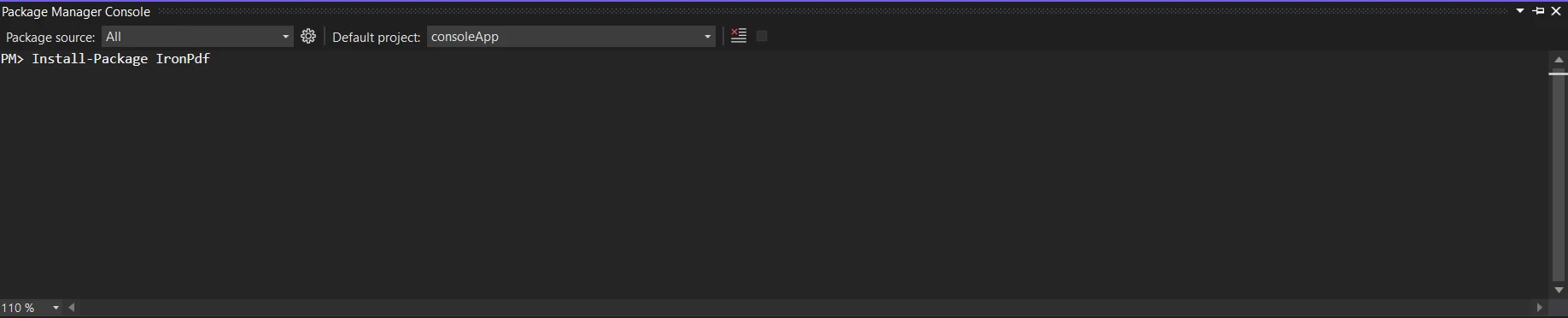
IronPDF kütüphanesini edinin; projenizi kurarken gereklidir. Bunu gerçekleştirmek için NuGet Paket Yöneticisi Konsoluna aşağıdaki kodu girin:
```shell
:ProductInstall
```
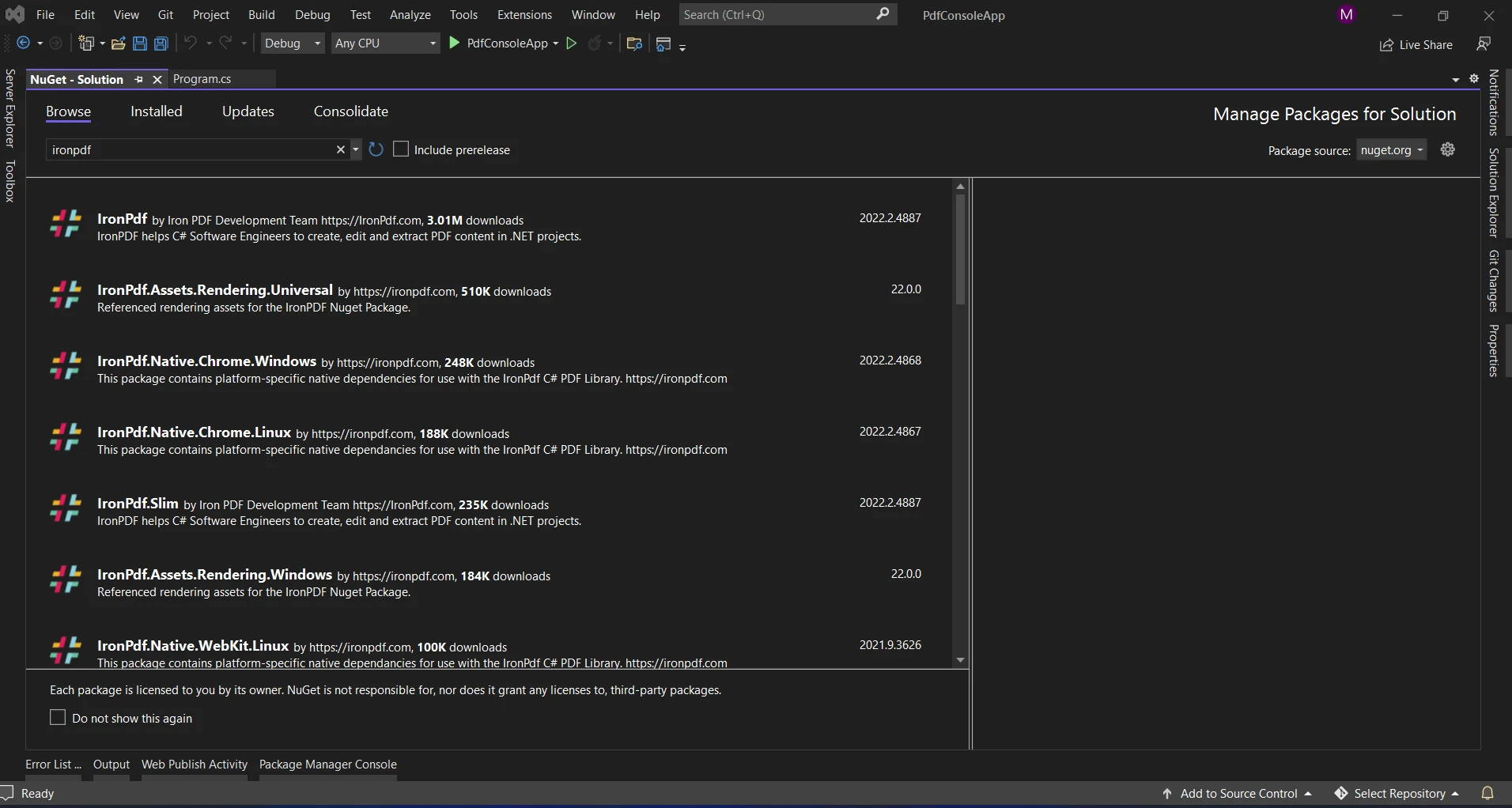
NuGet Paket Yöneticisini kullanarak 'IronPDF' paketini aramak bir başka seçenektir. Bu listeden IronPDF ile ilgili tüm NuGet paketleri içinden gerekli olan paketi seçip indirebiliriz.
### IronPDF ile LINQ
Bir veri kümesine sahip olduğunuzu ve bu kümeden farklı değerlere göre çeşitli PDF belgeleri oluşturmak istediğinizi düşünün. Bu, özelliğini özellikle IronPDF ile belgeleri hızlıca oluşturmak için kullanıldığında LINQ'un `Distinct` 'nın parladığı yerdir.
### Daha Önce Olmayan PDF'leri LINQ ve IronPDF ile Üretme
```csharp
using IronPdf;
using System;
using System.Collections.Generic;
using System.Linq;
public class DocumentGenerator
{
public static void Main()
{
// Sample data representing categories
List<string> categories = new List<string>
{
"Technology",
"Business",
"Health",
"Technology",
"Science",
"Business",
"Health"
};
// Use LINQ Distinct to filter out duplicate values
var distinctCategories = categories.Distinct();
// Generate a distinct elements PDF document for each category
foreach (var category in distinctCategories)
{
GeneratePdfDocument(category);
}
}
private static void GeneratePdfDocument(string category)
{
// Create a new PDF document using IronPDF
IronPdf.HtmlToPdf renderer = new IronPdf.HtmlToPdf();
PdfDocument pdf = renderer.RenderHtmlAsPdf($"<h1>{category} Report</h1>");
// Save the PDF to a file
string pdfFilePath = $"{category}_Report.pdf";
pdf.SaveAs(pdfFilePath);
// Display a message with the file path
Console.WriteLine($"PDF generated successfully. File saved at: {pdfFilePath}");
}
}
```
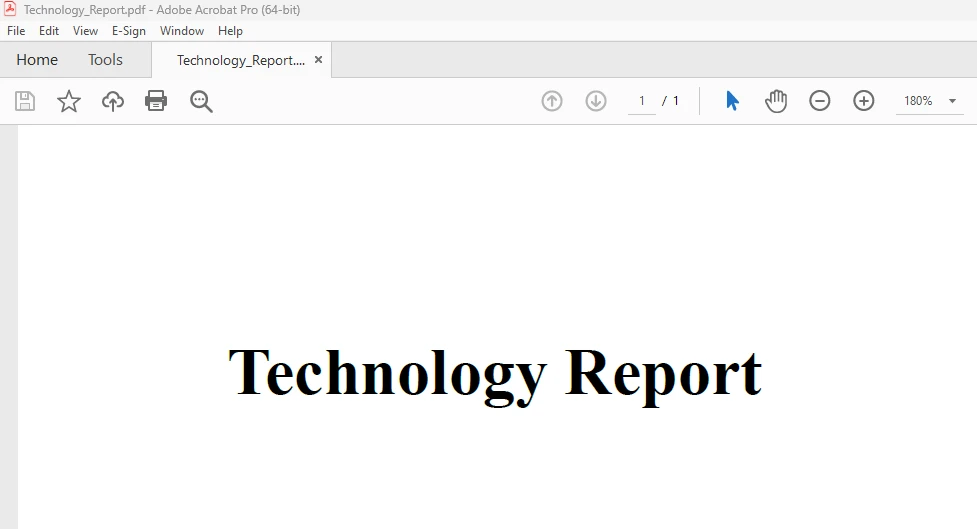
Bu örnekte, kategoriler koleksiyonu için `Distinct` metodu kullanılarak bir dizi farklı kategori elde edilir. Bir diziden kopya elemanları kaldırmaya yardımcı olur. Daha sonra, IronPDF bu benzersiz öğelerle bir PDF belgesi oluşturmak için kullanılır. Bu yöntem, yalnızca benzersiz kategoriler için ayrı PDF belgelerinin üretildiğini garanti eder.
#### Konsol ÇIKTISI

#### Üretilen PDF Çıktısı
HTML kullanarak PDF'ler oluşturma hakkında daha fazla IronPDF kod örneği için [IronPDF HTML to PDF Örnek Kod](/examples/using-html-to-create-a-pdf/)una başvurun.
### Sonuç
LINQ'un `Distinct` genişletme metodu IronPDF ile birlikte değerler temelinde benzersiz PDF belgeleri oluşturmak için sağlam ve etkili bir mekanizma sunar. Bu yöntem, kategoriler, etiketler veya ayrı belgeler gerektiren diğer herhangi bir veriyle çalışırken kodu kolaylaştırır ve etkili belge üretimini garanti eder.
Veri işleme için LINQ'ı ve belge üretimi için IronPDF'yi kullanarak, C# uygulamalarınızın farklı yönlerini yönetmek için güvenilir ve açık bir çözüm geliştirebilirsiniz. Projeniz için bu stratejileri kullanırken, uygulamanızın özel ihtiyaçlarını dikkate alın ve maksimum güvenilirlik ve performansı elde etmek için uygulamayı ayarlayın.
Dil-tümleştirilmiş sorgu (LINQ), C#'da güçlü bir dil özelliği olarak, programcılara çeşitli veri kaynakları için açık ve ifadeli sorgular oluşturma yeteneği sağlar. IronPDF, bir LINQ'nun Distinct fonksiyonunu kullanarak PDF belgeleriyle çalışma için çok yönlü bir C# kütüphanesi kullanımı tartışılacaktır. Bu kombinasyonun, bir koleksiyondan benzersiz belgeler oluşturma sürecini nasıl kolaylaştırabileceğini göstereceğiz. Bu makalede, IronPDF ile C# LINQ distinct fonksiyonunu öğreneceğiz.
C# LINQ Distinct Metodunu Kullanma
Yeni bir konsol projesi oluşturun.
System.Linq ad alanını içe aktarın.
Birden çok öğe içeren bir liste oluşturun.
Listeden Distinct() metodunu çağırın.
Benzersiz değerleri alın ve sonucu konsole görüntüleyin.
Tüm oluşturulan nesneleri bertaraf edin.
LINQ Nedir
C#'ın LINQ (Dil Bütünleşik Sorgusu) özelliği ile geliştiriciler, veri manipülasyonu için doğrudan kodları içinde açık ve anlamlı sorgular oluşturabilirler. İlk kez .NET Framework 3.5'te dahil edildiğinde, LINQ, veritabanları ve koleksiyonlar dahil çok çeşitli veri kaynakları için standart bir sorgulama sözdizimi sunar. LINQ, Where ve Select gibi operatörler kullanarak filtreleme ve projeksiyon gibi basit işleri kolaylaştırır, bu da kod okunabilirliğini artırır. Bu özellik, optimal hız için gecikmiş yürütmeye izin verdiği için, C# geliştiricilerinin veri manipulasyonu işlemlerinin doğal yollarla, SQL'e benzer bir biçimde hızlı ve sorunsuz tamamlandığından emin olmalarına olanak sağlar.
LINQ Distinct Anlamını Anlamak
Çift elemanlar LINQ'un Distinct fonksiyonu kullanılarak bir koleksiyon veya diziden kaldırılabilir. Özel bir eşitlik karşılaştırıcısı yoksa, varsayılan karşılaştırıcısını kullanarak öğeleri karşılaştırılır. Bu, benzersiz bir koleksiyonla çalışmanız ve çift bileşenleri kaldırmanız gerektiğinde harika bir çözümdür. Distinct tekniği, değerleri değerlendirmek için varsayılan eşitlik karşılaştırıcıları kullanır. Sadece benzersiz öğeleri döndürmek için çiftleri dışarıda bırakacaktır.
Temel Kullanım
Farklı öğeleri elde etmek için, en basit yol, bir koleksiyon üzerinde doğrudan Distinct metodunu kullanmaktır.
using System.Linq;using System.Collections.Generic;public class DistinctExample{ public static voidExample() { // Example list with duplicate integers List<int> numbers = new List<int> { 1, 2, 2, 3, 4, 4, 5 }; // Using Distinct to remove duplicates var distinctNumbers = numbers.Distinct(); // Display the distinct numbers foreach (var number in distinctNumbers) {Console.WriteLine(number); } }}
using System.Linq;
using System.Collections.Generic;

public class DistinctExample
{
    public static void Example()
    {
        // Example list with duplicate integers
        List<int> numbers = new List<int> { 1, 2, 2, 3, 4, 4, 5 };

        // Using Distinct to remove duplicates
        var distinctNumbers = numbers.Distinct();

        // Display the distinct numbers
        foreach (var number in distinctNumbers)
        {
            Console.WriteLine(number);
        }
    }
}
ImportsSystem.LinqImportsSystem.Collections.GenericPublic Class DistinctExample PublicShared Sub Example() ' Example list with duplicate integers Dim numbers As New List(OfInteger) From {1, 2, 2, 3, 4, 4, 5} ' Using Distinct to remove duplicates Dim distinctNumbers = numbers.Distinct() ' Display the distinct numbers For Each number In distinctNumbersConsole.WriteLine(number) Next number End SubEnd Class
Imports System.Linq
Imports System.Collections.Generic

Public Class DistinctExample
	Public Shared Sub Example()
		' Example list with duplicate integers
		Dim numbers As New List(Of Integer) From {1, 2, 2, 3, 4, 4, 5}

		' Using Distinct to remove duplicates
		Dim distinctNumbers = numbers.Distinct()

		' Display the distinct numbers
		For Each number In distinctNumbers
			Console.WriteLine(number)
		Next number
	End Sub
End Class
Özel Eşitlik Karşılaştırıcısı
Distinct fonksiyonunun aşırı yüklemesini kullanarak özel bir eşitlik karşılaştırması tanımlayabilirsiniz. Bu, öğeleri belirli kriterlere göre karşılaştırmak istiyorsanız yararlıdır. Lütfen aşağıdaki örneğe bakınız:
using System;using System.Collections.Generic;using System.Linq;public class Person{ public stringFirstName { get; set; } public stringLastName { get; set; }}public class PersonEqualityComparer : IEqualityComparer<Person>{ public boolEquals(Person x, Person y) { return x.FirstName == y.FirstName && x.LastName == y.LastName; } public intGetHashCode(Person obj) { return obj.FirstName.GetHashCode() ^ obj.LastName.GetHashCode(); }}public class DistinctCustomComparerExample{ public static voidExample() { // Example list of people List<Person> people = new List<Person> { new Person { FirstName = "John", LastName = "Doe" }, new Person { FirstName = "Jane", LastName = "Doe" }, new Person { FirstName = "John", LastName = "Doe" } }; // Using Distinct with a custom equality comparer var distinctPeople = people.Distinct(new PersonEqualityComparer()); // Display distinct people foreach (var person in distinctPeople) {Console.WriteLine($"{person.FirstName} {person.LastName}"); } }}
using System;
using System.Collections.Generic;
using System.Linq;

public class Person
{
    public string FirstName { get; set; }
    public string LastName { get; set; }
}

public class PersonEqualityComparer : IEqualityComparer<Person>
{
    public bool Equals(Person x, Person y)
    {
        return x.FirstName == y.FirstName && x.LastName == y.LastName;
    }

    public int GetHashCode(Person obj)
    {
        return obj.FirstName.GetHashCode() ^ obj.LastName.GetHashCode();
    }
}

public class DistinctCustomComparerExample
{
    public static void Example()
    {
        // Example list of people
        List<Person> people = new List<Person>
        {
            new Person { FirstName = "John", LastName = "Doe" },
            new Person { FirstName = "Jane", LastName = "Doe" },
            new Person { FirstName = "John", LastName = "Doe" }
        };

        // Using Distinct with a custom equality comparer
        var distinctPeople = people.Distinct(new PersonEqualityComparer());

        // Display distinct people
        foreach (var person in distinctPeople)
        {
            Console.WriteLine($"{person.FirstName} {person.LastName}");
        }
    }
}
ImportsSystemImportsSystem.Collections.GenericImportsSystem.LinqPublic Class Person Public Property FirstName() AsString Public Property LastName() AsStringEnd ClassPublic Class PersonEqualityComparerImplementsIEqualityComparer(OfPerson) Public Function Equals(ByVal x AsPerson, ByVal y AsPerson) AsBooleanImplementsIEqualityComparer(OfPerson).Equals Return x.FirstName = y.FirstNameAndAlso x.LastName = y.LastName End Function Public Function GetHashCode(ByVal obj AsPerson) AsIntegerImplementsIEqualityComparer(OfPerson).GetHashCode Return obj.FirstName.GetHashCode() Xor obj.LastName.GetHashCode() End FunctionEnd ClassPublic Class DistinctCustomComparerExample PublicShared Sub Example() ' Example list of people Dim people As New List(OfPerson) From { New PersonWith { .FirstName = "John", .LastName = "Doe" }, New PersonWith { .FirstName = "Jane", .LastName = "Doe" }, New PersonWith { .FirstName = "John", .LastName = "Doe" } } ' Using Distinct with a custom equality comparer Dim distinctPeople = people.Distinct(New PersonEqualityComparer()) ' Display distinct people For Each person In distinctPeopleConsole.WriteLine($"{person.FirstName} {person.LastName}") Next person End SubEnd Class
Imports System
Imports System.Collections.Generic
Imports System.Linq

Public Class Person
	Public Property FirstName() As String
	Public Property LastName() As String
End Class

Public Class PersonEqualityComparer
	Implements IEqualityComparer(Of Person)

	Public Function Equals(ByVal x As Person, ByVal y As Person) As Boolean Implements IEqualityComparer(Of Person).Equals
		Return x.FirstName = y.FirstName AndAlso x.LastName = y.LastName
	End Function

	Public Function GetHashCode(ByVal obj As Person) As Integer Implements IEqualityComparer(Of Person).GetHashCode
		Return obj.FirstName.GetHashCode() Xor obj.LastName.GetHashCode()
	End Function
End Class

Public Class DistinctCustomComparerExample
	Public Shared Sub Example()
		' Example list of people
		Dim people As New List(Of Person) From {
			New Person With {
				.FirstName = "John",
				.LastName = "Doe"
			},
			New Person With {
				.FirstName = "Jane",
				.LastName = "Doe"
			},
			New Person With {
				.FirstName = "John",
				.LastName = "Doe"
			}
		}

		' Using Distinct with a custom equality comparer
		Dim distinctPeople = people.Distinct(New PersonEqualityComparer())

		' Display distinct people
		For Each person In distinctPeople
			Console.WriteLine($"{person.FirstName} {person.LastName}")
		Next person
	End Sub
End Class
Değer Türleri ile Distinct Kullanmak
Distinct metodunu değer türleri ile kullanırken özel bir eşitlik karşılaştırması sağlamanız gerekmez.
using System;using System.Collections.Generic;using System.Linq;public class DistinctValueTypeExample{ public static voidExample() { List<int> integers = new List<int> { 1, 2, 2, 3, 4, 4, 5 }; // Using Distinct to remove duplicates var distinctIntegers = integers.Distinct(); // Display distinct integers foreach (var integer in distinctIntegers) {Console.WriteLine(integer); } }}
using System;
using System.Collections.Generic;
using System.Linq;

public class DistinctValueTypeExample
{
    public static void Example()
    {
        List<int> integers = new List<int> { 1, 2, 2, 3, 4, 4, 5 };

        // Using Distinct to remove duplicates
        var distinctIntegers = integers.Distinct();

        // Display distinct integers
        foreach (var integer in distinctIntegers)
        {
            Console.WriteLine(integer);
        }
    }
}
ImportsSystemImportsSystem.Collections.GenericImportsSystem.LinqPublic Class DistinctValueTypeExample PublicShared Sub Example() Dim integers As New List(OfInteger) From {1, 2, 2, 3, 4, 4, 5} ' Using Distinct to remove duplicates Dim distinctIntegers = integers.Distinct() ' Display distinct integers For Each [integer] In distinctIntegersConsole.WriteLine([integer]) Next [integer] End SubEnd Class
Imports System
Imports System.Collections.Generic
Imports System.Linq

Public Class DistinctValueTypeExample
	Public Shared Sub Example()
		Dim integers As New List(Of Integer) From {1, 2, 2, 3, 4, 4, 5}

		' Using Distinct to remove duplicates
		Dim distinctIntegers = integers.Distinct()

		' Display distinct integers
		For Each [integer] In distinctIntegers
			Console.WriteLine([integer])
		Next [integer]
	End Sub
End Class
Anonim Türlerle Distinct Kullanmak
Distinct, belirli nitelikler temelinde yinelenenleri kaldırmak için anonim türlerle kullanılabilir. Lütfen aşağıdaki örneğe bakınız:
using System;using System.Collections.Generic;using System.Linq;public class Person{ public stringFirstName { get; set; } public stringLastName { get; set; }}public class DistinctAnonymousTypesExample{ public static voidExample() { List<Person> people = new List<Person> { new Person { FirstName = "John", LastName = "Doe" }, new Person { FirstName = "Jane", LastName = "Doe" }, new Person { FirstName = "John", LastName = "Doe" } }; // Using Distinct with anonymous types var distinctPeople = people .Select(p => new { p.FirstName, p.LastName }) .Distinct(); // Display distinct anonymous types foreach (var person in distinctPeople) {Console.WriteLine($"{person.FirstName} {person.LastName}"); } }}
using System;
using System.Collections.Generic;
using System.Linq;

public class Person
{
    public string FirstName { get; set; }
    public string LastName { get; set; }
}

public class DistinctAnonymousTypesExample
{
    public static void Example()
    {
        List<Person> people = new List<Person>
        {
            new Person { FirstName = "John", LastName = "Doe" },
            new Person { FirstName = "Jane", LastName = "Doe" },
            new Person { FirstName = "John", LastName = "Doe" }
        };

        // Using Distinct with anonymous types
        var distinctPeople = people
            .Select(p => new { p.FirstName, p.LastName })
            .Distinct();

        // Display distinct anonymous types
        foreach (var person in distinctPeople)
        {
            Console.WriteLine($"{person.FirstName} {person.LastName}");
        }
    }
}
ImportsSystemImportsSystem.Collections.GenericImportsSystem.LinqPublic Class Person Public Property FirstName() AsString Public Property LastName() AsStringEnd ClassPublic Class DistinctAnonymousTypesExample PublicShared Sub Example() Dim people As New List(OfPerson) From { New PersonWith { .FirstName = "John", .LastName = "Doe" }, New PersonWith { .FirstName = "Jane", .LastName = "Doe" }, New PersonWith { .FirstName = "John", .LastName = "Doe" } } ' Using Distinct with anonymous types Dim distinctPeople = people.Select(Function(p) New With {Key p.FirstName,Key p.LastName }).Distinct() ' Display distinct anonymous types For Each person In distinctPeopleConsole.WriteLine($"{person.FirstName} {person.LastName}") Next person End SubEnd Class
Imports System
Imports System.Collections.Generic
Imports System.Linq

Public Class Person
	Public Property FirstName() As String
	Public Property LastName() As String
End Class

Public Class DistinctAnonymousTypesExample
	Public Shared Sub Example()
		Dim people As New List(Of Person) From {
			New Person With {
				.FirstName = "John",
				.LastName = "Doe"
			},
			New Person With {
				.FirstName = "Jane",
				.LastName = "Doe"
			},
			New Person With {
				.FirstName = "John",
				.LastName = "Doe"
			}
		}

		' Using Distinct with anonymous types
		Dim distinctPeople = people.Select(Function(p) New With {
			Key p.FirstName,
			Key p.LastName
		}).Distinct()

		' Display distinct anonymous types
		For Each person In distinctPeople
			Console.WriteLine($"{person.FirstName} {person.LastName}")
		Next person
	End Sub
End Class
Belirli Bir Özellik ile Distinct
Nesnelerle çalışırken, belirli bir özellik ile ayırt edici bir mantık oluşturabilir veya üçüncü taraf kütüphanelerden (MoreLINQ gibi) DistinctBy genişletme metodunu kullanabilirsiniz.
// Ensure to include the MoreLINQ Libraryusing MoreLinq;using System;using System.Collections.Generic;using System.Linq;public class Person{ public intId { get; set; } public stringFirstName { get; set; } public stringLastName { get; set; }}public class DistinctByExample{ public static voidExample() { List<Person> people = new List<Person> { new Person { Id = 1, FirstName = "John", LastName = "Doe" }, new Person { Id = 2, FirstName = "Jane", LastName = "Doe" }, new Person { Id = 1, FirstName = "John", LastName = "Doe" } }; // Using DistinctBy to filter distinct people by Id var distinctPeople = people.DistinctBy(p => p.Id); // Display distinct people foreach (var person in distinctPeople) {Console.WriteLine($"{person.Id}: {person.FirstName} {person.LastName}"); } }}
// Ensure to include the MoreLINQ Library
using MoreLinq;
using System;
using System.Collections.Generic;
using System.Linq;

public class Person
{
    public int Id { get; set; }
    public string FirstName { get; set; }
    public string LastName { get; set; }
}

public class DistinctByExample
{
    public static void Example()
    {
        List<Person> people = new List<Person>
        {
            new Person { Id = 1, FirstName = "John", LastName = "Doe" },
            new Person { Id = 2, FirstName = "Jane", LastName = "Doe" },
            new Person { Id = 1, FirstName = "John", LastName = "Doe" }
        };

        // Using DistinctBy to filter distinct people by Id
        var distinctPeople = people.DistinctBy(p => p.Id);

        // Display distinct people
        foreach (var person in distinctPeople)
        {
            Console.WriteLine($"{person.Id}: {person.FirstName} {person.LastName}");
        }
    }
}
' Ensure to include the MoreLINQ LibraryImportsMoreLinqImportsSystemImportsSystem.Collections.GenericImportsSystem.LinqPublic Class Person Public Property Id() AsInteger Public Property FirstName() AsString Public Property LastName() AsStringEnd ClassPublic Class DistinctByExample PublicShared Sub Example() Dim people As New List(OfPerson) From { New PersonWith { .Id = 1, .FirstName = "John", .LastName = "Doe" }, New PersonWith { .Id = 2, .FirstName = "Jane", .LastName = "Doe" }, New PersonWith { .Id = 1, .FirstName = "John", .LastName = "Doe" } } ' Using DistinctBy to filter distinct people by Id Dim distinctPeople = people.DistinctBy(Function(p) p.Id) ' Display distinct people For Each person In distinctPeopleConsole.WriteLine($"{person.Id}: {person.FirstName} {person.LastName}") Next person End SubEnd Class
' Ensure to include the MoreLINQ Library
Imports MoreLinq
Imports System
Imports System.Collections.Generic
Imports System.Linq

Public Class Person
	Public Property Id() As Integer
	Public Property FirstName() As String
	Public Property LastName() As String
End Class

Public Class DistinctByExample
	Public Shared Sub Example()
		Dim people As New List(Of Person) From {
			New Person With {
				.Id = 1,
				.FirstName = "John",
				.LastName = "Doe"
			},
			New Person With {
				.Id = 2,
				.FirstName = "Jane",
				.LastName = "Doe"
			},
			New Person With {
				.Id = 1,
				.FirstName = "John",
				.LastName = "Doe"
			}
		}

		' Using DistinctBy to filter distinct people by Id
		Dim distinctPeople = people.DistinctBy(Function(p) p.Id)

		' Display distinct people
		For Each person In distinctPeople
			Console.WriteLine($"{person.Id}: {person.FirstName} {person.LastName}")
		Next person
	End Sub
End Class
IronPDF
Programcılar, .NET kütüphanesi IronPDF Websitesi yardımıyla C# dili kullanarak PDF belgeleri oluşturabilir, düzenleyebilir ve değiştirebilir. Program, HTML'den PDF oluşturmak, HTML'yi PDF'ye dönüştürmek, PDF belgelerini birleştirmek veya bölmek ve mevcut PDF'lere metin, resimler ve açıklamalar eklemek gibi PDF dosyalarını içeren çeşitli görevleri mümkün kılan bir dizi araç ve işlevsellik sunar. IronPDF hakkında daha fazla bilgi almak için lütfen IronPDF Dokümantasyonuna başvurun.
IronPDF'nin ana özelliği HTML'den PDF'ye Dönüşümdür, bu da yerleşim düzenlerinizi ve stillerinizi bozulmadan tutar. Web içeriğinden PDF'ler oluşturabilirsiniz, bu raporlar, faturalar ve dokümantasyon için mükemmeldir. HTML dosyalarını, URL'leri ve HTML dizelerini PDF dosyalarına dönüştürmeyi destekler.
using IronPdf;class Program{ static voidMain(string[] args) { var renderer = new ChromePdfRenderer(); // 1. Convert HTML String to PDF var htmlContent = "<h1>Hello, IronPDF!</h1><p>This is a PDF from an HTML string.</p>"; var pdfFromHtmlString = renderer.RenderHtmlAsPdf(htmlContent); pdfFromHtmlString.SaveAs("HTMLStringToPDF.pdf"); // 2. Convert HTML File to PDF var htmlFilePath = "path_to_your_html_file.html"; // Specify the path to your HTML file var pdfFromHtmlFile = renderer.RenderHtmlFileAsPdf(htmlFilePath); pdfFromHtmlFile.SaveAs("HTMLFileToPDF.pdf"); // 3. Convert URL to PDF var url = "http://ironpdf.com"; // Specify the URL var pdfFromUrl = renderer.RenderUrlAsPdf(url); pdfFromUrl.SaveAs("URLToPDF.pdf"); }}
using IronPdf;

class Program
{
    static void Main(string[] args)
    {
        var renderer = new ChromePdfRenderer();

        // 1. Convert HTML String to PDF
        var htmlContent = "<h1>Hello, IronPDF!</h1><p>This is a PDF from an HTML string.</p>";
        var pdfFromHtmlString = renderer.RenderHtmlAsPdf(htmlContent);
        pdfFromHtmlString.SaveAs("HTMLStringToPDF.pdf");

        // 2. Convert HTML File to PDF
        var htmlFilePath = "path_to_your_html_file.html"; // Specify the path to your HTML file
        var pdfFromHtmlFile = renderer.RenderHtmlFileAsPdf(htmlFilePath);
        pdfFromHtmlFile.SaveAs("HTMLFileToPDF.pdf");

        // 3. Convert URL to PDF
        var url = "http://ironpdf.com"; // Specify the URL
        var pdfFromUrl = renderer.RenderUrlAsPdf(url);
        pdfFromUrl.SaveAs("URLToPDF.pdf");
    }
}
ImportsIronPdfFriend Class ProgramShared Sub Main(ByVal args() AsString) Dim renderer = New ChromePdfRenderer() ' 1. Convert HTML String to PDF Dim htmlContent = "<h1>Hello, IronPDF!</h1><p>This is a PDF from an HTML string.</p>" Dim pdfFromHtmlString = renderer.RenderHtmlAsPdf(htmlContent) pdfFromHtmlString.SaveAs("HTMLStringToPDF.pdf") ' 2. Convert HTML File to PDF Dim htmlFilePath = "path_to_your_html_file.html" ' Specify the path to your HTML file Dim pdfFromHtmlFile = renderer.RenderHtmlFileAsPdf(htmlFilePath) pdfFromHtmlFile.SaveAs("HTMLFileToPDF.pdf") ' 3. Convert URL to PDF Dim url = "http://ironpdf.com" ' Specify the URL Dim pdfFromUrl = renderer.RenderUrlAsPdf(url) pdfFromUrl.SaveAs("URLToPDF.pdf") End SubEnd Class
Imports IronPdf

Friend Class Program
	Shared Sub Main(ByVal args() As String)
		Dim renderer = New ChromePdfRenderer()

		' 1. Convert HTML String to PDF
		Dim htmlContent = "<h1>Hello, IronPDF!</h1><p>This is a PDF from an HTML string.</p>"
		Dim pdfFromHtmlString = renderer.RenderHtmlAsPdf(htmlContent)
		pdfFromHtmlString.SaveAs("HTMLStringToPDF.pdf")

		' 2. Convert HTML File to PDF
		Dim htmlFilePath = "path_to_your_html_file.html" ' Specify the path to your HTML file
		Dim pdfFromHtmlFile = renderer.RenderHtmlFileAsPdf(htmlFilePath)
		pdfFromHtmlFile.SaveAs("HTMLFileToPDF.pdf")

		' 3. Convert URL to PDF
		Dim url = "http://ironpdf.com" ' Specify the URL
		Dim pdfFromUrl = renderer.RenderUrlAsPdf(url)
		pdfFromUrl.SaveAs("URLToPDF.pdf")
	End Sub
End Class
IronPDF Özellikleri
HTML'den PDF'ye Dönüştürme: Her tür HTML verisini - Ister dosyalar, URL'ler ister HTML kod dizeleri olsun - IronPDF kullanarak PDF belgelere dönüştürebilirsiniz.
PDF Oluşturma: C# programlama dili kullanılarak PDF belgelerine programatik olarak metin, resim ve diğer öğeler eklenebilir.
PDF Manipülasyonu: IronPDF, bir PDF dosyasını birçok dosyaya bölebilir, birkaç PDF belgesini tek bir dosyada birleştirebilir ve mevcut PDF'leri düzenleyebilir.
PDF Formları: Kütüphane, kullanıcıların PDF formları oluşturup doldurmasına olanak tanır, bu da form verilerinin toplanması ve işlenmesi gereken senaryoları kullanışlı hale getirir.
Güvenlik Özellikleri: IronPDF, PDF belgelerini şifrelemek ve parola ve izin koruması sağlamak için kullanılabilir.
Metin Çıkarma: PDF dosyalarından metin çekmek için IronPDF kullanılabilir.
IronPDF Kurulumu
IronPDF kütüphanesini edinin; projenizi kurarken gereklidir. Bunu gerçekleştirmek için NuGet Paket Yöneticisi Konsoluna aşağıdaki kodu girin:
PM > Install-Package IronPdf
Install-Package IronPdf
NuGet Paket Yöneticisini kullanarak 'IronPDF' paketini aramak bir başka seçenektir. Bu listeden IronPDF ile ilgili tüm NuGet paketleri içinden gerekli olan paketi seçip indirebiliriz.
IronPDF ile LINQ
Bir veri kümesine sahip olduğunuzu ve bu kümeden farklı değerlere göre çeşitli PDF belgeleri oluşturmak istediğinizi düşünün. Bu, özelliğini özellikle IronPDF ile belgeleri hızlıca oluşturmak için kullanıldığında LINQ'un Distinct 'nın parladığı yerdir.
Daha Önce Olmayan PDF'leri LINQ ve IronPDF ile Üretme
using IronPdf;using System;using System.Collections.Generic;using System.Linq;public class DocumentGenerator{ public static voidMain() { // Sample data representing categories List<string> categories = new List<string> { "Technology", "Business", "Health", "Technology", "Science", "Business", "Health" }; // Use LINQ Distinct to filter out duplicate values var distinctCategories = categories.Distinct(); // Generate a distinct elements PDF document for each category foreach (var category in distinctCategories) {GeneratePdfDocument(category); } } private static voidGeneratePdfDocument(string category) { // Create a new PDF document using IronPDF IronPdf.HtmlToPdf renderer = new IronPdf.HtmlToPdf(); PdfDocument pdf = renderer.RenderHtmlAsPdf($"<h1>{category} Report</h1>"); // Save the PDF to a file string pdfFilePath = $"{category}_Report.pdf"; pdf.SaveAs(pdfFilePath); // Display a message with the file pathConsole.WriteLine($"PDF generated successfully. File saved at: {pdfFilePath}"); }}
using IronPdf;
using System;
using System.Collections.Generic;
using System.Linq;

public class DocumentGenerator
{
    public static void Main()
    {
        // Sample data representing categories
        List<string> categories = new List<string>
        {
            "Technology",
            "Business",
            "Health",
            "Technology",
            "Science",
            "Business",
            "Health"
        };

        // Use LINQ Distinct to filter out duplicate values
        var distinctCategories = categories.Distinct();

        // Generate a distinct elements PDF document for each category
        foreach (var category in distinctCategories)
        {
            GeneratePdfDocument(category);
        }
    }

    private static void GeneratePdfDocument(string category)
    {
        // Create a new PDF document using IronPDF
        IronPdf.HtmlToPdf renderer = new IronPdf.HtmlToPdf();
        PdfDocument pdf = renderer.RenderHtmlAsPdf($"<h1>{category} Report</h1>");

        // Save the PDF to a file
        string pdfFilePath = $"{category}_Report.pdf";
        pdf.SaveAs(pdfFilePath);

        // Display a message with the file path
        Console.WriteLine($"PDF generated successfully. File saved at: {pdfFilePath}");
    }
}
ImportsIronPdfImportsSystemImportsSystem.Collections.GenericImportsSystem.LinqPublic Class DocumentGenerator PublicShared Sub Main() ' Sample data representing categories Dim categories As New List(OfString) From { "Technology", "Business", "Health", "Technology", "Science", "Business", "Health" } ' Use LINQ Distinct to filter out duplicate values Dim distinctCategories = categories.Distinct() ' Generate a distinct elements PDF document for each category For Each category In distinctCategoriesGeneratePdfDocument(category) Next End Sub PrivateShared Sub GeneratePdfDocument(ByVal category AsString) ' Create a new PDF document using IronPDF Dim renderer As New IronPdf.HtmlToPdf() Dim pdf AsPdfDocument = renderer.RenderHtmlAsPdf($"<h1>{category} Report</h1>") ' Save the PDF to a file Dim pdfFilePath AsString = $"{category}_Report.pdf" pdf.SaveAs(pdfFilePath) ' Display a message with the file pathConsole.WriteLine($"PDF generated successfully. File saved at: {pdfFilePath}") End SubEnd Class
Imports IronPdf
Imports System
Imports System.Collections.Generic
Imports System.Linq

Public Class DocumentGenerator
    Public Shared Sub Main()
        ' Sample data representing categories
        Dim categories As New List(Of String) From {
            "Technology",
            "Business",
            "Health",
            "Technology",
            "Science",
            "Business",
            "Health"
        }

        ' Use LINQ Distinct to filter out duplicate values
        Dim distinctCategories = categories.Distinct()

        ' Generate a distinct elements PDF document for each category
        For Each category In distinctCategories
            GeneratePdfDocument(category)
        Next
    End Sub

    Private Shared Sub GeneratePdfDocument(ByVal category As String)
        ' Create a new PDF document using IronPDF
        Dim renderer As New IronPdf.HtmlToPdf()
        Dim pdf As PdfDocument = renderer.RenderHtmlAsPdf($"<h1>{category} Report</h1>")

        ' Save the PDF to a file
        Dim pdfFilePath As String = $"{category}_Report.pdf"
        pdf.SaveAs(pdfFilePath)

        ' Display a message with the file path
        Console.WriteLine($"PDF generated successfully. File saved at: {pdfFilePath}")
    End Sub
End Class
Bu örnekte, kategoriler koleksiyonu için Distinct metodu kullanılarak bir dizi farklı kategori elde edilir. Bir diziden kopya elemanları kaldırmaya yardımcı olur. Daha sonra, IronPDF bu benzersiz öğelerle bir PDF belgesi oluşturmak için kullanılır. Bu yöntem, yalnızca benzersiz kategoriler için ayrı PDF belgelerinin üretildiğini garanti eder.
Konsol ÇIKTISI
Üretilen PDF Çıktısı
HTML kullanarak PDF'ler oluşturma hakkında daha fazla IronPDF kod örneği için IronPDF HTML to PDF Örnek Koduna başvurun.
Sonuç
LINQ'un Distinct genişletme metodu IronPDF ile birlikte değerler temelinde benzersiz PDF belgeleri oluşturmak için sağlam ve etkili bir mekanizma sunar. Bu yöntem, kategoriler, etiketler veya ayrı belgeler gerektiren diğer herhangi bir veriyle çalışırken kodu kolaylaştırır ve etkili belge üretimini garanti eder.
Veri işleme için LINQ'ı ve belge üretimi için IronPDF'yi kullanarak, C# uygulamalarınızın farklı yönlerini yönetmek için güvenilir ve açık bir çözüm geliştirebilirsiniz. Projeniz için bu stratejileri kullanırken, uygulamanızın özel ihtiyaçlarını dikkate alın ve maksimum güvenilirlik ve performansı elde etmek için uygulamayı ayarlayın.
Jacob Mellor, Iron Software'de Baş Teknoloji Yöneticisidir ve C# PDF teknolojisinde öncü bir mühendisdir. Iron Software'ın ana kod tabanının ilk geliştiricisi olarak, CEO Cameron Rimington ile birlikte şirketin ürün mimarisini 50'den fazla kişilik bir şirkete dönüştürmüştür ve NASA, Tesla ve dünya genelindeki devlet kurumlarına hizmet etmektedir.

















