

Google HTTP İstemci Kütüphanesi Java için (Geliştiriciler için Nasıl Çalışır)

Java İçin Google HTTP İstemcisi Kitaplığı, Java uygulamalarında HTTP istekleri oluşturma ve yanıtları işleme sürecini basitleştirmek için tasarlanmış sağlam bir kütüphanedir. Bu, Google uygulama motorunun ve Google API istemcisinin bir parçası olarak Google API'lerinin bir parçasıdır. Google tarafından geliştirilen ve sürdürülen bu güçlü Java kütüphanesi, geniş bir HTTP yöntemleri yelpazesini destekler ve JSON veri modelleri ve XML veri modelleri ile sorunsuz bir şekilde bütünleşir, bu da onu web servislerle etkileşim kurmak isteyen geliştiriciler için mükemmel bir seçenek haline getirir. Ek olarak, Java için IronPDF keşfedeceğiz ve HTTP Yanıtı verilerinden PDF belgelerini oluşturmak için Google HTTP İstemcisi Kitaplığı ile nasıl entegre edileceğini göstereceğiz.
Başlıca Özellikler
- Basitleştirilmiş HTTP İstekleri: Kitaplık, HTTP istekleri oluşturma ve gönderme karmaşıklığının çoğunu soyutlayarak, geliştiricilerin işini kolaylaştırır.
- Çeşitli Kimlik Doğrulama Yöntemleri İçin Destek: OAuth 2.0 ve diğer kimlik doğrulama şemalarını destekler, bu da modern API'lerle etkileşim için önemlidir.
- JSON ve XML Analizi: Kitaplık, JSON ve XML yanıtlarını otomatik olarak Java nesnelerine çözümleyebilir, bu da şablon kodunu azaltır.
- Asenkron İstekler: Ağ işlemlerini arka plan iş parçacıklarına taşıyarak uygulama performansını arttırabilir.
- Yerleşik Tekrar Deneme Mekanizması: Kitaplık, geçici ağ hatalarını işlemek için yerleşik bir tekrar deneme mekanizması içermektedir, bu da uygulamaların sağlamlığını arttırmasına yardımcı olabilir.
- Kararlılık ve Bakım: Kitaplık, üretim ortamlarında güvenilir performansı garanti eden kararlı ve beta olmayan özellikler sunar.
Java için Google HTTP İstemcisi Kitaplığını Kurma
Java için Google HTTP İstemcisi Kitaplığını kullanmak için, tam istemci kitaplığını ve gerekli bağımlılıkları projenize eklemelisiniz. Maven kullanıyorsanız, pom.xml dosyanıza aşağıdaki bağımlılıkları ekleyebilirsiniz:
<dependencies>
    <dependency>
        <groupId>com.google.http-client</groupId>
        <artifactId>google-http-client</artifactId>
        <version>1.39.2</version>
    </dependency>
    <dependency>
        <groupId>com.google.http-client</groupId>
        <artifactId>google-http-client-jackson2</artifactId>
        <version>1.39.2</version>
    </dependency>
</dependencies>
<dependencies>
<dependency>
<groupId>com.google.http-client</groupId>
<artifactId>google-http-client</artifactId>
<version>1.39.2</version>
</dependency>
<dependency>
<groupId>com.google.http-client</groupId>
<artifactId>google-http-client-jackson2</artifactId>
<version>1.39.2</version>
</dependency>
</dependencies>Temel Kullanım
Java için Google HTTP İstemcisi Kitaplığının temel kullanımını çeşitli örneklerle keşfedelim.
1. Basit Bir GET İsteği Yapma
Aşağıdaki kod, Google HTTP İstemci Kütüphanesi kullanarak basit bir GET isteğinin nasıl yapılacağını göstermektedir:
import com.google.api.client.http.HttpRequest;
import com.google.api.client.http.HttpRequestFactory;
import com.google.api.client.http.HttpResponse;
import com.google.api.client.http.javanet.NetHttpTransport;
import com.google.api.client.http.GenericUrl;

public class HttpClientExample {
    public static void main(String[] args) {
        try {
            // Create a request factory using NetHttpTransport
            HttpRequestFactory requestFactory = new NetHttpTransport().createRequestFactory();
            // Define the URL for the GET request
            GenericUrl url = new GenericUrl("https://jsonplaceholder.typicode.com/posts/1");
            // Build the GET request
            HttpRequest request = requestFactory.buildGetRequest(url);
            // Execute the request and get the response
            HttpResponse response = request.execute();
            // Parse the response as a String and print it
            System.out.println(response.parseAsString());
        } catch (Exception e) {
            // Print the stack trace if an exception occurs
            e.printStackTrace();
        }
    }
}
import com.google.api.client.http.HttpRequest;
import com.google.api.client.http.HttpRequestFactory;
import com.google.api.client.http.HttpResponse;
import com.google.api.client.http.javanet.NetHttpTransport;
import com.google.api.client.http.GenericUrl;
public class HttpClientExample {
public static void main(String[] args) {
try {
// Create a request factory using NetHttpTransport
HttpRequestFactory requestFactory = new NetHttpTransport().createRequestFactory();
// Define the URL for the GET request
GenericUrl url = new GenericUrl("https://jsonplaceholder.typicode.com/posts/1");
// Build the GET request
HttpRequest request = requestFactory.buildGetRequest(url);
// Execute the request and get the response
HttpResponse response = request.execute();
// Parse the response as a String and print it
System.out.println(response.parseAsString());
} catch (Exception e) {
// Print the stack trace if an exception occurs
e.printStackTrace();
}
}
}Bu örnekte, bir HttpRequestFactory oluşturuyor ve bir placeholder API'ye GET isteği yapmak için kullanıyoruz. Burada, istek başarısız olduğunda meydana gelebilecek istisnaları ele almak için bir try-catch bloğu kullanıyoruz. Ardından, yanıtı konsola yazdırıyoruz.

2. JSON Verileri ile POST İsteği Yapma
Aşağıdaki kod, JSON verileriyle POST isteğinin nasıl yapılacağını göstermektedir:
import com.google.api.client.http.HttpRequest;
import com.google.api.client.http.HttpRequestFactory;
import com.google.api.client.http.HttpResponse;
import com.google.api.client.http.javanet.NetHttpTransport;
import com.google.api.client.http.GenericUrl;
import com.google.api.client.http.json.JsonHttpContent;
import com.google.api.client.json.JsonFactory;
import com.google.api.client.json.jackson2.JacksonFactory;
import java.util.HashMap;
import java.util.Map;

public class HttpClientExample {
    public static void main(String[] args) {
        try {
            // Create a request factory using NetHttpTransport
            HttpRequestFactory requestFactory = new NetHttpTransport().createRequestFactory();
            // Define the URL for the POST request
            GenericUrl url = new GenericUrl("https://jsonplaceholder.typicode.com/posts");
            // Create a map to hold JSON data
            Map<String, Object> jsonMap = new HashMap<>();
            jsonMap.put("title", "foo");
            jsonMap.put("body", "bar");
            jsonMap.put("userId", 1);
            // Create a JSON content using the map
            JsonFactory jsonFactory = new JacksonFactory();
            JsonHttpContent content = new JsonHttpContent(jsonFactory, jsonMap);
            // Build the POST request
            HttpRequest request = requestFactory.buildPostRequest(url, content);
            // Execute the request and get the response
            HttpResponse response = request.execute();
            // Parse the response as a String and print it
            System.out.println(response.parseAsString());
        } catch (Exception e) {
            // Print the stack trace if an exception occurs
            e.printStackTrace();
        }
    }
}
import com.google.api.client.http.HttpRequest;
import com.google.api.client.http.HttpRequestFactory;
import com.google.api.client.http.HttpResponse;
import com.google.api.client.http.javanet.NetHttpTransport;
import com.google.api.client.http.GenericUrl;
import com.google.api.client.http.json.JsonHttpContent;
import com.google.api.client.json.JsonFactory;
import com.google.api.client.json.jackson2.JacksonFactory;
import java.util.HashMap;
import java.util.Map;
public class HttpClientExample {
public static void main(String[] args) {
try {
// Create a request factory using NetHttpTransport
HttpRequestFactory requestFactory = new NetHttpTransport().createRequestFactory();
// Define the URL for the POST request
GenericUrl url = new GenericUrl("https://jsonplaceholder.typicode.com/posts");
// Create a map to hold JSON data
Map<String, Object> jsonMap = new HashMap<>();
jsonMap.put("title", "foo");
jsonMap.put("body", "bar");
jsonMap.put("userId", 1);
// Create a JSON content using the map
JsonFactory jsonFactory = new JacksonFactory();
JsonHttpContent content = new JsonHttpContent(jsonFactory, jsonMap);
// Build the POST request
HttpRequest request = requestFactory.buildPostRequest(url, content);
// Execute the request and get the response
HttpResponse response = request.execute();
// Parse the response as a String and print it
System.out.println(response.parseAsString());
} catch (Exception e) {
// Print the stack trace if an exception occurs
e.printStackTrace();
}
}
}Bu örnekte, bir JSON nesnesi oluşturuyoruz ve POST isteği göndermek için JsonHttpContent kullanıyoruz. Yanıt daha sonra konsola yazdırılır.

Java için IronPDF'ye Giriş
IronPDF, PDF belgelerini oluşturmak, düzenlemek ve yönetmek için Java geliştiricilerine kolaylık sağlayan güçlü bir kütüphanedir. HTML'yi PDF'ye dönüştürme, mevcut PDF dosyalarını manipüle etme ve PDF'lerden metin ve resim çıkarma dahil geniş bir özellik yelpazesi sunar.
IronPDF'nin Ana Özellikleri
- HTML'yi PDF'ye Dönüştürme: HTML içeriğini yüksek sadakatle PDF'ye dönüştürün.
- Mevcut PDF'leri Manipüle Etme: Mevcut PDF belgelerini birleştirin, ayrıştırın ve düzenleyin.
- Metin ve Resim Çıkarma: Daha fazla işlem için PDF belgelerinden metin ve resim çıkarın.
- Filigranlar ve Açıklamalar: PDF dosyalarına filigranlar, açıklamalar ve diğer iyileştirmeler ekleyin.
- Güvenlik Özellikleri: PDF belgelerini güvence altına almak için parolalar ve izinler ekleyin.
Java için IronPDF'yi Kurma
Java projenizde IronPDF kullanmak için, IronPDF kütüphanesini dahil etmeniz gerekmektedir. JAR dosyasını IronPDF web sitesinden indirebilir veya projenize dahil etmek için Maven gibi bir derleme aracı kullanabilirsiniz. Maven kullanan kullanıcılar için, pom.xml dosyanıza aşağıdaki kodu ekleyin:
<dependency>
    <groupId>com.ironsoftware</groupId>
    <artifactId>ironpdf</artifactId>
    <version>2023.12.1</version>
</dependency>

<dependency>
    <groupId>org.slf4j</groupId>
    <artifactId>slf4j-simple</artifactId>
    <version>2.0.3</version>
</dependency>
<dependency>
    <groupId>com.ironsoftware</groupId>
    <artifactId>ironpdf</artifactId>
    <version>2023.12.1</version>
</dependency>

<dependency>
    <groupId>org.slf4j</groupId>
    <artifactId>slf4j-simple</artifactId>
    <version>2.0.3</version>
</dependency>IronPDF ile Google HTTP İstemci Kütüphanesi Kullanma
Bu bölümde, bir web hizmetinden HTML içeriği almak için Google HTTP İstemci Kütüphanesi'ni kullanmayı ve ardından bu HTML içeriğini PDF belgesine dönüştürmek için IronPDF'yi kullanmayı göstereceğiz.
Örnek: HTML Alma ve PDF'ye Dönüştürme
import com.google.api.client.http.HttpRequest;
import com.google.api.client.http.HttpRequestFactory;
import com.google.api.client.http.HttpResponse;
import com.google.api.client.http.javanet.NetHttpTransport;
import com.google.api.client.http.GenericUrl;
import com.ironsoftware.ironpdf.PdfDocument;

public class HtmlToPdfExample {
    public static void main(String[] args) {
        try {
            // Fetch HTML content using Google HTTP Client Library
            HttpRequestFactory requestFactory = new NetHttpTransport().createRequestFactory();
            GenericUrl url = new GenericUrl("https://jsonplaceholder.typicode.com/posts/1");
            HttpRequest request = requestFactory.buildGetRequest(url);
            HttpResponse response = request.execute();
            String htmlContent = response.parseAsString();

            // Convert HTML content to PDF using IronPDF
            PdfDocument pdf = PdfDocument.renderHtmlAsPdf(htmlContent);
            pdf.saveAs("output.pdf");

            System.out.println("PDF created successfully!");
        } catch (Exception e) {
            // Print the stack trace if an exception occurs
            e.printStackTrace();
        }
    }
}
import com.google.api.client.http.HttpRequest;
import com.google.api.client.http.HttpRequestFactory;
import com.google.api.client.http.HttpResponse;
import com.google.api.client.http.javanet.NetHttpTransport;
import com.google.api.client.http.GenericUrl;
import com.ironsoftware.ironpdf.PdfDocument;
public class HtmlToPdfExample {
public static void main(String[] args) {
try {
// Fetch HTML content using Google HTTP Client Library
HttpRequestFactory requestFactory = new NetHttpTransport().createRequestFactory();
GenericUrl url = new GenericUrl("https://jsonplaceholder.typicode.com/posts/1");
HttpRequest request = requestFactory.buildGetRequest(url);
HttpResponse response = request.execute();
String htmlContent = response.parseAsString();
// Convert HTML content to PDF using IronPDF
PdfDocument pdf = PdfDocument.renderHtmlAsPdf(htmlContent);
pdf.saveAs("output.pdf");
System.out.println("PDF created successfully!");
} catch (Exception e) {
// Print the stack trace if an exception occurs
e.printStackTrace();
}
}
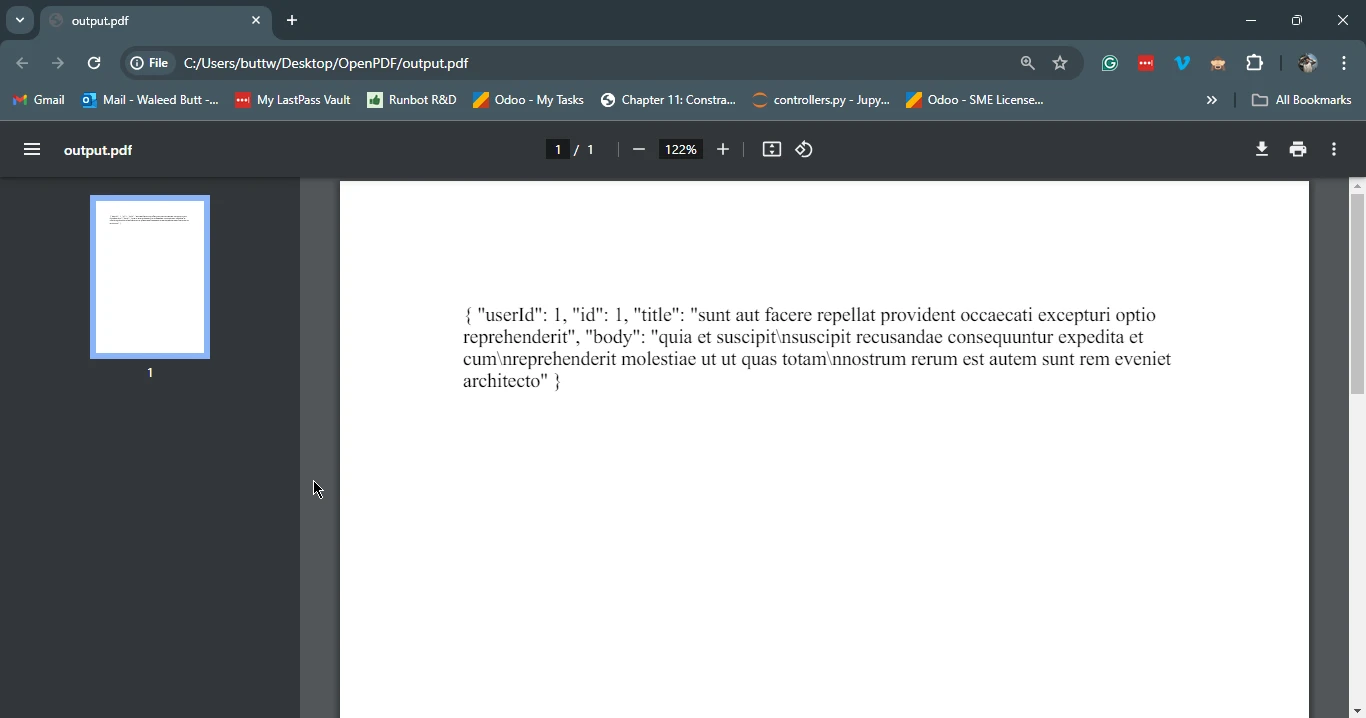
}Bu örnekte, Google HTTP İstemci Kütüphanesi'ni kullanarak bir yer tutucu API'den ilk olarak HTML içeriğini alıyoruz. Daha sonra, elde edilen HTML içeriğini bir PDF belgesine dönüştürmek ve output.pdf olarak kaydetmek için IronPDF kullanıyoruz.
Sonuç
Java için Google HTTP İstemci Kütüphanesi, web hizmetleriyle etkileşim kurmak için güçlü bir araçtır, basit HTTP istekleri, çeşitli kimlik doğrulama yöntemleri desteği, JSON ve XML ayrıştırma ile sorunsuz entegrasyonu ve çeşitli Java ortamları için uyumluluk sunar. IronPDF ile birlikte, geliştiriciler web hizmetlerinden kolayca HTML içeriği alabilir ve bunu PDF belgelerine dönüştürebilir, rapor oluşturmaktan web uygulamaları için indirilebilir içerik oluşturmaya kadar çeşitli uygulamalar için tam bir kütüphane sağlar. Bu iki kütüphaneyi kullanarak, Java geliştiricileri uygulamalarının yeteneklerini önemli ölçüde artırabilirken, kodun karmaşıklığını azaltabilirler.
Lütfen aşağıdaki bağlantıya göz atın.









 Ücretsiz Başlayın
 Ücretsiz Başlayın
 Ücretsiz Canlı Demo Rezervasyonu





 Kredi kartı veya hesap oluşturma gerektirmez










