





已更新 2026年4月23日
简化 .NET 与 Microsoft.Extensions.AI 的 LLM 集成
AI正在改变软件开发,但将大型语言模型(LLM)集成到.NET中直到现在一直很复杂。通过IronPdf.AI,将AI集成更进一步,该产品为.NET应用程序带来了OpenAI驱动的PDF解析、数据提取和内容摘要。
阅读更多

C# 是一种强大的编程语言,广泛用于开发 .NET Framework上的应用程序。 C# 中的基本概念之一是变量声明和初始化。 然而,开发人员经常遇到未分配的局部变量问题——这些变量已声明但在使用前未初始化。
本文探讨了未分配局部变量的影响,特别是在使用 IronPDF 时,这是一个用于生成和操作 .NET 中 PDF 文档的强大库。 有效管理这些变量可以提高代码的可靠性和性能,将 PDF 生成和操作任务提升到更高的水平。
在 C# 中,局部变量是在方法、构造函数或块内声明的,只能在该范围内访问。 未分配的局部变量是指已声明但尚未赋值的变量。 编译器强制要求在使用所有局部变量之前对其进行初始化。 如果尝试使用未分配的变量,编译器将抛出一个编译错误,指出该变量可能尚未被初始化。
例如,考虑以下源代码片段:
public void ExampleMethod()
{
    int number; // Declared but unassigned
    Console.WriteLine(number); // Error: Use of unassigned local variable 'number'
}Public Sub ExampleMethod()
Dim number As Integer ' Declared but unassigned
Console.WriteLine(number) ' Error: Use of unassigned local variable 'number'
End SubPublic Sub ExampleMethod()
Dim number As Integer ' Declared but unassigned
Console.WriteLine(number) ' Error: Use of unassigned local variable 'number'
End Sub在此示例中,变量number已声明但未在使用前初始化,导致编译错误。
未分配的局部变量通常发生在各种场景中,尤其是当开发人员:
1.声明变量时未初始化:这种情况通常发生在打算稍后赋值变量,但却过早地访问该变量时。 2.使用条件语句:在条件分支中声明变量的情况下,如果条件不满足,则这些变量可能保持未初始化状态。
请考虑此示例:
public void ConditionalExample(bool flag)
{
    int value;
    if (flag)
    {
        value = 10; // Only assigned if flag is true
    }
    Console.WriteLine(value); // Error: Use of unassigned local variable 'value'
}
public void ConditionalExample(bool flag)
{
int value;
if (flag)
{
value = 10; // Only assigned if flag is true
}
Console.WriteLine(value); // Error: Use of unassigned local variable 'value'
}Public Sub ConditionalExample(ByVal flag As Boolean)
Dim value As Integer
If flag Then
value = 10 ' Only assigned if flag is true
End If
Console.WriteLine(value) ' Error: Use of unassigned local variable 'value'
End SubPublic Sub ConditionalExample(ByVal flag As Boolean)
Dim value As Integer
If flag Then
value = 10 ' Only assigned if flag is true
End If
Console.WriteLine(value) ' Error: Use of unassigned local variable 'value'
End Sub在ConditionalExample方法中,变量flag为假,可能导致错误。 这种问题也可能发生在 switch 语句中,其中其他变量可能不会在每种情况下初始化。
确定赋值的概念在 C# 中至关重要。 它指的是编译器确定在变量被访问之前是否已被赋值的能力。 C# 编译器在编译时执行流分析,以检查每个局部变量是否已确定分配。 如果它无法保证变量已被赋值,它将引发编译器错误。
例如,如果您在方法中声明了一个变量但在未先初始化的情况下访问它,编译器将在编译期间拒绝该代码。 此功能帮助开发人员在开发过程中早期捕捉潜在的错误,从而提高代码的可靠性。
在使用 IronPDF 时,关键是在使用前执行变量的默认初始化,以确保 PDF 生成和操作的顺利进行。 IronPDF 提供了各种功能,这些功能需要适当的变量初始化,例如设置文档属性、页面设置和内容。
例如,请考虑以下在使用 IronPDF 之前正确初始化变量的代码片段:
using IronPdf;

// Initializing the PDF document
PdfDocument pdf = new PdfDocument(210, 297);
// Initializing the ChromePdfRenderer class
ChromePdfRenderer renderer = new ChromePdfRenderer();
// Initializing the content variable
string content = "<h2 style='color:red'>Confidential</h2>";
// Applying the content as a watermark to our PDF object
pdf.ApplyWatermark(content, rotation: 45, opacity: 90);
// Saving the PDF
pdf.SaveAs("output.pdf");
using IronPdf;
// Initializing the PDF document
PdfDocument pdf = new PdfDocument(210, 297);
// Initializing the ChromePdfRenderer class
ChromePdfRenderer renderer = new ChromePdfRenderer();
// Initializing the content variable
string content = "<h2 style='color:red'>Confidential</h2>";
// Applying the content as a watermark to our PDF object
pdf.ApplyWatermark(content, rotation: 45, opacity: 90);
// Saving the PDF
pdf.SaveAs("output.pdf");Imports IronPdf
' Initializing the PDF document
Private pdf As New PdfDocument(210, 297)
' Initializing the ChromePdfRenderer class
Private renderer As New ChromePdfRenderer()
' Initializing the content variable
Private content As String = "<h2 style='color:red'>Confidential</h2>"
' Applying the content as a watermark to our PDF object
pdf.ApplyWatermark(content, rotation:= 45, opacity:= 90)
' Saving the PDF
pdf.SaveAs("output.pdf")Imports IronPdf
' Initializing the PDF document
Private pdf As New PdfDocument(210, 297)
' Initializing the ChromePdfRenderer class
Private renderer As New ChromePdfRenderer()
' Initializing the content variable
Private content As String = "<h2 style='color:red'>Confidential</h2>"
' Applying the content as a watermark to our PDF object
pdf.ApplyWatermark(content, rotation:= 45, opacity:= 90)
' Saving the PDF
pdf.SaveAs("output.pdf")
在此示例中,pdf、renderer 和 content 变量在被使用之前已初始化,防止任何潜在的未分配变量错误。
为了避免与未分配的局部变量有关的问题,特别是在使用 IronPDF 进行 PDF 生成时,请考虑以下最佳实践:
1.始终初始化变量:确保在使用每个局部变量之前都为其赋值。 这种做法将消除编译器错误并提高代码稳定性。
2.使用默认值:如果适用,在变量声明期间使用默认初始化。 例如,count被初始化为0,从而避免错误。
3.限制作用域:将变量声明限制在尽可能小的作用域内。 这种做法有助于减少意外访问未初始化变量的机会。
4.利用编译器的警告:注意编译器关于未赋值局部变量的警告和错误。 它们提供了有关代码中潜在问题的有用信息。
通过遵循这些最佳实践,在使用 IronPDF 和 C# 时可以增强代码质量和可靠性。
IronPDF 是一个综合库,它简化了 .NET 应用程序中的 PDF 生成和操作。 IronPDF 因其丰富的功能集而脱颖而出——包括 HTML 到 PDF 的转换、CSS 样式的无缝集成以及处理各种 PDF 操作的能力——IronPDF 简化了生成动态文档这一往往复杂的任务。 它提供了一系列功能,包括:
这些功能使 IronPDF 成为希望在其应用程序中简化 PDF 相关任务的开发人员的优秀选择。 凭借广泛的文档和优秀的支持,您可以轻松地开始在项目中使用 IronPDF。
要开始使用 IronPDF,您首先需要安装它。 如果已经安装,您可以跳到下一节。 否则,以下步骤将介绍如何安装IronPDF库。
要使用 NuGet 包管理器控制台安装 IronPDF,打开 Visual Studio 并导航到包管理器控制台。 然后运行以下命令:
打开 Visual Studio,转到 "工具 -> NuGet 包管理器 -> 为解决方案管理 NuGet 包",然后搜索 IronPDF。 在这里,您只需选择您的项目并点击"安装",IronPDF 就会被添加到您的项目中。
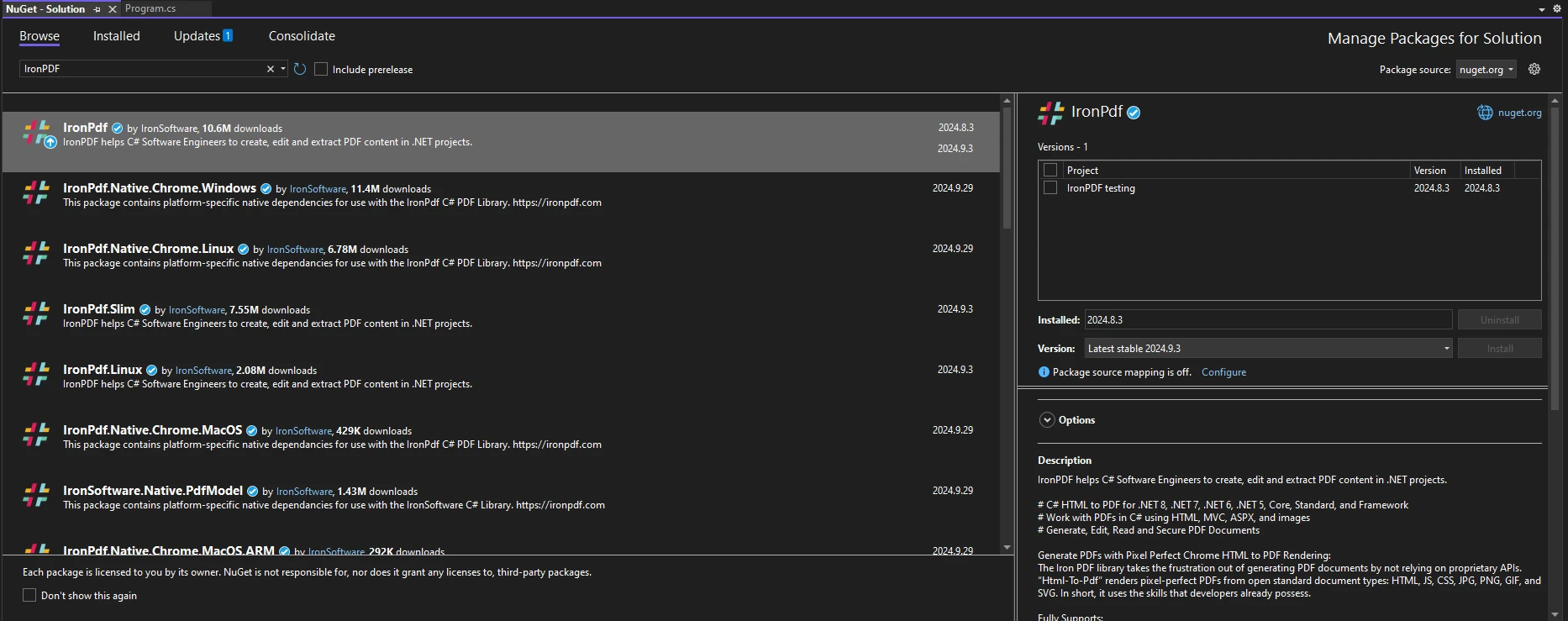
安装 IronPDF 后,开始使用 IronPDF 只需在您的代码顶部添加正确的 using 语句:
using IronPdf;using IronPdf;Imports IronPdfImports IronPdf为了说明在使用 IronPDF 时如何处理未分配的局部变量,请考虑以下说明正确初始化和使用的实际示例:
using IronPdf;
using System;

public class Program
{
    public static void Main(string[] args)
    {
        // Initialize the existing PDF document
        PdfDocument pdfDocument = PdfDocument.FromFile("Report.pdf");
        // Use the title from the PDF document to pass to the CreatePdfReport class
        var title = pdfDocument.MetaData.Title;
        CreatePdfReport(title, pdfDocument);
    }

    public static void CreatePdfReport(string title, PdfDocument existing)
    {
        // Initialize content variable
        string content = $"<p>Report Title: {title}\nGenerated on: {DateTime.Now}</p>";
        // Initialize ChromePdfRenderer
        ChromePdfRenderer renderer = new ChromePdfRenderer();
        // Set up HTML header for the PDF
        renderer.RenderingOptions.HtmlHeader = new HtmlHeaderFooter()
        {
            MaxHeight = 15,
            HtmlFragment = $"<center>{content}</center>"
        };
        // Create the PDF document to merge with our main file
        PdfDocument newPage = renderer.RenderHtmlFileAsPdf("reportTemplate.html");
        // Check if title is provided
        if (string.IsNullOrEmpty(title))
        {
            title = "Untitled Report"; // Assign default value if unassigned
        }
        // Merge new PDF page with existing PDF
        PdfDocument pdf = PdfDocument.Merge(newPage, existing);
        // Save the PDF
        pdf.SaveAs("FilledReport.pdf");
    }
}
using IronPdf;
using System;
public class Program
{
public static void Main(string[] args)
{
// Initialize the existing PDF document
PdfDocument pdfDocument = PdfDocument.FromFile("Report.pdf");
// Use the title from the PDF document to pass to the CreatePdfReport class
var title = pdfDocument.MetaData.Title;
CreatePdfReport(title, pdfDocument);
}
public static void CreatePdfReport(string title, PdfDocument existing)
{
// Initialize content variable
string content = $"<p>Report Title: {title}\nGenerated on: {DateTime.Now}</p>";
// Initialize ChromePdfRenderer
ChromePdfRenderer renderer = new ChromePdfRenderer();
// Set up HTML header for the PDF
renderer.RenderingOptions.HtmlHeader = new HtmlHeaderFooter()
{
MaxHeight = 15,
HtmlFragment = $"<center>{content}</center>"
};
// Create the PDF document to merge with our main file
PdfDocument newPage = renderer.RenderHtmlFileAsPdf("reportTemplate.html");
// Check if title is provided
if (string.IsNullOrEmpty(title))
{
title = "Untitled Report"; // Assign default value if unassigned
}
// Merge new PDF page with existing PDF
PdfDocument pdf = PdfDocument.Merge(newPage, existing);
// Save the PDF
pdf.SaveAs("FilledReport.pdf");
}
}Imports Microsoft.VisualBasic
Imports IronPdf
Imports System
Public Class Program
Public Shared Sub Main(ByVal args() As String)
' Initialize the existing PDF document
Dim pdfDocument As PdfDocument = PdfDocument.FromFile("Report.pdf")
' Use the title from the PDF document to pass to the CreatePdfReport class
Dim title = pdfDocument.MetaData.Title
CreatePdfReport(title, pdfDocument)
End Sub
Public Shared Sub CreatePdfReport(ByVal title As String, ByVal existing As PdfDocument)
' Initialize content variable
Dim content As String = $"<p>Report Title: {title}" & vbLf & "Generated on: {DateTime.Now}</p>"
' Initialize ChromePdfRenderer
Dim renderer As New ChromePdfRenderer()
' Set up HTML header for the PDF
renderer.RenderingOptions.HtmlHeader = New HtmlHeaderFooter() With {
.MaxHeight = 15,
.HtmlFragment = $"<center>{content}</center>"
}
' Create the PDF document to merge with our main file
Dim newPage As PdfDocument = renderer.RenderHtmlFileAsPdf("reportTemplate.html")
' Check if title is provided
If String.IsNullOrEmpty(title) Then
title = "Untitled Report" ' Assign default value if unassigned
End If
' Merge new PDF page with existing PDF
Dim pdf As PdfDocument = PdfDocument.Merge(newPage, existing)
' Save the PDF
pdf.SaveAs("FilledReport.pdf")
End Sub
End ClassImports Microsoft.VisualBasic
Imports IronPdf
Imports System
Public Class Program
Public Shared Sub Main(ByVal args() As String)
' Initialize the existing PDF document
Dim pdfDocument As PdfDocument = PdfDocument.FromFile("Report.pdf")
' Use the title from the PDF document to pass to the CreatePdfReport class
Dim title = pdfDocument.MetaData.Title
CreatePdfReport(title, pdfDocument)
End Sub
Public Shared Sub CreatePdfReport(ByVal title As String, ByVal existing As PdfDocument)
' Initialize content variable
Dim content As String = $"<p>Report Title: {title}" & vbLf & "Generated on: {DateTime.Now}</p>"
' Initialize ChromePdfRenderer
Dim renderer As New ChromePdfRenderer()
' Set up HTML header for the PDF
renderer.RenderingOptions.HtmlHeader = New HtmlHeaderFooter() With {
.MaxHeight = 15,
.HtmlFragment = $"<center>{content}</center>"
}
' Create the PDF document to merge with our main file
Dim newPage As PdfDocument = renderer.RenderHtmlFileAsPdf("reportTemplate.html")
' Check if title is provided
If String.IsNullOrEmpty(title) Then
title = "Untitled Report" ' Assign default value if unassigned
End If
' Merge new PDF page with existing PDF
Dim pdf As PdfDocument = PdfDocument.Merge(newPage, existing)
' Save the PDF
pdf.SaveAs("FilledReport.pdf")
End Sub
End Class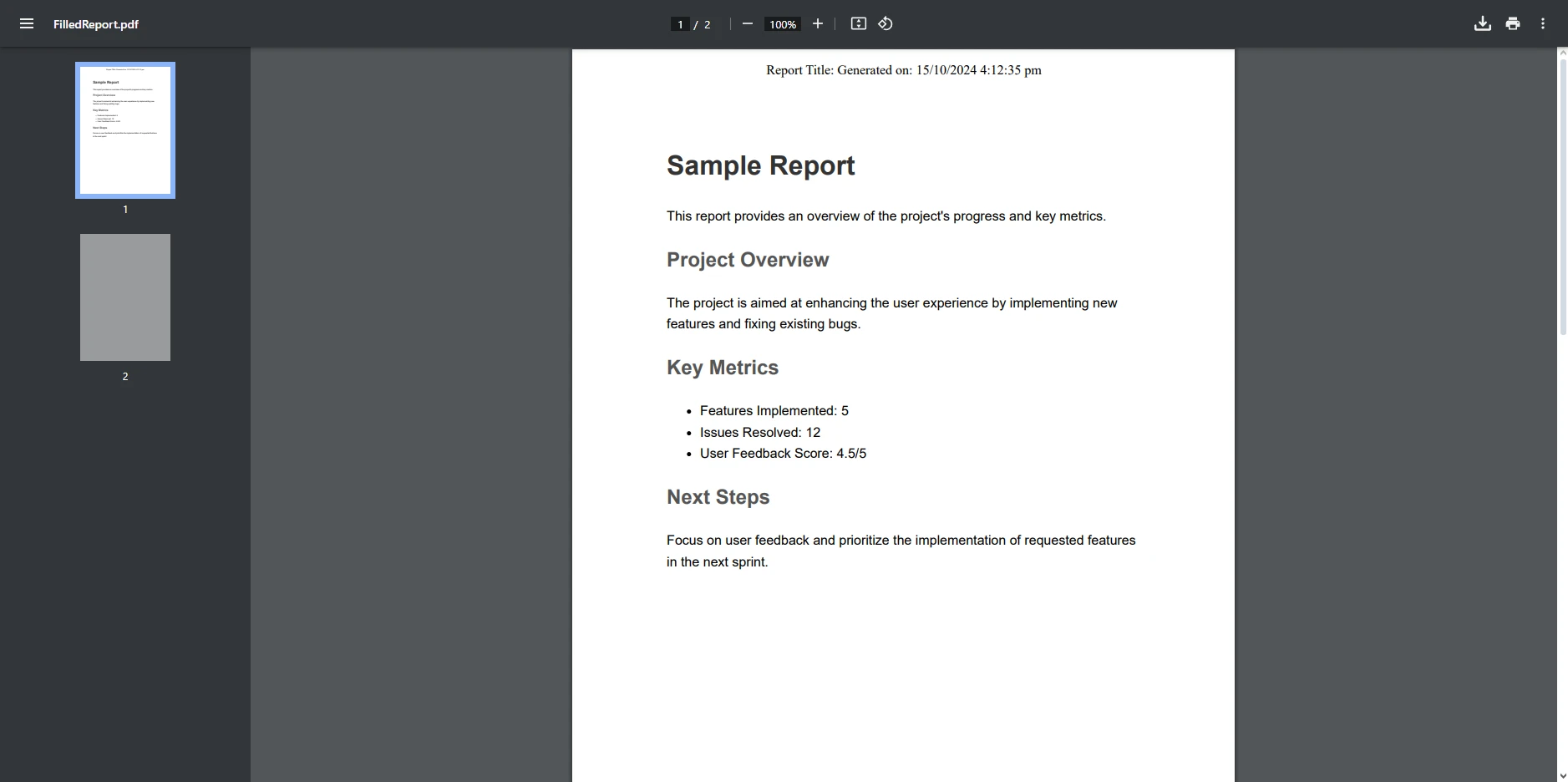
在上述代码示例中,我们首先初始化了一个名为"Report.pdf"的现有 PDF 文档,并从文档的元数据中检索其标题。
这个标题被传递到负责创建新 PDF 报告的 CreatePdfReport 方法中。 在这个方法中,一个名为content的字符串变量被初始化以包含报告的标题和当前日期。 ChromePdfRenderer 类用于渲染名为"reportTemplate.html"的 HTML 模板,并为 PDF 设置一个显示报告标题和日期的页眉。 如果未提供标题,则分配默认值"Untitled Report"。
新渲染的 PDF 文档然后与现有 PDF 文档合并,合并结果保存为"FilledReport.pdf"。这一过程展示了如何创建动态 PDF 内容并使用 IronPDF 将其与现有文档合并。
或者,可以更改代码以接受用户输入作为标题的参数。 如果未提供标题,可以分配一个默认值,以确保在使用之前对变量进行初始化。
理解未分配的局部变量对于编写可靠的 C# 代码至关重要,尤其是在使用像 IronPDF 这样的库时。 未分配的变量可能导致编译错误和运行时异常,这可能是令人沮丧且耗时的故障排除过程。 通过确保在使用之前适当地初始化所有局部变量,开发人员可以显著降低这些常见陷阱的风险,从而最终导致更清晰、更易维护的代码。
IronPDF 提供了一个用于生成和操作 PDF 的强大解决方案,是 .NET 开发人员的理想选择。 其用户友好的界面和广泛的功能使开发人员能够快速高效地创建高质量的 PDF 文档。 无论您是将 HTML 转换为 PDF、编辑现有文档还是渲染内容,IronPDF 都简化了这一过程,让您可以专注于构建应用程序,而不是处理低级别的 PDF 复杂性。
查看 IronPDF 的免费试用,开始使用这个强大的库来提高您 PDF 项目效率吧! IronPDF 是一个手边强大的工具,如果您想了解该库更多功能,务必查看其广泛的入门指南和代码示例。
Jacob Mellor 是 Iron Software 的首席技术官,也是一位开创 C# PDF 技术的有远见的工程师。作为 Iron Software 核心代码库的原始开发者,他从公司成立之初就开始塑造公司的产品架构,与首席执行官 Cameron Rimington 一起将公司转变为一家拥有 50 多名员工的公司,为 NASA、特斯拉和全球政府机构提供服务。



IronPDF 是 IRONSUITE的一部分
10 个 .NET API 产品用于您的办公文档

当您需要PDF看起来像HTML时,速度快。


