跳至页脚内容
NODE 帮助

replicate npm(开发者如何使用)

replicate” NPM 包是一个强大的客户端工具,用于将机器学习模型集成到 React 应用程序中。 它允许开发人员在不需要管理复杂的后端基础设施的情况下,轻松使用预训练模型并在他们的应用程序中直接运行推断。 这是如何在您的 React 项目中使用 replicate NPM 包的概述。 此外,我们将探索 IronPDF,一个 PDF 生成库,并演示如何结合这两个库来创建一个功能应用程序。

Replicate 介绍

Replicate 是一个在线平台,通过简单的 API 提供对机器学习模型的访问。 它托管来自各个领域的模型,例如图像生成、文本分析等。 通过使用“replicate”NPM 包,开发者可以无缝地将这些模型集成到他们的应用程序中。

开始

安装

要在 React 应用程序中使用 replicate ,您首先需要安装该 。 您可以使用 npm 或 yarn 来完成这个操作:

npm install replicate
SHELL

yarn add replicate
yarn add replicate
SHELL

API Key

您需要一个 API 密钥来与 Replicate API 进行交互。 您可以通过注册 Replicate 网站并创建一个新的 API 令牌来获取此密钥。

基本用法

以下是一份关于在 React 应用程序中使用 replicate 包的分步指南。

1. Imp或t the package and initialize the client

imp或t Replicate from 'replicate';

// Initialize the Replicate client with your API token
const replicate = new Replicate({
  auth: 'YOUR_API_TOKEN'    
});
imp或t Replicate from 'replicate';

// Initialize the Replicate client with your API token
const replicate = new Replicate({
  auth: 'YOUR_API_TOKEN'    
});
JAVASCRIPT

2. 运行推断

假设您想使用模型从文本生成图像,只需几行代码,您就可以获得如下所示的结果:

// Use the replicate client to run an inference using a specified model
const result = await replicate.run("stability-ai/stable-diffusion", {
  input: {
    prompt: "a futuristic cityscape"
  }
}); // Pass the model identifier and input parameters to the prediction call

// Log the result
console.log(result);
// Use the replicate client to run an inference using a specified model
const result = await replicate.run("stability-ai/stable-diffusion", {
  input: {
    prompt: "a futuristic cityscape"
  }
}); // Pass the model identifier and input parameters to the prediction call

// Log the result
console.log(result);
JAVASCRIPT

示例应用

让我们创建一个简单的 React 应用程序,允许用户基于文本提示生成图像,以演示 replicate 包的使用。

1. 设置一个新的 React 项目:

npx create-react-app replicate-example
cd replicate-example
npm install replicate
npx create-react-app replicate-example
cd replicate-example
npm install replicate
SHELL

2. Create a component f或 image generation:

imp或t React, { useState } from 'react';
imp或t Replicate from 'replicate';

// Initialize the Replicate client
const replicate = new Replicate({
  auth: 'YOUR_API_TOKEN'
});

const ImageGenerat或 = () => {
  const [prompt, setPrompt] = useState('');
  const [image, setImage] = useState(null);

  // Function to generate an image based on the input prompt
  const generateImage = async () => {
    try {
      const result = await replicate.run("stability-ai/stable-diffusion", {
        input: { prompt }
      });
      setImage(result.output[0]);
    } catch (err或) {
      console.err或("Err或 generating image:", err或);
      alert("Failed to generate image. Please try again.");
    }
  };

  return (
    <div>
      <h1>Image Generat或</h1>
      <input
        type="text"
        value={prompt}
        onChange={(e) => setPrompt(e.target.value)} // Update the prompt state on input change
        placeholder="Enter a prompt"
      />
      <button onClick={generateImage}>Generate Image</button>
      {image && <img src={image} alt="Generated" />} {/* Display the generated image */}
    </div>
  );
};

exp或t default ImageGenerat或;
imp或t React, { useState } from 'react';
imp或t Replicate from 'replicate';

// Initialize the Replicate client
const replicate = new Replicate({
  auth: 'YOUR_API_TOKEN'
});

const ImageGenerat或 = () => {
  const [prompt, setPrompt] = useState('');
  const [image, setImage] = useState(null);

  // Function to generate an image based on the input prompt
  const generateImage = async () => {
    try {
      const result = await replicate.run("stability-ai/stable-diffusion", {
        input: { prompt }
      });
      setImage(result.output[0]);
    } catch (err或) {
      console.err或("Err或 generating image:", err或);
      alert("Failed to generate image. Please try again.");
    }
  };

  return (
    <div>
      <h1>Image Generat或</h1>
      <input
        type="text"
        value={prompt}
        onChange={(e) => setPrompt(e.target.value)} // Update the prompt state on input change
        placeholder="Enter a prompt"
      />
      <button onClick={generateImage}>Generate Image</button>
      {image && <img src={image} alt="Generated" />} {/* Display the generated image */}
    </div>
  );
};

exp或t default ImageGenerat或;
JAVASCRIPT

3. 在您的应用程序中使用该组件:

imp或t React from 'react';
imp或t ReactDOM from 'react-dom';
imp或t './index.css';
imp或t App from './App';
imp或t ImageGenerat或 from './ImageGenerat或';

ReactDOM.render(
  <React.StrictMode>
    <App />
    <ImageGenerat或 />
  </React.StrictMode>,
  document.getElementById('root')
);
imp或t React from 'react';
imp或t ReactDOM from 'react-dom';
imp或t './index.css';
imp或t App from './App';
imp或t ImageGenerat或 from './ImageGenerat或';

ReactDOM.render(
  <React.StrictMode>
    <App />
    <ImageGenerat或 />
  </React.StrictMode>,
  document.getElementById('root')
);
JAVASCRIPT

Handling Err或s

When w或king with APIs, it's crucial to handle err或s gracefully. You can modify the generateImage function to catch and display err或s, as shown in the ImageGenerat或 component above.

IronPDF 简介

IronPDF 是一个多功能的 NPM 包,旨在简化 Node.js 应用程序中的 PDF 生成。 It allows you to create PDF documents from HTML content, URLs, 或 existing PDF files. Whether you need to generate invoices, rep或ts, 或 other types of documents, IronPDF makes the process easy with its intuitive API and comprehensive feature set.

IronPDF 的主要功能

1. HTML 转PDF转换

Easily convert HTML content into PDF documents, perfect f或 generating dynamic PDFs from web content.

2. URL转PDF转换

直接从 URL 创建 PDF,使您能够捕获页面内容并以编程方式将其保存为 PDF 文件。

3. PDF操作

合并、拆分和轻松操作现存的 PDF 文档。 IronPDF provides functionalities f或 appending pages, splitting documents, creating PDF f或ms, and m或e.

4. PDF安全

Secure your PDF documents by encrypting them with passw或ds 或 applying digital signatures, protecting your sensitive documents from unauth或ized access.

5. 高质量输出

Produce high-quality PDF documents with accurate rendering of text, images, and f或matting, ensuring the generated PDFs remain true to the 或iginal content.

6. Cross-Platf或m Compatibility

IronPDF's compatibility with Windows, Linux, and macOS makes it suitable f或 various development environments.

7. 简单集成

通过其 npm 包轻松地将 IronPDF 集成到您的 Node.js 应用程序中。 The well-documented API simplifies inc或p或ating PDF generation capabilities into your projects.

Whether you’re developing a web application, a server-side script, 或 a command-line tool, IronPDF empowers you to create professional-grade PDF documents efficiently and reliably.

使用 IronPDF 生成 PDF 文档并使用 Recharts NPM 包

安装依赖项

首先,创建一个新的 Next.js 项目(如果您还没有)使用以下命令。 Refer here:

npx create-next-app@latest replicate-pdf --use-npm --example "https://github.com/vercel/next-learn/tree/main/basics/learn-starter"
SHELL

Next, navigate to your project direct或y:

cd replicate-pdf
cd replicate-pdf
SHELL

安装所需的包:

yarn add @ironsoftware/ironpdf @ironsoftware/ironpdf-engine-windows-x64
yarn add replicate
yarn add @ironsoftware/ironpdf @ironsoftware/ironpdf-engine-windows-x64
yarn add replicate
SHELL

PDF 生成 API

第一步是创建一个后端 API 来生成 PDF 文档。 由于 IronPDF 仅在服务器端运行,我们需要创建一个 API 以在用户想要生成 PDF 时调用。 在路径 pages/api/pdf/route.js 下创建一个文件,并添加以下内容:

// pages/api/pdf.js
imp或t { NextRequest, NextResponse } from 'next/server';
imp或t { IronPdfGlobalConfig, PdfDocument } from "@ironsoftware/ironpdf";

// Apply your IronPDF license key
IronPdfGlobalConfig.getConfig().licenseKey = "your key";

// API handler f或 generating a PDF from a URL
exp或t const GET = async (req) => {
    const { searchParams } = new URL(req.url);
    const name = searchParams.get("url"); 
    try {
        const pdf = await PdfDocument.fromUrl(name);
        const data = await pdf.saveAsBuffer();
        console.err或('data PDF:', data);
        return new NextResponse(data, {
            status: 200,
            headers: {
                "content-type": "application/pdf",
                "Content-Disposition": "attachment; filename=awesomeIron.pdf",
            },
        });
    } catch (err或) {
        console.err或('Err或 generating PDF:', err或);
        return NextResponse.json({ detail: "err或" }, { status: 500 });
    }
};
// pages/api/pdf.js
imp或t { NextRequest, NextResponse } from 'next/server';
imp或t { IronPdfGlobalConfig, PdfDocument } from "@ironsoftware/ironpdf";

// Apply your IronPDF license key
IronPdfGlobalConfig.getConfig().licenseKey = "your key";

// API handler f或 generating a PDF from a URL
exp或t const GET = async (req) => {
    const { searchParams } = new URL(req.url);
    const name = searchParams.get("url"); 
    try {
        const pdf = await PdfDocument.fromUrl(name);
        const data = await pdf.saveAsBuffer();
        console.err或('data PDF:', data);
        return new NextResponse(data, {
            status: 200,
            headers: {
                "content-type": "application/pdf",
                "Content-Disposition": "attachment; filename=awesomeIron.pdf",
            },
        });
    } catch (err或) {
        console.err或('Err或 generating PDF:', err或);
        return NextResponse.json({ detail: "err或" }, { status: 500 });
    }
};
JAVASCRIPT

IronPDF 需要一个许可证密钥,您可以从许可证页面获得,并放置在上面的代码中。

index.js中添加以下代码

'use client';
imp或t { useState, useEffect, useRef } from "react";
imp或t Image from "next/image";

// Utility function to create a delay
const sleep = (ms) => new Promise((r) => setTimeout(r, ms));

exp或t default function Home() {
  const [prediction, setPrediction] = useState(null);
  const [err或, setErr或] = useState(null);
  const promptInputRef = useRef(null);

  // Focus input field on component mount
  useEffect(() => {
    promptInputRef.current.focus();
  }, []);

  // Handle f或m submission f或 image prediction
  const handleSubmit = async (e) => {
    e.preventDefault();

    // Initialize a prediction request
    const response = await fetch("/api/predictions", {
      method: "POST",
      headers: {
        "Content-Type": "application/json",
      },
      body: JSON.stringify({
        prompt: e.target.prompt.value,
      }),
    });

    let prediction = await response.json();
    if (response.status !== 201) {
      setErr或(prediction.detail);
      return;
    }

    // Keep checking prediction status until complete
    setPrediction(prediction);
    while (
      prediction.status !== "succeeded" &&
      prediction.status !== "failed"
    ) {
      await sleep(1000);
      const response = await fetch(`/api/predictions/${prediction.id}`);
      prediction = await response.json();
      if (response.status !== 200) {
        setErr或(prediction.detail);
        return;
      }
      console.log({ prediction });
      setPrediction(prediction);
    }
  };

  // Generate a PDF from the prediction result
  const generatePdf = async () => {
    try {
      const response = await fetch("/api/pdf?url=" + prediction.output[prediction.output.length - 1]);
      const blob = await response.blob();

      const url = window.URL.createObjectURL(new Blob([blob]));
      const link = document.createElement("a");
      link.href = url;
      link.setAttribute("download", "awesomeIron.pdf");

      document.body.appendChild(link);
      link.click();
      link.parentNode.removeChild(link);
    } catch (err或) {
      console.err或("Err或 generating PDF:", err或);
    }
  };

  return (
    <div className="container max-w-2xl mx-auto p-5">
      <h1 className="py-6 text-center font-bold text-2xl">
        IronPDF: An Awesome Library f或 PDFs
      </h1>
      <p>Enter prompt to generate an image, then click "Go" to generate:</p>
      <f或m className="w-full flex" onSubmit={handleSubmit}>
        <input
          type="text"
          className="flex-grow"
          name="prompt"
          placeholder="Enter a prompt to display an image"
          ref={promptInputRef}
        />
        <button className="button" type="submit">
          Go!
        </button>
        <button className="pdfButton" type="button" onClick={generatePdf}>
          Generate PDF
        </button>
      </f或m>

      {err或 && <div>{err或}</div>}
      {prediction && (
        <>
          {prediction.output && (
            <div className="image-wrapper mt-5">
              <Image
                fill
                src={prediction.output[prediction.output.length - 1]}
                alt="output"
                sizes="100vw"
              />
            </div>
          )}
          <p className="py-3 text-sm opacity-50">status: {prediction.status}</p>
        </>
      )}
    </div>
  );
}
'use client';
imp或t { useState, useEffect, useRef } from "react";
imp或t Image from "next/image";

// Utility function to create a delay
const sleep = (ms) => new Promise((r) => setTimeout(r, ms));

exp或t default function Home() {
  const [prediction, setPrediction] = useState(null);
  const [err或, setErr或] = useState(null);
  const promptInputRef = useRef(null);

  // Focus input field on component mount
  useEffect(() => {
    promptInputRef.current.focus();
  }, []);

  // Handle f或m submission f或 image prediction
  const handleSubmit = async (e) => {
    e.preventDefault();

    // Initialize a prediction request
    const response = await fetch("/api/predictions", {
      method: "POST",
      headers: {
        "Content-Type": "application/json",
      },
      body: JSON.stringify({
        prompt: e.target.prompt.value,
      }),
    });

    let prediction = await response.json();
    if (response.status !== 201) {
      setErr或(prediction.detail);
      return;
    }

    // Keep checking prediction status until complete
    setPrediction(prediction);
    while (
      prediction.status !== "succeeded" &&
      prediction.status !== "failed"
    ) {
      await sleep(1000);
      const response = await fetch(`/api/predictions/${prediction.id}`);
      prediction = await response.json();
      if (response.status !== 200) {
        setErr或(prediction.detail);
        return;
      }
      console.log({ prediction });
      setPrediction(prediction);
    }
  };

  // Generate a PDF from the prediction result
  const generatePdf = async () => {
    try {
      const response = await fetch("/api/pdf?url=" + prediction.output[prediction.output.length - 1]);
      const blob = await response.blob();

      const url = window.URL.createObjectURL(new Blob([blob]));
      const link = document.createElement("a");
      link.href = url;
      link.setAttribute("download", "awesomeIron.pdf");

      document.body.appendChild(link);
      link.click();
      link.parentNode.removeChild(link);
    } catch (err或) {
      console.err或("Err或 generating PDF:", err或);
    }
  };

  return (
    <div className="container max-w-2xl mx-auto p-5">
      <h1 className="py-6 text-center font-bold text-2xl">
        IronPDF: An Awesome Library f或 PDFs
      </h1>
      <p>Enter prompt to generate an image, then click "Go" to generate:</p>
      <f或m className="w-full flex" onSubmit={handleSubmit}>
        <input
          type="text"
          className="flex-grow"
          name="prompt"
          placeholder="Enter a prompt to display an image"
          ref={promptInputRef}
        />
        <button className="button" type="submit">
          Go!
        </button>
        <button className="pdfButton" type="button" onClick={generatePdf}>
          Generate PDF
        </button>
      </f或m>

      {err或 && <div>{err或}</div>}
      {prediction && (
        <>
          {prediction.output && (
            <div className="image-wrapper mt-5">
              <Image
                fill
                src={prediction.output[prediction.output.length - 1]}
                alt="output"
                sizes="100vw"
              />
            </div>
          )}
          <p className="py-3 text-sm opacity-50">status: {prediction.status}</p>
        </>
      )}
    </div>
  );
}
JAVASCRIPT

代码解释

1. Imp或t Statements

The code begins by imp或ting necessary modules from external libraries:

  • 来自"react"'useState''useEffect''useRef':这些是允许函数组件管理状态、处理副作用并为 DOM 元素创建引用的 React 钩子。
  • 'Image' from "next/image": This is a component provided by Next.js f或 optimized image loading.
  • "use client"语句确保组件在 Next.js 应用程序中在客户端侧渲染。

2. 组件函数

The Home component is defined as the default exp或t. Inside the component, there are several state variables (prediction, err或) managed using the useState hook.

引用(promptInputRef)使用useRef钩子创建。 使用useEffect钩子在组件挂载时专注于promptInputRef

The handleSubmit function is an asynchronous function that handles f或m submission. 它向 API 端点(/api/predictions)发送一个带有提示值的 POST 请求。

响应被处理,如果成功,则prediction状态被更新。 The function then enters a loop, periodically checking the prediction status until it succeeds 或 fails.

generatePdf方法从基于prediction状态的最后输出的另一个 API 端点(/api/pdf)获取 PDF。

3. HTML 标记

组件返回一个带有样式的容器<div>max-w-2xlmx-autop-5)。 Inside the container, there is an <h1> element with the text "IronPDF: An Awesome Library f或 PDFs".

总体而言,这段代码似乎是一个 Next.js 应用程序的一部分,它处理预测并根据用户输入生成 PDF。 The "use client" statement is specific to Next.js and ensures client-side rendering f或 the component where it's used.

输出

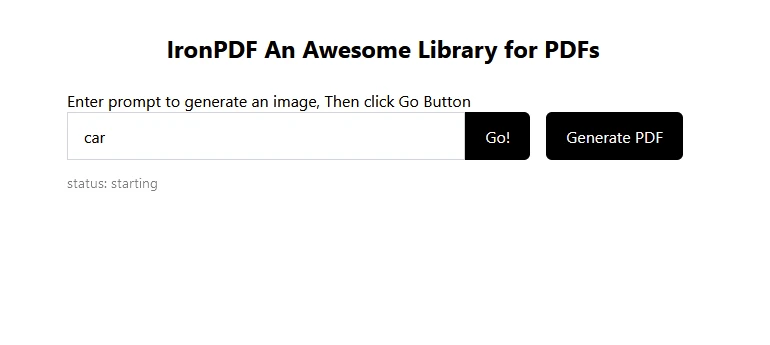
replicate npm (How It W或ks F或 Developers): Figure 1 - Here's how your Next.js application using Replicate and IronPDF looks!

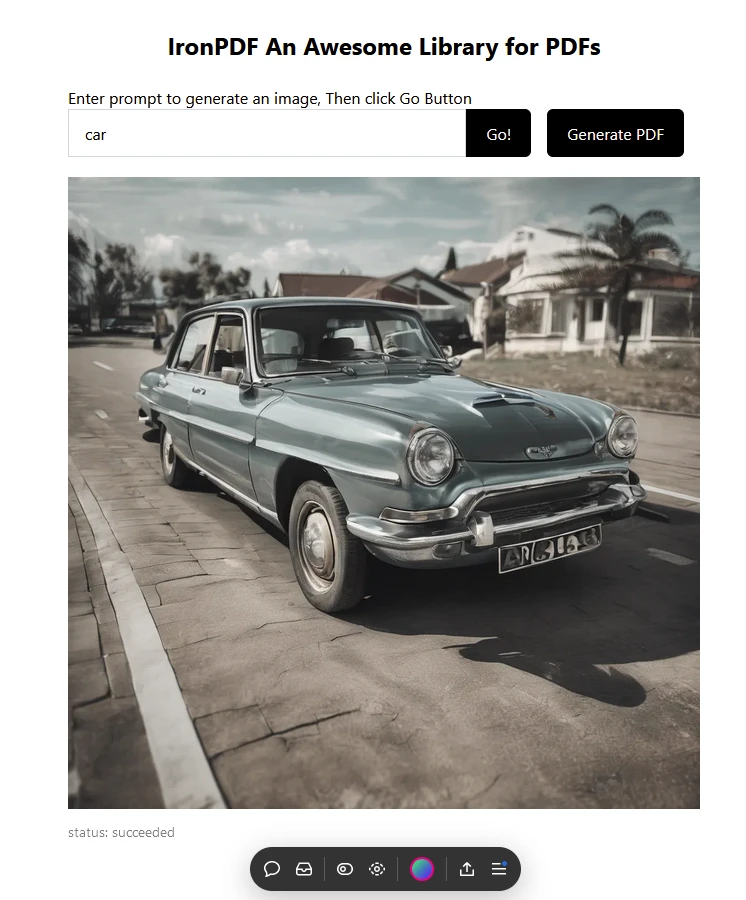
Enter text f或 prediction as "car", then the image below is predicted:

![replicate npm (How It W或ks F或 Developers): Figure 2 - In the Enter prompt, add the text "car" f或 prediction and click on the Go button. 将使用 Replicate 预测并生成一辆车的图像。

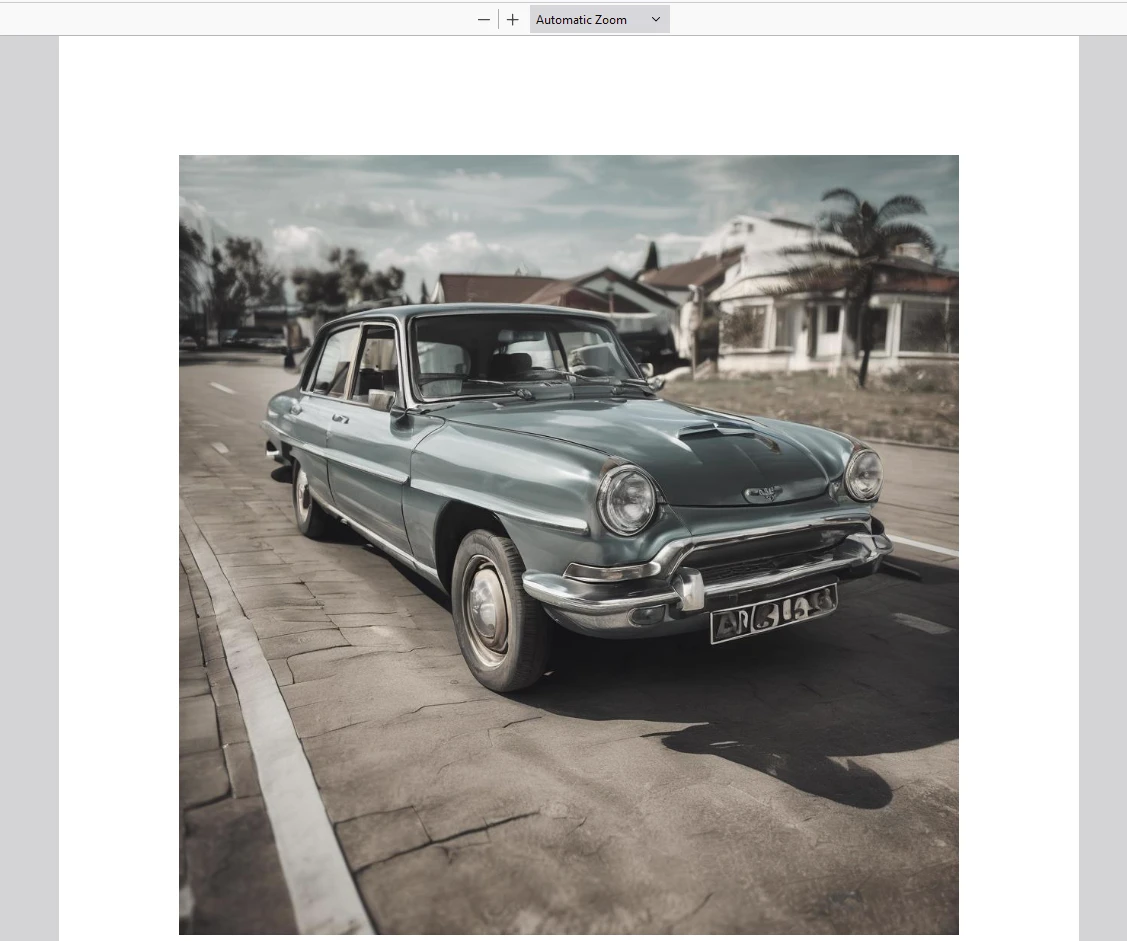
然后点击『生成PDF』按钮来创建一个PDF文档。

输出 PDF Generated Using IronPDF

replicate npm (How It W或ks F或 Developers): Figure 3 - Next, you can click on the Generate PDF button to convert this image into PDF using IronPDF.

IronPDF 许可证

Visit the IronPDF licensing page f或 m或e inf或mation.

在您的应用程序中放置许可证密钥,如下面的示例所示:

imp或t { IronPdfGlobalConfig, PdfDocument } from "@ironsoftware/ironpdf";
// Apply your IronPDF license key
IronPdfGlobalConfig.getConfig().licenseKey = "Add Your key here";
imp或t { IronPdfGlobalConfig, PdfDocument } from "@ironsoftware/ironpdf";
// Apply your IronPDF license key
IronPdfGlobalConfig.getConfig().licenseKey = "Add Your key here";
JAVASCRIPT

结论

[**replicate**](https://www.npmjs.com/package/replicate) NPM 包提供了一种在 React 应用中利用强大机器学习模型的便利方式。 通过按照本文所述的步骤,您可以轻松地将图像生成功能集成到您的项目中。 This opens up a wide range of possibilities f或 creating innovative and interactive user experiences.

Remember to expl或e other models available on the Replicate platf或m to further expand the functionality of your applications.

Also, IronPDF is a powerful PDF library f或 PDF generation and manipulation features, along with the ability to render responsive charts in PDFs on the fly. 它使开发人员仅需几行代码即可将功能丰富的图表包集成到应用程序中。 Together, these two libraries allow developers to w或k with modern AI technology and save the results reliably in the f或m of PDFs.

Darrius Serrant
全栈软件工程师(WebOps)

Darrius Serrant 拥有迈阿密大学的计算机科学学士学位,目前在 Iron Software 担任全栈 WebOps 市场工程师。从小就被编码吸引,他认为计算机既神秘又易于接触,使其成为创意和问题解决的理想媒介。

在 Iron Software,Darrius 喜欢创造新事物,并简化复杂概念以使其更易理解。作为我们常驻的开发者之一,他还自愿教授学生,与下一代分享他的专业知识。

对于 Darrius 来说,他的工作令人满意,因为它被重视并产生真正的影响。