Die switch-Anweisung in C# bietet eine optimierte und lesbare Alternative zu mehreren if-else-Blöcken. Es ist vorteilhaft, wenn Sie eine Variable haben, die einen von mehreren eindeutigen Werten annehmen kann, und Sie müssen je nach Wert unterschiedlichen Code ausführen. Die switch-Anweisung wertet einen Ausdruck aus und führt Code basierend auf dem passenden Wert aus, wodurch sie ein integraler Bestandteil der Entscheidungsfindung in Ihrem Code ist.
Während if-else-Strukturen für einfache Bedingungen oder Überprüfungen nützlich sind, sind switch-case-Anweisungen besonders effektiv, wenn es um komplexere Bedingungsüberprüfungen geht, insbesondere solche, die auf einer einzelnen Variablen oder Musterübereinstimmungsausdruck basieren. Sie bieten eine klarere und verständlichere Syntax im Vergleich zu if-Anweisungen, was sowohl für das Schreiben als auch das Warten von Code entscheidend ist.
Grundlagen der Switch-Anweisung
Was ist eine Switch-Anweisung?
Eine switch-Anweisung in C# ist eine Kontrollstruktur, die verwendet wird, um einen von vielen möglichen Codepfaden zur Ausführung auszuwählen. Die Auswahl basiert auf dem Wert oder einem Ausdruck. Es ist eine effiziente Alternative zur Verwendung mehrerer if-else-Bedingungen, insbesondere wenn es um eine Variable geht, die mehrere eindeutige Werte haben kann.
Syntax
Die grundlegende Syntax einer switch-Anweisung ist unkompliziert:
// Switch statement
switch (variable)
{
    case value1:
        // Code to execute if variable equals value1
        break;
    case value2:
        // Code to execute if variable equals value2
        break;
    // More cases as needed
    default:
        // Code to execute if variable doesn't match any case
        break;
}
// Switch statement
switch (variable)
{
    case value1:
        // Code to execute if variable equals value1
        break;
    case value2:
        // Code to execute if variable equals value2
        break;
    // More cases as needed
    default:
        // Code to execute if variable doesn't match any case
        break;
}
' Switch statement
Select Case variable
Case value1
' Code to execute if variable equals value1
Case value2
' Code to execute if variable equals value2
' More cases as needed
Case Else
' Code to execute if variable doesn't match any case
End Select
' Switch statement
Select Case variable
	Case value1
		' Code to execute if variable equals value1
	Case value2
		' Code to execute if variable equals value2
	' More cases as needed
	Case Else
		' Code to execute if variable doesn't match any case
End Select
switch (variable): Dies spezifiziert die Variable oder den Ausdruck, der ausgewertet werden soll.case value1: Dies sind die verschiedenen Werte oder Bedingungen, die Sie gegen die Variable überprüfen.break: Dieses Schlüsselwort wird verwendet, um den Switch-Block zu verlassen, sobald ein übereinstimmender Fall ausgeführt wird.default-Anweisung: Dieser Block wird ausgeführt, wenn keiner der angegebenen Fälle mit der Variable übereinstimmt.
Verstehen der Break-Anweisung
Die break-Anweisung in switch ist entscheidend. Sie verhindert das "durchrutschen", bei dem die Ausführung zum nächsten Fall weitergeht, auch wenn die Übereinstimmungsbedingung bereits erfüllt ist. Jeder Fallblock endet typischerweise mit einer break-Anweisung, um sicherzustellen, dass nur der Code unter dem passenden Fall ausgeführt wird.
Vergleich von Switch-Anweisungen und If-Else-Anweisungen
Während die Struktur der if-else-Anweisung darin besteht, eine Bedingung zu überprüfen und einen Codeblock auszuführen, wenn die Bedingung erfüllt ist, vergleichen switch-Anweisungen eine einzelne Variable oder einen Ausdruck mit mehreren potenziellen Werten. Dies macht die switch-Anweisung prägnanter und leichter lesbar, wenn viele Bedingungen oder Fallmuster zu überprüfen sind.
Beispiel: Verwendung einer Switch-Anweisung
int number = 3;
switch (number)
{
    case 1:
        Console.WriteLine("One");
        break;
    case 2:
        Console.WriteLine("Two");
        break;
    case 3:
        Console.WriteLine("Three");
        break;
    default:
        Console.WriteLine("Other Number"); // Print to console
        break;
}
int number = 3;
switch (number)
{
    case 1:
        Console.WriteLine("One");
        break;
    case 2:
        Console.WriteLine("Two");
        break;
    case 3:
        Console.WriteLine("Three");
        break;
    default:
        Console.WriteLine("Other Number"); // Print to console
        break;
}
Dim number As Integer = 3
Select Case number
Case 1
Console.WriteLine("One")
Case 2
Console.WriteLine("Two")
Case 3
Console.WriteLine("Three")
Case Else
Console.WriteLine("Other Number") ' Print to console
End Select
Dim number As Integer = 3
Select Case number
	Case 1
		Console.WriteLine("One")
	Case 2
		Console.WriteLine("Two")
	Case 3
		Console.WriteLine("Three")
	Case Else
		Console.WriteLine("Other Number") ' Print to console
End Select
In diesem Beispiel wird das Programm "Three" als Ausgabe drucken, da die Zahl mit Fall 3 übereinstimmt.
Die Rolle des Standardfalls
Die Voreinstellung in einem Schalterblock verstehen
In einer switch-Anweisung spielt der Standardfall eine entscheidende Rolle. Er dient als Auffangoption, die ausgeführt wird, wenn keiner der angegebenen Fallbezeichnungen mit dem Wert des Schaltausdrucks übereinstimmt. Obwohl er optional ist, ist es eine gute Praxis, einen Standardfall einzubeziehen, um unerwartete oder unbekannte Werte zu behandeln.
Wie und wann man die Standardanweisung verwendet
Der Standardfall wird verwendet, wenn Sie einen Codeblock ausführen möchten, wenn keiner der spezifischen Fälle übereinstimmt. Er stellt sicher, dass die switch-Anweisung immer ein definiertes Verhalten hat, unabhängig von der Eingabe. Der Standardfall wird mit dem Schlüsselwort default, gefolgt von einem Doppelpunkt, deklariert.
default:
    // Code to execute if no case matches
    break;
default:
    // Code to execute if no case matches
    break;
Case Else
' Code to execute if no case matches
break
Case Else
	' Code to execute if no case matches
	break
Der Standardfall kann überall innerhalb des Switch-Blocks platziert werden, wird jedoch typischerweise am Ende zur Lesbarkeit platziert.
Beispiel: Switch-Anweisung mit Standardfall
Betrachten Sie ein Szenario, in dem Sie einen Wochentag bewerten:
int day = 5;
string dayName;
switch (day)
{
    case 1:
        dayName = "Monday";
        break;
    case 2:
        dayName = "Tuesday";
        break;
    case 3:
        dayName = "Wednesday";
        break;
    case 4:
        dayName = "Thursday";
        break;
    case 5:
        dayName = "Friday";
        break;
    case 6:
        dayName = "Saturday";
        break;
    case 7:
        dayName = "Sunday";
        break;
    default:
        dayName = "Invalid day";
        break;
}
Console.WriteLine(dayName);
int day = 5;
string dayName;
switch (day)
{
    case 1:
        dayName = "Monday";
        break;
    case 2:
        dayName = "Tuesday";
        break;
    case 3:
        dayName = "Wednesday";
        break;
    case 4:
        dayName = "Thursday";
        break;
    case 5:
        dayName = "Friday";
        break;
    case 6:
        dayName = "Saturday";
        break;
    case 7:
        dayName = "Sunday";
        break;
    default:
        dayName = "Invalid day";
        break;
}
Console.WriteLine(dayName);
Dim day As Integer = 5
Dim dayName As String
Select Case day
Case 1
dayName = "Monday"
Case 2
dayName = "Tuesday"
Case 3
dayName = "Wednesday"
Case 4
dayName = "Thursday"
Case 5
dayName = "Friday"
Case 6
dayName = "Saturday"
Case 7
dayName = "Sunday"
Case Else
dayName = "Invalid day"
End Select
Console.WriteLine(dayName)
Dim day As Integer = 5
Dim dayName As String
Select Case day
	Case 1
		dayName = "Monday"
	Case 2
		dayName = "Tuesday"
	Case 3
		dayName = "Wednesday"
	Case 4
		dayName = "Thursday"
	Case 5
		dayName = "Friday"
	Case 6
		dayName = "Saturday"
	Case 7
		dayName = "Sunday"
	Case Else
		dayName = "Invalid day"
End Select
Console.WriteLine(dayName)
In diesem Beispiel wird, wenn day einen anderen Wert als 1 bis 7 hat, der Standardfall ausgeführt, wobei dayName auf "Ungültiger Tag" gesetzt wird.
Best Practices für den Standardfall
- Immer einen Standardfall einbeziehen: Auch wenn Sie glauben, alle möglichen Fälle abgedeckt zu haben, sollten Sie einen Standardfall einbeziehen, um unvorhergesehene Werte zu berücksichtigen.
- Sinnvolle Aktionen: Verwenden Sie den Standardfall, um sinnvolle Aktionen durchzuführen, wie z. B. das Protokollieren eines Fehlers, das Festlegen eines Standardwerts oder das Benachrichtigen des Benutzers über einen unbekannten Wert.
Erweiterte Switch-Funktionen
Introduction to Switch Expressions in C#
Mit der Entwicklung von C# wurden Switch-Ausdrücke eingeführt, die eine prägnantere und ausdrucksstärkere Möglichkeit zum Umgang mit mehreren bedingten Verzweigungen bieten. Im Gegensatz zu herkömmlichen Switch-Anweisungen geben Switch-Ausdrücke einen Wert zurück und sind optimierter, was sie zu einem leistungsstarken Werkzeug in der modernen C#-Programmierung macht.
Syntax von Switch-Ausdrücken
Die Syntax eines Switch-Ausdrucks in C# ist eine kompaktere Form der Switch-Case-Anweisung. Hier ist eine grundlegende Struktur:
var result = variable switch
{
    value1 => result1,
    value2 => result2,
    _ => defaultResult
};
var result = variable switch
{
    value1 => result1,
    value2 => result2,
    _ => defaultResult
};
'INSTANT VB TODO TASK: The following 'switch expression' was not converted by Instant VB:
'var result = variable switch
'{
' value1 => result1,
' value2 => result2,
' _ => defaultResult
'};
'INSTANT VB TODO TASK: The following 'switch expression' was not converted by Instant VB:
'var result = variable switch
'{
'	value1 => result1,
'	value2 => result2,
'	_ => defaultResult
'};
Das Unterstrichsymbol (_) stellt den Default-Fall in den Schaltausdrücken dar und funktioniert ähnlich wie der Standardblock in traditionellen Switch-Anweisungen.
Beispiel: Verwendung eines Switch-Ausdrucks
Betrachten Sie ein Szenario, in dem Sie eine Temperaturmessung kategorisieren müssen:
int temperature = 25;
string weatherDescription = temperature switch
{
    <= 0 => "Freezing",
    < 20 => "Cold",
    < 30 => "Mild",
    _ => "Hot"
};
Console.WriteLine(weatherDescription);
int temperature = 25;
string weatherDescription = temperature switch
{
    <= 0 => "Freezing",
    < 20 => "Cold",
    < 30 => "Mild",
    _ => "Hot"
};
Console.WriteLine(weatherDescription);
Dim temperature As Integer = 25
'INSTANT VB TODO TASK: The following 'switch expression' was not converted by Instant VB:
'string weatherDescription = temperature switch
'{
' <= 0 => "Freezing",
' < 20 => "Cold",
' < 30 => "Mild",
' _ => "Hot"
'};
Console.WriteLine(weatherDescription)
Dim temperature As Integer = 25
'INSTANT VB TODO TASK: The following 'switch expression' was not converted by Instant VB:
'string weatherDescription = temperature switch
'{
'	<= 0 => "Freezing",
'	< 20 => "Cold",
'	< 30 => "Mild",
'	_ => "Hot"
'};
Console.WriteLine(weatherDescription)
In diesem Beispiel kategorisiert der Switch-Ausdruck die Temperatur prägnant, wobei der Standardfall (_) jede nicht von den anderen Fällen abgedeckte Situation abdeckt.
Pattern Matching mit Switch-Ausdrücken
Switch-Ausdrücke in C# ermöglichen Pattern Matching, was sie noch vielseitiger macht. Sie können Typen, Werte oder sogar Muster abgleichen:
object obj = // some object;
string description = obj switch
{
    int i => $"Integer: {i}",
    string s => $"String: {s}",
    _ => "Unknown type"
};
object obj = // some object;
string description = obj switch
{
    int i => $"Integer: {i}",
    string s => $"String: {s}",
    _ => "Unknown type"
};
'INSTANT VB TODO TASK: The following 'switch expression' was not converted by Instant VB:
'object obj = string description = obj switch
'{
' int i => $"Integer: {i}",
' string s => $"String: {s}",
' _ => "Unknown type"
'};
'INSTANT VB TODO TASK: The following 'switch expression' was not converted by Instant VB:
'object obj = string description = obj switch
'{
'	int i => $"Integer: {i}",
'	string s => $"String: {s}",
'	_ => "Unknown type"
'};
C# Switch-Anweisung vs. Switch-Ausdruck
- C# Switch-Anweisung: Wird traditionell verwendet, um je nach Wert einer Variablen unterschiedliche Codeblöcke auszuführen. Es erfordert eine break-Anweisung für jeden Fall.
- Switch-Ausdruck: Diese in C# 8.0 eingeführte Syntax bietet eine prägnantere Ausdrucksweise und wird typischerweise verwendet, wenn ein Wert basierend auf einer Bedingung zurückgegeben werden soll.
Integrating Switch Statements with IronPDF in C#
Entdecken Sie die IronPDF-Funktionen ist eine .NET-PDF-Bibliothek zum Erstellen, Bearbeiten und Arbeiten mit PDF-Dokumenten. In Kombination mit C#-Switch-Anweisungen oder Ausdrücken wird es zu einem leistungsstarken Werkzeug zur Handhabung verschiedener PDF-bezogener Operationen basierend auf spezifischen Bedingungen. Diese Integration ist besonders nützlich für Aufgaben, die Entscheidungsfindung basierend auf PDF-Inhalten oder Metadaten erfordern.
Die Schlüsselmerkmale von IronPDF umfassen die Konvertierung von HTML zu PDF mit Layouts und Stilen und das Beibehalten von Layouts und Stilen. Dies ist ideal für die Erstellung von PDFs aus Webinhalten, einschließlich Berichten, Rechnungen und Dokumentation. HTML-Dateien, URLs und HTML-Strings sind alle in PDF-Dateien konvertierbar.
using IronPdf;

class Program
{
    static void Main(string[] args)
    {
        var renderer = new ChromePdfRenderer();

        // 1. Convert HTML String to PDF
        var htmlContent = "<h1>Hello, IronPDF!</h1><p>This is a PDF from an HTML string.</p>";
        var pdfFromHtmlString = renderer.RenderHtmlAsPdf(htmlContent);
        pdfFromHtmlString.SaveAs("HTMLStringToPDF.pdf");

        // 2. Convert HTML File to PDF
        var htmlFilePath = "path_to_your_html_file.html"; // Specify the path to your HTML file
        var pdfFromHtmlFile = renderer.RenderHtmlFileAsPdf(htmlFilePath);
        pdfFromHtmlFile.SaveAs("HTMLFileToPDF.pdf");

        // 3. Convert URL to PDF
        var url = "http://ironpdf.com"; // Specify the URL
        var pdfFromUrl = renderer.RenderUrlAsPdf(url);
        pdfFromUrl.SaveAs("URLToPDF.pdf");
    }
}
using IronPdf;

class Program
{
    static void Main(string[] args)
    {
        var renderer = new ChromePdfRenderer();

        // 1. Convert HTML String to PDF
        var htmlContent = "<h1>Hello, IronPDF!</h1><p>This is a PDF from an HTML string.</p>";
        var pdfFromHtmlString = renderer.RenderHtmlAsPdf(htmlContent);
        pdfFromHtmlString.SaveAs("HTMLStringToPDF.pdf");

        // 2. Convert HTML File to PDF
        var htmlFilePath = "path_to_your_html_file.html"; // Specify the path to your HTML file
        var pdfFromHtmlFile = renderer.RenderHtmlFileAsPdf(htmlFilePath);
        pdfFromHtmlFile.SaveAs("HTMLFileToPDF.pdf");

        // 3. Convert URL to PDF
        var url = "http://ironpdf.com"; // Specify the URL
        var pdfFromUrl = renderer.RenderUrlAsPdf(url);
        pdfFromUrl.SaveAs("URLToPDF.pdf");
    }
}
Imports IronPdf
Module Program
Sub Main(args As String())
Dim renderer = New ChromePdfRenderer()
' 1. Convert HTML String to PDF
Dim htmlContent = "<h1>Hello, IronPDF!</h1><p>This is a PDF from an HTML string.</p>"
Dim pdfFromHtmlString = renderer.RenderHtmlAsPdf(htmlContent)
pdfFromHtmlString.SaveAs("HTMLStringToPDF.pdf")
' 2. Convert HTML File to PDF
Dim htmlFilePath = "path_to_your_html_file.html" ' Specify the path to your HTML file
Dim pdfFromHtmlFile = renderer.RenderHtmlFileAsPdf(htmlFilePath)
pdfFromHtmlFile.SaveAs("HTMLFileToPDF.pdf")
' 3. Convert URL to PDF
Dim url = "http://ironpdf.com" ' Specify the URL
Dim pdfFromUrl = renderer.RenderUrlAsPdf(url)
pdfFromUrl.SaveAs("URLToPDF.pdf")
End Sub
End Module
Imports IronPdf

Module Program
    Sub Main(args As String())
        Dim renderer = New ChromePdfRenderer()

        ' 1. Convert HTML String to PDF
        Dim htmlContent = "<h1>Hello, IronPDF!</h1><p>This is a PDF from an HTML string.</p>"
        Dim pdfFromHtmlString = renderer.RenderHtmlAsPdf(htmlContent)
        pdfFromHtmlString.SaveAs("HTMLStringToPDF.pdf")

        ' 2. Convert HTML File to PDF
        Dim htmlFilePath = "path_to_your_html_file.html" ' Specify the path to your HTML file
        Dim pdfFromHtmlFile = renderer.RenderHtmlFileAsPdf(htmlFilePath)
        pdfFromHtmlFile.SaveAs("HTMLFileToPDF.pdf")

        ' 3. Convert URL to PDF
        Dim url = "http://ironpdf.com" ' Specify the URL
        Dim pdfFromUrl = renderer.RenderUrlAsPdf(url)
        pdfFromUrl.SaveAs("URLToPDF.pdf")
    End Sub
End Module
Beispiel: Conditional Watermarking mit IronPDF und Switch-Anweisungen
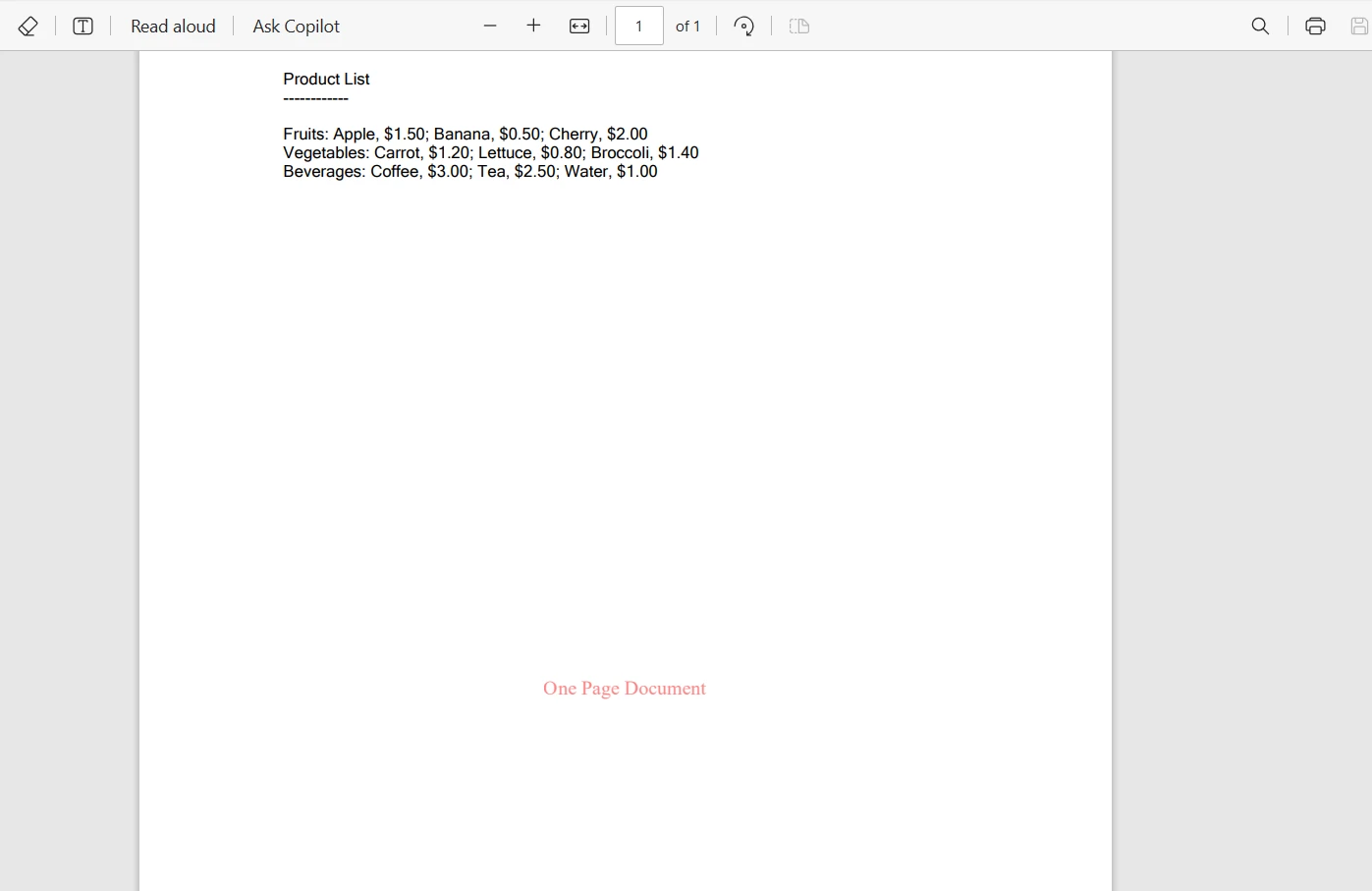
Betrachten wir ein Szenario, in dem Sie ein PDF-Dokument haben und basierend auf der Seitenzahl möchten Sie verschiedene Wasserzeichen anwenden. So können Sie dies mithilfe von IronPDF in Kombination mit einer C#-Switch-Anweisung erreichen:
using IronPdf;

class Program
{
    static void Main(string[] args)
    {
        IronPdf.License.LicenseKey = "Your-License-Code";
        PdfDocument pdf = PdfDocument.FromFile("sample.pdf");
        // Define different watermark HTML for each case
        string watermarkHtmlOnePage = "<div style='color:red;'>One Page Document</div>";
        string watermarkHtmlTwoPage = "<div style='color:blue;'>Two Page Document</div>";
        switch (pdf.PageCount)
        {
            case 1:
                // Apply watermark for one-page document
                pdf.ApplyWatermark(watermarkHtmlOnePage);
                break;
            case 2:
                // Apply watermark for two-page documents
                pdf.ApplyWatermark(watermarkHtmlTwoPage);
                break;
            default:
                // Apply a default watermark for other cases
                pdf.ApplyWatermark("<div style='color:green;'>Multiple Page Document</div>");
                break;
        }
        // Save the watermarked PDF
        pdf.SaveAs("watermarked.pdf");
    }
}
using IronPdf;

class Program
{
    static void Main(string[] args)
    {
        IronPdf.License.LicenseKey = "Your-License-Code";
        PdfDocument pdf = PdfDocument.FromFile("sample.pdf");
        // Define different watermark HTML for each case
        string watermarkHtmlOnePage = "<div style='color:red;'>One Page Document</div>";
        string watermarkHtmlTwoPage = "<div style='color:blue;'>Two Page Document</div>";
        switch (pdf.PageCount)
        {
            case 1:
                // Apply watermark for one-page document
                pdf.ApplyWatermark(watermarkHtmlOnePage);
                break;
            case 2:
                // Apply watermark for two-page documents
                pdf.ApplyWatermark(watermarkHtmlTwoPage);
                break;
            default:
                // Apply a default watermark for other cases
                pdf.ApplyWatermark("<div style='color:green;'>Multiple Page Document</div>");
                break;
        }
        // Save the watermarked PDF
        pdf.SaveAs("watermarked.pdf");
    }
}
Imports IronPdf
Friend Class Program
Shared Sub Main(ByVal args() As String)
IronPdf.License.LicenseKey = "Your-License-Code"
Dim pdf As PdfDocument = PdfDocument.FromFile("sample.pdf")
' Define different watermark HTML for each case
Dim watermarkHtmlOnePage As String = "<div style='color:red;'>One Page Document</div>"
Dim watermarkHtmlTwoPage As String = "<div style='color:blue;'>Two Page Document</div>"
Select Case pdf.PageCount
Case 1
' Apply watermark for one-page document
pdf.ApplyWatermark(watermarkHtmlOnePage)
Case 2
' Apply watermark for two-page documents
pdf.ApplyWatermark(watermarkHtmlTwoPage)
Case Else
' Apply a default watermark for other cases
pdf.ApplyWatermark("<div style='color:green;'>Multiple Page Document</div>")
End Select
' Save the watermarked PDF
pdf.SaveAs("watermarked.pdf")
End Sub
End Class
Imports IronPdf

Friend Class Program
	Shared Sub Main(ByVal args() As String)
		IronPdf.License.LicenseKey = "Your-License-Code"
		Dim pdf As PdfDocument = PdfDocument.FromFile("sample.pdf")
		' Define different watermark HTML for each case
		Dim watermarkHtmlOnePage As String = "<div style='color:red;'>One Page Document</div>"
		Dim watermarkHtmlTwoPage As String = "<div style='color:blue;'>Two Page Document</div>"
		Select Case pdf.PageCount
			Case 1
				' Apply watermark for one-page document
				pdf.ApplyWatermark(watermarkHtmlOnePage)
			Case 2
				' Apply watermark for two-page documents
				pdf.ApplyWatermark(watermarkHtmlTwoPage)
			Case Else
				' Apply a default watermark for other cases
				pdf.ApplyWatermark("<div style='color:green;'>Multiple Page Document</div>")
		End Select
		' Save the watermarked PDF
		pdf.SaveAs("watermarked.pdf")
	End Sub
End Class
Hier ist die Ausgabedatei des PDFs mit einer Seite:
Abschluss
In diesem Tutorial haben wir die switch-Anweisung in C#, eine grundlegende Form der Entscheidungsfindung in der Programmierung, erkundet. Wir haben angefangen, ihre grundlegende Struktur zu verstehen und sie mit traditionellen if-else-Anweisungen zu vergleichen, wobei wir ihre Vorteile in Lesbarkeit und Einfachheit bei der Handhabung mehrerer Bedingungen herausgestellt haben.
Wir haben einfache Switch-Fälle erstellt, verschiedene Szenarien mit dem Standardfall behandelt und erweiterte Funktionen wie Switch-Ausdrücke untersucht. Die Anwendung von Switch-Anweisungen in der realen Welt wurde durch ein Beispiel mit der Integration von IronPDF für dynamische PDF-Verarbeitung demonstriert, das zeigt, wie Switch-Anweisungen ein wertvolles Werkzeug in der Werkzeugkiste eines Programmierers sein können.
IronPDF bietet eine kostenlose Testversion für die Funktionserkundung, mit der Sie die Funktionen und Funktionalitäten erkunden können. Für die weitere Nutzung und Zugang zu ihrer vollständigen Palette an Tools beginnen die Lizenzen von IronPDF bei einem wettbewerbsfähigen Preismodell, das eine umfassende Lösung für alle Ihre Anforderungen an die PDF-Verarbeitung in C# bietet.























