Listen sind Teil des System.Collections.Generic Namespace und sind vielseitig für die Handhabung von Datensammlungen. Listen in C# sind dynamisch, was bedeutet, dass ihre Größe zur Laufzeit geändert werden kann. Diese Flexibilität ist in vielen Software-Engineering-Szenarien nützlich, in denen die Anzahl der Elemente nicht im Voraus bekannt ist. Tauchen wir in verschiedene Möglichkeiten ein, eine Liste in C# zu initialisieren. Wir werden grundlegende Techniken, die Syntax für Objektinitialisierer, Sammlungsinitialisierer und die IronPDF-Bibliothek abdecken.
Basische Listeninitialisierung
Um eine Liste zu initialisieren, beginnen Sie mit der Erstellung einer Instanz der List<t>-Klasse, wobei T der Typ der Elemente in der Liste ist. Der häufigste Typ ist string, aber Sie können jeden Typ verwenden.
using System;
using System.Collections.Generic;

class Program
{
    static void Main()
    {
        // Initialize an empty list
        List<string> fruits = new List<string>();

        // Adding elements to the list
        fruits.Add("Apple");
        fruits.Add("Banana");
        fruits.Add("Cherry");

        // Display the list
        foreach (var fruit in fruits)
        {
            Console.WriteLine(fruit);
        }
    }
}
using System;
using System.Collections.Generic;

class Program
{
    static void Main()
    {
        // Initialize an empty list
        List<string> fruits = new List<string>();

        // Adding elements to the list
        fruits.Add("Apple");
        fruits.Add("Banana");
        fruits.Add("Cherry");

        // Display the list
        foreach (var fruit in fruits)
        {
            Console.WriteLine(fruit);
        }
    }
}
Imports System
Imports System.Collections.Generic
Module Program
Sub Main()
' Initialize an empty list
Dim fruits As New List(Of String)()
' Adding elements to the list
fruits.Add("Apple")
fruits.Add("Banana")
fruits.Add("Cherry")
' Display the list
For Each fruit In fruits
Console.WriteLine(fruit)
Next
End Sub
End Module
Imports System
Imports System.Collections.Generic

Module Program
    Sub Main()
        ' Initialize an empty list
        Dim fruits As New List(Of String)()

        ' Adding elements to the list
        fruits.Add("Apple")
        fruits.Add("Banana")
        fruits.Add("Cherry")

        ' Display the list
        For Each fruit In fruits
            Console.WriteLine(fruit)
        Next
    End Sub
End Module
Im obigen Beispiel haben wir eine leere Liste erstellt und Elemente mit der Add-Methode hinzugefügt. Die List<string> stellt eine Liste von Zeichenfolgen dar, und wir haben die Add-Methode verwendet, um sie mit Werten zu füllen.
Verwendung der Syntax von Sammlungsinitialisierern
C# bietet eine kürzere Möglichkeit, eine Liste mithilfe der Syntax für Sammlungsinitialisierer zu initialisieren. Dies ermöglicht es Ihnen, die Liste direkt bei der Erstellung zu füllen, ohne die Add-Methode wiederholt aufrufen zu müssen.
public void InitializeList()
{
    List<string> fruits = new List<string> { "Apple", "Banana", "Cherry" };
}
public void InitializeList()
{
    List<string> fruits = new List<string> { "Apple", "Banana", "Cherry" };
}
Public Sub InitializeList()
Dim fruits As New List(Of String) From {"Apple", "Banana", "Cherry"}
End Sub
Public Sub InitializeList()
	Dim fruits As New List(Of String) From {"Apple", "Banana", "Cherry"}
End Sub
Dieser Code erzielt dasselbe Ergebnis wie das vorherige Beispiel, jedoch in einer kompakteren Form. Mit Sammlungsinitialisierern können Sie eine Liste mit Werten in einer einzigen Anweisung initialisieren, was Ihren Code besser lesbar macht.
Objektinitialisierer und Listeninitialisierung
Die Syntax für Objektinitialisierer ermöglicht eine einfache Listeninitialisierung, besonders mit benutzerdefinierten Objekten. Hier ist ein Beispiel dafür, wie Objektinitialisierer mit Listen funktionieren:
class Person
{
    public string Name { get; set; }
    public int Age { get; set; }
}

List<Person> people = new List<Person>
{
    new Person { Name = "John", Age = 30 },
    new Person { Name = "Jane", Age = 25 },
    new Person { Name = "Jack", Age = 35 }
};
class Person
{
    public string Name { get; set; }
    public int Age { get; set; }
}

List<Person> people = new List<Person>
{
    new Person { Name = "John", Age = 30 },
    new Person { Name = "Jane", Age = 25 },
    new Person { Name = "Jack", Age = 35 }
};
Friend Class Person
Public Property Name() As String
Public Property Age() As Integer
End Class
Private people As New List(Of Person) From {
New Person With {
.Name = "John",
.Age = 30
},
New Person With {
.Name = "Jane",
.Age = 25
},
New Person With {
.Name = "Jack",
.Age = 35
}
}
Friend Class Person
	Public Property Name() As String
	Public Property Age() As Integer
End Class

Private people As New List(Of Person) From {
	New Person With {
		.Name = "John",
		.Age = 30
	},
	New Person With {
		.Name = "Jane",
		.Age = 25
	},
	New Person With {
		.Name = "Jack",
		.Age = 35
	}
}
In diesem Beispiel erstellen wir eine Liste von Person-Objekten unter Verwendung von Objektinitialisierern. Die Person-Klasse hat zwei Eigenschaften: Name und Age, denen beim Erstellen der Liste explizit Werte zugewiesen werden.
Erstellen einer Liste mit einer Anfangsgröße
Obwohl Listen dynamisch in der Größe sind, können Sie eine anfängliche Kapazität angeben, wenn Sie ungefähr wissen, wie viele Elemente die Liste enthalten wird. Dies kann die Leistung verbessern, indem die Anzahl der Speicherneuzuweisungen reduziert wird.
List<string> fruits = new List<string>(10); // Initial size of 10
List<string> fruits = new List<string>(10); // Initial size of 10
Dim fruits As New List(Of String)(10) ' Initial size of 10
Dim fruits As New List(Of String)(10) ' Initial size of 10
Dies erstellt eine leere Liste mit einer anfänglichen Kapazität von 10. Obwohl keine Elemente hinzugefügt werden, wird genügend Speicher zugewiesen, um bis zu 10 Elemente ohne Größenänderung des internen Arrays zu enthalten.
Initialisierung einer Liste aus einem Array
Sie können auch eine Liste aus einem vorhandenen Array mit dem Listen-Konstruktor initialisieren, der ein IEnumerable<t>-Argument entgegennimmt. Dies ist nützlich, wenn Sie ein Array haben und es in eine Liste umwandeln möchten, um Flexibilität zu gewinnen.
// New String array of fruit
string[] fruitArray = { "Apple", "Banana", "Cherry" };
List<string> fruits = new List<string>(fruitArray);
// New String array of fruit
string[] fruitArray = { "Apple", "Banana", "Cherry" };
List<string> fruits = new List<string>(fruitArray);
' New String array of fruit
Dim fruitArray() As String = { "Apple", "Banana", "Cherry" }
Dim fruits As New List(Of String)(fruitArray)
' New String array of fruit
Dim fruitArray() As String = { "Apple", "Banana", "Cherry" }
Dim fruits As New List(Of String)(fruitArray)
Hier wird ein neues Array erstellt und dann verwendet, um eine Liste zu initialisieren. Dies wandelt das fruitArray-Array in eine Liste um. Jedes IEnumerable<t>, einschließlich Arrays, kann für die Initialisierung an den Listen-Konstruktor übergeben werden.
Verwendung der AddRange-Methode
Wenn Sie eine vorhandene Sammlung von Elementen haben, können Sie die AddRange-Methode verwenden, um mehrere Elemente zusammen zu einer Liste hinzuzufügen.
List<string> fruits = new List<string> { "Apple", "Banana" };
string[] moreFruits = { "Cherry", "Date", "Elderberry" };
fruits.AddRange(moreFruits);
List<string> fruits = new List<string> { "Apple", "Banana" };
string[] moreFruits = { "Cherry", "Date", "Elderberry" };
fruits.AddRange(moreFruits);
Dim fruits As New List(Of String) From {"Apple", "Banana"}
Dim moreFruits() As String = { "Cherry", "Date", "Elderberry" }
fruits.AddRange(moreFruits)
Dim fruits As New List(Of String) From {"Apple", "Banana"}
Dim moreFruits() As String = { "Cherry", "Date", "Elderberry" }
fruits.AddRange(moreFruits)
In diesem Beispiel beginnen wir mit einer Liste, die zwei Elemente enthält, und fügen mehrere neue Elemente aus einem Array mit AddRange hinzu. Diese Methode kann die Leistung verbessern, indem Elemente in großen Mengen hinzugefügt werden, da dies die Notwendigkeit mehrerer Neuzuweisungen minimiert.
Initialisierung einer Liste mit benutzerdefinierten Objekten
Beim Initialisieren einer Liste mit benutzerdefinierten Objekten können Sie Objektinitialisierer mit Sammlungsinitialisierern kombinieren, um komplexe Datenstrukturen in einem einzigen Ausdruck zu erstellen.
List<Person> people = new List<Person>
{
    new Person { Name = "Alice", Age = 28 },
    new Person { Name = "Bob", Age = 32 },
    new Person { Name = "Charlie", Age = 40 }
};
List<Person> people = new List<Person>
{
    new Person { Name = "Alice", Age = 28 },
    new Person { Name = "Bob", Age = 32 },
    new Person { Name = "Charlie", Age = 40 }
};
Dim people As New List(Of Person) From {
New Person With {
.Name = "Alice",
.Age = 28
},
New Person With {
.Name = "Bob",
.Age = 32
},
New Person With {
.Name = "Charlie",
.Age = 40
}
}
Dim people As New List(Of Person) From {
	New Person With {
		.Name = "Alice",
		.Age = 28
	},
	New Person With {
		.Name = "Bob",
		.Age = 32
	},
	New Person With {
		.Name = "Charlie",
		.Age = 40
	}
}
Diese Technik ermöglicht es, eine Liste von Objekten in einer einzigen Anweisung zu erstellen und zu initialisieren, was den Code prägnant und leicht lesbar macht.
Listeninitialisierung mit Erweiterungsmethoden
Sie können auch eine Erweiterungsmethode implementieren, um eine Liste auf benutzerdefinierte Weise zu initialisieren. Erweiterungsmethoden bieten einen Mechanismus, um bestehende Typen mit neuen Funktionen zu verbessern, ohne ihre ursprüngliche Struktur zu ändern.
public static class ListExtensions
{
    public static List<t> InitializeWith<t>(this List<t> list, params T[] elements)
    {
        list.AddRange(elements);
        return list;
    }
}

// Usage
List<string> fruits = new List<string>().InitializeWith("Apple", "Banana", "Cherry");
public static class ListExtensions
{
    public static List<t> InitializeWith<t>(this List<t> list, params T[] elements)
    {
        list.AddRange(elements);
        return list;
    }
}

// Usage
List<string> fruits = new List<string>().InitializeWith("Apple", "Banana", "Cherry");
Imports System.Collections.Generic
Public Module ListExtensions
<System.Runtime.CompilerServices.Extension>
Public Function InitializeWith(Of T)(list As List(Of T), ParamArray elements As T()) As List(Of T)
list.AddRange(elements)
Return list
End Function
End Module
' Usage
Dim fruits As List(Of String) = New List(Of String)().InitializeWith("Apple", "Banana", "Cherry")
Imports System.Collections.Generic

Public Module ListExtensions
    <System.Runtime.CompilerServices.Extension>
    Public Function InitializeWith(Of T)(list As List(Of T), ParamArray elements As T()) As List(Of T)
        list.AddRange(elements)
        Return list
    End Function
End Module

' Usage
Dim fruits As List(Of String) = New List(Of String)().InitializeWith("Apple", "Banana", "Cherry")
Hier definieren wir eine Erweiterungsmethode, InitializeWith, die Elemente zur Liste hinzufügt und die Liste selbst zurückgibt. Dadurch können Sie die Initialisierung und Füllung der Liste verketten.
IronPDF: C# PDF-Bibliothek
Wenn Sie eine Liste haben, wie eine Liste von Früchten, können Sie diese schnell in eine HTML-Tabelle umwandeln und als PDF rendern mit IronPDF, alles mit nur wenigen Codezeilen. Das Verfahren ist unkompliziert: Initialisieren Sie Ihre Liste, konvertieren Sie sie in HTML und lassen Sie IronPDF das PDF generieren. Hier ist ein Beispiel:
using IronPdf;
using System;
using System.Collections.Generic;
using System.Text;

class Program
{
    static void Main()
    {
        // Initialize a list of strings representing data
        List<string> fruits = new List<string> { "Apple", "Banana", "Cherry" };

        // Convert the list to an HTML table
        StringBuilder htmlContent = new StringBuilder();
        htmlContent.Append("<table border='1'><tr><th>Fruit Name</th></tr>");
        foreach (var fruit in fruits)
        {
            htmlContent.Append($"<tr><td>{fruit}</td></tr>");
        }
        htmlContent.Append("</table>");

        // Render the HTML to PDF using IronPDF
        var Renderer = new ChromePdfRenderer();
        var PDF = Renderer.RenderHtmlAsPdf(htmlContent.ToString());

        // Save the PDF to a file
        PDF.SaveAs("FruitsList.pdf");
        Console.WriteLine("PDF generated successfully.");
    }
}
using IronPdf;
using System;
using System.Collections.Generic;
using System.Text;

class Program
{
    static void Main()
    {
        // Initialize a list of strings representing data
        List<string> fruits = new List<string> { "Apple", "Banana", "Cherry" };

        // Convert the list to an HTML table
        StringBuilder htmlContent = new StringBuilder();
        htmlContent.Append("<table border='1'><tr><th>Fruit Name</th></tr>");
        foreach (var fruit in fruits)
        {
            htmlContent.Append($"<tr><td>{fruit}</td></tr>");
        }
        htmlContent.Append("</table>");

        // Render the HTML to PDF using IronPDF
        var Renderer = new ChromePdfRenderer();
        var PDF = Renderer.RenderHtmlAsPdf(htmlContent.ToString());

        // Save the PDF to a file
        PDF.SaveAs("FruitsList.pdf");
        Console.WriteLine("PDF generated successfully.");
    }
}
Imports IronPdf
Imports System
Imports System.Collections.Generic
Imports System.Text
Module Program
Sub Main()
' Initialize a list of strings representing data
Dim fruits As New List(Of String) From {"Apple", "Banana", "Cherry"}
' Convert the list to an HTML table
Dim htmlContent As New StringBuilder()
htmlContent.Append("<table border='1'><tr><th>Fruit Name</th></tr>")
For Each fruit In fruits
htmlContent.Append($"<tr><td>{fruit}</td></tr>")
Next
htmlContent.Append("</table>")
' Render the HTML to PDF using IronPDF
Dim Renderer = New ChromePdfRenderer()
Dim PDF = Renderer.RenderHtmlAsPdf(htmlContent.ToString())
' Save the PDF to a file
PDF.SaveAs("FruitsList.pdf")
Console.WriteLine("PDF generated successfully.")
End Sub
End Module
Imports IronPdf
Imports System
Imports System.Collections.Generic
Imports System.Text

Module Program
    Sub Main()
        ' Initialize a list of strings representing data
        Dim fruits As New List(Of String) From {"Apple", "Banana", "Cherry"}

        ' Convert the list to an HTML table
        Dim htmlContent As New StringBuilder()
        htmlContent.Append("<table border='1'><tr><th>Fruit Name</th></tr>")
        For Each fruit In fruits
            htmlContent.Append($"<tr><td>{fruit}</td></tr>")
        Next
        htmlContent.Append("</table>")

        ' Render the HTML to PDF using IronPDF
        Dim Renderer = New ChromePdfRenderer()
        Dim PDF = Renderer.RenderHtmlAsPdf(htmlContent.ToString())

        ' Save the PDF to a file
        PDF.SaveAs("FruitsList.pdf")
        Console.WriteLine("PDF generated successfully.")
    End Sub
End Module
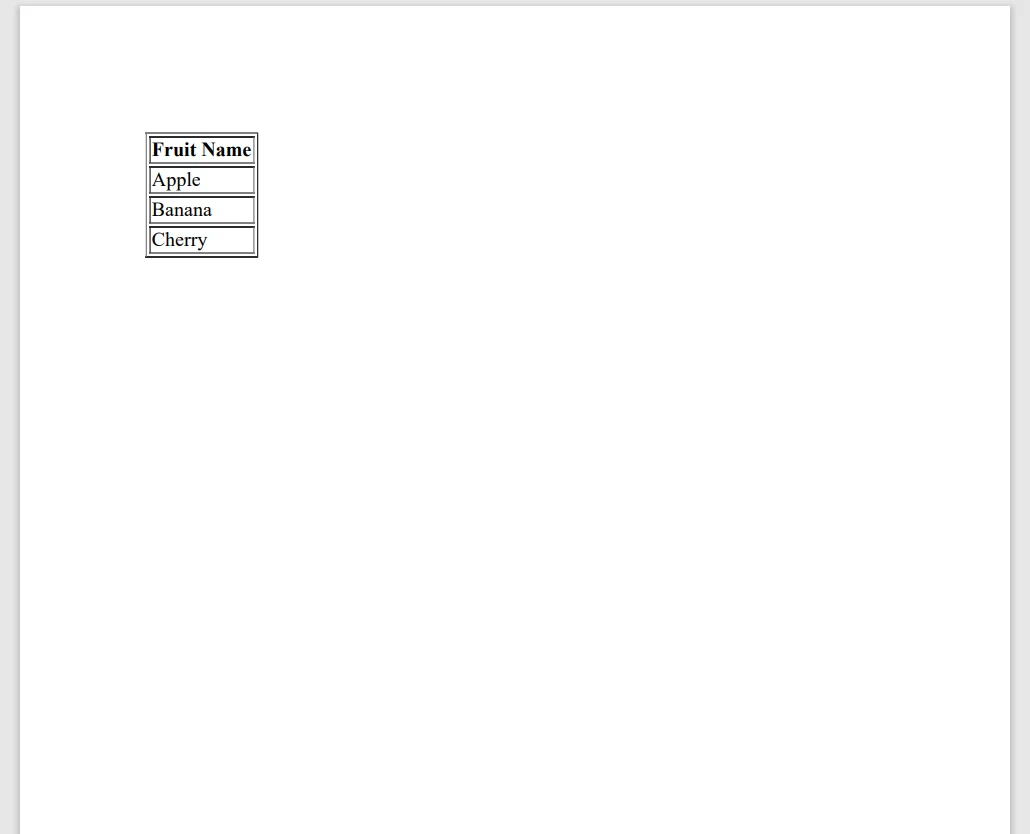
Dieser Code initialisiert eine Liste, erstellt eine HTML-Tabelle daraus und verwendet IronPDF, um eine PDF-Datei zu erstellen. Es ist ein einfacher und direkter Weg, PDFs aus Ihren Datensammlungen zu generieren.
Abschluss
Die Listeninitialisierung in C# ist ein grundlegendes Konzept, das jeder Software-Ingenieur beherrschen sollte. Egal, ob Sie mit einfachen Listen von Zeichenfolgen oder komplexen Listen von Objekten arbeiten, C# bietet verschiedene Methoden, um Listen effizient zu initialisieren und zu füllen. Von der grundlegenden Initialisierung bis hin zu Objekt- und Sammlungsinitialisierern helfen Ihnen diese Techniken, sauberen, prägnanten und wartbaren Code zu schreiben.
IronPDF bietet eine kostenlose Testversion, mit der Sie das Produkt ohne anfängliche Investition ausprobieren können. Wenn Sie sicher sind, dass es Ihren Anforderungen entspricht, sind Lizenzen ab $999 erhältlich.























