




Updated April 23, 2026
Bridging CLI Simplicity & .NET : Using Curl DotNet with IronPDF
Jacob Mellor has bridged this gap with CurlDotNet, a library created to bring the familiarity of cURL to the .NET ecosystem.
Read More

Lists are part of the System.Collections.Generic namespace and are versatile for handling collections of data. Lists in C# are dynamic, meaning their size can change at runtime. This flexibility is very helpful in many software engineering scenarios where the number of elements isn't known upfront. Let's dive into different ways to initialize a list in C#. We'll cover basic techniques, object initializer syntax, collection initializers, and the IronPDF library.
To initialize a list, start by creating an instance of the List<T> class, where T is the type of elements in the list. The most common type is string, but you can use any type.
using System;
using System.Collections.Generic;

class Program
{
    static void Main()
    {
        // Initialize an empty list
        List<string> fruits = new List<string>();

        // Adding elements to the list
        fruits.Add("Apple");
        fruits.Add("Banana");
        fruits.Add("Cherry");

        // Display the list
        foreach (var fruit in fruits)
        {
            Console.WriteLine(fruit);
        }
    }
}Imports System
Imports System.Collections.Generic
Module Program
Sub Main()
' Initialize an empty list
Dim fruits As New List(Of String)()
' Adding elements to the list
fruits.Add("Apple")
fruits.Add("Banana")
fruits.Add("Cherry")
' Display the list
For Each fruit In fruits
Console.WriteLine(fruit)
Next
End Sub
End ModuleIn the example above, we created an empty list and added elements using the Add method. The List<string> represents a list of strings, and we used the Add method to populate it with values.
C# offers a more concise way to initialize a list using collection initializer syntax. This allows you to populate the list directly when it is created without repeatedly calling the Add method.
public void InitializeList()
{
    List<string> fruits = new List<string> { "Apple", "Banana", "Cherry" };
}Public Sub InitializeList()
Dim fruits As New List(Of String) From {"Apple", "Banana", "Cherry"}
End SubThis code achieves the same result as the previous example but in a more compact form. Collection initializers allow you to initialize a list with values in a single statement, making your code more readable.
Object initializer syntax is another way to initialize lists, mainly when working with custom objects. Here's an example of how object initializers work with lists:
class Person
{
    public string Name { get; set; }
    public int Age { get; set; }
}

List<Person> people = new List<Person>
{
    new Person { Name = "John", Age = 30 },
    new Person { Name = "Jane", Age = 25 },
    new Person { Name = "Jack", Age = 35 }
};Friend Class Person
Public Property Name() As String
Public Property Age() As Integer
End Class
Private people As New List(Of Person) From {
New Person With {
.Name = "John",
.Age = 30
},
New Person With {
.Name = "Jane",
.Age = 25
},
New Person With {
.Name = "Jack",
.Age = 35
}
}In this example, we create a list of Person objects using object initializers. The Person class has two properties: Name and Age, which are explicitly assigned values when the list is created.
While lists are dynamic in size, you can specify an initial capacity if you know approximately how many elements the list will hold. This can improve performance by reducing the number of memory reallocations.
List<string> fruits = new List<string>(10); // Initial size of 10Dim fruits As New List(Of String)(10) ' Initial size of 10This creates an empty list with an initial capacity of 10. Although it doesn't add elements, it allocates enough memory to hold up to 10 elements without resizing the internal array.
You can also initialize a list from an existing array using the list constructor that takes an IEnumerable<T> argument. This is useful when you have an array and want to convert it into a list for flexibility.
// New String array of fruit
string[] fruitArray = { "Apple", "Banana", "Cherry" };
List<string> fruits = new List<string>(fruitArray);' New String array of fruit
Dim fruitArray() As String = { "Apple", "Banana", "Cherry" }
Dim fruits As New List(Of String)(fruitArray)Here, a new array is created and then used to initialize a list. This converts the fruitArray array into a list. Any IEnumerable<T>, including arrays, can be passed to the list constructor for initialization.
If you have an existing collection of items, you can use the AddRange method to add multiple elements to a list together.
List<string> fruits = new List<string> { "Apple", "Banana" };
string[] moreFruits = { "Cherry", "Date", "Elderberry" };
fruits.AddRange(moreFruits);Dim fruits As New List(Of String) From {"Apple", "Banana"}
Dim moreFruits() As String = { "Cherry", "Date", "Elderberry" }
fruits.AddRange(moreFruits)In this example, we start with a list containing two elements and add multiple new items from an array using AddRange. This method can improve performance by adding elements in bulk, as it minimizes the need for multiple reallocations.
When initializing a list of custom objects, you can combine object initializers with collection initializers to create complex data structures in a single expression.
List<Person> people = new List<Person>
{
    new Person { Name = "Alice", Age = 28 },
    new Person { Name = "Bob", Age = 32 },
    new Person { Name = "Charlie", Age = 40 }
};Dim people As New List(Of Person) From {
New Person With {
.Name = "Alice",
.Age = 28
},
New Person With {
.Name = "Bob",
.Age = 32
},
New Person With {
.Name = "Charlie",
.Age = 40
}
}This technique allows for creating and initializing a list of objects in a single statement, making the code concise and easy to read.
You can also implement an extension method to initialize a list in a custom way. Extension methods provide a mechanism to improve existing types with new capabilities without altering their original structure.
public static class ListExtensions
{
    public static List<T> InitializeWith<T>(this List<T> list, params T[] elements)
    {
        list.AddRange(elements);
        return list;
    }
}

// Usage
List<string> fruits = new List<string>().InitializeWith("Apple", "Banana", "Cherry");Public Module ListExtensions
<System.Runtime.CompilerServices.Extension> _
Public Function InitializeWith(Of T)(ByVal list As List(Of T), ParamArray ByVal elements() As T) As List(Of T)
list.AddRange(elements)
Return list
End Function
End Module
' Usage
Private fruits As List(Of String) = (New List(Of String)()).InitializeWith("Apple", "Banana", "Cherry")Here, we define an extension method, InitializeWith, which adds elements to the list and returns the list itself. This allows you to chain the list's initialization and population.
If you have a list, like a list of fruits, you can quickly turn it into an HTML table and render it as a PDF using IronPDF, all in just a few lines of code. The process is straightforward: initialize your list, convert it to HTML, and let IronPDF generate the PDF. Here's an example:
using IronPdf;
using System;
using System.Collections.Generic;
using System.Text;

class Program
{
    static void Main()
    {
        // Initialize a list of strings representing data
        List<string> fruits = new List<string> { "Apple", "Banana", "Cherry" };

        // Convert the list to an HTML table
        StringBuilder htmlContent = new StringBuilder();
        htmlContent.Append("<table border='1'><tr><th>Fruit Name</th></tr>");
        foreach (var fruit in fruits)
        {
            htmlContent.Append($"<tr><td>{fruit}</td></tr>");
        }
        htmlContent.Append("</table>");

        // Render the HTML to PDF using IronPDF
        var Renderer = new ChromePdfRenderer();
        var PDF = Renderer.RenderHtmlAsPdf(htmlContent.ToString());

        // Save the PDF to a file
        PDF.SaveAs("FruitsList.pdf");
        Console.WriteLine("PDF generated successfully.");
    }
}Imports IronPdf
Imports System
Imports System.Collections.Generic
Imports System.Text
Module Program
Sub Main()
' Initialize a list of strings representing data
Dim fruits As New List(Of String) From {"Apple", "Banana", "Cherry"}
' Convert the list to an HTML table
Dim htmlContent As New StringBuilder()
htmlContent.Append("<table border='1'><tr><th>Fruit Name</th></tr>")
For Each fruit In fruits
htmlContent.Append($"<tr><td>{fruit}</td></tr>")
Next
htmlContent.Append("</table>")
' Render the HTML to PDF using IronPDF
Dim Renderer = New ChromePdfRenderer()
Dim PDF = Renderer.RenderHtmlAsPdf(htmlContent.ToString())
' Save the PDF to a file
PDF.SaveAs("FruitsList.pdf")
Console.WriteLine("PDF generated successfully.")
End Sub
End Module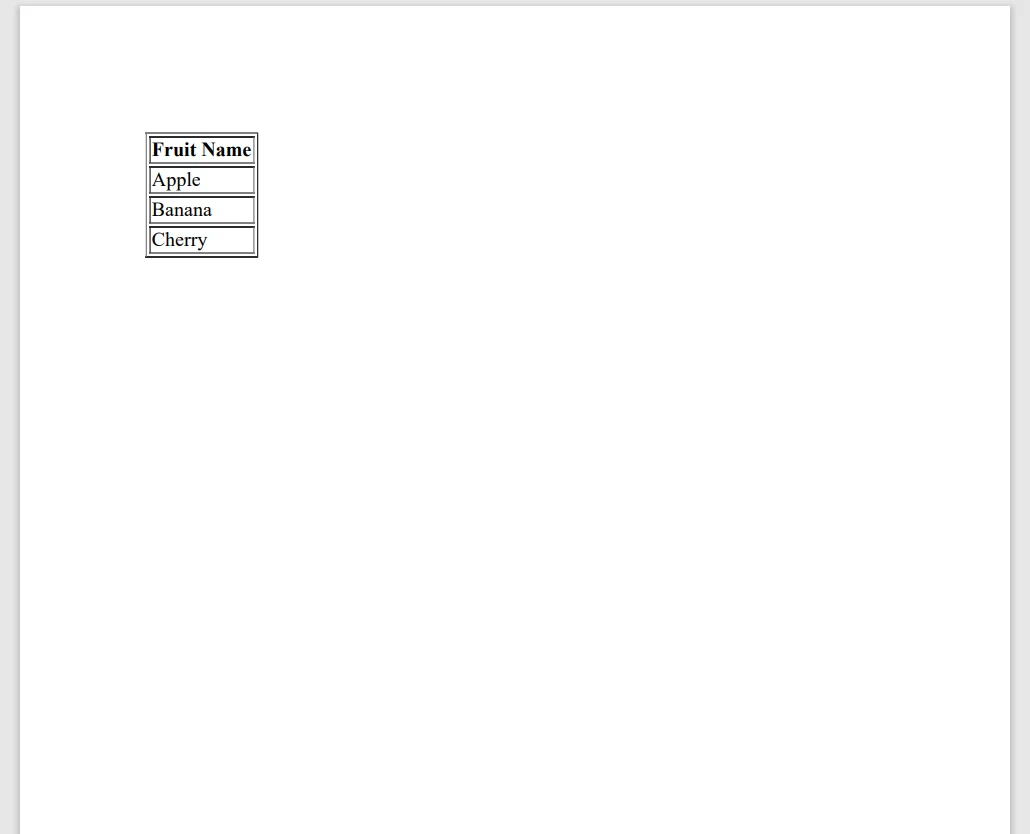
This code initializes a list, creates an HTML table from it, and uses IronPDF to create a PDF file. It's a simple and direct way to generate PDFs from your data collections.
List initialization in C# is a fundamental concept that every software engineer should master. Whether you're working with simple lists of strings or complex lists of objects, C# offers several methods to initialize and populate lists efficiently. From basic initialization to object and collection initializers, these techniques help you write clean, concise, and maintainable code.
IronPDF offers a free trial that lets you try the product without making an initial investment. When you're confident it meets your needs, licenses are available starting at $999.

Jacob Mellor is Chief Technology Officer at Iron Software and a visionary engineer pioneering C# PDF technology. As the original developer behind Iron Software's core codebase, he has shaped the company's product architecture since its inception, transforming it alongside CEO Cameron Rimington into a 50+ person company serving NASA, Tesla, and global government agencies.



IronPDF is a part of IRONSUITE
10 .NET API products for your office documents











When you need your PDF to look like HTML, fast.


