using IronPdf;

// Disable local disk access or cross-origin requests
Installation.EnableWebSecurity = true;

// Instantiate Renderer
var renderer = new ChromePdfRenderer();

// Create a PDF from a HTML string using C#
var pdf = renderer.RenderHtmlAsPdf("<h1>Hello World</h1>");

// Export to a file or Stream
pdf.SaveAs("output.pdf");

// Advanced Example with HTML Assets
// Load external html assets: Images, CSS and JavaScript.
// An optional BasePath 'C:\site\assets\' is set as the file location to load assets from
var myAdvancedPdf = renderer.RenderHtmlAsPdf("<img src='icons/iron.png'>", @"C:\site\assets\");
myAdvancedPdf.SaveAs("html-with-assets.pdf");
using IronPdf;// Disable local disk access or cross-origin requestsInstallation.EnableWebSecurity = true;// Instantiate Renderervar renderer = new ChromePdfRenderer();// Create a PDF from a HTML string using C#var pdf = renderer.RenderHtmlAsPdf("<h1>Hello World</h1>");// Export to a file or Streampdf.SaveAs("output.pdf");// Advanced Example with HTML Assets// Load external html assets: Images, CSS and JavaScript.// An optional BasePath 'C:\site\assets\' is set as the file location to load assets fromvar myAdvancedPdf = renderer.RenderHtmlAsPdf("<img src='icons/iron.png'>", @"C:\site\assets\");myAdvancedPdf.SaveAs("html-with-assets.pdf");
PM >Install-Package IronPdf
Install-Package IronPdf
ENTWICKLER-UPDATES
C# Null-Koaleszenz (Wie es für Entwickler funktioniert)
Der Null-Koaleszenz-Operator `??` wertet den rechten Operand aus und gibt dessen Ergebnis zurück, wenn der linke Operand eine null-Referenz ist; andernfalls gibt er den Wert seines linken Operanden zurück. Wenn der linke Operanden zu einem nicht-nullable Werttyp evaluiert, wertet der nullzusammenführende Operator (??) sein rechtes Operanden nicht aus. Der Zuweisungsoperator `??=` ist eine Null-Koaleszenz-Zuweisung, die den Wert des rechten Operanden nur dann dem linken Operanden zuweist, wenn der linke Operand als ein Nullable-Typ-Wert ausgewertet wird. Wenn der Operanden auf der linken Seite zu einem nicht-null Wert evaluiert, wertet der nullzusammenführende Zuweisungsoperator (??=) sein rechtes Operanden nicht aus. Der Null-Zusammenführungsoperator ähnelt dem ternären Operator.
In C# ist der Null-Zusammenführungsoperator (??) ein binärer Operator. Ein Operator, der auf zwei Operanden wirkt, wird als binärer Operator bezeichnet. Beim Verwenden des nullzusammenführenden Operators sind zwei Operanden erforderlich, und der Operator wertet jeden Operanden aus, um das Ergebnis zu bestimmen. Nun werden wir die Verwendung von nullzusammenführenden und nullkonditionalen Operatoren in C# unten sehen.
## So verwenden Sie C# Null Coalescing Value Types
1. Erstellen Sie ein neues C# Projekt.
2. Stellen Sie sicher, dass die entsprechende Version installiert ist.
3. Verwenden Sie den nullzusammenführenden Operator **??**.
4. Überprüfen Sie die Werte- oder Objekt-Verweistypen basierend auf der Anforderung.
5. Führen Sie den Code aus.
## Null Coalescing in C#
Nullwerte in C# werden standardmäßig durch den [nullzusammenführenden Operator](https://learn.microsoft.com/en-us/dotnet/csharp/language-reference/operators/null-coalescing-operator) (??) behandelt, die Idee der Zusammenführung wird verwendet, um solche Werte zu verwalten, wenn man mit nullable Typen oder Ausdrücken umgeht, die möglicherweise null ergeben.
### Syntax
Die folgende ist die Syntax für den nullzusammenführenden Operator:
```csharp
result = expression1 ?? expression2;
```
- **Ausdruck1:** Dieser Ausdruck könnte einen Nullwert erzeugen.
- **Ausdruck2:** Wenn Ausdruck1 null ist, ist dies der Standardwert bzw. der zu verwendende Ersatzausdruck.
- **Ergebnis:** Die Variable, die das Ergebnis der Zusammenführungsoperation enthält.
Der nullzusammenführende Operator bietet eine verkürzte Methode, um einen Standardwert zuzuweisen, wenn man mit nullable Typen arbeitet, was ihr Hauptziel ist, Code zu vereinfachen und effektiv mit null Werten umzugehen.
### Vorteile
- **Kürze:** Behandelt Nullwertprüfungen ohne die Notwendigkeit komplexer bedingter Anweisungen oder ternärer Operatoren.
- **Lesbarkeit des Codes:** Verbessert durch die explizite Angabe, dass ein Standardwert bereitgestellt wird, wenn null zurückgegeben wird.
Es ist wichtig sicherzustellen, dass die Ausdruckstypen, die verglichen werden, übereinstimmen oder kompatibel sind, bevor man den nullzusammenführenden Operator verwendet.
Obwohl nützlich, könnte das übermäßige Verwenden des Operators den Code schwerer verständlich machen. Verwenden Sie ihn sparsam, wenn er die Klarheit des Codes verbessert.
Beim Arbeiten mit nullable Typen oder Szenarien, die Standardwerte erfordern, ist der nullzusammenführende Operator (??) in C# ein effektives Werkzeug zum Verwalten von null Werten und kann helfen, kürzeren und verständlicheren Code zu schreiben.
Der nullzusammenführende Operator ?? besitzt die folgenden typbezogenen Eigenschaften:
### Ergebnistyp-Inferenz
Der Ergebnistyp des nullzusammenführenden Operators ist derselbe wie diese Operanden, wenn die Ausdrücke 1 und 2 denselben Typ haben, wie im folgenden Code gezeigt.
```csharp
int? Value = null;
int result = Value ?? 10;
```
### Typ-Kompatibilität
Der Ergebnistyp ist der Typ, zu dem beide Ausdrücke implizit konvertiert werden können, wenn die Ausdrücke 1 und 2 unterschiedliche Typen haben, aber einer implizit in den anderen konvertiert werden kann.
```csharp
double? value = null;
int result = (int)(value ?? 5.5);
```
### Typ Werbung
Wenn die Typen der Ausdrücke 1 und 2 nicht implizit konvertiert werden können, wird der Ergebnistyp gemäß den Typanhebungsregeln von C# ausgewählt.
```csharp
int? value = null;
long result = value ?? 100L;
```
Folglich bestimmen die Typen der beteiligten Operanden und die C#-Typkonvertierungsregeln den Typ der Variablen oder des Ausdrucks, der das Ergebnis des nullzusammenführenden Operators (??) hält. Um das korrekte Handling von Typen und Werten beim Einsatz des nullzusammenführenden Operators zu gewährleisten, ist es wichtig, die Kompatibilität und mögliche Typkonvertierungen zu berücksichtigen.
## Koaleszieren in IronPDF
### IronPDF installieren
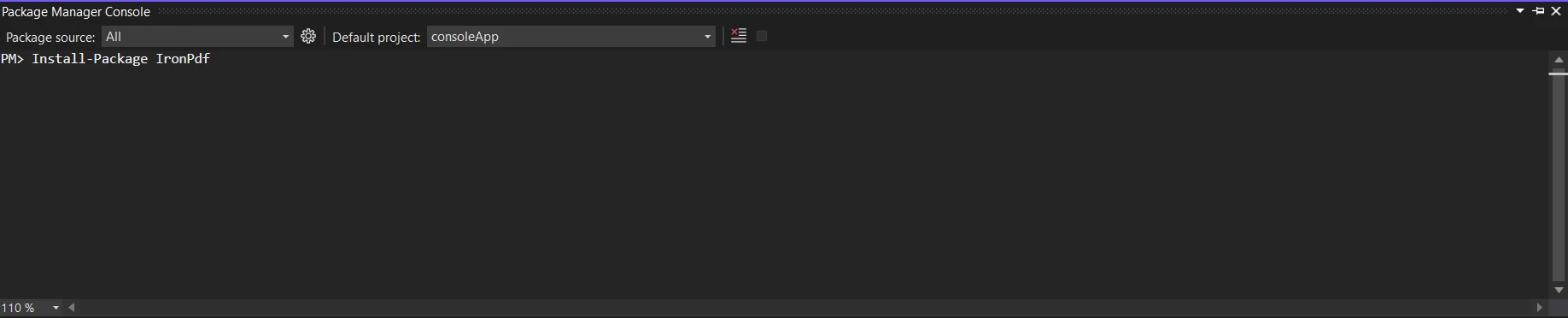
Um die IronPDF-Bibliothek zu installieren, geben Sie den folgenden Code in den Paket-Manager ein:
```shell
:ProductInstall
```
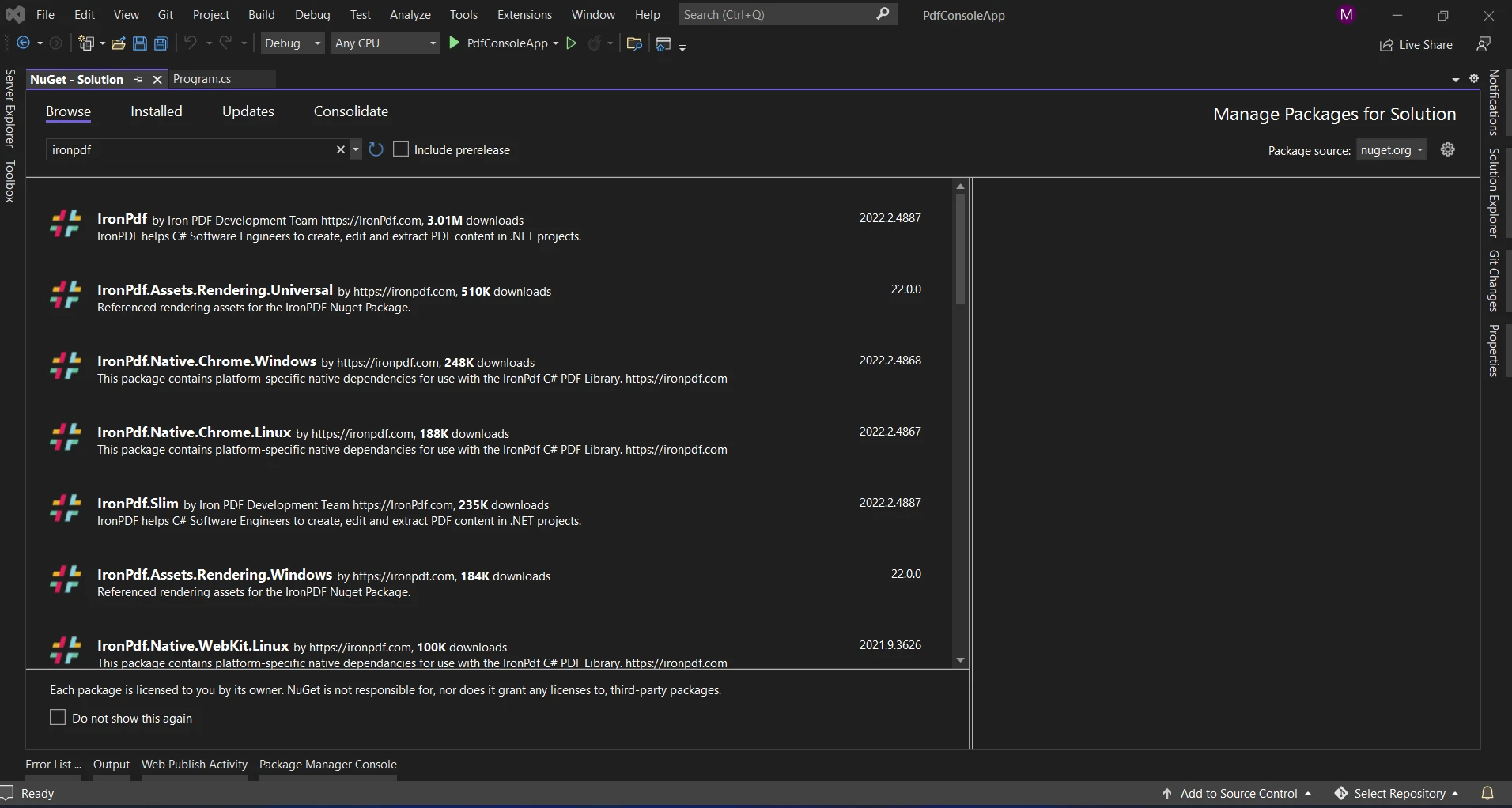
Alternativ können Sie den NuGet-Paket-Manager verwenden, um nach dem Paket "IronPDF" zu suchen. Sie können das notwendige Paket aus dieser Liste aller NuGet-Pakete, die mit IronPDF verbunden sind, auswählen und herunterladen.
### PDF mit Null Coalescing erstellen
Eine C#-Bibliothek namens IronPDF wird verwendet, um PDF-Dokumente zu erstellen und mit ihnen zu arbeiten. Die Bibliothek bietet Funktionen für die Arbeit mit PDFs, wie z.B. Formatierung, Textverarbeitung und Bildverwaltung. "Nullzusammenführung" ist keine Methode oder Funktion, die exklusiv für IronPDF ist, vielmehr ist es ein Sprachmerkmal und kein bibliotheksspezifischer Vorgang.
Wenn Sie jedoch mit IronPDF oder einer anderen Bibliothek in Ihrem C#-Code arbeiten, können Sie die nullzusammenführenden Operatoren (??) verwenden, die die C#-Sprache bietet.
Zum Beispiel, während Sie mit IronPDF-Objekten arbeiten, die nullable Wertetypen oder Eigenschaften sein können, die null zurückgeben können, können Sie den nullzusammenführenden Operator verwenden, um null Situationen zu behandeln oder Standardwerte bereitzustellen.
Das folgende Beispiel zeigt, wie der nullzusammenführende Operator mit IronPDF verwendet werden kann:
```csharp
using IronPdf;
using IronPdf.Pages;
namespace ConsoleApp1
{
internal class Program
{
static void Main(string[] args)
{
int? x = null;
// Use the null-coalescing operator to provide a default value if x is null
var outputstr = $@"square of <b>{x}</b> is <b>{Math.Sqrt(x ?? 30)}</b>";
// Render the HTML string as a PDF using IronPDF
var pdfcreate = ChromePdfRenderer.StaticRenderHtmlAsPdf(outputstr);
// Save the generated PDF to the file system
pdfcreate.SaveAs("demo.pdf");
// Wait for a key press to prevent the console from closing immediately
Console.ReadKey();
}
}
}
```
Denken Sie daran, dass IronPDF (oder eine andere Bibliothek) keine spezielle Funktion oder Methode für das Management von Nullwerten für bedingte Operatoren bereitstellt; sondern die Verwendung des nullzusammenführenden Operators basiert auf allgemeinen C#-Spracheigenschaften und Konzepten zur Handhabung eines null-bedingten Operators. Um mehr über die Funktionen und Fähigkeiten von IronPDF zu erfahren, besuchen Sie die [IronPDF-Demos](/demos/).
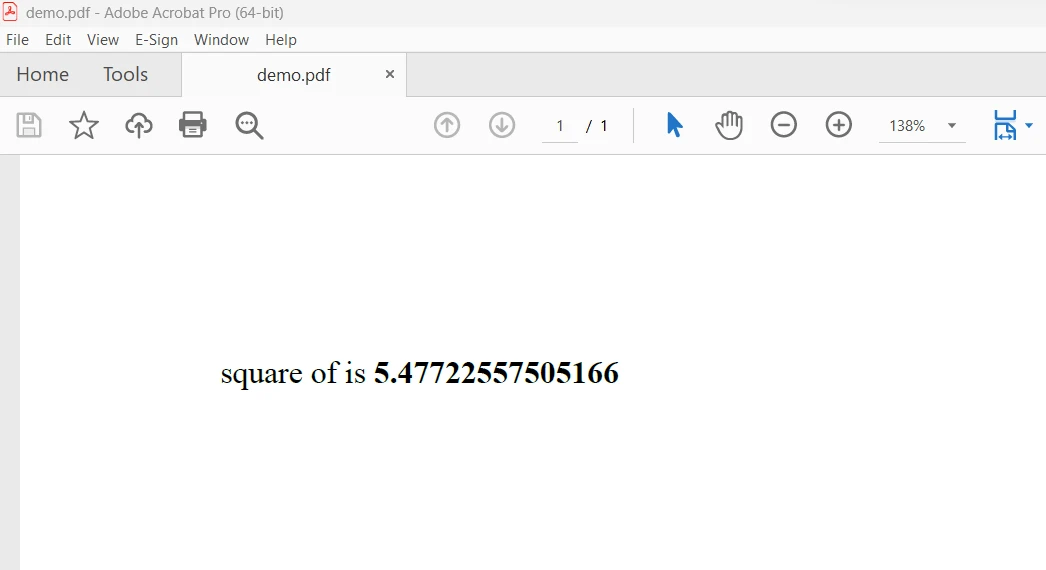
Ausgabe:
## Abschluss
Zusammenfassend lässt sich sagen, dass der nullzusammenführende Operator (??) von C# ein nützliches Merkmal ist, das die Handhabung von null Werten in Ausdrücken und Zuweisungen erleichtert und effizienter macht. Dieser Operator vereinfacht den Code, indem er Entwicklern eine klare Möglichkeit bietet, Szenarien zu handhaben, in denen ein Wert null sein könnte. Dies ermöglicht es Entwicklern, Standardwerte anzugeben oder alternative Logik mit Leichtigkeit auszuführen. Seine Anpassungsfähigkeit macht den Code schlanker und effektiver, vereinfacht null Tests und verbessert die Lesbarkeit.
IronPDF bietet eine unbefristete Lizenz, Upgrade-Optionen, ein Jahr Software-Wartung und eine dreißig-tägige Geld-zurück-Garantie, alles in dem `$liteLicense` Lite-Paket enthalten. Benutzer haben dreißig Tage Zeit, um das Produkt in realen Anwendungsszenarien während des mit Wasserzeichen versehenen Testzeitraums zu bewerten. Klicken Sie auf die bereitgestellte [IronPDF-Lizenzierung](/licensing/), um mehr über die Kosten, Lizenzierung und Testversion von IronPDF zu erfahren. Um mehr über die Produkte von Iron Software zu erfahren, besuchen Sie die [Iron Software-Website](https://ironsoftware.com/).
Der Null-Koaleszenz-Operator ?? wertet den rechten Operand aus und gibt dessen Ergebnis zurück, wenn der linke Operand eine null-Referenz ist; andernfalls gibt er den Wert seines linken Operanden zurück. Wenn der linke Operanden zu einem nicht-nullable Werttyp evaluiert, wertet der nullzusammenführende Operator (??) sein rechtes Operanden nicht aus. Der Zuweisungsoperator ??= ist eine Null-Koaleszenz-Zuweisung, die den Wert des rechten Operanden nur dann dem linken Operanden zuweist, wenn der linke Operand als ein Nullable-Typ-Wert ausgewertet wird. Wenn der Operanden auf der linken Seite zu einem nicht-null Wert evaluiert, wertet der nullzusammenführende Zuweisungsoperator (??=) sein rechtes Operanden nicht aus. Der Null-Zusammenführungsoperator ähnelt dem ternären Operator.
In C# ist der Null-Zusammenführungsoperator (??) ein binärer Operator. Ein Operator, der auf zwei Operanden wirkt, wird als binärer Operator bezeichnet. Beim Verwenden des nullzusammenführenden Operators sind zwei Operanden erforderlich, und der Operator wertet jeden Operanden aus, um das Ergebnis zu bestimmen. Nun werden wir die Verwendung von nullzusammenführenden und nullkonditionalen Operatoren in C# unten sehen.
So verwenden Sie C# Null Coalescing Value Types
Erstellen Sie ein neues C# Projekt.
Stellen Sie sicher, dass die entsprechende Version installiert ist.
Verwenden Sie den nullzusammenführenden Operator ??.
Überprüfen Sie die Werte- oder Objekt-Verweistypen basierend auf der Anforderung.
Führen Sie den Code aus.
Null Coalescing in C#
Nullwerte in C# werden standardmäßig durch den nullzusammenführenden Operator (??) behandelt, die Idee der Zusammenführung wird verwendet, um solche Werte zu verwalten, wenn man mit nullable Typen oder Ausdrücken umgeht, die möglicherweise null ergeben.
Syntax
Die folgende ist die Syntax für den nullzusammenführenden Operator:
result = expression1 ?? expression2;
result = expression1 ?? expression2;
result = If(expression1, expression2)
result = If(expression1, expression2)
Ausdruck1: Dieser Ausdruck könnte einen Nullwert erzeugen.
Ausdruck2: Wenn Ausdruck1 null ist, ist dies der Standardwert bzw. der zu verwendende Ersatzausdruck.
Ergebnis: Die Variable, die das Ergebnis der Zusammenführungsoperation enthält.
Der nullzusammenführende Operator bietet eine verkürzte Methode, um einen Standardwert zuzuweisen, wenn man mit nullable Typen arbeitet, was ihr Hauptziel ist, Code zu vereinfachen und effektiv mit null Werten umzugehen.
Vorteile
Kürze: Behandelt Nullwertprüfungen ohne die Notwendigkeit komplexer bedingter Anweisungen oder ternärer Operatoren.
Lesbarkeit des Codes: Verbessert durch die explizite Angabe, dass ein Standardwert bereitgestellt wird, wenn null zurückgegeben wird.
Es ist wichtig sicherzustellen, dass die Ausdruckstypen, die verglichen werden, übereinstimmen oder kompatibel sind, bevor man den nullzusammenführenden Operator verwendet.
Obwohl nützlich, könnte das übermäßige Verwenden des Operators den Code schwerer verständlich machen. Verwenden Sie ihn sparsam, wenn er die Klarheit des Codes verbessert.
Beim Arbeiten mit nullable Typen oder Szenarien, die Standardwerte erfordern, ist der nullzusammenführende Operator (??) in C# ein effektives Werkzeug zum Verwalten von null Werten und kann helfen, kürzeren und verständlicheren Code zu schreiben.
Der nullzusammenführende Operator ?? besitzt die folgenden typbezogenen Eigenschaften:
Ergebnistyp-Inferenz
Der Ergebnistyp des nullzusammenführenden Operators ist derselbe wie diese Operanden, wenn die Ausdrücke 1 und 2 denselben Typ haben, wie im folgenden Code gezeigt.
int? Value = null;int result = Value ?? 10;
int? Value = null;
int result = Value ?? 10;
DimValue? AsInteger = NothingDim result AsInteger = If(Value, 10)
Dim Value? As Integer = Nothing
Dim result As Integer = If(Value, 10)
Typ-Kompatibilität
Der Ergebnistyp ist der Typ, zu dem beide Ausdrücke implizit konvertiert werden können, wenn die Ausdrücke 1 und 2 unterschiedliche Typen haben, aber einer implizit in den anderen konvertiert werden kann.
double? value = null;int result = (int)(value ?? 5.5);
double? value = null;
int result = (int)(value ?? 5.5);
ImportsSystemDim value? AsDouble = NothingDim result AsInteger = CInt(Math.Truncate(If(value, 5.5)))
Imports System

Dim value? As Double = Nothing
Dim result As Integer = CInt(Math.Truncate(If(value, 5.5)))
Typ Werbung
Wenn die Typen der Ausdrücke 1 und 2 nicht implizit konvertiert werden können, wird der Ergebnistyp gemäß den Typanhebungsregeln von C# ausgewählt.
int? value = null;long result = value ?? 100L;
int? value = null;
long result = value ?? 100L;
Dim value? AsInteger = NothingDim result AsLong = If(value, 100L)
Dim value? As Integer = Nothing
Dim result As Long = If(value, 100L)
Folglich bestimmen die Typen der beteiligten Operanden und die C#-Typkonvertierungsregeln den Typ der Variablen oder des Ausdrucks, der das Ergebnis des nullzusammenführenden Operators (??) hält. Um das korrekte Handling von Typen und Werten beim Einsatz des nullzusammenführenden Operators zu gewährleisten, ist es wichtig, die Kompatibilität und mögliche Typkonvertierungen zu berücksichtigen.
Koaleszieren in IronPDF
IronPDF installieren
Um die IronPDF-Bibliothek zu installieren, geben Sie den folgenden Code in den Paket-Manager ein:
PM > Install-Package IronPdf
Install-Package IronPdf
Alternativ können Sie den NuGet-Paket-Manager verwenden, um nach dem Paket "IronPDF" zu suchen. Sie können das notwendige Paket aus dieser Liste aller NuGet-Pakete, die mit IronPDF verbunden sind, auswählen und herunterladen.
PDF mit Null Coalescing erstellen
Eine C#-Bibliothek namens IronPDF wird verwendet, um PDF-Dokumente zu erstellen und mit ihnen zu arbeiten. Die Bibliothek bietet Funktionen für die Arbeit mit PDFs, wie z.B. Formatierung, Textverarbeitung und Bildverwaltung. "Nullzusammenführung" ist keine Methode oder Funktion, die exklusiv für IronPDF ist, vielmehr ist es ein Sprachmerkmal und kein bibliotheksspezifischer Vorgang.
Wenn Sie jedoch mit IronPDF oder einer anderen Bibliothek in Ihrem C#-Code arbeiten, können Sie die nullzusammenführenden Operatoren (??) verwenden, die die C#-Sprache bietet.
Zum Beispiel, während Sie mit IronPDF-Objekten arbeiten, die nullable Wertetypen oder Eigenschaften sein können, die null zurückgeben können, können Sie den nullzusammenführenden Operator verwenden, um null Situationen zu behandeln oder Standardwerte bereitzustellen.
Das folgende Beispiel zeigt, wie der nullzusammenführende Operator mit IronPDF verwendet werden kann:
using IronPdf;using IronPdf.Pages;namespace ConsoleApp1{ internal class Program { static voidMain(string[] args) { int? x = null; // Use the null-coalescing operator to provide a default value if x is null var outputstr = $@"square of <b>{x}</b> is <b>{Math.Sqrt(x ?? 30)}</b>"; // Render the HTML string as a PDF using IronPDF var pdfcreate = ChromePdfRenderer.StaticRenderHtmlAsPdf(outputstr); // Save the generated PDF to the file system pdfcreate.SaveAs("demo.pdf"); // Wait for a key press to prevent the console from closing immediatelyConsole.ReadKey(); } }}
using IronPdf;
using IronPdf.Pages;

namespace ConsoleApp1
{
    internal class Program
    {
        static void Main(string[] args)
        {
            int? x = null;

            // Use the null-coalescing operator to provide a default value if x is null
            var outputstr = $@"square of <b>{x}</b> is <b>{Math.Sqrt(x ?? 30)}</b>";

            // Render the HTML string as a PDF using IronPDF
            var pdfcreate = ChromePdfRenderer.StaticRenderHtmlAsPdf(outputstr);

            // Save the generated PDF to the file system
            pdfcreate.SaveAs("demo.pdf");

            // Wait for a key press to prevent the console from closing immediately
            Console.ReadKey();
        }
    }
}
ImportsIronPdfImportsIronPdf.PagesModuleModule1 Sub Main(args AsString()) Dim x AsInteger? = Nothing ' Use the null-coalescing operator to provide a default value if x is null Dim outputstr = $"square of <b>{x}</b> is <b>{Math.Sqrt(If(x, 30))}</b>" ' Render the HTML string as a PDF using IronPDF Dim pdfcreate = ChromePdfRenderer.StaticRenderHtmlAsPdf(outputstr) ' Save the generated PDF to the file system pdfcreate.SaveAs("demo.pdf") ' Wait for a key press to prevent the console from closing immediatelyConsole.ReadKey() End SubEndModule
Imports IronPdf
Imports IronPdf.Pages

Module Module1
    Sub Main(args As String())
        Dim x As Integer? = Nothing

        ' Use the null-coalescing operator to provide a default value if x is null
        Dim outputstr = $"square of <b>{x}</b> is <b>{Math.Sqrt(If(x, 30))}</b>"

        ' Render the HTML string as a PDF using IronPDF
        Dim pdfcreate = ChromePdfRenderer.StaticRenderHtmlAsPdf(outputstr)

        ' Save the generated PDF to the file system
        pdfcreate.SaveAs("demo.pdf")

        ' Wait for a key press to prevent the console from closing immediately
        Console.ReadKey()
    End Sub
End Module
Denken Sie daran, dass IronPDF (oder eine andere Bibliothek) keine spezielle Funktion oder Methode für das Management von Nullwerten für bedingte Operatoren bereitstellt; sondern die Verwendung des nullzusammenführenden Operators basiert auf allgemeinen C#-Spracheigenschaften und Konzepten zur Handhabung eines null-bedingten Operators. Um mehr über die Funktionen und Fähigkeiten von IronPDF zu erfahren, besuchen Sie die IronPDF-Demos.
Ausgabe:
Abschluss
Zusammenfassend lässt sich sagen, dass der nullzusammenführende Operator (??) von C# ein nützliches Merkmal ist, das die Handhabung von null Werten in Ausdrücken und Zuweisungen erleichtert und effizienter macht. Dieser Operator vereinfacht den Code, indem er Entwicklern eine klare Möglichkeit bietet, Szenarien zu handhaben, in denen ein Wert null sein könnte. Dies ermöglicht es Entwicklern, Standardwerte anzugeben oder alternative Logik mit Leichtigkeit auszuführen. Seine Anpassungsfähigkeit macht den Code schlanker und effektiver, vereinfacht null Tests und verbessert die Lesbarkeit.
IronPDF bietet eine unbefristete Lizenz, Upgrade-Optionen, ein Jahr Software-Wartung und eine dreißig-tägige Geld-zurück-Garantie, alles in dem $999 Lite-Paket enthalten. Benutzer haben dreißig Tage Zeit, um das Produkt in realen Anwendungsszenarien während des mit Wasserzeichen versehenen Testzeitraums zu bewerten. Klicken Sie auf die bereitgestellte IronPDF-Lizenzierung, um mehr über die Kosten, Lizenzierung und Testversion von IronPDF zu erfahren. Um mehr über die Produkte von Iron Software zu erfahren, besuchen Sie die Iron Software-Website.
Jacob Mellor ist Chief Technology Officer bei Iron Software und ein visionärer Ingenieur, der Pionierarbeit in der C# PDF-Technologie leistet. Als der ursprüngliche Entwickler hinter der Kern-Codebasis von Iron Software hat er die Produktarchitektur des Unternehmens seit seiner Gründung geprägt und es zusammen mit CEO Cameron Rimington in ein Unternehmen mit mehr als 50 Mitarbeitern verwandelt, das die NASA, Tesla und globale Regierungsbehörden beliefert.


























