La programación en C# es bastante flexible, y IronPDF es una potente biblioteca que facilita el trabajo con documentos, especialmente al crear y modificar archivos PDF. Este artículo explicará la idea de una cola de prioridad en C# y te mostrará cómo utilizarla eficazmente con IronPDF para optimizar los procedimientos de procesamiento de documentos. En el artículo, vamos a utilizar la cola de prioridad de C# junto con IronPDF.
Cómo usar C# Priority Queue
- Crea un nuevo proyecto en C# y crea un objeto de Cola de Prioridad.
- Encolar elementos con prioridades.
- Desencolar el elemento con la prioridad más alta.
- Ver el elemento de mayor prioridad.
- Comprobar si la cola de prioridad está vacía.
- Ejecuta el código y desecha los objetos.
Cola de prioridades
Una estructura de datos llamada cola de prioridad realiza un seguimiento de varios componentes, a cada uno de los cuales se le asigna una prioridad. La característica esencial de una cola de prioridad es que permite la recuperación eficiente ya que el elemento con la prioridad más alta (o el valor de prioridad más bajo, según la implementación) siempre está al frente. En situaciones donde se deben manejar tareas o elementos en cierta secuencia de acuerdo a su prioridad, las colas de prioridad se utilizan frecuentemente.
Aunque no hay una clase PriorityQueue en la biblioteca estándar de C#, puedes crear una tú mismo o utilizar bibliotecas de terceros que ofrecen esta estructura de datos. El montículo de matriz tiene una capacidad inicial, y se forma un nuevo montículo con una capacidad mayor cuando se llena y tratamos de encolar un nuevo elemento. Dos componentes son atendidos en el mismo orden en que fueron encolados si comparten igual prioridad. Para evitar situaciones de carrera, necesitas desarrollar tu código único para manejar la seguridad de hilos.
Cuando los componentes tienen prioridades correspondientes y deben ser manejados de acuerdo a esas prioridades, una cola de prioridad en C# ofrece varios beneficios.
The following are some benefits of employing a priority queue in C#
- Ordenamiento de prioridad: los elementos se mantienen automáticamente en orden según su prioridad utilizando una cola de prioridad. Esto hace el procesamiento basado en prioridad más eficiente garantizando que los componentes con mayor prioridad sean manejados antes que aquellos con menor prioridad.
- Comparaciones personalizables: Las colas de prioridad te permiten usar clases
comparer personalizadas o construir comparaciones personalizadas, lo que posibilita ordenar datos según estándares complejos. Esto es útil al trabajar con objetos que tienen varias características o lógica de prioridad personalizada.
- Recuperación rápida: En la mayoría de los casos, recuperar el elemento con mayor o menor prioridad, según su implementación, requiere un tiempo constante. Esto es especialmente útil para algoritmos que necesitan obtener la pieza más importante rápidamente.
Implementing a Priority Queue in C#
Usemos un montículo binario para construir un sistema básico de cola de prioridad en C#. Ten en cuenta que tal vez desees aprovechar bibliotecas preexistentes o considerar un enfoque más complejo para uso en producción.
using System;
using System.Collections.Generic;

public class PriorityQueue<t>
{
    private List<t> elements;
    private readonly IComparer<t> comparer;

    // Constructor that sets up the priority queue with a specific comparer
    public PriorityQueue(IComparer<t> comparer)
    {
        this.elements = new List<t>();
        this.comparer = comparer;
    }

    // Property to get the number of elements in the queue
    public int Count => elements.Count;

    // Method to add an element to the priority queue
    public void Enqueue(T item)
    {
        elements.Add(item);
        int index = Count - 1;

        // Bubble up the newly added item to maintain heap property
        while (index > 0)
        {
            int parentIndex = (index - 1) / 2;
            if (comparer.Compare(elements[parentIndex], elements[index]) <= 0)
                break;
            Swap(index, parentIndex);
            index = parentIndex;
        }
    }

    // Method to remove and return the element with the highest priority
    public T Dequeue()
    {
        if (Count == 0)
            throw new InvalidOperationException("Queue is empty.");

        T front = elements[0];
        elements[0] = elements[Count - 1];
        elements.RemoveAt(Count - 1);

        // Push down the root element to maintain heap property
        int index = 0;
        while (true)
        {
            int leftChild = 2 * index + 1;
            if (leftChild >= Count)
                break;

            int rightChild = leftChild + 1;
            int minChild = (rightChild < Count && comparer.Compare(elements[rightChild], elements[leftChild]) < 0)
                ? rightChild
                : leftChild;

            if (comparer.Compare(elements[index], elements[minChild]) <= 0)
                break;

            Swap(index, minChild);
            index = minChild;
        }

        return front;
    }

    // Helper method to swap elements in the list
    private void Swap(int i, int j)
    {
        T temp = elements[i];
        elements[i] = elements[j];
        elements[j] = temp;
    }
}
using System;
using System.Collections.Generic;

public class PriorityQueue<t>
{
    private List<t> elements;
    private readonly IComparer<t> comparer;

    // Constructor that sets up the priority queue with a specific comparer
    public PriorityQueue(IComparer<t> comparer)
    {
        this.elements = new List<t>();
        this.comparer = comparer;
    }

    // Property to get the number of elements in the queue
    public int Count => elements.Count;

    // Method to add an element to the priority queue
    public void Enqueue(T item)
    {
        elements.Add(item);
        int index = Count - 1;

        // Bubble up the newly added item to maintain heap property
        while (index > 0)
        {
            int parentIndex = (index - 1) / 2;
            if (comparer.Compare(elements[parentIndex], elements[index]) <= 0)
                break;
            Swap(index, parentIndex);
            index = parentIndex;
        }
    }

    // Method to remove and return the element with the highest priority
    public T Dequeue()
    {
        if (Count == 0)
            throw new InvalidOperationException("Queue is empty.");

        T front = elements[0];
        elements[0] = elements[Count - 1];
        elements.RemoveAt(Count - 1);

        // Push down the root element to maintain heap property
        int index = 0;
        while (true)
        {
            int leftChild = 2 * index + 1;
            if (leftChild >= Count)
                break;

            int rightChild = leftChild + 1;
            int minChild = (rightChild < Count && comparer.Compare(elements[rightChild], elements[leftChild]) < 0)
                ? rightChild
                : leftChild;

            if (comparer.Compare(elements[index], elements[minChild]) <= 0)
                break;

            Swap(index, minChild);
            index = minChild;
        }

        return front;
    }

    // Helper method to swap elements in the list
    private void Swap(int i, int j)
    {
        T temp = elements[i];
        elements[i] = elements[j];
        elements[j] = temp;
    }
}
C#
IronPDF
Con la ayuda de la biblioteca .NET IronPDF, los programadores pueden usar el lenguaje C# para generar, editar y modificar documentos PDF. El software ofrece una gama de herramientas y características para facilitar diversas operaciones con archivos PDF, incluyendo entre otros la creación de PDFs a partir de HTML, la conversión de HTML a PDF, la combinación o división de documentos PDF, y la adición de texto, imágenes y anotaciones a PDFs preexistentes. Para saber más sobre IronPDF, consulta la Documentación de IronPDF.
La característica principal de IronPDF es su función de Conversión de HTML a PDF, que mantiene los diseños y estilos. Convierte contenido web en PDFs, ideal para informes, facturas y documentación. Esto incluye convertir archivos HTML, URLs, y cadenas de HTML a PDFs.
using IronPdf;

class Program
{
    static void Main(string[] args)
    {
        // Initialize the PDF renderer
        var renderer = new ChromePdfRenderer();

        // 1. Convert HTML String to PDF
        var htmlContent = "<h1>Hello, IronPDF!</h1><p>This is a PDF from an HTML string.</p>";
        var pdfFromHtmlString = renderer.RenderHtmlAsPdf(htmlContent);
        pdfFromHtmlString.SaveAs("HTMLStringToPDF.pdf");

        // 2. Convert HTML File to PDF
        var htmlFilePath = "path_to_your_html_file.html"; // Specify the path to your HTML file
        var pdfFromHtmlFile = renderer.RenderHtmlFileAsPdf(htmlFilePath);
        pdfFromHtmlFile.SaveAs("HTMLFileToPDF.pdf");

        // 3. Convert URL to PDF
        var url = "http://ironpdf.com"; // Specify the URL
        var pdfFromUrl = renderer.RenderUrlAsPdf(url);
        pdfFromUrl.SaveAs("URLToPDF.pdf");
    }
}
using IronPdf;

class Program
{
    static void Main(string[] args)
    {
        // Initialize the PDF renderer
        var renderer = new ChromePdfRenderer();

        // 1. Convert HTML String to PDF
        var htmlContent = "<h1>Hello, IronPDF!</h1><p>This is a PDF from an HTML string.</p>";
        var pdfFromHtmlString = renderer.RenderHtmlAsPdf(htmlContent);
        pdfFromHtmlString.SaveAs("HTMLStringToPDF.pdf");

        // 2. Convert HTML File to PDF
        var htmlFilePath = "path_to_your_html_file.html"; // Specify the path to your HTML file
        var pdfFromHtmlFile = renderer.RenderHtmlFileAsPdf(htmlFilePath);
        pdfFromHtmlFile.SaveAs("HTMLFileToPDF.pdf");

        // 3. Convert URL to PDF
        var url = "http://ironpdf.com"; // Specify the URL
        var pdfFromUrl = renderer.RenderUrlAsPdf(url);
        pdfFromUrl.SaveAs("URLToPDF.pdf");
    }
}
Imports IronPdf
Friend Class Program
Shared Sub Main(ByVal args() As String)
' Initialize the PDF renderer
Dim renderer = New ChromePdfRenderer()
' 1. Convert HTML String to PDF
Dim htmlContent = "<h1>Hello, IronPDF!</h1><p>This is a PDF from an HTML string.</p>"
Dim pdfFromHtmlString = renderer.RenderHtmlAsPdf(htmlContent)
pdfFromHtmlString.SaveAs("HTMLStringToPDF.pdf")
' 2. Convert HTML File to PDF
Dim htmlFilePath = "path_to_your_html_file.html" ' Specify the path to your HTML file
Dim pdfFromHtmlFile = renderer.RenderHtmlFileAsPdf(htmlFilePath)
pdfFromHtmlFile.SaveAs("HTMLFileToPDF.pdf")
' 3. Convert URL to PDF
Dim url = "http://ironpdf.com" ' Specify the URL
Dim pdfFromUrl = renderer.RenderUrlAsPdf(url)
pdfFromUrl.SaveAs("URLToPDF.pdf")
End Sub
End Class
Imports IronPdf

Friend Class Program
	Shared Sub Main(ByVal args() As String)
		' Initialize the PDF renderer
		Dim renderer = New ChromePdfRenderer()

		' 1. Convert HTML String to PDF
		Dim htmlContent = "<h1>Hello, IronPDF!</h1><p>This is a PDF from an HTML string.</p>"
		Dim pdfFromHtmlString = renderer.RenderHtmlAsPdf(htmlContent)
		pdfFromHtmlString.SaveAs("HTMLStringToPDF.pdf")

		' 2. Convert HTML File to PDF
		Dim htmlFilePath = "path_to_your_html_file.html" ' Specify the path to your HTML file
		Dim pdfFromHtmlFile = renderer.RenderHtmlFileAsPdf(htmlFilePath)
		pdfFromHtmlFile.SaveAs("HTMLFileToPDF.pdf")

		' 3. Convert URL to PDF
		Dim url = "http://ironpdf.com" ' Specify the URL
		Dim pdfFromUrl = renderer.RenderUrlAsPdf(url)
		pdfFromUrl.SaveAs("URLToPDF.pdf")
	End Sub
End Class
Características de IronPDF
- Conversión de HTML a PDF: IronPDF puede convertir cualquier tipo de datos HTML, como archivos, URL y cadenas de código HTML, en documentos PDF.
- Generación de PDF: El lenguaje de programación C# se puede utilizar para agregar texto, gráficos y otros objetos mediante programación a documentos PDF.
- Manipulación de PDF: IronPDF puede modificar archivos PDF existentes y dividir un archivo PDF en varios archivos. Puede combinar muchos archivos PDF en un solo archivo.
- Formularios PDF: La biblioteca es útil en situaciones donde es necesario recopilar y procesar datos de formularios, ya que permite a los usuarios crear y completar formularios PDF.
- Características de seguridad: IronPDF admite la seguridad con contraseña y permisos, junto con el cifrado de documentos PDF.
Cola de prioridades con IronPDF
Ahora que conocemos los fundamentos de una cola de prioridad, veamos cómo IronPDF y esta pueden trabajar juntas para procesar documentos más rápidamente. Imagina una situación donde tienes que producir documentos PDF con diferentes prioridades o niveles de urgencia.
Beneficios de la cola prioritaria con IronPDF
- Creación dinámica de documentos: puede producir documentos PDF dinámicamente según distintos grados de urgencia o prioridad utilizando una nueva cola de prioridad.
- Gestión eficaz del flujo de trabajo: para maximizar la eficiencia en la generación de documentos, la cola de prioridad garantiza que los trabajos con mayor prioridad se completen antes que aquellos con menor prioridad.
- Priorización ajustable: al cambiar los valores/niveles de prioridad y los criterios, puede modificar rápidamente la cola de prioridades para adaptarla a diversas circunstancias.
- Integración fluida: la generación de documentos basada en prioridades se puede integrar fácilmente en su aplicación utilizando IronPDF junto con la misma cola de prioridad.
- Escalabilidad: la nueva cola de prioridad se expande a medida que el programa se hace más grande y puede manejar más acciones relacionadas con la creación de PDF.
A continuación está el código de ejemplo para la cola de prioridad usando IronPDF.
using IronPdf;
using System;
using System.Collections.Generic;

public class PdfGenerator
{
    static void Main()
    {
        // Create a priority queue for PDF tasks
        PriorityQueue<PdfTask> pdfTaskQueue = new PriorityQueue<PdfTask>(new PdfTaskComparer());

        // Enqueue PDF tasks with different priorities
        pdfTaskQueue.Enqueue(new PdfTask("High Priority Document", Priority.High));
        pdfTaskQueue.Enqueue(new PdfTask("Medium Priority Document", Priority.Medium));
        pdfTaskQueue.Enqueue(new PdfTask("Low Priority Document", Priority.Low));

        // Process PDF tasks in order of their priority
        while (pdfTaskQueue.Count > 0)
        {
            PdfTask nextTask = pdfTaskQueue.Dequeue();
            GeneratePdf(nextTask);
        }
    }

    // Generate PDF document using IronPDF
    static void GeneratePdf(PdfTask pdfTask)
    {
        // Create a new PDF document using IronPDF
        IronPdf.HtmlToPdf renderer = new IronPdf.HtmlToPdf();
        PdfDocument pdf = renderer.RenderHtmlAsPdf($"<h1>{pdfTask.Content}</h1>");

        // Save the PDF to a file
        string pdfFilePath = $"{pdfTask.Priority}_{Guid.NewGuid()}.pdf";
        pdf.SaveAs(pdfFilePath);

        // Display confirmation message
        Console.WriteLine($"PDF generated successfully. File saved at: {pdfFilePath}");
    }
}

// Class to define a PDF task
public class PdfTask
{
    public string Content { get; }
    public Priority Priority { get; }

    public PdfTask(string content, Priority priority)
    {
        Content = content;
        Priority = priority;
    }
}

// Enum to define priority levels
public enum Priority
{
    Low,
    Medium,
    High
}

// Comparer to compare PDF tasks based on their priority
public class PdfTaskComparer : IComparer<PdfTask>
{
    public int Compare(PdfTask x, PdfTask y)
    {
        // Prioritize higher priority tasks
        return y.Priority.CompareTo(x.Priority);
    }
}
using IronPdf;
using System;
using System.Collections.Generic;

public class PdfGenerator
{
    static void Main()
    {
        // Create a priority queue for PDF tasks
        PriorityQueue<PdfTask> pdfTaskQueue = new PriorityQueue<PdfTask>(new PdfTaskComparer());

        // Enqueue PDF tasks with different priorities
        pdfTaskQueue.Enqueue(new PdfTask("High Priority Document", Priority.High));
        pdfTaskQueue.Enqueue(new PdfTask("Medium Priority Document", Priority.Medium));
        pdfTaskQueue.Enqueue(new PdfTask("Low Priority Document", Priority.Low));

        // Process PDF tasks in order of their priority
        while (pdfTaskQueue.Count > 0)
        {
            PdfTask nextTask = pdfTaskQueue.Dequeue();
            GeneratePdf(nextTask);
        }
    }

    // Generate PDF document using IronPDF
    static void GeneratePdf(PdfTask pdfTask)
    {
        // Create a new PDF document using IronPDF
        IronPdf.HtmlToPdf renderer = new IronPdf.HtmlToPdf();
        PdfDocument pdf = renderer.RenderHtmlAsPdf($"<h1>{pdfTask.Content}</h1>");

        // Save the PDF to a file
        string pdfFilePath = $"{pdfTask.Priority}_{Guid.NewGuid()}.pdf";
        pdf.SaveAs(pdfFilePath);

        // Display confirmation message
        Console.WriteLine($"PDF generated successfully. File saved at: {pdfFilePath}");
    }
}

// Class to define a PDF task
public class PdfTask
{
    public string Content { get; }
    public Priority Priority { get; }

    public PdfTask(string content, Priority priority)
    {
        Content = content;
        Priority = priority;
    }
}

// Enum to define priority levels
public enum Priority
{
    Low,
    Medium,
    High
}

// Comparer to compare PDF tasks based on their priority
public class PdfTaskComparer : IComparer<PdfTask>
{
    public int Compare(PdfTask x, PdfTask y)
    {
        // Prioritize higher priority tasks
        return y.Priority.CompareTo(x.Priority);
    }
}
Imports IronPdf
Imports System
Imports System.Collections.Generic
Public Class PdfGenerator
Shared Sub Main()
' Create a priority queue for PDF tasks
Dim pdfTaskQueue As New PriorityQueue(Of PdfTask)(New PdfTaskComparer())
' Enqueue PDF tasks with different priorities
pdfTaskQueue.Enqueue(New PdfTask("High Priority Document", Priority.High))
pdfTaskQueue.Enqueue(New PdfTask("Medium Priority Document", Priority.Medium))
pdfTaskQueue.Enqueue(New PdfTask("Low Priority Document", Priority.Low))
' Process PDF tasks in order of their priority
While pdfTaskQueue.Count > 0
Dim nextTask As PdfTask = pdfTaskQueue.Dequeue()
GeneratePdf(nextTask)
End While
End Sub
' Generate PDF document using IronPDF
Shared Sub GeneratePdf(pdfTask As PdfTask)
' Create a new PDF document using IronPDF
Dim renderer As New IronPdf.HtmlToPdf()
Dim pdf As PdfDocument = renderer.RenderHtmlAsPdf($"<h1>{pdfTask.Content}</h1>")
' Save the PDF to a file
Dim pdfFilePath As String = $"{pdfTask.Priority}_{Guid.NewGuid()}.pdf"
pdf.SaveAs(pdfFilePath)
' Display confirmation message
Console.WriteLine($"PDF generated successfully. File saved at: {pdfFilePath}")
End Sub
End Class
' Class to define a PDF task
Public Class PdfTask
Public ReadOnly Property Content As String
Public ReadOnly Property Priority As Priority
Public Sub New(content As String, priority As Priority)
Me.Content = content
Me.Priority = priority
End Sub
End Class
' Enum to define priority levels
Public Enum Priority
Low
Medium
High
End Enum
' Comparer to compare PDF tasks based on their priority
Public Class PdfTaskComparer
Implements IComparer(Of PdfTask)
Public Function Compare(x As PdfTask, y As PdfTask) As Integer Implements IComparer(Of PdfTask).Compare
' Prioritize higher priority tasks
Return y.Priority.CompareTo(x.Priority)
End Function
End Class
Imports IronPdf
Imports System
Imports System.Collections.Generic

Public Class PdfGenerator
    Shared Sub Main()
        ' Create a priority queue for PDF tasks
        Dim pdfTaskQueue As New PriorityQueue(Of PdfTask)(New PdfTaskComparer())

        ' Enqueue PDF tasks with different priorities
        pdfTaskQueue.Enqueue(New PdfTask("High Priority Document", Priority.High))
        pdfTaskQueue.Enqueue(New PdfTask("Medium Priority Document", Priority.Medium))
        pdfTaskQueue.Enqueue(New PdfTask("Low Priority Document", Priority.Low))

        ' Process PDF tasks in order of their priority
        While pdfTaskQueue.Count > 0
            Dim nextTask As PdfTask = pdfTaskQueue.Dequeue()
            GeneratePdf(nextTask)
        End While
    End Sub

    ' Generate PDF document using IronPDF
    Shared Sub GeneratePdf(pdfTask As PdfTask)
        ' Create a new PDF document using IronPDF
        Dim renderer As New IronPdf.HtmlToPdf()
        Dim pdf As PdfDocument = renderer.RenderHtmlAsPdf($"<h1>{pdfTask.Content}</h1>")

        ' Save the PDF to a file
        Dim pdfFilePath As String = $"{pdfTask.Priority}_{Guid.NewGuid()}.pdf"
        pdf.SaveAs(pdfFilePath)

        ' Display confirmation message
        Console.WriteLine($"PDF generated successfully. File saved at: {pdfFilePath}")
    End Sub
End Class

' Class to define a PDF task
Public Class PdfTask
    Public ReadOnly Property Content As String
    Public ReadOnly Property Priority As Priority

    Public Sub New(content As String, priority As Priority)
        Me.Content = content
        Me.Priority = priority
    End Sub
End Class

' Enum to define priority levels
Public Enum Priority
    Low
    Medium
    High
End Enum

' Comparer to compare PDF tasks based on their priority
Public Class PdfTaskComparer
    Implements IComparer(Of PdfTask)

    Public Function Compare(x As PdfTask, y As PdfTask) As Integer Implements IComparer(Of PdfTask).Compare
        ' Prioritize higher priority tasks
        Return y.Priority.CompareTo(x.Priority)
    End Function
End Class
En este caso, las tareas PDF con diferentes prioridades asociadas se encolan en la cola de prioridad (pdfTaskQueue) por la clase PdfGenerator. Las tareas de mayor prioridad se procesan primero gracias a PriorityQueue. Usamos el método Enqueue para agregar el elemento a la cola de prioridad. También podemos usar el método Dequeue para eliminar y recuperar los valores de mayor prioridad. Podemos usar el método peek para ver la mayor prioridad sin eliminar el elemento.

Archivo de salida de ejemplo:
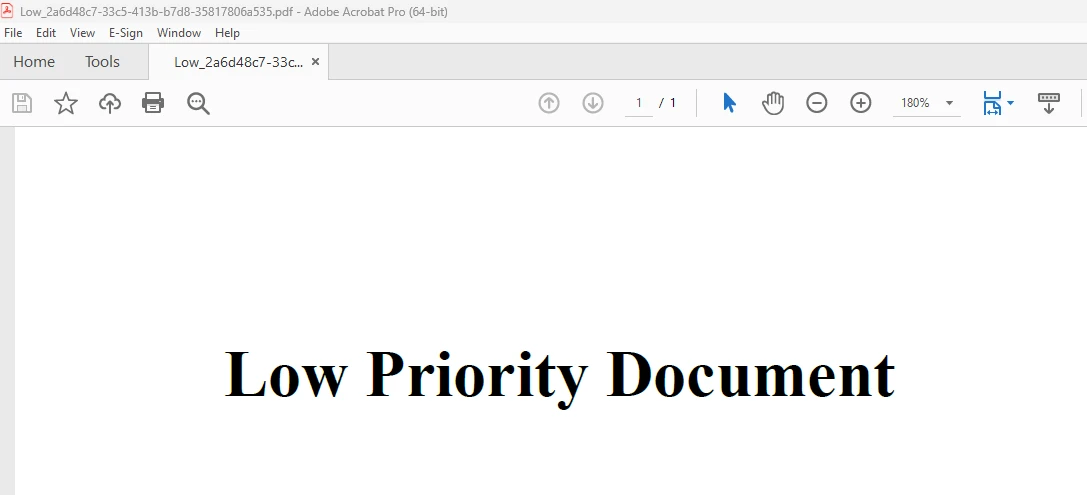
Basándose en el contenido de la tarea, la función GeneratePdf utiliza IronPDF para construir un documento PDF, que luego se guarda en un archivo. Para saber más sobre el código de IronPDF, consulta los Ejemplos de IronPDF de HTML a PDF.
Conclusión
Cuando IronPDF y una cola de prioridad se combinan en una aplicación en C#, es posible generar documentos de forma rápida y dinámica según diferentes prioridades o niveles de urgencia. Este método funciona especialmente bien en situaciones donde algunos documentos deben ser procesados y proporcionados antes que otros.
Tu aplicación puede gestionar tareas de creación de documentos de manera flexible, escalable y priorizada utilizando las capacidades de conversión de HTML a PDF de IronPDF e integrando una cola de prioridad para la gestión de tareas. El marco para integrar estas ideas ha sido proporcionado en este artículo; se puede utilizar una personalización adicional para satisfacer los requisitos particulares de tus operaciones de procesamiento de documentos. Se puede obtener una solución efectiva y priorizada para el manejo de documentos en C# combinando IronPDF con una cola de prioridad, ya sea que estés diseñando una herramienta de informes, un sistema de gestión de documentos o cualquier otra aplicación que genere PDFs.
La edición Lite de $999 de IronPDF incluye un año de mantenimiento de software, opciones de actualización y una licencia permanente. Los usuarios pueden evaluar el producto en situaciones reales durante el período de prueba con marca de agua. Para obtener más información sobre el costo, las licencias y la prueba gratuita de IronPDF, consulta la Información de Licencias de IronPDF. Para obtener más información sobre Iron Software, consulta el Sitio Web de Iron Software.























