




已更新 2026年4月23日
简化 .NET 与 Microsoft.Extensions.AI 的 LLM 集成
AI正在改变软件开发,但将大型语言模型(LLM)集成到.NET中直到现在一直很复杂。通过IronPdf.AI,将AI集成更进一步,该产品为.NET应用程序带来了OpenAI驱动的PDF解析、数据提取和内容摘要。
阅读更多

使用C#编程非常灵活,而IronPDF是一个强大的库,可以更轻松地处理文档,尤其是在创建和修改PDF文件时。 这篇文章将解释C#中优先队列的概念,并展示如何使用IronPDF来优化文档处理流程。 在本文中,我们将使用C#优先队列和IronPDF。
优先队列是一种数据结构,跟踪多个元素,每个元素都有一个分配的优先级。 优先队列的重要特征是其高效的检索能力,最高优先级(或根据实现是最低优先值)的元素始终位于前面。 在任务或项目必须根据其优先级按特定顺序处理的情况下,优先队列经常被使用。
虽然在C#标准库中没有PriorityQueue类,您可以自己创建一个或者使用提供这种数据结构的第三方库。 数组堆有一个初始容量,当它填满时,系统会创建一个容量更大的新堆,而我们尝试入队一个新元素。 如果两个元素具有相同的优先级,则按照它们的入队顺序提供服务。 为了防止竞争情况,您需要开发您自己独特的代码来处理线程安全。
当元素需要根据对应的优先级进行处理时,C#中的优先队列提供了许多优势。
*优先级排序:使用优先级队列,根据优先级自动保持元素的顺序。 这使得基于优先级的处理更高效,保证具有更高优先级的组件在较低优先级的组件之前被处理。
comparer类或构建自定义比较,这使得根据复杂标准排序数据成为可能。 这对于处理具有多个特征的对象或使用自定义优先级逻辑对象很有用。
*快速检索:在大多数情况下,检索优先级最高或最低的元素(取决于具体实现方式)所需的时间基本相同。这对于需要快速获取最关键元素的算法尤为重要。我们来使用二进制堆构建一个基本的C#优先队列系统。 请记住,可能希望利用现有库或考虑使用更复杂的方法以供生产使用。
using System;
using System.Collections.Generic;

public class PriorityQueue<t>
{
    private List<t> elements;
    private readonly IComparer<t> comparer;

    // Constructor that sets up the priority queue with a specific comparer
    public PriorityQueue(IComparer<t> comparer)
    {
        this.elements = new List<t>();
        this.comparer = comparer;
    }

    // Property to get the number of elements in the queue
    public int Count => elements.Count;

    // Method to add an element to the priority queue
    public void Enqueue(T item)
    {
        elements.Add(item);
        int index = Count - 1;

        // Bubble up the newly added item to maintain heap property
        while (index > 0)
        {
            int parentIndex = (index - 1) / 2;
            if (comparer.Compare(elements[parentIndex], elements[index]) <= 0)
                break;
            Swap(index, parentIndex);
            index = parentIndex;
        }
    }

    // Method to remove and return the element with the highest priority
    public T Dequeue()
    {
        if (Count == 0)
            throw new InvalidOperationException("Queue is empty.");

        T front = elements[0];
        elements[0] = elements[Count - 1];
        elements.RemoveAt(Count - 1);

        // Push down the root element to maintain heap property
        int index = 0;
        while (true)
        {
            int leftChild = 2 * index + 1;
            if (leftChild >= Count)
                break;

            int rightChild = leftChild + 1;
            int minChild = (rightChild < Count && comparer.Compare(elements[rightChild], elements[leftChild]) < 0)
                ? rightChild
                : leftChild;

            if (comparer.Compare(elements[index], elements[minChild]) <= 0)
                break;

            Swap(index, minChild);
            index = minChild;
        }

        return front;
    }

    // Helper method to swap elements in the list
    private void Swap(int i, int j)
    {
        T temp = elements[i];
        elements[i] = elements[j];
        elements[j] = temp;
    }
}借助.NET库IronPDF,程序员可以使用C#语言生成、编辑和修改PDF文档。 该软件提供了一系列工具和功能来促进与PDF文件的多样操作,包括但不限于从HTML创建PDF,将HTML转换为PDF,合并或拆分PDF文件,以及向现有PDF添加文本、图像和注释。 要了解更多关于IronPDF的信息,请参阅IronPDF文档。
IronPDF的主要功能是其HTML到PDF转换功能,该功能保持布局和样式。 它将网络内容转换为 PDF,适用于报告、发票和文档。 这包括将HTML文件、URL和HTML字符串转换为PDF。
using IronPdf;

class Program
{
    static void Main(string[] args)
    {
        // Initialize the PDF renderer
        var renderer = new ChromePdfRenderer();

        // 1. Convert HTML String to PDF
        var htmlContent = "<h1>Hello, IronPDF!</h1><p>This is a PDF from an HTML string.</p>";
        var pdfFromHtmlString = renderer.RenderHtmlAsPdf(htmlContent);
        pdfFromHtmlString.SaveAs("HTMLStringToPDF.pdf");

        // 2. Convert HTML File to PDF
        var htmlFilePath = "path_to_your_html_file.html"; // Specify the path to your HTML file
        var pdfFromHtmlFile = renderer.RenderHtmlFileAsPdf(htmlFilePath);
        pdfFromHtmlFile.SaveAs("HTMLFileToPDF.pdf");

        // 3. Convert URL to PDF
        var url = "http://ironpdf.com"; // Specify the URL
        var pdfFromUrl = renderer.RenderUrlAsPdf(url);
        pdfFromUrl.SaveAs("URLToPDF.pdf");
    }
}Imports IronPdf
Friend Class Program
Shared Sub Main(ByVal args() As String)
' Initialize the PDF renderer
Dim renderer = New ChromePdfRenderer()
' 1. Convert HTML String to PDF
Dim htmlContent = "<h1>Hello, IronPDF!</h1><p>This is a PDF from an HTML string.</p>"
Dim pdfFromHtmlString = renderer.RenderHtmlAsPdf(htmlContent)
pdfFromHtmlString.SaveAs("HTMLStringToPDF.pdf")
' 2. Convert HTML File to PDF
Dim htmlFilePath = "path_to_your_html_file.html" ' Specify the path to your HTML file
Dim pdfFromHtmlFile = renderer.RenderHtmlFileAsPdf(htmlFilePath)
pdfFromHtmlFile.SaveAs("HTMLFileToPDF.pdf")
' 3. Convert URL to PDF
Dim url = "http://ironpdf.com" ' Specify the URL
Dim pdfFromUrl = renderer.RenderUrlAsPdf(url)
pdfFromUrl.SaveAs("URLToPDF.pdf")
End Sub
End Class现在我们了解了优先队列的基本知识,让我们看看IronPDF和它如何协同工作以加快文档处理速度。 想象一个场景,您需要生成具有不同优先级或紧迫性的PDF文档。
*动态创建文档:您可以利用新的优先级队列,根据不同的紧急程度或优先级动态生成 PDF 文档。 *有效的工作流程管理:为了最大限度地提高文档生成效率,优先级队列确保优先级较高的作业在优先级较低的作业之前完成。 *可调整的优先级:通过更改优先级值/级别和标准,您可以快速修改优先级队列以适应各种情况。 *无缝集成:通过将 IronPDF 与相同的优先级队列结合使用,可以轻松地将基于优先级的文档生成集成到您的应用程序中。 *可扩展性:随着程序规模的增大,新的优先级队列也会随之扩展,可以处理更多与创建 PDF 相关的操作。
以下是使用IronPDF的优先队列示例代码。
using IronPdf;
using System;
using System.Collections.Generic;

public class PdfGenerator
{
    static void Main()
    {
        // Create a priority queue for PDF tasks
        PriorityQueue<PdfTask> pdfTaskQueue = new PriorityQueue<PdfTask>(new PdfTaskComparer());

        // Enqueue PDF tasks with different priorities
        pdfTaskQueue.Enqueue(new PdfTask("High Priority Document", Priority.High));
        pdfTaskQueue.Enqueue(new PdfTask("Medium Priority Document", Priority.Medium));
        pdfTaskQueue.Enqueue(new PdfTask("Low Priority Document", Priority.Low));

        // Process PDF tasks in order of their priority
        while (pdfTaskQueue.Count > 0)
        {
            PdfTask nextTask = pdfTaskQueue.Dequeue();
            GeneratePdf(nextTask);
        }
    }

    // Generate PDF document using IronPDF
    static void GeneratePdf(PdfTask pdfTask)
    {
        // Create a new PDF document using IronPDF
        IronPdf.HtmlToPdf renderer = new IronPdf.HtmlToPdf();
        PdfDocument pdf = renderer.RenderHtmlAsPdf($"<h1>{pdfTask.Content}</h1>");

        // Save the PDF to a file
        string pdfFilePath = $"{pdfTask.Priority}_{Guid.NewGuid()}.pdf";
        pdf.SaveAs(pdfFilePath);

        // Display confirmation message
        Console.WriteLine($"PDF generated successfully. File saved at: {pdfFilePath}");
    }
}

// Class to define a PDF task
public class PdfTask
{
    public string Content { get; }
    public Priority Priority { get; }

    public PdfTask(string content, Priority priority)
    {
        Content = content;
        Priority = priority;
    }
}

// Enum to define priority levels
public enum Priority
{
    Low,
    Medium,
    High
}

// Comparer to compare PDF tasks based on their priority
public class PdfTaskComparer : IComparer<PdfTask>
{
    public int Compare(PdfTask x, PdfTask y)
    {
        // Prioritize higher priority tasks
        return y.Priority.CompareTo(x.Priority);
    }
}Imports IronPdf
Imports System
Imports System.Collections.Generic
Public Class PdfGenerator
Shared Sub Main()
' Create a priority queue for PDF tasks
Dim pdfTaskQueue As New PriorityQueue(Of PdfTask)(New PdfTaskComparer())
' Enqueue PDF tasks with different priorities
pdfTaskQueue.Enqueue(New PdfTask("High Priority Document", Priority.High))
pdfTaskQueue.Enqueue(New PdfTask("Medium Priority Document", Priority.Medium))
pdfTaskQueue.Enqueue(New PdfTask("Low Priority Document", Priority.Low))
' Process PDF tasks in order of their priority
While pdfTaskQueue.Count > 0
Dim nextTask As PdfTask = pdfTaskQueue.Dequeue()
GeneratePdf(nextTask)
End While
End Sub
' Generate PDF document using IronPDF
Shared Sub GeneratePdf(pdfTask As PdfTask)
' Create a new PDF document using IronPDF
Dim renderer As New IronPdf.HtmlToPdf()
Dim pdf As PdfDocument = renderer.RenderHtmlAsPdf($"<h1>{pdfTask.Content}</h1>")
' Save the PDF to a file
Dim pdfFilePath As String = $"{pdfTask.Priority}_{Guid.NewGuid()}.pdf"
pdf.SaveAs(pdfFilePath)
' Display confirmation message
Console.WriteLine($"PDF generated successfully. File saved at: {pdfFilePath}")
End Sub
End Class
' Class to define a PDF task
Public Class PdfTask
Public ReadOnly Property Content As String
Public ReadOnly Property Priority As Priority
Public Sub New(content As String, priority As Priority)
Me.Content = content
Me.Priority = priority
End Sub
End Class
' Enum to define priority levels
Public Enum Priority
Low
Medium
High
End Enum
' Comparer to compare PDF tasks based on their priority
Public Class PdfTaskComparer
Implements IComparer(Of PdfTask)
Public Function Compare(x As PdfTask, y As PdfTask) As Integer Implements IComparer(Of PdfTask).Compare
' Prioritize higher priority tasks
Return y.Priority.CompareTo(x.Priority)
End Function
End Class在此情况下,具有不同相关优先级的PDF作业由pdfTaskQueue)。 由于PriorityQueue,优先级较高的作业被优先处理。 我们使用Enqueue方法将元素添加到优先队列。 我们还可以使用Dequeue方法删除并检索最高优先级值。 我们可以使用peek方法查看最高优先级而不删除该项。

示例输出文件:
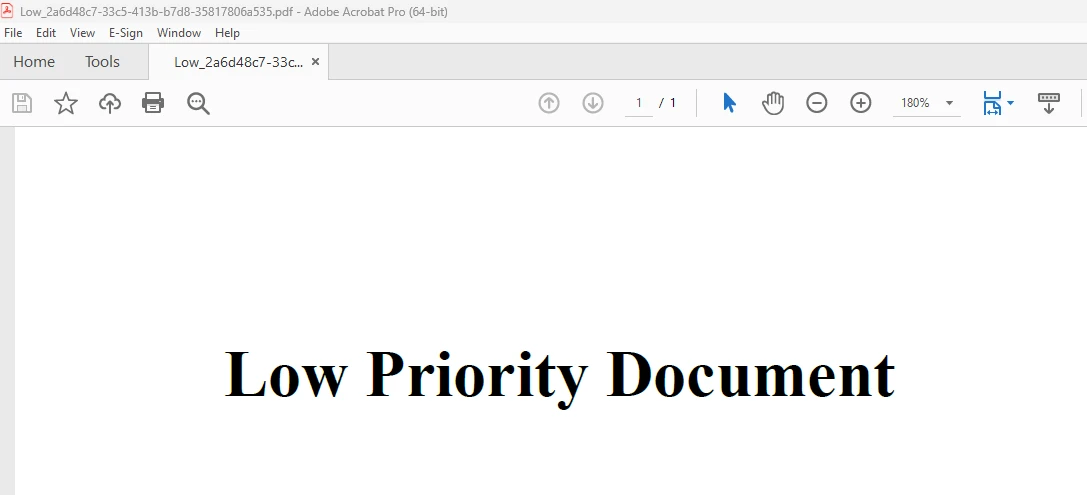
根据作业内容,GeneratePdf函数利用IronPDF创建PDF文档,然后将其保存到文件。要了解更多关于IronPDF代码的信息,请参阅IronPDF HTML to PDF 示例。
当IronPDF和优先队列结合在C#应用程序中使用时,可以根据不同的优先级或紧迫性快速动态地生成文档。 这种方法在一些文件必须比其他文件优先处理并提供的情况下尤其有效。
通过利用IronPDF的HTML到PDF转换功能并结合优先队列进行任务管理,您的应用程序可以以灵活、可扩展和优先的方式管理文档创建任务。 用于整合这些概念的框架已在本文中提供; 可以进行附加自定义以满足您的文档处理操作的特定需求。 无论您是在设计一个报告工具,一个文档管理系统,还是任何生成PDFs的应用程序,将IronPDF和优先队列结合起来都可以获得一个高效的优先化文档处理解决方案。
IronPDF的$999 Lite版包括一年的软件维护、升级选项和永久许可证。 在带水印的试用期间,用户可以在实际应用中评估产品。 有关IronPDF的费用、许可和免费试用的进一步信息,请参见IronPDF许可信息。 有关Iron Software的进一步信息,请参见Iron Software网站。

Jacob Mellor 是 Iron Software 的首席技术官,也是一位开创 C# PDF 技术的有远见的工程师。作为 Iron Software 核心代码库的原始开发者,他从公司成立之初就开始塑造公司的产品架构,与首席执行官 Cameron Rimington 一起将公司转变为一家拥有 50 多名员工的公司,为 NASA、特斯拉和全球政府机构提供服务。



当您需要PDF看起来像HTML时,速度快。













