




更新日 2026年4月23日
Microsoft.Extensions.AIを使用した .NET での LLM 統合の簡素化
AI はソフトウェア開発を変革していますが、.NET への大規模言語モデル (LLM) の統合はこれまで複雑でした。IronPdf.AI を使用して AI 統合をさらに進め、OpenAI を活用した PDF 解析、データ抽出、およびコンテンツの要約を .NET アプリケーションにもたらします。
詳しく読む

C#では、ObservableCollectionは、アイテムの追加、削除、変更が行われた際にリスナーに自動的に通知を行う強力なデータ構造です。 これは、UIやレポートでリアルタイムの変更を反映する必要がある動的なデータコレクションシナリオに特に役立ちます。 IronPDFと組み合わせることで、この強力なコレクションを使用して、ライブデータに基づいた動的なPDFを生成することができます。
IronPDFは、C#でPDFを生成するための堅牢なライブラリです。 HTMLからPDFへの変換機能により、請求書、レポート、その他のリアルタイムデータに基づくドキュメントを簡単に作成できます。 この記事では、ObservableCollectionクラスをIronPDFと統合し、データバインディングを活用して、データの変化に応じて動的に更新されるPDFを生成する方法を紹介します。
ObservableCollectionは、アイテムが追加、削除、または変更されたときに通知を提供するINotifyCollectionChangedインターフェースを実装するC#のクラスです。 これは、コレクションへの変更が自動的にUIに更新を引き起こすWPFのようなUIアプリケーションでのデータバインディングによく使用されます。 Listのような他のコレクションとは異なり、ObservableCollectionは組み込みのイベント通知を提供し、データがリアルタイムで反映される必要があるシナリオに最適です。
ObservableCollectionは全体のコレクションの変更を自動的に処理するため、アプリケーションで動的なデータコレクションを簡単に管理および表示できます。
この記事の冒頭で述べたように、IronPDFは.NET PDF生成ライブラリで、PDFドキュメントの作成、修正、レンダリングを容易にします。 他のPDFライブラリとは異なり、IronPDFは、HTMLをPDFに変換したり、透かしを追加したり、既存のPDFを操作したりする機能など、PDFの操作を簡素化する豊富な機能セットを提供します。
IronPDFは、HTML、画像、普通のテキストなど、さまざまなデータソースからのPDFレンダリングも可能で、動的なデータを表示する必要がある場合に特に役立ちます。 IronPDFのAPIを使用すると、詳細なレイアウト、テーブル、画像、スタイルを含む高品質なPDFを生成することができます。
IronPDFを使い始めるには、NuGetを介してライブラリをインストールする必要があります。 パッケージマネージャーコンソールで以下のコマンドを実行して、プロジェクトに追加できます。
インストール後、IronPDFを初期化して、その強力な機能を使用できます。 この記事では、ObservableCollectionの動的データからPDFを生成することに焦点を当てます。
アイテムリストがObservableCollectionに格納されている請求書PDFを生成する必要があるシナリオを考えてみましょう。 コレクションにアイテムが追加または削除されると、データの現在の状態を反映するためにPDFが自動的に再生成される必要があります。
この作業において、ObservableCollectionは請求書内のアイテムを管理する簡単な方法を提供し、IronPDFは請求書をPDFフォーマットで生成およびエクスポートすることを可能にします。
ObservableCollectionのデータをPDFにバインドするためには、コレクションをループし、そのアイテムをPDFコンテンツに追加する必要があります。 IronPDFは、テーブルを作成したり、テキストを追加したり、レイアウトをカスタマイズしたりする方法を提供しており、データを構造化された形式で表示するのを容易にします。
例えば、いくつかのアイテムがある請求書の場合、ObservableCollectionをループして、各アイテムをドキュメント内のテーブルやリストに追加することで、動的にPDFを生成できます。 IronPDFはフォントの調整、境界線、ロゴやバーコードのような画像の挿入など、高度なカスタマイズも可能にします。
この仕組みを理解するための簡単な例を見てみましょう。 人のコレクション(Personクラスで表される)を持っていて、これらの人々の詳細を反映したPDFを生成したいとします。 コレクションに新しい人が追加されるたびに、PDFは自動的に更新されます。
public class Person
{
    public string Name { get; set; }
    public int Age { get; set; }
}Public Class Person
Public Property Name() As String
Public Property Age() As Integer
End Classこのケースでは、PersonクラスにはNameやAgeといった基本的なプロパティが含まれています。 このクラスをObservableCollectionと組み合わせて、動的にPDFを生成します。
using System.Collections.ObjectModel;

var collection = new ObservableCollection<Person>
{
    new Person { Name = "John Doe", Age = 30 },
    new Person { Name = "Jane Smith", Age = 28 }
};Imports System.Collections.ObjectModel
Private collection = New ObservableCollection(Of Person) From {
New Person With {
.Name = "John Doe",
.Age = 30
},
New Person With {
.Name = "Jane Smith",
.Age = 28
}
}このObservableCollectionは、NameとAgeを持つPersonオブジェクトのコレクションを含んでいます。 アイテムが追加または削除されると、イベントハンドラがトリガーされ、PDFを動的に更新します。
この例では、コレクションが変わるたびにPDFを自動的に再生成するために、ObservableCollectionクラスのCollectionChangedイベントに登録します。 これにより、Personオブジェクトの追加や削除といった変更に対応できます。
// Subscribe to the ObservableCollection's CollectionChanged event
collection.CollectionChanged += (object sender, System.Collections.Specialized.NotifyCollectionChangedEventArgs e) =>
{
    // Regenerate the PDF whenever the collection changes
    GeneratePersonPDF(collection);
};' Subscribe to the ObservableCollection's CollectionChanged event
AddHandler collection.CollectionChanged, Sub(sender As Object, e As System.Collections.Specialized.NotifyCollectionChangedEventArgs)
' Regenerate the PDF whenever the collection changes
GeneratePersonPDF(collection)
End Sub新しいPersonをコレクションに追加すると、コレクション全体がイベントハンドラをトリガーして、PDFを再生成します。 このアプローチは、人物のリスト全体の変更を自動的に処理します。
// Adding a new person to the collection
collection.Add(new Person { Name = "Alice Brown", Age = 32 });' Adding a new person to the collection
collection.Add(New Person With {
.Name = "Alice Brown",
.Age = 32
})コレクションに新しい人を追加するたびに、PDFは再生成され、新しいエントリを含みます。
また、Personの年齢プロパティを外部システム(UIやアプリケーションの他の部分など)にバインドし、変更を自動的に反映することもできます。
以下は、 Age プロパティがPerson クラスでどのようにバインドされるかを示す例です。
public class Person
{
    public string Name { get; set; }
    private int _age;
    public int Age
    {
        get { return _age; }
        set
        {
            _age = value;
            // Raise property changed event here if using data binding
        }
    }
}Public Class Person
Public Property Name() As String
Private _age As Integer
Public Property Age() As Integer
Get
Return _age
End Get
Set(ByVal value As Integer)
_age = value
' Raise property changed event here if using data binding
End Set
End Property
End Class年齢のバインディングをUI要素に使用し、年齢値を更新して、コレクション内での変更がどのように反映されるかを観察する方法を示します。
ObservableCollection<Person> people = new ObservableCollection<Person>
{
    new Person { Name = "John", Age = 30 },
    new Person { Name = "Jane", Age = 28 }
};
// Binding the Age of the first person to a UI element (pseudo-code)
someUIElement.Text = people[0].Age.ToString();Dim people As New ObservableCollection(Of Person) From {
New Person With {
.Name = "John",
.Age = 30
},
New Person With {
.Name = "Jane",
.Age = 28
}
}
' Binding the Age of the first person to a UI element (pseudo-code)
someUIElement.Text = people(0).Age.ToString()ObservableCollectionを設定し、イベントハンドラを追加したので、次は動的な人々のコレクションを反映するPDFを生成することに焦点を当てましょう。
using IronPdf;

public void GeneratePersonPDF(ObservableCollection<Person> people)
{
    var pdf = new ChromePdfRenderer();  // Initialize IronPDF's ChromePdfRenderer class
    // Create HTML content representing the people in the collection
    var htmlContent = "<h1>People Information</h1><table border='1' cellpadding='5' cellspacing='0'>" +
                      "<tr><th>Name</th><th>Age</th></tr>";
    foreach (var person in people)
    {
        htmlContent += $"<tr><td>{person.Name}</td><td>{person.Age}</td></tr>";
    }

    htmlContent += "</table>";
    // Convert the HTML content to a PDF
    var pdfDocument = pdf.RenderHtmlAsPdf(htmlContent);
    // Save the generated PDF to disk
    pdfDocument.SaveAs("PeopleInformation.pdf");
}Imports IronPdf
Public Sub GeneratePersonPDF(people As ObservableCollection(Of Person))
Dim pdf = New ChromePdfRenderer() ' Initialize IronPDF's ChromePdfRenderer class
' Create HTML content representing the people in the collection
Dim htmlContent = "<h1>People Information</h1><table border='1' cellpadding='5' cellspacing='0'>" &
"<tr><th>Name</th><th>Age</th></tr>"
For Each person In people
htmlContent += $"<tr><td>{person.Name}</td><td>{person.Age}</td></tr>"
Next
htmlContent += "</table>"
' Convert the HTML content to a PDF
Dim pdfDocument = pdf.RenderHtmlAsPdf(htmlContent)
' Save the generated PDF to disk
pdfDocument.SaveAs("PeopleInformation.pdf")
End SubObservableCollectionの請求書アイテムからPDFを生成する方法の例を以下に示します。
このクラスは、アイテム名、数量、価格、合計価格のプロパティを持つ請求書アイテムを表します。
public class InvoiceItem
{
    public string ItemName { get; set; }
    public int Quantity { get; set; }
    public decimal Price { get; set; }
    public decimal Total => Quantity * Price;
}Public Class InvoiceItem
Public Property ItemName() As String
Public Property Quantity() As Integer
Public Property Price() As Decimal
Public ReadOnly Property Total() As Decimal
Get
Return Quantity * Price
End Get
End Property
End Classこの例では、いくつかの請求書アイテムを含むObservableCollectionを初期化します。 このコレクションのアイテムを動的に追加、削除、または変更できます。
ObservableCollection<InvoiceItem> invoiceItems = new ObservableCollection<InvoiceItem>
{
    new InvoiceItem { ItemName = "Item 1", Quantity = 2, Price = 10.00m },
    new InvoiceItem { ItemName = "Item 2", Quantity = 1, Price = 25.00m },
    new InvoiceItem { ItemName = "Item 3", Quantity = 5, Price = 5.00m }
};Dim invoiceItems As New ObservableCollection(Of InvoiceItem) From {
New InvoiceItem With {
.ItemName = "Item 1",
.Quantity = 2,
.Price = 10.00D
},
New InvoiceItem With {
.ItemName = "Item 2",
.Quantity = 1,
.Price = 25.00D
},
New InvoiceItem With {
.ItemName = "Item 3",
.Quantity = 5,
.Price = 5.00D
}
}ここでは、PDFを生成する関数を作成します。 この関数は、ObservableCollectionのデータをHTMLに変換し、それをIronPDFを使用してPDFとしてレンダリングします。
public void GenerateInvoicePDF(ObservableCollection<InvoiceItem> items)
{
    var pdf = new ChromePdfRenderer();  // Initialize IronPDF's ChromePdfRenderer class
    // Create HTML content representing the invoice
    var htmlContent = "<h1>Invoice</h1><table border='1' cellpadding='5' cellspacing='0'>" +
                      "<tr><th>Item</th><th>Quantity</th><th>Price</th><th>Total</th></tr>";
    foreach (var item in items)
    {
        htmlContent += $"<tr><td>{item.ItemName}</td><td>{item.Quantity}</td><td>{item.Price:C}</td><td>{item.Total:C}</td></tr>";
    }
    htmlContent += "</table>";
    // Convert the HTML content to a PDF
    var pdfDocument = pdf.RenderHtmlAsPdf(htmlContent);
    // Save the generated PDF to disk
    pdfDocument.SaveAs("Invoice.pdf");
}Public Sub GenerateInvoicePDF(ByVal items As ObservableCollection(Of InvoiceItem))
Dim pdf = New ChromePdfRenderer() ' Initialize IronPDF's ChromePdfRenderer class
' Create HTML content representing the invoice
Dim htmlContent = "<h1>Invoice</h1><table border='1' cellpadding='5' cellspacing='0'>" & "<tr><th>Item</th><th>Quantity</th><th>Price</th><th>Total</th></tr>"
For Each item In items
htmlContent &= $"<tr><td>{item.ItemName}</td><td>{item.Quantity}</td><td>{item.Price:C}</td><td>{item.Total:C}</td></tr>"
Next item
htmlContent &= "</table>"
' Convert the HTML content to a PDF
Dim pdfDocument = pdf.RenderHtmlAsPdf(htmlContent)
' Save the generated PDF to disk
pdfDocument.SaveAs("Invoice.pdf")
End SubObservableCollectionは変更を自動的に通知するため、コレクションが更新されるたびにPDFを簡単に再生成できます。 例えば、アイテムが追加または削除された場合、PDFは更新データで再生成できます。
CollectionChangedイベントに登録し、コレクションが変わるたびにPDFを再生成する方法を次に示します。
// Subscribe to the ObservableCollection's CollectionChanged event
invoiceItems.CollectionChanged += (sender, e) =>
{
// Regenerate the PDF whenever the collection changes
GenerateInvoicePDF(invoiceItems);
};' Subscribe to the ObservableCollection's CollectionChanged event
AddHandler invoiceItems.CollectionChanged, Sub(sender, e)
' Regenerate the PDF whenever the collection changes
GenerateInvoicePDF(invoiceItems)
End SubObservableCollectionに新しいアイテムを追加してPDFが自動的に再生成される様子を観察することでテストを行うことができます。
// Adding a new item to the ObservableCollection
invoiceItems.Add(new InvoiceItem { ItemName = "Item 4", Quantity = 3, Price = 12.50m });' Adding a new item to the ObservableCollection
invoiceItems.Add(New InvoiceItem With {
.ItemName = "Item 4",
.Quantity = 3,
.Price = 12.50D
})using System;
using System.Collections.ObjectModel;
using IronPdf;
public class InvoiceItem
{
public string ItemName { get; set; }
public int Quantity { get; set; }
public decimal Price { get; set; }
// Property to calculate the total price for each item
public decimal Total => Quantity * Price;
}
public class InvoiceGenerator
{
// Function to generate the invoice PDF
public void GenerateInvoicePDF(ObservableCollection<InvoiceItem> items)
{
    var pdf = new ChromePdfRenderer();  // Initialize IronPDF's ChromePdfRenderer class
    // Create HTML content representing the invoice
    var htmlContent = "<h1>Invoice</h1><table border='1' cellpadding='5' cellspacing='0'>" +
                      "<tr><th>Item</th><th>Quantity</th><th>Price</th><th>Total</th></tr>";
    foreach (var item in items)
    {
        htmlContent += $"<tr><td>{item.ItemName}</td><td>{item.Quantity}</td><td>{item.Price:C}</td><td>{item.Total:C}</td></tr>";
    }
    htmlContent += "</table>";
    // Convert the HTML content to a PDF
    var pdfDocument = pdf.RenderHtmlAsPdf(htmlContent);
    // Save the generated PDF to disk
    pdfDocument.SaveAs("Invoice.pdf");
}
// Main function to test the code
public static void Main(string[] args)
{
var invoiceItems = new ObservableCollection<InvoiceItem>
{
new InvoiceItem { ItemName = "Item 1", Quantity = 2, Price = 10.00m },
new InvoiceItem { ItemName = "Item 2", Quantity = 1, Price = 25.00m },
new InvoiceItem { ItemName = "Item 3", Quantity = 5, Price = 5.00m }
};
var invoiceGenerator = new InvoiceGenerator();
// Subscribe to the ObservableCollection's CollectionChanged event
invoiceItems.CollectionChanged += (sender, e) =>
{
// Regenerate the PDF whenever the collection changes
invoiceGenerator.GenerateInvoicePDF(invoiceItems);
};
// Generate initial PDF
invoiceGenerator.GenerateInvoicePDF(invoiceItems);
// Add a new item to the collection and automatically regenerate the PDF
invoiceItems.Add(new InvoiceItem { ItemName = "Item 4", Quantity = 3, Price = 12.50m });
// Remove an item and see the PDF update
invoiceItems.RemoveAt(0);
}
}Imports System
Imports System.Collections.ObjectModel
Imports IronPdf
Public Class InvoiceItem
Public Property ItemName As String
Public Property Quantity As Integer
Public Property Price As Decimal
' Property to calculate the total price for each item
Public ReadOnly Property Total As Decimal
Get
Return Quantity * Price
End Get
End Property
End Class
Public Class InvoiceGenerator
' Function to generate the invoice PDF
Public Sub GenerateInvoicePDF(items As ObservableCollection(Of InvoiceItem))
Dim pdf = New ChromePdfRenderer() ' Initialize IronPDF's ChromePdfRenderer class
' Create HTML content representing the invoice
Dim htmlContent = "<h1>Invoice</h1><table border='1' cellpadding='5' cellspacing='0'>" &
"<tr><th>Item</th><th>Quantity</th><th>Price</th><th>Total</th></tr>"
For Each item In items
htmlContent &= $"<tr><td>{item.ItemName}</td><td>{item.Quantity}</td><td>{item.Price:C}</td><td>{item.Total:C}</td></tr>"
Next
htmlContent &= "</table>"
' Convert the HTML content to a PDF
Dim pdfDocument = pdf.RenderHtmlAsPdf(htmlContent)
' Save the generated PDF to disk
pdfDocument.SaveAs("Invoice.pdf")
End Sub
' Main function to test the code
Public Shared Sub Main(args As String())
Dim invoiceItems = New ObservableCollection(Of InvoiceItem) From {
New InvoiceItem With {.ItemName = "Item 1", .Quantity = 2, .Price = 10.0D},
New InvoiceItem With {.ItemName = "Item 2", .Quantity = 1, .Price = 25.0D},
New InvoiceItem With {.ItemName = "Item 3", .Quantity = 5, .Price = 5.0D}
}
Dim invoiceGenerator = New InvoiceGenerator()
' Subscribe to the ObservableCollection's CollectionChanged event
AddHandler invoiceItems.CollectionChanged, Sub(sender, e)
' Regenerate the PDF whenever the collection changes
invoiceGenerator.GenerateInvoicePDF(invoiceItems)
End Sub
' Generate initial PDF
invoiceGenerator.GenerateInvoicePDF(invoiceItems)
' Add a new item to the collection and automatically regenerate the PDF
invoiceItems.Add(New InvoiceItem With {.ItemName = "Item 4", .Quantity = 3, .Price = 12.5D})
' Remove an item and see the PDF update
invoiceItems.RemoveAt(0)
End Sub
End Class出力
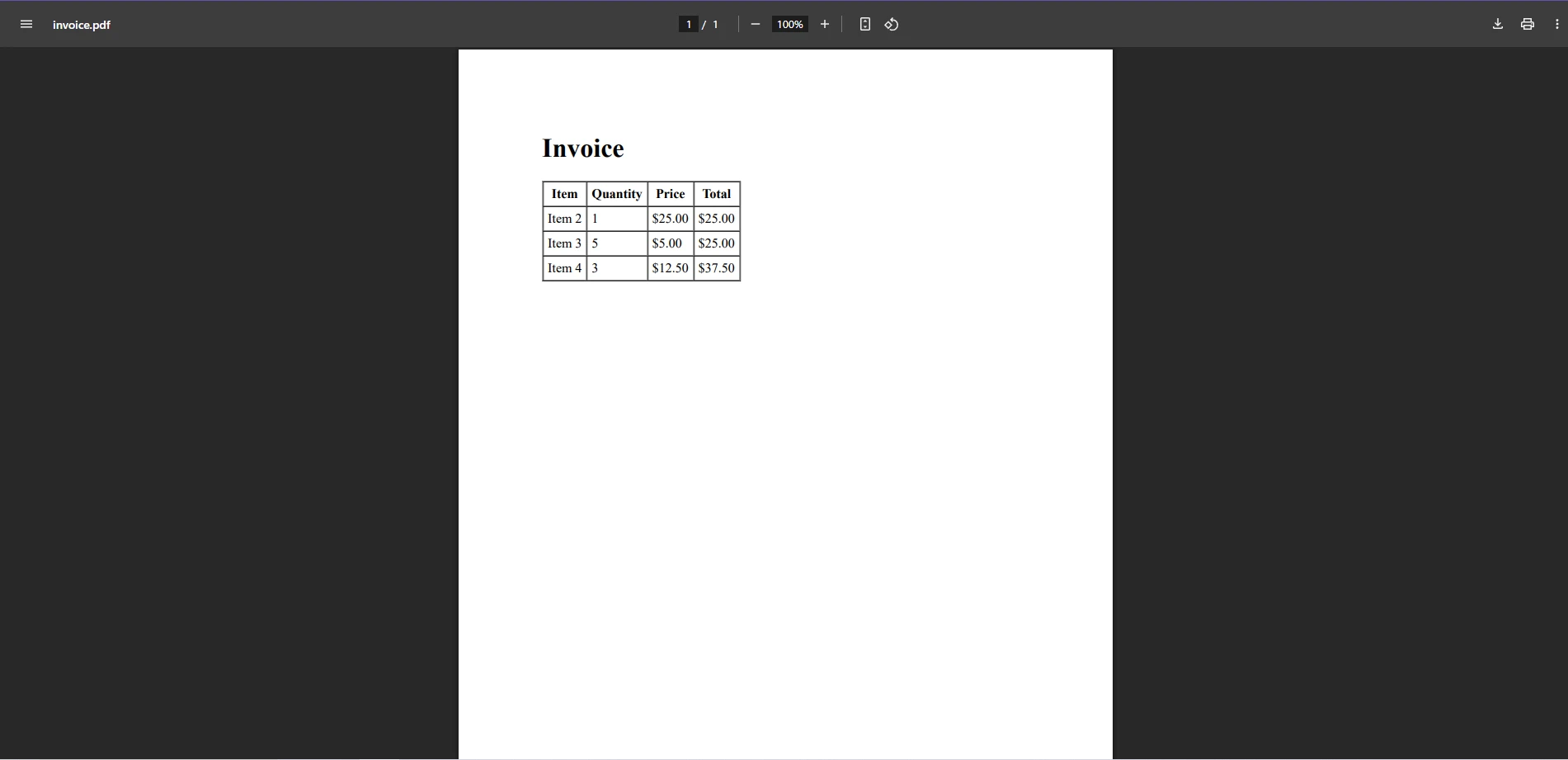
大規模なObservableCollectionインスタンスを扱う場合、パフォーマンスが問題になる可能性があります。 コレクションが変わるたびにPDFを再生成するのは、多くのアイテムがある場合、リソース集約的かもしれません。 これを軽減するために、バッチ処理を検討したり、ページングのようなテクニックを採用して、PDF生成プロセスの過負荷を回避することを検討してください。
PDFレンダリングを効率的にするために、次のヒントを念頭に置いてください。
C#のObservableCollectionとIronPDFを組み合わせることで、アプリケーションのデータにリアルタイムで変更を反映する動的なPDFを簡単に生成することができます。 請求書、レポート、その他のドキュメントを生成する際、このアプローチにより基礎となるコレクションが変わるたびに、自動的にPDFコンテンツが更新されます。
ObservableCollectionの統合により、アプリケーションは常に最新の状態を保つことができ、IronPDFは高品質なPDFのレンダリングを行います。 この記事で説明したベストプラクティスとパフォーマンスのヒントに従うことで、.NETアプリケーションのためのシームレスなPDF生成体験を作成できます。
IronPDFを自分で試してみますか? 無料試用版をダウンロードして、C#のPDFプロジェクトを向上させ、豊富なドキュメントセクションをチェックして、このライブラリの動作を確認してください。

ジェイコブ・メラーはIron Softwareの最高技術責任者(CTO)であり、C# PDFテクノロジーを開拓する先見的なエンジニアです。Iron Softwareのコアコードベースを支えるオリジナル開発者として、彼は創業以来、会社の製品アーキテクチャを形成し、CEOのCameron Rimingtonとともに、会社をNASA、Tesla、および世界的な政府機関にサービスを提供する50人以上の会社に変えました。1999年にロンドンで最初のソフトウェアビジネスを開業し、2005年に最初 for .NETコンポーネントを作成した後、Microsoftのエコシステム全体で複雑な問題を解決することを専門としました。



IronPDF はIRONSUITEの一部です
オフィス文書向けの.NET API製品10個

PDFがHTMLのように見える必要があるとき、迅速に。












