


C# ObservableCollection(對開發者來說是如何工作的)

在C#中,ObservableCollection是一個強大的資料結構,可以在項目新增、刪除或改變時自動通知監聽者。 這在動態資料收集場景中特別有用,例如當您需要在UI或報告中反映即時變更時。 當與IronPDF結合使用時,這個強大的集合可用於根據即時資料生成動態PDF。
IronPDF是用於在C#中生成PDF的穩健程式庫。 憑藉其HTML到PDF的轉換能力,不論您需要生成發票、報告或基於即時資料的任何其他文件,皆可輕鬆建立高品質的PDF。 在本文中,我們將展示如何將ObservableCollection類別與IronPDF整合,利用資料綁定生成在資料更改時動態更新的PDF。
了解ObservableCollection
什麼是ObservableCollection?
ObservableCollection是C#中的一個類別,實現了INotifyCollectionChanged介面,當項目新增、刪除或修改時提供通知。 它通常用於像WPF這樣的UI應用程式中的資料綁定,當集合改變時,自動觸發UI的更新。 和其他像List的集合不同,ObservableCollection提供內建的事件通知,這使得它非常適合資料需要即時反映的場景。
ObservableCollection自動處理整個集合的變更,讓您輕鬆管理並在應用程式中顯示動態資料集合。
常見用例
- 與UI組件綁定:例如在WPF中,ObservableCollection常用於將資料綁定到像ListView、DataGrid和ComboBox這樣的控制項。 當基礎集合發生變化時,UI會自動更新。
- 即時更新:當資料頻繁變更時,ObservableCollection可確保UI始終保持同步。 例如,您可以將其用於即時報告,其中新資料條目被即時新增到集合中,報告相應更新。
- 動態變更:如果您的應用程式允許使用者新增、刪除或修改資料,ObservableCollection可用於自動反映這些變更在UI或其他組件中。
使用IronPDF
IronPDF概述
如我們在本文開頭提到的,IronPDF是一個.NET PDF生成程式庫,簡化PDF文件的建立、修改和渲染。 與其他一些PDF程式庫不同,IronPDF提供豐富的功能集,使得操作PDF變得簡單,如轉換 HTML 到 PDF、新增水印、操控現有的PDF等等。
IronPDF還允許開發者從不同的資料源渲染PDF,包括HTML、圖片和純文字,這在您需要展示動態資料時特別有用。 通過IronPDF的API,您可以生成包括詳細佈局、表格、圖片和樣式的高品質PDF。
IronPDF設置
要開始使用IronPDF,您需要通過NuGet安裝程式庫。 您可以通過在套件管理器主控台中執行以下命令,將其新增到您的專案中:
Install-Package IronPdf
安裝後,您可以初始化IronPDF並使用其強大的功能。 在這篇文章中,我們將專注於從動態資料生成PDF,利用ObservableCollection。
將ObservableCollection與IronPDF整合
用例:從ObservableCollection動態生成PDF
讓我們想像一個情況,您需要從儲存在ObservableCollection中的項目列表生成發票PDF。 當項目新增或從集合中移除時,PDF應該自動重新生成,以反映資料的當前狀態。
對於此任務,ObservableCollection提供了一個管理發票項目的簡單方式,而IronPDF將允許我們生成並將發票導出為PDF格式。
將資料綁定到PDF內容
要將ObservableCollection中的資料綁定到PDF,需要遍歷集合並將其項目新增到PDF內容中。 IronPDF提供了建立表格、新增文字和自定義佈局的方法,使得按結構化格式表示資料變得簡單。
例如,如果您有一個包含多個項目的發票,可透過遍歷ObservableCollection並將每項新增到文件中的表格或列表中動態生成PDF。 IronPDF允許高級自定義,包括調整字體、邊框,甚至包含如標誌或條形碼等圖片。
範例一:使用ObservableCollection生成PDF
讓我們來看看一個簡單的範例來展示這種功能。 假設您有一個人員集合(由Person類別表示),並且您想生成一個反映這些人詳細資訊的PDF。 每當有新的人加入到集合中時,PDF將自動更新。
Person類別範例
public class Person
{
    public string Name { get; set; }
    public int Age { get; set; }
}
public class Person
{
public string Name { get; set; }
public int Age { get; set; }
}Public Class Person
Public Property Name() As String
Public Property Age() As Integer
End Class在這種情況下,Person類別包含基本屬性,如姓名和年齡。 我們將使用這個類別與ObservableCollection結合來動態生成PDF。
建立ObservableCollection
using System.Collections.ObjectModel;

var collection = new ObservableCollection<Person>
{
    new Person { Name = "John Doe", Age = 30 },
    new Person { Name = "Jane Smith", Age = 28 }
};
using System.Collections.ObjectModel;
var collection = new ObservableCollection<Person>
{
new Person { Name = "John Doe", Age = 30 },
new Person { Name = "Jane Smith", Age = 28 }
};Imports System.Collections.ObjectModel
Private collection = New ObservableCollection(Of Person) From {
New Person With {
.Name = "John Doe",
.Age = 30
},
New Person With {
.Name = "Jane Smith",
.Age = 28
}
}這個ObservableCollection包含了一個人的集合,每個都有名字和年齡。 當項目新增或移除時,事件處理程式被觸發,我們將利用它動態更新PDF。
為集合變更新增事件處理程式
在這個例子中,我們訂閱了ObservableCollection類別的CollectionChanged事件,以便每當集合發生改變時自動重新生成PDF。 這在您需要響應新增或移除Person物件等變更時很有用。
// Subscribe to the ObservableCollection's CollectionChanged event
collection.CollectionChanged += (object sender, System.Collections.Specialized.NotifyCollectionChangedEventArgs e) =>
{
    // Regenerate the PDF whenever the collection changes
    GeneratePersonPDF(collection);
};
// Subscribe to the ObservableCollection's CollectionChanged event
collection.CollectionChanged += (object sender, System.Collections.Specialized.NotifyCollectionChangedEventArgs e) =>
{
// Regenerate the PDF whenever the collection changes
GeneratePersonPDF(collection);
};' Subscribe to the ObservableCollection's CollectionChanged event
AddHandler collection.CollectionChanged, Sub(sender As Object, e As System.Collections.Specialized.NotifyCollectionChangedEventArgs)
' Regenerate the PDF whenever the collection changes
GeneratePersonPDF(collection)
End Sub向集合中新增新人物
您可以向集合中新增一個新的人,然後整個集合將觸發事件處理程式重新生成PDF。 這種方法自動處理整個人員列表的變更。
// Adding a new person to the collection
collection.Add(new Person { Name = "Alice Brown", Age = 32 });
// Adding a new person to the collection
collection.Add(new Person { Name = "Alice Brown", Age = 32 });' Adding a new person to the collection
collection.Add(New Person With {
.Name = "Alice Brown",
.Age = 32
})每當您向集合中新增一個新的人時,PDF將重新生成,包括此新條目。
綁定年齡屬性
您還可以將一個人的年齡屬性綁定到某個外部系統(如UI或應用程式的其他部分),以自動反映變更。
這裡是一個年齡屬性在Person類別中綁定的範例:
public class Person
{
    public string Name { get; set; }
    private int _age;
    public int Age
    {
        get { return _age; }
        set
        {
            _age = value;
            // Raise property changed event here if using data binding
        }
    }
}
public class Person
{
public string Name { get; set; }
private int _age;
public int Age
{
get { return _age; }
set
{
_age = value;
// Raise property changed event here if using data binding
}
}
}Public Class Person
Public Property Name() As String
Private _age As Integer
Public Property Age() As Integer
Get
Return _age
End Get
Set(ByVal value As Integer)
_age = value
' Raise property changed event here if using data binding
End Set
End Property
End Class使用ObservableCollection進行綁定
讓我們演示一下使用綁定年齡到UI元素,更新年齡值並觀察集合中變更的反映:
ObservableCollection<Person> people = new ObservableCollection<Person>
{
    new Person { Name = "John", Age = 30 },
    new Person { Name = "Jane", Age = 28 }
};
// Binding the Age of the first person to a UI element (pseudo-code)
someUIElement.Text = people[0].Age.ToString();
ObservableCollection<Person> people = new ObservableCollection<Person>
{
new Person { Name = "John", Age = 30 },
new Person { Name = "Jane", Age = 28 }
};
// Binding the Age of the first person to a UI element (pseudo-code)
someUIElement.Text = people[0].Age.ToString();Dim people As New ObservableCollection(Of Person) From {
New Person With {
.Name = "John",
.Age = 30
},
New Person With {
.Name = "Jane",
.Age = 28
}
}
' Binding the Age of the first person to a UI element (pseudo-code)
someUIElement.Text = people(0).Age.ToString()使用IronPDF生成PDF
現在我們已經設置了ObservableCollection並新增了事件處理程式,該是專注於生成反映動態人物集合的PDF的時候了。
using IronPdf;

public void GeneratePersonPDF(ObservableCollection<Person> people)
{
    var pdf = new ChromePdfRenderer();  // Initialize IronPDF's ChromePdfRenderer class
    // Create HTML content representing the people in the collection
    var htmlContent = "<h1>People Information</h1><table border='1' cellpadding='5' cellspacing='0'>" +
                      "<tr><th>Name</th><th>Age</th></tr>";
    foreach (var person in people)
    {
        htmlContent += $"<tr><td>{person.Name}</td><td>{person.Age}</td></tr>";
    }

    htmlContent += "</table>";
    // Convert the HTML content to a PDF
    var pdfDocument = pdf.RenderHtmlAsPdf(htmlContent);
    // Save the generated PDF to disk
    pdfDocument.SaveAs("PeopleInformation.pdf");
}
using IronPdf;
public void GeneratePersonPDF(ObservableCollection<Person> people)
{
var pdf = new ChromePdfRenderer(); // Initialize IronPDF's ChromePdfRenderer class
// Create HTML content representing the people in the collection
var htmlContent = "<h1>People Information</h1><table border='1' cellpadding='5' cellspacing='0'>" +
"<tr><th>Name</th><th>Age</th></tr>";
foreach (var person in people)
{
htmlContent += $"<tr><td>{person.Name}</td><td>{person.Age}</td></tr>";
}
htmlContent += "</table>";
// Convert the HTML content to a PDF
var pdfDocument = pdf.RenderHtmlAsPdf(htmlContent);
// Save the generated PDF to disk
pdfDocument.SaveAs("PeopleInformation.pdf");
}Imports IronPdf
Public Sub GeneratePersonPDF(ByVal people As ObservableCollection(Of Person))
Dim pdf = New ChromePdfRenderer() ' Initialize IronPDF's ChromePdfRenderer class
' Create HTML content representing the people in the collection
Dim htmlContent = "<h1>People Information</h1><table border='1' cellpadding='5' cellspacing='0'>" & "<tr><th>Name</th><th>Age</th></tr>"
For Each person In people
htmlContent &= $"<tr><td>{person.Name}</td><td>{person.Age}</td></tr>"
Next person
htmlContent &= "</table>"
' Convert the HTML content to a PDF
Dim pdfDocument = pdf.RenderHtmlAsPdf(htmlContent)
' Save the generated PDF to disk
pdfDocument.SaveAs("PeopleInformation.pdf")
End Sub範例二:從ObservableCollection生成PDF發票
這是一個如何使用IronPDF從ObservableCollection的發票項目生成PDF的範例:
步驟1:範例發票項目類別
此類別表示發票中的一個項目,具有項目名稱、數量、價格和總價格的屬性。
public class InvoiceItem
{
    public string ItemName { get; set; }
    public int Quantity { get; set; }
    public decimal Price { get; set; }
    public decimal Total => Quantity * Price;
}
public class InvoiceItem
{
public string ItemName { get; set; }
public int Quantity { get; set; }
public decimal Price { get; set; }
public decimal Total => Quantity * Price;
}Public Class InvoiceItem
Public Property ItemName() As String
Public Property Quantity() As Integer
Public Property Price() As Decimal
Public ReadOnly Property Total() As Decimal
Get
Return Quantity * Price
End Get
End Property
End Class步驟2:範例ObservableCollection
這個範例初始化了一個包含多個發票項目的ObservableCollection。 您可以動態地新增、移除或修改這個集合中的項目。
ObservableCollection<InvoiceItem> invoiceItems = new ObservableCollection<InvoiceItem>
{
    new InvoiceItem { ItemName = "Item 1", Quantity = 2, Price = 10.00m },
    new InvoiceItem { ItemName = "Item 2", Quantity = 1, Price = 25.00m },
    new InvoiceItem { ItemName = "Item 3", Quantity = 5, Price = 5.00m }
};
ObservableCollection<InvoiceItem> invoiceItems = new ObservableCollection<InvoiceItem>
{
new InvoiceItem { ItemName = "Item 1", Quantity = 2, Price = 10.00m },
new InvoiceItem { ItemName = "Item 2", Quantity = 1, Price = 25.00m },
new InvoiceItem { ItemName = "Item 3", Quantity = 5, Price = 5.00m }
};Dim invoiceItems As New ObservableCollection(Of InvoiceItem) From {
New InvoiceItem With {
.ItemName = "Item 1",
.Quantity = 2,
.Price = 10.00D
},
New InvoiceItem With {
.ItemName = "Item 2",
.Quantity = 1,
.Price = 25.00D
},
New InvoiceItem With {
.ItemName = "Item 3",
.Quantity = 5,
.Price = 5.00D
}
}步驟3:使用IronPDF生成PDF
在這裡,我們建立一個函式來生成PDF。 這個函式使用ObservableCollection中的資料並將其轉換為HTML,然後使用IronPDF將其渲染為PDF。
public void GenerateInvoicePDF(ObservableCollection<InvoiceItem> items)
{
    var pdf = new ChromePdfRenderer();  // Initialize IronPDF's ChromePdfRenderer class
    // Create HTML content representing the invoice
    var htmlContent = "<h1>Invoice</h1><table border='1' cellpadding='5' cellspacing='0'>" +
                      "<tr><th>Item</th><th>Quantity</th><th>Price</th><th>Total</th></tr>";
    foreach (var item in items)
    {
        htmlContent += $"<tr><td>{item.ItemName}</td><td>{item.Quantity}</td><td>{item.Price:C}</td><td>{item.Total:C}</td></tr>";
    }
    htmlContent += "</table>";
    // Convert the HTML content to a PDF
    var pdfDocument = pdf.RenderHtmlAsPdf(htmlContent);
    // Save the generated PDF to disk
    pdfDocument.SaveAs("Invoice.pdf");
}
public void GenerateInvoicePDF(ObservableCollection<InvoiceItem> items)
{
var pdf = new ChromePdfRenderer(); // Initialize IronPDF's ChromePdfRenderer class
// Create HTML content representing the invoice
var htmlContent = "<h1>Invoice</h1><table border='1' cellpadding='5' cellspacing='0'>" +
"<tr><th>Item</th><th>Quantity</th><th>Price</th><th>Total</th></tr>";
foreach (var item in items)
{
htmlContent += $"<tr><td>{item.ItemName}</td><td>{item.Quantity}</td><td>{item.Price:C}</td><td>{item.Total:C}</td></tr>";
}
htmlContent += "</table>";
// Convert the HTML content to a PDF
var pdfDocument = pdf.RenderHtmlAsPdf(htmlContent);
// Save the generated PDF to disk
pdfDocument.SaveAs("Invoice.pdf");
}Public Sub GenerateInvoicePDF(ByVal items As ObservableCollection(Of InvoiceItem))
Dim pdf = New ChromePdfRenderer() ' Initialize IronPDF's ChromePdfRenderer class
' Create HTML content representing the invoice
Dim htmlContent = "<h1>Invoice</h1><table border='1' cellpadding='5' cellspacing='0'>" & "<tr><th>Item</th><th>Quantity</th><th>Price</th><th>Total</th></tr>"
For Each item In items
htmlContent &= $"<tr><td>{item.ItemName}</td><td>{item.Quantity}</td><td>{item.Price:C}</td><td>{item.Total:C}</td></tr>"
Next item
htmlContent &= "</table>"
' Convert the HTML content to a PDF
Dim pdfDocument = pdf.RenderHtmlAsPdf(htmlContent)
' Save the generated PDF to disk
pdfDocument.SaveAs("Invoice.pdf")
End Sub步驟4:訂閱CollectionChanged事件
由於ObservableCollection自動通知變更,您可以在集合更新時輕鬆地重新生成PDF。 例如,如果新增或移除項目,PDF可以使用更新的資料重新生成。
這是如何訂閱CollectionChanged事件並在集合變更時重新生成PDF的方法:
// Subscribe to the ObservableCollection's CollectionChanged event
invoiceItems.CollectionChanged += (sender, e) =>
{
// Regenerate the PDF whenever the collection changes
GenerateInvoicePDF(invoiceItems);
};// Subscribe to the ObservableCollection's CollectionChanged event
invoiceItems.CollectionChanged += (sender, e) =>
{
// Regenerate the PDF whenever the collection changes
GenerateInvoicePDF(invoiceItems);
};' Subscribe to the ObservableCollection's CollectionChanged event
AddHandler invoiceItems.CollectionChanged, Sub(sender, e)
' Regenerate the PDF whenever the collection changes
GenerateInvoicePDF(invoiceItems)
End Sub步驟5:新增項目和測試
現在,您可以透過向ObservableCollection新增新項目來測試,並觀察PDF如何自動重新生成。
// Adding a new item to the ObservableCollection
invoiceItems.Add(new InvoiceItem { ItemName = "Item 4", Quantity = 3, Price = 12.50m });// Adding a new item to the ObservableCollection
invoiceItems.Add(new InvoiceItem { ItemName = "Item 4", Quantity = 3, Price = 12.50m });' Adding a new item to the ObservableCollection
invoiceItems.Add(New InvoiceItem With {
.ItemName = "Item 4",
.Quantity = 3,
.Price = 12.50D
})完整程式碼範例
using System;
using System.Collections.ObjectModel;
using IronPdf;
public class InvoiceItem
{
public string ItemName { get; set; }
public int Quantity { get; set; }
public decimal Price { get; set; }
// Property to calculate the total price for each item
public decimal Total => Quantity * Price;
}
public class InvoiceGenerator
{
// Function to generate the invoice PDF
public void GenerateInvoicePDF(ObservableCollection<InvoiceItem> items)
{
    var pdf = new ChromePdfRenderer();  // Initialize IronPDF's ChromePdfRenderer class
    // Create HTML content representing the invoice
    var htmlContent = "<h1>Invoice</h1><table border='1' cellpadding='5' cellspacing='0'>" +
                      "<tr><th>Item</th><th>Quantity</th><th>Price</th><th>Total</th></tr>";
    foreach (var item in items)
    {
        htmlContent += $"<tr><td>{item.ItemName}</td><td>{item.Quantity}</td><td>{item.Price:C}</td><td>{item.Total:C}</td></tr>";
    }
    htmlContent += "</table>";
    // Convert the HTML content to a PDF
    var pdfDocument = pdf.RenderHtmlAsPdf(htmlContent);
    // Save the generated PDF to disk
    pdfDocument.SaveAs("Invoice.pdf");
}
// Main function to test the code
public static void Main(string[] args)
{
var invoiceItems = new ObservableCollection<InvoiceItem>
{
new InvoiceItem { ItemName = "Item 1", Quantity = 2, Price = 10.00m },
new InvoiceItem { ItemName = "Item 2", Quantity = 1, Price = 25.00m },
new InvoiceItem { ItemName = "Item 3", Quantity = 5, Price = 5.00m }
};
var invoiceGenerator = new InvoiceGenerator();
// Subscribe to the ObservableCollection's CollectionChanged event
invoiceItems.CollectionChanged += (sender, e) =>
{
// Regenerate the PDF whenever the collection changes
invoiceGenerator.GenerateInvoicePDF(invoiceItems);
};
// Generate initial PDF
invoiceGenerator.GenerateInvoicePDF(invoiceItems);
// Add a new item to the collection and automatically regenerate the PDF
invoiceItems.Add(new InvoiceItem { ItemName = "Item 4", Quantity = 3, Price = 12.50m });
// Remove an item and see the PDF update
invoiceItems.RemoveAt(0);
}
}using System;
using System.Collections.ObjectModel;
using IronPdf;
public class InvoiceItem
{
public string ItemName { get; set; }
public int Quantity { get; set; }
public decimal Price { get; set; }
// Property to calculate the total price for each item
public decimal Total => Quantity * Price;
}
public class InvoiceGenerator
{
// Function to generate the invoice PDF
public void GenerateInvoicePDF(ObservableCollection<InvoiceItem> items)
{
var pdf = new ChromePdfRenderer(); // Initialize IronPDF's ChromePdfRenderer class
// Create HTML content representing the invoice
var htmlContent = "<h1>Invoice</h1><table border='1' cellpadding='5' cellspacing='0'>" +
"<tr><th>Item</th><th>Quantity</th><th>Price</th><th>Total</th></tr>";
foreach (var item in items)
{
htmlContent += $"<tr><td>{item.ItemName}</td><td>{item.Quantity}</td><td>{item.Price:C}</td><td>{item.Total:C}</td></tr>";
}
htmlContent += "</table>";
// Convert the HTML content to a PDF
var pdfDocument = pdf.RenderHtmlAsPdf(htmlContent);
// Save the generated PDF to disk
pdfDocument.SaveAs("Invoice.pdf");
}
// Main function to test the code
public static void Main(string[] args)
{
var invoiceItems = new ObservableCollection<InvoiceItem>
{
new InvoiceItem { ItemName = "Item 1", Quantity = 2, Price = 10.00m },
new InvoiceItem { ItemName = "Item 2", Quantity = 1, Price = 25.00m },
new InvoiceItem { ItemName = "Item 3", Quantity = 5, Price = 5.00m }
};
var invoiceGenerator = new InvoiceGenerator();
// Subscribe to the ObservableCollection's CollectionChanged event
invoiceItems.CollectionChanged += (sender, e) =>
{
// Regenerate the PDF whenever the collection changes
invoiceGenerator.GenerateInvoicePDF(invoiceItems);
};
// Generate initial PDF
invoiceGenerator.GenerateInvoicePDF(invoiceItems);
// Add a new item to the collection and automatically regenerate the PDF
invoiceItems.Add(new InvoiceItem { ItemName = "Item 4", Quantity = 3, Price = 12.50m });
// Remove an item and see the PDF update
invoiceItems.RemoveAt(0);
}
}Imports System
Imports System.Collections.ObjectModel
Imports IronPdf
Public Class InvoiceItem
Public Property ItemName() As String
Public Property Quantity() As Integer
Public Property Price() As Decimal
' Property to calculate the total price for each item
Public ReadOnly Property Total() As Decimal
Get
Return Quantity * Price
End Get
End Property
End Class
Public Class InvoiceGenerator
' Function to generate the invoice PDF
Public Sub GenerateInvoicePDF(ByVal items As ObservableCollection(Of InvoiceItem))
	Dim pdf = New ChromePdfRenderer() ' Initialize IronPDF's ChromePdfRenderer class
	' Create HTML content representing the invoice
	Dim htmlContent = "<h1>Invoice</h1><table border='1' cellpadding='5' cellspacing='0'>" & "<tr><th>Item</th><th>Quantity</th><th>Price</th><th>Total</th></tr>"
	For Each item In items
		htmlContent &= $"<tr><td>{item.ItemName}</td><td>{item.Quantity}</td><td>{item.Price:C}</td><td>{item.Total:C}</td></tr>"
	Next item
	htmlContent &= "</table>"
	' Convert the HTML content to a PDF
	Dim pdfDocument = pdf.RenderHtmlAsPdf(htmlContent)
	' Save the generated PDF to disk
	pdfDocument.SaveAs("Invoice.pdf")
End Sub
' Main function to test the code
Public Shared Sub Main(ByVal args() As String)
Dim invoiceItems = New ObservableCollection(Of InvoiceItem) From {
New InvoiceItem With {
.ItemName = "Item 1",
.Quantity = 2,
.Price = 10.00D
},
New InvoiceItem With {
.ItemName = "Item 2",
.Quantity = 1,
.Price = 25.00D
},
New InvoiceItem With {
.ItemName = "Item 3",
.Quantity = 5,
.Price = 5.00D
}
}
'INSTANT VB NOTE: The variable invoiceGenerator was renamed since it may cause conflicts with calls to static members of the user-defined type with this name:
Dim invoiceGenerator_Conflict As New InvoiceGenerator()
' Subscribe to the ObservableCollection's CollectionChanged event
AddHandler invoiceItems.CollectionChanged, Sub(sender, e)
' Regenerate the PDF whenever the collection changes
invoiceGenerator_Conflict.GenerateInvoicePDF(invoiceItems)
End Sub
' Generate initial PDF
invoiceGenerator_Conflict.GenerateInvoicePDF(invoiceItems)
' Add a new item to the collection and automatically regenerate the PDF
invoiceItems.Add(New InvoiceItem With {
.ItemName = "Item 4",
.Quantity = 3,
.Price = 12.50D
})
' Remove an item and see the PDF update
invoiceItems.RemoveAt(0)
End Sub
End Class輸出
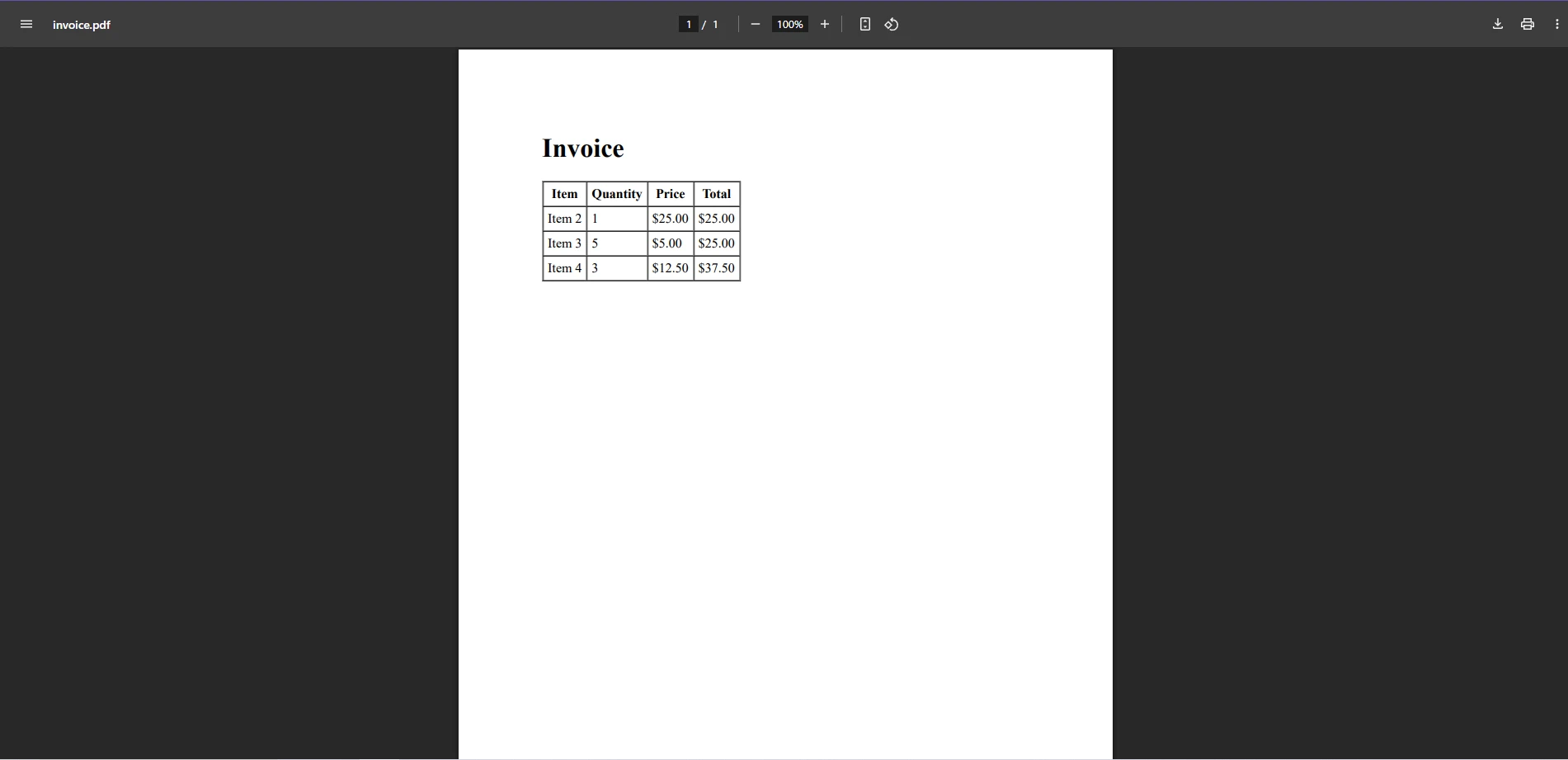
程式碼的功能
- InvoiceItem類別:代表一個具有ItemName、Quantity、Price屬性和計算所得Total屬性的發票項目。
- ObservableCollection:用於儲存發票項目的列表。 該集合自動通知監聽者任何變更(例如,新增或移除項目時)。
- GenerateInvoicePDF:此方法建立表示發票的HTML內容並使用IronPDF將其轉換為PDF。
- CollectionChanged:處理ObservableCollection事件以在集合變更時重新生成PDF,使PDF生成具有動態性。
- 測試:Main方法展示了如何透過向ObservableCollection新增和移除項目觸發PDF重新生成。
效能考量
處理大型集合
當處理大型ObservableCollection實例時,效能可能成為一個問題。 若每次集合發生變化時都重新生成PDF,對於含有大量項目的情況,可能會消耗很多資源。 為了減少影響,考慮批量更新或使用分頁等技術,以避免超載PDF生成過程。
高效的PDF渲染
為了確保PDF渲染的效率,請記住以下提示:
- 最小化不必要的重新渲染:僅在資料顯著變化時(例如,新增或移除項目時)重新生成PDF。
- 優化表格佈局:在渲染大型資料集時,將其分割為較小、更易於管理的部分,以提高渲染時間。
- 使用快取:對於靜態或不頻繁變更的資料,快取先前生成的PDF。
結論
結合C#的ObservableCollection和IronPDF,您可以輕鬆生成反映您應用程式中即時資料變更的動態PDF。 無論您是生成發票、報告或其他文件,這種方法可讓您在基礎集合改變時自動更新PDF內容。
ObservableCollection的整合確保您的應用程式始終保持最新,並以最少的努力,讓IronPDF負責高品質PDF的渲染。 通過遵循本文討論的最佳實踐和效能提示,您可以為您的.NET應用程式創造一個無縫的PDF生成體驗。
想要親自嘗試IronPDF嗎? 立即下載免費試用,提高您的C# PDF專案,並務必查看詳細文件部分,查看更多這個程式庫的應用情形。
常見問題
什麼是C#中的ObservableCollection?
ObservableCollection是C#中的一個類別,實作了INotifyCollectionChanged介面。它提供在項目新增、刪除或修改時的通知,這使其非常適合需要即時更新的UI應用程式中的資料繫結。
如何在C#中從動態資料生成PDF?
使用IronPDF,您可以透過利用C#的ObservableCollection從動態資料中生成PDF。當集合更新時,您可以自動重新生成PDF以反映當前的資料狀態。
使用ObservableCollection進行PDF生成的好處是什麼?
ObservableCollection允許即時資料追蹤,這在需要反映即時資料變更的PDF生成中是有利的。結合IronPDF,它保證資料中的任何更新都能及時反映在PDF輸出中。
如何將資料從ObservableCollection繫結到C#中的PDF?
您可以通過迭代集合項目,並使用IronPDF的方法將它們作為結構化元素(如表格或清單)新增到PDF中來將資料從ObservableCollection繫結到PDF。這確保PDF內容始終與資料同步。
使用ObservableCollection在C#中生成PDF的一個常見用例是什麼?
一個常見的用例是從一個項目的ObservableCollection生成發票。隨著項目從集合中新增或刪除,PDF發票可以重新生成以準確反映當前的項目清單,確保文件的及時更新。
IronPDF如何在C#中處理HTML到PDF的轉換?
IronPDF可使用RenderHtmlAsPdf和RenderHtmlFileAsPdf等方法將HTML轉換為PDF。這允許開發者從網頁或HTML字串中建立PDF,有助於動態內容呈現。
在處理大型ObservableCollections進行PDF生成時應考慮什麼?
當處理大型集合時,請考慮使用分頁、批次更新和優化佈局來防止效能問題。IronPDF的快取和渲染優化也可以幫助有效地管理大型資料。
IronPDF如何提升.NET應用程式中的生產力?
IronPDF通過提供強大的PDF建立功能,如詳細的佈局自訂、HTML到PDF的轉換以及與各種資料源的整合來提升生產力。它簡化了複雜的PDF任務,使開發者能專注於核心應用程式邏輯。










 免費開始
免費開始 免費開始
免費開始 預訂免費直播演示
















