


IronPDF와 Apitron PDF Kit의 비교

프로그래밍 방식으로 PDF 문서를 생성하는 것은 특히 이미지, 테이블, 텍스트, 형식 및 기타 기능을 포함할 때 그 복잡성으로 인해 어려울 수 있습니다.
주요 도전 과제는 일반 텍스트 문서를 PDF 형식으로 변환하는 방법을 찾는 것입니다. 많은 방법이 있지만 원본 문서의 형식을 유지할 방법을 선택하는 것이 중요합니다.
이 튜토리얼에서는 Progress Software Corporation의 Telerik PdfProcessing 라이브러리와 Iron Software의 IronPDF가 PDF 문서를 얼마나 잘 생성할 수 있는지를 비교하겠습니다.
Telerik에서 HTML을 PDF로 변환하는 방법
- C# 라이브러리를 설치하여 HTML을 PDF로 변환
Import메소드를 사용하여 C#에서 기존 HTML 파일을 로드Export메소드로 HTML을 PDF로 변환- 생성된 PDF 문서를 원하는 위치에 내보내기
- C#에서 3 및 4단계를 한 줄로 수행
Telerik PdfProcessing
Telerik PdfProcessing 문서는 Progress의 문서 처리 애플리케이션 포트폴리오의 일부로, 여러분이 코드 없이도 PDF를 생성하고 내보낼 수 있도록 해줍니다. 텍스트 블록, 이미지, 양식, 테이블, 가져오기 및 내보내기와 같은 기능을 가지고 있습니다. 게다가, 이 라이브러리는 순차적인 편집에 적합한 기능을 제공합니다. PdfProcessing 앱은 웹, 데스크톱 및 모바일 플랫폼에서 사용할 수 있습니다.
IronPDF .NET PDF 라이브러리
IronPDF는 Adobe Acrobat이나 다른 타사 소프트웨어를 필요로 하지 않고 PDF를 생성할 수 있는 .NET PDF 라이브러리입니다. 이 라이브러리는 PDF를 처음부터 생성하거나 기존의 .NET 구성요소(예: ASP.NET 공식 사이트 웹 페이지, WPF 사용자 인터페이스 등)를 PDF 파일로 내보낼 수 있습니다.
설치
이 섹션에서는 IronPDF와 Telerik Document Processing 라이브러리를 설치하는 방법을 다룹니다.
Telerik Document Processing 라이브러리 설치
Telerik Document Processing suite를 사용하여 HTML로부터 PDF 문서를 생성하려면, 세 가지 라이브러리를 설치해야 합니다:
- Telerik.Documents.Core.Trial
- Telerik.Documents.Flow.FormatProviders.Doc.Trial
- Telerik.Documents.Flow.FormatProviders.Pdf.Trial
- Telerik.Documents.Flow.Trial
이 라이브러리들은 NuGet 패키지 관리자를 사용하여 설치할 수 있습니다.
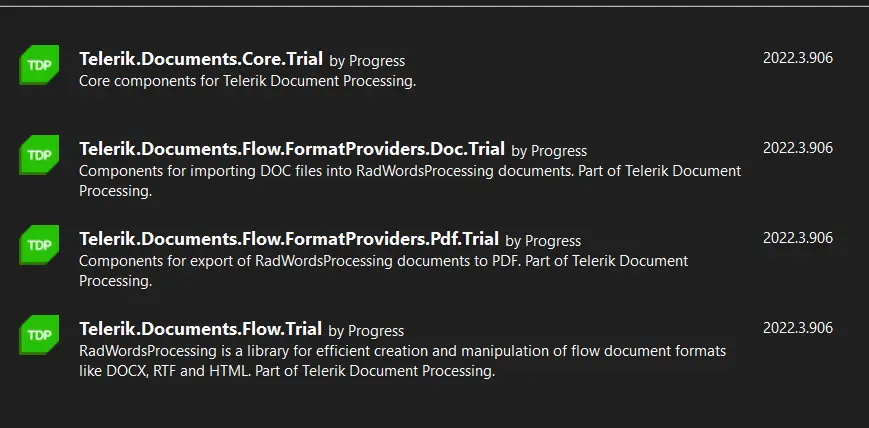
Telerik 및 Kendo UI 라이브러리
IronPDF C#.NET PDF 라이브러리 설치
IronPDF는 세 가지 방법으로 설치할 수 있습니다:
- NuGet 패키지 관리자 콘솔을 통해 설치
- NuGet Visual Studio GUI를 통해 설치
- 수동 설치를 위한 IronPDF DLL 파일을 다운로드하십시오
패키지 관리자 콘솔을 통한 설치는 콘솔에 다음 명령어를 입력해야 합니다.
Install-Package IronPdf
이 명령어는 프로젝트에 최신 IronPDF 라이브러리 버전을 설치합니다. 물론, IronPDF의 최신 버전을 IronPDF의 NuGet 페이지에서 항상 확인할 수 있습니다.
Telerik를 사용하여 PDF 생성
Telerik은 RadFlowDocument 라이브러리 애드온을 사용하여 HTML을 PDF로 변환하는 것을 지원합니다. HTML 문자열을 포함한 HTML 문서를 PDF 문서로 변환할 수 있습니다.
다음 코드를 사용하여 HTML을 PDF로 변환할 수 있습니다.
using Telerik.Windows.Documents.Flow.FormatProviders.Html;
using Telerik.Windows.Documents.Flow.Model;

// Create an HTML format provider for importing HTML files.
HtmlFormatProvider htmlProvider = new Telerik.Windows.Documents.Flow.FormatProviders.Html.HtmlFormatProvider();

// Create a document instance from the content of an HTML file.
RadFlowDocument document = htmlProvider.Import(File.ReadAllText(@"C:\HTML Website\website\index.html"));

// Create a PDF format provider for exporting the document.
Telerik.Windows.Documents.Flow.FormatProviders.Pdf.PdfFormatProvider pdfProvider = new Telerik.Windows.Documents.Flow.FormatProviders.Pdf.PdfFormatProvider();

// Export the document to a byte array.
byte[] pdfBytes = pdfProvider.Export(document);

// Save the PDF byte array to a file.
File.WriteAllBytes(@"C:/test.pdf", pdfBytes);
using Telerik.Windows.Documents.Flow.FormatProviders.Html;
using Telerik.Windows.Documents.Flow.Model;
// Create an HTML format provider for importing HTML files.
HtmlFormatProvider htmlProvider = new Telerik.Windows.Documents.Flow.FormatProviders.Html.HtmlFormatProvider();
// Create a document instance from the content of an HTML file.
RadFlowDocument document = htmlProvider.Import(File.ReadAllText(@"C:\HTML Website\website\index.html"));
// Create a PDF format provider for exporting the document.
Telerik.Windows.Documents.Flow.FormatProviders.Pdf.PdfFormatProvider pdfProvider = new Telerik.Windows.Documents.Flow.FormatProviders.Pdf.PdfFormatProvider();
// Export the document to a byte array.
byte[] pdfBytes = pdfProvider.Export(document);
// Save the PDF byte array to a file.
File.WriteAllBytes(@"C:/test.pdf", pdfBytes);Imports Telerik.Windows.Documents.Flow.FormatProviders.Html
Imports Telerik.Windows.Documents.Flow.Model
' Create an HTML format provider for importing HTML files.
Private htmlProvider As HtmlFormatProvider = New Telerik.Windows.Documents.Flow.FormatProviders.Html.HtmlFormatProvider()
' Create a document instance from the content of an HTML file.
Private document As RadFlowDocument = htmlProvider.Import(File.ReadAllText("C:\HTML Website\website\index.html"))
' Create a PDF format provider for exporting the document.
Private pdfProvider As New Telerik.Windows.Documents.Flow.FormatProviders.Pdf.PdfFormatProvider()
' Export the document to a byte array.
Private pdfBytes() As Byte = pdfProvider.Export(document)
' Save the PDF byte array to a file.
File.WriteAllBytes("C:/test.pdf", pdfBytes)위 코드는 다소 복잡합니다. 먼저 HtmlFormatProvider와 RadFlowDocument을(를) 만들어야 합니다. HtmlFormatProvider의 Import 기능을 사용하여 HTML 파일을 가져오고, 반환된 RadFlowDocument 객체를 사용하여 PdfFormatProvider을(를) 생성합니다. 마지막으로, PdfFormatProvider에서 WriteAllBytes 메서드를 사용하여 PDF 파일을 특정 위치로 내보냅니다.
Telerik에서 생성된 출력물은 좋지 않습니다. Telerik는 HTML 문서의 UI를 유지하지 못했고 이미지를 로드하지 않았습니다.
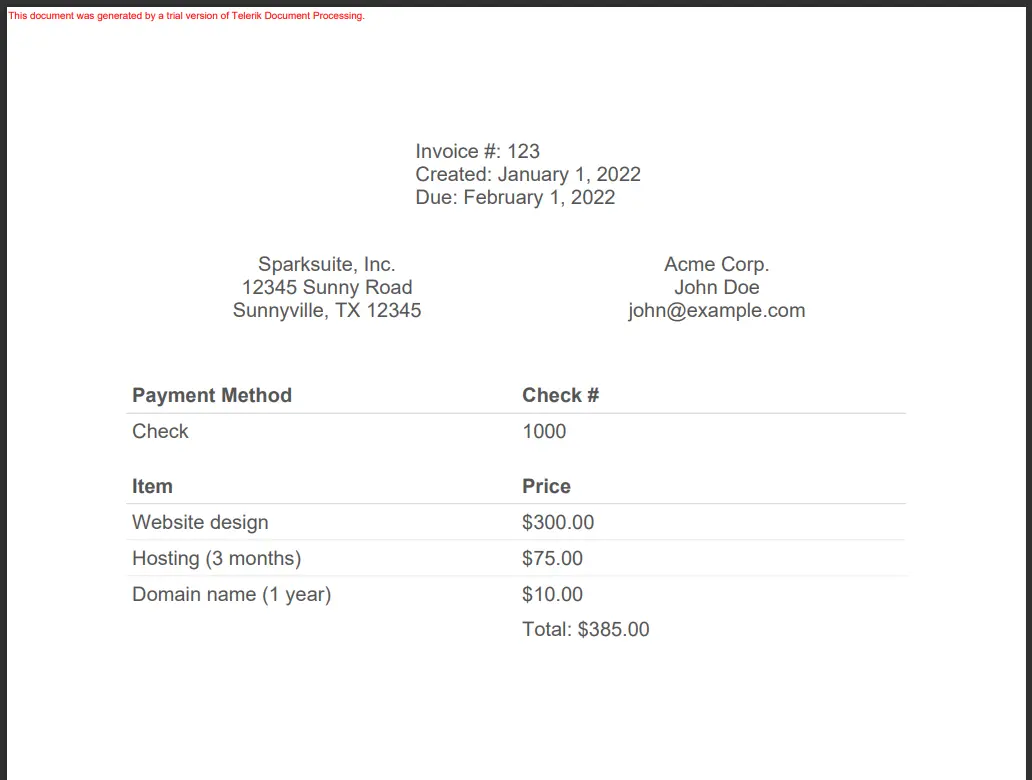
Telerik 출력물
IronPDF를 사용하여 PDF 생성
IronPDF는 HTML 파일, HTML 문자열 및 URL을 사용하여 PDF를 생성할 수 있습니다.
HTML을 PDF로 변환
다음 코드를 사용하여 HTML 파일로 PDF 문서를 생성할 수 있습니다.
using IronPdf;

// Create an instance of ChromePdfRenderer
var IronRenderer = new ChromePdfRenderer();

// Set the renderer's options to fit to the specified paper mode.
IronRenderer.RenderingOptions.FitToPaperMode = IronPdf.Engines.Chrome.FitToPaperModes.FixedPixelWidth;

// Render the HTML file as a PDF document.
var pdfFromHtmlFile = IronRenderer.RenderHtmlFileAsPdf(@"C:\HTML Website\website\index.html");

// Save the rendered PDF document to a file.
pdfFromHtmlFile.SaveAs(@"C:/IronPDF Test.pdf");
using IronPdf;
// Create an instance of ChromePdfRenderer
var IronRenderer = new ChromePdfRenderer();
// Set the renderer's options to fit to the specified paper mode.
IronRenderer.RenderingOptions.FitToPaperMode = IronPdf.Engines.Chrome.FitToPaperModes.FixedPixelWidth;
// Render the HTML file as a PDF document.
var pdfFromHtmlFile = IronRenderer.RenderHtmlFileAsPdf(@"C:\HTML Website\website\index.html");
// Save the rendered PDF document to a file.
pdfFromHtmlFile.SaveAs(@"C:/IronPDF Test.pdf");Imports IronPdf
' Create an instance of ChromePdfRenderer
Private IronRenderer = New ChromePdfRenderer()
' Set the renderer's options to fit to the specified paper mode.
IronRenderer.RenderingOptions.FitToPaperMode = IronPdf.Engines.Chrome.FitToPaperModes.FixedPixelWidth
' Render the HTML file as a PDF document.
Dim pdfFromHtmlFile = IronRenderer.RenderHtmlFileAsPdf("C:\HTML Website\website\index.html")
' Save the rendered PDF document to a file.
pdfFromHtmlFile.SaveAs("C:/IronPDF Test.pdf")RenderHtmlFileAsPdf 메서드는 HTML 파일에서 PDF를 생성하는 데 사용됩니다. 이 함수는 HTML 파일의 모든 콘텐츠를 읽고 관련 CSS 및 JavaScript 파일을 로딩합니다. RenderHtmlFileAsPdf 메서드의 출력은 아래에 표시됩니다.
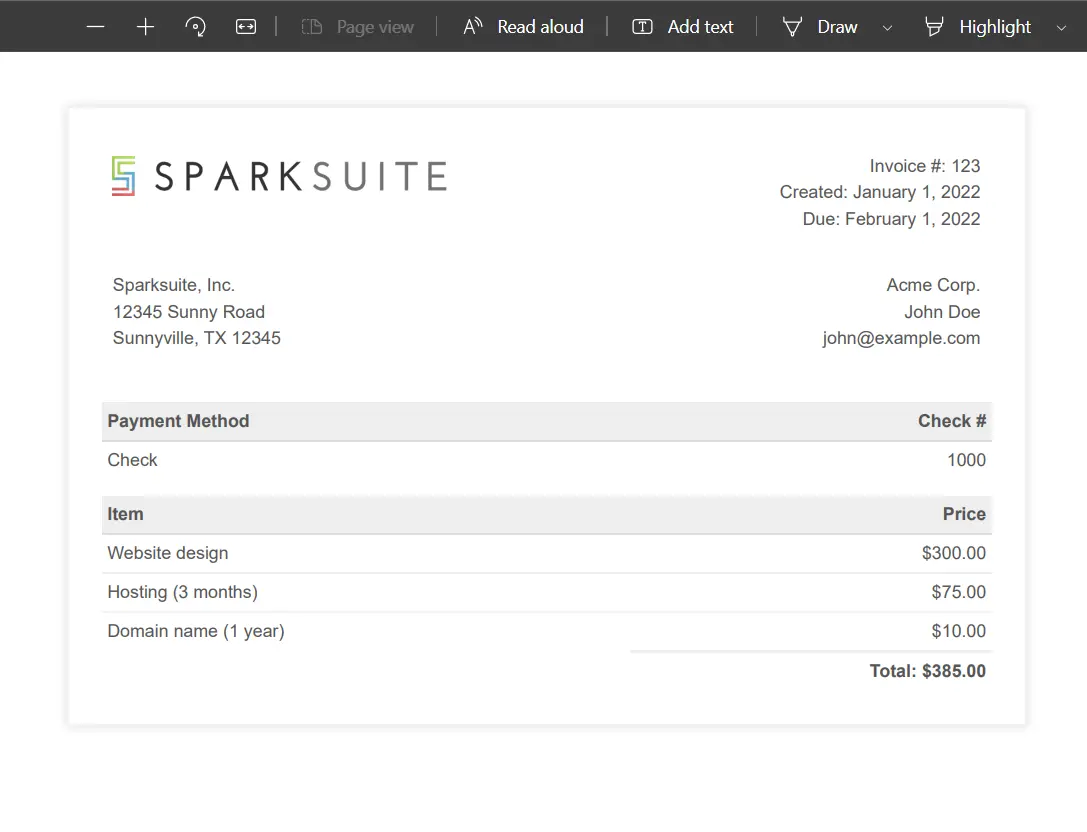
IronPDF HTML을 PDF로 변환
IronPDF는 HTML로부터 매우 아름다운 PDF를 생성합니다. 이 결과는 Telerik이 생성한 PDF보다 다릅니다.
URL에서 PDF로
다음 코드를 사용하여 URL에서 PDF를 생성할 수 있습니다.
using IronPdf.Rendering;
using IronPdf;

// Create an instance of ChromePdfRenderer
ChromePdfRenderer renderer = new ChromePdfRenderer();

// Set the paper size for rendering the PDF.
renderer.RenderingOptions.PaperSize = PdfPaperSize.A2;

// Render the specified URL as a PDF document.
PdfDocument myPdf = renderer.RenderUrlAsPdf("https://dotnet.microsoft.com/en-us/");

// Save the rendered PDF document to a file.
myPdf.SaveAs(@"C:/dotnet.pdf");
using IronPdf.Rendering;
using IronPdf;
// Create an instance of ChromePdfRenderer
ChromePdfRenderer renderer = new ChromePdfRenderer();
// Set the paper size for rendering the PDF.
renderer.RenderingOptions.PaperSize = PdfPaperSize.A2;
// Render the specified URL as a PDF document.
PdfDocument myPdf = renderer.RenderUrlAsPdf("https://dotnet.microsoft.com/en-us/");
// Save the rendered PDF document to a file.
myPdf.SaveAs(@"C:/dotnet.pdf");Imports IronPdf.Rendering
Imports IronPdf
' Create an instance of ChromePdfRenderer
Private renderer As New ChromePdfRenderer()
' Set the paper size for rendering the PDF.
renderer.RenderingOptions.PaperSize = PdfPaperSize.A2
' Render the specified URL as a PDF document.
Dim myPdf As PdfDocument = renderer.RenderUrlAsPdf("https://dotnet.microsoft.com/en-us/")
' Save the rendered PDF document to a file.
myPdf.SaveAs("C:/dotnet.pdf")RenderUrlAsPdf 기능은 웹페이지의 URL을 PDF로 변환합니다. 모든 관련 파일을 렌더링하기 전에 로드하여 놀라운 결과를 만들어냅니다. 모든 색상, 디자인 및 UI를 유지합니다. 아래에 출력을 볼 수 있습니다.

PDF URL
IronPDF에 대한 더 많은 튜토리얼을 확인하고 IronPDF 튜토리얼 페이지에서 액션을 볼 수 있습니다.
비교
IronPDF와 Telerik의 ASP.NET 결과 출력을 본 결과, Telerik은 HTML을 PDF로 변환하기에 좋지 않은 선택이며, 렌더링 품질이 좋지 않습니다. 아래에서 IronPDF와 Telerik의 출력 차이를 볼 수 있습니다.
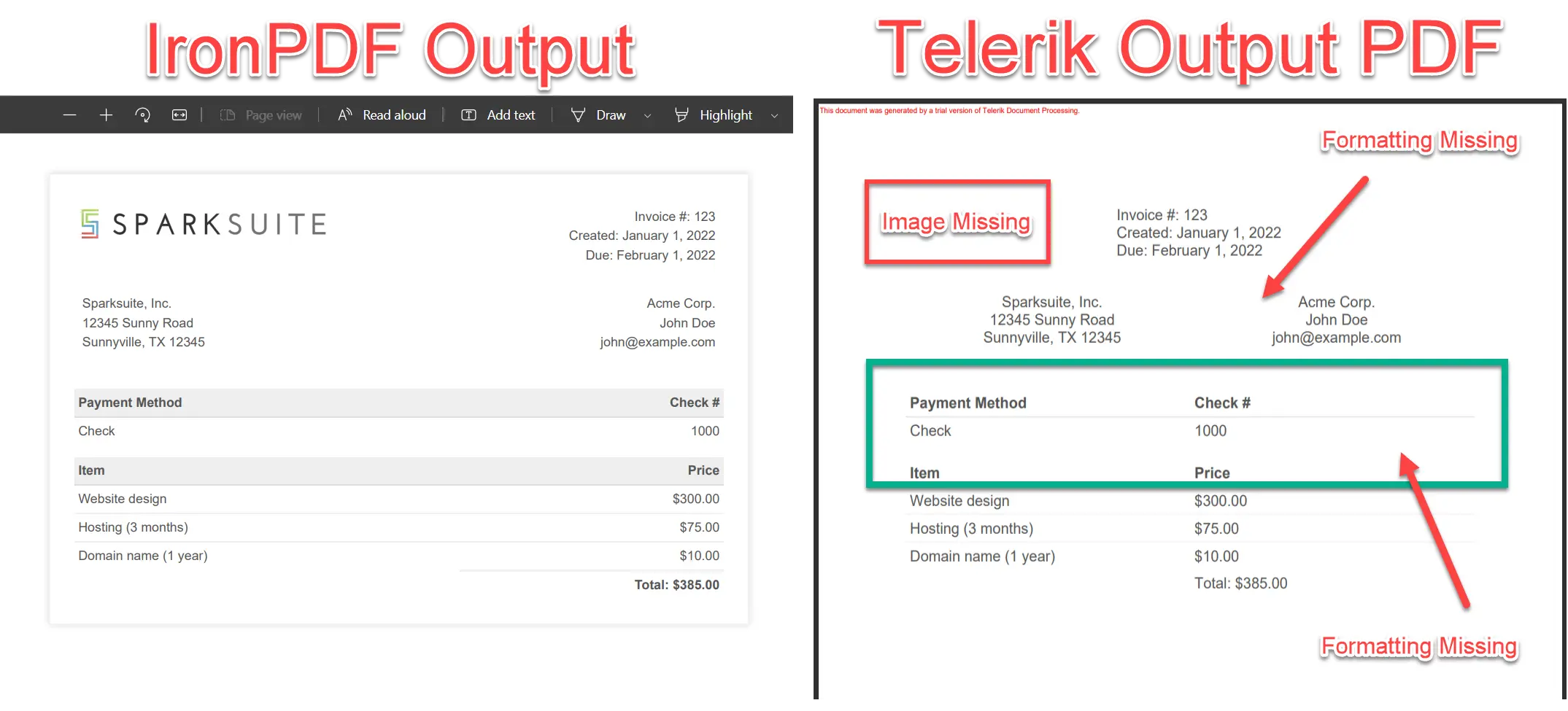
출력 비교
렌더링 품질
위 이미지에서 IronPDF와 Telerik의 표준 출력 간의 명확한 차이를 볼 수 있습니다. 기능을 기준으로 출력을 비교해 봅시다.
Telerik의 렌더링 품질은 좋지 않습니다. 렌더링된 PDF는 서식이 좋지 않아 문서의 원래 스타일을 유지하지 못합니다. 반면에 IronPDF는 탁월한 렌더링 품질을 자랑하며, 소스 문서의 모든 측면을 유지합니다.
CSS 및 JavaScript 지원
Telerik PdfProcessing은 주로 코드 기반 PDF 생성을 위해 설계되었으며, HTML 변환을 위한 외부 CSS 또는 JavaScript 파일을 네이티브로 지원하지 않습니다. 그 초점은 HTML 렌더링보다는 프로그래밍 방식의 문서 생성에 있습니다.
반대로, IronPDF는 내부 및 외부 CSS 및 JavaScript 선언에 대한 완벽한 지원을 제공합니다. IronPDF를 사용하여 JavaScript 처리를 필요에 따라 켜거나 끌 수 있습니다.
Telerik 문서 처리의 제한 사항
요약하자면, HTML-to-PDF 워크플로우에 대한 Telerik PdfProcessing의 추가 제한 사항은 다음과 같습니다:
- Telerik PdfProcessing은 HTML 변환을 위한 외부 CSS 또는 JavaScript 파일을 네이티브로 지원하지 않습니다.
- 브라우저 기반 PDF 생성기와 비교하여 제한된 HTML 렌더링 기능을 가지고 있습니다.
- 내장된 URL-to-PDF 변환 기능이 없습니다.
- HTML 문서 변환보다는 프로그래밍 방식의 PDF 생성을 위해 설계되었습니다.
- HTML 렌더링 품질이 소스 문서의 외형을 일치하지 않을 수 있습니다.
IronPDF 의 특징
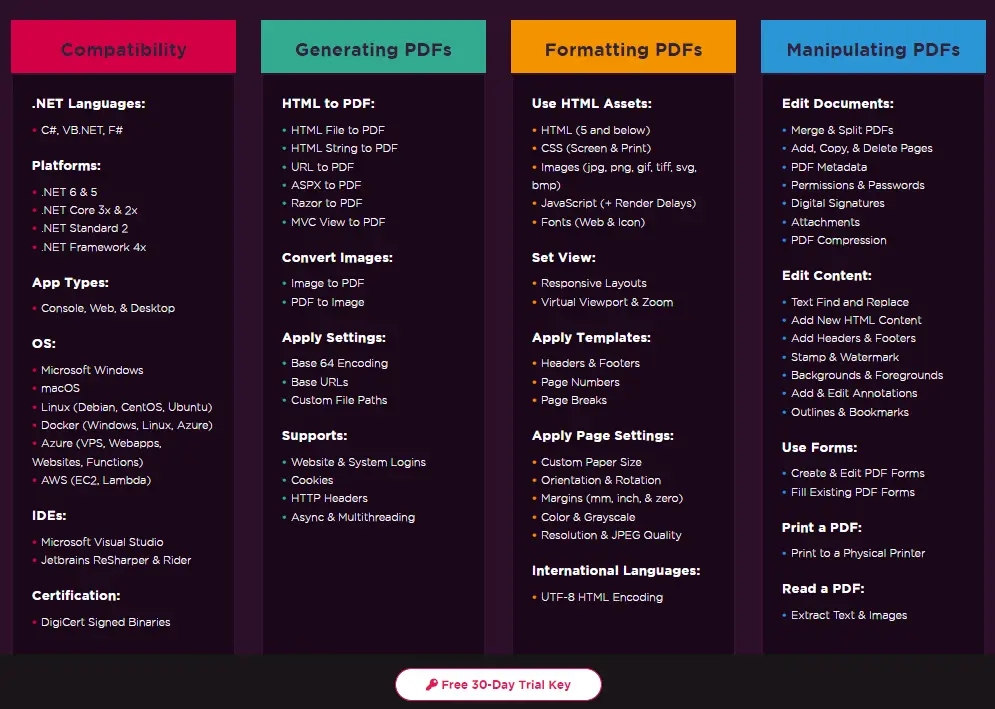
IronPDF의 주요 기능은 다음과 같습니다:
- IronPDF는 URL-to-PDF 및 HTML 파일-to-PDF 변환을 지원합니다.
- IronPDF는 이미지, CSS 및 JS 파일 등 외부 파일을 지원합니다.
- IronPDF는 외부 라이브러리를 사용하지 않고 모든 파일을 자동으로 로드합니다.
- IronPDF는 방대한 문서를 제공합니다.
- IronPDF는 UI를 보존하며 완벽한 렌더링 품질을 제공합니다.
IronPDF의 다른 많은 기능이 있습니다. 최고의 정보를 얻기 위해 IronPDF 기능 페이지를 방문하세요.
IronPDF 기능
결론
이 기사에서 우리는 IronPDF와 Telerik PdfDocument Processing 라이브러리를 비교하여 HTML to PDF 변환에서 IronPDF가 Telerik 라이브러리보다 훨씬 뛰어나다는 것을 발견했습니다.
IronPDF는 모든 PDF 관련 작업에 훌륭한 라이브러리입니다. 모든 최신 .NET 및 .NET Core 프레임워크에서 PDF 파일을 작성, 편집 및 수정할 수 있습니다. IronPDF 제품 번들의 배포 및 라이선싱에 대한 추가 정보는 IronPDF 라이선싱 페이지를 방문하세요.
자주 묻는 질문
C#에서 HTML을 PDF로 변환하는 방법은 무엇인가요?
IronPDF의 RenderHtmlAsPdf 메서드를 사용하여 HTML 문자열을 PDF로 변환할 수 있습니다. 또한 RenderHtmlFileAsPdf 사용하여 HTML 파일을 PDF로 변환할 수도 있습니다.
PDF 생성을 위한 IronPDF 사용의 이점은 무엇입니까?
IronPDF는 우수한 렌더링 품질을 제공하며, 외부 CSS 및 JavaScript 파일을 지원하고, URL을 PDF로 변환할 수 있습니다. 또한 IronPDF는 Telerik PdfProcessing보다 원본 문서의 스타일과 UI를 더 잘 보존합니다.
IronPDF를 사용하여 외부 CSS 및 JavaScript 파일을 처리할 수 있습니까?
네, IronPDF는 외부 CSS 및 JavaScript 파일을 포함할 수 있어 HTML 문서의 정확한 렌더링을 보장합니다.
IronPDF 설치 방법은 무엇이 있습니까?
IronPDF는 NuGet 패키지 관리자 콘솔, NuGet Visual Studio GUI를 사용하여 설치하거나 IronPDF DLL 파일을 다운로드하여 수동으로 설치할 수 있습니다.
Telerik PdfProcessing이 렌더링 품질에 한계가 있는 이유는 무엇입니까?
Telerik PdfProcessing은 외부 CSS, JavaScript, URL을 PDF로 변환할 수 없기 때문에 렌더링 품질이 낮고 문서 기능이 완전하지 못합니다.
IronPDF의 주요 기능은 무엇입니까?
IronPDF는 URL을 PDF로, HTML 파일을 PDF로 변환할 수 있으며, 이미지, CSS, JS와 같은 외부 파일을 처리하고 우수한 렌더링 품질을 제공합니다. 포괄적인 문서화도 포함되어 있습니다.
IronPDF로 URL을 PDF로 변환할 수 있나요?
네, IronPDF는 URL을 PDF로 변환하여 원래 스타일과 콘텐츠를 유지합니다.
패키지 관리자 콘솔을 사용하여 IronPDF를 설치하는 방법은 무엇입니까?
패키지 관리자 콘솔을 통해 IronPDF를 설치하려면 Install-Package IronPdf 명령을 사용하십시오.
PDF 내 이미지 처리에서 Telerik PdfProcessing이 직면하는 도전과제는 무엇입니까?
Telerik PdfProcessing은 외부 CSS 및 JavaScript를 지원하지 않기 때문에 PDF 내 이미지 렌더링에 어려움을 겪어 문서의 총체적인 품질 및 완성도에 영향을 미칠 수 있습니다.
IronPDF는 Telerik과 비교하여 더 나은 PDF 문서 품질을 어떻게 보장합니까?
IronPDF는 외부 CSS 및 JavaScript를 지원하고, 포괄적인 문서화를 제공하며, 원본 문서의 스타일과 UI를 보존하는 강력한 렌더링 기능을 제공하여 더 나은 품질을 보장합니다.









 무료로 시작하세요
 무료로 시작하세요
 무료 라이브 데모 예약하기





 신용카드나 계정 생성은 필요하지 않습니다.










