




업데이트됨 2026년 4월 23일
.NET에서 Microsoft.Extensions.AI로 LLM 통합 간소화
AI는 소프트웨어 개발을 변혁하고 있으나, 대규모 언어 모델(LLM)을 .NET에 통합하는 것은 지금까지 복잡했습니다. 현대에는 OpenAI 기반 PDF 파싱, 데이터 추출 및 콘텐츠 요약을 .NET 애플리케이션에 가져오는 IronPdf.AI로 AI 통합을 더욱 확장하세요.
더 읽어보기

.NET 개발에서 의존성을 효율적으로 관리하는 것은 확장 가능하고, 유지 보수가 가능하며, 테스트 가능한 애플리케이션을 구축하는 데 중요합니다. 의존성 주입(DI) 컨테이너는 제어의 역전(IoC) 원칙을 촉진하여 이러한 목표를 달성하는 데 중요한 역할을 합니다. 사용 가능한 다양한 일반 호스팅 메커니즘 라이브러리 중에서 Autofac은 .NET을 위한 기능이 풍부하고 확장 가능한 프레임워크로 돋보입니다.
이 기사에서는 Autofac .NET 6을 탐색하기 위한 여정을 시작하여 그 기능과 이점을 드러내고 실용적인 사용 예제를 보여줍니다. 이 기사 후반부에서는 Iron Software의 강력한 PDF 생성 라이브러리인 IronPDF에 대해 알아볼 것입니다. 또한 Autofac.NET과 IronPDF가 함께 사용되는 사용 사례를 제시할 것입니다.
Autofac은 오픈 소스의 .NET용 IoC 컨테이너로, 웹 API와 같은 앱에서 의존성 주입과 컴포넌트 등록에 대한 포괄적인 지원을 제공합니다. Nicholas Blumhardt가 개발하고 헌신적인 커뮤니티가 유지 관리하는 Autofac은 객체 수명 관리, 의존성 해결 및 애플리케이션 컴포넌트 구성에 대한 강력하고 유연한 솔루션을 제공합니다.
Autofac이 .NET 애플리케이션을 어떻게 향상시키는지에 대한 추가 정보를 얻으려면 IronPDF의 .NET PDF 라이브러리에서 제공하는 리소스를 탐색해 보세요. 이는 PDF 생성 및 조작을 위한 고급 기능을 강조합니다. 또한 IronBarcode의 .NET 바코드 라이브러리에 깊이 파고들어 바코드 생성에서의 의존성 주입의 실용적인 응용을 확인하십시오.
실제 시나리오에서 Autofac을 사용한 추가 통찰력 및 실질적인 예제에 참여하려면 Iron Software의 공식 페이지를 방문하십시오, 여기서 IronOCR 및 IronXL과 같은 공장 제품을 통해 Autofac 및 .NET 개발 프로세스를 통합하고 향상할 수 있습니다.
컨테이너 빌딩 및 컴포넌트 등록: Autofac을 사용하여 시작 클래스에서 컴포넌트를 등록하여 컨테이너를 빌드할 수 있습니다. 람다, 타입 또는 미리 빌드된 인스턴스를 사용하여 컴포넌트를 등록할 수 있습니다.
public class Startup
{
    public void ConfigureContainer()
    {
        var builder = new ContainerBuilder(); // Create a new container builder
        builder.RegisterInstance(new TaskRepository()).As<ITaskRepository>(); // Register an instance for ITaskRepository
        builder.RegisterType<TaskController>(); // Register TaskController type
        builder.Register(c => new LogManager(DateTime.Now)).As<ILogger>(); // Use lambda expression to register ILogger
        // Scan an assembly for components and register them
        builder.RegisterAssemblyTypes(myAssembly).Where(t => t.Name.EndsWith("Repository")).AsImplementedInterfaces();
        var container = builder.Build(); // Build the container
    }
}Public Class Startup
Public Sub ConfigureContainer()
Dim builder = New ContainerBuilder() ' Create a new container builder
builder.RegisterInstance(New TaskRepository()).As(Of ITaskRepository)() ' Register an instance for ITaskRepository
builder.RegisterType(Of TaskController)() ' Register TaskController type
builder.Register(Function(c) New LogManager(DateTime.Now)).As(Of ILogger)() ' Use lambda expression to register ILogger
' Scan an assembly for components and register them
builder.RegisterAssemblyTypes(myAssembly).Where(Function(t) t.Name.EndsWith("Repository")).AsImplementedInterfaces()
Dim container = builder.Build() ' Build the container
End Sub
End Class의존성 표현: Autofac은 생성자 매개변수 주입, 속성 주입 및 메서드 주입을 처리할 수 있습니다.
public class TaskController
{
    private ITaskRepository _repository;
    private ILogger _logger;

    public TaskController(ITaskRepository repository, ILogger logger)
    {
        _repository = repository; // Assign injected repository to the local variable
        _logger = logger; // Assign injected logger to the local variable
    }
}Public Class TaskController
Private _repository As ITaskRepository
Private _logger As ILogger
Public Sub New(ByVal repository As ITaskRepository, ByVal logger As ILogger)
_repository = repository ' Assign injected repository to the local variable
_logger = logger ' Assign injected logger to the local variable
End Sub
End Class유연한 모듈 시스템: Autofac 모듈은 XML 구성과 코드 기반 등록 간의 균형을 잡습니다. 코드에서 복잡한 등록을 지정하거나 XML을 사용하여 배포 시점의 동작을 변경할 수 있습니다.
public class CarTransportModule : Module
{
    public bool ObeySpeedLimit { get; set; }

    protected override void Load(ContainerBuilder builder)
    {
        builder.RegisterType<Car>().As<IVehicle>(); // Register Car as IVehicle
        if (ObeySpeedLimit)
            builder.RegisterType<SaneDriver>().As<IDriver>(); // Register SaneDriver if speed limit is to be obeyed
        else
            builder.RegisterType<CrazyDriver>().As<IDriver>(); // Register CrazyDriver otherwise
    }
}Public Class CarTransportModule
Inherits Module
Public Property ObeySpeedLimit() As Boolean
Protected Overrides Sub Load(ByVal builder As ContainerBuilder)
builder.RegisterType(Of Car)().As(Of IVehicle)() ' Register Car as IVehicle
If ObeySpeedLimit Then
builder.RegisterType(Of SaneDriver)().As(Of IDriver)() ' Register SaneDriver if speed limit is to be obeyed
Else
builder.RegisterType(Of CrazyDriver)().As(Of IDriver)() ' Register CrazyDriver otherwise
End If
End Sub
End Class간단한 확장 포인트: Autofac은 컴포넌트 활성화 또는 해제를 사용자 정의하기 위한 활성화 이벤트를 제공합니다.
var builder = new ContainerBuilder();
builder.RegisterType<Listener>().As<IListener>().OnActivated(e => e.Instance.StartListening()); // Setup activation event
builder.RegisterType<Processor>().OnActivating(e => e.Instance.Initialize()); // Setup activating event
var container = builder.Build();Dim builder = New ContainerBuilder()
builder.RegisterType(Of Listener)().As(Of IListener)().OnActivated(Function(e) e.Instance.StartListening()) ' Setup activation event
builder.RegisterType(Of Processor)().OnActivating(Function(e) e.Instance.Initialize()) ' Setup activating event
Dim container = builder.Build()유연한 컴포넌트 등록: Autofac은 수동 등록, 어셈블리 스캔, 어트리뷰트 기반 등록을 포함한 다양한 등록 기술을 사용하여 개발자가 컴포넌트를 등록할 수 있습니다. 이 유연성은 컴포넌트 인스턴스화 및 구성에 대한 세밀한 제어를 가능하게 합니다.
수명 관리: Autofac은 싱글톤, 의존성별 인스턴스, 수명 범위별 인스턴스, 요청별 인스턴스를 포함한 다양한 객체 수명 범위를 지원합니다. 이러한 세밀한 객체 수명 제어는 효율적인 자원 활용을 보장하고 장기 실행 애플리케이션에서 메모리 누수를 방지합니다.
자동 의존성 해결: Autofac은 등록된 컴포넌트 등록과 의존성에 기반하여 의존성을 자동으로 해결합니다. 이 자동 배선은 복잡한 객체 그래프의 구성을 단순화하고 컴포넌트 간의 느슨한 결합을 촉진합니다.
모듈 구성: Autofac은 개발자가 모듈을 사용하여 컴포넌트 등록을 구성하고 캡슐화할 수 있습니다. 모듈은 관련 등록을 위한 논리적 컨테이너 역할을 하며, 다수의 컴포넌트를 가진 대규모 애플리케이션을 더 쉽게 관리하고 유지 보수할 수 있습니다.
인터셉션 및 AOP: Autofac은 인터셉션 확장을 통해 인터셉션 및 관점 지향 프로그래밍(AOP)에 대한 지원을 제공합니다. 인터셉션을 통해 개발자는 구현을 수정하지 않고도 로깅, 캐싱, 보안과 같은 횡단 관심사를 컴포넌트에 적용할 수 있습니다.
ASP.NET Core 및 .NET Core 통합: Autofac은 .NET Core와 ASP.NET Core와 매끄럽게 통합되어 현대 웹 애플리케이션과 마이크로서비스에서의 의존성 주입을 위한 일급 지원을 제공합니다. 내장된 서비스 제공자 추상을 활용하여 .NET 에코시스템과의 호환성 및 상호 운용성을 보장합니다.
Autofac.NET 사용 예제를 설명하기 위해 몇 가지 실용적인 예제를 살펴보겠습니다:
public class Program
{
    public static void Main()
    {
        // Setting up Autofac container
        var builder = new ContainerBuilder();

        // Registering types manually
        builder.RegisterType<MyService>().As<IMyService>();

        // Registering types using assembly scanning
        builder.RegisterAssemblyTypes(typeof(MyAssembly).Assembly)
            .Where(t => t.Name.EndsWith("Repository"))
            .AsImplementedInterfaces();

        // Registering modules
        builder.RegisterModule(new MyModule());

        // Building the container
        var container = builder.Build();

        // Resolving dependencies
        using (var scope = container.BeginLifetimeScope())
        {
            var service = scope.Resolve<IMyService>();
            service.DoSomething();
        }
    }
}Public Class Program
Public Shared Sub Main()
' Setting up Autofac container
Dim builder = New ContainerBuilder()
' Registering types manually
builder.RegisterType(Of MyService)().As(Of IMyService)()
' Registering types using assembly scanning
builder.RegisterAssemblyTypes(GetType(MyAssembly).Assembly).Where(Function(t) t.Name.EndsWith("Repository")).AsImplementedInterfaces()
' Registering modules
builder.RegisterModule(New MyModule())
' Building the container
Dim container = builder.Build()
' Resolving dependencies
Using scope = container.BeginLifetimeScope()
Dim service = scope.Resolve(Of IMyService)()
service.DoSomething()
End Using
End Sub
End Class이 섹션에서는 의존성 주입을 위한 Autofac.NET의 실용적인 구현을 시연했습니다. 수동 등록에서 어셈블리 스캔 및 모듈 기반 등록에 이르기까지, 우리는 Autofac이 의존성 관리를 제공하는 유연성을 보여주었습니다. 이러한 기술을 활용하여 개발자는 애플리케이션의 의존성 주입 프로세스를 간소화하여 유지 보수성과 확장성을 향상시킬 수 있습니다.
Iron Software의 제품이 .NET 응용 프로그램과 통합하여 기능을 더욱 간소화하고 향상시키는 방법에 대한 추가 정보를 원한다면, 프로그래밍 방식으로 PDF 문서를 생성하고 편집하는 방법을 배울 수 있는 IronPDF 문서를 탐색하거나 Iron Software의 웹사이트를 방문하여 바코드를 읽고 쓰는 IronBarcode와 고급 광학 문자 인식을 위한 IronOCR와 같은 강력한 .NET 라이브러리를 발견하십시오.
단순성과 유연성: Autofac은 구성 요소 등록 및 해결에 대한 간단하고 직관적인 API를 제공하여 종속성 주입을 쉽게 구현하고 유지할 수 있게 합니다.
테스트 가능성과 유지 관리성: 느슨한 결합과 종속성 반전을 촉진함으로써 Autofac은 .NET 응용 프로그램의 테스트 가능성과 유지 관리성을 높여 단위 테스트 및 리팩토링을 쉽게 수행할 수 있습니다.
성능과 확장성: Autofac의 경량 및 효율적인 런타임 성능은 대규모 객체 그래프가 있는 고성능 응용 프로그램 및 확장 가능한 시스템에 적합합니다.
확장성 및 사용자 정의: Autofac의 확장 가능한 아키텍처는 개발자가 사용자 지정 모듈, 등록 소스 및 미들웨어 구성 요소를 통해 Autofac의 동작을 확장하고 사용자 정의할 수 있도록 하여 다양한 응용 프로그램 요구 사항을 충족할 수 있습니다.
커뮤니티와 지원: 활발한 개발자 커뮤니티와 포괄적인 문서 덕분에 Autofac은 학습, 문제 해결 및 프레임워크 기여에 대한 훌륭한 지원과 리소스를 제공합니다.
Autofac은 개발 및 상업적 용도를 위한 무료 MIT License와 함께 제공됩니다.
IronPDF는 .NET 프로젝트에서 PDF 관리를 위한 종합적인 솔루션을 제공하도록 설계된 강력한 C# PDF 라이브러리입니다. PDF 문서를 생성, 편집, 내보내기, 보안 설정, 로드 또는 조작하는 것이 필요하다면 IronPDF는 필요한 도구를 제공합니다. 다음은 주목할 만한 기능 및 활용 사례입니다:
HTML to PDF 변환: HTML 콘텐츠를 PDF로 손쉽게 변환합니다. HTML, MVC, ASPX 및 이미지에서 PDF 생성.
PDF 관리: 50개 이상의 기능을 통해 IronPDF는 PDF 서명, 편집 및 콘텐츠 추출을 할 수 있으며, 디지털 서명 및 수정을 쉽게 처리합니다.
크로스 플랫폼 지원: C#, F#, VB.NET과 호환되며 .NET Core, .NET Standard, .NET Framework를 포함한 다양한 .NET 버전에서 실행됩니다. Java, Node.js 및 Python에서도 사용할 수 있습니다.
IronPDF가 프로젝트에 PDF 기능을 통합하는 방법에 대해 더 알고 싶다면 IronPDF 제품 페이지를 방문하십시오.
IronBarcode, IronOCR 등을 포함한 Iron Software의 제품 제공에 대한 포괄적인 개요를 보려면 Iron Software 홈페이지를 방문하십시오.
.NET 버전: C#, VB.NET, F#을 지원합니다.
프로젝트 유형: 웹(Blazor 및 WebForms와 IronPDF), 데스크탑(WPF 및 MAUI), 콘솔 응용 프로그램에 적합합니다.
앱 환경: Windows, Linux, Mac, Docker, Azure, AWS 등과 호환됩니다.
IDE: Microsoft Visual Studio 및 JetBrains Rider와 원활하게 통합됩니다.
OS 및 프로세서: Windows, Mac 및 Linux(x64, x86, ARM)에서 작동합니다.
호환성: 다양한 PDF 버전(1.2 - 1.7), PDF/UA 및 PDF/A를 지원합니다.
사용자 정의: PDF 파일의 속성, 보안 및 압축 설정을 할 수 있습니다.
메타데이터 및 구조: 메타데이터, 수정 이력 및 문서 구조를 편집합니다.
템플릿 및 설정: 페이지 템플릿, 머리글, 바닥글 및 페이지 설정을 적용합니다.
자세한 기능 및 구현 방법에 대한 정보는 IronPDF의 공식 사이트에서 PDF 생성 및 조작에 관한 상세 가이드를 방문하십시오.
효율성: 효율적인 PDF 생성을 위한 완전한 멀티 스레딩 및 비동기 지원.
우선순위: 정확성, 사용의 용이성 및 속도에 중점을 둡니다.
이제 이 두 라이브러리를 사용한 실용 예를 살펴보겠습니다.
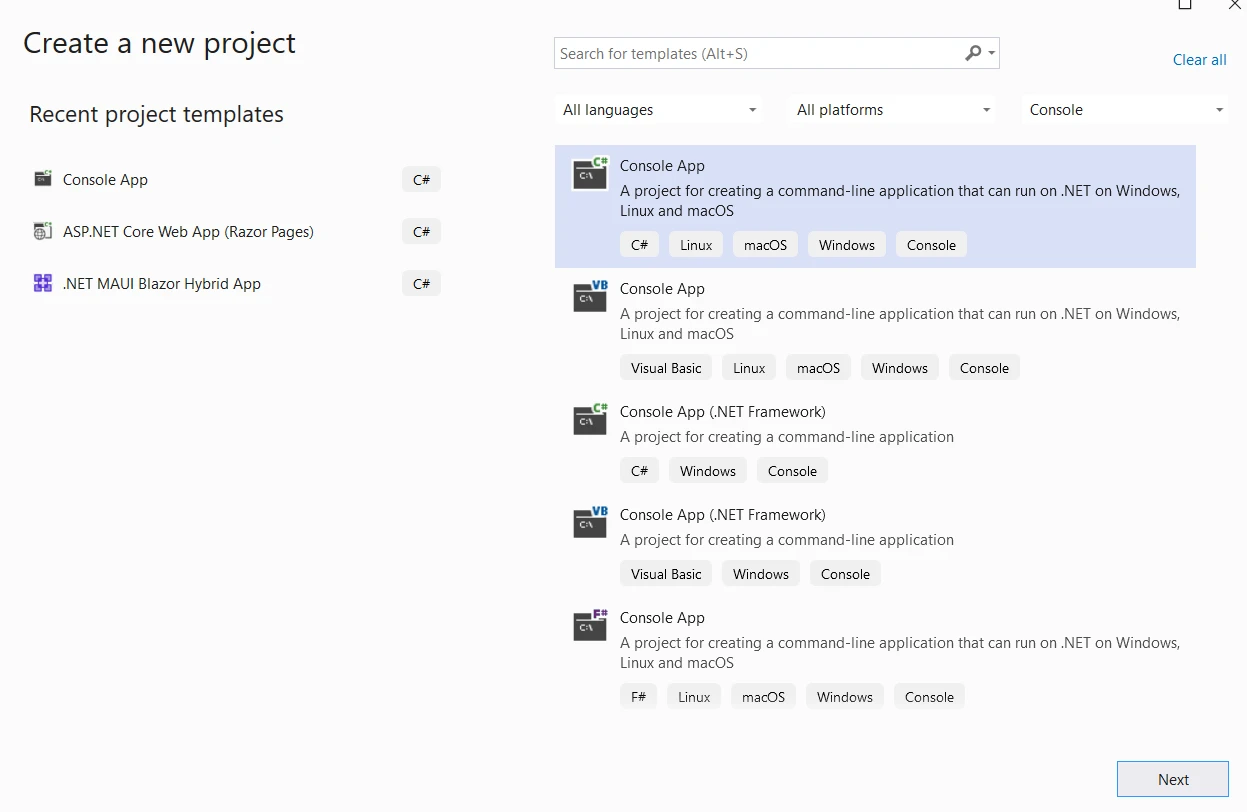
먼저 Visual Studio 콘솔 응용 프로그램을 만듭니다
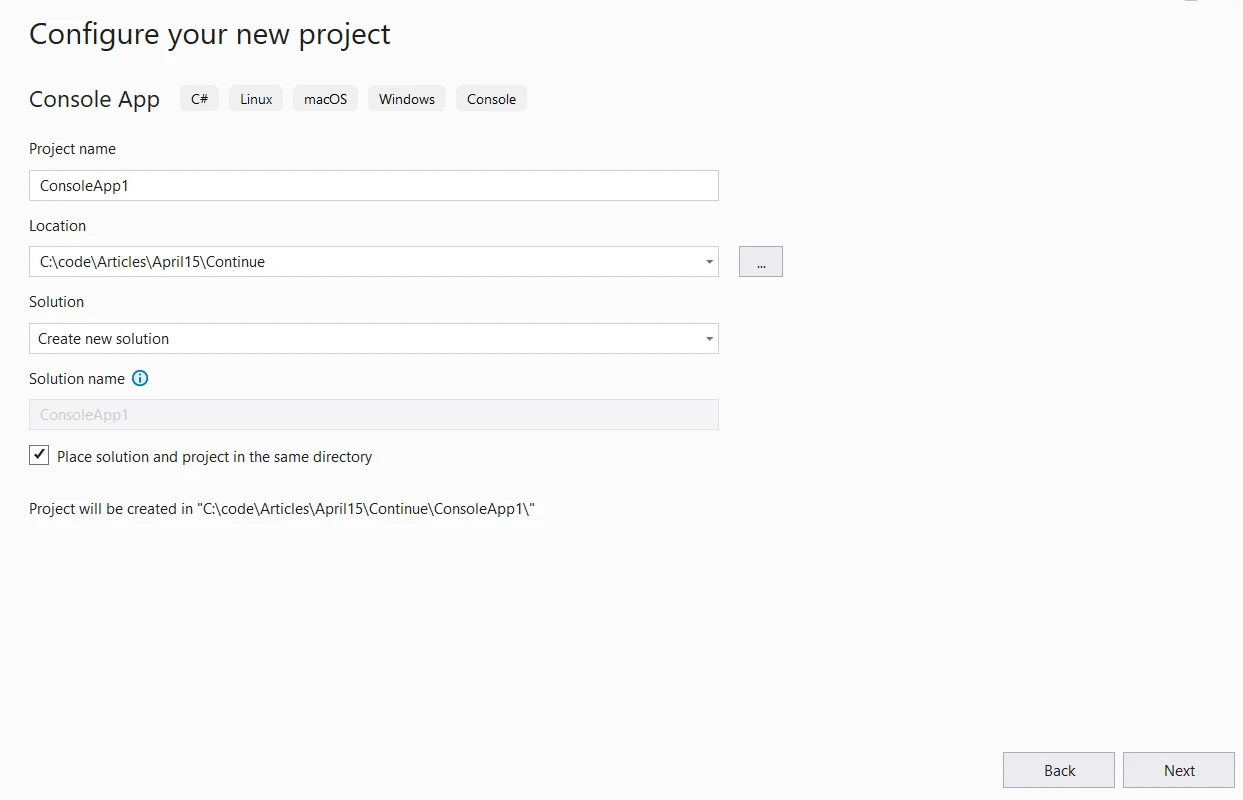
프로젝트 이름과 위치를 제공합니다.
다음 단계에서는 필요한 .NET 버전을 선택하고 생성 버튼을 클릭하십시오.
그런 다음 Visual Studio 패키지 관리자의 NuGet 패키지에서 IronPDF 라이브러리를 설치하십시오.
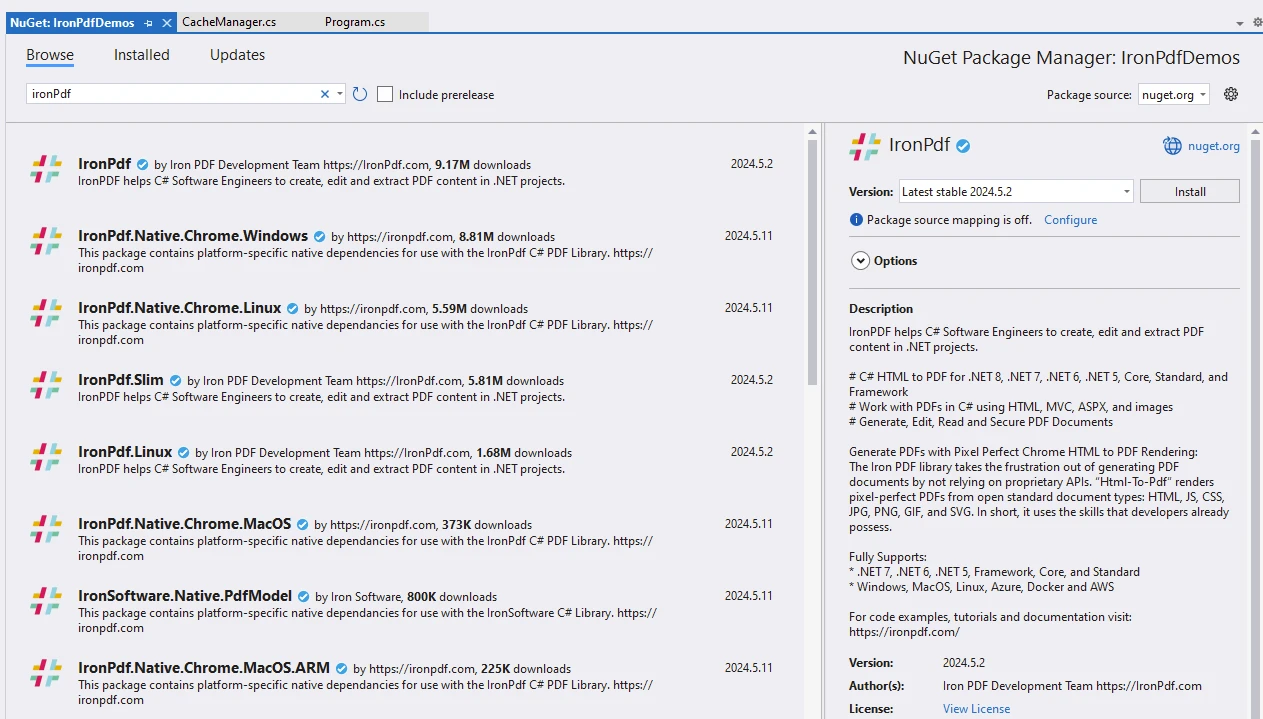
IronPDF 라이브러리 설치 및 활용에 대한 추가 정보는 IronPDF 문서를 방문하십시오.
Visual Studio 패키지 관리자의 NuGet 패키지에서 Autofac을 설치하십시오.
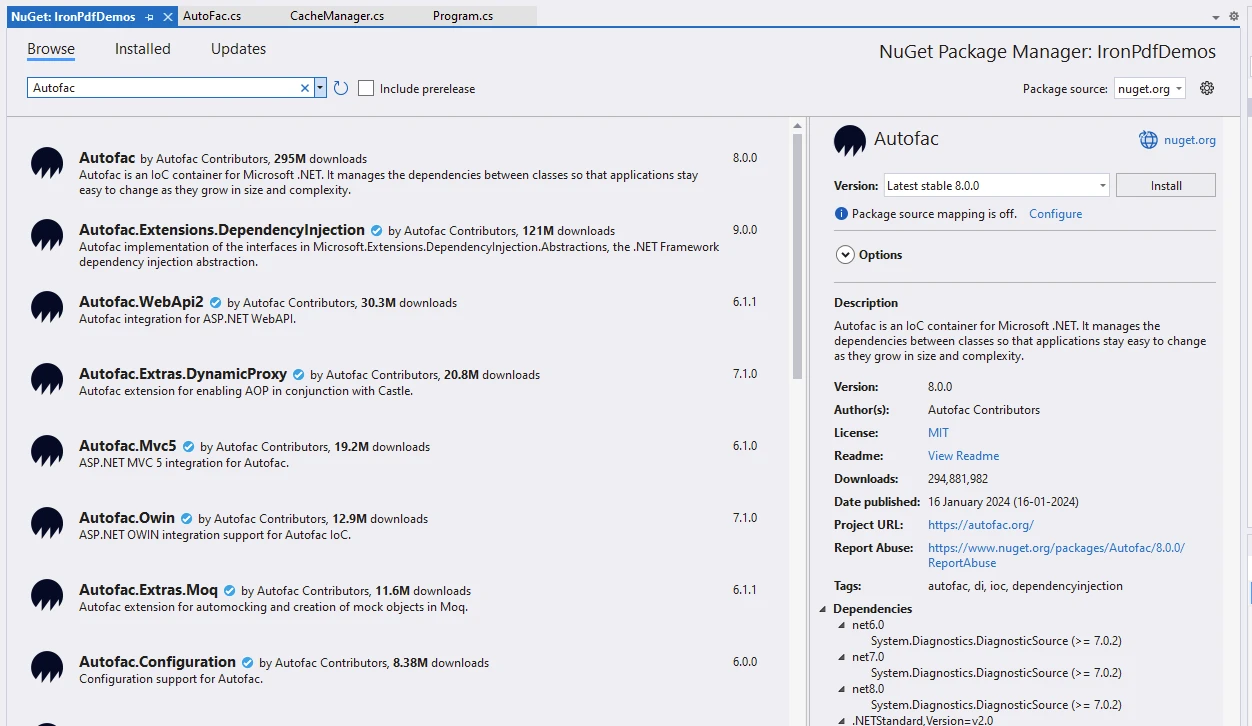
Autofac 문서 페이지를 방문하여 Autofac에 대해 자세히 알아보세요.
using Autofac;
using CacheManager.Core;
using IronPdf;
using System.Reflection;

namespace IronPdfDemos
{
    public class AutoFac
    {
        public static void Execute()
        {
            // Instantiate Cache and ChromePdfRenderer
            var renderer = new ChromePdfRenderer();
            var cache = CacheFactory.Build("ironPdfAutofac", settings =>
            {
                settings.WithDictionaryHandle();
            });

            // Prepare HTML content
            var content = "<h1>Demonstrate Autofac with IronPDF</h1>";
            content += "<p>This is an illustration of using Autofac for dependency injection and IronPDF for generating PDF documents.</p>";
            content += "<h2>Setting up Autofac container</h2>";

            // Setting up Autofac container
            var builder = new ContainerBuilder();
            content += "<p>var builder = new ContainerBuilder();</p>";

            content += "<h2>Registering types manually</h2>";
            // Registering types manually
            builder.RegisterType<MyService>().As<IMyService>();
            content += "<p>builder.RegisterType<MyService>().As<IMyService();</p>";

            content += "<h2>Registering types using assembly scanning</h2>";
            // Registering types using assembly scanning
            builder.RegisterAssemblyTypes(typeof(AutoFac).Assembly)
                .Where(t => t.Name.EndsWith("Repository"))
                .AsImplementedInterfaces();
            content += "<p>builder.RegisterAssemblyTypes(typeof(AutoFac).Assembly).Where(t => t.Name.EndsWith(\"Repository\")).AsImplementedInterfaces();</p>";

            content += "<h2>Registering modules</h2>";
            // Registering modules
            builder.RegisterModule(new MyModule());
            content += "<p>builder.RegisterModule(new MyModule());</p>";

            content += "<h2>Building the container</h2>";
            // Building the container
            var container = builder.Build();
            content += "<p>var container = builder.Build();</p>";

            content += "<h2>Resolving dependencies</h2>";
            // Resolving dependencies
            using (var scope = container.BeginLifetimeScope())
            {
                var service = scope.Resolve<IMyService>();
                service.DoSomething();
            }
            content += "<p>var service = scope.Resolve<IMyService();</p>";

            // Create a PDF from the HTML string using C#
            var pdf = renderer.RenderHtmlAsPdf(content);
            // Export to a file or Stream
            pdf.SaveAs("autofac.pdf");
            Console.WriteLine("We are done...");
            Console.ReadKey();
        }
    }

    internal interface IMyService
    {
        void DoSomething();
    }

    internal class MyModule : Module
    {
        protected override void Load(ContainerBuilder builder)
        {
            // Register module dependencies here
        }
    }

    internal class MyService : IMyService
    {
        public void DoSomething()
        {
            Console.WriteLine("DoSomething");
        }
    }
}Imports Autofac
Imports CacheManager.Core
Imports IronPdf
Imports System.Reflection
Namespace IronPdfDemos
Public Class AutoFac
Public Shared Sub Execute()
' Instantiate Cache and ChromePdfRenderer
Dim renderer = New ChromePdfRenderer()
Dim cache = CacheFactory.Build("ironPdfAutofac", Sub(settings)
settings.WithDictionaryHandle()
End Sub)
' Prepare HTML content
Dim content = "<h1>Demonstrate Autofac with IronPDF</h1>"
content &= "<p>This is an illustration of using Autofac for dependency injection and IronPDF for generating PDF documents.</p>"
content &= "<h2>Setting up Autofac container</h2>"
' Setting up Autofac container
Dim builder = New ContainerBuilder()
content &= "<p>var builder = new ContainerBuilder();</p>"
content &= "<h2>Registering types manually</h2>"
' Registering types manually
builder.RegisterType(Of MyService)().As(Of IMyService)()
content &= "<p>builder.RegisterType<MyService>().As<IMyService();</p>"
content &= "<h2>Registering types using assembly scanning</h2>"
' Registering types using assembly scanning
builder.RegisterAssemblyTypes(GetType(AutoFac).Assembly).Where(Function(t) t.Name.EndsWith("Repository")).AsImplementedInterfaces()
content &= "<p>builder.RegisterAssemblyTypes(typeof(AutoFac).Assembly).Where(t => t.Name.EndsWith(""Repository"")).AsImplementedInterfaces();</p>"
content &= "<h2>Registering modules</h2>"
' Registering modules
builder.RegisterModule(New MyModule())
content &= "<p>builder.RegisterModule(new MyModule());</p>"
content &= "<h2>Building the container</h2>"
' Building the container
Dim container = builder.Build()
content &= "<p>var container = builder.Build();</p>"
content &= "<h2>Resolving dependencies</h2>"
' Resolving dependencies
Using scope = container.BeginLifetimeScope()
Dim service = scope.Resolve(Of IMyService)()
service.DoSomething()
End Using
content &= "<p>var service = scope.Resolve<IMyService();</p>"
' Create a PDF from the HTML string using C#
Dim pdf = renderer.RenderHtmlAsPdf(content)
' Export to a file or Stream
pdf.SaveAs("autofac.pdf")
Console.WriteLine("We are done...")
Console.ReadKey()
End Sub
End Class
Friend Interface IMyService
Sub DoSomething()
End Interface
Friend Class MyModule
Inherits Module
Protected Overrides Sub Load(ByVal builder As ContainerBuilder)
' Register module dependencies here
End Sub
End Class
Friend Class MyService
Implements IMyService
Public Sub DoSomething() Implements IMyService.DoSomething
Console.WriteLine("DoSomething")
End Sub
End Class
End Namespace제공된 코드 스니펫을 분석해 봅시다.
ChromePdfRenderer 설정:
ChromePdfRenderer 인스턴스를 초기화합니다. 이는 IronPDF의 주요 기능입니다.HTML 콘텐츠 준비:
content 변수는 PDF 생성을 위해 사용될 HTML 문자열입니다.
여기에는 "Demonstrate Autofac with IronPDF" 타이틀을 가진 <h1> 태그가 포함됩니다.
Autofac 컨테이너 설정:
코드는 ContainerBuilder라는 이름의 builder 인스턴스를 생성합니다.
이는 종속성 주입을 위한 Autofac 컨테이너 설정의 첫 번째 단계입니다.
유형 수동 등록:
이를 IMyService 인터페이스의 구현으로 MyService 타입을 등록합니다.
이것은 필요한 경우 Autofac이 종속성을 해결할 수 있게 합니다.
어셈블리 스캐닝 사용하여 유형 등록:
AutoFac 타입을 포함하는 어셈블리를 스캔합니다.
이름이 'Repository'로 끝나는 유형을 해당 인터페이스의 구현으로 등록합니다.
모듈 등록:
MyModule라는 모듈을 등록합니다.
모듈은 관련 등록의 그룹화를 허용합니다.
컨테이너 빌드:
builder.Build() 메소드를 사용하여 컨테이너를 빌드합니다.종속성 해결:
수명 주기 범위(using (var scope = container.BeginLifetimeScope())) 내에서 IMyService의 인스턴스를 해결합니다.
해결된 서비스에서 DoSomething 메서드를 호출합니다.
PDF 생성:
ChromePdfRenderer를 사용하여 콘텐츠로부터 PDF를 생성합니다.
결과 PDF는 'autofac.pdf'로 저장됩니다.
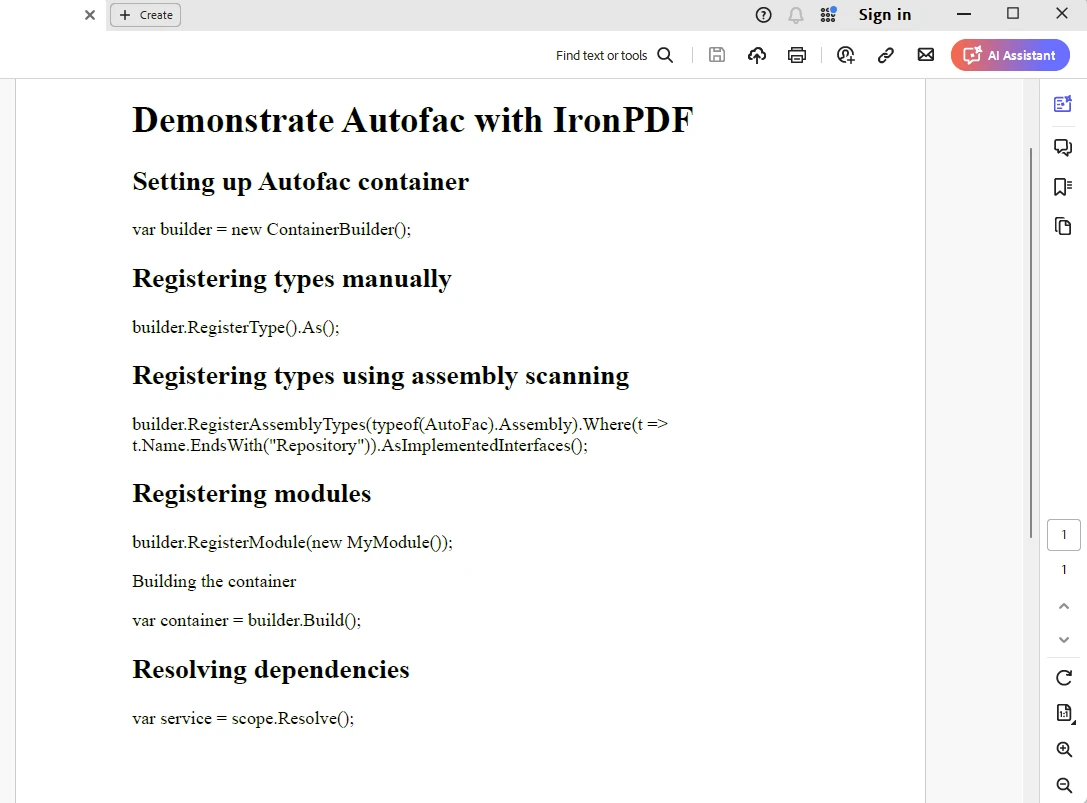
IronPDF는 라이선스 키가 필요합니다. 아래에 표시된 대로 appSettings.json 파일에 라이선스 키를 배치하세요.
{
  "IronPdf.License.LicenseKey": "The Key Here"
}
제이콥 멜러는 Iron Software의 최고 기술 책임자(CTO)이자 C# PDF 기술을 개척한 선구적인 엔지니어입니다. Iron Software의 핵심 코드베이스를 최초로 개발한 그는 창립 초기부터 회사의 제품 아키텍처를 설계해 왔으며, CEO인 캐머런 리밍턴과 함께 회사를 NASA, 테슬라, 그리고 전 세계 정부 기관에 서비스를 제공하는 50명 이상의 직원을 보유한 기업으로 성장시켰습니다.



IronPDF는 IRON SUITE 의 일부입니다.
10개의 .NET API 제품, 당신의 사무 문서를 위해











PDF 파일을 HTML처럼 빠르게 변환해야 할 때.


