


Autofac .NET 6(對於開發者的運行原理)

在.NET開發領域中,有效地管理依賴是構建可擴展、可維護和可測試應用的重要關鍵。 依賴注入(DI)容器在實現這些目標中扮演著關鍵角色,透過促進控制反轉(IoC)原則來達成。 在眾多可用的泛型託管機制程式庫中,Autofac 脫穎而出,成為.NET的豐富且可擴展的框架。
在本文中,我們會探索Autofac .NET 6,揭示其特性和優勢,並展示其使用的實際範例。 在本文稍後部分,我們將了解IronPDF,這是一個來自Iron Software的強大PDF生成程式庫。 我們還將展示Autofac.NET和IronPDF一起使用的案例。
了解Autofac .NET
Autofac是一個開源的IoC容器,適用於.NET,它提供了完整的支援,用於應用如網頁API的依賴注入和元件註冊。由Nicholas Blumhardt開發,並由專注的社群維護,Autofac 提供了管理物件生命周期、解析依賴和組合應用元件的穩健且靈活的解決方案。
如需進一步了解Autofac如何增強您的.NET應用,考慮探索IronPDF的.NET PDF程式庫提供的資源,這些資源突出了PDF生成和操作的高級特性。 您也可以深入了解IronBarcode的.NET條碼程式庫,看看依賴注入在條碼生成中的實際應用。
透過造訪Iron Software的官方頁面,了解在真實世界情境中使用Autofac的額外見解和實際範例,您會發現如IronOCR和IronXL等產品套件,它們與Autofac無縫整合,增強.NET開發流程。
Autofac的特性
-
容器建構和元件註冊:您可以通過在啟動類中註冊元件來使用Autofac建構容器。 您可以使用lambda、型別或預構建實例註冊元件。
public class Startup
{
    public void ConfigureContainer()
    {
        var builder = new ContainerBuilder(); // Create a new container builder
        builder.RegisterInstance(new TaskRepository()).As<ITaskRepository>(); // Register an instance for ITaskRepository
        builder.RegisterType<TaskController>(); // Register TaskController type
        builder.Register(c => new LogManager(DateTime.Now)).As<ILogger>(); // Use lambda expression to register ILogger
        // Scan an assembly for components and register them
        builder.RegisterAssemblyTypes(myAssembly).Where(t => t.Name.EndsWith("Repository")).AsImplementedInterfaces();
        var container = builder.Build(); // Build the container
    }
}
public class Startup { public void ConfigureContainer() { var builder = new ContainerBuilder(); // Create a new container builder builder.RegisterInstance(new TaskRepository()).As<ITaskRepository>(); // Register an instance for ITaskRepository builder.RegisterType<TaskController>(); // Register TaskController type builder.Register(c => new LogManager(DateTime.Now)).As<ILogger>(); // Use lambda expression to register ILogger // Scan an assembly for components and register them builder.RegisterAssemblyTypes(myAssembly).Where(t => t.Name.EndsWith("Repository")).AsImplementedInterfaces(); var container = builder.Build(); // Build the container } }Public Class Startup Public Sub ConfigureContainer() Dim builder = New ContainerBuilder() ' Create a new container builder builder.RegisterInstance(New TaskRepository()).As(Of ITaskRepository)() ' Register an instance for ITaskRepository builder.RegisterType(Of TaskController)() ' Register TaskController type builder.Register(Function(c) New LogManager(DateTime.Now)).As(Of ILogger)() ' Use lambda expression to register ILogger ' Scan an assembly for components and register them builder.RegisterAssemblyTypes(myAssembly).Where(Function(t) t.Name.EndsWith("Repository")).AsImplementedInterfaces() Dim container = builder.Build() ' Build the container End Sub End Class$vbLabelText $csharpLabel -
表達依賴:Autofac可以注入構造函式參數,處理屬性注入和方法注入。
public class TaskController
{
    private ITaskRepository _repository;
    private ILogger _logger;

    public TaskController(ITaskRepository repository, ILogger logger)
    {
        _repository = repository; // Assign injected repository to the local variable
        _logger = logger; // Assign injected logger to the local variable
    }
}
public class TaskController { private ITaskRepository _repository; private ILogger _logger; public TaskController(ITaskRepository repository, ILogger logger) { _repository = repository; // Assign injected repository to the local variable _logger = logger; // Assign injected logger to the local variable } }Public Class TaskController Private _repository As ITaskRepository Private _logger As ILogger Public Sub New(ByVal repository As ITaskRepository, ByVal logger As ILogger) _repository = repository ' Assign injected repository to the local variable _logger = logger ' Assign injected logger to the local variable End Sub End Class$vbLabelText $csharpLabel -
靈活的模組系統:Autofac模組在XML配置和基於程式碼的註冊之間取得了平衡。 您可以在程式碼中指定複雜的註冊,或使用XML更改部署時的行為。
public class CarTransportModule : Module
{
    public bool ObeySpeedLimit { get; set; }

    protected override void Load(ContainerBuilder builder)
    {
        builder.RegisterType<Car>().As<IVehicle>(); // Register Car as IVehicle
        if (ObeySpeedLimit)
            builder.RegisterType<SaneDriver>().As<IDriver>(); // Register SaneDriver if speed limit is to be obeyed
        else
            builder.RegisterType<CrazyDriver>().As<IDriver>(); // Register CrazyDriver otherwise
    }
}
public class CarTransportModule : Module { public bool ObeySpeedLimit { get; set; } protected override void Load(ContainerBuilder builder) { builder.RegisterType<Car>().As<IVehicle>(); // Register Car as IVehicle if (ObeySpeedLimit) builder.RegisterType<SaneDriver>().As<IDriver>(); // Register SaneDriver if speed limit is to be obeyed else builder.RegisterType<CrazyDriver>().As<IDriver>(); // Register CrazyDriver otherwise } }Public Class CarTransportModule Inherits Module Public Property ObeySpeedLimit() As Boolean Protected Overrides Sub Load(ByVal builder As ContainerBuilder) builder.RegisterType(Of Car)().As(Of IVehicle)() ' Register Car as IVehicle If ObeySpeedLimit Then builder.RegisterType(Of SaneDriver)().As(Of IDriver)() ' Register SaneDriver if speed limit is to be obeyed Else builder.RegisterType(Of CrazyDriver)().As(Of IDriver)() ' Register CrazyDriver otherwise End If End Sub End Class$vbLabelText $csharpLabel -
簡單擴充點:Autofac提供激活事件以自定義元件的激活或釋放。
var builder = new ContainerBuilder();
builder.RegisterType<Listener>().As<IListener>().OnActivated(e => e.Instance.StartListening()); // Setup activation event
builder.RegisterType<Processor>().OnActivating(e => e.Instance.Initialize()); // Setup activating event
var container = builder.Build();
var builder = new ContainerBuilder(); builder.RegisterType<Listener>().As<IListener>().OnActivated(e => e.Instance.StartListening()); // Setup activation event builder.RegisterType<Processor>().OnActivating(e => e.Instance.Initialize()); // Setup activating event var container = builder.Build();Dim builder = New ContainerBuilder() builder.RegisterType(Of Listener)().As(Of IListener)().OnActivated(Function(e) e.Instance.StartListening()) ' Setup activation event builder.RegisterType(Of Processor)().OnActivating(Function(e) e.Instance.Initialize()) ' Setup activating event Dim container = builder.Build()$vbLabelText $csharpLabel
Autofac.NET的關鍵特性
-
靈活的元件註冊:Autofac允許開發人員使用多種註冊技術來註冊元件,包括手動註冊、程式集掃描和基於屬性的註冊。 這種靈活性使得元件實例化和配置具有細緻的控制。
-
生命週期管理:Autofac支援多種物件生命週期範圍,包括單例、每個依賴實例、每個生命週期範圍的實例和每個請求的實例。這種對物件生命週期的細微控制確保了資源的有效利用,並防止長時間運行應用中的記憶體洩漏。
-
自動依賴解析:Autofac根據註冊的元件註冊和其依賴,自動解析依賴。 這種自動連接簡化了複雜物件圖形的配置,並促進了元件之間的鬆耦合。
-
模組組合:Autofac允許開發人員使用模組來組織和封裝元件註冊。 模組作為相關註冊的邏輯容器,使得管理和維護大型應用中的多個元件變得更加容易。
-
攔截和AOP:Autofac透過其攔截擴展提供對攔截和面向方面編程(AOP)的支援。 使用攔截,開發人員可以對元件應用橫切關注點,例如日誌記錄、快取和安全性,而無需修改它們的實現。
- ASP.NET Core及.NET Core整合:Autofac與.NET Core和ASP.NET Core無縫整合,為現代網頁應用和微服務提供第一級的依賴注入支援。 它利用內建的服務提供者抽象確保與.NET生態系統的相容性和互操作性。
Autofac.NET的實際範例
讓我們探索一些實際範例來說明Autofac.NET的使用:
public class Program
{
    public static void Main()
    {
        // Setting up Autofac container
        var builder = new ContainerBuilder();

        // Registering types manually
        builder.RegisterType<MyService>().As<IMyService>();

        // Registering types using assembly scanning
        builder.RegisterAssemblyTypes(typeof(MyAssembly).Assembly)
            .Where(t => t.Name.EndsWith("Repository"))
            .AsImplementedInterfaces();

        // Registering modules
        builder.RegisterModule(new MyModule());

        // Building the container
        var container = builder.Build();

        // Resolving dependencies
        using (var scope = container.BeginLifetimeScope())
        {
            var service = scope.Resolve<IMyService>();
            service.DoSomething();
        }
    }
}
public class Program
{
public static void Main()
{
// Setting up Autofac container
var builder = new ContainerBuilder();
// Registering types manually
builder.RegisterType<MyService>().As<IMyService>();
// Registering types using assembly scanning
builder.RegisterAssemblyTypes(typeof(MyAssembly).Assembly)
.Where(t => t.Name.EndsWith("Repository"))
.AsImplementedInterfaces();
// Registering modules
builder.RegisterModule(new MyModule());
// Building the container
var container = builder.Build();
// Resolving dependencies
using (var scope = container.BeginLifetimeScope())
{
var service = scope.Resolve<IMyService>();
service.DoSomething();
}
}
}Public Class Program
Public Shared Sub Main()
' Setting up Autofac container
Dim builder = New ContainerBuilder()
' Registering types manually
builder.RegisterType(Of MyService)().As(Of IMyService)()
' Registering types using assembly scanning
builder.RegisterAssemblyTypes(GetType(MyAssembly).Assembly).Where(Function(t) t.Name.EndsWith("Repository")).AsImplementedInterfaces()
' Registering modules
builder.RegisterModule(New MyModule())
' Building the container
Dim container = builder.Build()
' Resolving dependencies
Using scope = container.BeginLifetimeScope()
Dim service = scope.Resolve(Of IMyService)()
service.DoSomething()
End Using
End Sub
End Class在本節中,我們展示了Autofac.NET用於依賴注入的實際應用。 從手動註冊到程式集掃描和基於模組的註冊,我們展示了Autofac在管理依賴方面提供的靈活性。 透過使用這些技術,開發人員可以簡化其應用的依賴注入過程,增強可維護性和可擴展性。
如需更多資訊了解Iron Software如何的產品可以整合至您的.NET應用中以進一步簡化和增強功能,請探索IronPDF文件,您可以學習程式化生成和編輯PDF文件,或造訪Iron Software的網站,以發現像是用於讀寫條碼的IronBarcode和用於進階光學字元識別的IronOCR等強大的.NET程式庫。
使用Autofac.NET的好處
-
簡單性和靈活性:Autofac提供簡單且直觀的API以註冊和解析元件,使依賴注入易於實施和維護。
-
可測試性和可維護性:透過促進鬆耦合和依賴反轉,Autofac增強了.NET應用的可測試性和可維護性,使單元測試和重構變得輕鬆。
-
效能和可擴展性:Autofac的輕量和高效運行時效能使它適用於高效能應用和具有大型物件圖形的可擴展系統。
-
可擴展性和自定義:Autofac的可擴展架構允許開發人員透過自定義模組、註冊來源和中介元件來擴展和自定義Autofac的行為,以滿足不同的應用要求。
- 社群和技術支援:有一個活躍的開發者社群和全面的文件,Autofac提供了優秀的支援和資源以利於學習、故障排除和對該框架的貢獻。
Autofac License
Autofac附帶MIT授權,免費用於開發和商業用途。
介紹Iron Software的IronPDF
IronPDF是一個強大的C# PDF程式庫,旨在提供在.NET專案中管理PDF的完整解決方案。 無論您的需求是建立、編輯、導出、保護、載入或操作PDF文件,IronPDF都能提供所需的工具。 以下是其一些突出的功能和應用:
- 了解更多使用IronPDF建立PDF的方法
- 探索如何使用IronPDF高效編輯PDF
- 探索IronPDF的安全功能
- 造訪Iron Software網站查看更多詳情
- 查看IronPDF文件以獲取詳細指導
關鍵特性
-
HTML轉PDF轉換:輕鬆地將HTML內容轉換為PDF。 從HTML、MVC、ASPX和圖片生成PDF。
-
PDF管理:擁有超過50項功能,IronPDF允許您簽署、編輯和從PDF中提取內容,簡化數位簽名和修改。
- 跨平台支援:與C#、F#和VB.NET相容,IronPDF可在多種.NET版本上運行,包括.NET Core、.NET Standard和.NET Framework。 它還適用於Java、Node.js和Python。
如需了解更多IronPDF如何將PDF功能整合到您的專案中,請造訪IronPDF產品頁面。
如需Iron Software產品推出的全面概覽,包括IronBarcode、IronOCR等,請造訪Iron Software首頁。
相容性和環境
-
.NET版本:支援C#、VB.NET和F#。
-
項目型別:適用於Web(Blazor & WebForms with IronPDF)、桌面(WPF & MAUI)和控制台應用。
-
應用環境:與Windows、Linux、Mac、Docker、Azure、AWS等相容。
-
IDE:與Microsoft Visual Studio和JetBrains Rider無縫整合。
- 操作系統和處理器:可在Windows、Mac和Linux(x64、x86、ARM)上運行。
PDF標準和編輯
-
相容性:支援多種PDF版本(1.2 - 1.7)、PDF/UA和PDF/A。
-
自定義:設置PDF文件的屬性、安全性和壓縮。
-
元資料和結構:編輯元資料、修訂歷史和文件結構。
- 範本和設置:應用頁面範本、頁眉、頁腳和頁面設置。
如需了解這些功能和如何實施的更多資訊,請存取IronPDF官網上的詳細的PDF生成和操作指南。
性能優化
-
效率:完全多執行緒和異步支援,以實現高效的PDF生成。
- 優先:專注於準確性、易用性和速度。
現在讓我們來看看這兩個內容庫的實際例子。
使用Autofac.NET和IronPDF生成PDF文件
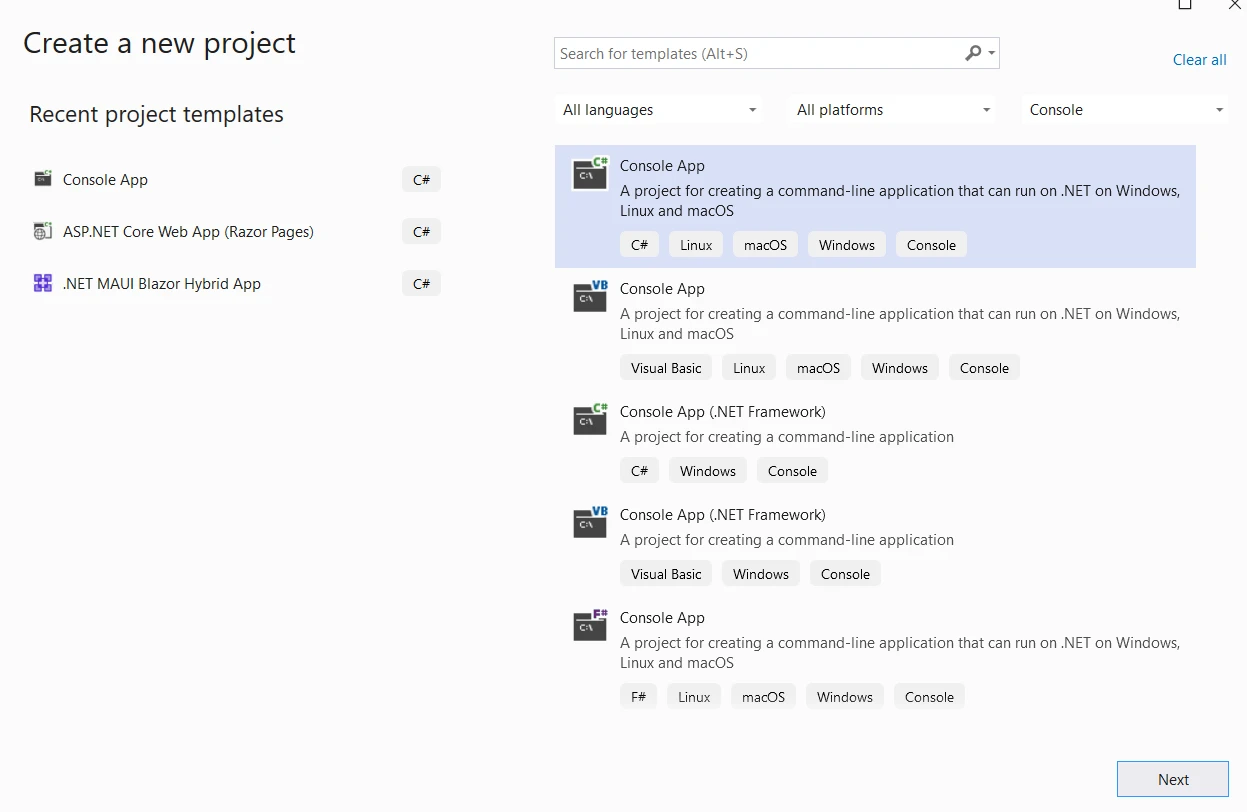
首先,讓我們建立一個Visual Studio控制台應用
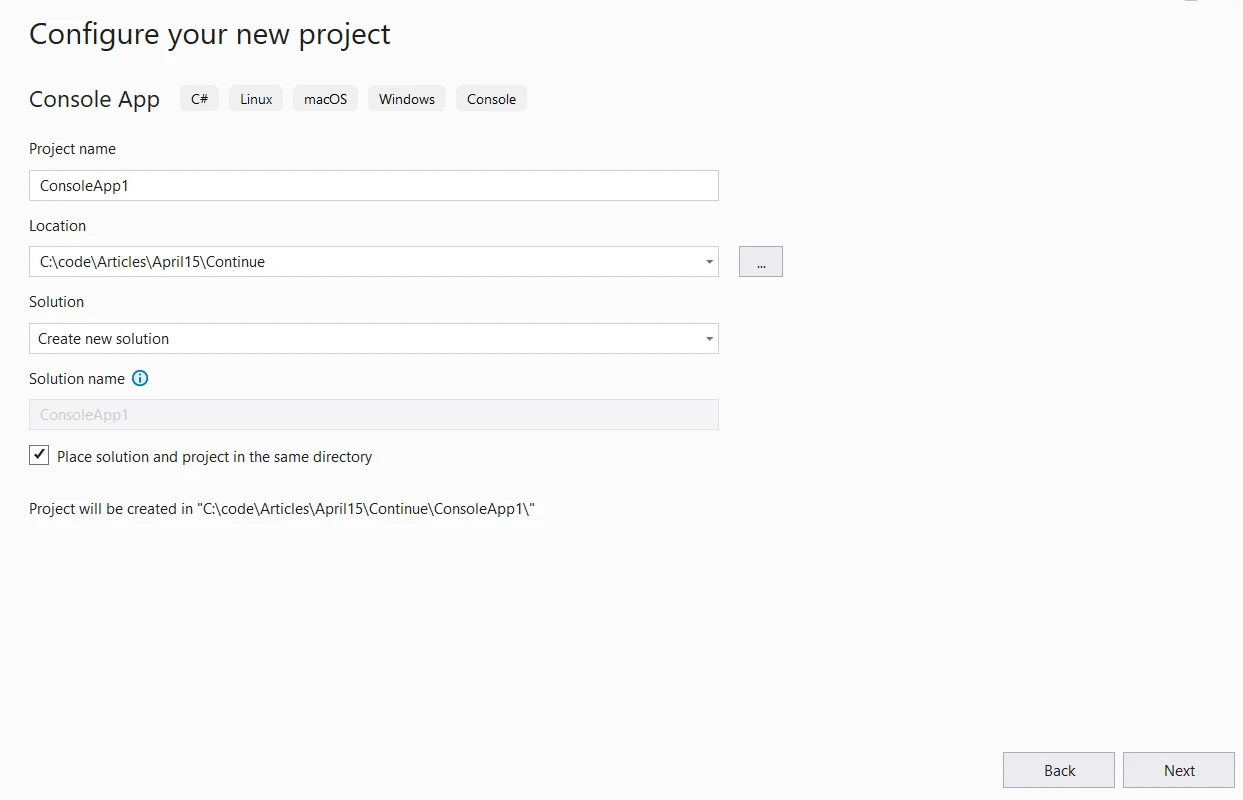
提供專案名稱和位置。
下一步,選擇所需的.NET版本並點擊建立。
然後從Visual Studio的NuGet套件管理器中安裝IronPDF程式庫
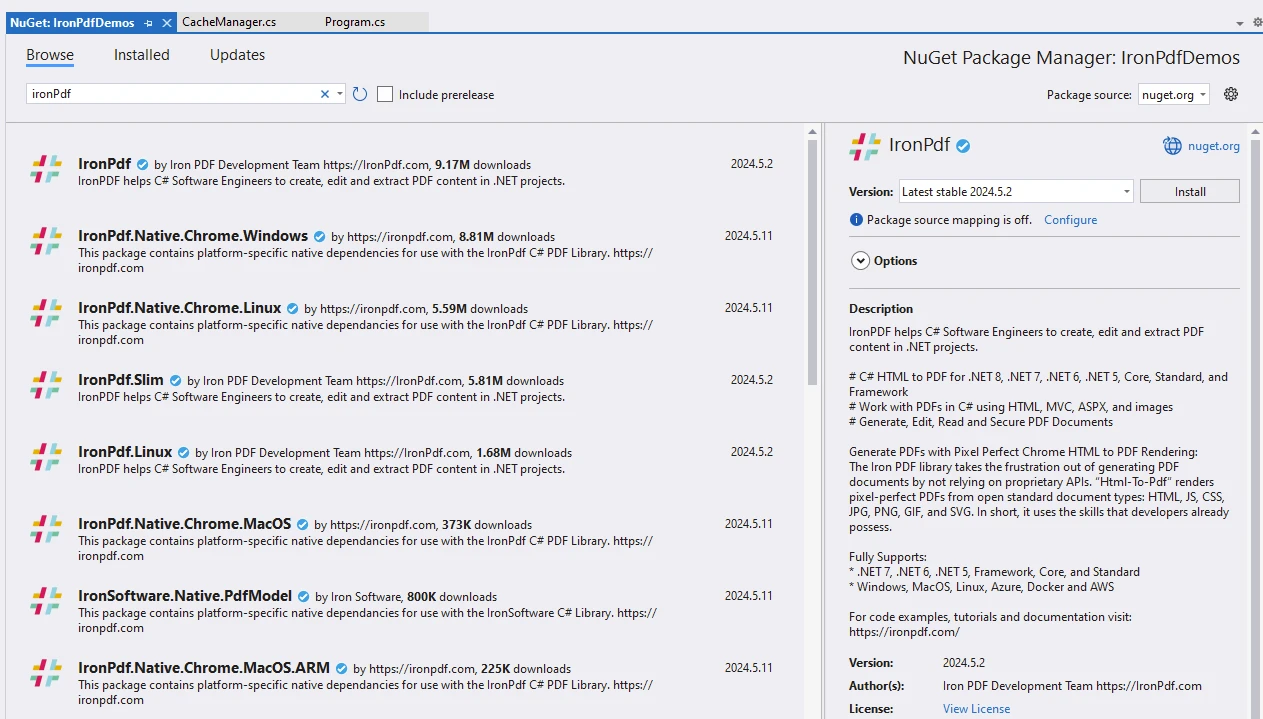
存取IronPDF文件以獲取有關安裝和使用IronPDF程式庫的更多資訊。
從Visual Studio的NuGet套件管理器中安裝Autofac
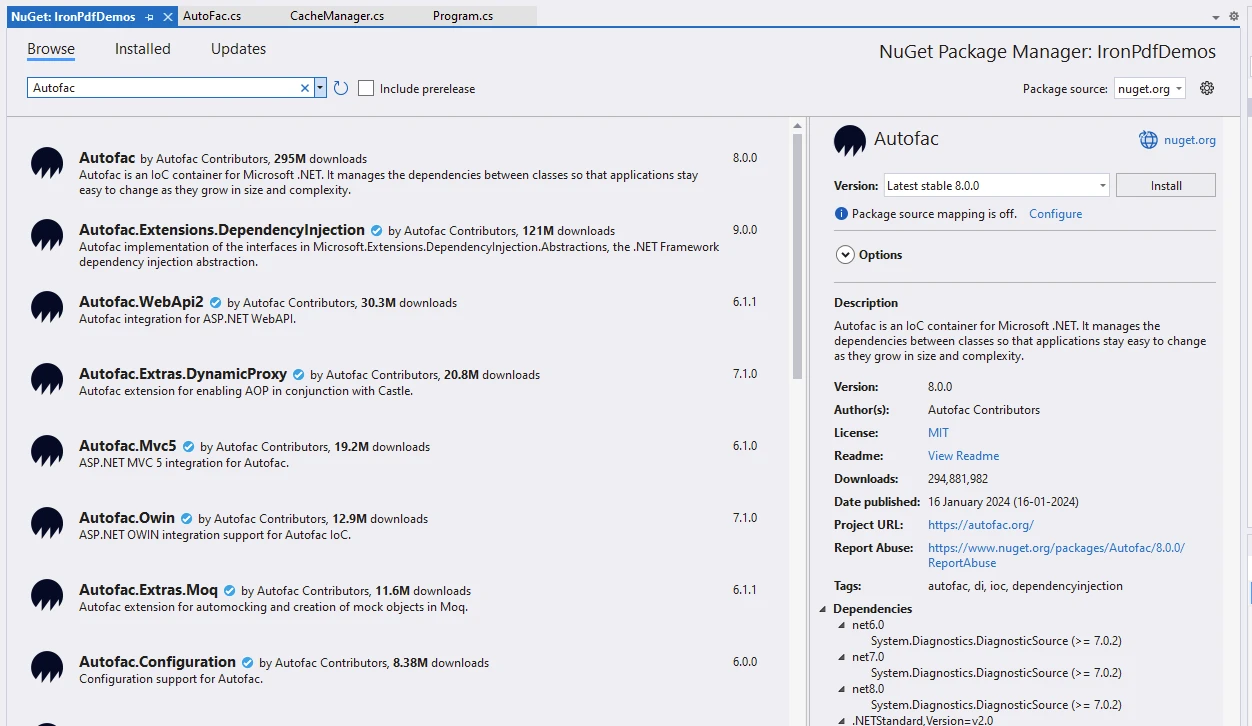
造訪Autofac文件頁面以了解更多關於Autofac的資訊。
程式碼範例:Autofac與IronPDF
using Autofac;
using CacheManager.Core;
using IronPdf;
using System.Reflection;

namespace IronPdfDemos
{
    public class AutoFac
    {
        public static void Execute()
        {
            // Instantiate Cache and ChromePdfRenderer
            var renderer = new ChromePdfRenderer();
            var cache = CacheFactory.Build("ironPdfAutofac", settings =>
            {
                settings.WithDictionaryHandle();
            });

            // Prepare HTML content
            var content = "<h1>Demonstrate Autofac with IronPDF</h1>";
            content += "<p>This is an illustration of using Autofac for dependency injection and IronPDF for generating PDF documents.</p>";
            content += "<h2>Setting up Autofac container</h2>";

            // Setting up Autofac container
            var builder = new ContainerBuilder();
            content += "<p>var builder = new ContainerBuilder();</p>";

            content += "<h2>Registering types manually</h2>";
            // Registering types manually
            builder.RegisterType<MyService>().As<IMyService>();
            content += "<p>builder.RegisterType<MyService>().As<IMyService();</p>";

            content += "<h2>Registering types using assembly scanning</h2>";
            // Registering types using assembly scanning
            builder.RegisterAssemblyTypes(typeof(AutoFac).Assembly)
                .Where(t => t.Name.EndsWith("Repository"))
                .AsImplementedInterfaces();
            content += "<p>builder.RegisterAssemblyTypes(typeof(AutoFac).Assembly).Where(t => t.Name.EndsWith(\"Repository\")).AsImplementedInterfaces();</p>";

            content += "<h2>Registering modules</h2>";
            // Registering modules
            builder.RegisterModule(new MyModule());
            content += "<p>builder.RegisterModule(new MyModule());</p>";

            content += "<h2>Building the container</h2>";
            // Building the container
            var container = builder.Build();
            content += "<p>var container = builder.Build();</p>";

            content += "<h2>Resolving dependencies</h2>";
            // Resolving dependencies
            using (var scope = container.BeginLifetimeScope())
            {
                var service = scope.Resolve<IMyService>();
                service.DoSomething();
            }
            content += "<p>var service = scope.Resolve<IMyService();</p>";

            // Create a PDF from the HTML string using C#
            var pdf = renderer.RenderHtmlAsPdf(content);
            // Export to a file or Stream
            pdf.SaveAs("autofac.pdf");
            Console.WriteLine("We are done...");
            Console.ReadKey();
        }
    }

    internal interface IMyService
    {
        void DoSomething();
    }

    internal class MyModule : Module
    {
        protected override void Load(ContainerBuilder builder)
        {
            // Register module dependencies here
        }
    }

    internal class MyService : IMyService
    {
        public void DoSomething()
        {
            Console.WriteLine("DoSomething");
        }
    }
}
using Autofac;
using CacheManager.Core;
using IronPdf;
using System.Reflection;
namespace IronPdfDemos
{
public class AutoFac
{
public static void Execute()
{
// Instantiate Cache and ChromePdfRenderer
var renderer = new ChromePdfRenderer();
var cache = CacheFactory.Build("ironPdfAutofac", settings =>
{
settings.WithDictionaryHandle();
});
// Prepare HTML content
var content = "<h1>Demonstrate Autofac with IronPDF</h1>";
content += "<p>This is an illustration of using Autofac for dependency injection and IronPDF for generating PDF documents.</p>";
content += "<h2>Setting up Autofac container</h2>";
// Setting up Autofac container
var builder = new ContainerBuilder();
content += "<p>var builder = new ContainerBuilder();</p>";
content += "<h2>Registering types manually</h2>";
// Registering types manually
builder.RegisterType<MyService>().As<IMyService>();
content += "<p>builder.RegisterType<MyService>().As<IMyService();</p>";
content += "<h2>Registering types using assembly scanning</h2>";
// Registering types using assembly scanning
builder.RegisterAssemblyTypes(typeof(AutoFac).Assembly)
.Where(t => t.Name.EndsWith("Repository"))
.AsImplementedInterfaces();
content += "<p>builder.RegisterAssemblyTypes(typeof(AutoFac).Assembly).Where(t => t.Name.EndsWith(\"Repository\")).AsImplementedInterfaces();</p>";
content += "<h2>Registering modules</h2>";
// Registering modules
builder.RegisterModule(new MyModule());
content += "<p>builder.RegisterModule(new MyModule());</p>";
content += "<h2>Building the container</h2>";
// Building the container
var container = builder.Build();
content += "<p>var container = builder.Build();</p>";
content += "<h2>Resolving dependencies</h2>";
// Resolving dependencies
using (var scope = container.BeginLifetimeScope())
{
var service = scope.Resolve<IMyService>();
service.DoSomething();
}
content += "<p>var service = scope.Resolve<IMyService();</p>";
// Create a PDF from the HTML string using C#
var pdf = renderer.RenderHtmlAsPdf(content);
// Export to a file or Stream
pdf.SaveAs("autofac.pdf");
Console.WriteLine("We are done...");
Console.ReadKey();
}
}
internal interface IMyService
{
void DoSomething();
}
internal class MyModule : Module
{
protected override void Load(ContainerBuilder builder)
{
// Register module dependencies here
}
}
internal class MyService : IMyService
{
public void DoSomething()
{
Console.WriteLine("DoSomething");
}
}
}Imports Autofac
Imports CacheManager.Core
Imports IronPdf
Imports System.Reflection
Namespace IronPdfDemos
Public Class AutoFac
Public Shared Sub Execute()
' Instantiate Cache and ChromePdfRenderer
Dim renderer = New ChromePdfRenderer()
Dim cache = CacheFactory.Build("ironPdfAutofac", Sub(settings)
settings.WithDictionaryHandle()
End Sub)
' Prepare HTML content
Dim content = "<h1>Demonstrate Autofac with IronPDF</h1>"
content &= "<p>This is an illustration of using Autofac for dependency injection and IronPDF for generating PDF documents.</p>"
content &= "<h2>Setting up Autofac container</h2>"
' Setting up Autofac container
Dim builder = New ContainerBuilder()
content &= "<p>var builder = new ContainerBuilder();</p>"
content &= "<h2>Registering types manually</h2>"
' Registering types manually
builder.RegisterType(Of MyService)().As(Of IMyService)()
content &= "<p>builder.RegisterType<MyService>().As<IMyService();</p>"
content &= "<h2>Registering types using assembly scanning</h2>"
' Registering types using assembly scanning
builder.RegisterAssemblyTypes(GetType(AutoFac).Assembly).Where(Function(t) t.Name.EndsWith("Repository")).AsImplementedInterfaces()
content &= "<p>builder.RegisterAssemblyTypes(typeof(AutoFac).Assembly).Where(t => t.Name.EndsWith(""Repository"")).AsImplementedInterfaces();</p>"
content &= "<h2>Registering modules</h2>"
' Registering modules
builder.RegisterModule(New MyModule())
content &= "<p>builder.RegisterModule(new MyModule());</p>"
content &= "<h2>Building the container</h2>"
' Building the container
Dim container = builder.Build()
content &= "<p>var container = builder.Build();</p>"
content &= "<h2>Resolving dependencies</h2>"
' Resolving dependencies
Using scope = container.BeginLifetimeScope()
Dim service = scope.Resolve(Of IMyService)()
service.DoSomething()
End Using
content &= "<p>var service = scope.Resolve<IMyService();</p>"
' Create a PDF from the HTML string using C#
Dim pdf = renderer.RenderHtmlAsPdf(content)
' Export to a file or Stream
pdf.SaveAs("autofac.pdf")
Console.WriteLine("We are done...")
Console.ReadKey()
End Sub
End Class
Friend Interface IMyService
Sub DoSomething()
End Interface
Friend Class MyModule
Inherits Module
Protected Overrides Sub Load(ByVal builder As ContainerBuilder)
' Register module dependencies here
End Sub
End Class
Friend Class MyService
Implements IMyService
Public Sub DoSomething() Implements IMyService.DoSomething
Console.WriteLine("DoSomething")
End Sub
End Class
End Namespace程式碼説明
讓我們逐步分析您提供的程式碼片段:
-
ChromePdfRenderer設置:
- 這段程式碼初始化了一個
ChromePdfRenderer實例以從HTML內容渲染PDF,這是IronPDF的重要特性。
- 這段程式碼初始化了一個
-
HTML內容準備:
-
content變數是一個HTML字串,將用於生成PDF。 - 包含一個
<h1>標籤,標題為"使用IronPDF展示Autofac"。
-
-
建立Autofac容器:
-
該程式碼建立了一個名為
ContainerBuilder實例。 - 這是為依賴注入設立Autofac容器的第一步。
-
-
手動註冊型別:
-
它將型別
IMyService介面的實現。 - 這允許Autofac在需要時解析依賴。
-
-
通過程式集掃描註冊型別:
-
它掃描包含
AutoFac型別的程式集。 - 註冊名稱以"Repository"結尾的型別作為其對應介面的實現。
-
-
註冊模組:
-
它註冊了一個稱為
MyModule的模組。 - 模組允許將相關註冊進行分組。
-
-
構建容器:
- 容器是通過使用
builder.Build()方法從註冊的元件構建的。
- 容器是通過使用
-
解析依賴:
-
在一個生命週期範圍(
IMyService實例。 DoSomething方法被調用在解析的服務上。
-
-
PDF生成:
-
使用
ChromePdfRenderer從內容中建立PDF。 - 所生成的PDF保存為"autofac.pdf"。
-
輸出
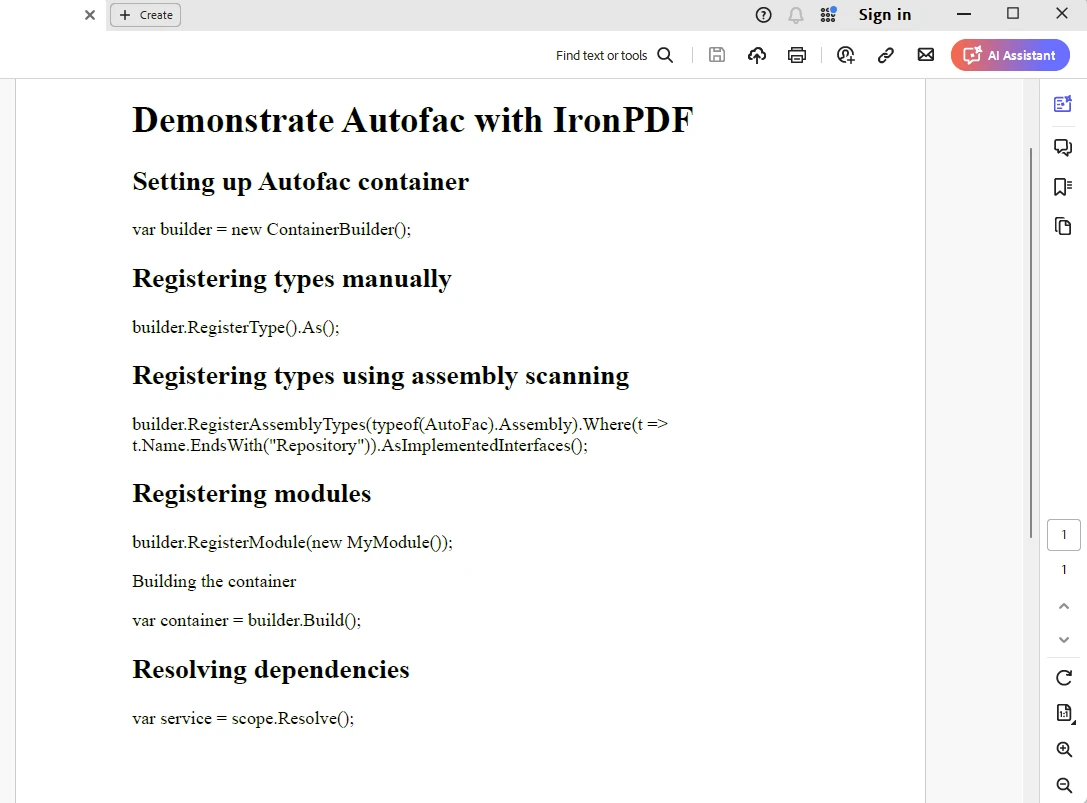
IronPDF License
IronPDF需要一個授權金鑰。 將授權金鑰放在appSettings.json文件中,如下面所示。
{
  "IronPdf.License.LicenseKey": "The Key Here"
}
常見問題
什麼是Autofac以及它在.NET 6中的工作原理?
Autofac是.NET的依賴注入容器,透過如容器構建和元件註冊等功能有效管理依賴。在.NET 6中,Autofac繼續增強應用的可擴展性和可維護性。
如何在現代網路應用開發中利用Autofac?
Autofac與ASP.NET Core和.NET Core無縫整合,透過提供健全的依賴注入和靈活的模組系統來促進現代網路應用開發。
在.NET應用中使用Autofac有什麼好處?
Autofac提供如靈活的元件註冊、生命周期管理、自動依賴解析以及對攔截和面向切面編程(AOP)的支持等優勢,以加強.NET應用的可擴展性和可測試性。
如何在.NET應用中生成PDF?
您可以使用IronPDF,一個提供建立、編輯和管理PDF文件程式方法的C#程式庫,在.NET應用中生成PDF。
Autofac能夠整合於.NET的PDF生成程式庫嗎?
是的,Autofac可以透過建立依賴注入容器來管理.NET應用中PDF函式庫的服務,與像IronPDF這樣的PDF生成程式庫整合。
像Autofac這樣的依賴注入容器在.NET開發中扮演什麼角色?
Autofac等依賴注入容器通過管理依賴來促進.NET開發中的控制反轉(IoC)原則,這導致更具可擴展性、可維護性和可測試的應用。
Autofac如何支持自動依賴解析?
Autofac支持自動依賴解析,允許開發人員透過其容器註冊組件並解析其依賴,簡化組件管理並提升應用可擴展性。
C# PDF程式庫的關鍵功能是什麼?
像IronPDF這樣的C# PDF程式庫的關鍵功能包括HTML到PDF轉換、跨平台支持,以及與各種.NET版本的相容性,使全面的PDF文件建立和管理成為可能。










 免費開始使用
 免費開始使用
 預約免費現場演示





 不需信用卡或帳戶建立










