푸터 콘텐츠로 바로가기
.NET 도움말

CakeBuilder .NET (How it Works For Developers)

With the enhancement in the field of software development and the tech industry, automation plays a crucial role in streamlining repetitive tasks, ensuring consistency, and improving overall efficiency, such as running unit tests and creating personalized content and ads with site statistics to understand the quality of those services. CakeBuild, a cross-platform build automation system, is a powerful tool that simplifies managing and executing build tasks in C# and ASP.NET projects without needing extra engagement and site statistics or a task runner.

In this article, we'll explore what CakeBuild is, why it's beneficial in C# development, and how it can be integrated with IronPDF to automate PDF document generation tasks and protect against spam, fraud, and abuse in the same way.

Automating C# Build Processes with CakeBuild and Enhancing PDF Generation with IronPDF

CakeBuild, A Brief Overview

CakeBuild, often referred to simply as Cake, is an open-source build automation system that allows developers to define and execute build tasks using C# code. It provides a domain-specific language (DSL) for expressing build scripts, making it easy for C# developers to automate various aspects of their build and deployment processes.

Why Use CakeBuild in C# Development?

  1. C# Familiarity: Since Cake scripts are written in C#, developers can benefit from their existing knowledge and skills, making it seamless to integrate build automation into C# projects.
  2. Cross-Platform Support: CakeBuild is designed to be cross-platform, supporting Windows, Linux, and macOS. This allows for consistent build processes across different operating systems.
  3. Extensibility: Cake supports the use of add-ins, which are packages that extend its functionality. This extensibility allows developers to integrate Cake with various tools and manage complex build scenarios.
  4. Flexibility: With Cake, you have fine-grained control over your build process. Whether it's compiling code, running tests, or packaging applications, you can tailor the build script to meet the specific needs of your project.

Getting Started with CakeBuild

Installation

To get started with CakeBuild, you need to install the Cake global tool manifest. Open a terminal or command prompt and run the following .NET tool command:

dotnet tool install -g Cake.Tool

Using Visual Studio

To install CakeBuild, you can use the Cake extension for Visual Studio. Here are the steps to install CakeBuild in Visual Studio:

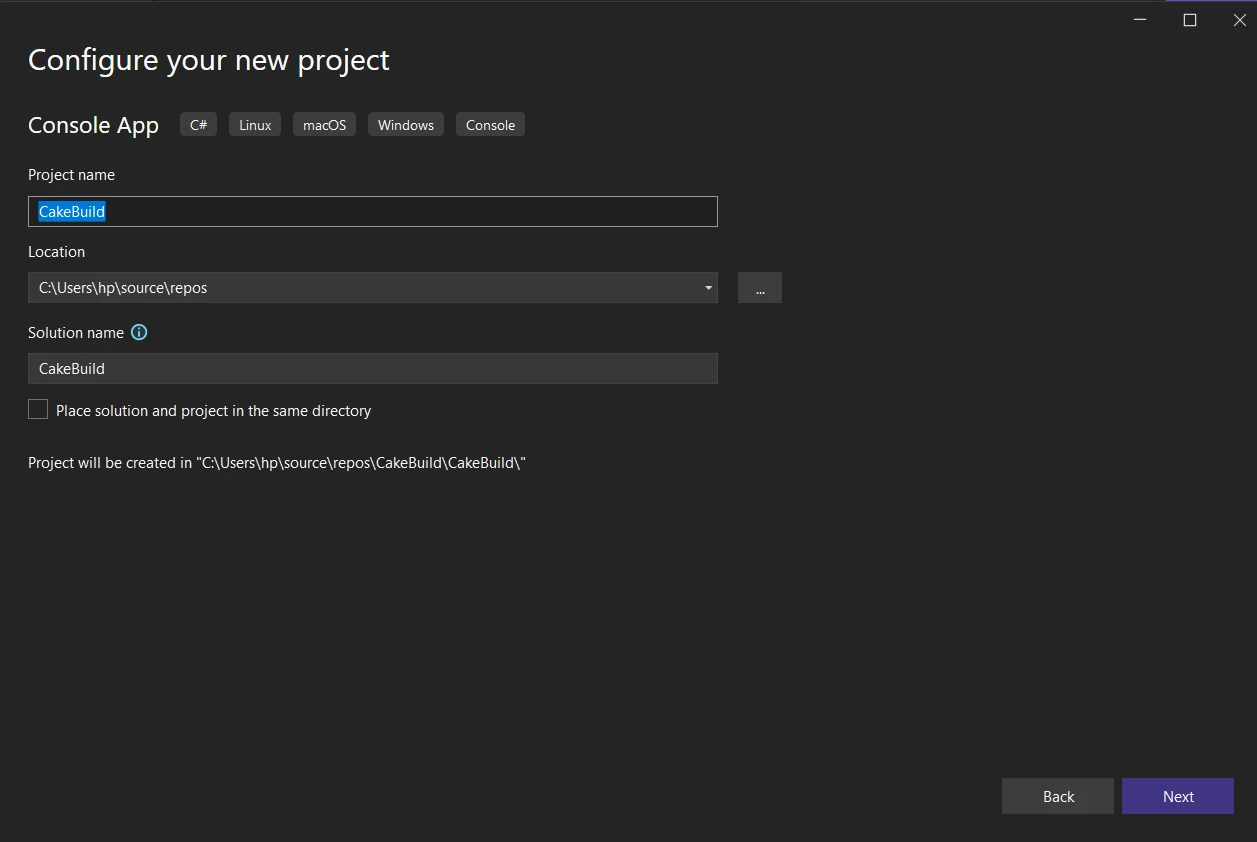
  1. Open Visual Studio: Launch Visual Studio on your machine. Make sure you have a version of Visual Studio installed that supports extensions. Download the latest 2022 version from Microsoft Visual Studio Downloads. Create a new Console Application.

    CakeBuilder .NET (How It Works For Developers): Figure 1 - New Project

  2. Open the Extensions and Updates Dialog:

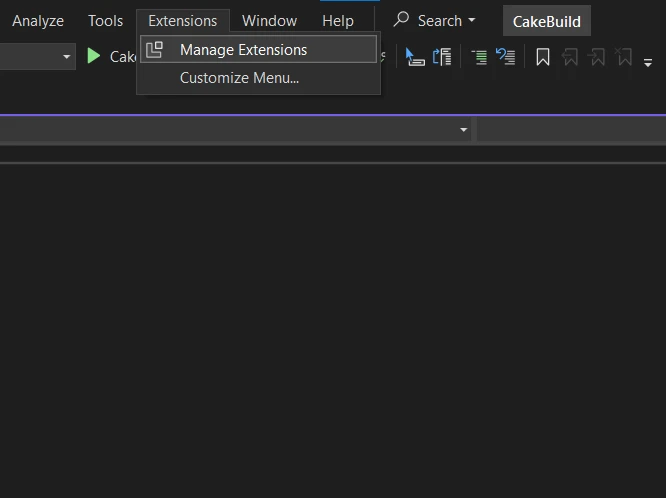
    • In Visual Studio, go to the "Extensions" menu.
    • Select "Manage Extensions" from the dropdown. This will open the Extensions and Updates dialog.

    CakeBuilder .NET (How It Works For Developers): Figure 2 - Manage Extensions

  3. Search for the Cake Extension:

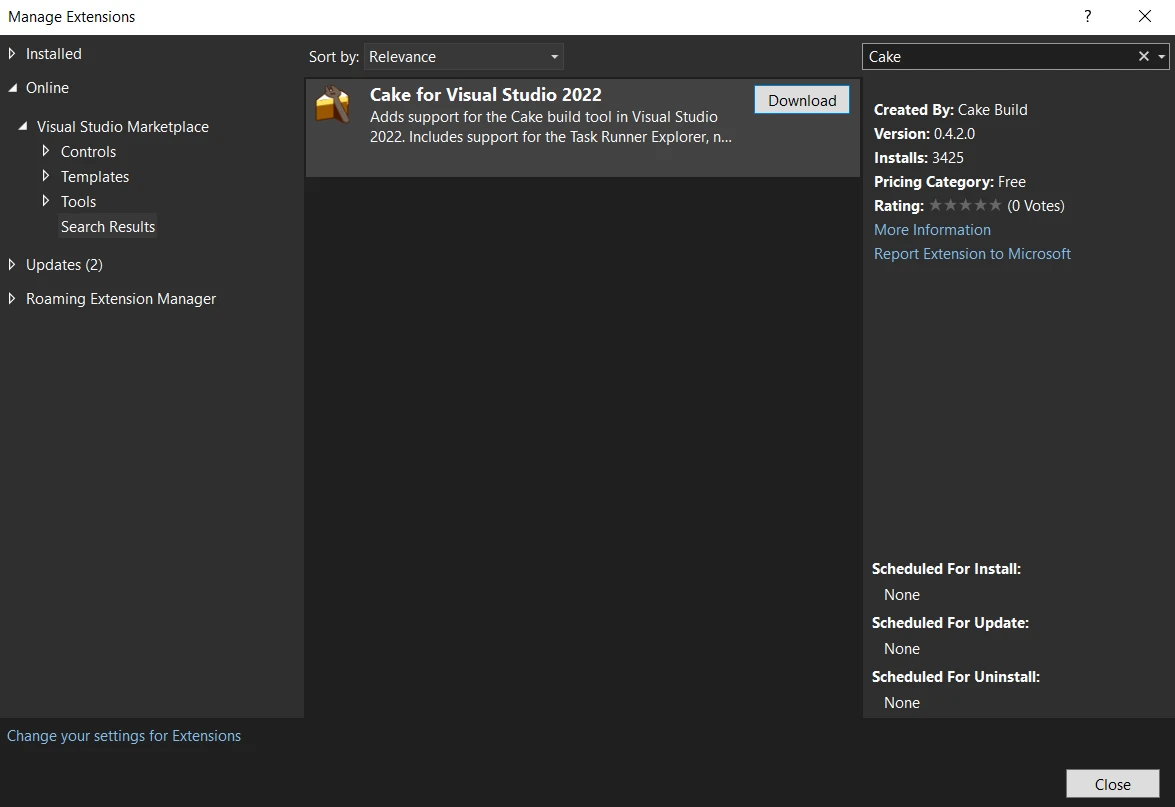
    • In the Extensions and Updates dialog, click on the "Online" tab on the left.
    • Use the search box in the top-right corner and enter "Cake" to search for the Cake extension.

    CakeBuilder .NET (How It Works For Developers): Figure 3 - Cake Extension

  4. Install the Cake Extension:
    • Look for the "Cake for Visual Studio 2022" extension in the search results.
    • Click the "Download" button to download and install the extension.
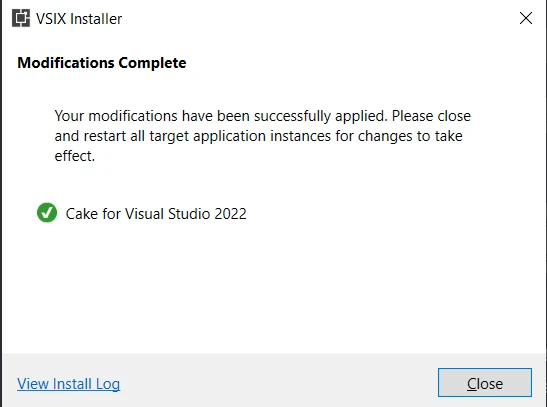
  5. Restart Visual Studio:
    • After the installation, you will be prompted to restart Visual Studio.
    • Close and reopen Visual Studio to apply the changes.
  6. Verify Installation:

    Once Visual Studio restarts, you can verify that the Cake extension is installed.

    CakeBuilder .NET (How It Works For Developers): Figure 4 - Cake Extension Installation

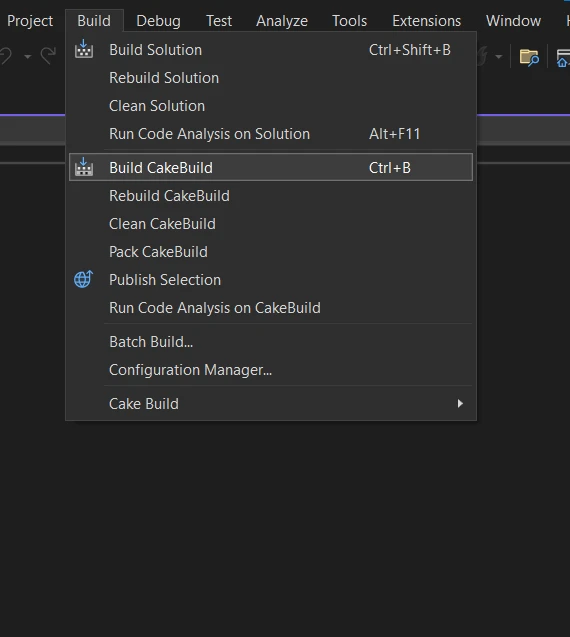
    You should see a new "Build CakeBuild" option in the Build menu bar, indicating that the Cake extension has been successfully added.

CakeBuilder .NET (How It Works For Developers): Figure 5 - Build CakeBuild

Creating a Simple Cake Script

Once Cake is installed, you can create simple Cake scripts depending on your settings. Create a file named build.cake with the following content:

var target = Argument("target", "Default");

Task("Default")
    .Does(() =>
{
    Information("Hello, Cake!");
});

RunTarget(target);
var target = Argument("target", "Default");

Task("Default")
    .Does(() =>
{
    Information("Hello, Cake!");
});

RunTarget(target);
$vbLabelText   $csharpLabel

This simple example script defines a default target that prints "Hello, Cake!" when executed.

Running a Cake Script

To run the script, navigate to the directory containing the build.cake file and execute the following command:

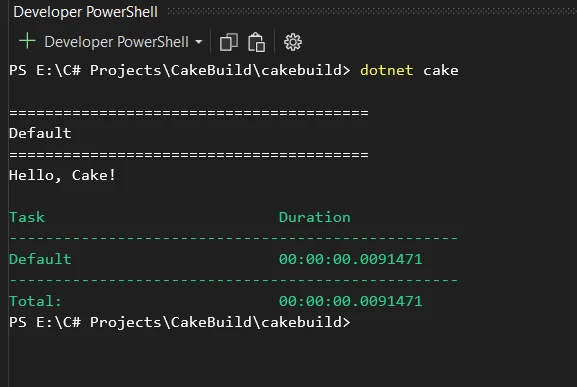
dotnet cake

This will execute the default target in the script and display the message on the console "Hello, Cake!".

CakeBuilder .NET (How It Works For Developers): Figure 6 - Output

Advanced Usage CakeBuild Examples

Beyond a simple "Hello, Cake!" example, CakeBuild can be used for more advanced scenarios. Here are a couple of examples:

Compiling and Testing

Task("Compile")
    .Does(() =>
{
    // Compile C# code
    MSBuild("./src/MyProject.sln");
});

Task("RunTests")
    .IsDependentOn("Compile")
    .Does(() =>
{
    // Run tests
    DotNetTest("./src/MyProject.Tests");
});

Task("Build")
    .IsDependentOn("RunTests");
Task("Compile")
    .Does(() =>
{
    // Compile C# code
    MSBuild("./src/MyProject.sln");
});

Task("RunTests")
    .IsDependentOn("Compile")
    .Does(() =>
{
    // Run tests
    DotNetTest("./src/MyProject.Tests");
});

Task("Build")
    .IsDependentOn("RunTests");
$vbLabelText   $csharpLabel

This example demonstrates a build script that compiles C# code and runs unit tests using MSBuild and the .NET Test SDK.

Packaging and Deployment

Task("Package")
    .IsDependentOn("Build")
    .Does(() =>
{
    // Package application
    NuGetPack("./src/MyProject.csproj");
});

Task("Deploy")
    .IsDependentOn("Package")
    .Does(() =>
{
    // Deploy application
    // Add deployment steps here
});

Task("Release")
    .IsDependentOn("Deploy");
Task("Package")
    .IsDependentOn("Build")
    .Does(() =>
{
    // Package application
    NuGetPack("./src/MyProject.csproj");
});

Task("Deploy")
    .IsDependentOn("Package")
    .Does(() =>
{
    // Deploy application
    // Add deployment steps here
});

Task("Release")
    .IsDependentOn("Deploy");
$vbLabelText   $csharpLabel

This script showcases tasks for packaging and deploying a C# application using NuGet.

Integrating IronPDF with CakeBuild

IronPDF: A PDF Generation Library

IronPDF Library Overview is a .NET library that allows developers to create, manipulate, and render PDF documents in C#. It provides a range of features for working with PDF files, including the ability to create PDFs from scratch, modify existing PDFs, convert HTML to PDF, extract text and images from PDFs, and more.

Key Features

Here are some key features of IronPDF:

  1. PDF Creation: You can create PDF documents from scratch using C# code.
  2. HTML to PDF Conversion: IronPDF allows you to convert HTML content to PDF, which can be useful for generating PDFs from web pages or HTML documents.
  3. PDF Modification: You can modify existing PDF documents by adding, deleting, or modifying text and images.
  4. PDF Rendering: IronPDF supports rendering PDF documents, which can be useful for displaying PDFs within a .NET application.
  5. PDF Forms: It provides functionality for working with PDF forms, including form filling and extraction.
  6. Security: IronPDF supports PDF security features, such as password protection and encryption.

Automating IronPDF Tasks with CakeBuild

Let's consider a scenario where you want to integrate IronPDF into your build process to automate the generation of PDF documents. Here's how you can enhance your Cake script:

// Install IronPdf as a Cake Addin
#addin nuget:?package=IronPdf&version=2023.12.6

Task("GeneratePDF")
    .Does(() =>
{
    // Your HTML content to convert to PDF
    var htmlContent = "<html><body><h1>Hello, IronPDF!</h1></body></html>";

    // Convert HTML to PDF using IronPDF
    var renderer = new IronPdf.ChromePdfRenderer();
    var pdf = renderer.RenderHtmlAsPdf(htmlContent);

    // Save the generated PDF
    pdf.SaveAs("GeneratedDocument.pdf");
});

Task("Build")
    .IsDependentOn("GeneratePDF");
// Install IronPdf as a Cake Addin
#addin nuget:?package=IronPdf&version=2023.12.6

Task("GeneratePDF")
    .Does(() =>
{
    // Your HTML content to convert to PDF
    var htmlContent = "<html><body><h1>Hello, IronPDF!</h1></body></html>";

    // Convert HTML to PDF using IronPDF
    var renderer = new IronPdf.ChromePdfRenderer();
    var pdf = renderer.RenderHtmlAsPdf(htmlContent);

    // Save the generated PDF
    pdf.SaveAs("GeneratedDocument.pdf");
});

Task("Build")
    .IsDependentOn("GeneratePDF");
$vbLabelText   $csharpLabel

In this example, the Cake script includes the IronPDF library as an add-in (#addin "nuget:?package=IronPDF") and defines a task called "GeneratePDF." This task uses IronPDF's ChromePdfRenderer to convert HTML content to a PDF document.

You can also add IronPDF as a tool manifest to CakeBuild:

// Install IronPdf as a Cake Tool
#tool nuget:?package=IronPdf&version=2023.12.6

By incorporating IronPDF into your CakeBuild script, you can automate PDF generation as part of your build process. This can be particularly useful for creating documentation, reports, or any other PDF content needed in your application. Please refer to the IronPDF documentation for further working with PDFs.

Conclusion

In conclusion, CakeBuild is a versatile and developer-friendly build automation tool for C# projects. Its C# DSL makes it easy for developers to define and execute build tasks, providing flexibility and consistency in the software development lifecycle. When combined with IronPDF, the automation capabilities of CakeBuild can be extended to include PDF generation tasks, enhancing the overall efficiency of your development process.

Whether you're compiling code, running tests, packaging applications, or generating PDF documents, the combination of CakeBuild and IronPDF empowers you to automate these tasks seamlessly within your C# projects.

IronPDF is free for development purposes; however, it needs to be licensed for commercial use to test out its complete functionality in commercial mode. Download the library from IronPDF's official website.

자주 묻는 질문

CakeBuild란 무엇이며 어떻게 작동하나요?

CakeBuild는 C# 및 ASP.NET 프로젝트를 위해 설계된 오픈 소스 빌드 자동화 도구입니다. 개발자는 C#의 도메인별 언어를 사용하여 빌드 작업을 정의하고 실행할 수 있습니다. CakeBuild는 크로스 플랫폼으로 Windows, Linux 및 macOS를 지원하므로 다양한 개발 환경에서 다용도로 사용할 수 있습니다.

PDF 생성 작업을 자동화하기 위해 CakeBuild를 어떻게 사용할 수 있나요?

CakeBuild는 IronPDF와 통합하여 PDF 생성 작업을 자동화할 수 있습니다. 개발자는 CakeBuild 스크립트 내에서 IronPDF를 사용하여 HTML을 PDF로 변환하고, PDF 문서를 수정하고, 빌드 프로세스의 일부로 PDF 파일 생성을 자동화할 수 있습니다.

C# 개발에서 CakeBuild를 사용하면 어떤 이점이 있나요?

케이크빌드는 빌드 프로세스 자동화 기능, 플랫폼 간 호환성, 빌드 스크립트 작성을 위한 C# 구문 사용 등 C# 개발에서 여러 가지 이점을 제공합니다. 또한 PDF 생성과 같은 추가 기능을 위해 IronPDF와 같은 라이브러리와의 통합을 지원합니다.

CakeBuild는 어떻게 설치하고 설정하나요?

CakeBuild는 터미널에서 dotnet tool install -g Cake.Tool 명령을 사용하여 글로벌 도구로 설치할 수 있습니다. 또한 Cake 확장을 사용하여 Visual Studio에서 설정할 수 있으므로 개발 환경 내에서 직접 빌드 스크립트를 정의할 수 있습니다.

케이크빌드는 빌드 자동화 이외의 작업에도 사용할 수 있나요?

예, 케이크빌드는 단위 테스트 실행, 문서 작성, 개인화된 콘텐츠 및 광고 생성 자동화 등 기존의 빌드 자동화를 넘어 다양한 작업을 수행하도록 확장할 수 있습니다. 이러한 확장성 덕분에 다양한 개발 작업을 위한 다용도 도구로 활용할 수 있습니다.

문서 작성을 향상시키는 IronPDF의 기능은 무엇인가요?

IronPDF는 HTML을 PDF로 변환, PDF 병합, 워터마크 추가, 문서 렌더링 등 .NET에서 PDF 문서를 만들고 조작할 수 있는 기능을 제공합니다. 이러한 기능을 CakeBuild 스크립트에 원활하게 통합하여 PDF 관련 작업을 자동화할 수 있습니다.

IronPDF는 상업용 프로젝트에 적합한가요?

IronPDF는 개발 중에는 무료로 사용할 수 있지만 상업적으로 사용하려면 라이선스가 필요합니다. 라이선스를 구매해야 모든 기능을 사용할 수 있으며 프로덕션 환경에 IronPDF를 배포하는 데 필요합니다.

개발자가 CakeBuild와 IronPDF를 통합하면 어떤 이점을 얻을 수 있나요?

CakeBuild와 IronPDF를 통합하면 개발자는 빌드 프로세스와 PDF 문서 생성을 모두 자동화하여 워크플로우를 간소화할 수 있습니다. 이러한 통합으로 효율성을 높이고 프로젝트 전반의 일관성을 보장하며 반복적인 작업에서 수동 개입을 줄일 수 있습니다.

커티스 차우
기술 문서 작성자

커티스 차우는 칼턴 대학교에서 컴퓨터 과학 학사 학위를 취득했으며, Node.js, TypeScript, JavaScript, React를 전문으로 하는 프론트엔드 개발자입니다. 직관적이고 미적으로 뛰어난 사용자 인터페이스를 만드는 데 열정을 가진 그는 최신 프레임워크를 활용하고, 잘 구성되고 시각적으로 매력적인 매뉴얼을 제작하는 것을 즐깁니다.

커티스는 개발 분야 외에도 사물 인터넷(IoT)에 깊은 관심을 가지고 있으며, 하드웨어와 소프트웨어를 통합하는 혁신적인 방법을 연구합니다. 여가 시간에는 게임을 즐기거나 디스코드 봇을 만들면서 기술에 대한 애정과 창의성을 결합합니다.