




업데이트됨 2026년 4월 23일
.NET에서 Microsoft.Extensions.AI로 LLM 통합 간소화
AI는 소프트웨어 개발을 변혁하고 있으나, 대규모 언어 모델(LLM)을 .NET에 통합하는 것은 지금까지 복잡했습니다. 현대에는 OpenAI 기반 PDF 파싱, 데이터 추출 및 콘텐츠 요약을 .NET 애플리케이션에 가져오는 IronPdf.AI로 AI 통합을 더욱 확장하세요.
더 읽어보기

C# 프로그래밍 영역에서 람다 식은 가장 강력한 기능 중 하나입니다. 이 간결하고 표현력 있는 구성은 개발자가 가독성, 유지 보수성, 전반적인 효율성을 향상시키는 컴팩트하면서도 강력한 코드를 작성할 수 있게 합니다.
이 문서에서는 C# 람다 식의 문법, 사용 사례, 이점 및 고급 기술을 깊이 있게 탐구할 것입니다. IronPDF의 기능이 Iron Software에서 C# 애플리케이션에서 즉석에서 PDF 문서를 생성할 수 있는 방법도 탐구할 것입니다.
람다 식은 C# 3.0에서 도입된 익명 함수 또는 대리자를 간결하게 정의할 수 있는 방법으로 제공합니다. 이들은 사실상 대리자형이 예상되는 모든 곳에 사용할 수 있는 인라인 익명 함수입니다.
람다 식의 문법은 다음과 같습니다:
(parameters) => expression // lambda expression syntax'INSTANT VB TODO TASK: The following line uses invalid syntax:
'(parameters) => expression ' lambda expression syntax예:
x => x * x // lambda expression to square a number'INSTANT VB TODO TASK: The following line uses invalid syntax:
'x => x * x ' lambda expression to square a number여기에서 parameters 은(는) 람다 표현식의 입력 매개변수이고, expression 은(는) 실행할 문 또는 문 블록입니다. .NET 공용 언어 런타임은 컴파일 시점에 각각의 람다 식에 대해 익명 함수를 생성합니다.
정수 목록이 있는 람다 식의 예제를 살펴보고 짝수를 필터링해 보겠습니다.
우리는 이 문제를 List<t>.FindAll 메서드와 람다 표현식을 사용하여 해결할 수 있습니다:
List<int> numbers = new List<int> { 1, 2, 3, 4, 5, 6, 7, 8, 9, 10 };
List<int> evenNumbers = numbers.FindAll(x => x % 2 == 0);Dim numbers As New List(Of Integer) From {1, 2, 3, 4, 5, 6, 7, 8, 9, 10}
Dim evenNumbers As List(Of Integer) = numbers.FindAll(Function(x) x Mod 2 = 0)위의 예에서, x => x % 2 == 0 은(는) 정수 x 을(를) 입력 매개변수로 받아서 x 가 짝수일 경우 true 을(를) 반환하고, 그렇지 않으면 false 을(를) 반환하는 람다 표현식입니다. 람다 본문 표현식은 각 리스트 요소에 대해 실행됩니다.
현대 애플리케이션 프로그래밍에서 람다 식은 다음을 포함한 다양한 사용 사례를 찾습니다:
Task.Run 과 같은 비동기 프로그래밍 패턴에서, 람다 표현식을 사용하여 실행할 비동기 작업을 정의할 수 있습니다.=> 이(가) 포함된 람다 표현식을 표현식 람다라고 합니다. 이들은 다음 형식을 갖습니다:
x => x * x // expression to square a number'INSTANT VB TODO TASK: The following line uses invalid syntax:
'x => x * x ' expression to square a number위의 예제에서 우리는 숫자의 제곱을 생성하고 있습니다. 식 람다에서는 본문에 메서드 호출을 포함할 수 있습니다. .NET 공용 언어 런타임(CLR) 외부에서 평가할 의도로 식 트리를 생성할 때, 예를 들어 SQL Server에서, 람다 식 내에서 어떤 메서드 호출을 피하는 것이 바람직합니다.
이는 메서드가 CLR 컨텍스트 밖에서는 의미를 가지지 않을 수 있기 때문입니다. 따라서, 호환성과 의미 있는 해석을 보장하기 위해 식 트리를 구성할 때 대상 환경을 고려하는 것이 중요합니다.
문 람다 식은 여러 문을 허용하고 더 복잡한 작업을 제공합니다:
Func<int, int> mySquareDelegate = (x) =>
{
    return x * x;
};

Console.WriteLine(mySquareDelegate(4)); // Output: 16Dim mySquareDelegate As Func(Of Integer, Integer) = Function(x)
Return x * x
End Function
Console.WriteLine(mySquareDelegate(4)) ' Output: 16이 코드에서는 정수에 작용하고 그들의 제곱을 반환하는 대리자가 선언됩니다. 람다 본문은 블록 {} 내에 여러 문을 포함할 수 있습니다.
람다 표현식은 둘러싸인 범위에서 변수를 캡처할 수 있습니다. 변수 캡처 또는 클로저로 알려진 이 기능은 람다 표현식이 그 본체 외부에 선언된 변수에 접근하고 사용할 수 있게 해줍니다:
int factor = 2;
Func<int, int> multiplier = x => x * factor;Dim factor As Integer = 2
Dim multiplier As Func(Of Integer, Integer) = Function(x) x * factor이 예제에서 x => x * factor 람다 표현식은 둘러싼 범위에서 factor 변수를 캡처합니다.
람다 표현식은 여러 매개 변수를 가질 수 있으며 블록 내에 여러 문장을 실행할 수 있습니다:
Func<int, int, int> add = (a, b) =>
{
    int result = a + b;
    Console.WriteLine($"The sum of {a} and {b} is {result}");
    return result;
};Dim add As Func(Of Integer, Integer, Integer) = Function(a, b)
Dim result As Integer = a + b
Console.WriteLine($"The sum of {a} and {b} is {result}")
Return result
End FunctionIronPDF를 탐색 Iron Software의 다방면으로 활용 가능한 고성능 PDF 생성 및 파싱 라이브러리로, PDF 문서를 생성하는 데 사용할 수 있습니다.
IronPDF는 아래 명령어로 NuGet 패키지 관리자에서 설치할 수 있습니다:
또는 아래에 표시된 대로 Visual Studio에서 설치할 수 있습니다:

이제 람다 표현식을 사용하여 PDF 생성을 시작해 봅시다:
using IronPdf; // Import the IronPdf library
using System;
using System.Collections.Generic;
using System.Linq;

namespace IronPatterns
{
    class Program
    {
        static void Main()
        {
            Console.WriteLine("-----------Iron Software-------------");
            var renderer = new ChromePdfRenderer(); // Initialize the PDF renderer
            var content = "<h1> Iron Software is Awesome </h1> Made with IronPDF!";
            content += "<h2>Demo C# lambda expressions</h2>";
            content += $"<p>Generating Square of list of numbers x=>x*x</p>";

            List<int> numbers = new List<int> { 1, 2, 3, 4, 5, 6, 7, 8, 9, 10 };
            // Use Select to create a list of squared numbers
            List<int> squares = numbers.Select(x => x * x).ToList();

            content += $"<p>Numbers list: {string.Join(",", numbers)}</p>";
            content += $"<p>Squares: {string.Join(",", squares)}</p>";

            var pdf = renderer.RenderHtmlAsPdf(content); // Render the HTML as a PDF
            pdf.SaveAs("output.pdf"); // Save the PDF document
        }
    }
}Imports IronPdf ' Import the IronPdf library
Imports System
Imports System.Collections.Generic
Imports System.Linq
Namespace IronPatterns
Friend Class Program
Shared Sub Main()
Console.WriteLine("-----------Iron Software-------------")
Dim renderer = New ChromePdfRenderer() ' Initialize the PDF renderer
Dim content = "<h1> Iron Software is Awesome </h1> Made with IronPDF!"
content &= "<h2>Demo C# lambda expressions</h2>"
content &= $"<p>Generating Square of list of numbers x=>x*x</p>"
Dim numbers As New List(Of Integer) From {1, 2, 3, 4, 5, 6, 7, 8, 9, 10}
' Use Select to create a list of squared numbers
Dim squares As List(Of Integer) = numbers.Select(Function(x) x * x).ToList()
content &= $"<p>Numbers list: {String.Join(",", numbers)}</p>"
content &= $"<p>Squares: {String.Join(",", squares)}</p>"
Dim pdf = renderer.RenderHtmlAsPdf(content) ' Render the HTML as a PDF
pdf.SaveAs("output.pdf") ' Save the PDF document
End Sub
End Class
End Namespace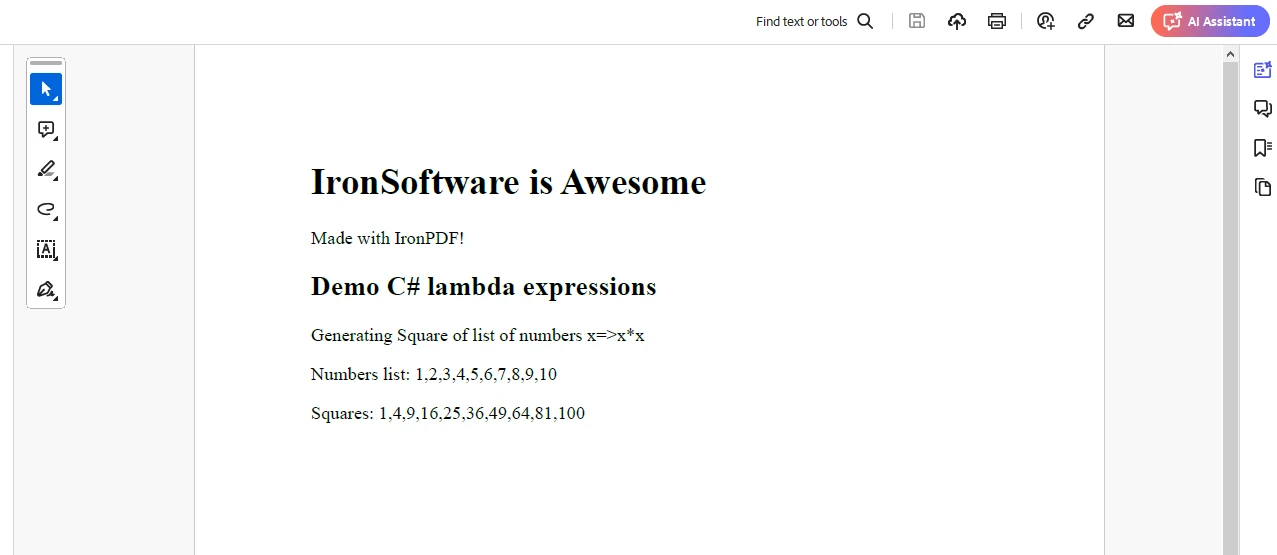
IronPDF 코드는 IronPDF 체험판 라이선스 페이지에서 얻은 체험판 라이선스가 있어야만 실행됩니다. 팝업에 이메일 ID를 제공하여 라이선스 키를 생성하고 그 키를 이메일로 전송합니다.
"IronPdf.LicenseKey": "<YourKey>"라이선스 키를 AppSettings.json 파일에 배치하십시오.
C# 람다 표현식은 인라인 함수를 정의하는 간결하고 표현력 있는 방법을 제공하여 코드를 더 읽기 쉽게, 유지관리 가능하게, 효율적으로 만듭니다. 이들은 LINQ 쿼리, 이벤트 처리, 비동기 프로그래밍, 함수형 프로그래밍 등 다양한 도메인에서 응용됩니다.
람다 표현식을 마스터함으로써 개발자는 C# 코드베이스에서 생산성과 우아함의 새로운 차원을 열 수 있습니다.
경험 많은 C# 개발자든 방금 시작한 개발자든 상관없이, 람다 표현식의 힘을 이해하고 활용하면 프로그래밍 실력을 새로운 수준으로 끌어올릴 수 있습니다.
그러니 참여하고, 실험하고, C# 프로젝트에서 람다 표현식의 아름다움을 받아들이세요!

제이콥 멜러는 Iron Software의 최고 기술 책임자(CTO)이자 C# PDF 기술을 개척한 선구적인 엔지니어입니다. Iron Software의 핵심 코드베이스를 최초로 개발한 그는 창립 초기부터 회사의 제품 아키텍처를 설계해 왔으며, CEO인 캐머런 리밍턴과 함께 회사를 NASA, 테슬라, 그리고 전 세계 정부 기관에 서비스를 제공하는 50명 이상의 직원을 보유한 기업으로 성장시켰습니다.



IronPDF는 IRON SUITE 의 일부입니다.
10개의 .NET API 제품, 당신의 사무 문서를 위해











PDF 파일을 HTML처럼 빠르게 변환해야 할 때.


