




已更新 2026年4月23日
在 .NET 中用 Microsoft.Extensions.AI 簡化 LLM 整合
AI 正在改變軟體開發,但將大型語言模型 (LLM) 整合到 .NET 中一直很複雜。利用 IronPdf.AI 將 AI 整合推向更遠,為 .NET 應用程式帶來由 OpenAI 驅動的 PDF 解析、資料擷取和內容總結。
閱讀更多

在C#程式設計的領域中,lambda 表達式是最強大的功能之一。 這些簡潔而富有表現力的構造使開發人員能夠編寫緊湊但強大的程式碼,提高了可讀性、可維護性和整體效率。
在這篇文章中,我們將深入探討C# lambda 表達式,探索它們的語法、使用情境、優勢,以及進階技術。 我們也將探索如何使用IronPDF 的功能從Iron Software在C#應用程式中即時生成PDF文件。
Lambda 表達式於C# 3.0中引入,提供了一種定義匿名函式或委託的簡潔方式。 它們本質上是內嵌的匿名函式,可以在任何預期委託型別的地方使用。
lambda 表達式的語法是:
(parameters) => expression // lambda expression syntax'INSTANT VB TODO TASK: The following line uses invalid syntax:
'(parameters) => expression ' lambda expression syntax範例:
x => x * x // lambda expression to square a number'INSTANT VB TODO TASK: The following line uses invalid syntax:
'x => x * x ' lambda expression to square a number在這裡,parameters是lambda 表達式的輸入參數,而expression是要執行的語句或語句區塊。 .NET通用語言執行時在編譯時為每個lambda 表達式建立匿名函式。
讓我們來看看一個Lambda 表達式的例子,我們有一個整數列表,我們想要篩選出偶數。
我們可以使用List<t>.FindAll方法和一個lambda 表達式來實現這一點:
List<int> numbers = new List<int> { 1, 2, 3, 4, 5, 6, 7, 8, 9, 10 };
List<int> evenNumbers = numbers.FindAll(x => x % 2 == 0);Dim numbers As New List(Of Integer) From {1, 2, 3, 4, 5, 6, 7, 8, 9, 10}
Dim evenNumbers As List(Of Integer) = numbers.FindAll(Function(x) x Mod 2 = 0)在上述範例中,x => x % 2 == 0是一個lambda 表達式,它將整數false。lambda 主體表達式對每個列表元素執行。
在現代應用程式開發中,使用Lambda表達式可以找到各種使用情境,包括:
Task.Run這樣的非同步程式設計模式中,lambda 表達式可以用來定義要執行的非同步操作。帶有=>的lambda 表達式稱為表達式Lambda。 它們的格式為:
x => x * x // expression to square a number'INSTANT VB TODO TASK: The following line uses invalid syntax:
'x => x * x ' expression to square a number在上述範例中,我們正在建立一個數字的平方。 在表達式Lambda中,主體可以包含方法調用。 然而,在生成為了在.NET 通用語言執行時(CLR)之外執行的表達式樹(例如在SQL Server中)時,建議避免在Lambda表達式中使用任何方法調用。
這是因為方法在CLR環境之外可能沒有意義。 因此,在構造表達式樹時,了解目標環境、確保相容性和有意義的解讀是非常重要的。
語句Lambda表達式允許多個語句,並提供更複雜的操作:
Func<int, int> mySquareDelegate = (x) =>
{
    return x * x;
};

Console.WriteLine(mySquareDelegate(4)); // Output: 16Dim mySquareDelegate As Func(Of Integer, Integer) = Function(x)
Return x * x
End Function
Console.WriteLine(mySquareDelegate(4)) ' Output: 16在這段程式碼中,宣告了一個操作在整數上並返回其平方的委託。 Lambda 主體可以包涵在區塊{}內的多個語句。
Lambda 表達式可以從封閉範圍捕捉變數。 這一特性稱為變數捕捉或閉包,使得lambda 表達式能夠存取和使用其主體外宣告的變數:
int factor = 2;
Func<int, int> multiplier = x => x * factor;Dim factor As Integer = 2
Dim multiplier As Func(Of Integer, Integer) = Function(x) x * factor在此範例中,lambda 表達式factor變數。
Lambda 表達式可以有多個參數並執行包含在區塊內的多個語句:
Func<int, int, int> add = (a, b) =>
{
    int result = a + b;
    Console.WriteLine($"The sum of {a} and {b} is {result}");
    return result;
};Dim add As Func(Of Integer, Integer, Integer) = Function(a, b)
Dim result As Integer = a + b
Console.WriteLine($"The sum of {a} and {b} is {result}")
Return result
End Function探索 IronPDF作為一個多功能和高性能的PDF生成和解析程式庫,來自Iron Software,可用於生成PDF文件。
IronPDF 可以使用以下命令從NuGet 程式包管理器中安裝:
或者如以下所示從Visual Studio中安裝:

現在,讓我們深入了解使用lambda 表達式進行PDF生成:
using IronPdf; // Import the IronPdf library
using System;
using System.Collections.Generic;
using System.Linq;

namespace IronPatterns
{
    class Program
    {
        static void Main()
        {
            Console.WriteLine("-----------Iron Software-------------");
            var renderer = new ChromePdfRenderer(); // Initialize the PDF renderer
            var content = "<h1> Iron Software is Awesome </h1> Made with IronPDF!";
            content += "<h2>Demo C# lambda expressions</h2>";
            content += $"<p>Generating Square of list of numbers x=>x*x</p>";

            List<int> numbers = new List<int> { 1, 2, 3, 4, 5, 6, 7, 8, 9, 10 };
            // Use Select to create a list of squared numbers
            List<int> squares = numbers.Select(x => x * x).ToList();

            content += $"<p>Numbers list: {string.Join(",", numbers)}</p>";
            content += $"<p>Squares: {string.Join(",", squares)}</p>";

            var pdf = renderer.RenderHtmlAsPdf(content); // Render the HTML as a PDF
            pdf.SaveAs("output.pdf"); // Save the PDF document
        }
    }
}Imports IronPdf ' Import the IronPdf library
Imports System
Imports System.Collections.Generic
Imports System.Linq
Namespace IronPatterns
Friend Class Program
Shared Sub Main()
Console.WriteLine("-----------Iron Software-------------")
Dim renderer = New ChromePdfRenderer() ' Initialize the PDF renderer
Dim content = "<h1> Iron Software is Awesome </h1> Made with IronPDF!"
content &= "<h2>Demo C# lambda expressions</h2>"
content &= $"<p>Generating Square of list of numbers x=>x*x</p>"
Dim numbers As New List(Of Integer) From {1, 2, 3, 4, 5, 6, 7, 8, 9, 10}
' Use Select to create a list of squared numbers
Dim squares As List(Of Integer) = numbers.Select(Function(x) x * x).ToList()
content &= $"<p>Numbers list: {String.Join(",", numbers)}</p>"
content &= $"<p>Squares: {String.Join(",", squares)}</p>"
Dim pdf = renderer.RenderHtmlAsPdf(content) ' Render the HTML as a PDF
pdf.SaveAs("output.pdf") ' Save the PDF document
End Sub
End Class
End Namespace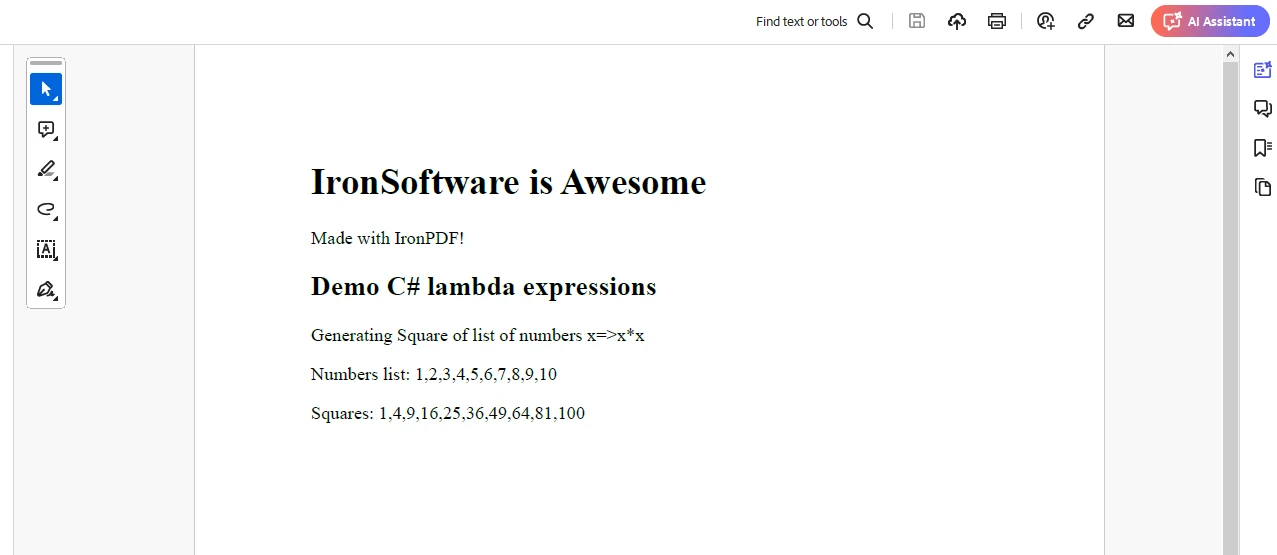
IronPDF 程式碼只能在從IronPDF 試用授權頁面獲得的試用授權下執行。 在彈出視窗中提供一個電子郵件地址以生成授權金鑰,並將金鑰發送到您的電子郵件。
"IronPdf.LicenseKey": "<YourKey>"將授權金鑰放置在AppSettings.json文件中。
C# lambda 表達式提供了一種定義內嵌函式的簡潔而富有表現力的方式,使程式碼更具可讀性、可維護性且更高效。 它們在包括LINQ查詢、事件處理、非同步程式設計和函式式程式設計等不同領域中找到了應用。
透過掌握lambda 表達式,開發人員可以在他們的C#程式碼庫中開啟新的生產力和優雅的維度。
無論您是經驗豐富的C#開發人員還是剛剛開始您的旅程,理解和利用lambda 表達式的力量毫無疑問會將您的程式設計技能提升到新的高度。
所以,深入研究、嘗試並擁抱lambda 表達式在您的C#專案中的美麗吧!

Jacob Mellor是Iron Software的首席技術官,一位在C# PDF技術上開創先河的遠見工程師。作為Iron Software核心程式碼庫的原開發者,他從創立以來就一直在塑造公司的產品架構,與首席執行官Cameron Rimington一起將公司轉變為服務於NASA、特斯拉和全球政府公司的50多名人員的公司。



IronPDF 是 IRONSUITE 的一部分
10 款適用於辦公室文件的 .NET API 產品

當您需要您的PDF看起來像HTML一樣快速。












